 Yummy FTP is an FTP client much appreciated by the Mac crowd because of its simple interface and speedy transfers. Items can be kept organized in colored directories. The application features a built in editor and turbo upload. Yummy FTP is compatible with the majority of FTP servers and is highly flexible when it comes to handling your FTP connection.
Month: November 2007
Make Windows XP look like Ubuntu
 If you like Ubuntu but don’t dare to switch operating systems yet, Ubuntu XP is the perfect solution for you. This package includes anything you need to make Windows XP look like Ubuntu without actually changing the OS. Customize your visual style, wallpaper, icons, cursors, logon screens and even Firefox skin and get a brighter, more colorful Windows!
Warm up for the World Cup
 Yesterday’s World Cup qualifying draw in South Africa threw up some interesting match-ups, as the countdown to the biggest football event on the planet began (only 927 days, 11 hours, 38 minutes and 22 seconds to go). Of course, that leaves you plenty of time to practice your soccer gaming skills before all the ubiquitous World Cup 2008 titles are released.
Try out these top sims to get ready for the main event, or even act out your own country’s qualifying group. We’ve included some old favourites mixed with a selection of interesting freeware and shareware games:
- FIFA 08 – The grand-daddy of soccer sims with all the international licences
- Pro Evolution Soccer 2008 – Like FIFA, only better
- Sensible Soccer – The only game where players are named after candy bars
- New Star Soccer – 2D side-scrolling affair where footballers look like ants
- Sensational Soccer – Guide your favourite team to pixelated football glory
- Yoda Soccer – Free, open source game in the style of Sensible Soccer
- United Football – Unique online sim where you control a single player
- Addictive Football – Five-a-side fun on different playing surfaces
- Kickin’ Soccer (Mac) – Win the World Cup on your Mac
- The Match (Symbian) – Another Sensible Soccer clone for mobile phones
How to: add any search engine to Firefox
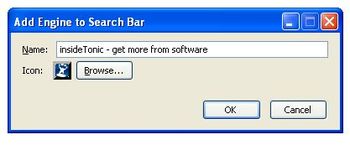 Firefox features a handy embedded search field that you can use to query Internet search engines such as Google or Yahoo, popular websites like Amazon or eBay and many other webpages. New search engines can be easily installed by visiting Mozilla’s search engine list. Sometimes you can also install customized search plug-ins that certain websites develop for Firefox.
But now you’re not limited to Mozilla’s list or to the websites that have created special plug-ins for Firefox. Simply install the Add to Search Bar extension and you’ll be able to turn any search field on any webpage into a fully functional embedded search tool in Firefox.
After installing the extension, right click on any search field and select the new “Add to search bar” option in the context menu. Then name your new embedded search engine and choose an icon for it. That’s all! You can now search any website right from your browser’s interface.
It’s easy to hack VOIP
 At least that’s what UK based VOIP expert Peter Cox, demonstrated with his Siptap software, which is able to “monitor multiple Voice-over-IP (VoIP) call streams, listening in and (record) them for remote inspection as .wav files.” Run on a test network, the application was able to extract sensitive information from a normal VoIP conversation. Still proof-of-concept, the experiment would probably have to be run on a wider scale to really demonstrate that it can work though.
The lack of privacy in VoIP connections is nothing new though, as anyone with a bit of networking knowledge can access packets of a VoIP flow from an unencrypted network and easily eavesdrop on a conversation. That’s why VoIP users need to make sure they follow a few steps to guarantee a minimum of privacy while chatting away. The best is to set up an encrypted network and just make sure you’re not giving away private information when you’re talking over VoIP. Also check out this list of 25 ways to secure your VoIP network. It includes tips like restricting VoIP to a Virtual Local Area Network (VLAN), monitoring traffic on your VoIP network, setting up firewalls or using proxy servers. You’re never too safe.
Make great looking flash slideshows
 You may know nothing about Flash and yet if you use BannerZest you’ll be able to create really snazzy flash presentations with your pictures. The application may still be in Beta, but it works flawlessly. Making your presentation is as easy as pie. Drag and drop pictures from your images folder to the time line into the order you want them to appear. Using the settings window you’ll be able to add all sorts of effects, themes and animations.
Instant messaging on your Pocket PC
 Mobile devices are great for talking but they’re also good for text chatting too. If you want to connect with your MSN, Yahoo!, ICQ or AIM contacts on your Pocket PC then simply install Agile Messenger. Besides being an IM client, the program features Push to Talk technology, which enables you to send voice messages from mobile to mobile and mobile to PC.
Easily download and convert Youtube videos
 Youtube is a great website for watching videos online, but what if you want to download them? Simply use Youtube Download & Convert and you’ll be able to save your favorite videos on your PC and keep them forever. But that’s not all: the program converts saved videos on the fly to the most popular formats, such as AVI, MPEG, MOV or 3GP.
Excit: an Excel game that is actually fun
 Can Excel be any fun? The answers is yes! Oh well, you’re right, there’s something fishy here. It’s not really Excel but Excit, an Excel-themed Flash game that will put your logic skills to test! Each level is designed like a real Excel spreadsheet, from which you have to escape in order to progress through the game.
Simply move your cursor with the arrow keys, but take into account that the cursor won’t stop until it hits an object. This means that you need to plan your route very carefully and make a wise use of the walls spread all over the screen if you want to reach the exit. There’s no “lives” concept in Excit, so you can keep on trying until you either succeed, give up or it’s time to go back to the real Excel.
The most vulgar software in the world
 Having just become addicted to Zed Pig Blaster, a game where you guide a pig through the air through the power of flatulence, my appetite (if you can call it that) for toilet humour has returned with a vengeance. If you too still get amused by rude noises and putrid imagery then get a whiff of some of Softonic’s most disgusting downloads.
Wind is always guaranteed to get a laugh and there are a couple of programs that excel at reproducing this effect on your PC (only audibly, thankfully). Based on an invention in one of the Wallace and Gromit movies, FartMatic will give you hours of pleasure producing fart noises from your desktop. If you prefer the sound of gas coming from the mouth then Random Burper is for you. Install the program on a colleague’s machine and chuckle as their PC lets out a belch every minute, leaving your pal to take the blame.
Translator Fun Voices takes things a stage further by allowing you to transform your voice into a rude noise. The app allows you to apply random body noises and also includes a burpulator. Still not crude enough for you? Then install FaceOnBody, which lets you create unsavoury images by super-imposing people’s heads onto a series of gross backgrounds. Urgh.