 iPDA will allow you to sync and transfer all your information from your Mac to your iPod. Contacts, emails, notes documents, you name it, iPDA takes care of it. Even though syncing and transferring can be a bit slow, iPDA can handle information from Gmail, Entourage, and most Apple apps.
Month: December 2007
5 tools to keep track of your Christmas spending
 Ok, call me Scrooge but Christmas is that time of year when I get carried away and wake up with the mother of all hangovers in January – and it’s got nothing to do with alcohol. Yes, it’s that moment when I check my bank balance and I feel like Santa has taken me for a sleigh ride. If you’re Christmas shopping on a budget or are a bit worried how much you’re spending, there are several applications out there that can help you. Here is a selection of five to put in your PC’s stocking:
- Budget – Nice simple graphics and separates credit from debit cards
- Budget Advisor – Takes a month by month approach to spending
- Rylstim Budget – Categorizes spending methods and breaks down daily outgoings
- Accounts & Budget – Budget tracking with a professional feel
- AceMoney – In depth analysis and budget predictions for your year and beyond
Track Santa using Google Earth
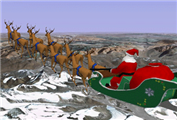 I remember as kid wondering when Santa would finally arrive at my house. Of course, the harder I tried to stay awake, the more futile it became until I fell asleep and the presents magically appeared at the end of my bed in the morning. Those days are over however with Google’s new NORAD Tracks Santa iGoogle gadget which allows you to see exactly where world he is, using Google Earth. You might be thinking you’ve heard of NORAD before and you’d be right. NORAD (North American Defence Command) were the people responsible for failing to scramble a single jet to intercept the hijacked planes on 9-11 and it seems they’re focusing their energy on less taxing missions with this plugin.
From December 24th, you’ll be able to follow Santa as he delivers present to the children of the world in just one night. Yes – an amazing feat made even more amazing by the fact that his only vehicle is a sleigh pulled by reindeers. If you log onto the Norad Christmas website at the same time, you’ll also be able to download and extra plugin so that you can watch the whole journey in 3D. I’d like to see someone try and tell me Santa doesn’t exist now.
Carry the Christmas spirit on your phone
 We’ve already shown you how to dress up your PC or Mac for Christmas, but what about if you need to leave the house before the big day? Well fear not, because you need never be without seasonal software because there’s plenty available for all mobile devices. So, whether you have a Palm, a Pocket PC, an Ericsson or a Nokia, you can spread digital Christmas cheer wherever you go.
- Snow Baller (Palm) – What’s that? Santa’s been captured by evil elves? Let’s help him
- Gift Wrap (Palm) – Keep tabs on all the presents you send and receive this year
- Disney Christmas Theme (Pocket PC) – The wacky gang in a seasonal scenario
- X-Runner (Pocket PC) – Clone of the classic with a Christmas twist
- Bubble Xmas (Pocket PC) – Play with bubbles in this festive game
- Li-Nuggz X-Mas (Pocket PC) – Jump-and-run platformer in a Christmas style
- X’Mas Theme Pack (Windows Mobile) – Get yourself well into the festive spirit
- Quarz X-Mas (S60) – Unlimited fun in this Christmas version of Quarz
- MicroPinball – Snowball (S60) – Sophisicated pinball game with an injection of snow
Announcing the Softonic Toolbar!
 Softonic is pleased to announce the launch of a new browser toolbar designed to help you get the most out of our site. The toolbar includes links to our pick of the day, software search and access to our RSS feeds, meaning you’ll never miss another update or addition on the site.
In addition to the Softonic features, our toolbar also includes an email checker, embedded weather forecast, Babylon translation tool, radio tuner and a powerful Google search engine. Whether you want to stay up-to-date with the latest software on Softonic or you just want to be add loads of extra functions to your browser, the Softonic Toolbar is definitely worth a look. It’s available for Firefox and Internet Explorer and you can download it for free from Softonic right now!
Create posters out of your own photos
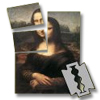 With PosteRazor you no longer need professional printing services to get customized posters. Just use any of your favorite digital photos with this easy tool to create a large-sized poster and print it in your own home! Images are sliced down into several pages and saved to a PDF document. Then, you only have to print it and arrange the pages into a great poster.
Tip: Browsing files with Cover Flow
 The Cover Flow technology introduced in iTunes, which lets you flip through album covers just like in a jukebox, has been so popular with Mac users that Apple have decided to expand it to any folder in the new Mac OS X 10.5 Leopard. It’s a nice way to flip through pictures or browse movies by their cover. If you have one of the latest iPods, you can even flip through all your photos, music albums and video clips with Cover Flow.
This new way of looking at files might be a bit discouraging to new users though. This is why Apple offer up a tutorial of Cover Flow on their website. When in Finder view, press Command-4 to go into Cover Flow view. You can open any image by double clicking it. If you’re working with a mouse use your trackpad or scroll wheel to quickly skim through files. You can also use the drag bar under the images or he arrows keys on your keyboard to move back and forth through your collection of files. To me the only drawback to Cover Flow is when you have too many files. How do you quickly find the one you’re looking for? Apple suggest to scroll through the list view under the images. You’ll know what you’re looking for and still enjoy the snazzy animation. You can even click on sidebar items in the Finder and keep the Cover Flow view.
How to: map an FTP drive in Windows
If you have a personal FTP server or web space which you often use to upload and download data, you’re probably fed up with FTP clients, file managers and all sorts of solutions to handle your file transfers. In that case, follow this quick tip on how to map an FTP drive in Windows and you’ll be able to transfer data in a much faster, easier way.
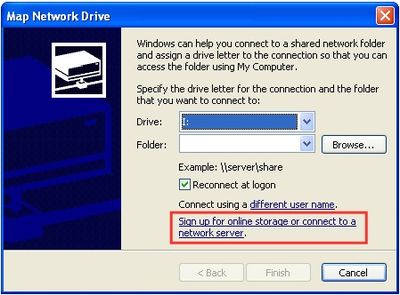
1. Open a File Explorer window and click on Tools – Map Network Drive
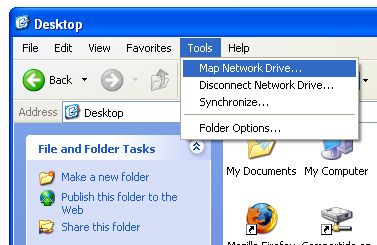
2. On the next window, select the letter you want to assign to your drive and click on the last option (“Sign up for online storage or connect to a network server”).
Wake up to your favourite tunes
 There’s nothing I hate more than the piercing shrill of my alarm clock every morning. It’s like being punched awake by Mike Tyson day after day until even the mere sound of it sells chills down my spine at any time of day. A far more pleasant experience is to wake up to one of my favourite songs which in comparison, is like being awoken by Claudia Schiffer whispering softly in my ear while Penelope Cruz brings me a cooked breakfast.
Sometimes I’ll use my mobile phone but since that can only store a limited amount of music. it’s much better to use my PC. To it’s eternal shame however, Windows does not come pre-installed with a wake-up function but there are a few third party programs that can help you. One of the best is Music Alarm Clock which can select from a playlist of your choosing and even wake you up with videos.
If you’re a iTunes user, you’ll be best to try iTunes/Mp3 Alarm Clock. It works with even DRM protected music and integrates pretty seamlessly with iTunes. Meanwhile, Alarm is more flexible in that it plays MIDI and WAV files aswell as Mp3’s. Finally, if it’s aesthetics you’re after, WakeMeUp! has to win as the best looking. It can also wake-up your PC from standby mode so you don’t have to leave it on all night.
E-book publishing made e-asy
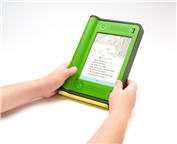 If you’re a budding author and are having a hard time finding a publisher for your book, have you ever thought about publishing it yourself? Nowadays, there’s no need to convince a publisher of your potential with all the self-publishing tools you need at your fingertips.
One of the best tools around is EbooksWriter which basically composes the book in electronic format as you type into it’s own in-build word processor. It’s good because you can see how your book will look as you write complete with pictures and annotations. It can also be used to create eCatalogues and eBrochures.
A simpler tool that works in RTF format is eBook Builder. The program is very thin on features but it interferes less with your writing than EbooksWriter and it’s incredibly easy to use. Finally, distributing your book is equally as important as writing it. If you’re looking for a solution that takes you all the way from A to B, then Natata eBook Compiler helps you with a range of compression ratios and sending solutions so that your writing reaches the widest possible audience.