Top 10 free Flickr tools

Top 10 free Flickr toolsAfter four years of existence (it was launched in February 2004) Flickr has become the most popular online photo sharing website, with over two billion pictures hosted on their servers. Flickr has evolved a lot during these years, from the early beta stages to a social networking community that has grown around photography. It has also survived Yahoo’s acquisition, along with some slight changes in design and functionality.

As regards the latter, you can now find a handful of software tools that have been especially developed to work with Flickr, either to make image uploading easier or to make use of their massive photo catalog in some creative way. So if you’re looking for a faster way to upload your pics to Flickr or want to download entire sets in one click, have a look at the list of Flickr tools we’ve prepared for you:

Tools to help you get more out of YouTube

YouTube logoYouTube has become such a phenomenon that it has spawned a whole industry of software related apps that are designed to enhance your uploading, downloading and general viewing experience. By far, the most saturated area is that of downloaders which attempt to speed-up and improve downloading of YouTube clips with varying degrees of efficiency and success.

There are many other tools however that help you get more out of YouTube. One of the most useful is Free YouTube to Mp3 Converter which allows you to save any YouTube audio to Mp3 in one click. This is great for classic movie soundbytes or rare interviews that you want to listen to later on your Mp3 device. Equally useful, especially if you’re going to try and edit your footage, is YouTube FLV to AVI Easy Converter which as the name suggests, takes YouTube videos in their native FLV format and turns them into AVI files. The other advantage of this is that you can pick and choose which media player you want to watch your clips on.

If you don’t want to have lots of separate utilities for YouTube, then Axara YouTube Tools is a good bet. This package consists of a number of tools, mainly aimed at converting and downloading in one package. The good thing about this program is that everything is taken care of at once and it converts to iPod, WMV and 3GP formats amongst others. Meanwhile, if it is downloading that remains your number one activity on YouTube, you probably need something that can take care of more than one job at once unlike most downloaders. In this case, YouTube Batch Downloader is a good solution for batch downloads but even better in my opinion is YouTube Robot which even allows you to schedule YouTube downloads when new clips are uploaded.

The .Mac Web Gallery gets an update

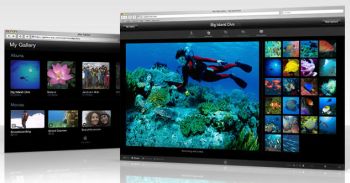
.Mac Web Gallery.Mac and iLife’08 allow you to share all your photos and videos in customized galleries with your friends and family, directly from iPhoto or iMovie. So instead of wasting time putting those snaps and videoclips from the Christmas Holidays onto a DVD and having to send a copy to each and every one, which takes time and money, you can just publish them all online, create a unifying theme and then send the link to everyone you want. It’s quicker, looks great and is really easy to work with.

Improvements to the .Mac Web Gallery now allow Aperture users to publish their photos directly online and even allow online visitors to download the RAW file (Apple offers 10 Gb of storage space in .Mac). With iPhoto’08, online visitors will be able to download pictures in their original format or a print friendly 16 by 20 inch size. The new .Mac Web Gallery also lets friends publish their pictures to your own gallery, with new additions automatically synced to your iPhoto’08 library.

If you follow a friend’s web gallery, you can also subscribe to their RSS feed, which takes into account the whole gallery, not just an album. Photos and videos can also be protected via a password. Apple TV 2.0 users will be glad to know that they now have access to the Web Galleries straight from their TV.

Not everyone will be willing to pay the annual $100 subscription fee to the .Mac service. I still think it’s worth giving it a go to test out all these improvements in the Web Gallery though.

Enjoy free live football with TvAnts

Get closer to the action with TvAntsThanks to spiralling ticket prices and the outrageous costs of pay-per-view these days, it’s becoming ever more difficult for soccer fans to watch their team in action. Not to worry though because, like most things, it’s possible to combat this problem using computer software. One of the best apps for watching live football on your PC is TvAnts, which allows you to tune into channels showing the games via Internet servers.
The basic installation process of the software is pretty straightforward and is merely a case of ‘OK’-ing through the prompts. However, there are a number of problems that crop up that can hamper your viewing progress. For instance, the resolution of the player window is often distorted and you may experience some degree of ‘flipping’. To combat this, try reducing both the colour depth and resoltuion. If this still doesn’t make a difference, you might need to watch the game in a smaller window, rather than maximising it.

You could also find the playback a little jerky, even with 100% buffering. This is usually due to the combination of your processor and software firewall. If your connection is running off a router then try disabling the firewall temporarily (remember to turn it back on again afterwards!)

Another problem occurs when you have the XP Service Pack 2 installed. The pack applies a limitation on streaming, so you’ll probably find the transmission isn’t smooth enough. To restore the original limit and resolve the issue simply install the XP Service Pack Socket Fix.

OK, so now everything is set up for maximum viewing pleasure, it’s time to find the games. First off, make sure you have the fanshoptv.no-ip.info server installed, as the one default server, www.tvants.com, is pretty unreliable. Now to access the channels. The best ones for live Premiership, La Liga, Champions League, etc. are the Asian ones such as Shanghai Sports, Gungdong TV and Goal TV. You’ll find channel guides and match schedules at BoxtoBox or Live Internet Football. Now, site back relax and enjoy your team dish out a good thumping.

Take screenshots in a more stylish way

Download RumshotTaking a screenshot is not just a question of having the right window opened in front of you and then pressing the Prntscrn key. They say a picture is worth a thousand words, so you should choose the screen capturing tool you’re going to use very carefully.


If you’d like to have professional-looking screenshots, RumShot is probably your best choice. It’s a free snapshot tool with which not only can you take snapshots from your screen in a variety of ways, but also add some original effects to them. Rumshot is very easy to use: simply overlay its transparent interface window over the area you want to capture and press the Take Screenshot button. The only drawback is that you can’t resize the capturing window, but the funny part comes right after taking the snapshot. Time for some effects!

Download Rumshot

As default, Rumshot features only one simple frame, but if you download this pack from the developer’s pack and copy all the included files into the My Documents\Rumshot Themes folder, you’ll get an impressive 67 different frames and borders you can apply right to your captured image. Some of them follow more traditional design styles but there are others that can make your screenshots look like a 3D monitor, a mobile phone, a photo collage, a Sony PSP, a filmstrip or an ancient scroll.

So next time you need to produce a bunch of stylish snapshots, give Rumshot a go. You won’t be disappointed.

A first look at Aperture 2.0

ApertureApple’s star photo editing and management software has just been updated to version 2.
Focused on performance, simplicity and imaging, this new release brings with it more than 100 new features, a fresher interface and a completely new processing engine, now putting it on par with Adobe’s Lightroom.

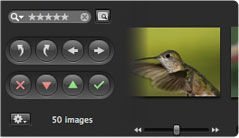
Aperture can handle thousands of images, which it can display in a number of views, quick preview being one of the best. It offers support for a wide range of digital RAW formats, with new ones being added to the update. Also, Apple have made the effort to make Aperture simpler to use for amateurs. Importing your images from any source, whether iPhoto, your camera, or any folder, is easy and you can watch a few great tutorials to learn all about the program.

Projects, Metadata and Adjustments have been joined into one single inspector and Heads Up Display (HUD). You can edit metadata, such as ISO, exposure, tags, or aperture straight from a RAW file. Aperture will now even show your lens model. The adjustments tab is probably where you’ll spend the most time though, especially if you’re working with RAW. Use the sliders to play around with everything from white balance to exposure, colors, highlights & shadows or enhancements. Changes are instantly displayed onto your picture.

Aperture import screenNew editing features you’ll find include highlight recovery, color vibrancy, local contrast definition, soft-edged retouching, vignetting and RAW fine-tuning. Aperture 2 now also includes support for tethered shooting, which allows you to connect a camera to your Mac via USB or Firewire and shoot directly into Aperture. We also enjoyed the Loupe tool, which lets you zoom in up to 1600%.

The most significant update has got to be the new plugin architecture though. This will allow anybody to create their own third party plugin for Aperture, so you can soon expect to see all sorts of cool effects and filters only for Aperture popping up.

Aperture allows you to save and export your edited snaps in a number of ways, from smart albums to web pages or your .Mac Web gallery, which you can then view from anywhere using your iPhone, iPod Touch or Apple TV. The library database has been redesigned and you can now easily switch between projects, even when working with a lot of images.

There’s no doubt, Aperture is a real beauty and a pleasure to work with. It’s fast, looks great and makes it easier than ever to enhance pictures. The only drawback is still the price though . Despite having dropped by a significant $100, at $200 it’s still an expensive piece of software, especially for amateurs.

Fast, extremely well designed, and offering up a lot of advanced editing tools, Aperture is an excellent photo editing and management application. Another milestone for Apple.

Protect your mobile phone from viruses

Keep mobile bugs at bayUnless you’re completely braindead, the chances are that you have an antivirus solution installed on your home computer. But have you got one running on your phone? Probably not. Yet, these days all phones are Internet and network-enabled, and virus writers are starting to exploit this by creating nasties to screw up your phone. There are plenty of effective tools for blocking these kind of attacks though, so there’s no excuse for not protecting yourself. Here are some of the best:



Welcome to OnSoftware!

Regular readers may well have noticed some changes going on around here recently, so we’re really happy to finally share our big news with you: insideTonic is now OnSoftware!

onsoftware-blog-1.png

We’ve changed the name of our blog for a variety of reasons, the main one being that we thought ‘OnSoftware‘ says a lot more about what we’re writing about and what we’re interested in (I’m talking about software, in case you didn’t cotton on). Also, as we already have a sister blog in Spanish, along with more to come in other languages (keep your eyes peeled!) – we figure that OnSoftware is generally a little clearer and easier to follow for our readers from all over the world.

Along with the new name, we’ve taken on an updated design and we’ll continue to add great new features over the weeks and months to come.

Remember to update your subscription to the blog so you don’t miss out on a single post.

Today’s downloads for Windows, Mac and Mobile

Download Webmaster Password GeneratorIf you’ve run out of ideas for creating new passwords, let this handy tool help you. Webmaster Password Generator will create as many passwords as you need, based on diverse criteria such as length, upper or lower case or using numbers and special characters. You can even use a custom word to make them easier to remember.

DiscoBrickThe Discobrick iTunes plugin is a great little discovery. This addon lets you associate 80 different visual themes to any sort of music, whether trance, rap, jazz or anything else. You can even drag and drop images and add live video to a displayed theme. Discobrick is excellent to have on your Mac if you’re planning concerts or live performances.

Play table football on your phoneHere at Softonic we like nothing more than a game of table-soccer over a quiet drink at the beginning, middle and end of the day. Then we leave for the night ready to do the same thing again tomorrow. Oh how I longed for a day when I could enjoy the fun of table-soccer without having to play my colleagues. Well, imagine my excitement when I found Master Kick.

Software apps to turn Windows into Mac

Windows apps that emulate Mac functionsMany people drool over Mac computers but not all of them can afford one – and that includes me. Beautiful as they are, Macs are still too expensive for a tight budget like mine, so while I’m saving to buy one some day in the future, I’ve decided to give my Windows a more Appleish look.

Have you ever noticed the amount of Windows apps that have been developed to emulate Mac’s apps and functions? You can start by having your own Windows dock with ObjectDock or RocketDock, two toolbars that replace the Windows standard toolbar with a more Mac-themed one. Or you install Switcher, the Windows version of the cool Exposé effect, which enables you to change between running programs in a really stylish way. But if you’re taking the hardcore way then you should probably grab hold of FlyakiteOSX, a full featured visual theme that will completely transform your Windows into something more similar to a Mac.

There are also some Windows tools that have been developed with some well-known Mac programs in mind. One of them is MightyBox, a Windows clone of the popular Mac application launcher QuickSilver. Another one is Snap, a webcam tool that resembles the famous Mac app Photobooth. Likewise, some Mac developers have also created specific versions of their applications for the Windows system, like Safari and Comic Life.

Funnily enough, I don’t think there are that many Mac programs that emulate Windows functions. I wonder why!