
How to change hair color in Photoshop

Feel like changing your look? Not sure if that new hair color will fit you? Don’t worry: now you can have a preview in Photoshop. Just take a picture of yourself and try different looks with this simple tutorial until you find the perfect color for you, without ruining your current style.

1. Open the photo you’re going to be working with and create a new layer over it.

change hair color in Photoshop

2. Go to Layer > New Adjustment Layer > Hue/Saturation and apply a Hue layer on your composition. Tick the “Colorize” option and use the sliders to select the new color of your hair. In this case we’ve chosen a light red. Continue reading “How to change hair color in Photoshop”

Flickr launches video

Flickr videoAs Nick reported a few weeks back, Flickr have decided to jump on the video bandwagon. As of today, Pro users will be able to showcase videos of up to 90 seconds in their photostream. The 90 second limit might sound a bit odd, but as Flickr explain on their blog, they want to remain a photo sharing site so the idea is for videos to be like ‘long photos’. According to the guidelines videos will also have to be simple and personal, so hopefully Flickr will not turn into another YouTube clone. Having Pro users only uploading videos should also ensure that they meet quality standards normally expected on the photo sharing site.

I can’t really say for now if I’m really glad or not by this new offering. Obviously, Flickr are trying to keep it to some level of quality, however I really see video as another medium. Will the 90 second limit always be around? How will you guarantee that all videos have that ‘long photo’ feel? From what I’ve seen of the videos that have already been posted on Flickr, the focus on ‘artistic content’ seems to be respected: it’s all about the beauty of the image and showcasing cool effects. The playback functions are very simple: a start/pause button, a draggable progress bar, volume control and full screen. Videos can also be of different sizes and shapes.

As Flickr do well to explain, this will also change the role Flickr moderators will have. The photo and video sharing website has also taken the opportunity to double the video size limit to 20 MB for Pro users and 10 MB for Free users. One point that is not mentioned though is how video will affect all the Flickr related apps out there like the Flickr Uploadr, Flickr Downloader or FlickrFox.

Has Google Gears failed?

Google Gears logoIt’s not very often that you have to talk about a Google product in terms of failure but is Google Gears one of them? With internet connections, laptops and mobile devices now so ubiquitous, was there really any need for a Google plugin that would allow you to work offline. And with the offline versions of apps such as Google Reader and Google Docs so stripped-down, are they even worth using?

I remember when Google Gears was launched almost a year ago getting quite excited at the prospect of downloading all my Google Reader feeds and reading them at my own leisure when not connected to the internet. I wasn’t alone either – PC World named it the most innovative product of 2007. However, I soon realised that whenever I’m on my laptop, I’m virtually always connected to the internet wherever I am and via whatever means anyway – whether it’s my home connection, in an office, via a hotspot or dare I say it, somebody else’s open connection. I also wasn’t particularly impressed by the general functionality – it became increasingly confusing to realise whether what I was reading in Google Reader was the online or offline version, the offline version was very basic and the synching process wasn’t half as fast or as automatic as I expected it to be.

However, what has really disappointed many users about Google Gears is simply how few applications support it a whole year after its initial release. At the time of writing, there are only a handful such as Google Reader, Zoho Writer and a pretty superficial attempt on Google Docs. Continue reading “Has Google Gears failed?”

Save the world, and this time it’s not a game

distributed-computing.gifHave you ever thought that your computer can help scientists solving critical world problems like cancer, AIDS and global warming? This can be achieved thanks to distributed computing. This technology allows to use your computer as if it were just one of many CPUs all joined via the net to form a supercomputer. Once it has processed a package of data it connects to a centre to upload the results and download new materials.

If just a small percentage of the world’s estimated 650 million PCs were doing so, it would result in the creation of a huge amount of calculating power, enough to solve problems that would otherwise take years. You can help find cures for diseases like diabetes, Alzheimer’s, search for cosmic gravitational waves (whatever they are) or help in the hunt for extraterrestrial intelligence. There are many projects you can join and two main platforms you can install:

  • BOINC (Berkeley Open Infrastructure for Network Computing) is a free, open-source software. You can select which of the nine projects to help.
  • WCG (World Community Grid) is founded by IBM and currently hosts 5 projects.


When choosing a project, always check the intellectual property of the results which have to be available to the whole scientific community. Some projects that at the moment need particular help are Rosetta@Home, Einstein@Home, SIMAP, World Community Grid, specifically Human Proteome Folding and FightAIDS.

Other three interesting and easy ways on how digital technologies can help us to make a difference with not a great effort are:

The Hunger Site, where you click in the main page the ‘give’ button to see lots of little banner which should pay to sustain different projects, from protecting the rain forest to sustain the research against breast cancer.

FreeRice, where you play a challenging word game and for every right answer you donate grains of rise distributed by the United Nations World Food Program.

Kiva, where you can lend small amounts of money to people in developing countries to support their projects.

4 cool Apple Mail plugins

Mail.appetizerAmong all the mail clients available for Mac, I consider Apple Mail to be one of the best. It’s easy to use, making it attractive to new users, yet has enough features to keep more advanced users pleased. Another major plus is that it comes preinstalled in your Mac.

What Apple Mail users don’t always know though is that their mail client can be complemented with a number of plugins, which perform specific actions. A good deal of indie Mac developers have worked on all sorts of plugins that add new features to Apple Mail, and most of them are generally pretty good.

You could spend some time looking for them on the web. Or you could start out by taking a look at these four useful plugins listed by MakeUseOf. Having tested them out myself, I do believe they improve the overall performance of Apple Mail and add necessary features to the client. Take a look at them and see which one you might need:

Mail.appetizer – Preview incoming messages when they’re downloaded without opening up Apple Mail. Also lets you mark messages as read or delete them straight from the notification window and display headers. Great if you receive a lot of emails and don’t want to waste time opening up the client at every moment. Mail.appetizer is still in Beta and may be a little bit unstable.

Letterbox – Change the normal Apple Mail interface to a three-column view. Best for widescreen monitors, it sort of reminds us of the explorer view. A good way to quickly browse through mailboxes, folders and emails.

Attachment Scanner – Because everybody’s forgotten to add an attachment to an email at least once. This program looks for words like ‘attached’ or ‘attachment’ in your message and warns you if you’ve forgotten to add your document.

Mail Act-On – You can’t properly master your inbox without rules. This little plugin is for the productivity junkies out there. It allows you to assign keystrokes to your rules, making them much more accessible.

The question with plugins is always which ones to choose. You don’t want to overload Apple Mail with plugins, and turn it into a memory hog. What I recommend is to try out the ones that sound interesting to you for a few weeks, and then based on your usage of them, only keep the ones you need. This also goes with browser extensions: every once in a while you need to check out the ones you have and get rid of those that you aren’t using.


Pitchfork launches live music video site

Pitchfork logoIndie music fans will be interested to learn that the Pitchfork music site have launched a live new music video site Pitchfork.tv. The site features live performances in high quality video by bands both well-known and obscure from Radiohead and Nick Cave to King Khan and Jay Reatard.

I have to agree with Newteevee that it’s pretty good. There’s always a danger with new music video sites that the content is simply music videos from YouTube or aspiring musicians who’ve uploaded some of there dubious work themselves but the new site seems to feature some genuinely exciting, professionally filmed gig performances and talent. The quality of the footage is superb too – far bigger and better than you get on YouTube, even in full screen mode.

Unfortunately however, there’s no option for embedding videos in blogs and it’s not particularly intuitive when it comes to navigation. There are no suggestions for further viewing related to the content you’ve just watched and no history of your viewing activities. However, I don like the fact that it auto plays so basically, you can watch (or listen) to a whole gig by the same band without it stopping or starting – it just cycles through the tracks automatically until you stop it.

This is obviously a niche noncommercial service that Pitchfork are attempting to appeal to a select number of discerning alternative indie fans. But with such a small viewing audience, it does beg the question how are they going to afford to keep filming and distributing high quality footage. As Chris Albrecht points out:

Right now, Pitchfork.tv has a very small, intimate feel, which is best because the company would never want to be perceived as big and corporate. But as it has to start paying for all this video bandwidth, it will need to make adjustments (and add advertising) to remain viable.

However, if you’re tired of watching sub-standard mobile phone footage of your favourite upcoming bands on YouTube, Pitchfork.tv is a breath of fresh air although European fans will have to wait a while to see their bands on their as it’s predominantly focused on American talent. I’ll certainly be adding it to my video favourites for now.

Tools to bring out the poet in you

Poetry words I’ve never been much of a poetry fan although as I get older, I’m growing to appreciate it more. I guess part of the reason for this is that poetry is often about trying to describe and reflect deeper issues of life and meaning that you don’t really appreciate when you’re younger. However, while I’m growing an appreciation for reading it, I’d never dream of writing it.
If you’re simply lacking inspiration to get your poems out, then you can use a number of software tools to help you. VersePerfect is a good starting point as it has been written by experienced poets and helps you find that illusive rhyming word that you’ve spent all day trying to find. If it’s good enough to get a write-up in the New York Times and Wall Street Journal, then it’s good enough for me. Virtual Poet meanwhile is an interesting if slightly simpler alternative aimed more at those that want something to help format and organise their poems. It’s designed more for short and sweet poems but features around 60,000 words to help them flow well.

If you’re a true poet at heart, then you’ll probably find computers a rather sterile tool with which to let your words flow. But before you pick up your pen and quill, try Visual Typewriter which replicates a real typewriter for a more authentic writing experience. And if you’re an old romantic, then light a candle and use Love Quotes to get your creative juices flowing and watch your loved one melt at your words.

Test Firefox 3 without messing up Firefox 2

Test Firefox 3While the final version of Firefox 3 will supposedly be launched in June (at least that’s the latest news from official sources), as an avid software tester I can’t keep myself from testing every single beta that comes out before the great day arrives. On the downside, this means that my Firefox installation may end up being a total mess: running different versions of the same program is never a good idea, and even less in the case of Firefox which I use to work on a daily basis.
If you can’t wait until the final version comes out, but at the same time don’t want to run any risks with your current Firefox version, use the portable Firefox instead. This special Firefox edition can be run from a USB device – or from your computer itself, without having to install a single thing. In this way you can take a sneak peek at the new exciting Firefox 3 features without compromising your previous installation and therefore your bookmarks, saved data, user profile and so on.

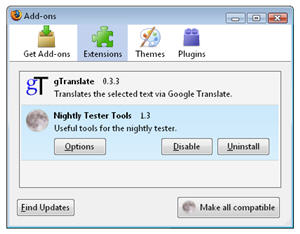
Now that you’ve managed to test Firefox 3 without ruining the good ol’ Firefox 2, what about extensions? Most of them may not be compatible with the latest beta yet so you’re probably wondering if there’s any way to make them work. And the answer is yes: it’s called Nightly Tester Tool, an extension that’s been especially developed to make your old extensions compatible with the latest Firefox 3 beta versions. Of course, this is no magical cure for all extension incompatibility issues, but I must say it worked for me perfectly fine. Nightly Tester Tool also adds some useful tools for beta testers, such as a built-in screenshot app, direct access to the Profiles folder and a log file analyzer.

Top video converters for Mac

RoadMovie video converterVideo converters are ten a penny these days, which generally means that you’ll come across as many good programs as terrible ones. Although you may not have excessively high technical requirements and may simply want to convert from one format to another it’s still best to go for a better known application.

You can find all sorts of reason for needing a video converter: it may be that you want to play a video for your iPod, or your video player only supports one format, or you need to post your video on the web and are looking for a file type that doesn’t take too much space. The reality is, considering the number of video devices that we use in our lives, converting almost becomes an obligatory task. And you want to get it right, so that the movie that comes out on the other side possibly looks as good as it was at first. Here we list up what we consider the best video converters for Mac and let you know why:

  • Sorenson Squeeze – Pro choice for converting and encoding to any video format. Excellent for Flash.
  • Reelbean – An all-in-one exporter, converter and media player.
  • RoadMovie – Batch encode, add subtitles and upload to the web.
  • ffmpegX – Handles all sorts of formats and subtitles. A must!
  • HandBrake – A Mac fan favorite for ripping and converting DVDs to MPEG4.
  • MediaFork – inspired by HandBrake, it may be a little easier to use.
  • VisualHub – Quickly convert to any video format and prepare for DVD.
  • iSquint – A free version of VisualHub, with a little less features.
  • iPod Video – As the name suggests, it’s your one stop shop to convert any video or audio to iPod format.
  • Flash Decompiler Trillix – Extract objects from a SWF or convert to FLA.

Top 5 online racing games

Racing carsMy favourite games have always been racing games and I remember the days when racing against a friend involved being in the same room and even sometimes using the same keyboard. Nowadays, however, distance is no issue. You can race against buddies in any part of the globe as long as they’ve got a fairly decent internet connection. The only question is, which game do you choose? There are so many great racing games out there that’s it’s not easy to choose but these 5 must surely rank as a selection of the best ever made that can also be enjoyed against online opponents:

Need For Speed Carbon – Amazing graphics, blistering circuits and superb gameplay

KartRider – Fun cartoon style karting game that you can play against up to 8 players

Drag Racer – Pimp your car for a super-smashing ride

Drift City – Take to the streets of San Francisco in a world without oil

Street Challenge – Impressive free street racing game with lots of depth and levels