 So April Fools’ is finally over and we’ve been left here with a bunch of pranks, fake news and weird software apps to be added to our personal collection. It seems that April Fools’ jokes are becoming more and more sophisticated each year: now it’s not a question of coming up with the most absurd idea to make people laugh; it’s trying to make those people actually believe that what you’re talking about is true.
During the past few years, Google has made it clear that they’re the absolute April Fools’ kings. Since they also used this date (April 1st) to launch Gmail for real, sometimes it’s hard to know whether they’re launching another new service or simply trying to fool us.
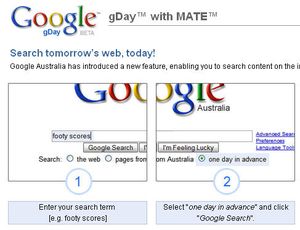
 Yesterday we could see several examples of their creativity and sense of humor: the gDay (a new feature enabling you to search Internet content before it’s created), the Wakeup Kit (a new service in Google Calendar to make sure you get out of bed) and Virgle (a Virgin & Google project to set the first permanent human colony on Mars) were some of the Google pranks, together with some smaller details like the possibility to create a paper airplane in Google Docs or set an appointment with famous people in Google Calendar.
But Google is not the only one that tried to get us to smile yesterday. Youtube, for example, linked every single featured video on its homepage to Rick Astley’s hit Never Gonna Give You Up. Meanwhile, Aviary surprised us with a revolutionary web-based time machine that could take any photo and create its future – or past – version. The accompanying screenshots were just hilarious.
 Pranks were not limited to software: videogames also contributed to the fun by providing us with great headlines like this: WoWinsider decides to give up on Blizzard’s MMORPG and focus on the much more exciting Hello Kitty Online. Talking about WoW, we also learned that this popular game was finally coming to consoles… but starting with the Atari 2600 platform at a “glorious 192i resolution”. Thinkgeek, the popular geek online shop, also contributed to the gaming April Fools’ with the awesome Super Pii Pii Brothers game for the Wii, as well as other remarkable objects such as the Personal Soundtrack T-Shirt or the USB Pregnancy Test.
Finally, we hope you liked our contribution to this year’s April Fools’. We had loads of fun while creating Satellite Live and hope you didn’t take the joke too badly!
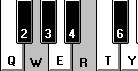 If you’ve always dreamed of learning to play the piano but have never had the space or resources to have one yourself, then all is not lost. If you fancy yourself as the next Elton John or Richard Clayderman, your PC can emulate a piano to a pretty impressive degree of reality. Of course, it’s not exactly the same playing Beethoven’s Fifth on your keyboard compared to ebony and ivory but it’s a darn sight cheaper and a good start for beginners in particular.
 If you’re a big user of Apple’s iCal, you’ve probably enjoyed the updates brought to the application in Leopard. A fresh new interface, new group scheduling tools and an updated sidebar. One of the most used features of iCal is alarms, essentially to keep up with events. Although you can easily add a new alarm to each new event, you’d think that changing the default alarm sound would also be straightforward. Yet Apple haven’t made it that easy. You’ll need to make sure you have Apple’s Xcode Developer Tools installed, so you can use Property List Editor. Close iCal, go to Library>Preferences and open com.apple.iCal.plist.
  Today is a special day for any Apple fanboy out there. On April the 1st 1976, Apple Computers Inc was founded by Steve Jobs, Ronald Wayne and Steve Wozniak and the first ever Apple I personal computer kit was created in Steve Jobs’ parents’ living room. Since then, Apple has gone through many ups and downs of which memorable moments we remember Steve Jobs’ outing in 1985, his triumphant return in 1996 with the acquisition of NeXT by Apple, the release of the first Powerbook in 1991, the Apple Store in 1997, the iPod in 2001, the iPhone in 2007 and the Macbook Air in 2008.
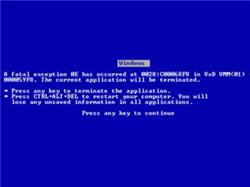
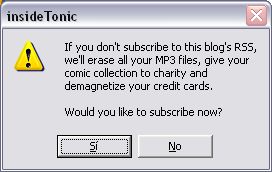 April Fools’ is here again and this means you must be aware of fake news, jokes from your friends and coworkers and of course, any possible tricks played on you thanks to technology. In case you want to take revenge, here’s a top ten list with the best techie pranks you can make use of on April 1st.
 5. Mouse. Removing the mouse ball was a classic April joke some years ago. Now it has evolved to sticking a piece of tape over the laser sensor of optical mice. Color the tape with a marker and the effect will be even better!