Gmail by Google will soon start writing your emails for you

How often have you not responded to a friend’s email because you were lazy? Not anymore, because Google will be launching a new Gmail function that promises to write all of your emails for you. Come November 5, the new feature will suggest three possible responses to emails that you receive, based on the content of those emails.

Named ‘Smart Reply’, the feature uses machine learning technology to capture and understand the content of your emails. While new to Gmail, Google has already used this technology in their apps and services such as Photos to identify elements in your pictures so that you find them easily.

Smart Reply by Gmail will improve as you use it and suggestions should become more and more accurate, and appropriate, with time.

The only bad news is that you will no longer be able to say “oh, I’m so sorry I did not respond. I didn’t have the time”.

PS4 hopes to help you isolate yourself from the world with this device

Sony has revealed a brand new set of noise cancelling earphones for PS4 that will hit shelves in December.

The highlight of these new earbuds is an innovation they call Audioshield, a clever feature that will help eliminate almost all exterior sounds. So even if the person next to you is in the thick of a zombie massacre, you will not hear his screams (or squeals, or whatever other sounds he might make), and concentrate on your game of Uncharted, uninterrupted. Jokes aside, this is actually a pretty nifty gadget to own for the occasional need to concentrate and isolate ourselves from the hustle and bustle of the world around you.

The Audioshield noise cancellation feature relies on an internal battery that promises 15 hours of use, and is charged through the USB cable that is included in the box.

Obviously, these earphones connect directly to your DualShock4 control, but it will also connect to your smartphones and tablets.

New In-ear Stereo Headset for PS4

The Sony noise cancelling headphones for PS4 will go on sale from December 4 in the UK and Ireland, and will reach Europe, Australia, New Zealand, the Middle East, and Africa on December 9. Price: $90.

Windows 10 Tip: Is your touchpad not working? We have the solution

One thing which some Windows 10 users have complained of is that, after installation, their laptop’s touchpad stops working. This problem is certainly annoying, but it’s easy to fix, as we explain in this article.

But why has your touchpad stopped working in Windows 10? It’s usually for one of these two reasons: it’s either disabled, or your drivers aren’t up to date. Here we’ll show you how to check for these problems and fix them.

Naturally, to fix them, bear in mind that you’ll need to interact with Windows 10. If you don’t have a touch screen, then connect a USB mouse – you’re sure to have one around the house somewhere – or can borrow one!

The touchpad isn’t properly configured in Windows 10

To check for this and fix it:

– Go to Home > Settings > Devices > Mouse & touchpad

– Click on “Additional mouse options“. Open the “Mouse Properties” window.

– Click the tab on the far right (it may be called “ELAN” or “Device Settings“)

– Under “Devices“, check that your touchpad is enabled. If not, click on its name, and then on “Enable“.

With this trick, the touchpad should now be working if the problem was that it had been disabled.

The touchpad has out-of-date drivers

If you have tried this and the touchpad still isn’t working, its drivers may be out of date. To update them:

Go to Home > Control Panel > Device manager

– Search for your touchpad in the list of devices, and click on Update Driver Software.

– If Windows can’t find the driver, go to your laptop manufacturer’s website, where you’ll be able to find them.

After doing so, your touchpad should now be working properly.

Related Stories

Five hidden Windows 10 tools

Windows 10 will launch their first big update in November: Threshold 2

Windows 10: The 45 most useful keyboard shortcuts

When you read about this new hacking method, you’ll be afraid to use Facebook and WhatsApp

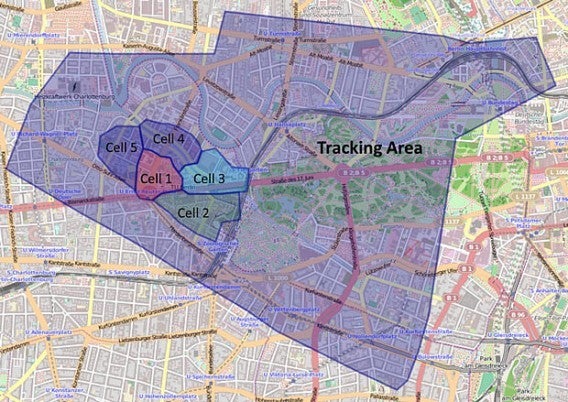
Investigators specialized in security have discovered that simply contacting someone by WhatsApp or Facebook can reveal the location of their smartphone. This hack is possible if a security breach found in the 4G network is exploited.

When a cell phone connects to the network, it is assigned a temporary number known by the acronym TMSI. This code is made up of eight random numbers. The security breach allows the hacker to access the data behind this code using WhatsApp and Facebook; the hacker sends a contact request and that request becomes the breach.

In this way, the hacker would obtain the cell phone’s location. The hacker would not know the exact whereabouts of their victim: but they would have a zone of two square kilometers within which the owner of the cell phone in question is located.

Now that this security breach has been discovered, we hope it’s fixed as soon as possible.

It’s normal to feel paranoid about using Facebook and WhatsApp but remember, that although these hacking methods look easy to execute on paper, they require time and dedication. For example, in this case radio communications would need to be hacked. That’s not something you achieve in five minutes.

Source: The Telegraph

Five apps to survive the apocalypse

Next week the massive, post-apocalyptic, open-world, survival role-playing game Fallout 4 is coming to PC and console. Because of this we have been thinking a lot about surviving in the wilderness, and searching out the best apps to help us – that is assuming we still have some way to charge our phones…

Do you want to know a great way to survive? Get help from the experts, and Alpify (iOS|Android) can instantly connect you with the emergency services. Originally designed for mountaineers, this app uses geolocation to track your position for rescuers – providing you are in a supported area. Unfortunately the service is currently limited, but hopefully this will change.

Basic knowledge is also key, which is where Survival Guide (Android) comes into play. Need to know how to build a shelter from branches and mud? It’s all in the app… well the instructions are, not the branches or the mud.

Maps.me (iOS|Android) fulfills another key factor – orientation. This map app is capable of downloading and storing maps on your device rather than streaming them in when needed – ideal for finding yourself in an emergency.

Honestly, we think First Aid – American Red Cross (iOS|Android) should come installed by default on smartphones. This app offers basic first aid information to help you provide first response care to anyone in need. It doesn’t replace actual first aid training, but it is a great way to ensure that you always have the basics to hand.

Finally, we all know that preparation is essential, and for this you need Survival Backpack (Android). Filled with conveniently organized lists to help you build the perfect bug out bag, this little app helps you make sure that you are ready for anything.

Those are our picks for the top five survival apps, but let us know in the comments if you thing we missed anything. Next week we will be bringing you the five best Google Chrome extensions – subscribe to make sure you don’t miss that.

Related Stories

The top three cyborg games – because we can’t have Halo 5

The five best security apps for your smartphone and tablet

Avast Free Antivirus 2016 review

Follow me on Twitter: @DoFuss

Here’s to you Halo 5 – our favorite three cyborg games

With Halo 5 out on Xbox One this week, we here at Click-Swipe-Play our PC’s were feeling a little left out of the cyborg action. We decided to rectify this by searching our gaming libraries for our favorite three augmented super-human titles.

We start off with a gaming classic, Capcom’s Blue Bomber himself, Mega Man – or more specifically the Mega Man Legacy Collection. It’s a bundle of platforming history, including all six original installments spanning from 1987 to 1993. Add in a Challenge Mode, and this punishing package of games should keep you busy for the foreseeable future.

Deus Ex: Human Revolution is our second pick, an RPG that is as stylish as it is fun. Taking control of security chief, Adam Jensen, you get to upgrade your body with cutting edge technology – which in turn creates more paths through the huge open-world hub areas. You can even punch through walls.

Finally we have Syndicate. Not the original 1993 strategy game but the 2012, fast-paced, cyberpunk, first-person shooter. Mixing frantic gunplay with the ability to hack the world on the fly courtesy of your cybernetic implants, this game’s campaign never lets up. And when you’re done there are the nine co-op missions to take on with friends.

If none of these tickle your fancy though, I guess at this point Call of Duty: Black Ops 3 is basically a cyborg game – give that a go.

That’s it for this week, we will be back with another three reviews next week – until that remember to like or dislike this video to let us know what you thought.

Related Stories

The top three gaming assassins

The top three horror games on PC

Cybernetic horrors from the deep – SOMA review

The Jackbox Party Pack 2 review

Follow me on Twitter: @DoFuss