Would you spend nearly $2,000 on a foldable phone?
Samsung has recently released a four-minute video showing off the basic functionality and design of its new Galaxy Fold device. The complete lack of voiceover or text gives the video a slightly eerie vibe, but it does a good job of showing off the phone’s basic design and tactile nuances. The mostly silent film can be seen below.
The video demonstrates the phone’s inward folding design, as opposed to the Huawei Mate X’s outward folding design. While folded in “phone mode,” the outside of the device has a 4.6inch HD+ display. The phone unfolds into “tablet mode,” featuring the device’s signature 7.3-inch Infinity Flex Display.
The Infinity Flex Display’s resolution is 2048×1536, which is much larger than 1080p. Apps that were running while folded will seamlessly transition to the unfolded screen, expanding to reveal additional content and information. This technology is called App Continuity, and it was added by Google to the Android platform with the Galaxy Fold being the first device to make use of it.
Smartphone photographers rejoice, as the Galaxy Fold features a whopping six cameras: a selfie camera while folded, three rear cameras that are usable while folded or unfolded, and two front cameras to use while unfolded. As shown in the video, the cameras can be easily switched between by tapping a button, changing the zoom of the image. Hopefully, you’ll be able to put all of these cameras to better use than the video’s Patrick Bateman-like star shooting his sterile apartment.
The Galaxy Fold will be priced at $1,980, making it one of the most expensive smartphones in the world. Samsung is well aware that this price comes as shocking to many potential customers. To help ease their fears, Samsung considers the Galaxy Fold as a superpremium device and is treating its launch as such, including by limiting its supply. Elaborating on this in an interview with The Verge, Samsung UK’s Director of Product, Services, and Commercial Strategy Kate Beaumont said, “This is a super premium device, and we want to make sure it has a concierge-like service and experience, so it’s not going to be on display in all stores. You’re not going to see it on the stands, we want to make sure it’s a very personal experience. There will be quite intensive aftercare that goes with it as well.”
What exactly is meant by the “concierge and aftercare service” remains to be seen, but Samsung’s troubleshooting and tech support for such a premium device need to be spotless.
The Galaxy Fold will come with a free set of Galaxy Buds in premium packaging. If Samsung intends to stick with this price point, it’s smart of them to consider the Fold a superpremium product, complete with limited supply. At its release, the Galaxy Fold will likely be considered the absolute best, most advanced smartphone money can buy. The Galaxy Fold faces competition from the Huawei Mate X, another device that features a foldable design (though the Mate X’s outward folding and all-screen design are notably different from the Fold). The Mate X is even more expensive at $2,600. Huawei will be hard pressed to overcome Samsung’s highly recognizable Galaxy brand, as consumers are likelier to buy a never-before-seen foldable smartphone from a brand they already trust.
Need some help in the kitchen? Check out these great apps.
One of the hardest things about adulting is meal planning. The practice requires a daily, weekly struggle to find food options for individual tastes!
Yet, while planning the scheduling and shopping may seem crazy, your efforts will pay dividends: homemade meals are usually tastier, cheaper, and healthier than restaurant fare or instant meals. The downside comes from time spent wondering what to eat!
If you’re looking for better, tastier food and wish to take a bite out of the time spent planning, try these apps! They might just be your golden ticket.
Best meal planning apps
The Options
We have two top apps for your consideration: Mealime and Yummly. These apps stand out because they specifically help users find good recipes, plan a week’s worth of cooking, and compile an entire shopping list for the purpose.
We’ll go through both, explain what they do, and discuss their differences!
Mealime capitalizes on the minimalist theme, with a user interface reminiscent of a well-kept kitchen. Opening the app may remind you of organized cutlery, shining sinks, and impeccably lined spices.
Open the first page of the app and you’re greeted with the Mealime slogan: “Take the Hassle out of ‘What’s for Dinner?'”
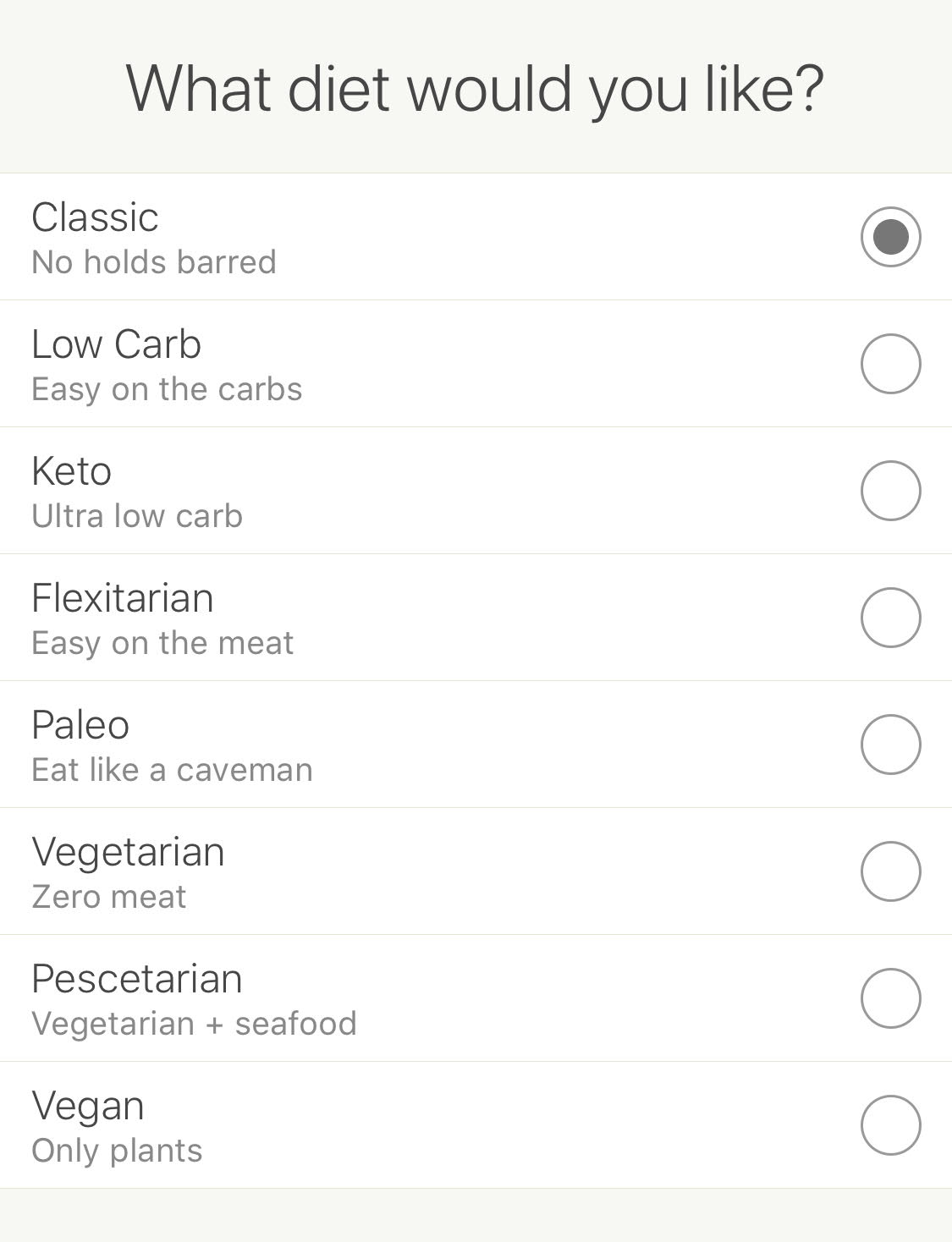
Many meal planning apps follow a similar pattern. After signing in, you’ll be directed through a series of windows that gauge your preferences, dietary needs, and desired weight loss/gain. Mealime’s system begins with a roster of classic diets:
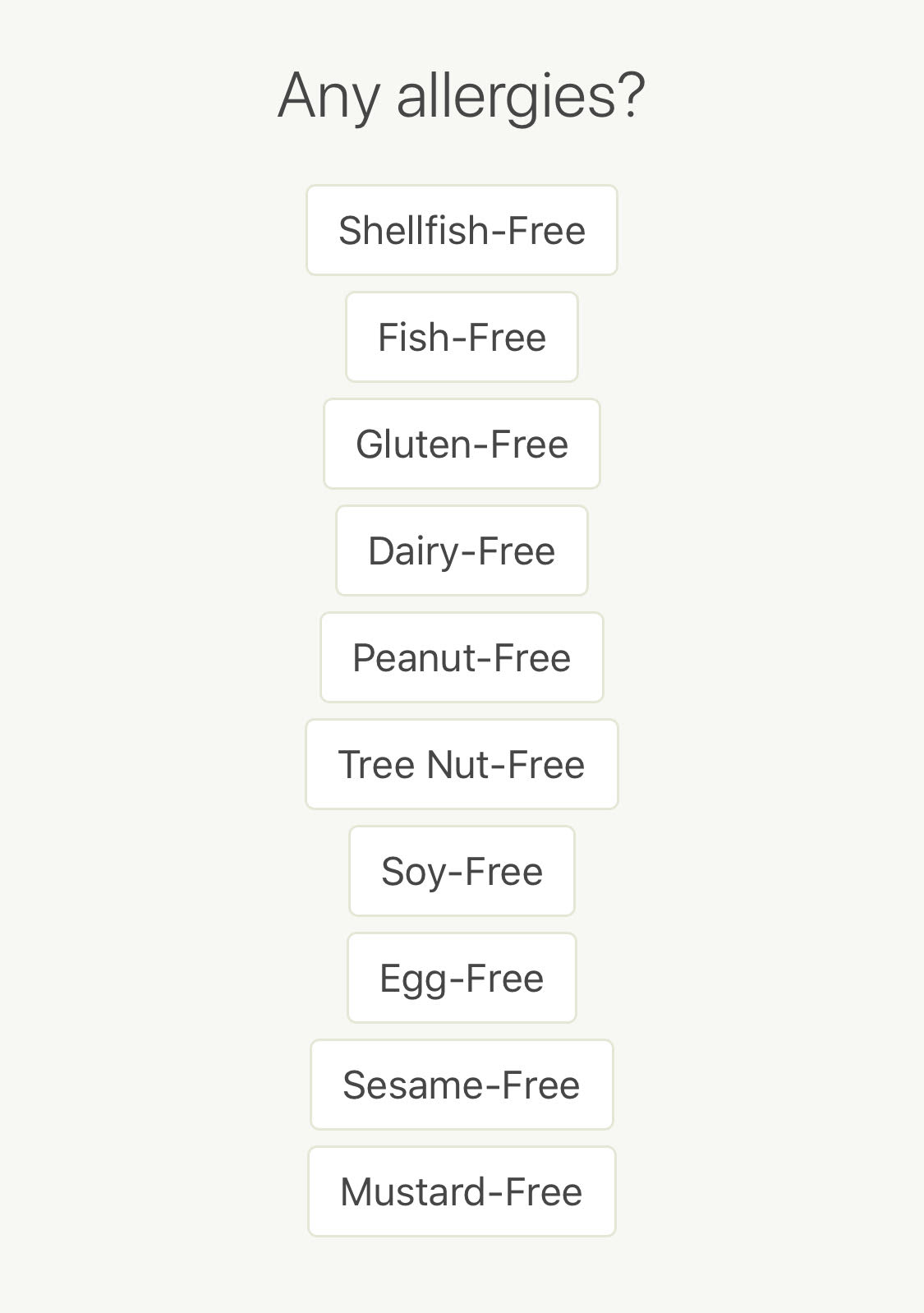
Next, they follow with the classic allergies screen. Remember to ask friends, family, and housemates about their allergies if you’re cooking for a group!
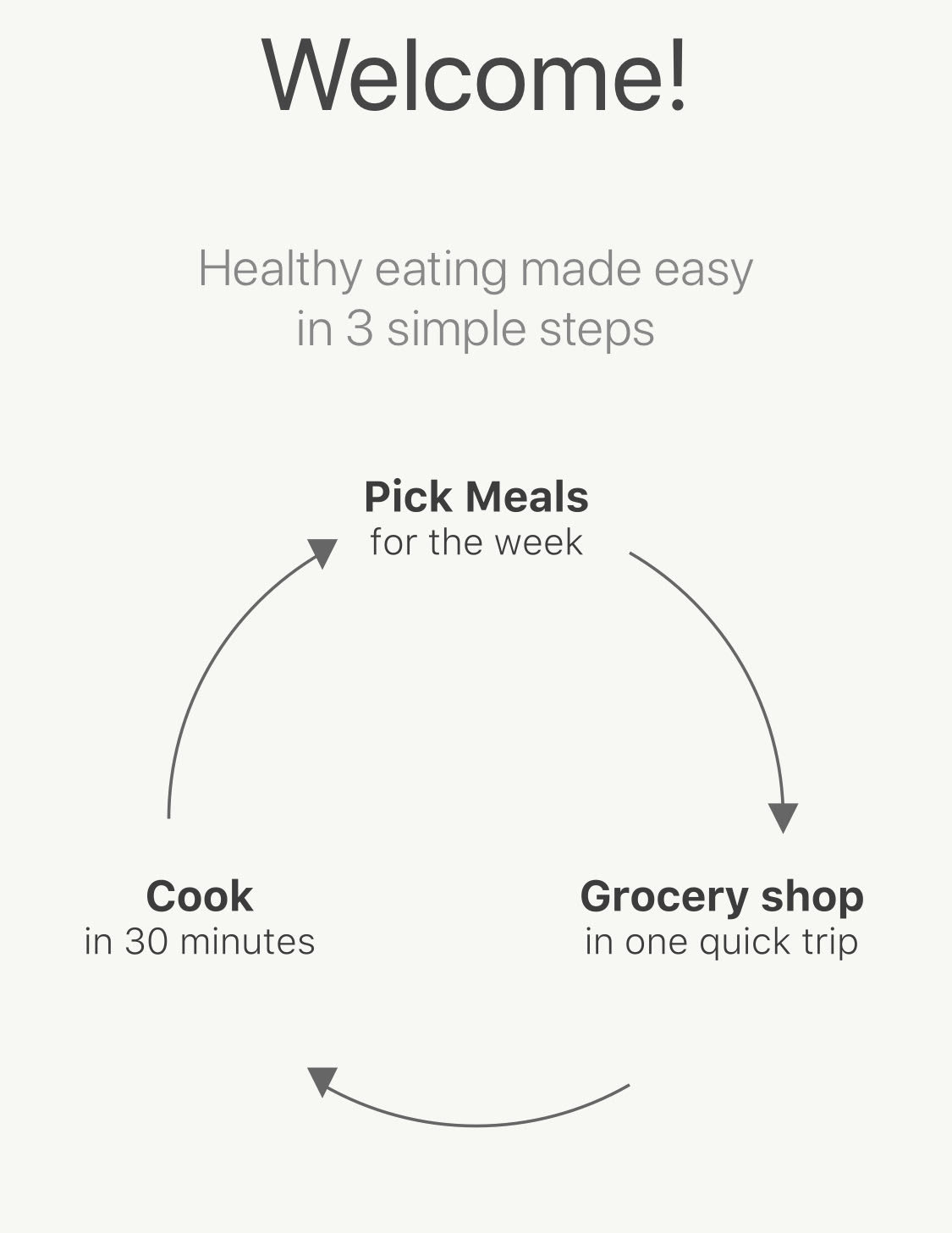
After a few more options, the Welcome screen appears, with a diagram that explains the Mealime cycle: choose food each week, use the conveniently created grocery list to shop, and create meals within 30 minutes, one of Mealime’s signature promises.
Looks simple…but how does it work, really?
When you open your Meal Plan, the screen will be empty at first. Click “New” to start!
Opening the meal selector looks something like the picture below. Hit “+” to add whatever looks good to your list!
Pretty homogenous, IMHO.
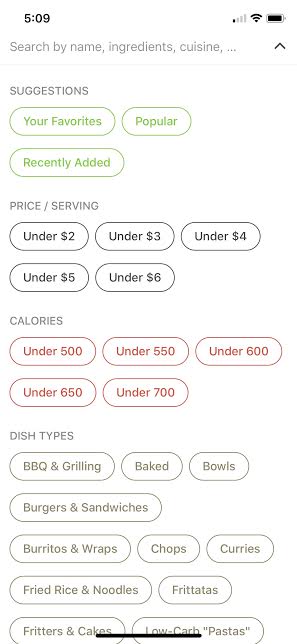
If you’re looking for something specific and can’t find it, the search menu has options to filter by favorites, price range, calories, and more, including a normal keyword search.
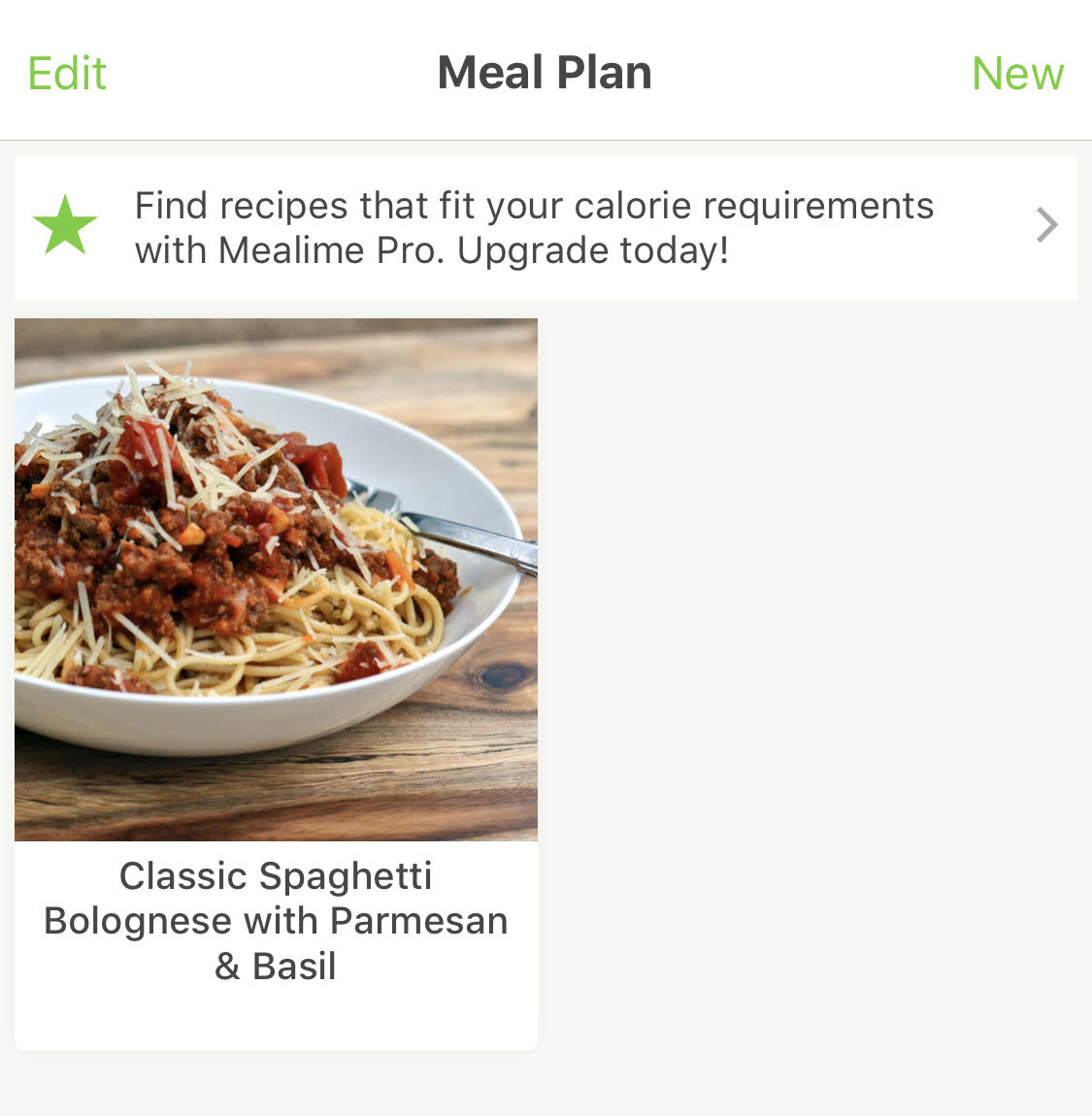
At this point, add all the meals you want to try for the week! For example, if you chose to eat Classic Spaghetti all week, it’ll look like so:
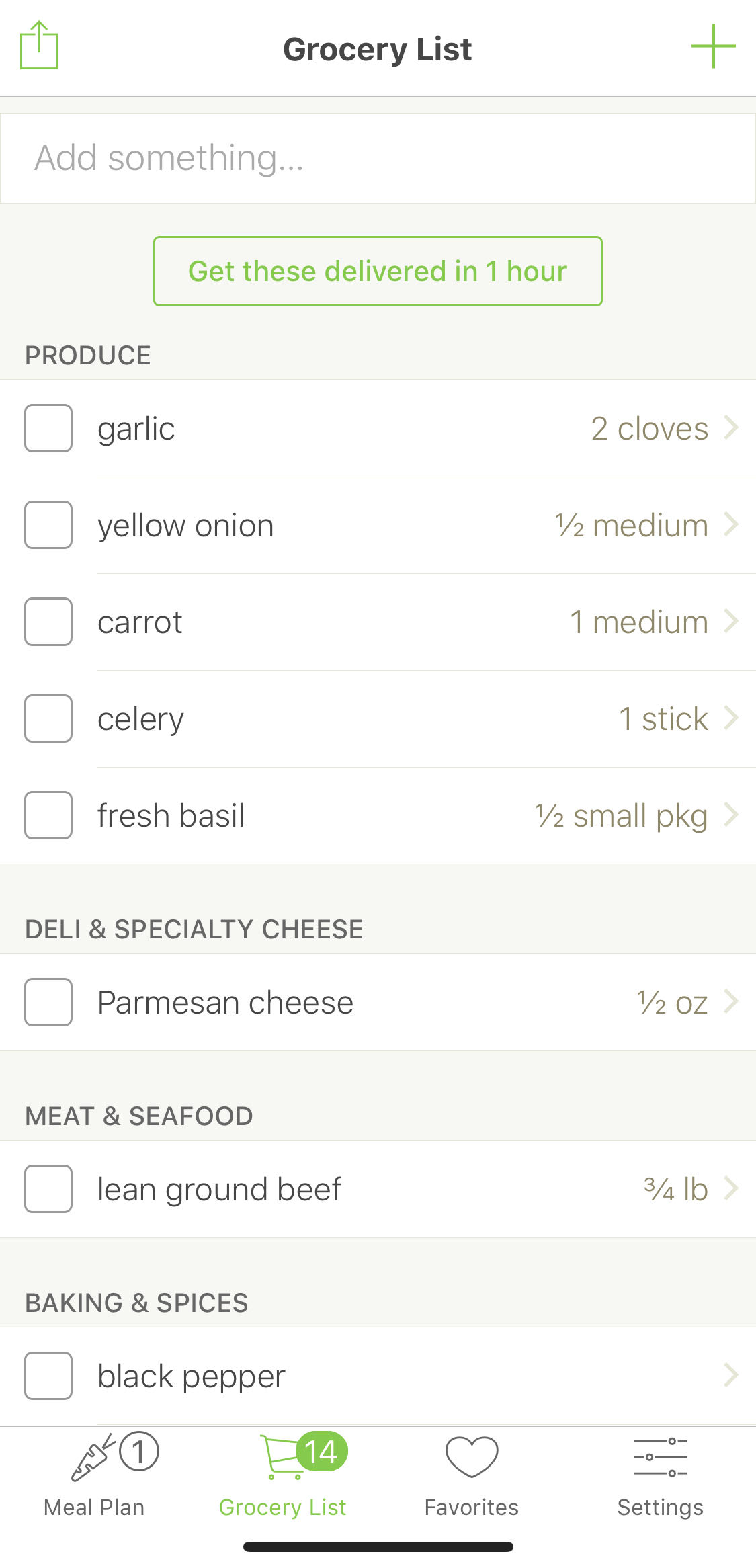
With that step complete, the app automatically fills up your Grocery List. You’re ready to start shopping!
(Remember, as a general rule, don’t run off to the store the moment your list comes together. First, check the fridge and the pantry, checking off anything that’s already there and will be around when you plan to cook.)
By now, you’ve encountered the Meal Plan and Grocery List menus. We’ll skip over Favorites and head right to settings for one last topic… Mealime Premium.
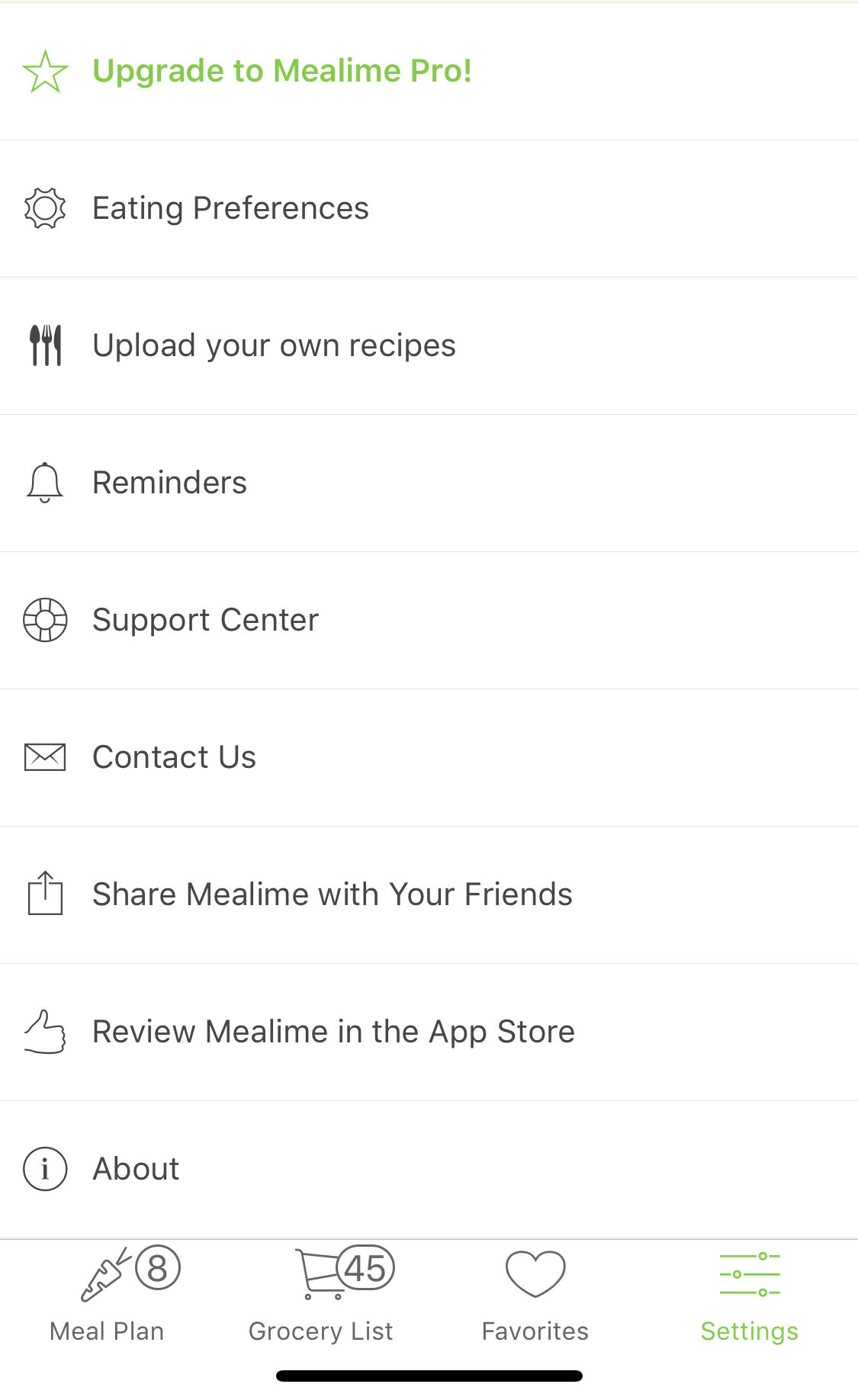
In the settings section, you can change the eating preferences you set earlier. Most options here are available to all users but some – such as “Upload your own recipes” – can only be used by Pro members.
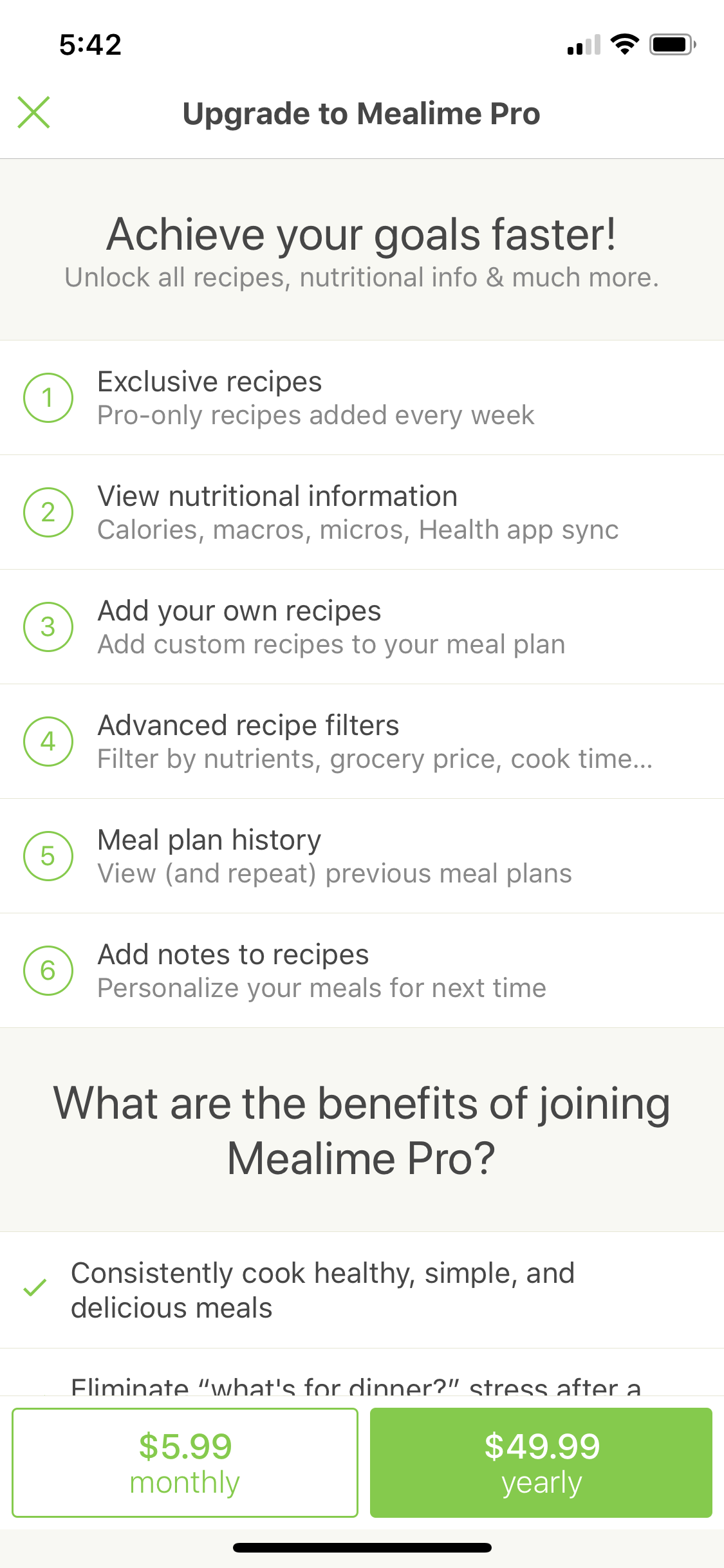
Upgrading to Pro provides a few more benefits, the most pressing of which is the Exclusive Recipes only available with a premium account. The price of $6 a week or $60 a year won’t break the bank, but we recommend checking whether you prefer this app to others before committing.
Welcome to Yummly! Whereas Mealime appears minimalistic, Yummly has all the rich color one would expect from a well-used kitchen: the rich grain of a cutting board, a line of earthy nut jars, or the inside of a freshly cut steak.
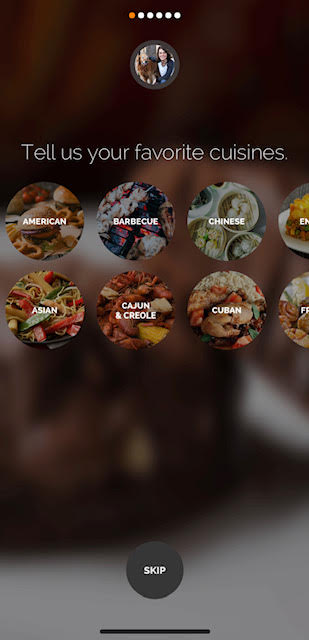
From the start, Yummly shows its colors: rather than focusing on just healthy, quick options, it provides suggestions for a much larger range of tastes!
Yeah, that picture is me and m’dog.
Ah, the allergies screen.
Another important option: the disliked foods. If you’re opposed to avocados (Did we just hear a collective gasp from California?), now’s the time to let them know.
Even better, Yummly lets you choose your cooking skill preference! It can be changed later, so don’t feel bad about choosing “beginner” if you’re new to the kitchen.
Based on your choices above, Yummly now brings you to a personally generated option screen, which holds a range of meals. Unlike Mealime each page scrolls up and down like a social media feed. Oooh. Aaah.
To select a food that looks good, hit the “Yum’d” icon. That meal appears on a list for later use! However, they do not immediately show up in the grocery list…
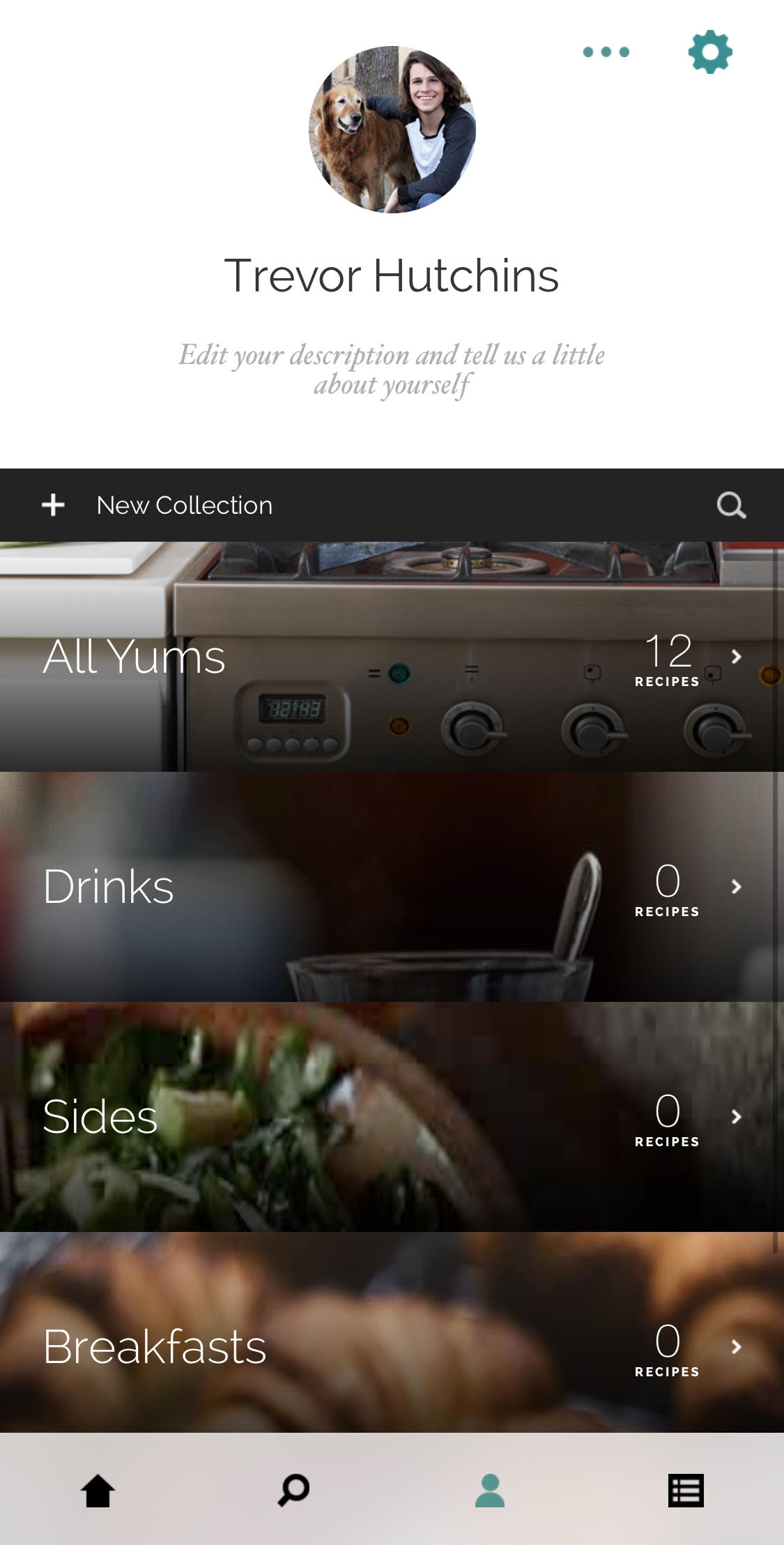
Head to the profile section. Here, you can see all your “Yums”.
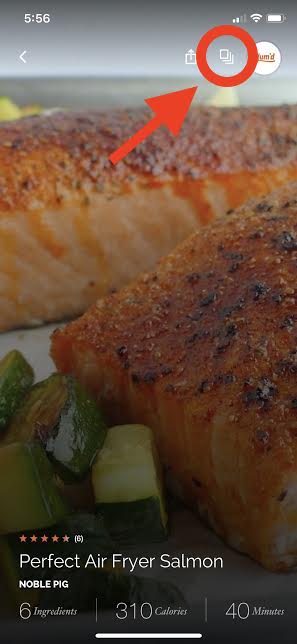
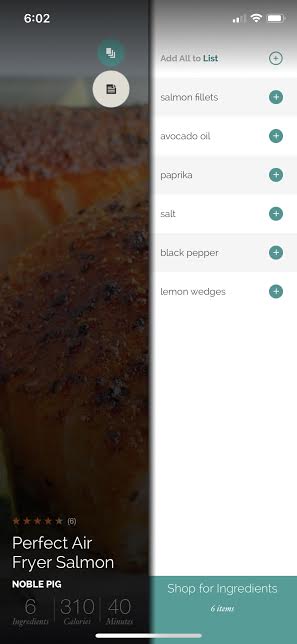
To begin adding ingredients to the grocery list, select an individual Yum and hit the menu button. For example, if you’re going to make “Perfect Air Fryer Salmon”…
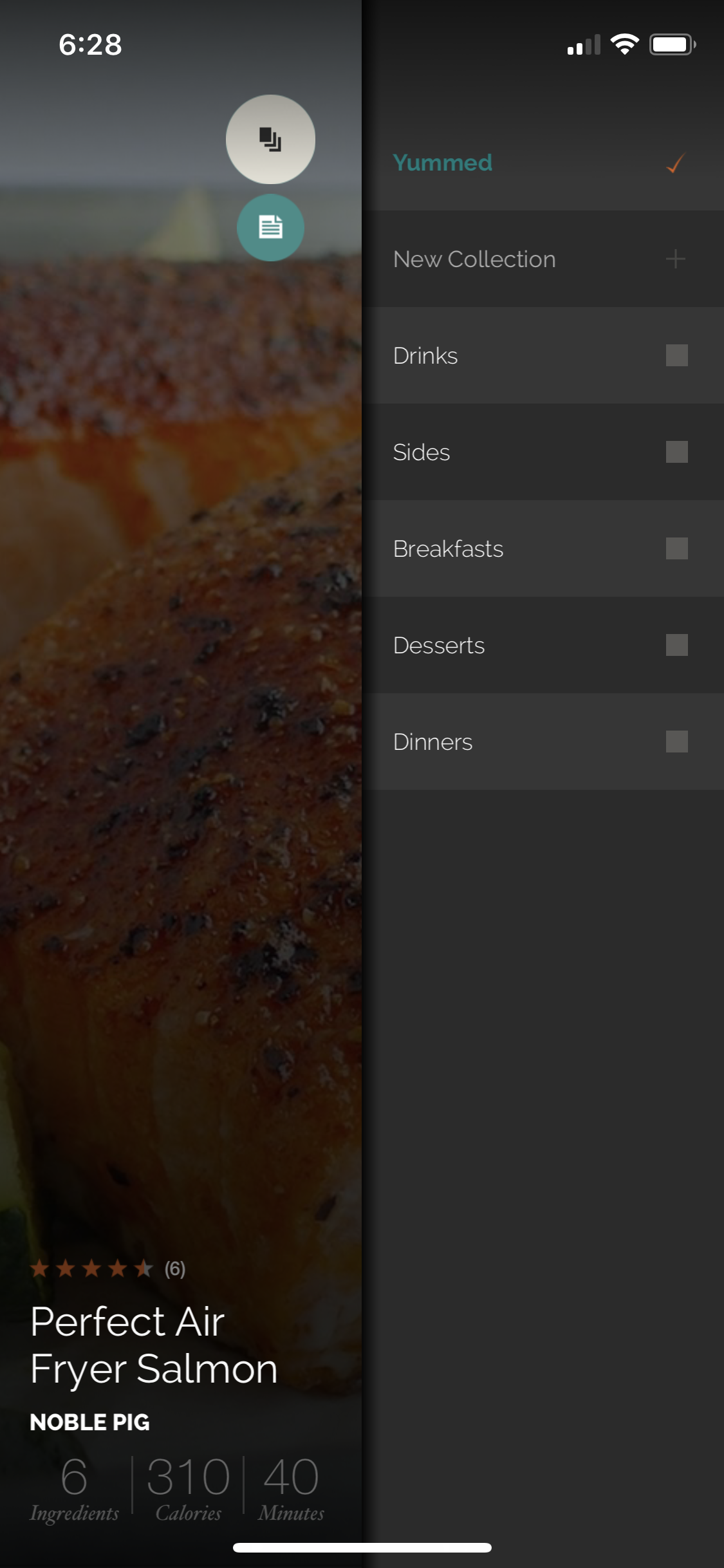
Yummly now brings up the options: here, you can set the Yum as a Drink, Side, or more. We’re not to the groceries yet…
Hit the Grocery List, which will appears under the menu button, but only after the menu button has been selected:
There the groceries are! Once you’re sure an item isn’t already available at home, add it individually. Or, if everything’s missing, select “Add All” and call it a day.
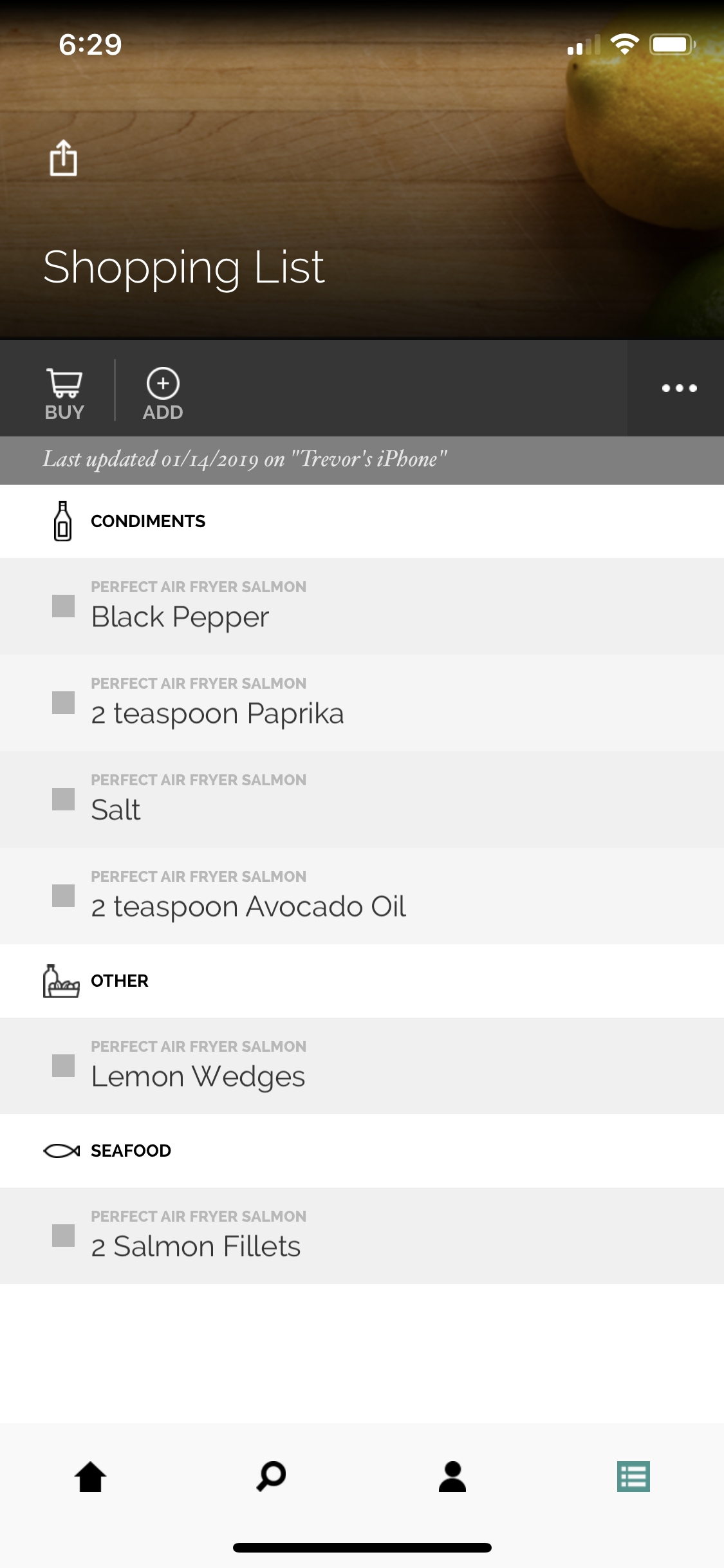
Now, you’re ready to shop! The grocery list even organizes everything by type, so you can get all your condiment shopping done at once:
So, which one works best? The answer (of course) is: whichever works best for you. In fact, there are a few we left out, but we’ll mention those later. In the meantime, here’s our quick rundown of the important differences.
Mealime will likely work better for those looking to maintain a more healthy lifestyle. It looks simple and refreshing. Their setup options help create a personalized list of quick, healthy meals that are tailor-made for user diets. Their use of favorites makes meal planning easy and simple, but their Pro accounts limit what foods can be chosen, along with other choices.
Yummly aims to help anyone who enjoys food connect with more recipes that fit their taste, whether that means a lean meal or the tastiest homemade burger around town. The interface looks richer, but navigation (and especially grocer shopping) will take longer to figure out. Still, their food photography is hard to beat! Warning: if you choose this app, you may find yourself drawn to new things by the beautiful pictures.
Since we only had time to review two top-tier meal planning apps, there are many more out there which could better help specific users. If you were looking for something similar, but not quite like Mealime or Yummly, you may be seeking one of these awesome apps:
1. Plan to Eat: like Mealime and Yummly, Plan to Eat provides meal choices, recipes, and grocery shopping support.
2. Atkins Carb Counter/Tracker: the Atkins Carb Counter helps track the number of carbs consumed. If you’re looking to hold yourself accountable, the website and app can help you stay on top of things.
4. Lifesum: another excellent app with “diet plans, nutrition advice & healthy recipes.” Huge bonus in our opinion: the user interface looks great! (Yeah, that’ll always be a big thing with us)
5. Weight Watchers: a clear and present classic. Weigh Watchers reigns supreme among dieting apps, especially on the Apple app store where it has a five-star rating with 497k reviews. Dang!
We hope this helps you put together better meals at home, throughout the week. Remember: there’s no need to start making breakfast, lunch, and dinner every day. Even professionals may find that kind of schedule exhausting! Some meals just need to be quick.
With that in mind, we recommend planning ahead for just a few meals. For the best results, place them at meaningful times in your schedule: if Wednesday holds four college classes at midday, perhaps set a celebratory dinner that night. Or, to cap off the work week, have something nice on Friday night, or Sunday night before Monday sets in.
The possibilities, and meals, are in your hands. Enjoy them!
Is this the future of dental hygiene or a goofy-looking fad?
Buying that new smartphone or game console is one thing, but did we really expect to see an upgrade to the toothbrush in our lifetime? Did we even want it? While a new electronic toothbrush likely won’t appear at the top of many Christmas lists, let’s face facts: Everybody brushes their teeth, and we’ve been doing it the same way every day since 1938. Cars and computers have certainly come a long way since then; it’s time some of our more ubiquitous products get a much-needed face-lift.
Introducing the new Y-Brush from the French manufacturer FasTeesH:
Why use Y-Brush?
The human mouth houses 32 teeth and has 3 different angles, totaling 96 overall places that require cleaning twice a day. Dentists recommend brushing for 2 minutes minimum per session, which means you’re supposed to brush each tooth for about 4 seconds. Does that happen?
Dentists use a mirror for a reason. You’re probably missing a lot of surface area.
The Y-Brush removes an impressive 15% more plaque than a traditional toothbrush and sports rounded hair tips for less aggressive strokes against the gums and teeth, taking care not to aggravate while brushing. But that’s not all – the Y-Brush knocks brushing time down to 10 seconds.
How does the Y-Brush work?
We’ve been brushing our teeth ‘the normal way’ for so long that a device as odd-looking as the Y-Brush probably looks like some bizarre prop from a sci-fi show.
The Y-Brush looks like a mouth guard, and you put it in the same way
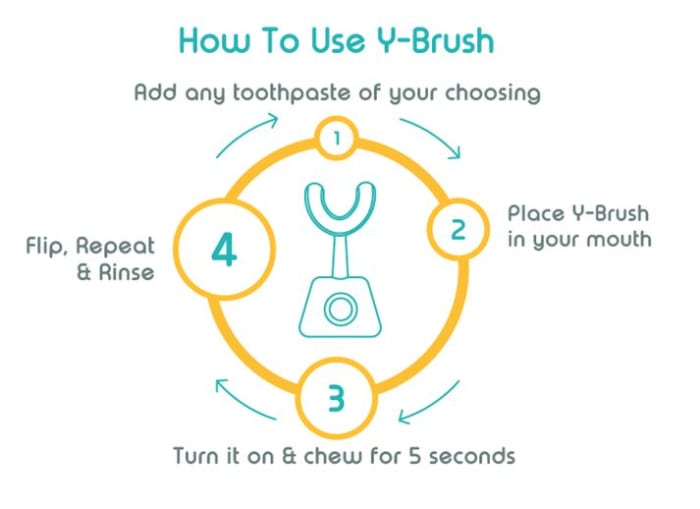
The process is simple, however: Just put in your toothpaste and bite down on the Y-Brush. Turn it on and make slow chewing motions with your mouth. After five seconds, flip the Y-Brush and repeat with your other jaw, and five seconds later you’re done.
It feels like you’re not spending enough time brushing, but in reality, you’re brushing 400% more. The Y-Brush tackles each tooth for five seconds since the device brushes all the teeth of one jaw simultaneously – four times longer than a manual or even an electric toothbrush during a standard two-minute brushing session.
The reason it’s so efficient is that the bristles are pointed up at a perfect 45-degree angle – the angle recommended by the ADA when you use a standard toothbrush. The motor on the front of the brush tray vibrates to clean your teeth much more reliably (and carefully) than your arm. There are even three different (but equally effective) settings you can choose between if you find the higher ones uncomfortable.
Adjust vibration strength by pressing here.
The brush of the future?
What makes the Y-Brush so promising is that it walks the line between efficiency and convenience. Yes, we care about our dental health, but we care more about our own convenience and ease of living. Since the Y-Brush doesn’t even require any unique toothpaste (you can fill it with any you like!), it’s an improvement in practically every way.
Cleaning the Y-Brush is as simple as rinsing it – just like with your old toothbrush.
You can plug the device in when you use it (like you would with an electronic toothbrush) or you can even charge it wirelessly via induction. The Y-Brush comes with a charging station so you can bring it with you on the go and use it in a more portable capacity. Since it’s so easy and fast to use, the product is especially good for kids or people with disabilities.
FasTeesH has been developing the Y-Brush and testing it with professional dentists for three years, and the general consensus is very positive: The device eliminates bacteria responsible for gingivitis, periodontitis, and gum disease, and does it all with efficiency and speed. Unfortunately, the product is on the expensive side, costing around $125. To be fair, however, that’s about as much as a premium electric toothbrush – and the Y-Brush is the better alternative. Plus it comes with the handle, brush, charging station, and a storage pod and toothpaste applicator, so you’ll be taken care of from the start.
The Y-Brush comes with 4 different purchase plans, and 4 different mouth sizes.
The Y-Brush isn’t available yet, but you can pre-order one right here. Deliveries are expected to happen in April 2019.
Are you going to get one, or is this just an expensive fad? Let us know your thoughts in the comments below, and don’t forget to floss!
Given up on your New Year’s resolutions? Here are 5 apps to get you back on track.
Whether you’re a January 1st resolution maker or you simply want to identify some patterns about yourself — an app might be a tool that can help you understand your habits and learn to leverage them for success.
Here is a look at the top apps for making—and keeping—the habits that make you a better person.
5 best apps to create good habits
Habitica
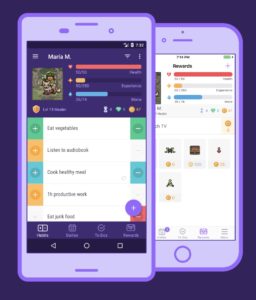
Habitica shines in the sense that it aims to make habit creation a game. The app takes something of an RPG video gaming approach — which makes it feel like you’re leveling yourself up with every task you complete. If you fall short of expectations, your avatar loses health.
While this won’t help you become a more powerful mage or stealthy assassin, the idea is pretty neat. Available for Android and iOS.
Strangely enough, HabitBull is based on Jerry Seinfeld’s method for building new habits. If you’re a Seinfeld fan, maybe you’ve heard of this, but the general idea is, you complete a task every day and you form a streak — Seinfeld marks each day off of the calendar. After performing a task day after day, you’ll start to get attached to that streak and will work hard not to break it.
Not only does HabitBull keep tabs on your streaks, but it also comes with several data recording features, aimed at giving you the most detailed information possible about how you’re progressing.
Integrations add an extra layer of functionality to the mix — the app connects with Google Fit, Apple Health, and your calendar. It also creates graphs and offers access to a ton of data. We could see this app being a bit overwhelming for someone who just wants to remember to exercise more often. Available for Android and iOS.
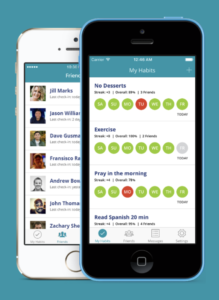
Habitshare operates on the social pressure/group motivation philosophy. If not breaking the chain or treating yourself like a game character doesn’t motivate you — the social networking aspect employed in this app might make a difference.
We could see this app being especially appealing to those who like to keep things organized. The interface is clean, easy to read, and it allows you to schedule reminders. The social aspect isn’t mandatory, so if you prefer to keep all or some of your activity private, no problem. That said, the main selling point here is the motivation and accountability that sharing with friends can offer. Available for Android and iOS.
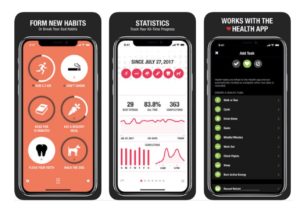
Streaks and its signature bright orange interface are a joy to interact with. How it works is, users can choose up to 12 habits to track. Each time you complete one of these tasks, a streak is extended — and, if you break the chain, your streak resets to zero days.
The app integrates with the iOS Health app, which allows Streaks to automatically track goals like walking X amount of steps, going for a run, and so on. Additionally, the app lets you track habits that you don’t do every day — set it up so you can remember to go to the gym four times a week or pay your water bill. Available for iOS.
Productive is a robust blend of reporting features, reminders, and usability. It’s similar to Streaks and Habitbull, in that your calendar keeps track of your habit streaks. What we like most about Productive is, the app is delightful to look at.
The app syncs up with the Apple Watch and Siri Shortcuts but isn’t compatible with other devices or applications. That lack of integrations may be a mark against Productive for some prospective users, but it’s still got a good mix of general features. Plus, the Siri shortcuts are pretty cool—you can set up trigger phrases for marking habit tasks off your to-do list.
One thing that would make the app all the more useful is if it connected with your Mac, just like your Notes, Tasks, and Calendar. Available for iOS.
The above apps are all highly rated, well-designed choices, but sticking to new habits requires commitment, motivation, and finding a system that works for you.
Some people are motivated by social pressure, while others like to track their improvement over time. Chances are, the app won’t make you a better person, but it might be just the thing you need to get going on that new gym habit — or even just remembering to drink water.
You see autoplaying videos all over the web. Here’s why.
Autoplaying videos are the bane of the internet.
Maybe it’s just us, but it’s always felt like content playing without our consent felt like a violation. Some of us now live life with computers on mute 24/7 to avoid any public outbursts.
You know how it goes. Sometimes you’re cruising the web, trying to get work done, multiple tabs opened. Suddenly, some poor quality sound starts competing with your music, and you’re frantically clicking around looking for the source of auditory spam.
We all hate autoplay — yet somehow, the much-maligned feature hangs around, providing distractions and noise pollution without warning.
Here’s a look at why autoplay will likely stick around through web 3.0 and beyond.
Why autoplay will never die
Why is autoplay still so prevalent?
The answer is obvious — autoplay videos are real money-makers. Why else would something so terrible be a mainstay on the web?
The user, in this case, doesn’t matter. UX might apply to individual sites, but it’s hardly a concern for advertisers.
We’ve seen a rise in autoplay ads over the past decade or so due to faster internet connections and the rise of smartphones. As consumers, we’ve gotten used to watching videos on Facebook, YouTube, streaming Netflix on our phones.
Netflix claims to have data suggesting that autoplay trailers are worthwhile — they reportedly make us watch even more movies and reruns of “Friends” and “The Office.”
Netflix isn’t the only one forcing autoplay on their viewers. Back in December, YouTube announced it would roll out a new feature that would “make it easier to preview videos on the go.” Called Autoplay on Home, YouTube now automatically plays preview videos on the mobile app — you know, for convenience.
This change provides one clear benefit: inflating the number of views. For content creators, autoplay makes it easier to monetize videos.
Still, YouTube has one edge over the Netflix approach — the autoplay function can be muted, with captions for a less disruptive experience.
Are companies trying to do better?
Social media sites like Facebook and Twitter allow you to mute autoplay videos in your account settings. Instagram even mutes videos by default these days
A few months back, both Chrome and Firefox released updates that block the issue. Google’s browser now comes with the ability to mute specific tabs — and if you’re visiting a new site — you can use these options as a safeguard against unwanted noise by muting the site.
Version 64 also allows you to flag autoplay videos, but you’ll need to get into your Chrome settings.
The Firefox update added some options to the preferences section. The Nightly update also offers some tracking protections, too, blocking advertisers from running software that follows your online activity.
Firefox’s solution to stop Facebook from spying on you
Unfortunately, the Chrome update puts HTML5 games at risk. Shortly after the rollout, Google was flooded with complaints from smaller game developers claiming that their games no longer worked in the browser. Other issues with these blockers include things like trouble with video calls.
That said, if you do a lot of reading and research online, muting sites like Forbes, CNN, and others that provide a small news report with every written story, the Chrome add-on is a real boon.
On the verge of a new silent generation?
Because everyone mutes their videos anyway, advertisers are now creating ad content with that in mind. For that, you can thank the Coalition for Better Ads, a group that includes big players like Facebook, Procter & Gamble, and the Washington Post.
The idea behind the coalition is, these brands hope that by making ads less invasive, fewer people will use ad blockers. Because blogs and news outlets are at the mercy of their advertisers, ad blockers pose a threat to their profitability.
How to block ads and still reward your favorite sites
AdAge reported that the coalition’s efforts haven’t moved as quickly as expected–the changes were supposed to be a good thing for both advertisers and consumers. The problem is, consumers might not be ready to switch off the ad blockers.
The New England area offers tons of fun for geeks. Here are the conventions you should add to your calendar.
Conventions are a great way for like-minded fans to enjoy celebrating their interests together. They can even provide a way for you to meet some of your favorite voice actors and comic book creators. Conventions also typically have showcases for new products, as well as fan artists selling their work. But with so many conventions out there, it can be difficult to choose the right ones to go to. Thankfully, we’ve looked over dozens of northeastern conventions to find you the best eight. Each one of these conventions is well worth checking out.
The Penny Arcade Expo is one of the most well-known gaming conventions all over the world. There are multiple different locations for PAX events each year, and the east coast one happens to be in Boston. PAX East features new game announcements, tons of free games to try, and crowds of excited gaming fans wondering its halls. Tickets sell out within days of them going up, so you’ll have to act fast if you want to get a ticket to the best gaming convention of New England.
AB is by far the largest anime convention in New England, and one of the largest in North America. If you’re looking to see big anime announcements, popular Japanese bands, and tons of celebrity guests, then AB is one of the best conventions you can attend. They also have more merch and panels than probably any other con on this list, so be ready to come home with lots of goodies.
One of the few successful and fantastic general geek conventions, PortCon has a little of everything. From anime to games, there’s nothing you can’t find out of a PortCon experience. They are a four-day convention, which is a little longer than most, and has given them the opportunity to really expand how many panels and events they have. There’s always something to do, somewhere to go, and something to see at this unforgettable con.
Despite being a relatively new convention, PopCult Anime Con offers just as much excitement as the decades-old conventions it competes with. Whether you’re a vendor or an attendee, the PopCult staff make sure everyone leaves with a smile. The convention is entirely run by well known members of the New England anime communities, so you know the staff is there to have a good time just like you. Plus, their mascots are adorable. Make sure not to miss out on this delightful convention if you ever have the opportunity to attend.
One of the few conventions specifically dedicated to celebrating the past. This is the ideal con for gaming collectors, as RetroWorld features some of the rarest games available. No matter what decade of gaming you’re into, RetroWorld has something unique and exciting for you. The convention is mostly merchandise-based, but their selection is incredibly wide. Some dealers even come with bucket-loads of old and rare retro games that are a wonder to see.
Location: 2019 venue is currently unannounced but most likely in Manchester, NH
This convention used to be pretty small, but has grown to become a sizable and popular New England con. A great convention for cosplayers to attend, as your elaborate outfits will not go unnoticed by the attendees or staff. Even though they have grown to become one of the more popular conventions in the area, the community surrounding AAC still resembles that of a smaller convention. This means many of the staff has a high emphasis on being kind, helpful, and approachable compared to other medium-to-large conventions.
Probably the biggest comic convention on the east coast, Rhode Island Comic Con features some of the most popular and famous guests in comic book history. They also have many up-and-coming comic book artists just starting to make a name for themselves. It is the perfect place to discover comics old and new, and lose yourself in the world of graphic novels.
A tabletop gaming convention in Vermont, Carnage can be a great convention to go to when trying to increase your gaming circle. There aren’t many conventions in the area that focus primarily on roleplay-based games like D&D and LARPs, so Carnage is the perfect place to build new relationships with members of the community. There is also a lot to do at this convention, and it caters heavily to all ages, which can be really refreshing for conventions in this area.
These conventions are typically held at different times in the year, with a few overlaps, so you’ll be able to attend multiple if there are a few that interest you. Each one has their own forums you can look into, and use to plan meetups with like-minded fans. They often have cosplay events that you can prepare for by checking out those forums! Definitely worth looking into if you want a group to meet up with at these conventions.
It’s not hard to switch your Skyrim soundtrack. Here’s how!
Jeremy Soule made some of the best music to ever grace an open-world RPG when he composed the soundtrack for Elder Scrolls V: Skyrim. After nine years and hundreds of in-game hours, however, even the greatest soundtrack can get a little stale. Now there’s a way to add your own tracks to the game – tracks that follow the same rules for trigger events as Soule’s original music.
The best thing about it?
The process is very easy and requires zero coding knowledge. In fact, you don’t even need to use the Creation Kit. Here’s how to do it in 5 easy steps:
The Elder Scrolls V: Skyrim Special EditionFree Download
No_Aardvarks_Allowed created this Personalized Music mod for Skyrim back in March 2012 and was still treating it with updates four years later. This top-notch work is available both for the original version of Skyrim and for Skyrim: Special Edition which came out in October 2016.
This mod is the crux of the process, so it’s a good thing that, as with all Skyrim mods, it’s 100% free to download. As such, we encourage you to support and sponsor No_Aardvarks_Allowed for his hard work making Skyrim an even more unique experience for you. We also recommend installing Nexus Mod Manager to make the download process as streamlined as possible.
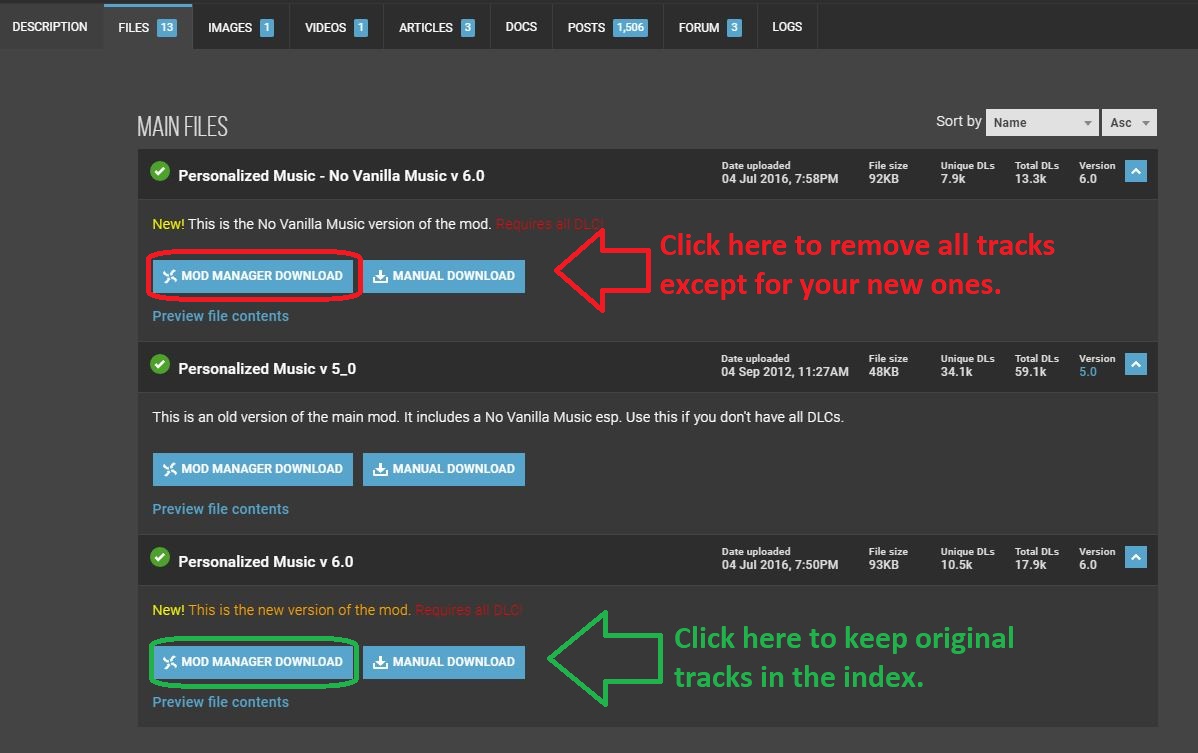
There’s also an option to download this mod while simultaneously removing all the default music from Skyrim. Click the first file on the page if this is your preference.
Choose whether you want the original Skyrim tracks to remain in rotation.
2. Download this program to convert your music files
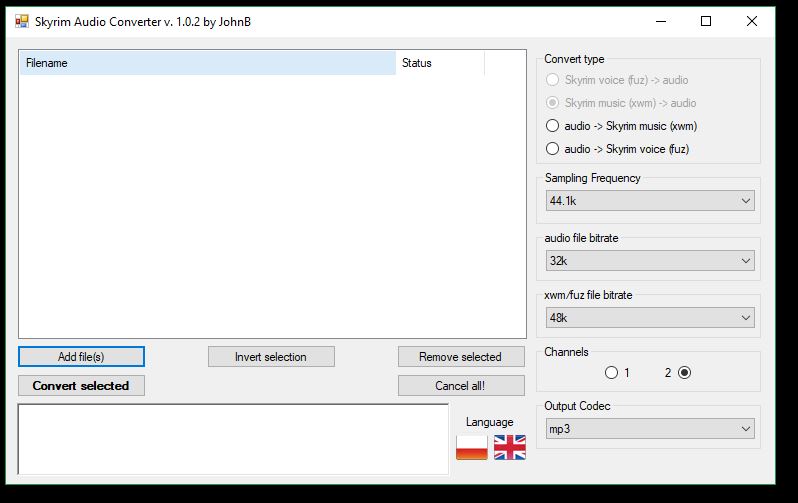
Skyrim only recognizes audio files with a .xwm extension. This handy mod created by JohnBSkyrim is a lightweight package that’s easily installed and easier still to use. Grab it here, unzip the file using your favorite extractor and run the super quick install.
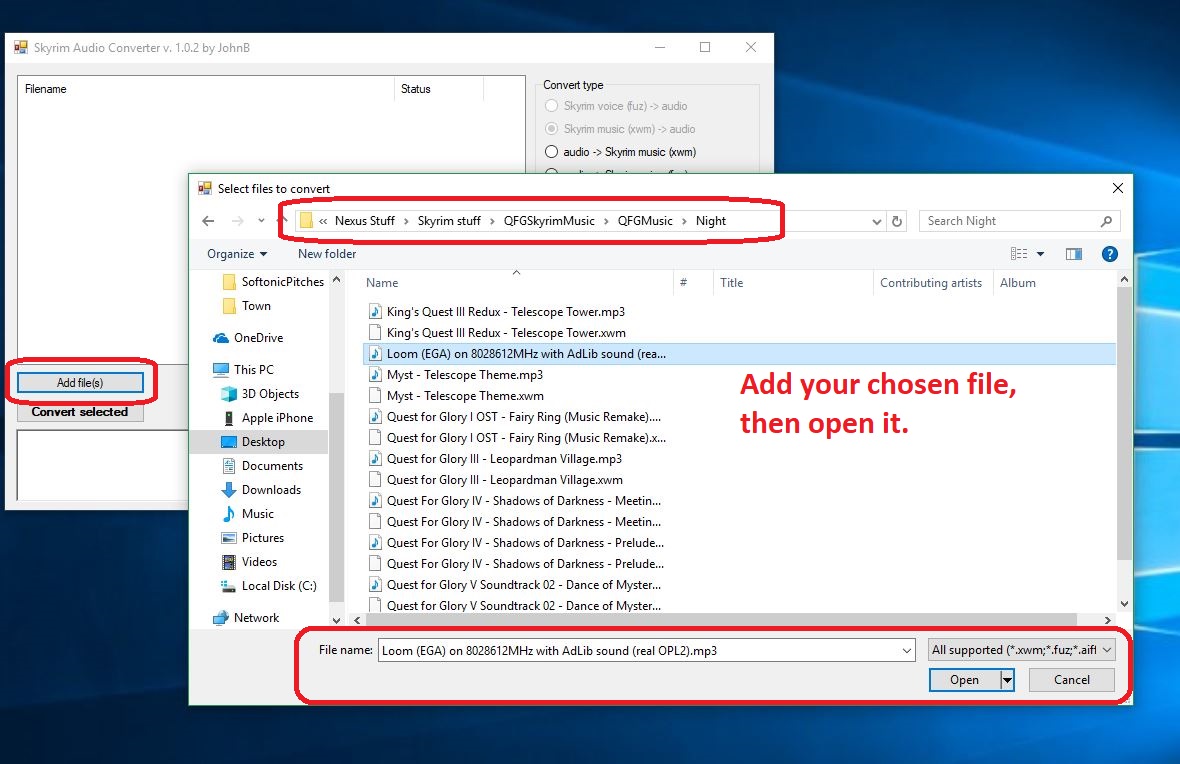
Once you have your audio file (whether it’s .mp3 or .wav doesn’t matter), open the Skyrim Audio Converter program that you just downloaded in the previous step. You might also want to copy the path where your audio track is so that you can easily paste it; Skyrim Audio Converter is going to ask for that path in just a sec. Click ‘Add file‘ and paste in that path. Then select the audio file you want the program to convert.
Click ‘Add file,’ locate it, then open it.
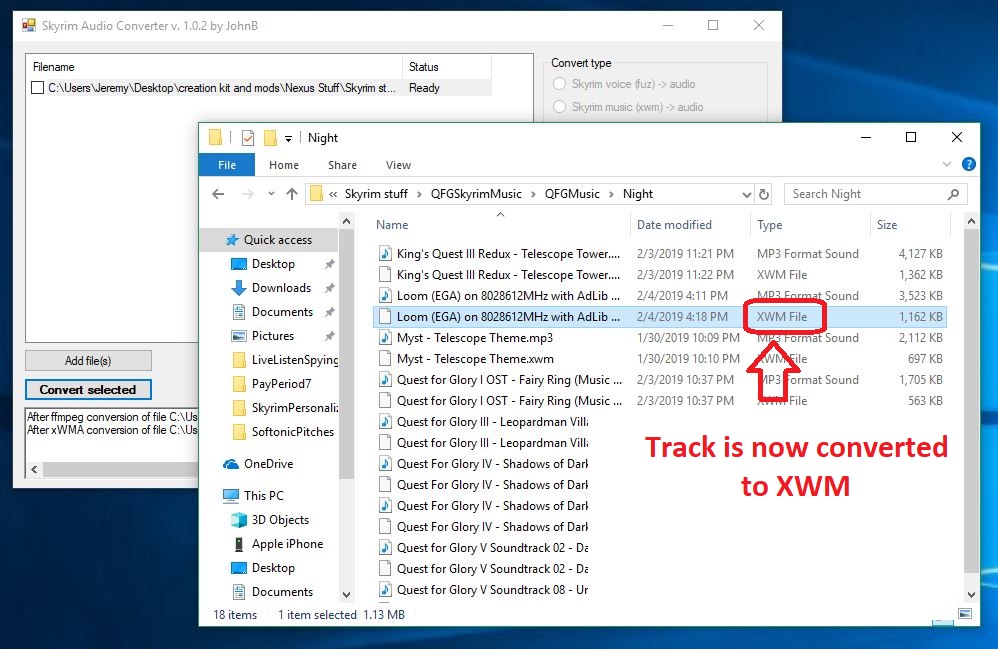
Click ‘Convert selected‘ and the audio file will convert (should take about 2-3 seconds) and magically appear in the same folder where the original audio file, now with a shiny new .xwm extension.
Now the audio file can be recognized by Skyrim’s engine.
4. Place the .xwm file in your chosen folder
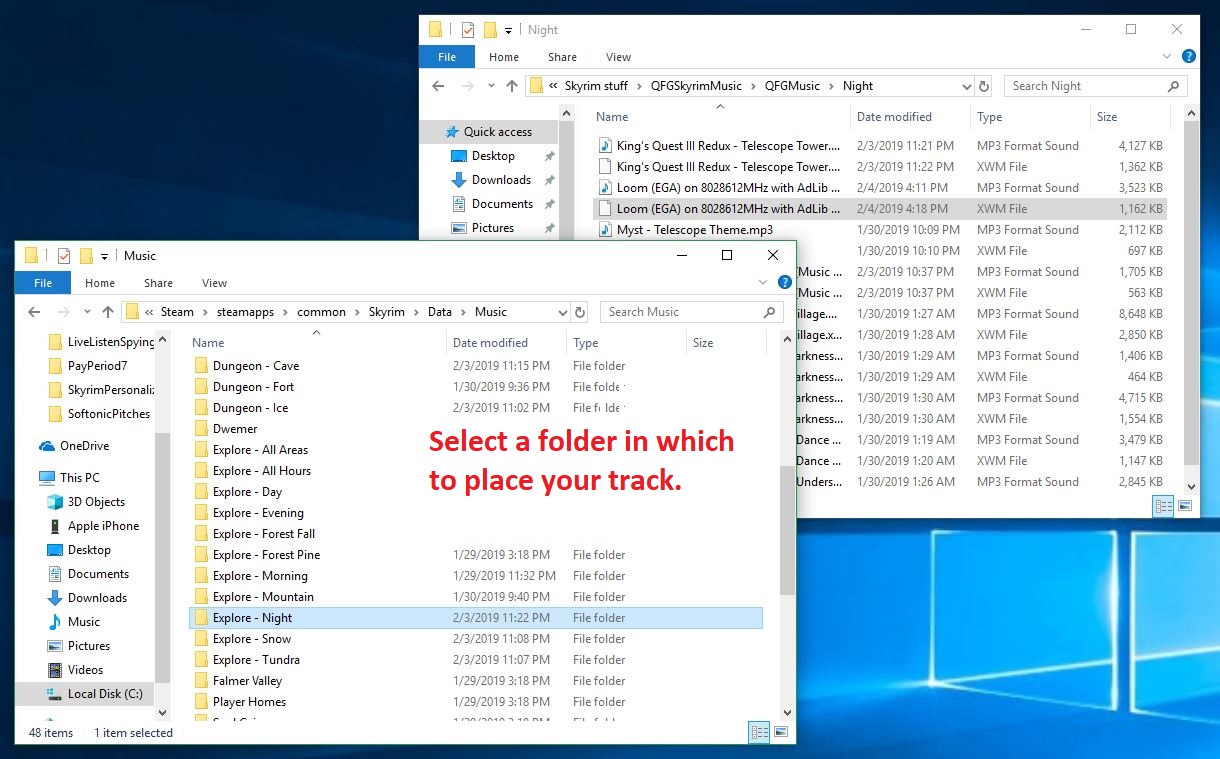
Now all you have to do is put that soundtrack file in the folder of your choice. The options are laid out in front of you right here. Just paste this path into your File Explorer:
C:\Program Files (x86)\Steam\steamapps\common\Skyrim Special Edition\Data\Music
Want it to play during combat? Maybe in an icy cave? In the Soul Cairn? There’s a folder for pretty much every event trigger, so the choice is yours. Check here for a description of when each folder will play. Simply open the folder and paste your newly-converted audio file right inside. Most folders can hold 20+ tracks so there’s tons of space for you to add as many tracks as you like!
Drop the xwm file into whichever folder you like; each folder is a trigger event in-game.
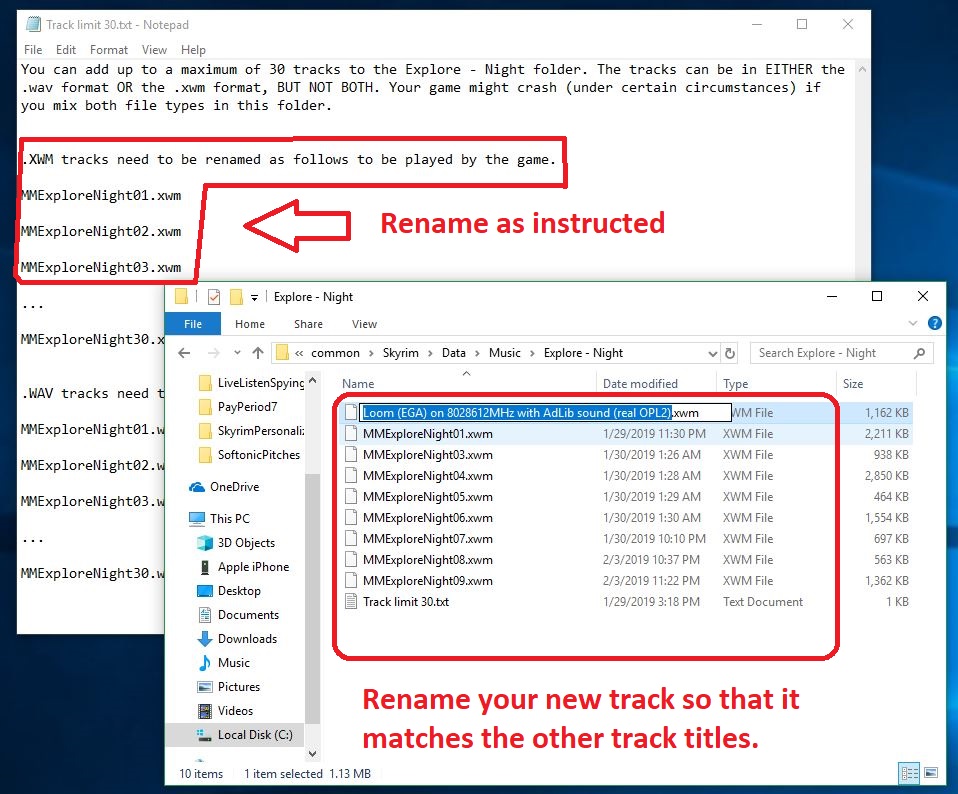
5. Re-name the audio file
The last step of the process is the easiest. Inside the folder that you chose in the previous step is a .txt file that explains how you need to re-name your new .xwm file so that Skyrim can read it. The names usually start with ‘MM’ and end up being pretty intuitive, such as ‘MMCombatAll03.’
Select the file and press F2 to rename it as the embedded .txt instructs.
After that, boot up the game and test to see if it works! If you’ve followed our above steps carefully, you should now be able to roam the snowy landscape of Skyrim and slay dragons to the beat of your favorite music! Comment below with your favorite choice for custom battle music, and stay tuned for more great Skyrim mods.
The upgrade rush has slowed dramatically. People are hanging on to phones longer, and new iPhone releases aren’t the massive event they once were.
One issue is, smartphones don’t have anywhere to go, really. Not in terms of improving ease of use at least.
Sure, the Animoji feature was pretty cool. And better cameras and faster speeds are always a win. But phones from a couple years ago also still have great cameras and generally, work just fine.
The thing is, the difference between the newest phones and those from the recent past don’t have dramatically different functionalities.
Why don’t new smartphones blow our minds anymore?
Fast rise and subsequent plateau
Blame the fast rise from the initial iPhone to where we are today. Smartphones have only been around for a decade, and they’ve gone through several changes.
Today’s phones have powerful processing capabilities, GPS, they work as sophisticated cameras, and music players, and house all of our favorite apps.
The thing is, higher-end phones have been able to do everything we want them to for the past few years. Upgrading now means you might get a bigger screen or more memory, but the ability to use Spotify or capture the perfect selfie doesn’t require the latest and greatest anymore.
As such, smartphones don’t have anywhere to go in a big way. So, we’re kind of just bored. Your next phone is going to basically be a prettier version of your current one.
Plans don’t provide good deals anymore
We’ve been led to believe that we need to upgrade our phones about every other year. In part, that’s due to the way phone contracts worked in the past. Now, phones often top $1,000 and customers don’t get the free upgrade that once was par for the course.
Carriers offer minimal subsidies. Where the norm used to be a free upgrade every two years, carriers now use monthly payment plans as a way to offset the sticker shock.
Bottom line, it’s worse for the consumer. The monthly payment might alleviate the pain, but shoppers no longer have access to the markdowns that made a difference.
We should repair them when they become damaged. And, when it is no longer worth repairing, then look into a new one. Like cars, smartphones saw a lot of dramatic improvements in a short period. But now, features tend to offer a marginally better experience year to year.
Just look at a 2014 car vs. a 2019 model — there’s not a huge difference if you’re looking at similar models.
Innovations in the Android space
While Apple phones are failing to drive as much excitement as they have in the past, Androids are getting more experimental.
There’s all this talk about foldable phones — which is kind of strange — but it might help people with tiny pockets ditch the purse. There’s also the idea that the foldable phone combines the benefits of a smaller phone and a tablet. While some applications are better suited for the big screen, carrying around a so-called “phablet” isn’t practical for making calls or sending texts, much less taking it everywhere you go. Still, we’ve yet to see how the software holds up or how durable the devices are out in the real world.
Then there are some other interesting developments. One example is the Pundi X Phone, which doesn’t yet have a release date. But, it features blockchain security features — like blockchain calling. It’s even block-shaped.
Or, there’s China’s Vivo, a smartphone maker that offers a pop-up camera — the elevating front camera:
In any case, we might be on the verge of a new era in crazy phones. The thing is, beating phone boredom likely means ditching Apple and perhaps enduring a few bugs, too.
Passive income, by way of the web, often seems too good to be true.
There’s no shortage of spam comments, weird pop-ups and affiliate blogs claiming that if someone’s mother-in-law or step-cousin can make six figures with minimal effort, you too, can make things happen.
Now let’s be clear, passive income is not the same thing as “making your money work for you” through smart investments.
Instead, we’ll take a look at the reality of affiliate incomes, drop shipping, and other money-making schemes that promise comfortable living.
Guide to popular passive income options
What is passive income?
Traditionally, passive income includes things like a limited partnership in a company, real estate ownership, or dividends from investments. Online, however, other passive income opportunities promise a way to game the system.
Admittedly, it’s hard to find any information on passive income tips and tricks that don’t feel like junk. Much of the online content consists of ebooks and courses and yes, mom blogs that rake in the residuals.
So, how do you separate the fakers from the legit opportunities — and is it even possible?
Affiliate sites
Digital entrepreneurship and affiliate links are a fact of life on the web. A good chunk of your favorite sites engage in some affiliate partnership; they’re embedded in articles, YouTube videos, and online games.
A quick refresher: affiliate links are a type of advertising that pays sites a commission based on clicks and sales. Online content creators can sign up with Amazon or other eCommerce programs and promote links within their blog posts and videos.
It’s not just Amazon, either. Uber has an affiliate program, as does iTunes, and others.
The issue with affiliate marketing isn’t that it’s a scam. You can make some money this way, but it’s not something that you can set up, forget about and get rich overnight.
For one, you need to have a website that generates enough traffic to result in income. You’ll need to have a blog or popular website to do this — and, of course, that takes time and its skillset.
Affiliate programs also need to match your content. If you write a food blog then adding affiliate links for fishing gear and motorcycle parts isn’t going to work. For one, customers will think that you’ll shill anything, thus compromising your authenticity.
Second, those visitors likely are on your website because they want to learn how to make a chocolate cake that doesn’t stick to the pan. They’re not going to see a link and think — hey, I do need a new fishing pole.
In addition to creating content, maintaining a website, and finding affiliate links that fit, you also need to have some marketing savvy to make this work. You’ll have to start an email list and create landing pages that you promote to encourage new sign-ups.
There’s more to affiliate marketing than what we’ve listed here, but the point is, it’s hard. If you’re considering this path, you should want to create a blog/site anyway.
Drop shipping, and its cousin, retail arbitrage, are something of a shortcut to establishing an online store. Instead of selling your products, you sell products from other companies. Customers submit an order through your website, but the company who makes the product ships it. The benefit is, you don’t have to buy inventory and maintain stock levels. As such, drop shipping is often promoted as easy money.
That said, you need to find a way to promote your store in a crowded space. Cosmetics and vitamins are popular products in the drop shipping space, for example. You might run into a lot of competitors with the same products.
With retail arbitrage, you buy up items on discount or clearance at your local brick-and-mortar store and flip them online for retail prices. In this case, you do the shopping, the packaging, and the shipping. Not super passive.
With either method, you will need to field customer service inquiries, which involves answering questions about other peoples’ products and order statuses that may be out of your control. But customer service dealings may only take up a couple of hours here and there.
We should note, drop shipping needs to be approached with some caution. For example, many drop shippers are scammy. You also need to look for products that are trending and that you know enough about your audience to market effectively.
This article from Shopify is a good source for someone looking for a primer on drop shipping. For retail arbitrage, check out these videos.
Sell a digital resource
Digital resources include things like memberships, e-books, online events, and so on. These items are known as information products, and there’s no shortage of bloggers promoting their own set of paid content.
The benefit of digital resources is, you’re making almost 100% profit margin — you create a product once, and sell it over and over.
The only thing is, to make any money, people need to know who you are and you need to make something people want. Do you have knowledge that other people can’t find with a simple online search?
Sell courses
If you have an online audience and a skill that people want to learn, you could earn some passive cash by offering digital courses. Skills like photography, video editing, SEO best practices, e-commerce basics, and so on could all potentially net you some money here and there.
Creating courses that add value to your audience is not remotely passive. Up front, it’s an investment that requires time and some cash. Thankfully, it gets easier after the initial push.
To do this, you’ll need to create an email list as a means to promote your course to readers.
It’s important to realize that there’s no such thing as a truly passive income. Affiliate marketing, selling products, and monetizing digital resources all depend on your ability to drive traffic and create something that people want.
It’s not simple, and it isn’t passive. Instead, you need to be able to handle web hosting, copywriting, content creation and have a firm grasp of digital analytics.
And, those skills are just the starting point. It’s a whole other skill set to find and promote affiliate links that make sense for your audience. Developing online resources that have professional polish is a separate skill, too.
Get a closer look at all the Pokémon coming your way in May.
“Detective Pikachu” looks like one of the craziest movies we’ve seen in a long time. What would Pokémon look like if they broke loose in the real world? Pretty crazy stuff. Take a look at the trailer that just dropped:
Is it just us, or is it super weird to hear Deadpool’s voice coming out of Pikachu? Also, we have a Mewtwo sighting!
You can catch “Detective Pikachu” in theaters on May 10. In the meantime, we’re collecting the best places to watch movies online.




























































 You can catch “Detective Pikachu” in theaters on May 10. In the meantime, we’re collecting the best places to