
Google teases new console, ‘Netflix for games’

Can Google blow up the video game biz?

gamer

Google is about to plunge headfirst into the gaming world, with details about its planned game streaming service expected to be revealed at the Game Developers Conference on March 19.

Rumors and details about Google’s gaming-related plans have been swirling for the past several years. As of 2019, Google has two major gaming projects in the works. The first, Project Yeti, is a full-fledged gaming console intended to compete with PlayStation and Xbox. A companion project, Project Stream, is a game-streaming service similar to PlayStation Now, which Google has stated will be like “Netflix for games.”

Google’s move towards gaming seems to be following a general trend in the tech industry, in particular, a move towards game streaming. Apple, Amazon, and Nvdia have all also announced plans for similar services, and Microsoft’s xCloud project is slated to begin testing in 2019. These all follow Sony’s rampant success with PlayStation Now, one of the first successful forays into large-scale game streaming. Most sources indicate that Google’s GDC panel will have a particular focus on Project Yeti.

Project Yeti

Of the two projects, Project Yeti has been the most mysterious. Since the project was announced in February 2018, not much has been revealed about Google’s planned console other than the fact that it will have a lower price-point, compared to other major consoles. Other reports indicate that the console will be Android-based, like Google’s other systems, and it will most likely be highly integrated with the Project Stream service. Speculation is that Project Stream will be the primary method of playing games on the console, rather than using physical discs.

gaming

Project Stream

Compared to Project Yeti, much more has been revealed about Project Stream. As of now, the Project appears to be a primarily PC-based service. Google’s intent is to let gamers on a tighter budget play big-name, graphically intensive titles without having to shell out the cash for an expensive gaming rig. A Project Stream beta was released last fall. The beta was limited in scope, and allowed gamers to play Assassin’s Creed Odyssey in-browser until the beta concluded in January. The service doesn’t require downloads or installs of any kind.

Though no plans for a second round of beta-testing have yet been announced, sign-ups are still available via the official Project Stream webpage. It should be noted that players hoping to participate need to have a hefty Wi-Fi connection to qualify. Players participating in the previous beta needed to have a connection speed of at least 15 megabits per second, among other stats. Google is aiming to release Project Stream alongside the highly anticipated rollout of 5G, which should prevent any issues with lag or connectivity problems.

Though Google certainly isn’t the first company to roll out a game-streaming service, its plans certainly seem to be the most ambitious. Gamers should check out their GDC panel on March 19 for more details about the two upcoming projects.


Everything you need to know about Facebook Messenger’s unsend feature

Here’s how to use Unsend, and why it may not solve all our problems.

messenger

It’s finally here.

Facebook Messenger now lets you unsend messages that perhaps should never have gone out in the first place. You’ll have 10 minutes to make up your mind, too.

If you’re a WhatsApp user, you’re already familiar with the app’s unsend feature — and its generous 60-minute unsend period. Or, Instagram’s unlimited window for takebacks.

And many of us have long been users of the Gmail unsend add-on, and lately, ephemeral apps that range from the fun (Instagram Stories, Snapchat) to the secure (Signal, Telegram).

Facebook Messenger Download Free
8

The basic rundown: what is Facebook Messenger Unsend?

We’ve already gone over how to “unsend messages.” But there’s been a lot of noise surrounding the topic since the feature was initially announced last year.

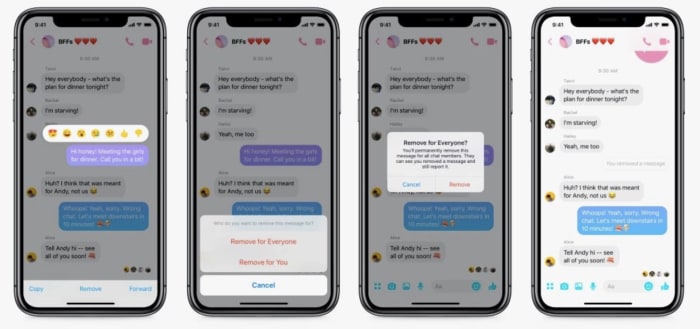
The new feature is available in version 191.0 of the app and Facebook says it comes in handy if you send the wrong information, photo, or message the wrong thread.

The feature allows you to rethink that text, and take it back. However, many critics feel that the timeframe is too short, and the feature doesn’t go far enough. Facebook says the limits imposed are an attempt to cut back on bullying.

We looked back at how the media reported on the feature — and there were several reports of bullying experts saying the feature was a bad thing — a step in the wrong direction for combatting the problem of cyberbullying. In April, experts told Business Insider that deleting messages could be used to gaslight victims.

Or this point raised by Sarah Jeong, who worries that the feature would allow sexual harrassers to send and unsend evidence.

Interestingly, the feature was announced Facebook employees discovered Mark Zuckerberg himself had been deleting messages.

Of course, this resulted in an uproar; users were not happy that Facebook execs like Zuckerberg could delete messages while average Joe Facebook could not.

Can you delete a message before someone reads it?

Yes, provided you act fast enough.

The reality is — you can’t control whether someone sees your message before you delete it.

So hopefully, you luck out. The difference between Facebook’s unsend and Gmail’s is, Gmail builds in a delay — that’s why you only have a few seconds to make your choice.

Facebook sends the message as usual but gives you a window of time to delete it. They don’t let you control who sees the message.

Facebook’s Help section says that there’s nothing keeping from people seeing your message — which, given that Messenger is a chat app, it’s likely they’ll see the message come through right away.

This means you still need to be careful about what you send.

Can you delete messages from both sides?

The unsend feature aims to reduce that embarrassment that goes hand-in-hand with sending out a text-based mistake. Or maybe a photo. You’ll have two options, you can choose to remove a message from your end only or remove for everyone.

Facebook unsend settings

Unfortunately, once that 10-minute period expires, the “remove for everyone” option is off the table — and your friend now owns that message.

The second is the less useful, “Remove for You,” which clears your screen of unwanted missives. There’s no time limit on this one — and it lets you at least forget about the embarrassing messages you’ve sent to your friends, even if it’s too late to erase it from their side of the thread.

We tried researching some workarounds for deleting messages after the 10-minute limit. Unfortunately, the advice is all quite convoluted and involves marking messages as spam or abuse. Or, flat out deleting your account.

Not exactly helpful.

You also can’t permanently delete messages

Should you be able to delete messages at any point? We don’t actually know how long Facebook hangs on to chat records.

We do know that if, say, you’re harassing someone online and delete the evidence, Facebook can still access the initial record.

Admittedly, we thought this feature was meant to be a convenience. Along the lines of Gmail’s unsend, the initial interpretation was: I can delete that message that I immediately regretted. Or, “Oh god, there’s an error,” etc.

In the end, it’s never been more obvious that if privacy features like being able to completely delete a record are important to you, Facebook isn’t the messaging app that meets your needs.

We’re torn on whether we think anything is wrong here — we like the crackdown on hate speech and the moves toward reducing cyberbullying are admirable.

However, this is a good reminder that all apps come with a certain set of risks — and it’s a good idea to familiarize yourself with how all of Facebook’s features work.

If you’re worried about Facebook storing your messages, it might be a better idea to use a fully encrypted app instead.

Here are a couple of options:

Signal Private Messenger Download Free ►
8
9

Quitting time: signs that it’s time to look for a new job

These days, nearly every job is temporary. Here’s how to know when to move on.

We all have bad days at work, but when it feels like you haven’t had a good day in recent memory, it might be time to pack your things and move along.

Quitting your job can be scary, and it’s not the kind of decision you can make lightly. Whether you’re daydreaming about a more challenging role or you’re dealing with some nasty coworkers, it’s important to know when it’s time to pull the plug.

Here are some signs that it’s time to get out.

How to know when you should quit your job

quitting job

1. Your skills are being underused

One of the most disheartening realizations you can have on the job is that management doesn’t recognize what you have to offer.

This might hit after being passed up for a promotion or later on as you ask for challenging projects repeatedly to no avail.

It’s not uncommon that starting a new job means easing into more and more responsibilities. But, if you’ve been waiting too long for your boss to call you up to the big leagues, it’s time to start looking at other options.

Our brains like tackling problems on a daily basis, and when you’re stuck in a role that feels like it’s centered on moving data around or writing emails — it can feel like your brain is just rotting away.

2. There are no learning opportunities

If there is little in the way of learning opportunities, it’s a sure sign that it’s time to look for a new job. Sure, you can’t expect to learn something new every day you’re at work.

But if you’ve leveled up as much as possible in this role, sticking around can cause your career to stall out. If you’re not learning anything new and you’re sitting around watching others get promotions — get out fast.

When you start looking for work, make sure you look for companies that support professional development. Look at company websites, read employee reviews, and ask the right questions.

Example questions might include:

  • Do you have mentorship opportunities?
  • What does success look like in this role?
  • How do you support continuous learning?
  • Do you typically promote from within?

3. Company culture isn’t a fit

bad office

Whether the office culture is just plain toxic or it’s not a match, when your daily grind isn’t quite right, it can feel as though you’re trying to be something you’re not.

It could be the people you work with, the set-up in the office, the approach to meetings. Maybe you hate the in-office foosball or catered lunches that prevent you from going outside midday.

Additionally, if you don’t share the company’s values or the direction they’re moving in just plain sucks, it likely feels disingenuous to work toward a goal that doesn’t mean anything to you.

4. Your job is affecting your personal life or health

Feeling overworked and miserable can impact the rest of your life in harmful ways. You might have a shorter fuse with your spouse or children. Or, you’ve started ignoring your friends. Maybe anxiety and stress are keeping you from enjoying yourself outside of work.

Stress symptoms affect more than relationships, they affect your body, too.

Left unchecked, you could start seeing your blood pressure climb, or develop heart disease, obesity, or diabetes. According to the American Psychological Association, stress impacts just about every major system in the body — so your unhappiness at work could turn into chronic pain, upset stomachs, and a whole lot of colds.

5. You dread going to work or can’t be bothered to care

If it feels like pulling teeth to perform basic tasks, it’s time to move on.

That said, you could simply be experiencing burnout. We experience burnout even at jobs we love — so if possible, take a vacation or a couple of days off to evaluate your feelings about the situation.

If that sense of dread is omnipresent and you find yourself watching the clock day in, day out, it’s time to get out of there. 40+ hours a week is a lot of time to dedicate to something that makes you miserable.

Additionally, if others can sense your unhappiness, it can impact your relationship with your boss and your colleagues. It might even be interpreted as a performance issue.

6. You don’t feel valued

There are several ways that a workplace might make you feel undervalued. One example is if colleagues routinely leave you out of the loop when discussing project details or scheduling meetings. In other cases, your ideas are not acknowledged or other people take credit for your accomplishments.
These slights add up over time — and you may become resentful, unmotivated, or just plain angry.

The other way this might play out is if you’re underpaid. If your responsibilities demand a bigger paycheck, it’s time to reevaluate your market value. Do some salary research to learn the average rate for your role — and maybe start applying for jobs.

Final thoughts

Hanging around a bad job can hurt your career, your relationships, and your self-worth. If you’re not growing or you’re just not happy—it’s time to leave.

Don’t burn bridges and keep things professional during the job hunt and transition period. Instead, explain that you’re leaving to pursue the next phase in your career.

Best apps for teens and new drivers

Looking to help your teen become a safer driver? These apps will do the trick!

teen driver

It can be difficult getting your license if you don’t go to a driving school beforehand. Some teens don’t even have family members that they can practice with regularly before their test.

The past decade has helped with this a lot, though. There are now so many more resources for new drivers, including online state permit tests, and even websites dedicated to helping you past the regulations of your state’s driving test. Along with these are apps that provide similar information that can help you gain the abilities and confidence to successfully become a good driver. Many of these apps can also help parents learn about what they should be teaching their teen about the road. Here are some of the best apps for this:

Best apps for new drivers

8. Waze

Considered by many to be the best navigation app, you may not be using it much before you actually obtain your license, but once you have, it can become an essential part of your driving experience. Other GPS apps are considered somewhat inferior to the traffic tracking abilities of Waze. It is worth adjusting to this style of GPS use as early as possible.

7. Drivers Ed App

If you don’t plan on taking a Drivers Ed class, then this is your next best chance at preparing yourself for a road test. It takes everything you would learn in a class and reorganizes it into an easy-to-read mobile app. This makes it useful for teens who are struggling with only a specific part of driving. You won’t have to go through everything in Drivers Ed, and instead and just focus on the subjects you are having a hard time with.

6. DriveSafe.ly Pro

Unlike most helpful apps of this nature, DriveSafe.ly actually does cost a monthly fee. However, if you’re someone who needs to text/call and drive, then this app is a far easier and safer application for it than Siri or Google Assistant. It minimizes phone interaction, while still letting you text hands-free. While you shouldn’t make a habit of doing this, it can be useful in emergency situations.

DriveSafe.ly Download Free ►
8

5. TrueMotion Family

Formerly known as Canary, this app is definitely more for the parents of a new driver than the driver itself. It’s helpful if you don’t think your teen will be able to limit cell phone use or stick to the speed limit when you’re not in the car with them. This app is mostly dedicated for parents with children who have already obtained their license but may be unsure of how well they plan to use it. TrueMotion Family will alert you how often your teen is distracted while behind the wheel.

TrueMotion Family Safe Driving download free ►
9

4. DMV Genie Permit Practice Test

If you don’t have your permit yet in a state that needs one, then this is the perfect app for getting you started. It uses your specific state’s permit questions as a basis for the questions it uses. It is the best way to learn about your state’s road laws and get you on the right track to getting your permit.

DMV Genie Practice Test: Permit & Driver's License download free ►
6

3. DMV Practice Test 2019

Similar to the previous app, this practice test app focuses on preparing you for written exams, as well as the actual road test you will be taking in order to get your license. No matter what state you live in, it will provide detailed information on everything you need to know to pass your test so you can get your license with worry. This works especially well in conjunction with Drivers Ed.

DMV Practice Test download free ►
7

2. Do Not Disturb

In Europe, Toyota has released a special Do Not Disturb app for driving called Safe & Sound. Until this app is brought to America, however, you can use the regular Do Not Disturb app to schedule your driving time and prevent you from using your phone while you’re driving without having to mess with the actual settings in your phone. This is good if you often forget to put your phone on silent when you’re at driver’s ed.

DoNotDisturb download free ►
6

1. DriveSmart

This app will give you a detailed analysis of how well you are driving. It records data as you drive, keeping track of your speed and braking skills to give you a report on how well you are doing. It can also keep you less distracted by alerting you to various changes in your surroundings, such as speed limit changes.

DriveSmart download free ►
8

Once you’ve succeeded in becoming a better driver with the help of these apps, you’ll surely want to check out our Softonic Solutions page where we’ve listed the best apps for car management. These apps can help you find your car in a parking lot, and even navigate you through city traffic. Definitely worth checking out for both new and experienced drivers.

Watch: 4 most iconic moments in the history of eSports

Insane comebacks, crazy luck, and unmatched skill: watch the greatest moments in eSports history.

esports

So many games have competitive scenes nowadays. Websites like YouTube and Twitch have thousands of compilations showing streamers making flashy plays. With all of this, it can be hard to tell the difference between a skilled gamer and a professional one. However, the moments on this list will clearly show you what it means to be a pro. These iconic moments changed competitive gaming and helped eSports evolve into the monster that it is today.

Top 4 moments in the history of eSports

4. Wombo Combo – Super Smash Bros. Melee

The Wombo Combo is far from the most impressive combo in competitive Smash Bros. It’s not a display of amazing technical skill coming together in symphonious harmony. It may not be either of those things, but it is the single rawest, hypest moment in Smash Bros history. You can know absolutely nothing about Smash and still get hyped like crazy while watching the clip. Commentator HomemadeWaffles is a legend on the mic, and within 30 seconds of improv spawned numerous iconic catchphrases like “WHERE YOU AT!?” “THAT AIN’T FALCO!” and “HAPPY FEET, WOMBO COMBO!”

Beyond just being a highly entertaining and quotable clip, the Wombo Combo was a major force in revitalizing interest in the competitive Smash scene. The clip was posted online in 2008, which is when Melee’s sequel Super Smash Bros. Brawl was released. At this time, the Melee competitive scene was struggling to stay afloat. Though the release of Brawl took attention away from Melee, Brawl’s gameplay was largely seen as inferior to Melee’s in a competitive setting. Brawl was floatier, had less combo potential, lacked Melee’s advanced techniques, and was a generally slower paced, less exciting competitive game. The Wombo Combo going viral turned heads and brought new players to the Melee scene, evolving it from the grassroots movement it was to the competitive powerhouse it is today over 11 years later.

3. S1mple’s Double Falling Headshots – Counter-Strike Global Offensive

Counter-Strike is a hard game to get into competitively. It requires a steady hand, good tactical senses, and the ability to remain cool under pressure. Mistakes are punished brutally, and smart, slow advances are often rewarded over flashier, riskier pushes. However, even in this game of positioning and mind games, sometimes the most straightforward plays are the most effective.

At ESL One Cologne in 2016, Team Liquid faced off against Fnatic. In the most memorable play of the night, Fnatic players dennis and KRiMZ were up against Liquid’s S1mple as the only players alive. Stalking his prey, S1mple jumped into the warehouse and killed both enemies in seconds with two expertly placed headshots. The craziest part is that S1mple got both of his headshots without scoping his AWP sniper rifle, shocking Fnatic with a remarkable feat of accuracy. S1mple lived up to his namesake with that no-nonsense play.

Counter-Strike: Global Offensive Download free ►
8

2. The $6 Million Slam – Dota 2

Dota 2 is one of the most popular and lucrative competitive games out today. Its enormous player base and constant updates constantly create a fresh competitive metagame with multi-million dollar payouts. One of the most impressive and harrowing moments in Dota 2’s storied competitive history came to be known as the Six Million Dollar Slam.

Top American team Evil Geniuses faced off against Chinese team CDEC in the grand finals of Dota 2 International 5, the largest annual Dota 2 tournament. After killing one member of EG, CDEC moved to kill Roshan, a powerful neutral dragon character who grants huge amounts of exp and gold when defeated. Roshan’s area is tightly packed, which cramped CDEC as they moved in for the kill. Sensing opportunity, EG laid out a complex series of moves that culminated in the prolific Slam.

EG used the Ice Blast ability to slow all of CDEC’s heroes, which also increased the magical damage they would take. Suddenly, an EG Earthshaker comes in with his ultimate: Echo Slam, a devastating attack that does more damage as more opponents are caught in its radius. This combination quickly sends CDEC into a panic, and as they try to escape a further combination of moves from EG kills four of their players. EG then swoops in and finishes off the damaged Roshan, powering them up and allowing them to secure the $6 million grand prize money.

1. Evo Moment 37 – Street Fighter III: Third Strike

Evo is the world’s largest fighting game tournament, and its 2004 incarnation hosted what many consider to be the greatest moment in competitive video gaming history.

During the semifinals of the Street Fighter III: 3rd Strike tournament, Japanese player Daigo Umehara faced off against American player Justin Wong. Daigo, nicknamed “The Beast,” was known for his aggressive, high-risk playstyle, making him a fan favorite. On the other hand, Justin Wong tore through the American scene with his defensive “turtling” style of play, frustrating his opponents with his stonewall defense. Daigo and Justin had never played each other prior to this set, so anticipation was high when they finally got to duke it out.

In match 1, Daigo (Ken) had a hard time breaking through Justin’s (Chun-Li) defenses. Justin was playing conservatively, methodically bringing Daigo’s health bar to one pixel. The normally cool and collected Daigo became frustrated, as noted by the commentators. At one pixel of health, literally any special move would’ve ended Daigo, as special moves do chip damage even if blocked.

Daigo’s only remaining method of defense would be to parry, which is an extremely difficult technique in which you move towards your opponent at a precise moment they’re attacking, negating all damage of the move. Parrying is extremely risky compared to blocking, but Daigo’s minuscule health bar left him no choice. Eager to end the match, Justin switched gears and threw out Chun-Li’s super move, a combination of fast and powerful kicks. Predicting this, Daigo amazingly parried every hit of the super and retailed with his own, winning the match.

This mindblowing feat of mind games and technical skill electrified the crowd. The clip, which came to be known as Evo Moment 37, has been compared to legendary non-gaming sports moments like the Miracle on Ice and Michael Jordan’s 1991 Tomahawk dunk. This stunning comeback single-handedly revived interest in the competitive fighting game scene, giving way to the healthy scene the genre enjoys today. Daigo’s determination and high-risk clutch play symbolized everything we love about video games, comebacks, and the spirit of competition.

Any big moments we missed? Let us know!

How to create and connect to a local Minecraft server

Looking to set up your own Minecraft server? Here’s how to do it.

minecraft

Considering how popular Minecraft is, one can expect it to have some of the best co-op features of any mainstream game. And while it does definitely hold up in this department, it can be a bit tricky getting your own private server up and running. Realms are Minecraft’s easy solution to co-op play, where you can pay to have Minecraft take care of hosting and creating your server for you. However, some players prefer to have a free local server that they host themselves. Here is how to make that server and how to have your friends connect to it once it’s up:

How to create and connect to a local Minecraft server

Step 1: Make sure you have the newest version of Java installed.

Step 2: Download the Mojang Minecraft server software (you’ll need to keep track of whatever folder you download this to, as there will be multiple programs from the software you’ll need to access. You should create your own folder to keep all of these in).

Step 3: Run the .jar file from the software you downloaded

From here the instructions branch off depending on whether you have a PC or a Mac.

For PC:

Step 4: There will be a text document created called “eula.txt”. Open this in a text editor like Notepad, and change “eula=false” to “eula=true”.

This is you accepting the terms and conditions of Minecraft.

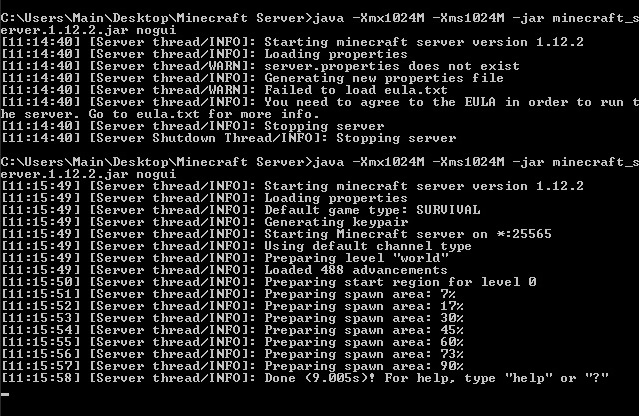
Step 5: Go to your computer’s command prompt and type the following

java -Xmx1024M -Xms1024M -jar {server file name}

Replace server file name, with the name of your server’s file (this can be found by copying the file location of the .jar program). If you want to disable the graphical user interface (GUI), you can add “nogui” to the end of this command line. Players have reported this lowers CPU and memory usage.

Minecraft

Step 6: While this is optional, you may want to create a .bat file with the same command used above, in order to quickly access the server, instead of needing to open the command prompt each time. For the .bat file you can use the command:

@Echo Off

java -Xmx1024M -Xms1024M -jar {server file name}

If you’ve completed step 5, then your server should be fully functional. Other players connected to your home network will be able to connect directly to the server.

Notepad++ Free Download
8

For Macs:

Step 4: Open a text editing program like TextEdit and input the following:

#!/bin/bash
cd “$(dirname “$0″)”
exec java -Xms1G -Xmx1G -jar {server name}

Server name should be replaced with the file location of the .jar file. You can choose to add nogui at the end if you’d like to remove the graphical user interface (GUI). Players have reported doing this used less memory and CPU.

Step 5: Save this document as “start.command” in the same folder as the .jar file.

Step 6: Open the Terminal program, and type:

chmod a+x 

And make sure there is a space after the x. Then drag the start.command file into the Terminal window. This will give executive permissions to the start.command program. Once done, you can simply click start.command to open your Minecraft server.

Minecraft

Hosting a Minecraft server can take a bit of a toll on your computer. We recommend you avoid trying this on a laptop, unless it’s a high-end gaming laptop, and even then you may prefer hosting on a desktop instead.

These instructions work for hosting a Minecraft server on your local network with other devices connected to that network. If you wish to host a server online, you’ll have to PortForward your router. It will take a bit of programming knowledge and your router information to PortForward your Minecraft server.

Simple Port Forwarding Free Download
6

Note: PortForwarding a server will also make your home network more vulnerable for strangers to access. If that’s something you’re worried about, you could pay a third-party hosting service to host your server instead, or you could create a Minecraft Realm. Realms are similar to local servers, but require a monthly payment and are hosted by Minecraft itself.

Listen: this is the oldest song in recorded history

Is this 3,400-year-old song worth a slot on your Spotify playlist?

“Let’s all get up and dance to a song that was a hit before your mother was born,” the Beatles wrote back in 1967, “though she was born a long, long time ago.” Music has been around for millennia, and while much of it has been cataloged (mostly religious music, the further back you go), it’s tragic to think of the history that we have no record of – some that were lost to time, or others that were passed on solely through oral tradition and never written down. So what is the oldest song in recorded history?

Epitaph of Seikilos

It probably won’t come as much surprise that the oldest complete composition dates back to ancient Greece. In 1883, Sir W. M. Ramsay discovered the epitaph in Tralleis, a small town near modern day Turkey. The stele tombstone dates back as far as the 1st or 2nd century and was inscribed with both an epitaph … and with song lyrics. The lyrics were underscored with the ancient Greek musical notation used from the 6th century BC until approximately the 4th century AD, a style of music writing that was discontinued around the time of the decline of the western Roman Empire.

Epitaph of Seikilos on original stele
The original epitaph of Seikilos, carved into a stone slab

The epitaph itself reads “I am a tombstone, an image. Seikilos placed me here as a long-lasting sign of deathless remembrance.” The last two words on the tombstone itself are “Seikilos Euterpe,” which has led scholars to believe that Euterpe was either Seikilos’ lover or his mother. Either way, the lyrics of the following song were written in her memory:

“While you live, shine. Have no grief at all. Life exists only for a short while, and Time demands his due.”

The short melody has a peaceful simplicity and a bittersweet emptiness, reinforced by the lack of melodic resolution and ephemeral tonality. Like much ancient music, the Epitaph of Seikilos was not written in a major or minor key; keys as we understand them now had not been invented yet!

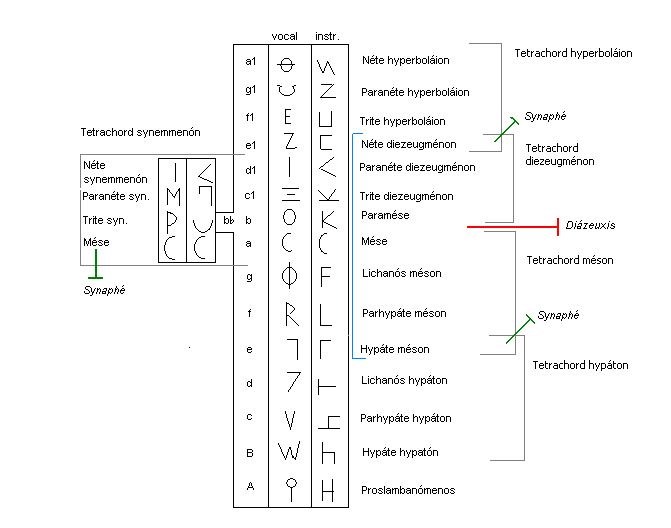
An overview of the Systema ametabolon
This is a peek at the musical notation of the ancient Greeks

Rather, the precise modality of piece is up for debate. University of Chicago Musicology Professor Don Randel points out that “the harmoniai had no finals, dominants, or internal relationships that would establish a hierarchy of tensions and points of rest. Although the epitaph’s melody is clearly structured around a single octave, the melody emphasizes the mese by position rather than the mese by function.”

While the reasons behind the melodic concept have been lost to time, the lyrics are reflective of a modern ‘seize the day’ mentality, very much in line with the typical ancient Greek mentality – to quote Alexander the Great, “I would rather live a short life of glory than a long one of obscurity.”

Alexander the Great
Alexander the Great epitomizes the “short life of glory” immortalized on Seikilos’ epitaph

The Seikilos epitaph is the oldest complete musical composition in recorded history … but we can find written music that’s older still:

Hurrian Hymn no. 6

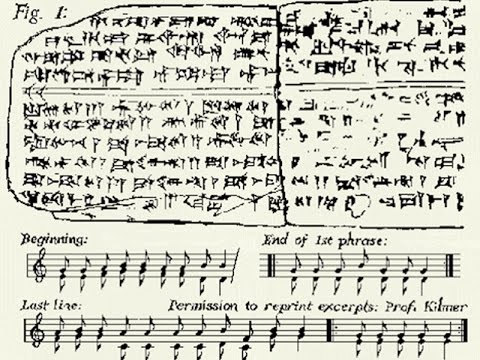
In what is modern Iraq, we found a cuneiform tablet created in what was once the ancient Sumerian city of Nippur. The tablet represents fragmentary instructions for performing music and dates as far back as 1400 BC. The music actually utilizes the standard diatonic scale, and is composed of harmonies of thirds. Another tablet from 1250 BC offers us insight on a more perfected variant of the same notation:

Stone tablet of Hurrian Hymn no. 6
It may look indecipherable to us, but there’s actually music here.

The notation system dates back so far that modern interpretations are widely controversial. The interpretation of the musical notation is still controversial, though the words written upon it are purportedly a Hurrian hymn concerning offerings to the goddess Nikkal, wife of the moon god. The notation does indicate the names of strings on a lyre, the tuning of which is described in other tablets. Though we only understand fragments of what was written on this tablet, there have been attempts to musically recreate the structure of the song:

Though other tablets in the Hurrian songs bear the names of their composer, this largely complete fragment is an anonymous work, even the text of which is not perfectly understood. It does use the Ugarit dialect, albeit a more local variant than the ones previously encountered, but the discovery and translation of these tablets is honestly miracle enough after being lost for over 3,400 years.

Ugarit translated from Hurrian Hymn 6

Stay tuned with us for more interesting historical tidbits, and let us know in the comments below if you learned something about music today!

IObit Software Updater: Update all your programs with one click

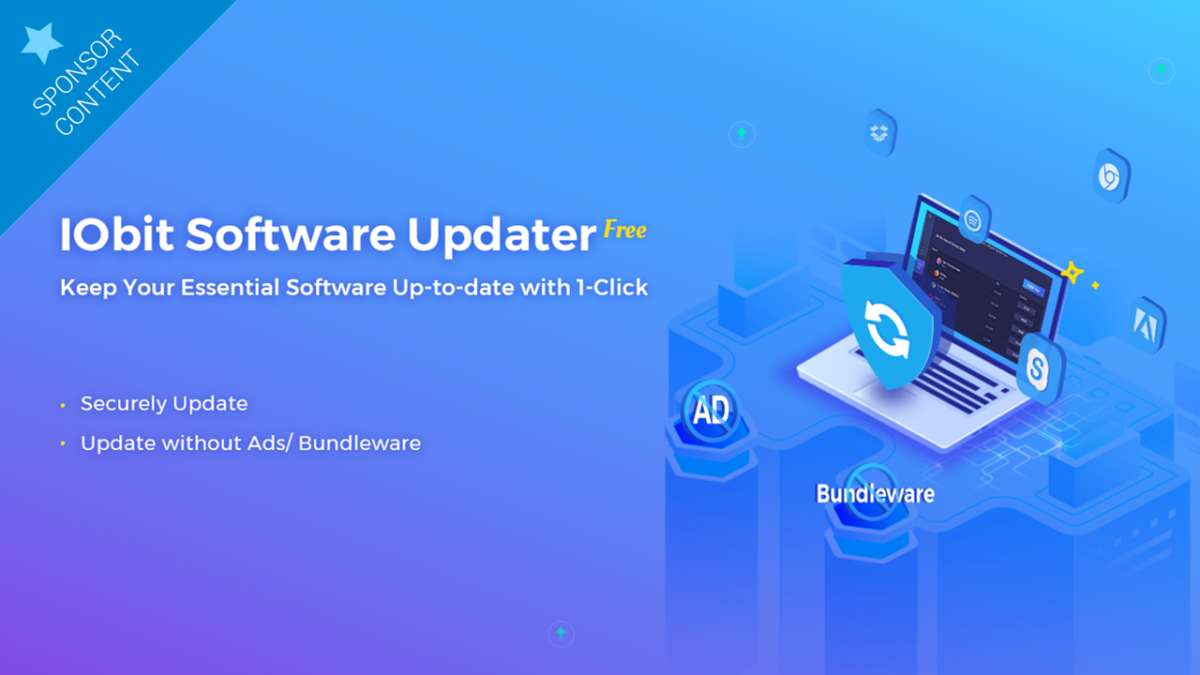
The system utilities and security software provider IObit just launched a program that can update all your obsolete programs with one click. It’s called IObit Software Updater, and it not only updates your programs quickly and securely but also installs the essential Windows programs you can’t do without.

IObit Software Updater is a free program, free from advertisements and very easy to use. The program sends you reminders to update important programs as soon as the developers launch a new version. This tool also gives you the option of ignoring unwanted updates.

It’s all possible in a single step, so you’ll save lots of time and work.

Easy and secure updates

The program is designed to make the updating process very simple. For example, it lets you schedule automatic updates at the most convenient times for you. The system will shut down and/or restart your computer automatically once the update is finished. It even lets you update several programs at once.

Once the updating process is finished, IObit Software Updater automatically eliminates the installation package to free up system space, so you don’t have to worry about filling up your computer with files that use memory. It can even update programs in the background, so nothing will interrupt your flow of work.
Besides making things easier for you, IObit Software Updater guarantees your updates are secure since all have passed strict testing prior to installation.

More than 100 essential programs

Thanks to IObit Software Updater, you can install more than 100 essential Windows programs, including browsers, office applications, security software, and useful tools. This tool has a large database to guarantee that you won’t miss any essential program, and it’s organized by category to make it easy to search for them.

In this database, you’ll find browsers, security, social media, multimedia, runtime, utilities and tools to install instantly, with a single click, and there are no annoying ads or malware risks.

When you want to update or install specific software, you can find it easily by performing a simple search by category or by name and selecting one or several programs to be installed at the same time.

For all these reasons, IObit Software Updater will become an essential tool on our computers. “It’s the best way to update your obsolete Windows software,” says Bing Wang, Product Director at IObit, who explains that with this tool, “you don’t need to update all the programs on the developer’s website.”

Bing Wang also points out that the IObit Software Updater is a reliable tool for installing essential Windows programs, “especially when users get a new computer or restore, reformat or update their computer.”

This tool joins IObit’s extensive catalog of system utilities for Windows, MAC and Android OS, which help to improve operating performance and protect our computers and mobile devices against security threats
IObit Software Updater is compatible with Windows 10, 8 /8.1, 7, XP and Vista.

Where to watch Green Book and the other 2019 Oscar winners online

Want to watch the Oscar-winning movies online now? Here’s how.

green bookAlthough “Green Book” took home the top honor at the 2019 Academy Awards, it didn’t walk away with the Oscar haul you typically expect from a truly great movie. It only garnered three Oscars – a number matched by “Black Panther” and “Roma.” “Bohemian Rhapsody” actually took home four statuettes. So whether you like historical dramas, personal films, musical biopics, or superhero fantasies, all were honored on film’s biggest night.



Here are all the winners of this year’s awards, and if you’d like to watch any of them online, simply click the title to discover where to watch the Oscar winners online legally.

2019 Academy Award Winners

Best Picture: Green Book

Director: Alfonso Cuarón, Roma

Actor: Rami Malek, Bohemian Rhapsody

Actress: Olivia Colman, The Favourite

Supporting Actor: Mahershala Ali, Green Book

Supporting Actress: Regina King, If Beale Street Could Talk

Original Screenplay: Green Book

Adapted Screenplay: BlackKklansman

Foreign Language Film: Roma

Animated Feature: Spider-Man: Into the Spider-Verse

Animated Short: Bao

Documentary Feature: Free Solo

Documentary Short: Period. End of Sentence.

Live Action Short: Skin

Sound Editing: Bohemian Rhapsody

Sound Mixing: Bohemian Rhapsody

Visual Effects: First Man

Film Editing: Bohemian Rhapsody

Original Score: Black Panther

Original Song: “Shallow” from A Star Is Born

Production Design: Black Panther

Cinematography: Roma

Costume Design: Black Panther

Makeup and Hairstyling: Vice

10 apps where you can win or earn real money

Turn your phone into an ATM with these great apps.

money apps

Money making apps are a real mixed bag. The ones that actually provide a payday are more in the realm of gig economy apps like Uber, Lyft, and Instacart. Those looking for a free lunch (snack?) and a way to pass some time may have something else in mind.

Most of these options don’t provide much in the way of actual income, and some are outright scams. Others demand too much of a time investment before you get any return whatsoever.

Here’s a list of apps that will deliver some cash, points, or another form of payout.

First of all, we should mention, “free money” apps fall firmly within two camps. There are the games — where you win prizes by answering questions, playing the lottery, and so on. And the something-for-almost-nothing types. The latter covers things like rebate apps or those that let you earn points you can trade for prizes.

10 apps that pay real money

1. Ebates

ebates deals

Ebates is a favorite among bargain hunters. The app awards you with up to 40% cash back on items you purchase. Set up the app to remind you any time there’s a new coupon available across the 2,500+ participating retailers.

What’s more, if you’re looking for a specific purchase — say a new TV or a laptop — Ebates will show you which stores have that item and how much you can expect in your rebate. Available for iOS and Android.

2. Slidejoy

slide joy screenshots

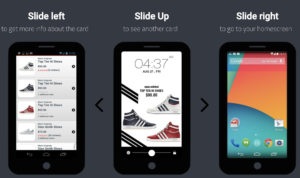
Slidejoy is an app that lets you make some money by checking promotions or news stories on your phone.

How it works is, you’ll register for an account. Once you’re in, you’ll receive a notification with news or an ad every time you open your phone. Slide the screen up to see news, right to access your home screen, left to see more information and down to access notifications. Available for Android.

8

3. Ibottaibotta earn money shopping

Ibotta makes getting groceries like a game, allowing you to earn some cash back as you shop.

It’s kind of like a high-tech version of couponing, and all you need to do is select the items you purchased from a list of available rebates and scan your receipt. Ibotta deposits cash back to PayPal within 48 hours. Available for iOS and Android.

4. Sweatcoin

sweatcoin app

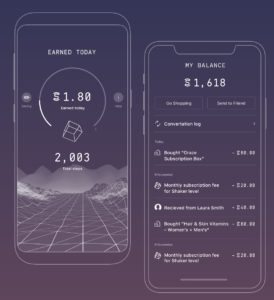
Sweatcoin is an app that turns your daily steps into new stuff. The app’s motto is, “it pays to walk.” And we suppose if you’re already walking around, might as well get something out if it, right?

Every 1,000 steps is worth 0.95 in Sweatcoin, which you can save up for fitness gear, experiences, or donate to charity. Available for iOS and Android.

Sweatcoin Download free ►
8

5. HQ Trivia

HQ Trivia Quiz App

HQ Trivia is likely the biggest game in the apps with prizes category. The live trivia game is available on Android and iOS and is a challenging series of questions that—if answered correctly, promise some big bucks.

Between the engaging multi-player approach and quizmaster personality Scott Rogowsky, the app has become a major phenomenon. While winning big is a long shot, it’s a fun time — and hey, you never know. Available for iOS and Android.

HQ - Live Trivia Game Show Download free ►
6

6. Grand: Save Money and Win

grand save money

Grand: Save Money and Win rewards users for saving money by gamifying the experience. The app makes saving into a lottery game. How it works is, you’ll link your checking account to the app’s FDIC-insured savings account which enables you to earn one percent. Every time you add money to your account, you are entered to win a weekly drawing. Winners can receive up to $1,000, which is transferred to your account.

Banking details are encrypted with bank-level security protections. So rest assured, your data is safe. Available for iOS and Android.

7. SwagIQ

swag iq app

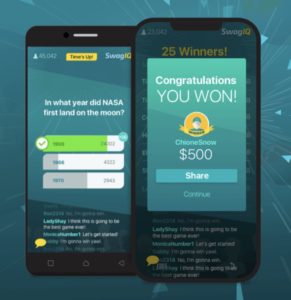
SwagIQ does sound a bit like an HQ knockoff, but who cares? If you’re a trivia buff, there are two opportunities to play to win. Swag is a live trivia game show you can play on your phone to win cash prizes and gift cards. Available for iOS and Android.

8

8. Long Game Savings

long game saving app

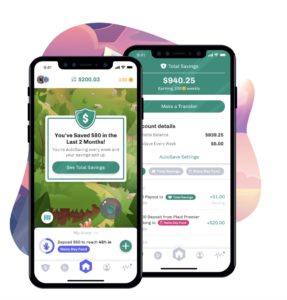
Long Game Savings helps you achieve your financial goals through cash prizes. Like Grand, Long Game aims to make saving “fun.”

How it works is, you’ll create an account, link your bank, and deposit money into the app-provided secure bank account. The app gives you “missions” which align with long term goals, and along the way, you can play games to win coins. Games have different prizes — cryptocurrency or a $1M cash prize. Available for iOS and Android.

Long Game Savings download free
7

9. Lottery — Play the Powerball

play the powerball app

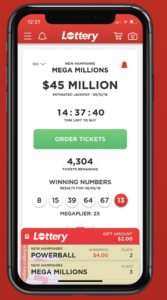
If you’d rather play the real lottery than trick yourself into saving money through a lottery-like game, the Lottery’s mobile app allows users in select states to play the Mega Millions and Powerball. You don’t actually pay anything through the app — but you will receive alerts when the jackpot is especially high and you can track lottery tickets. Available for iOS and Android.

10. Perk Pop Quiz

pop quiz app

Perk Pop Quiz is a trivia game built for pop culture fiends. If you’re the type of person who rattles off movie quotes and knows the ins and outs of popular shows — this game is a real treat.

The game doesn’t pay in cash. However, you can turn your in-depth “Game of Thrones” knowledge into gift cards for Amazon, Target, Starbucks, and more. Available for iOS and Android.

Perk Pop Quiz download free ►
8