Skip to content

Softonic English

Just another Softonic Sites site

Animate with Ease: Transform Static Art into Dynamic Motion Using After Effects

If you want to bring static images to life, After Effects is your best option. With After Effects, any user can create high-quality animations, effects, and transitions, even if they lack previous experience with this type of program. On the other hand, more experienced users can make even more use of it to make their projects more dynamic and attractive. In this article, we will take the first steps in After Effects so you can learn to animate any element from scratch. Create your project in After Effects Before starting, we will need to prepare a new project within After Effects. From the […]

If you want to bring static images to life After Effects is your best option. With After Effects, any user can create high-quality animations, effects, and transitions, even if they lack previous experience with this type of software. On the other hand, more experienced users can make even more use of it to make their projects more dynamic and attractive.

In this article, we will take the first steps in After Effects so that you learn to animate any element from scratch.

After Effects
After Effects DOWNLOAD

Create your project in After Effects

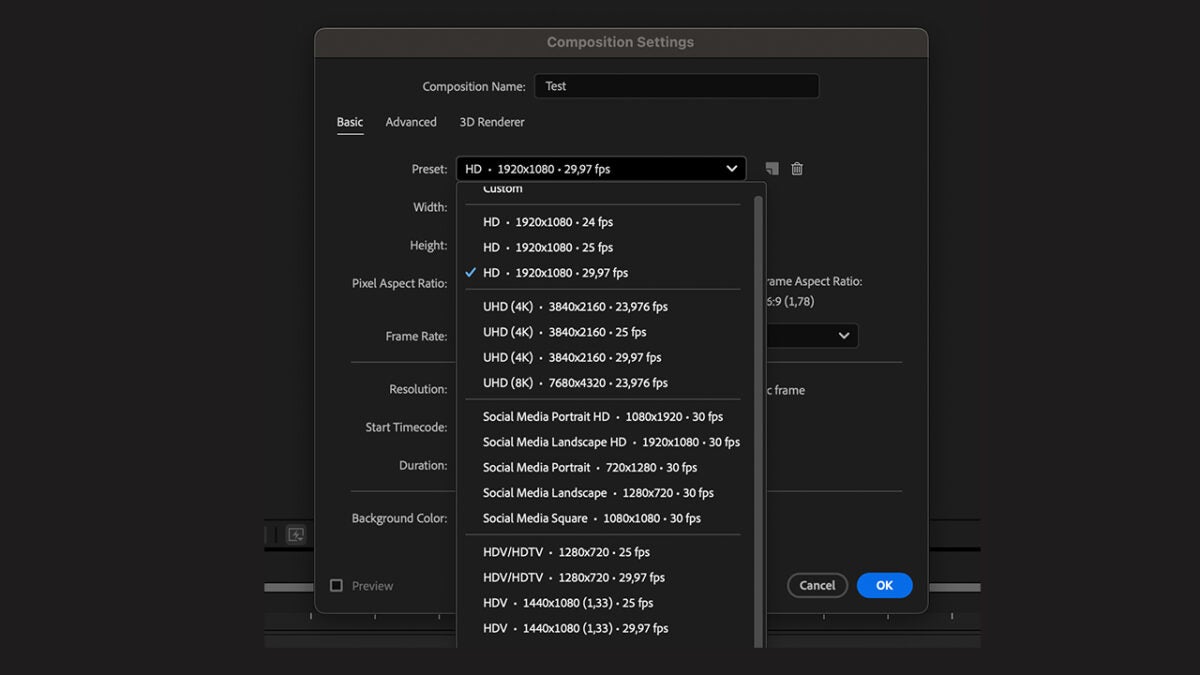
Before starting, we will need to prepare a new project within After Effects. From the home page, click on New Project and then New Composition. A new window, Composition Settings, will open, where we will need to write the project title and set its resolution, among other things. For this occasion, click on Preset and choose the HD option. If you want to try other resolutions, through Preset, you will see a long list of different resolutions and sizes.
To open an existing project, go to File > Open Project. You can also import them from File > Import > File.

Animating in After Effects: Timeline and Keyframes

Within After Effects, we can create many types of animations and effects by changing their properties on the timeline. To do this, we need to work with Key Frames, which define the parameters of movement, effects, and audio. This way, the program knows how an object should change over time.

In the timeline, keyframes are represented as small diamonds, which you can move and adjust freely. To use them, you must do the following:

  • Select which layer you want to animate. It can be an image or text, for example.
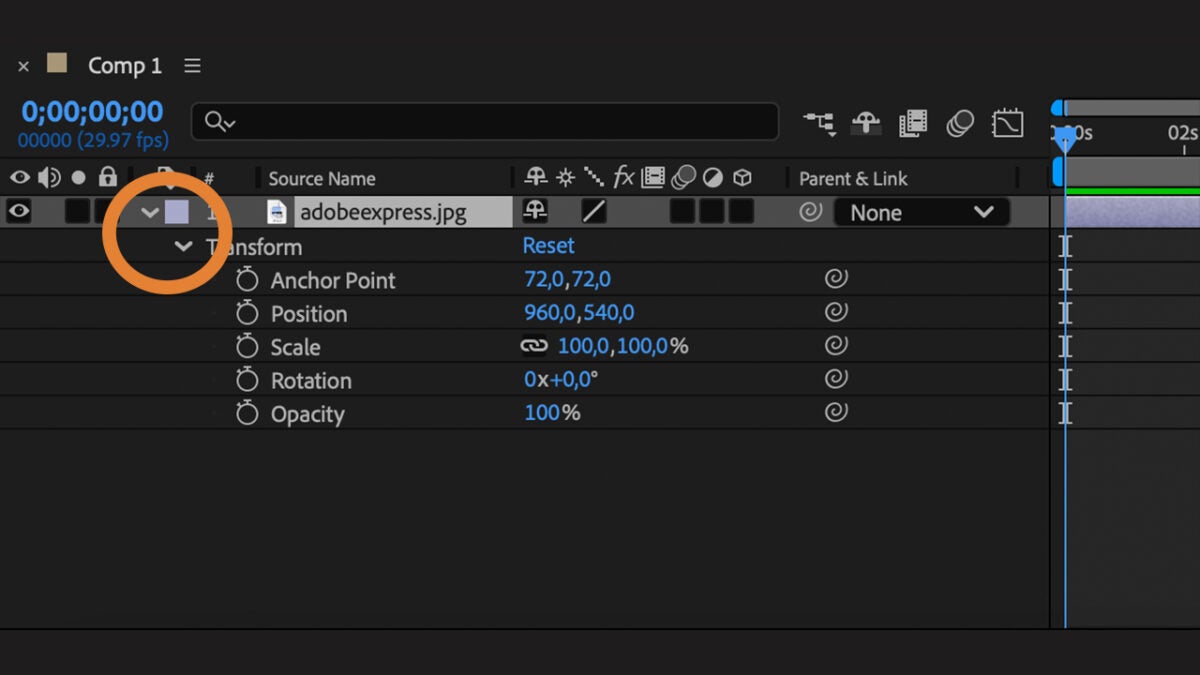
  • In the selected layer, click on the arrow symbol on the left and select which section you want to animate. It can be the scale, position, opacity, etc.
    • From Position, you can control where the object is located on the screen. With Scale, you will control the size of the object. Rotation will help you rotate the object and Opacity to adjust its transparency.
  • When you already know what to animate, activate the keyframe by clicking on the clock icon located to the left of the property.
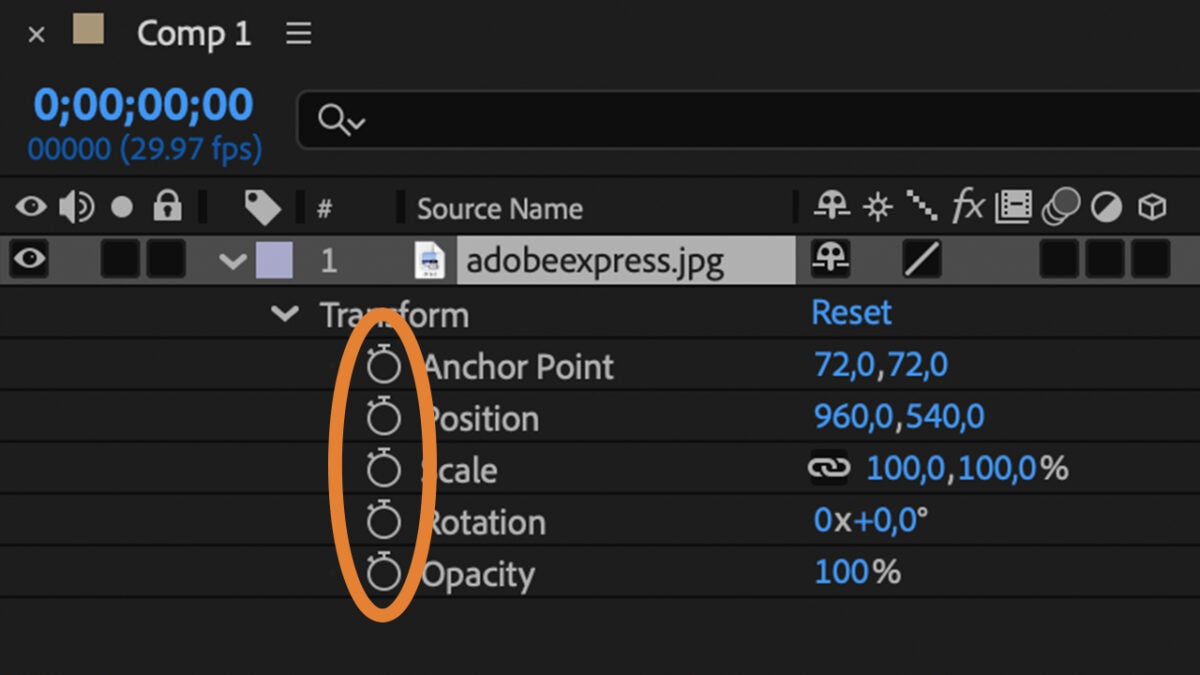
  • With the keyframe, first, define where the animation starts. Move forward in the timeline and then add another keyframe that is the end of that animation. You can press the spacebar to play it and see how the object in question changes between the two keyframes.

If you want the movement to look more natural, right-click on one of the keyframes and select Keyframe Assistant > Easy Ease Out or Easy Ease In. This makes the animation start or end more smoothly.

Add effects to your project

From After Effects, we can add all kinds of effects to our projects. To start, you just need to follow these steps:

  • Click on Window > Workspace > Effects & Presets. This will make a new panel of effects and presets appear on the right.
  • Use the search bar to find any effect. You have different categories: Audio, Color Correction, Distort, etc…
  • To add any of these effects, drag the effect from the Effects & Presets panel and place it on the layer where the item you want to animate is located.
  • When applied, the Effect Controls panel will appear. From there, you can adjust how the effect will look. Combine several effects to achieve more interesting results.
  • You can also animate the effect from the timeline. Locate the effect on the selected layer and click on the clock icon to add new keyframes.

If you want to orient your workspace towards effects, go to Window > Workspace > Effects. This will adjust the entire interface for effects editing. From Workspace, you can switch to other special layouts if you wish.

Export your animation

If you already have everything ready, export your animation by following these steps:

  • Go to the top menu and click on Composition > Add to Render Queue. This will open the render queue at the bottom of the screen and also allow you to adjust how you want to export your video.
  • Click on the blue text next to Output to to choose where you want to save your file and assign it a name.
  • Then, select the blue text next to Render Settings. From here you can adjust the quality, resolution, and frame rate.
  • Finally, click on the blue text of Output Module and select the format you need. The H.264 format is ideal for videos intended for social media. If the video has sound, make sure the Audio Output option is set to On.
  • From the Render Queue panel, click on the Render button to export your video. After Effects will start rendering and you can see the progress in real-time in the bottom panel.

Now that you have your project exported, all that’s left is to check that everything is correct and well. Experiment in After Effects with different effects, do tests, and be creative.

After Effects
After Effects DOWNLOAD

Author: María López

{ "de-DE": "Künstler aus Berufung und Technikliebhaber. Seit ich denken kann, habe ich gerne an allen möglichen Gadgets herumgebastelt.", "en-US": "Artist by vocation and technology lover. I have liked to tinker with all kinds of gadgets for as long as I can remember.", "es-ES": "Artista de vocación y amante de la tecnología. Me ha gustado cacharrear con todo tipo de gadgets desde que tengo uso de razón.", "fr-FR": "Artiste de vocation et amateur de technologie. J'aime bricoler avec toutes sortes de gadgets depuis que j'ai l'usage de la raison.", "it-IT": "", "ja-JP": "", "nl-NL": "", "pl-PL": "", "pt-BR": "", "social": { "email": "", "facebook": "", "twitter": "", "linkedin": "" } } View all posts by María López

Author María LópezPosted on December 30, 2024July 1, 2025Categories News

Post navigation

Previous Previous post: You’re One in 200 Million: What Do Amazon Prime Statistics Say About the Future of Shopping And Streaming
Next Next post: Illustrating Sustainability: How to Create Eco-Friendly Designs with Adobe Illustrator

Recent Posts

  • Bluey lives, the fight continues: Why Disney+ just released new mini-episodes even though they promised the series was over
  • The critics are hating The Mandalorian and Grogu and that could mean the end of Star Wars
  • Sony's new game is strange, creepy, and dodging literal bullet rains is incredibly fun
  • Yoshi arrives on Switch 2 to cap off an outstanding first half of the year for Nintendo
  • The most hated character from Final Fantasy VII Rebirth will return for the third part

Archives

  • May 2026
  • April 2026
  • March 2026
  • February 2026
  • January 2026
  • December 2025
  • November 2025
  • October 2025
  • September 2025
  • August 2025
  • July 2025
  • June 2025
  • May 2025
  • April 2025
  • March 2025
  • February 2025
  • January 2025
  • December 2024
  • November 2024
  • October 2024
  • September 2024
  • August 2024
  • July 2024
  • June 2024
  • May 2024
  • April 2024
  • March 2024
  • February 2024
  • January 2024
  • December 2023
  • November 2023
  • October 2023
  • September 2023
  • August 2023
  • July 2023
  • June 2023
  • May 2023
  • April 2023
  • March 2023
  • February 2023
  • January 2023
  • December 2022
  • November 2022
  • October 2022
  • September 2022
  • August 2022
  • July 2022
  • June 2022
  • May 2022
  • April 2022
  • March 2022
  • February 2022
  • January 2022
  • December 2021
  • November 2021
  • October 2021
  • September 2021
  • August 2021
  • July 2021
  • June 2021
  • May 2021
  • April 2021
  • March 2021
  • February 2021
  • January 2021
  • December 2020
  • November 2020
  • October 2020
  • September 2020
  • August 2020
  • July 2020
  • June 2020
  • May 2020
  • April 2020
  • March 2020
  • February 2020
  • January 2020
  • December 2019
  • November 2019
  • October 2019
  • September 2019
  • August 2019
  • July 2019
  • June 2019
  • May 2019
  • April 2019
  • March 2019
  • February 2019
  • January 2019
  • December 2018
  • November 2018
  • October 2018
  • September 2018
  • August 2018
  • July 2018
  • June 2018
  • May 2018
  • April 2018
  • March 2018
  • February 2018
  • January 2018
  • December 2017
  • November 2017
  • October 2017
  • September 2017
  • August 2017
  • July 2017
  • June 2017
  • May 2017
  • April 2017
  • March 2017
  • February 2017
  • January 2017
  • December 2016
  • November 2016
  • October 2016
  • September 2016
  • August 2016
  • July 2016
  • June 2016
  • May 2016
  • April 2016
  • March 2016
  • February 2016
  • January 2016
  • December 2015
  • November 2015
  • October 2015
  • September 2015
  • August 2015
  • July 2015
  • June 2015
  • May 2015
  • April 2015
  • March 2015
  • February 2015
  • January 2015
  • December 2014
  • November 2014
  • October 2014
  • September 2014
  • August 2014
  • July 2014
  • June 2014
  • May 2014
  • April 2014
  • March 2014
  • February 2014
  • January 2014
  • December 2013
  • November 2013
  • October 2013
  • September 2013
  • August 2013
  • July 2013
  • June 2013
  • May 2013
  • April 2013
  • March 2013
  • February 2013
  • January 2013
  • December 2012
  • November 2012
  • October 2012
  • September 2012
  • August 2012
  • July 2012
  • June 2012
  • May 2012
  • April 2012
  • March 2012
  • February 2012
  • January 2012
  • December 2011
  • November 2011
  • October 2011
  • September 2011
  • August 2011
  • July 2011
  • June 2011
  • May 2011
  • April 2011
  • March 2011
  • February 2011
  • January 2011
  • December 2010
  • November 2010
  • October 2010
  • September 2010
  • August 2010
  • July 2010
  • June 2010
  • May 2010
  • April 2010
  • March 2010
  • February 2010
  • January 2010
  • December 2009
  • November 2009
  • October 2009
  • September 2009
  • August 2009
  • July 2009
  • June 2009
  • May 2009
  • April 2009
  • March 2009
  • February 2009
  • January 2009
  • December 2008
  • November 2008
  • October 2008
  • September 2008
  • August 2008
  • July 2008
  • June 2008
  • May 2008
  • April 2008
  • March 2008
  • February 2008
  • January 2008
  • December 2007
  • November 2007
  • October 2007
  • September 2007
  • August 2007
  • July 2007
  • June 2007
  • May 2007
  • April 2007
  • March 2007
  • February 2007
  • January 2007
  • December 2006
  • November 2006
  • September 2006
  • August 2006
  • June 2006
  • May 2006
  • July 2001
  • January 2001
  • November 2000
  • September 2000
  • August 2000
  • July 2000
  • April 2000
  • March 2000

Categories

  • Affiliate post
  • Expert Review
  • Gaming
  • Guides
  • How to
  • Legacy how To
  • News
  • Noticias
  • Software>Security
  • Sponsored
  • Trucos y Consejos
  • Uncategorized
  • Windows software

Meta

  • Log in
  • Entries feed
  • Comments feed
  • WordPress.org
Softonic English Proudly powered by WordPress