Firefox 3 Alpha 4 released

mozicon128.pngA week ahead of schedule, Mozilla have announced the release of Firefox 3 Alpha 4. The project, codenamed Gran Paradiso, features several important improvements that focus on extensions. Principally, these include better integration of FUEL (Firefox User Extension Library) and a JavaScipt library designed to facilitate extension development.

Firefox 3 now also supports as standard the popular global notification system ‘Growl’ on Macs although an extension for this was already available. To embrace Web 2.0, Firefox 3 will also offer better support for offline web applications.
Some developments haven’t reached completion, however. The Mozilla team are still working on an integrated history and bookmarks system as well as enabling ‘Breakpad’ – a new crash reporting tool. These developments are expected to be included in the Alpha 5 release due at the end of May.

Please remember that this version is for testing purposes only and mainly aimed at web developers and alpha testers. You will probably find that most of the extensions you have in Firefox 2 don’t work with Firefox 3 although some can be forced to work using the potentially unstable ‘Nightly‘ extension. The actual look of this release is not much different from Firefox 2 so if you’re just a general user, you’d be best to wait until the official release.

Spb Brain Evolution 1.1 released

spb-brain-evo-blog-1.pngAnyone who owns a Windows Mobile phone or Pocket PC should know about Spb Software House. They’re one of our favourite mobile developers, producing an excellent line of programs from across the board but focusing on games and productivity tools. Their latest news is an updated version of Spb Brain Evolution, their popular brain training game for Pocket PCs and other Windows Mobile devices.

If you haven’t tried the game out yet, it’s an essential addition to your collection. It features 10 Brain Testing and Brain Marking modes which become highly addictive as you continually try to better your last score. The mini-games (which include Sudoku and Minesweeper) all feature a special combination of fun and self-improvement: a recipe for a good game, in our opinion.

The latest version includes updated quiz topics and questions, as well as support for 10 languages.

New launch for Launchy

Lunchy logoWe managed to kick the clicking habit a while ago by installing Launchy. Now the program makes it even easier to open applications and folders without so much as looking at the Windows Start menu. Now out of beta, the latest release of the program adds a new plug-in that allows you to launch commands from the utility, effectively replacing the ‘Run’ dialog.

The developers are doing their best to open up the program to the masses and you can now create your own plug-ins and share them on the Plug-in Developers Forum. There’s also a meaty selection of skins available for download so you can customize the app. If you’re still using shortcut icons or the Start menu then quite frankly you’re living in the past, as Launchy takes all the effort out of opening documents, accessing files, launching programs, and even searching Google.

Track the news with Feeddemon

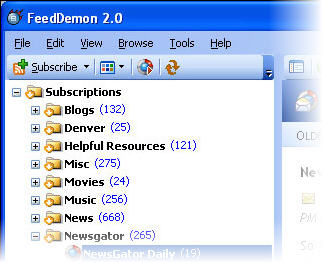
fd.jpgRSS or Real Simple Syndication, is an increasingly popular way to follow news on the Internet. By subscribing to an XML or RSS link, a user can receive all the latest information from multiple sources in one page. Online RSS readers like Google Reader, Bloglines or Rojo are now very popular among users yet you can also use an external RSS reader like Feeddemon to keep up with the flow of information.

Feeddemon is easy to install and although it will ask you for a Newsgator account, you can still launch it even if you don’t have one. The program can import all of your previous subscriptions or it can suggest new feeds to you in all sorts of categories like business, sports or entertainment.

Once launched, the program automatically downloads the latest posts. Feeds are saved in different categories so that you know where to find them. You can also use the search function to find a post containing a particular word. Thanks to the custom news watch, you can get Feeddemon to find news according to certain keywords. This is extremely useful if you’re doing a research paper or investigating a particular topic.

Continue reading “Track the news with Feeddemon”

Thunderbird 2.0 coming soon

thumb_thunderbirdlogo.jpgThe rumors are that Mozilla will be launching version 2.0 of its open source email client Thunderbird this week. Considered a serious competitor to Microsoft’s Outlook, Thunderbird features the similar technology used in the Firefox browser. It’s free, constantly updated and you can add all sorts of add-ons to it. In our review of Thunderbird we explained how much we appreciated those features but lamented the lack of proper business oriented tools (like Exchange compatibility or a calendar).

It’s no secret that version 2.0 will finally incorporate multiple tagging for messages, folder views, find as you type and an improved add-ons manager; you can already test these out in the 2.0 Beta. Scott MacGregor lead engineer for Thunderbird, gave Read/WriteWeb a bit more info to chew on, without expanding too much on details. We should be expecting “webmail integration with Gmail and .Mac” and message history to browse to the messages you’ve read previously. Disappointingly, Scott did not reveal much about the expanded add-ons manager, and how different it will be to the one already in Thunderbird. Will there be more themes and extensions available? Will Thunderbird suggest add-ons according to what use you want to make of it?

We like Thunderbird and are glad to see new features being implemented into it. While we can’t wait to try out tagging, search as you type and webmail integration we still wonder if version 2.0 will seem a real step up from 1.5. If you really can’t wait till the end of the week for the full release, you can make your own opinion by testing out the Beta version.

Joost 0.9 – final release edges closer

joost-beta-logo-1.pngYes folks, the latest version of revolutionary peer-to-peer TV app, Joost, is now out and it includes some pretty important new features, as well as a handful of invitations for anyone already testing the program.

Certain little annoyances in the program’s interface persist. You’re forced to uninstall your previous version as a part of the install process, though the installer does take care of this for you. Also, some users are still a bit confused by the system for browsing channels, not all of which are automatically activated in your ‘My Channels’ listing. My advice is to explore the program thoroughly: it’s still a beta, after all.

Joost’s roster of channels is increasing rapidly, to include such stalwarts as MTV, VH1, Comedy Central and, er, The Diddy Channel. Unfortunately most of the big-name channels are limited to US users only, no doubt for licensing reasons. Let’s hope that some agreements can be reached to extend availability of these channels… it’s tough knowing there’s an entire stream of Ren and Stimpy which I can’t access.
Continue reading “Joost 0.9 – final release edges closer”

Prevent spam reaching your inbox

spam_blockerYahoo’s recent announcement that they are to offer unlimited e-mail storage will come as good news to users but equally good news to those evil spammers. E-mail spam is one of the biggest problems on the internet, causing headaches for users and costing businesses billions of dollars each year filtering it from inboxes. We can’t offer you any billion dollar solutions but there are a few useful utlilities out there that could help you if you are sick of spam. Note that these only work if you’ve got your own POP3 account such as with Outlook – they won’t work with web based e-mail programs such as Hotmail or Gmail.

K9 AntSpam is an email filtering application that works in conjunction with your regular POP3 email program and automatically filters spam without the need for dozens of rules or constant updates. Over time, it uses statisitical analysis to ‘learn’ which e-mails are spam and which aren’t. The downside of this is that you might not notice results immediately but in the long-run, it should prove effective.

Continue reading “Prevent spam reaching your inbox”

Softonic launches new program page

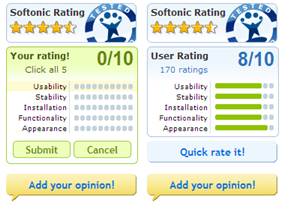
ratings2.pngWe’re pleased to announce that we’ve launched a major redesign of our program pages at Softonic. The biggest new features are a much-improved user rating interface, and a swish new ‘lightbox’ mode for program screenshots. Our new rating system makes it easier than ever to say what you think about a program, as well as allowing you to check out and rate other users’ reviews.screenshots1.png
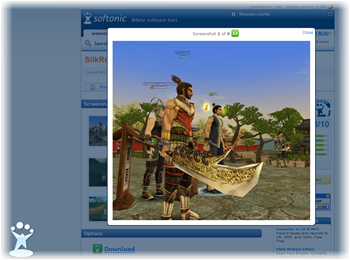
Our new screenshot viewer lets you take a better look at a program before downloading. Simply click the thumbnail and you’ll get an instant peek at the full size image. What’s more, we’ve given the page a generous lick of paint, to give it a bolder, clearer look.

So come on in and have a look around. And don’t forget to let us know what you think of the new design!

Microsoft to launch Live for PC

vista-xbox.jpgPlaying videogames is not just for kids any more. According to Nielsen/NetRatings,  36.7% of game console owners in the United States are adults. Plus, more than half of them live with their family (spouse and at least one child). It seems then that game consoles should no longer be considered as children’s toys. As these devices evolve into highly sophisticated entertainment systems, “families have incorporated them into their centralized home media centers, which include television, digital recording device, digital music player and the PC” said Carolyn Creekmore of Nielsen/NetRatings.

Microsoft seems to be well aware of this convergence towards a centralized home entertainment system, or at least this is what you can infer from the announcement that the Redmond guys released yesterday: the Live online gaming network, which so far was exclusive to Xbox players, will soon be opened for PC players too. Microsoft plans to launch Live for PC in May 8th, exactly the same day when Halo 2, the Xbox blockbuster, will be released for Windows Vista. In this way, the Live Xbox community will expand to another platform and enable PC gamers to play, compete and interact with the over six million Xbox gamers who already belong to it.

There will be two levels of PC Live membership: ‘silver’ is free and offers basic multiplayer functionalities, some social network tools and a single gamertag, while ‘gold’ features cross-platform gaming and other advanced multiplayer possibilities for a $49.95 monthly fee.

A month after the launch date, Microsoft will release the first game in which PC players will actually be able to join Live community: Shadowrun, a first-person shooter set in the near future where PC and Xbox gamers will enrol in cross-platform online battles of up to 16 players. Later on during 2007, Microsoft will also launch the Vista version of Uno, one of the most popular arcade games in Xbox Live, as one more step towards uniting videogamers across different gaming systems and platforms.

Microsoft to launch new Office VOIP program

Office LogoIt’s been a long time in coming but Microsoft has announced it is to launch its own Skype-like VOIP program designed especially to integrate with Office 2007. The company has confirmed that by the end of this month, beta testing will go ahead for its IP telephony software Office Communications Server 2007.

Until now, voice or conference calling within Office was limited to Microsoft’s NetMeeting but the new program promises to offer far better integration and quality in calling and video conferencing. The most recent version of Microsoft Office will automatically be able to incorporate the software so users won’t have to resort to third party applications such as Skype to make calls. Microsoft first announced plans for such a service last summer and has since spent the past year developing it alongside Nortel.

The add-on will mean that users can simply click on a name in Word, Excel or Outlook to call them directly. Calls to contacts will also be possible from Sharepoint and MSN Messenger. It will also allow one-to-one, multi-videoconferencing and webconferencing and will be launched in both desktop and Windows Mobile-based versions. The downside however is that it will only work with Office and not any other external programs.

The fact that Microsoft Office is the world’s most widely used business and domestic desktop package means that its certainly going to prove a challenge to VOIP heavywight Skype. However, how many home PC users will be willing to pay to upgrade to the new version of Office just to use something they can already do for free is debatable. The other problem for Microsoft is that many people will be loath to start their contact lists from scratch again. A tool or integrated wizard which would make this process as seamless as possible from Skype would be a wise investment for them if it is to really take-off – at least for home users.