Google launches a bug bounty program

Google’s new Developer Data Protection Reward Program (DDPRP) is now targeting cases of data abuse and offers rewards of up to $50,000

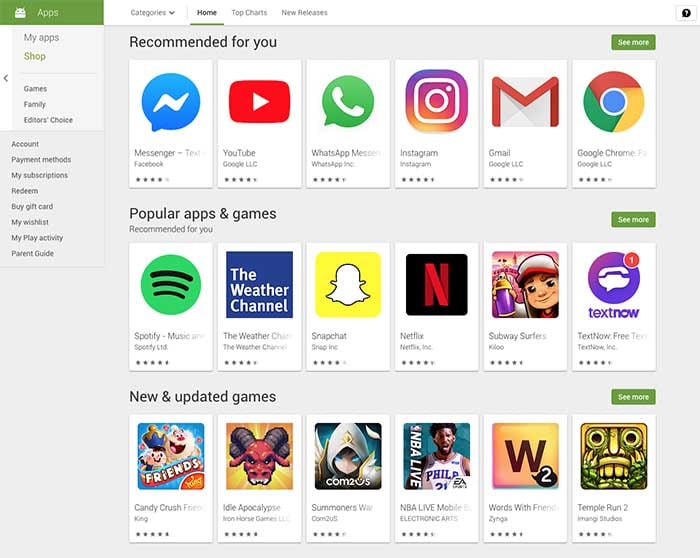
The Google Play Store has been plagued with bugs, fake apps, phishing scams, and general malware for years. We’ve reported on an endless stream of malware discoveries in recent times with the stories falling either to security researchers who’ve discovered something not right or Google efforts to clean up some sort of mess.

With Google’s Android mobile operating system sitting at the heart of most of the smartphones on the planet, this prevalence of bad code is to be expected. It is even less of a surprise due to the open nature of the Android source code. Google wants anybody who can code to be able to contribute to the OS but unfortunately, that also opens it up to hackers and cyber criminals too.

It is in this environment that Google has recently announced the formation of a new program that will incentivize the reporting of bad code. This means it won’t just be relying on the good faith of the ‘good guys’ to out the behavior of the ‘bad guys.’

Google’s new Developer Data Protection Reward Program (DDPRP) is now targeting cases of data abuse and offers rewards of up to $50,000

The new DDPRP that Google recently announced in a blog post is now offering massive rewards to security researchers who can identify certain issues. The program is targeting cases of potential data abuse in apps that fit three categories. These are third-party apps that have access to the Google API, Android apps listed on the Play Store, and Chrome apps and extensions listed on the Chrome Web Store.
The blog post says, “In particular, the program aims to identify situations where user data is being used or sold unexpectedly, or repurposed in an illegitimate way without user consent. If data abuse is identified related to an app or Chrome extension, that app or extension will accordingly be removed from Google Play or Google Chrome Web Store.” Although the Android Developer’s Google blog post goes on to say that there will be no fixed table of rewards for certain types of discoveries it does make it clear that bounties will go up to $50,000.

This new Google initiative mirrors a recent move made by Facebook in the wake of the Cambridge Analytica scandal. Like Google, Facebook has an incredibly large user base and so when user data was leaked it was on an industrial scale and the consequences rocked Western democracy as we know it. Facebook recently extended its bug bounty program to include Instagram apps and now Google has also moved to offer rewards to developers and programmers out there with a nose for sniffing out foul play.

If you use Facebook on your Mobile you need to Beware of this Scam

Google hasn’t fallen victim to a huge infraction on the scale of the Cambridge Analytica debacle, that many analysts say Facebook is still reeling from today. As we mentioned earlier, however, it has been hit with multiple smaller scandals involving apps on the Google Play Store. With such huge numbers of apps being added to the store every day, freelancing out the bug hunting program is likely the most effective method of policing the platform.

As to whether the move will prove successful in the long run and result in fewer outbreaks of malware etc. remains to be seen. It is refreshing, however, to see a pro-active move from the mountain view company.
Your Bluetooth devices could be a handy backdoor for hackers

New Bluetooth bug can target Bluetooth devices from versions between 1.0 to 5.1

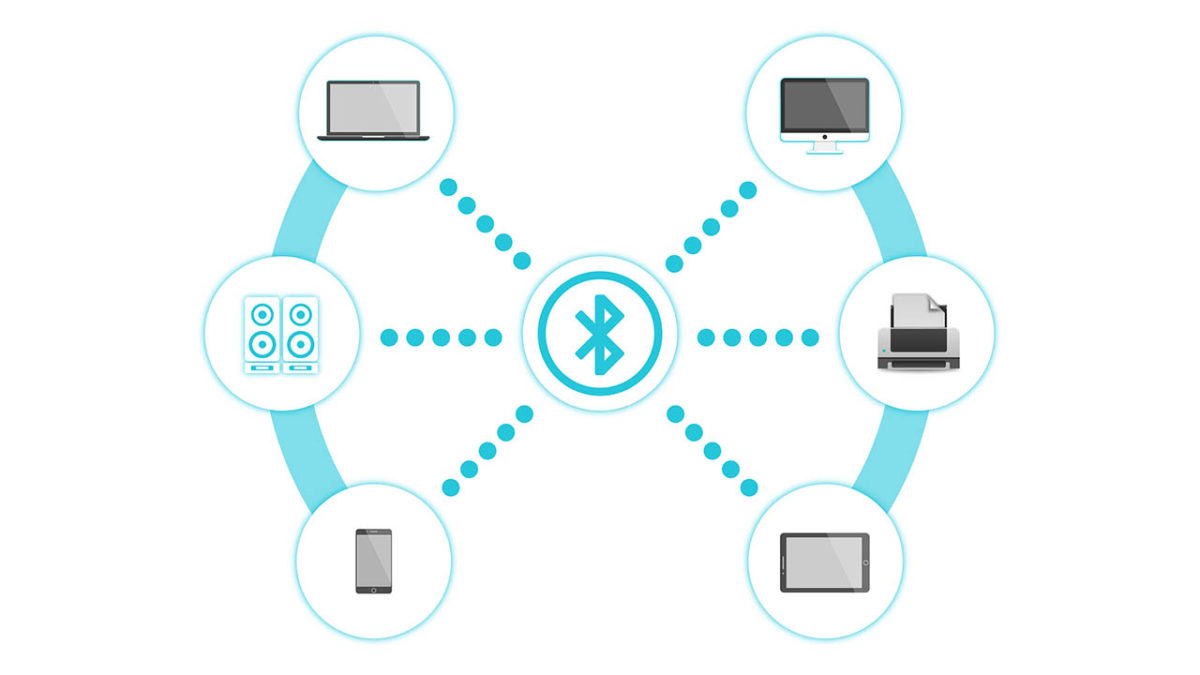
A disturbing new Bluetooth vulnerability has been discovered by researchers. It could see our wireless devices leaving us vulnerable to cyber-attack. The problem relates to Bluetooth’s authentication protocols and could see a potential attacker taking up a position between two Bluetooth  devices and eavesdropping on all information shared across the connection.

The vulnerability, which is known as KNOB (Key Negotiation of Bluetooth) is so serious that the Bluetooth SIG Group has been forced to public a security warning detailing the new bug.

New Bluetooth bug can target Bluetooth devices from versions 1.0 to 5.1

Bluetooth devices

A team of researchers from Oxford University, the Singapore University of Technology and Design, and CISPA Helmholtz Center for Information Security is responsible for the discovery. Known as a KNOB attack, the vulnerability degrades the level of security that Bluetooth connections have to such a level that a Brute Force attack, where a hacker simply cycles through all possible encryption passwords until they stumble upon the correct one, becomes possible.

Once the attacker comes to the correct encryption key, they then have ultimate access to all data being shared across the connection and could even add their own data to the connection. To give an example of what this could mean, I’m writing this report out on a keyboard and thinking about the last time I used my online banking!

Bluetooth Security notice
The Bluetooth SIG Group had to release a security notice warning about the vulnerability

The other scary thing to note about a KNOB attack is that victims don’t even know they’ve been compromised. It isn’t the easiest exploit, however, which means there is hope. The post explaining the vulnerability says, “For an attack to be successful, an attacking device would need to be within wireless range of two vulnerable Bluetooth devices that were establishing a BR/EDR connection. If one of the devices did not have the vulnerability, then the attack would not be successful.”

Fortunately, there are Bluetooth devices out there that aren’t vulnerable to this attack and the attack will only work if the attacker is in close proximity to two vulnerable devices at the same time. This means that the level of effort required to pull this off means it is likely to be businesses that will be targeted rather than individuals. Don’t worry, nobody is going to be hacking into your headphones and telling everybody that you listen Justin Bieber, and not Led Zeppelin like you’ve been telling everybody.

bluetooth logo

The other good news is that the Bluetooth SIG Group that describes itself as, “a global community of over 34,000 companies serving to unify, harmonize and drive innovation in the vast range of connected devices all around us” has already upgraded the minimum security specification that goes out to Bluetooth manufacturers to seven bytes. This means that even if the KNOB attack can degrade the security credentials of a Bluetooth connection, it won’t be able to do so to the extent that a brute force attack will be possible.

AAAANNNNDDDD Breath. Phew, it took a lot to get through all of that without making a single knob joke. Best knob jokes in the comments please.

Will this Google proposal make the internet more secure?

Why does it matter how long SSL certificates last and websites have a HTTPS classification?

A webpage on a laptop

HTTPS is the go-to security standard for websites. It has become so ubiquitous that most major web browsers, including Google Chrome and Mozilla Firefox, label a website as “not secure”, if it isn’t HTTPS. For a website to receive a HTTPS classification it needs to have been granted an SSL security certificate by members of the CA/B Forum. This is a group made up of certificate authorities and web browser developers that have been authorized to hand them out.

At the moment, when a website receives an SSL certificate it lasts for 825 days. This means the website will be HTTPS and not labeled as not secure for 825 days. It seems that Google thinks this is far too long because at a recent meeting of the CA/B Forum in Greece, the web giant proposed that certificates only be valid for 397 days. This would cut their duration from around two years and three months to just over one year and one month.

Why does it matter how long SSL certificates last?

There are two distinct camps to note in discussions on SSL certificates and HTTPS classification. The first camp is the browser makers, of which Google is the most prominent of all. Most browser developers expressed support for Google’s proposal for SSL certificates having shorter durations. In fact, they’ve all been pushing for shorter length certificates for years. It was only last year when they tried to cut the amount of time an SSL certificate was valid from three years to one before eventually compromising on just over two.

The people they compromised with, the other distinct camp in all of this, is the CAs or certificate authorities as they’re known. To them shorter durations means more certificates, which translates into more cost for the industry. The CAs have seen the duration of SSL certificate validation cut from eight years to five, then again to three, before only last year being cut again to just over two years.

What difference does it all make?

If this all sounds like a bit of a soap opera, you’d be right. There are a number of security related issues related to the proposed change from Google. These include SSL certificates being given out in error and even the revocation process not being effective. When malware filled sites or pages displaying phishing scams are discovered to have an SSL certificate and HTTPS classification, it can’t be guaranteed that revoking that certificate will effectively reclassify the site as just HTTP and consequently not secure. Shorter certificates mean this problem would take care itself more quickly.

There is something else to it though, and that is about who is in control of HTTPS. There is a train of thought being laid out by internet security experts Hashed Out, that says it is all a power play from the browser makers. They simply want to exert dominance over the CA/B forum and show them who is boss.

If the above is true then, it would seem to indicate that whether or not this proposed change form Google will make the internet more secure or not is an entirely subjective matter. It could be more effective to fix the bad certificate revocation process rather than shortening the length of time SSL certificates remain valid.

The one thing we do know, however, is that there wasn’t a vote on the proposed change that Google would like to see come into play in March next year. This means we’ll all be on the edge of our seats until the CA/B Forum next gets together and thrashes something out.

Google research suggests you’re not as security conscious as you think you are

According to Google over 80,000 people ignored breach alerts about their passwords

If you think you’re a security conscious individual when it comes to being online, we have some news that may shock you. Even if you don’t think about yourself that way this is still going to be pretty shocking. New research by Google shows that a lot of us have a pretty lax attitude to password safety.

Many of us use passwords that have already been breached and, even worse, a lot of us continue to use breached passwords after we’ve been told they have been compromised. What are we thinking people? Maybe, we should look at these numbers in a little more detail.

According to Google over 80,000 people ignored breach alerts about their passwords

username and password

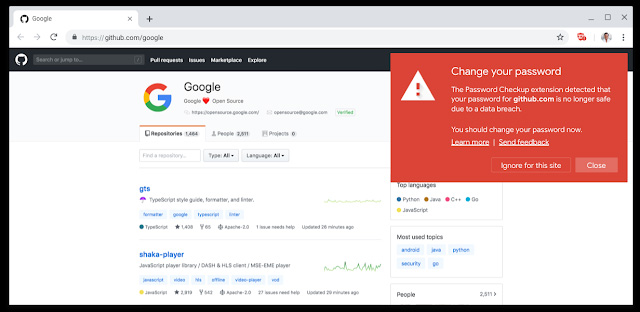
Google has been looking into its Password Checkup extension for Google Chrome to try and learn a little about our attitudes to our online safety. Password Checkup scans all of your login credentials when signing into your online accounts and then checks them against all the known sets of login credentials that have been affected by data breaches. In essence it tells you, if your password has fallen into the hands of hackers or not. The results of Google’s study have been a little surprising to say the least.

Since it was first launched, the password checkup extension has been downloaded over 650,000 times. If you think about how many different web accounts each of those users has, you’ll know that that number gives the extension access to a lot of usernames and passwords. Of those, Google looked at  21,000,0000 and found that over 316,000 of them were unsafe. This works out at about 1.5%, which isn’t much at all but makes sense when you consider that the people who will have downloaded Password Checkup in the first place will have been security minded individuals. What comes next though, does not make sense at all.

pasword checkup notification
Image via: Google Blog

When Password Checkup alerted these users to their breaches, the numbers weren’t as impressive. The report says that 26% of users changed to new passwords and 94% of these new passwords were at least as secure as the old ones. The weird thing though, is that 25.7% of the people warned that their passwords had been breached ignored the warnings. A massive 81,368 people were told their usernames and passwords had been leaked in a data breach and did absolutely nothing about it.

Something to think about

It is very important that you use unique login details for all of your online accounts and change them as soon as you hear they’ve been caught up in a breach. If you have unique credentials, you’ll only have to do this once. If you don’t, you’ll have to do this for every account you have with the same details as the people who bother to steal passwords in the first place will also bother to check them against every account you have.

8

In this regard, we can’t recommend using a password manager like LastPass highly enough. Password managers generate strong passwords automatically and will also let you know, if you are using the same security credentials on more than one account. It is likely that the people who ignored the breaches couldn’t be bothered making the changes because they’d have to change a lot of details for it to make a difference. A password manager like Last Pass does all of this hard work for you so if you have been breached but couldn’t be bothered to make any changes, download Last Pass and let it do the work for you.

On top of this, you should also be pleased to know that Google is working on integrating the Checkup Extension into Chrome directly so soon all Chrome users will be notified, if their login details have been compromised.

8 million Android phones infected with adware

You might have downloaded an app infected with adware. Here’s how to fix it!

Android

More than 80 Android apps infected about 8 million Android users’ phones.

The apps in question were fakes impersonating photo editing tools and games.

All of the apps in question were removed from the Play Store, so you don’t need to worry about downloading them going forward.

What do adware apps do?

As the name suggests, adware apps deal with advertising. While you surf the internet on your phone, adware clicks on ads in the background, which generates money for advertisers. This might not sound bad, but you can be bombarded with ads as a result, and your phone will also waste battery and data in the process.

According to an article from TechCrunch, these apps were very sneaky and weren’t offering any clues that anything fishy was going on in the background. The ads were also notoriously hard to close. 

Yeah, this sounds scary, but iPhones aren’t faring much better in the news these days:

What should I do?

The best thing you can do is to download a trusted antivirus program like Avast. If you run Avast, you can delete all traces of the adware. Just make sure you restart your phone after you run it.

However, from now on when you download apps on from the Play Store, make sure that you know the app comes from a trusted publisher. If an app has thousands of downloads and positive reviews, you can probably assume that you’ll be safe. According to the TechCrunch article, pretty much all of the apps in question had awful reviews on the Play Store. However, weekly virus scans are a great way to make sure you are safe from adware and other viruses. 

Your phone number can leak personal data online

Your phone number contains more personal information about you than your name does!

Phone number

When you’re on an app like Tinder, you already know better than to just slide anyone your digits. The last thing you want is to be harassed by some crazy person with obnoxious texts and unsolicited pics.

With that same logic, you wouldn’t give your phone number to some random website that says they need it to create an account for you, right?

Well, that’s where a lot of people fall off.

What can someone possibly learn from me just by having my phone number?

To state the obvious, if someone has your phone number, they can harass you and bombard you with ads. To some degree, that has probably happened to you.

You’ll be lounging around your home when suddenly you get an unsolicited text telling you about a deal on clothes, shoes, or food. 

However, your phone number can also give a hacker a ridiculous amount of personal information about you. In a recent article in the New York Times, a writer found the following personal knowledge about himself could be attained with his phone number. 

  • Full name
  • Birthday
  • Home address
  • Size of home in feet
  • Cost of property and other taxes
  • Full names of family members
  • Past phone numbers including ones associated with parents
  • Info on other owned property
  • Criminal record or lack thereof

The writer discovered that a hacker could find out more information about him with his phone number that with his full name. 

With this information, the writer discovered that someone with malicious intent could now attempt to answer his security questions. He and his family members could also be targeted with phishing ads. A hijacker could even trick his phone carrier into getting a new SIM card with his number. This means the hijacker would have access to the writer’s phone number and do with it as he pleases.

To make matters worse, this information wasn’t very hard to find at all. By using Whitepages Premium, a totally legal online tool, most of this information was uncovered from public records. Although using this information for nefarious deeds is illegal, obtaining it is not.

Why do so many websites ask for our phone numbers?

Phone number

In a lot of cases, giving a website your phone number makes perfect sense. For example, food delivery apps like Grubhub or the Papa John’s app and website ask for your phone number. They need it in case they show up to your residence to deliver your food and nobody is answering the door. 

At this point, you might be thinking, “Instagram and Twitter don’t deliver me food, so why do they need my number?” 

Well, they use it for a legitimate reason as well. For one, it makes logging in a whole lot easier. Be honest, are you more likely to remember your own cellphone number or the random username you created for a website? Also, many websites and apps require a cellphone number to make sure that you’re an actual person and not a bot. 

What should I do?

You don’t need to get a new phone number or throw your SIM card into a blender. However, you should start thinking twice before you give a person, app, or a website your cellphone number.

You should also consider upping your game when it comes to your online security. Make better passwords, and use two-factor verification whenever possible. 

Start treating websites and apps like they’re a potential new match from Tinder. Genuinely ask yourself whether you can trust this site (or person) enough to give them access to personal information about yourself. If the answer is “no,” do the smart thing and swipe left.

They’re coming for your camera! New ransomware attack in play

Researchers have discovered how to infect DSLR cameras with ransomware

Ransomware on a pc

Ransomware is possibly the most terrifying of all the malware threats. Even without all the Hollywood style nightmares the name alone can induce, the ransomware reality is bad enough. Data gets hacked and then held hostage. You either pay up or you lose it forever, or if there is something embarrassing in there, it gets spread all over the internet.

This reality sees ransomware being a more of a major enterprise-level threat than something the average joe should worry about. That is unless you’re the type of average joe who goes to or has a child in school, visits a hospital, or even just lives in a city. All three types of institution have fallen victim to ransomware attacks in recent memory, with the most recent attacks seeing two small cities in Florida having to fork out over $1 million between them to free up the citywide systems that kept the basic functions of government moving along.

It now seems that it isn’t just computers and phones that are vulnerable to ransomware attack. Internet of Things devices, otherwise known as smart devices, now look to be on the menu for hackers too.

Researchers have discovered how to infect DSLR cameras with ransomware

ransomware on a canon eos 80d

Security researchers at Check Point software have presented some rather interesting findings at the Def Con security conference in Las Vegas. Looking at the Canon EOS 80D, which has both USB and Wi-Fi connectivity they discovered that the camera, and others enjoying similar levels of connectivity, could be vulnerable to attack.

Eyal Itkin, a researcher at Check Point, recounts the vulnerability in a recent Check Point blog post, “Our research shows how an attacker in close proximity (WiFi), or an attacker who already hijacked our PC (USB), can also propagate to and infect our beloved cameras with malware.” He goes on to ask how you would feel, if attackers took control of both your computer and your camera, with all pictures being held until a ransom was paid.

The vulnerability relates to the Picture Transfer Protocol (PTP) found on the EOS 80D, which manages the transfer of digital files. Vulnerabilities found in the PTP make it possible for a malicious actor to infect the camera with ransomware. The PTP could then be used to infect accompanying computer systems whenever the infected camera is hooked using its USB or Wi-Fi connection.

Think about all the different types of staff members connected to local government institutions, hospitals, and schools that use cameras regularly and you’ll understand how explosive this development could be.

Speaking to ZDNet, a spokesperson for Canon said the company is working tirelessly to remove the vulnerability from the firmware it loads onto its cameras. The problem, however, is that PTPs are used by all camera vendors, meaning this isn’t just a Canon problem.

Chrome’s new and improved Incognito mode is not as good as Google is making out

Researchers have discovered two tricks that make it possible for websites to detect when users are visiting in Incognito mode

With recent stories rolling out about the amount of tracking cookies Chrome has hunting you down and the move to block ad-blockers unless you pay Google, Chrome’s reputation has taken a bit of a beating recently. It has also been a somewhat badly kept secret for years now that Google Chrome’s Incognito mode is not as private as you would think it is.

Last month, Google moved to address this final point in what must have seemed like a desperate attempt to restore Chrome’s beleaguered reputation. The internet giant moved to close off a loophole that allowed web developers and sites to detect users who were visiting their pages while in Incognito mode.

The move was met with plaudits too, as it appeared to work. Unfortunately for Google, that apparent truth has evaporated as researchers claim to have discovered a way around it.

Researchers have discovered two tricks that make it possible for websites to detect when users are visiting in Incognito mode

Incognito chrome

A successful Incognito mode can be bad for websites in a number of ways. The clearest one relates to ad revenue. When websites can track your online activity, they can serve you up more personalized ads, which in turn generate more revenue.

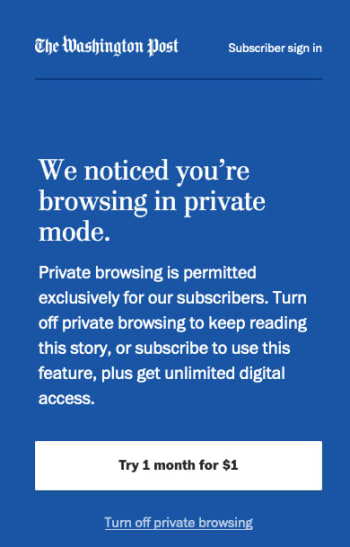
The other big one though, relates to media outlets offering a certain number of free page views before you have to pay. If you’ve ever seen a banner ad saying you’ve only three free articles left this month, then you’ve come up against this. A genuinely “incognito” mode stops these sites from knowing how many of your free articles you’ve read.

This all means that there is a real financial incentive to breaking through an Incognito Mode and it looks like it hasn’t taken long for researchers to bust through Google’s new and improved Incognito mode. Google announced that it had closed the previous loophole on July 18 and since then two security researchers have published ways for websites to detect somebody in Incognito mode.

wapo incognito mode screenshot

The first researcher, Vikas Mishra, noticed a painfully simple way to bypass the new and improved Incognito mode. He realized that Chrome caps incognito windows memory usage at 120mb while normal windows running normal web pages use a lot more memory than this. This means that any window that has a 120mb memory limit is likely to be in Incognito mode. Mishra even wrote a script that exploits this vulnerability.

The second researcher, Jesse Li, used a slightly more complicated measure. Li measured the different speeds of writing data to memory rather than disk using the two different browser modes and discovered a discrepancy that gives the game away.

When it comes down to it, Mishra’s breach is easily fixed by tweaking the amount of memory Incognito pages have access to and Li’s isn’t the easiest to implement. Whereas both researchers will likely be working at Google themselves sooner rather than later as a result of their discoveries they may not actually change too much stuff in the short to medium-term.

Google is already working on a fix to the problem, although, it has already noted that The New York Times is already exploiting one of the bugs, to detect people reading its articles in Incognito mode.

The problem in all of this, however, is that financial incentive we mentioned earlier. As long as invading your privacy will make companies money, they’ll keep trying to do it. In the long term this is a problem that isn’t going to go away until that fundamental issue is addressed.

Google is changing its password policy for Android users

Google is working on new security standards for Android that will enable users to log in to websites using their phone’s fingerprint sensor instead of a password

an open cyber lock password

Passwords, as a security login credential, have been falling out fashion recently as we’ve seen a number of key password policies change. We saw Microsoft realize that constantly pushing users to change their password every few months wasn’t necessarily the most secure way of doing things, before then announcing last month that Windows 10 users can make their devices password free, should they wish.

It now looks like another massive player on the tech scene, Google, is about to do something similar that could potentially see over a billion users turn their backs on passwords.

Google is working on new security standards for Android that will enable users to log in to websites using their phone’s fingerprint sensor instead of a password

As more and more Android devices are being built with fingerprint sensors it makes sense for Google to pivot Android towards using them more often. Passwords have long been the go-to security credential, but this is because we’ve had personal computing devices for decades now while biometric security measures have been reserved for Hollywood depictions of nuclear bunkers or galactic spaceships.

Why are passwords a problem?

Passwords have inherent security flaws built into them. The biggest such flaw is human error. We’re prone to choose a simple password that is easy to remember but that, unfortunately, is also easy to crack. Microsoft recently changed this policy but until recently we’ve often had to update our passwords every six months. This then leads many of us to write down our new passwords on post-it notes and stick them somewhere on our desk.

It isn’t all human error though. Passwords need to be stored on servers, which can then be breached or hacked. We’ve seen a multitude of such breaches in recent years, from the ridiculously scaled Yahoo data breach to the recent story about Google leaving certain user passwords unprotected for over 14 years.

8

Password managers like the impressive free offering Last Pass, offer a neat solution to the password problem. They store your passwords under rigid encryption and on secure servers and then generate incredibly secure passwords for all the different websites you need to log into.

What’s more, even the free version of Last Pass offers fingerprint authentication across your phone’s apps and on websites across both your mobile and on desktop.

How does the new Google offering all work?

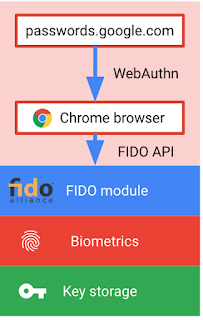
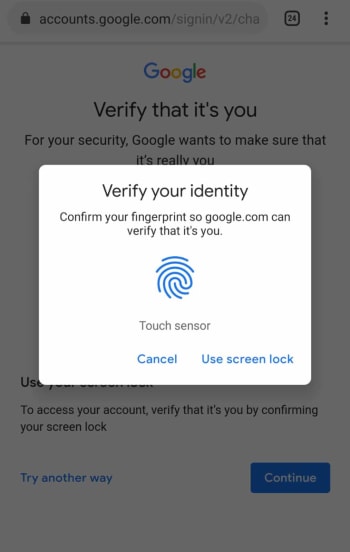
Google is trying to cut out the middleman on Android devices, however, by enabling fingerprint verification for Android phones running version 7, Nougat, and above. If you have a phone running Android 7 or above, the new fingerprint authentication feature should hit your device sometime in the next few days. This will open up fingerprint authentication across key Google products and sites.

Image via: Google Blog

The new local biometric authentication update follows an announcement Google made at the Mobile World Conference in February. It was then that Google told the world that all Android 7 phones and above are FIDO2 compliant, which means they can securely unlock sites and apps using either hardware security keys or locally stored information like biometrics. This is the same principle that makes your four-figure Windows 10 pin more secure than your standard multi-digit, multi-character password.

In the Google blog post announcing how FIDO2 Android capability works, it says, “your fingerprint is never sent to Google’s servers – it is securely stored on your device, and only a cryptographic proof that you’ve correctly scanned it is sent to Google’s servers.” This basic, yet much more secure, locally stored security protocol forms a key tenet of the FIDO2 design.

When the new feature lands on your Android device, you’ll be able to test it on Google Chrome by going to Google’s password manager site. There, you’ll find a list of all your web services and security credentials. You’ll then be able to verify your identity using your screen lock security ID, which should be your fingerprint authentication. Go check it out and let us know what you think.

WhatsApp on Android gets fingerprint lock

WhatsApp has already started rolling out Fingerprint lock feature the members of the Android WhatsApp beta program

It has been a while since we’ve been able to tell you about a significant WhatsApp development. After an endless stream of incoming updates, things recently slowed down. Well, finally we can bring you news of a very interesting update, although it isn’t exactly a new one. We first told you about WhatsApp’s plans to add fingerprint identification to the Android version of the app back in January, and we can now tell you that the feature is finally about to land.

WhatsApp has already started rolling out Fingerprint lock feature the members of the Android WhatsApp beta program

Fingerprint security

Fingerprint authentication landed on the beta version of WhatsApp for iOS months ago and is now finally making the leap to Android too. Once enabled, users will be able to secure their WhatsApp chats behind fingerprint authentication. There is also an option to hide content shown in system notifications behind the fingerprint lock feature too.

WhatsApp Messenger Download Now ►
8

The feature lands for all Android beta users who’ve updated their WhatsApp to version 2.19.221. The only catch is that you’ll have to be using an Android phone running Marshmallow or later and, rather obviously, your phone will need a fingerprint sensor.

How to use the new Fingerprint lock feature on WhatsApp for Android

Once you have the latest version of WhatsApp installed on your Android smartphone, you’ll have to activate it and confirm your fingerprint before you can use it. This is what you’ll need to do to activate the WhatsApp fingerprint lock.

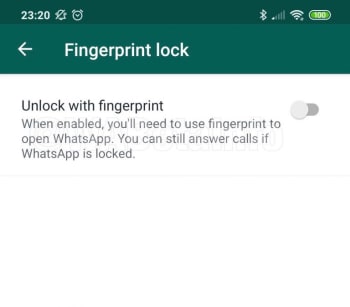
1. Open the WhatsApp Settings menu and then tap Account and then Privacy. You’ll then see the new Fingerprint lock option.
fingerpint lock whatsapp
Image via: WABetaInfo
2. Open Fingerprint lock and then enable Unlock with fingerprint.
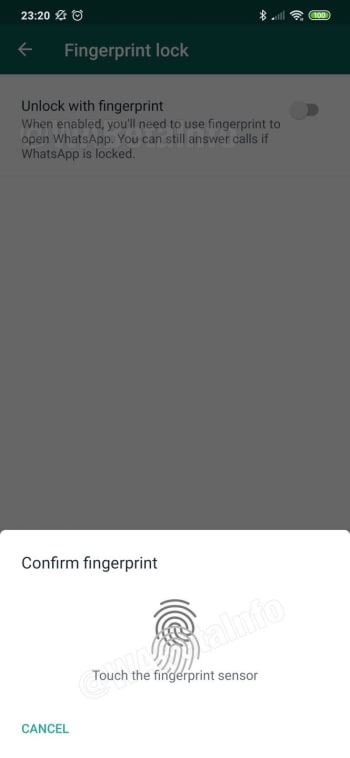
whatsapp fingerprint scanner
Image via: WABetaInfo
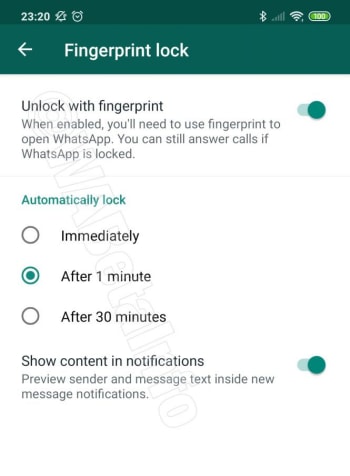
3. Confirm your fingerprint using your phone’s fingerprint sensor. This will then open up some different options for the Fingerprint lock feature including how quickly you want WhatsApp to lock after each use and whether you want WhatsApp to show message content in your system notifications.
whatsapp fingerprint options
Image via: WABetaInfo
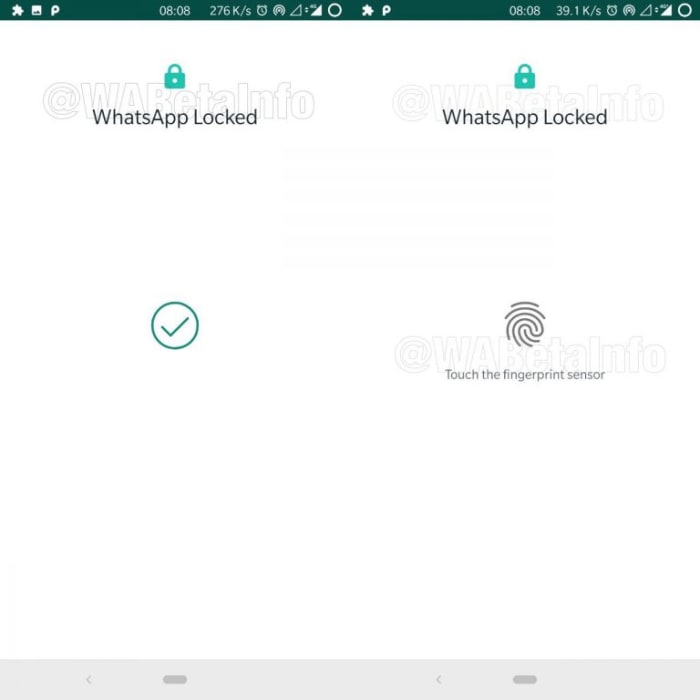
4. Configure each setting and then test the feature works by closing it.
Image via: WABetaInfo

The above steps will enable the WhatsApp Fingerprint lock when it lands on your version of WhatsApp for Android. The feature, however, doesn’t actually add an extra layer of security to your WhatsApp chats, on top of the regular lock you have protecting your phone.

The fingerprint data you use to lock your WhatsApp is actually the same fingerprint data you use to unlock your device. The WhatsApp fingerprint lock will be useful, however, if you ever pass your unlocked phone to somebody else but don’t want them to be able to read your chats or listen to your voice messages.