
iPhones can be hacked just by receiving a text

This bug can allow hackers access to all of your personal data just by receiving an iMessage!

iPhone

We’ve all had close calls when it comes to getting our phones hacked.

Sometimes we click on a malicious link while browsing the internet. Sometimes we download a shady app that is sending data in the background. All of these things typically boil down to our own human error whether it be from lack of knowledge, or taking a chance on a shady app. However, it was recently discovered that an iPhone can be hacked simply by receiving an iMessage. This has brought more attention to a  relatively new type of hacking tool known as “interaction-less” bugs.

Should I be worried?

At the Black Hat Security Conference this week, a Google Project Zero researcher showed that there are “interaction-less” bugs in iMessage that hackers can exploit to gain control. Once hackers gain control, they will be able to access your personal data on your phone.

You can click here to see the researcher’s full slideshow presentation. 

The bugs were found by looking for flaws while reverse engineering iMessage. The researcher, Natalie Silvanovich, did not find any similar bugs in Android phones. However, throughout the years, she and her team have found similar bugs in apps like WhatsApp and FaceTime. 

What should I do?

The best thing you can do is to make sure you are updating your phone whenever you can. According to Silvanovich, Apple has already patched six of these bugs in updates. 

You should also run regular virus scans on your phone to make sure that you are virus-free. We highly recommend using Malwarebytes since it is both free and efficient.

Malwarebytes Download now ►
8

You can also block texts from unknown numbers so that you won’t hear from them again. To do this, follow these steps:

1. Go to the Messages app

2. Tap on the spam message you received to open it

3. Tap at the top of your phone until the “Info” button appears.” Tap “Info”
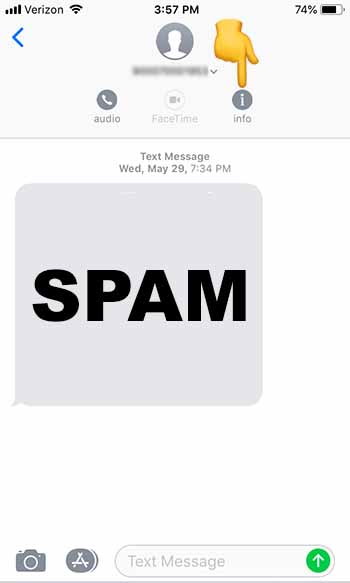
Click info

4. Tap on the number at the top of the screen
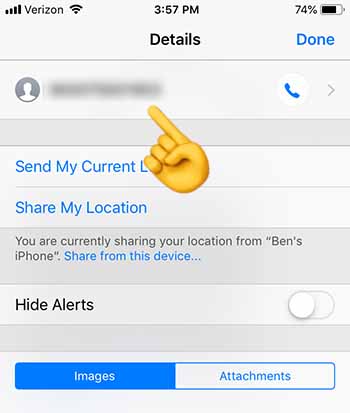
Click number

5. Scroll down to the bottom, and tap “Block this Caller”
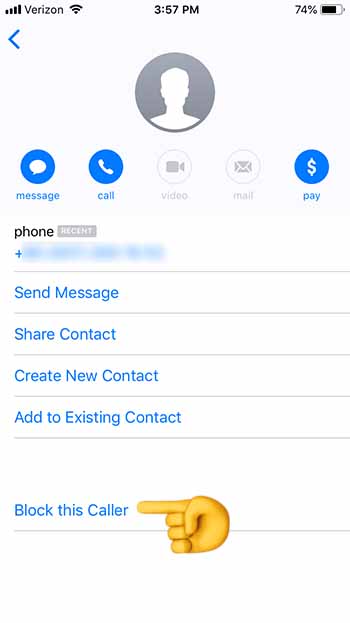
Block this Caller

6. You should stop receiving texts from this number altogether

If you do receive a shady text from an unknown number, you should block the caller, and then run Malwarebytes. Once you’re done, check and make sure that your phone is up to date.

Wrapping up

Although there is virtually no chance that your up-to-date iPhone will be hacked through this method, the question now remains: “How did Apple leave this vulnerability in the first place?” If you’re spending hundreds of dollars on an iPhone, you should rest assured that it won’t be easy for a hacker to access your personal data. Just recognize that your security depends on your vigilence.
New WhatsApp bug could let hackers talk for you

New tool exploits vulnerability in WhatsApp to allow third parties to manipulate your chats and talk on your behalf.

People fighting over a WhatsApp account

WhatsApp’s popularity is unquestionable. With over 1.6 billion monthly active users it is the most popular messaging app on the planet by quite a margin. This is great because it means most, if not all, of your friends and family are on WhatsApp, too. But there’s a problem: such a huge user base is also going to attract hackers and cyber-criminals.
We’ve covered a plethora of WhatsApp related scams here at Softonic. From fake versions of WhatsApp to dubious links being sent out across the network promising deals and freebies that are too good to be true, we’ve seen lots of different types of WhatsApp scam. Unfortunately, however, today we have to tell you that it doesn’t look like the scammers will be running out of ideas any time soon. There is another WhatsApp that you need to be aware of.

New tool exploits vulnerability in WhatsApp to allow third parties to manipulate your chats and put words in your mouth

At a recent cyber-security conference in Las Vegas, called Black Hat, cyber-security specialists from  Check Point Software Technologies demonstrated a new tool that allows hackers to intercept and manipulate user chats on WhatsApp. The tool enables hackers to fool the WhatsApp quote tool to make it look like users have said things that they hadn’t.

Speaking to the BBC, Check Point researcher, Oded Vanunu said, “It’s a vulnerability that allows a malicious user to create fake news and create fraud… You can completely change what someone says… You can completely manipulate every character in the quote.”

Vanunu also indicated that the tool can change the name of the sender who the quote is attributed to. This means a hacker could completely make up a quote and then put your name, or the name of another WhatsApp user, next to it.

On its own this thought is frightening enough. Somebody could do some real damage to your reputation and personal relationships, if they were able to accredit false quotes to your name. The potential problem is magnified, however, when you think of all the problems fake news has been causing on WhatsApp.

Fake newspaper whatsapp
Image via: Check Point Research

We’ve seen as many fake news WhatsApp scandals as we have WhatsApp scams. From causing riots and lynching in India to pushing false narratives in Brazil that have seen a far-right candidate take the presidency, WhatsApp has been dealing with a fake news global epidemic for quite some time. The messaging giant has taken steps to halt the spread of false information, but this latest tool could make that job even harder.

The good news, however, is that the vulnerability the tool exploits is now common knowledge so, hopefully, WhatsApp will already be working to close it. This is all another reminder of how precarious our digital security is and just how serious things can get, if we don’t stay vigilant when we’re online.

India’s government wants to read your WhatsApp messages

The Indian government wants WhatsApp messages to be linked to users.

whatsapp

If you’re a WhatsApp user in India, your messages might be compromised.

Two petitioners have requested India’s high court to link WhatsApp users’ accounts with their Aadhaar. Aadhaar is a 12-digit unique biometric identity number that everyone in India has to identify them. Aadhaar is pretty controversial in India as some believe it allows the government to track their every move. 

WhatsApp Messenger Download Now ►
8

Why should I care?

government surveillance

The petitioners want WhatsApp users linked to their Aadhaar so that users who cyberbully or defame other users can be held accountable. Linking users to their Aadhaar would significantly weaken WhatsApp’s encryption. 

Users are worried that weakening WhatsApp’s encryption would cause a domino effect that would extend to other apps as well. The mindset is if this can happen to WhatsApp, one of the most popular apps in the country, it can happen to any app.

WhatsApp is supposed to be a place for private conversations, but adding this link would mean that every message has a record associated with you and your phone number. 

Why is this happening and what is WhatsApp doing?

Fake news

The problem is that the petitioners aren’t the only ones fighting for this change in WhatsApp, the government of India is trying to weaken its encryption as well. 

India’s IT minister Ravi Shankar Prasad said that traceability will be WhatsApp’s job. The government has tried to get WhatsApp to allow messages to get traced back to users, but has been denied each time. With the support of the petitioners, this time the Indian government might be too loud for WhatsApp to ignore. 

Much of this was sparked by an event last year when a hoax was spread through WhatsApp about child abductors running rampant in India. This lead to several people being lynched in the chaos. People who helped spread the hoax could have potentially been tracked down and prosecuted if they were linked to their Aadhaar.  

WhatsApp has responded to the issue and is working to fight misinformation from spreading throughout the app. Recently, they unveiled a feature that would tell users if a message was forwarded more than five times. The idea is that if a message was forwarded more than five times, it is probably being sent on a massive scale, and maybe with malicious intent.

What’s going to happen?

First off, it is important to note that this is not necessarily an India-only issue. Weakening WhatsApp’s encryption could potentially have consequences for users in other countries.

WhatsApp has to take every user in every country into consideration before making this decision. They also have to consider the users in India that don’t want them to make this change. Whether WhatsApp and the Indian government reach a compromise is something we will have to wait to see. Until then, if you’re a WhatsApp user, continue to report users that spread misinformation on the app.

Watch out for this WhatsApp scam offering free data

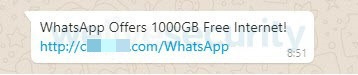
Look out for WhatsApp messages offering you 1000GB of free internet data!

A closer look at WhatsApp

Through recent months and years, we’ve seen quite a few WhatsApp scams do the rounds. We’ve seen fake links and phishing scams go viral and even fake versions of WhatsApp complete with unrealistic features.

Normally, the trick the hackers are trying to pull over us revolves around sending us to fake websites where they can infect our devices with malware and get private data out of us. They also might just bombard us with ads. An old classic.

This final one is exactly the MO of the latest WhatsApp scam that we’ve detected spreading across the network.

Look out for WhatsApp messages offering you 1000GB of free internet data

Fake WhatsApp message about 1000GB of free data
Image via: ESET

As is often the case with phishing scams, this latest WhatsApp scam is offering something that is too good to be true. Limited data plans are common these days, with many people falling short on their allowance before the end of the month. Being offered 1000GB of free internet is such a good offer, our better judgment might fly out the window.

The security team at We Live Security came upon such a message recently and decided to follow it to see where it would lead. The link took them to a URL that was not officially connected to WhatsApp where they were submitted to a particular type of click fraud. The We Live Security blog post describing the scam had this to say about click fraud, “[It is] a highly prevalent monetization scheme that relies on racking up bogus ad clicks that ultimately bring revenues for the operators of any given campaign.”

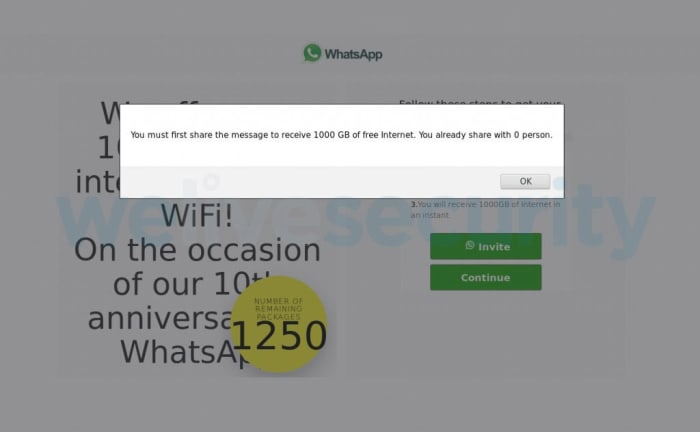
Basically, the site connected to this scam offers a huge reward to entice you to visit a fake website. The website is filled with questions that you need to answer if you want to collect your reward. Every time you click on the page to answer a question the fake sites generates revenue. Then, you’re asked to share the site with 30 of your friends to qualify for the prize you were first promised. In the end, you’ve spent a lot of time clicking on a fake website, spammed 30 of your friends with the false promise of a massive data allowance boost, and then you finish up with nothing for your trouble.

Fake site asking you to send it to 30 friends
Image via: ESET

The researchers at We Live Security didn’t find malware on the site, but they also pointed out that this didn’t mean there wouldn’t be any there in the future. On top of that, they also noted that the website domain connected to the scam is also being used to run multiple other click fraud scams while pretending to be other reputable brands like, “Adidas, Nestlé and Rolex, to name but a few.”

Wrapping up

The message from all of this is that if you ever see an offer pop up on WhatsApp or any other of your social channels that appears too good to be true, you should avoid it. Make sure you keep your eyes open for dodgy URLs and if something doesn’t look official, avoid it like the plague.

As we always say when reporting on scams like this, you are your own best line of defense. Stay vigilant and keep an eye out for the warning signs we’ve outlined above, if you want to have the best chance possible of staying safe when online.

FaceApp security warning: fake versions spreading

Researchers have discovered a number of different scams relating to FaceApp.

FaceApp scam

If you haven’t seen an aged version of a friend or family member recently you’ve either been living in a cave somewhere or you’ve possibly been the victim of some sort of unknown EMP-type event. FaceApp has taken the internet by storm with its realistic AI aging filter. FaceApp is an AI-powered photo manipulation app that has a few different filters, but it is the aging filter that has garnered so much popularity recently.

9

The FaceApp aging filter has become so popular that there are plenty of people out there who would be willing to pay for a premium version of the free app. If you’re one of those people or you know somebody who might be one of them remember this; there is no premium version of FaceApp. If you find a premium version of FaceApp it is a scam.

Researchers have discovered a number of different scams relating to FaceApp

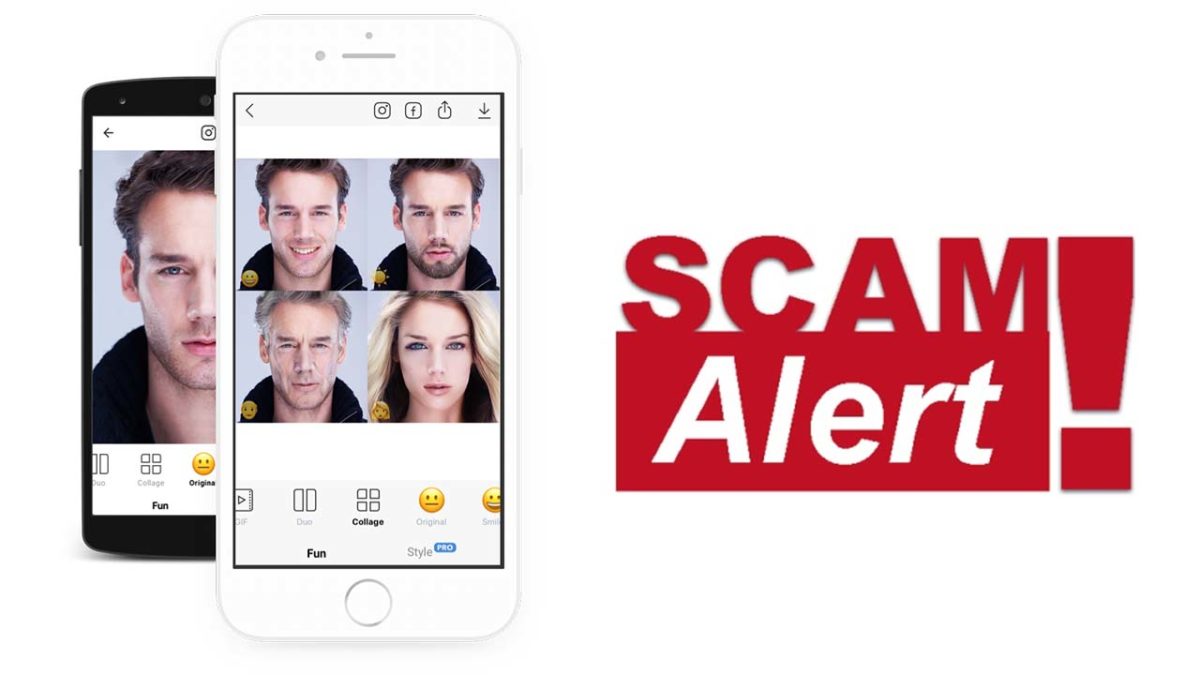
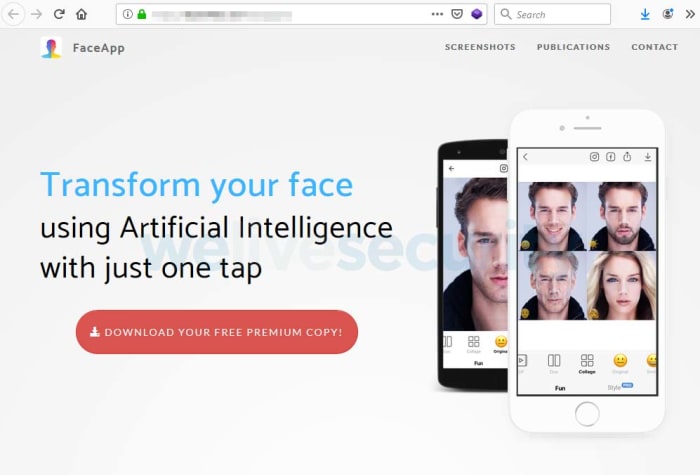
The first scam highlighted by security researcher Lukas Stefanko on the We Live Security blog relates to a fake pro version of FaceApp like the one detailed above. The “pro” version of the app is advertised on a fake website.

What’s worse, the “pro” version is advertised as a “free premium” app, which doesn’t even make any sense. All the website will do is push users to click an endless number of ads, sign up to various subscriptions, and view special offers for other paid apps.

This is a fake FaceApp pro website
Image via: We Live Security – Beware of fake FaceApp pro websites like this one

After what must have seemed like an eternity’s worth of clicks, all Stefanko and his team ended up with was the regular version FaceApp that is available on the Google Play Store.

Another scam Stefanko’s team have uncovered comes via YouTube videos. Their blog post shows a YouTube video that has well over 150,000 views, which again describes a fake “pro” version of FaceApp. The YouTube videos also contain shortened links in their descriptions where users can download the fake apps. In reality, much like with the fake website scam, these only lead users to apps that are simply designed to deliver ads to the unsuspecting user.

What’s worse about these YouTube scams is that shortened links offer scammers a great way to make people go to sites that are infected with malware.

Shortened links can hide a lot of the key giveaways that we should look out for when we suspect a link could be fake or malicious. Although, this isn’t the case with any of the shortened links the We Live Security team found, relating to the fake “pro” versions of FaceApp, we still need to be careful.

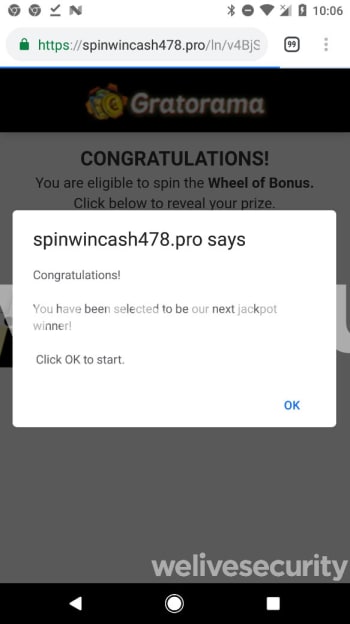
Image via: We Live Security – Looking for a “pro” version of FaceApp will only ever find you spam ads like this one or something worse.

The key takeaway here is to not allow ourselves to become too carried away by viral hype and lose our senses in the process. Stefanko has this important message, that we should all remember when there is a viral app doing the rounds. “Hype attracts scammers, and the bigger the wave, the higher the risk of falling victim of a scam. Before joining the hype, users should remember to stick to basic security principles.

Regardless how exciting the topic is, avoid downloading apps from sources other than official app stores, and examine available information about the app (developer, rating, reviews, etc.). Especially in the Android ecosystem.” Fake apps are a common problem, but they’re particularly dangerous when everybody is talking about the newest big thing.

If you want a more detailed explanation on how to avoid fake apps in the Google Play Store check out the short guide we’ve written below.

Google Play Store had apps that allowed digital stalking

Security specialists at Avast have identified 7 apps on the Google Play Store that allowed people to stalk others.

Malware is bad, but now we have a new threat to contend with. Ladies and gentlemen, let’s talk about stalkerware.

Security specialists at Avast have identified 7 apps on the Google Play Store that allowed people to stalk others

Stalkerware cybersecurity google play store avast

In a recent blog post, Avast announced that it had discovered seven apps available on the Google Play Store that enabled users to stalk other people. The apps work by sharing the victims live location, collecting their contact list, and monitoring their SMS and call history. This made it possible to stalk work employees or colleagues, romantic partners or, perhaps worst of all, children. According to Avast, all seven apps were likely designed by a Russian developer.

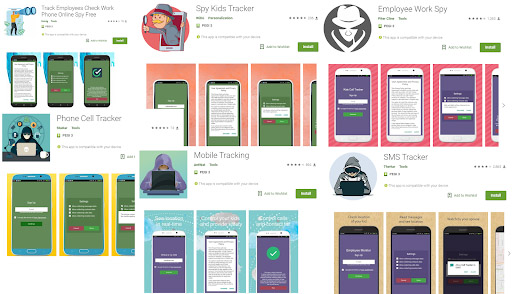
Before publishing the blog post, Avast first notified Google of the seven malicious apps and the internet giant has since removed them all from the Play Store. Unfortunately, however, they’d been downloaded over 130,000 times before Google was able to remove them. You can see the names of the seven apps below:

  • Track Employees Check Work Phone Online Spy Free
  • Spy Kids Tracker
  • Phone Cell Tracker
  • Mobile Tracking
  • Spy Tracker
  • SMS Tracker
  • Employee Work Spy
Image via: Avast

Each of the apps first required the stalker to gain access to the victim’s phone. They’d then install the apps on the phone before following instructions that would show them how to hide the apps so that the victim wouldn’t know they were there.

The stalker would then email themselves a link and use it to install the spying app onto his or her own phone. From then on, the stalker would be able to keep tabs on the victim, and even be able to view their location on a map.

Stalkerware removed from the Google Play Store
Image via: Avast

Avast’s head of mobile threat intelligence, Nikolaos Chrysaidos, had this to say of the new type of malware threat, “These apps are highly unethical and problematic for people’s privacy and shouldn’t be on the Google Play Store… They promote criminal behavior, and can be abused by employers, stalkers or abusive partners to spy on their victims. We classify such apps as stalkerware, and using apklab.io we can identify such apps quickly, and collaborate with Google to get them removed.”

These apps offer an insight into a worrying new digital threat that we need to be aware of. Protect your phone with a rigorous password as well as any biometric security measures your phone may offer. Don’t give it to anybody you can’t trust. We’ve also reached out to Chrysaidos to see about how to make sure nobody has installed these apps on your phone.

Firefox will soon make it much easier to spot websites that are insecure

Starting in October, Firefox will permanently mark all HTTP sites as not secure.

Firefox logo update

When Mozilla releases the next update to Firefox this October, it will make it much easier to spot sites that are more likely to be insecure.

Firefox 70 will follow in the footsteps of Chrome update number 68 from last year, by adding a permanent “not secure” indicator on all non-https websites. This marks a change from the current policy, which only shows the not secure indicator when a HTTP website includes forms or login fields.

Why is this important?

The Firefox team that announced the planned move cited the fact that 80% of all internet pages are now served via HTTPS. This means that rather than HTTPS websites receiving a positive note, it makes much more sense for non-HTTPS sites to be negatively flagged for their added security risk.

Talking to ZD Net, Firefox developer Johan Hoffmann said, “In desktop Firefox 70, we intend to show an icon in the ‘identity block’ (the left hand side of the URL bar which is used to display security / privacy information) that marks all sites served over HTTP (as well as FTP and certificate errors) as insecure.” This move will bring Firefox in-line with Google Chrome that made the same change a year ago.

It isn’t like Mozilla is simply copying Google with this, however, as the privacy valuing foundation has been working on the feature since 2017.

Google bans major Chinese app developer from the Play Store

Google has banned CooTek from the Google Play Store and its ad platforms.

Google has been having a bit of a torrid time with the Play Store recently. As well as the many scams and malware infested apps that constantly plague the Google store, the internet giant has also been having to deal with wholesale abuse of its best practices by major app developers based in China. In recent months we’ve seen a number of bulk breaches of trust that have led to Google taking drastic action in order to protect Play Store users.

The first came from app developer DO Global that had over 100 apps on the Google Play Store that between them had been downloaded over 600 million times. Google had to remove 46 of these apps while also looking into subsidiary developers linked to DO Global because the developer was committing ad fraud on a massive scale and abusing user permissions.

Another massive breach of trust came via the Chinese-based firm CooTek. CooTek’s 238 apps had amassed an impressive 440 million downloads between them. The problem was that they were also running unauthorized adware that could make the victim’s phones useless. The adware would lay dormant on the victim’s phone for some time before eventually bombarding them with so many ads that many victims couldn’t even perform basic functions like unlocking their phone.

Google has banned CooTek from the Google Play Store and its ad platforms

Google responded to the CooTek scandal by requesting the developer update all of its software and replace its apps on the Play Store with clean installs. CooTek duly complied with the Google request and it looked like all CooTek apps on the Google Play Store had been removed or updated.

Unfortunately, however, it appears CooTek wasn’t actually doing what it said it was. Rather than simply removing BeiTaPlugin, the aggressive adware in question, CooTek broke it up and hid its various functions deeper in the code of each of its apps. This meant that anybody downloading one of the affected apps could still fall victim to the aggressive ads that make normal use of a phone impossible.

Following the investigation that discovered the above, Google has taken swift action, banning CooTek both from the Play Store and its ad services. A Google Spokesperson said, “Our Google Play developer policies strictly prohibit malicious and deceptive behavior, as well as disruptive ads. When violations are found, we take action.” Google also confirmed that the hundreds of CooTek apps on the Play Store are being removed and that over 60 are already gone.

Although this puts the CooTek issue to bed this likely won’t be the last time we hear about fake apps and ad scams finding their way on to the Play Store. The sheer size of the platform makes it almost impossible to completely protect. Stick with us then, to stay up to date with all the latest news relating to where you buy all your Android apps.

The 3 best apps for blocking spam phone calls

Block unwanted robo calls with these apps!

Robocall

Since 2014, spam calls have risen considerably, and the inevitable truth is it’s only going to get worse. Of all the nuisance call complaints in 2017, 62 percent were about robocalls.

Think about that: Millions of people suffering unwanted interruptions to their lives from … a machine. It’s all a bit too “Terminator 2” for our liking. Unless you find some way to block the calls completely, the robocaller will harass you forever (or until you disconnect your phone).

So what can you do? Get suited up like Sarah Connor and track the machine down for immediate termination? That’s perhaps taking it too far, and besides, there’s a much simpler solution: Install a spam call blocker on your mobile phone. Basically, if you get a call, protect yourself. If you want to get rid of unwanted robocalls, check out our list: 

3 best apps for blocking spam phone calls

1. TrueCaller (free)

With more than 100 million daily users, TrueCaller is one of the most popular call blocker apps around. Promising to help you track and block spam, identify who’s calling you, and even tell you the best time to call your friends, TrueCaller is a powerful tool against the march of robo-spam. It’ll even block spam text messages, too.

stop the robocalls now!
Truecaller can identify fraud and robocalls before you even answer

TrueCaller’s strength lies in its community. Every time a member identifies spam numbers, it’s added to a list which is then used to block unwanted calls not just for that user, but all users. That means the occasional call might get through, but once identified it should, in theory, be blocked forever. That means no more pesky telemarketing calls. 

Since TrueCaller crowdsources contacts from its users, there’s been some controversy over privacy. The reverse look-up means you can find names from numbers (but not vice versa), even if they’re not in your address book. Sharing your friends’ contact info without them agreeing to it isn’t really fair, but the good news is you can opt out of this and still use the app. 

Truecaller Download Free ►
8

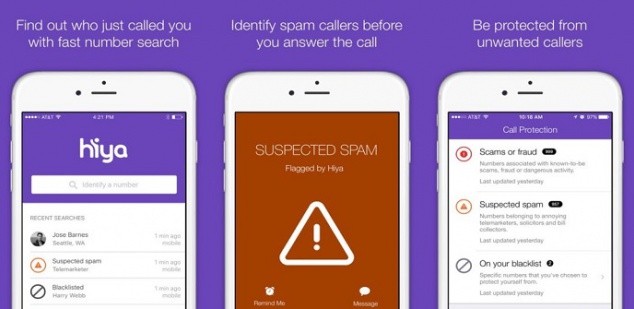
2. Hiya (free)

Hiya claims to have the “world’s most advanced phone spam protection engine”. While we can’t prove that’s true, the app does have a slew of 5-star reviews on the app store.

And it'll identify spam too.
Hiya provides context needed to confidently take or make calls.

Like other blockers, Hiya uses a spam database of over 1.5 billion phone numbers that it draws from to identify the source of incoming calls. It then filters unwanted calls, and you can create your own by adding numbers from your own contact list or call history. Basically, it automatically blocks calls. The free version identifies spammers, robots, and scams in real-time, and there’s a reverse-lookup feature so you can find out if you’re in the sights of some nefarious telemarketer.

To get their “premium caller ID” you need to pay extra, and again it means adding your contact list so you and others can “share” contacts and identify people not in your phone book. If you’d rather not share your contact list, you can ask Hiya to remove it.  

Hiya Caller ID and Block Download Free ►
7

3. RoboKiller ($2.99 per month) – iOS / Android

There's even a database of hilarious conversations.
RoboKiller answers spam calls and makes telemarketers’ lives miserable.

Oh, the sweet, sweet taste of revenge…

For just $2.99 per month, you can give the spammers a taste of their own medicine. RoboKiller doesn’t just block calls, it answers them for you.

Answer Bots (prerecorded voice snippets designed to simulate conversation) take your spam call and analyze voice patterns so even if your spammer is using a spoofed local number or an unknown number, they’re still caught. And the results are hilarious.

From drunken wasters to grumpy old men, Answer Bots make spammers’ lives hell while gathering the information RoboKiller needs to block even more nuisance calls. There’s even a RoboRadio where you can enjoy listening to the Answer Bots taking revenge.

Aside from the unbridled joy of vengeance, you’ll also get text blocking, and customizable block lists.

RoboKiller - Block Spam Calls & Identify Callers Download Now ►
8

So there you go – three powerful apps that can put an end to nuisance calls for good.

Firefox team considers paid news product that would kill ads

A funding model that replaces ads as a revenue driver will ultimately protect user privacy

ad-free news across multiple platforms

If you’re one of those internet users who hates seeing ads, you might be interested in some of the moves the Mozilla Foundation has been making recently. Mozilla is the not-for-profit organization behind the popular Firefox browser that focuses on user privacy above all else.

Mozilla recently introduced a new web browser called Firefox Preview, which makes it very easy for users to protect their data. The foundation has also been making other noises recently, about offering up an alternative to the current ad-based model that powers and pays for the modern internet. The Mozilla model would see us paying a subscription that would fund the sites we visit so that they’re not forced to show us ads when we do.

A funding model that replaces ads as a revenue driver will ultimately protect user privacy

An ad-free internet fits in with Mozilla’s wider privacy protection mandate as the biggest threat to our online privacy is the value our data holds for big tech companies. The more they can learn about us, the more targeted the ads they can show us, which in turn are worth more money towards their bottom line.

Mozilla confirmed the move towards a paid model a few weeks ago when Dave Camp, the senior VP of Firefox at Mozilla said in a statement, “A high-performing, free and private-by-default Firefox browser will continue to be central to our core service offerings. We also recognize that there are consumers who want access to premium offerings, and we can serve those users too.” Camp was responding to an earlier article in t3n.de where the CEO of Firefox said that the subscription model might arrive sometime by October. We’re now getting a look at what that new premium model might look like.

Preview logo
Firefox Preview is currently in the beta testing stage and puts user privacy front and center

Firefox has recently been testing a funding model in partnership with a news subscription startup called Scroll. The test gave users a chance to sign up to an ad-free news subscription for $5 a month. Scroll offers users a subscription to 12 media partners that include some big names like USA Today, Vox, and Buzzfeed.

The Mozilla test is no longer active, but it gave subscribers access to ad-free audio versions of their news stories as well as working with partnered content across different devices and from a variety of sources and platforms including native apps and social media.

Mozilla is no doubt poring over the data it has collected via its recent test as we move closer towards the October launch date the Firefox CEO talked of back in June.

It is worth noting that Apple offers a similar service for $10 a month, which hasn’t been too successful. If you’re looking for an-free internet though, Apple might not be a company you completely trust.

The Mozilla Foundation, on the other hand, has a solid reputation among web users and their version of an ad-free internet could be the one we see more of in the future.

Make sure you stick with us for more developments on this story, and others, as they happen.