
Facebook to try WhatsApp’s message forwarding limits

Facebook is limiting message forwarding on Messenger in Sri Lanka and clamping down on purveyors of fake stories in Myanmar

Fake news and Facebook

We’ve written a lot about WhatsApp’s fake news problem over the last few months and how the problem has also gripped Facebook in various parts of the world. We’re technology advocates and marvel at the way apps can change our modern lives. We also, however, understand the power that social technology on a global scale can have and this is why we report on the bad stuff like fake news as well as the good stuff like helping you get to work on time, for example.

WhatsApp and Facebook’s fake news scandals have been truly shocking with WhatsApp being at the heart of lynchings and horrific beatings in India and Facebook helping facilitate genocide in Myanmar. It is in India where most action has already been taken, with WhatsApp starting a number of initiatives including placing limits on message forwarding capabilities and even setting up an investigatory helpline to look into how users interact with false news stories.

It now looks as though Facebook is starting to apply what it has learned from its WhatsApp efforts in India to other parts of the world experiencing similar problems.

Facebook is limiting message forwarding on Messenger in Sri Lanka and clamping down on purveyors of fake stories in Myanmar

Facebook has released a blog post describing its efforts to halt the spread of fake news across its network and the most telling claim is that Facebook is starting to replicate what it has been doing on WhatsApp. In the post, Samdih Chakrabarti, who is a Facebook Director of Civil Integrity said, “In Sri Lanka, we have explored adding friction to message forwarding so that people can only share a message with a certain number of chat threads on Facebook Messenger. This is similar to a change we made to WhatsApp earlier this year to reduce forwarded messages around the world.”
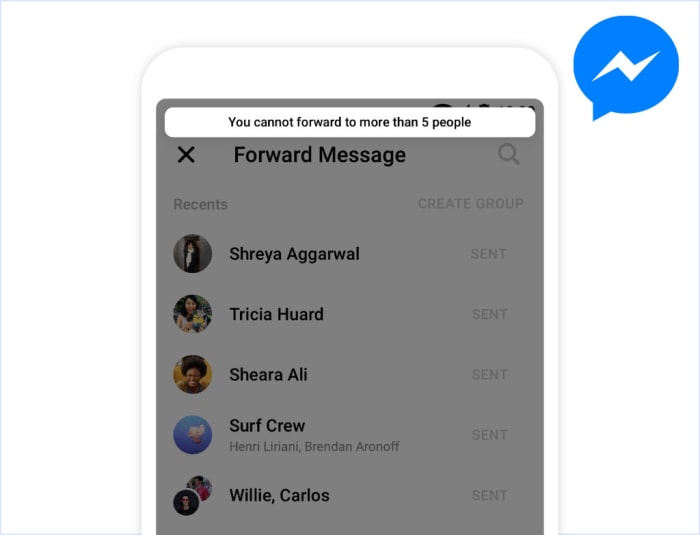
Message forwarding n Messenger limited to five people

A screenshot posted to the Facebook blog indicates the limits Messenger uses in Sri Lanka face will be the same as those faced by WhatsApp users in India. If you’re forwarding a message on Facebook Messenger, you’ll only be able to forward it to five people at a time.

In Myanmar, where Facebook’s fake news problem has helped whipped up hatred of the local Rohingya Muslim population, Facebook is taking a different approach. Chakrabarti went on to say, “In Myanmar, we have started to reduce the distribution of all content shared by people who have demonstrated a pattern of posting content that violates our Community Standards, an approach that we may roll out in other countries if it proves successful in mitigating harm.”

They’re targeting the sources of the problem, which is refreshing, and Facebook even said it is prepared to ban individuals or organizations promoting violence. This echoes past action taken by the social network against the Myanmar military.
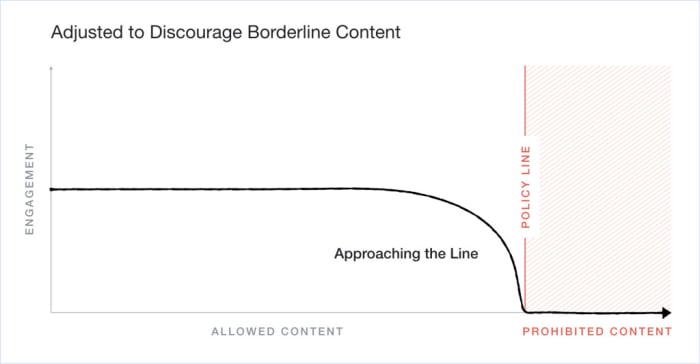
Facebook's new borderline content publication policy
Facebook’s new policy takes a harsher look on content that is close to its prohibition limit, rather than allowing it to naturally engage with other users.

It is good to see Facebook taking affirmative action in its bid to stamp out a true evil that has been able to spread across its network. It is also heartening to hear Chakrabarti recognize that, “This is some of the most important work being done at Facebook, and we fully recognize the gravity of these challenges.”

The damage that has already been done though, can’t be ignored and cleaning up the mess is only half of it. If Facebook truly understands the gravity of the situation, it will act more responsibly in the future to ensure this type of thing never happens again. With similar problems growing at home and with the hugely significant unveiling of Facebook’s planned cryptocurrency, it is more important than ever that the social giant recognizes its responsibilities and moves to fulfill them.


What is #TheGitUpChallenge?

#TheGitUpChallenge is spreading across social media. Here’s what to know.

Blanco Brown

Don’t look now, but we’re in the midst of a hip-hop/country crossover phenomenon. Much like Lil Nas X’s “Old Town Road,” this latest sensation began on Soundcloud and launched to prominence on TikTok.

Here’s the song:

First up, props to Blanco Brown for filming his music video in a trailer park, lit entirely by what we assume are car headlights.

“The Git Up” has more than 5 million streams on Spotify, and now everyone is doing their own spin on the dance. #TheGitUpChallenge has more than 100 million views on TikTok. You are guaranteed to encounter it at any weddings in the near future.

9

Need a tutorial? Blanco Brown is here to help:

Here’s how you know this thing has broken containment and spilled out into the real world. Newly married couples are doing it…

…and so are cops…

…and so are banks…

…and so are mechanics…

…and so is Spider-Man.

We’re counting down the minutes until we see Bernie Sanders doing this as a campaign stunt.

Study up now, friends. You will be required to do this dance before the year is out.

Facebook is making changes to how it ranks public comments

Facebook is trying to make your comments mean more meaningful

Facebook comments are a lot of different things to a lot of different people. Some people beam proudly about their best Facebook comments ever; others recoil at the annoying Facebook comments they have to deal with on a daily basis; while some constantly worry if they can delete their Facebook comments, thinking, will they know if I did?

shocking facebook comments

We all have a different relationship with Facebook, which is why we can see the same things differently. This is why Facebook, and other social networks like Twitter, have long eschewed showing things like your feed or post comments chronologically and have since attempted to rank everything according to how each of us uses Facebook individually. We don’t see the most recent Facebook comments, not even the most awesome Facebook comments; according to the social giant, we see Facebook’s most relevant comments.

7

Facebook is trying to make your comments more meaningful

In a recent blog post, Facebook announced a series of changes it is making to its public comments ranking system. The idea behind the change is to make Facebook comments more meaningful to the people that read them but also in relation to the original post they’re commenting on.

Facebook states, “Ranking is on by default for Pages and people with a lot of followers, but Pages and people with a lot of followers can choose to turn off comment ranking. People who don’t have as many followers will not have comment ranking turned on automatically since there are less comments overall, but any person can decide to enable comment ranking by going to their settings.” This means your comments likely won’t be ranked if you say something about a post from a friend or family member but if you comment on posts by a popular Facebook Page or account, they will be.

How Facebook ranks comments

Image via: FB Newsroom

Facebook looks at a number of different factors when it ranks a comment. These are integrity signals, which are designed to keep comments safe by removing comments that violate Facebook’s Community standards and clickbaity comments; how Facebook users have responded in official Facebook surveys; comment interaction; and the various controls Facebook gives the poster of the original post. You can find more information about toggling ranking on and off for comments on your posts here.

What changes is Facebook making to its comment ranking system?

There are two major changes Facebook is making to how it ranks public comments. Comments will rank higher if they have interactions with “the Page or person who originally posted.” The other factor Facebook is now considering is whether the comments or reactions are from friends of the person who made the original post.

Facebook hopes that these changes will make the publicly viewable comments on prominent posts much more meaningful to the people reading them. This slight tweak, however, will no doubt delight some Facebook users and annoy others.

Cracking the Twitter algorithm in 2019

Here’s how to stand out on Twitter after the recent changes.

Twitter

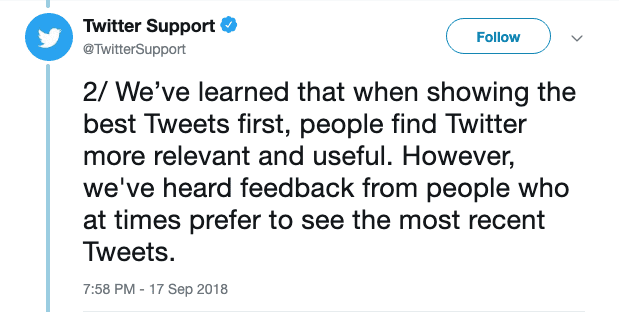
Last September, Twitter announced that users would be able to switch between a Top Tweet view and a chronological Latest Tweets timeline.

So, people now can move between an algorithm-based feed and a chronological timeline. This is something Facebook and Instagram have stayed away from in an effort to be relevant and engaging or whatever.

But just because the algorithm is optional doesn’t mean that everyone is opting out in favor of an old-school chronological feed.

Below, we’ll look at some of the key ranking signals you can expect to find inside your account.

7

What are the ranking signals?

As is the case with Facebook and Instagram, Twitter’s algorithm depends on a handful of ranking signals.

In 2019, the algorithm-based feed consists of the following sections:

Top Tweets

Top tweets are determined by the algorithm. Users will see content from accounts they follow, as well as content from their followers and suggested accounts.


Users also have the option to provide feedback on the content displayed in this section. This allows them to see some types of posts less often.

Latest Tweets

Latest Tweets represent a reverse chronological feed containing tweets from your followers.

ICYMI (In case you missed it)

In case you missed it, this is a compilation of top tweets determined by the algorithm. ICYMI is typically displayed to users who haven’t logged in lately. Frequent users won’t see this content much.

Happening Now

This is a section that appears at the top of your timeline, featuring trending topics and current events.

Trends for You

Another section determined by the algorithm, Trends for You highlights content that Twitter has determined to be relevant or interesting based on past activity.

You’ll have the option to customize this content by going into the Content Preferences section of your account.

As is the case with Facebook and Instagram, Twitter’s algorithm depends on a handful of ranking signals.

Here’s a quick look:

Recency

When was the tweet published? Timing weighs heavily into the Twitter algorithm, even if the user opts out of the algorithmic feed.

Rich media

Rich media refers to posts that contain video, audio, or GIFs, which encourage viewers to engage with the content. In other words, Twitter gives preferences to posts that contain more than a stock photo and a one-liner. That helps explain why this video just exploded:

Engagement

Engagement refers to how many tweets, impressions, replies, and clicks a tweet has received. It also takes into account how often people engage with the author’s account. It also factors the engagement of a tweet relative to other tweets posted by that same user.

Why chronological matters

Clock

Chronological content is one of the few ways that you can access neutral information in the aggregate format of a social media channel.

When you’re looking at something like top posts, that means that the platform’s algorithm is making a judgment call on your behalf. It is deciding what information you’re likely to click on, not which news stories are the most important or what is happening in real time.

We’ve become increasingly critical of what kind of content we see while scrolling mindlessly through social media.

Twitter’s move to allow people to opt out of the whole algorithm thing is actually a big deal.

Twitter feedback

Where Facebook has stated on multiple occasions that the algorithm offers users a better experience, it’s hard to separate that push toward engagement from the value it offers to advertisers.

Switching back to the chronological feed on a desktop is a matter of navigating to your account settings and unchecking the box that says “Show the Best Tweets First.”

change twitter timeline settings

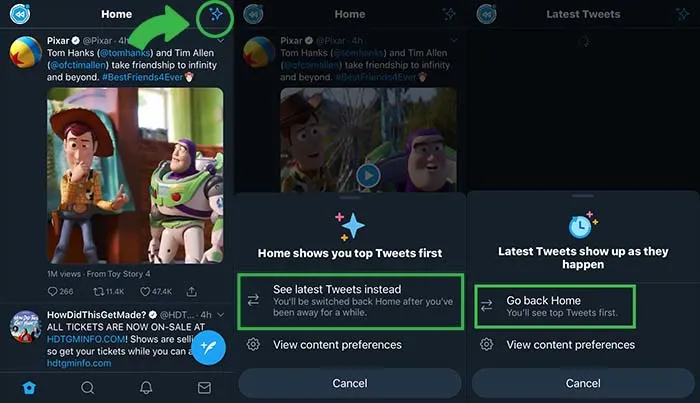
On your phone, click the little star icon and it will open options for you to flip back and forth between “top tweets” and “latest tweets.”

Twitter feed preferences

How to make sure people see your Tweets

Despite having the option to skip the algorithm in favor of an orderly feed, many people are likely going to stick to the curated feed.

With that in mind, here are some tips for making sure that your content gets in front of as many eyeballs as possible.

Use hashtags

The hashtag was actually created on Twitter as a means of helping people find tweets and accounts they might find interesting. To this day, adding a hashtag is one of the best ways to get “discovered.”

Respond to your followers

Because one of the key ranking factors is “engagement,” you’ll likely get more visibility in others’ feeds if you retweet, like, comment, or reply on the platform.

As we’ve seen with Facebook and Instagram, there’s been a real push toward getting people to engage more with others, rather than focusing on collecting more followers.

Add visuals

This draws back to the idea that rich media tweets do better than those without any compelling visual elements. It’s well-documented at this point that social media content depends on visual aids.

Take it a step further and diversify your feed by adding in video clips, live videos, GIFs, and audio.

Don’t be afraid to max out character limits

Yes, the whole concept of Twitter is based on brevity.

This is why there was a bit of controversy when the social media platform doubled the character limit — going from 140 to 280. That said, it seems that the expansion has created an opportunity for more engagement.

According to Twitter research, they found that Japanese users were able to say more with fewer characters, which led to more valuable conversations.

Bottom line

Just because Twitter has the option to toggle between chronological and algorithm based feeds doesn’t mean everyone is opting out of the algorithm.

This means if you want to get the best possible results, you’ll need to play to the algorithm’s rules.

Visiting or moving to the US? Trump wants to see your social media data before he’ll let you in

All Visa applicants to the U.S. will have to hand over all of their social media and email details from the last five years.

We’ve written a lot in the past about China’s scary use of modern technology. In particular, we’ve been frightened by the authoritarian social credit score it gives all Chinese citizens and the limits it places on those with low scores. It is easy to think, because China is so far away, that it isn’t really something we should worry about at home. But what makes China’s actions so scary is that they could easily be taken up in other countries by other governments. First, they came for the Chinese…

Well, now it seems that these draconian types of laws have just taken a huge step closer to home as the U.S. State Department has just made a rather chilling announcement.

All Visa applicants to the US will have to hand over all of their social media and email details from the last five years

Trump want5s to see your facebook

Anybody planning to visit or migrate to the U.S. on any kind of visa now has to give the State Department all of their social media usernames, previous email addresses, and phone numbers from the previous five years. According to the Associated Press, the move was first proposed in March 2018, but has only just taken effect after the new forms, including the new “social media identifiers” requests, were approved.

The new move marks a huge expansion of the Trump administration’s screening procedures for anybody coming to the U.S. Until this recent move, these types of requests were only made to people who’d been flagged as needing extra attention. These flags could come from a number of reasons including traveling to areas controlled by terrorist organizations. The AP reports that around 65,000 applicants fell into this category each year, but that now almost 15 million visa applicants, mostly for non-immigrant visas, will be required to hand over their social media details.

The new visa forms will list the most prominent social networks, but applicants will also be prompted to include the details for any other networks that aren’t explicitly mentioned. As yet, there are no details on how the State Department will ensure details of all accounts have been included in applications but speaking to The Hill, a State Department spokesperson warned of “serious immigration consequences” for those caught not complying. These consequences could potentially include visa withdrawal and refused entry.

many passports different nationalities
You now have to show much more than your passport, if you want to enter the US

As well as the scary implications that come from the U.S. government doing its best China impression, there is also the huge potential risk that comes from compiling such huge amounts of personal data in one place. We’ve seen time and time again, huge data breaches that have put user privacy and security at risk and as ZDNet points out, U.S. Customs doesn’t exactly have a  flawless record when it comes to data protection. A report in December showed that border agents hadn’t been deleting the data they’d collected from personal electronic device searches.

We’re not just walking down a scary path with this one, it also seems like a disaster waiting to happen at any moment.

What’s new with Facebook’s redesign

Facebook tries to reinvent itself. Will it work?

facebook new look

Facebook rolled out a redesign in the wake of its many recent privacy scandals. Today, it feels like Facebook is trying to wipe the slate clean with a minimalist interface and a pivot toward digital community-building.

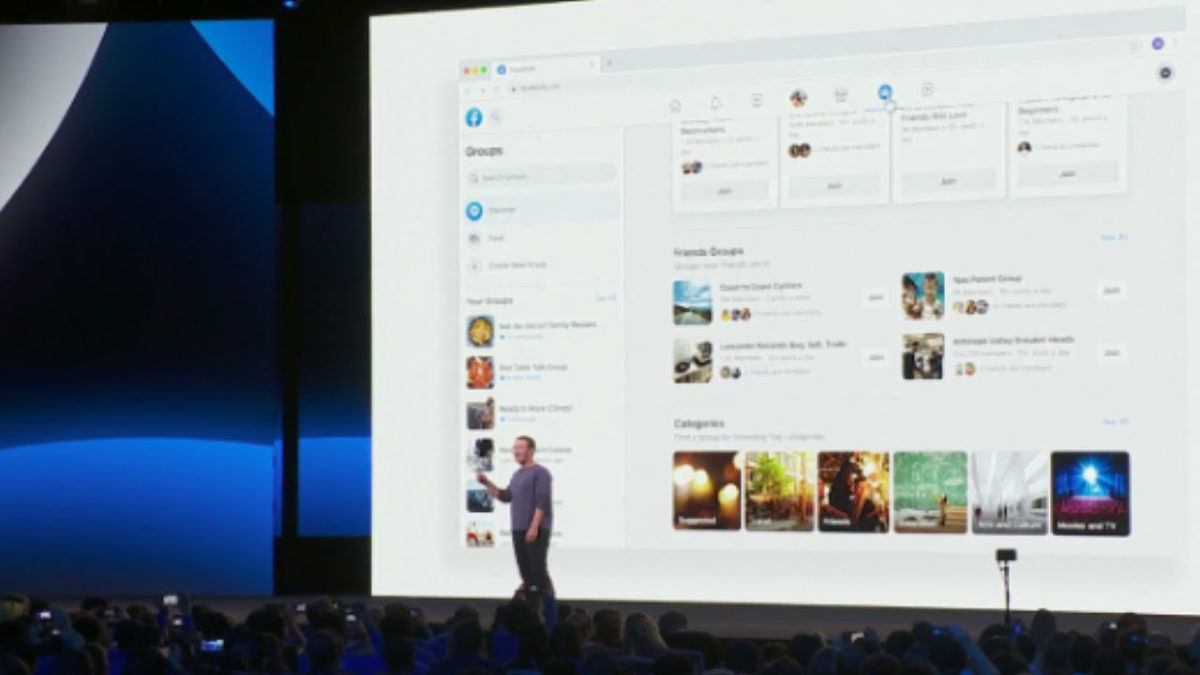
Just last month, Facebook announced that significant changes were coming to the mobile and desktop platforms. They announced the changes would shift away from the news feed and toward the two features people still use: Events and Groups.

Watch the Zuckerberg announcement here, if you’re so inclined:

But, the gist of it is, Facebook is aiming to get more personal. The company is doing so by putting some distance between features like Groups, Messenger, and Events and the increasingly problematic newsfeed.

Here’s what’s changing:

New look, new feel

Facebook redesign

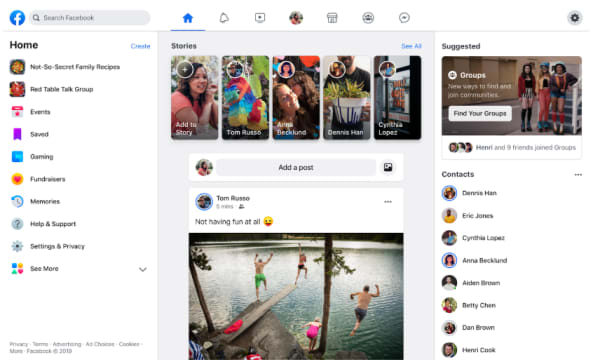
So, before we dive into the real meat of the redesign, Facebook has made some notable aesthetic changes. Instead of the big blue header at the top of the page, the site includes a lot more white space, with light gray icons for accessing your newsfeed, notifications, Messenger, and Facebook Watch.

They’ve also updated the logo, shifting gears from an F within a blue or white square to a brighter, circular icon.

7

It’s all about the groups

suggested groups

Zuckerberg is all about building communities these days. Groups represent a big part of that shift from a centralized newsfeed to a core focus on groups.

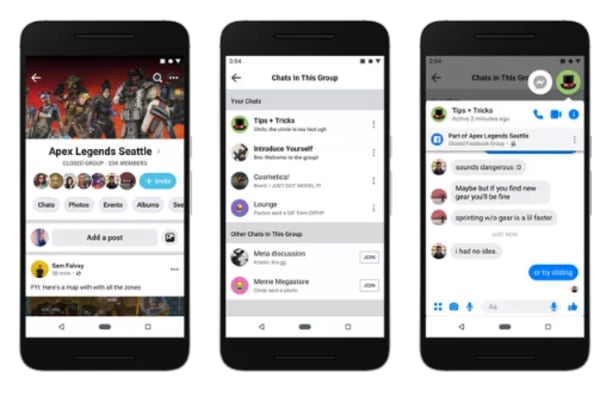
That focus on community, according to Zuckerberg, means building out both public and private groups on the platform. Increasingly, users seek private spaces where they can post content that reflects shared interests in front of an engaged audience.

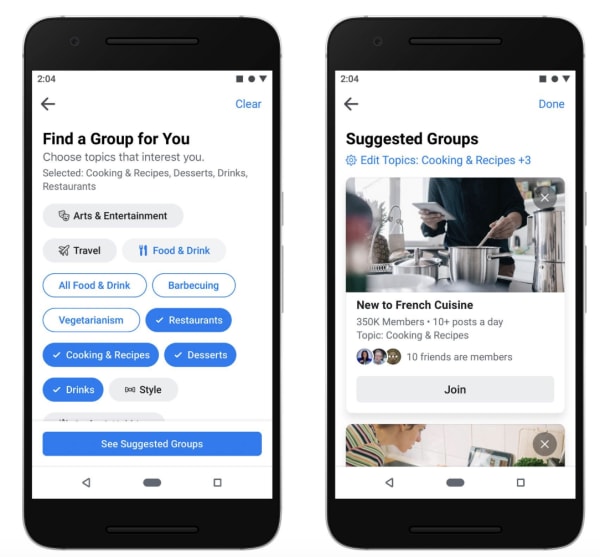
Facebook also plans on helping you expand your online circle by recommending groups based on past interests and interactions. Plus, they’ve improved the feed, making active Groups easier to find — within a personalized feed. Now, you can separate group posts from the regular newsfeed, making it easier to engage with other users.

Meet new friends

new friends on facebook

Remember when we could meet people online? Sure, dating apps are huge, and there are apps like Meetup designed to help you find a book club or a few local folks to go with you to happy hour.

7

But, the days of the chatroom are long gone — perhaps for a good reason (namely, safety).

It’s long been sort of taboo to add someone you don’t know in real life on Facebook. However, part of the redesign involves changing what’s become a digital norm.

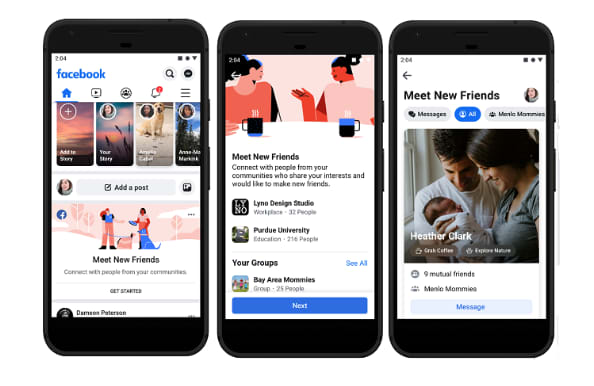
A new feature, Meet New Friends, aims to connect people with strangers who share an interest or connection. The goal is to help them meet up IRL.

Facebook Marketplace got a makeover, too

Facebook marketplace

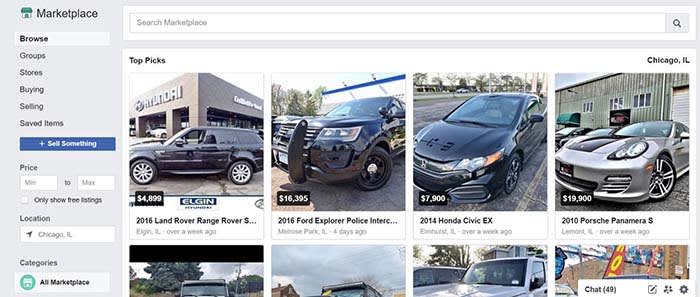
The social network’s e-commerce service, called Marketplace, also got an upgrade.

People selling goods through the platform will now be able to to take payment directly from the platform, including shipping costs.

As it stands, marketplace users have to arrange for payment outside of the platform — though they can do so inside Messenger.

Events

facebook events new look

Another area where Facebook is diving in head-first is its Events page. As is the case with groups, Facebook wants to help you find more things to do near where you live.

The new tab is now next to the Groups tab in the new menu bar layout. It offers a more detailed map view that allows you to see where the events you are interested in are located in relation to one another.

Facebook Watch is front and center

Wait, what is Facebook Watch? Don’t worry; if you’re asking that question, you’re certainly not alone. According to a Diffusion study, 50% of adult Facebook users in the U.S. had never heard about it.

Facebook Watch aims to capitalize on streaming trends — it’s trying to hitch a ride off of the success driving Netflix and YouTube. But, there aren’t any notable “hits” on the platform.

Facebook says that 75 million people now use Watch for at least one minute per day, and not necessarily all at once.

While we get why Facebook insists on making us notice Watch — it’s hard not to feel as though they’re really forcing us to pay attention.

Privacy

Privacy has been Facebook’s Achilles heel going on a few years now.

From Cambridge Analytics to the ongoing debate about the company’s data collection practices, the company has had some difficulties winning back the trust of the public.

To combat this image problem, Zuckerberg has been promoting a message centered around privacy. It runs in stark contrast to its old narrative as this digital public square.

Zuckerberg said, “Privacy gives us the freedom to be ourselves,” pointing to a shift in how we interact online these days.

In the past, the purpose of posting was to reach as many people as possible. Today, Zuckerberg says, we now crave a sense of intimacy online.

Which, in all honesty, is probably true.

Wrapping up

If the recent news about Facebook’s shareholders wanting to hire a chairman to oversee Zuckerberg is proof of anything, it’s that the company wants to change.

These new design changes to Facebook are nice, but we are hoping that the changes to the social media giant go beyond the cosmetic level.

Facebook shareholders vote to overthrow Zuckerberg (it doesn’t work)

Shareholders vote for a new Facebook chairman. Why won’t it work?

Zuckerberg

Nearly 70% of Facebook’s shareholders voted to reduce Mark Zuckerberg’s power in the company. This was revealed in a recent filing from Facebook from their shareholder meeting.

Last year, 51% of shareholders voted for an identical proposal. This year, even more Facebook stock owners are tired of how Zuckerberg has been conducting business.

Shareholders are upset with Zuckerberg over several major Facebook scandals. If you’re wondering what scandals they’re referring to, we can name a couple:

What do the shareholders want to do?

Shareholders are hoping to hire an independent chairman to hold Zuckerberg and his top team accountable.

Essentially, the shareholders are tired of Zuckerberg and his team not being held accountable. Hiring a chairman could put forward a set of checks and balances that would keep them from causing more harm to Facebook and its users.

7

Is anything going to come from this?

No.

The issue with hiring a chairman to oversee Zuckerberg is that he owns 60% of the company’s voting power. Zuckerberg and his team voted against hiring an independent chairman, so it’s not happening. Basically, no matter what the majority of shareholders propose, Zuckerberg always gets the final word.

This goes to show the importance of a chairman. Despite Zuckerberg’s majority voting power, a chairman could potentially approve or disapprove decisions made by Zuckerberg and his team. This would provide a new layer of accountability sorely needed at Facebook.

Should Zuckerberg not have as much power?

If you keep up to date with Facebook news, you’d know that there seems to be a new story about a Facebook scandal every week. Although Facebook will make a claim from time to time that they’re trying to make a change, the constant scandals speak for themselves.

To make matters worse, some scandals involved Zuckerberg’s direct actions.

Although Zuckerberg might be the founder of Facebook, his actions might continue to put the company in peril. If Facebook wants to outweigh the negative news with positive news, then they are going to need to make changes like these.

Facebook: Shake your phone to report bugs

Facebook is rolling out a “shake to report” bugs feature for mobile.

Facebook mobile

Facebook is unveiling a unique way to report bugs on the mobile app. Is it an inquiry? Is it a help bot? Is it a voice command? Nope, Facebook wants you to shake your phone.

When should I shake, shake, shake… shake, shake, shake… shake my phone?

The idea here is that Facebook wants to make it as easy as possible for users to report when the app isn’t working properly.

For example, you can shake your phone to report whenever a video won’t load or your news feed gets stuck. Facebook also hopes you will use it to ask for help if you can’t figure out how to do something.

7

How does it work?

The new action is simple enough. Whenever something doesn’t work or you want to ask for help, all you have to do is give your phone a little shake.

Remember, it’s a phone, not a Shake Weight.

There’s no need to risk throwing or dropping your phone. A gentle, little shake will suffice. When Facebook recognizes your shake, it will open up a pop-up menu where you can file your report.

This new way to report bugs on Facebook is brand-new for Android users, but it has been available on Facebook for iOS for a short while already. Until now, however, iPhone users have had to opt-in and activate the feature themselves. This will soon change.

How do I turn it on and off?

Your phone does not automatically have it enabled. To turn it on, follow these simple steps.

  1. Open your Facebook app
  2. Click the menu in the lower right-hand corner (it’s the three horizontal lines)
  3. Scroll down to “Help & Support”
  4. From there, click on “Report a Problem”
  5. A new window will pop up. Click on the gear in the upper right-hand corner of the window
  6. Turn the option to “Shake to Report” on or off
  7. You’re all set!

Wrapping up

With the general roll-out of the shake to report feature, Facebook will make it the default setting on all smartphones, Android and iOS. The feature is rolling out now to a small number of users globally, but Facebook expects the feature to arrive for everybody within two weeks.

Shaking Facebook on a mobile phone
Just shake your phone to report a bug or ask for help

Once it lands, you’ll be able to shake your phone whenever something isn’t right. Although shake to report is becoming the default action and will be activated on all phones within the next couple of weeks, you’ll still be able to report a bug the old-fashioned way. To do so, all you have to do is go to the Facebook Help & Support menu and report your bug there.

For the rest of us, we will be taking the advice of Metro Station. 

This new feature may sound intriguing to some, but we wouldn’t be surprised to hear about users accidentally flinging their phones at others. If you have a friend who doesn’t know their own strength, you might want to invest in safety goggles.

Flipboard data breach: What happened and who is exposed?

There is good news and bad news for Flipboard users.

Flipboard is a popular online news service and mobile app that takes stories from various news sites around the web and puts them together in an aesthetically pleasing interface. Since it first hit the web, Flipboard’s popularity has grown to the point where it enjoys 150 million active users every month. Unfortunately, however, the last few days have been bad both for the app and its users as notices have been going out to tell users that Flipboard has been hacked and user data has been exposed.

There is good news and bad news for Flipboard users

Flipboard

Flipboard has released information on the data breaches it has suffered via a security note posted to its website. The note says, “We recently identified unauthorized access to some of our databases containing certain Flipboard users’ account information, including account credentials.” It goes on to say that following the discovery the Flipboard team launched an investigation, which revealed some telling information.

“Findings from the investigation indicate an unauthorized person accessed and potentially obtained copies of certain databases containing Flipboard user information between June 2, 2018 and March 23, 2019 and April 21 – 22, 2019.” Yes, you read that right, the hacker had access to certain Flipboard databases for nine months.

The security note also points out that not all Flipboard accounts have been compromised by the breach and that the company is still trying to determine just how many accounts have been compromised. There is some good news there but the uncertainty surrounding which accounts have been breached and which haven’t, is probably why Flipboard is prompting all users to reset their passwords.

password and login details
Fortunately the stolen passwords are protected by a robust hashing encryption technique

The real good news, however, is that unlike with recent events at Facebook and Google, Flipboard had encrypted the vast majority of passwords it had stored on the breached database. Flipboard uses a strong password-hashing algorithm named bcrypt, which is widely regarded as being very difficult to break. The hacker may have been able to copy the database containing the sensitive user information, but there is good chance he/she won’t be able to access the data. Unfortunately, Flipboard also pointed out that passwords created or changed before March 14, 2012 were hashed using a weaker algorithm so may be easier to crack.

So, what should you do, if you have a Flipboard account?

As we’ve already pointed out, Flipboard is contacting users and prompting them to change their passwords. Follow the instructions it sends you and your account will be secure once again. The other thing to consider, however, is whether you’ve used the same password on Flipboard as you have on other accounts. This is the type of situation hackers dream of as it enables them to test the security credentials, they steal from one site on various other sites, too. Find out if any password you frequently use has been exposed here.

If you frequently use the same password, this is great time to reset all of your passwords. A password manager is the easiest and most secure way to do this. We recommend Last Pass – its free version offers multi-device support so you can use it to log in to sites on your computer and phone.

8

If you used Flipboard, but only signed in using your Google or social media accounts, Flipboard says you have nothing to worry about as it doesn’t store these credentials on internal databases. You will, however, have to log in again.

All this goes to remind you that you do need to take your online security seriously. A single breach can bring it all down like a house of cards if you’re using the same password across multiple accounts. That said, don’t wait. Act today, change your passwords and activate two-stage verification when possible, and stay safe online.

6 ways to level up your Instagram captions

Become an insta-sensation with these tips and tricks!

Instagram post

Sure, Instagram’s bread and butter is its focus on pretty pictures. It has been the case since 2010 when the app still had a reverse chronological timeline, well before Facebook entered the mix.

Initially, Instagram was designed as a platform for pics and pics alone. However, the founders quickly realized that something was missing… Enter the likes, comments, and yes, captions.

Instagram Download Now ►
7

Compelling captions do a lot for a post. They tell people what your photo is all about, prompt them to take action, and make sharing worthwhile.

Still, it’s hard to come up with the perfect combination of funny and thoughtful. How do you be descriptive but not too long? How many emoji should you use? What about hashtags? How many is too many?

Don’t make yourself crazy over captions. Here are some ways to drum up that coveted follower engagement without driving yourself nuts:

6 ways to level up your Instagram captions

1. Consider who you’re writing to… and why

Thinking before posting

First things first. Let’s talk goals.

Who are your followers? How old are they? If you add a reference will they get it?

Instagram has an inherently lighthearted tone. Think about it, you’ve got your pink walls and latte art, inspirational quotes, sunsets, and self-care. On a general level, you’ll likely see the best results from keeping things light.

Beyond understanding the platform, you do want to be in touch with the audience. Ask yourself what kind of language do they use?

2. Lead with the best stuff

Cool Instagram post

This is the Instagram equivalent of “above the fold.” Captions are cut off after a few lines of text. So, if you want to attract interest, you need to front load the information so that people might happen upon it while scanning through their feed.

Sure, you have 2,200 characters to say your peace. However, if you’re looking to max out your space you’ll want to treat the first part of your caption like a headline. After that, you can then dive into the rest for those care to click.

A note about caption length: The common wisdom is that shorter tends to be better, but it kind of depends on your profile personality. Some users approach their Instagram account as if it were a mini-blog while others go for brevity. They relish that expertly-selected emoji or slick one-liner. It’s all about finding what’s best for you.

3. Ask a question, make a call for action

Call to action

If you are a brand or you just work for one, you know better than to leave a social media post without listing a “next step” for your reader. The next step, otherwise known as your “call-to-action” or CTA for short invites readers to go, “Hey, I will click over to that website” or “check out that shop.”

Again, this brings us back to this idea of setting a goal. Think about what you want your post to accomplish — comments, likes, engagement, or website visits.

If you’re a typical user that just wants more engagement, try asking a question to get more people to comment. It doesn’t need to be complicated. You can ask people what they think about a new look or invite them to comment on a personal experience.

4. Formatting matters here

Yes, formatting counts when it comes to crafting the perfect post. Spaced out sentences are much easier to read than a big old wall of text. That’s blogging 101. However, you might not realize that avoiding the old text wall translates to social, too.

See this post from The Instagram Expert’s account


View this post on Instagram


– WHAT A DIFFERENCE 365 DAYS CAN MAKE IN YOUR BUSINESS (GO AHEAD, DREAM A LITTLE BIT) ⏡⏡ Meet @shannonleestrategy she has been a small business owner, like many of you, for the past 20 yrs. Shannon had been using online marketing for a while but she told me she felt like she was running on 1 cylinder when she wanted so badly to be at full throttle. Can you relate? – Because she knew she was missing something in her business, she joined Marie Forleo’s B-School last year. Shannon wanted to understand the FOUNDATION of what it takes to build a business online today using modern marketing. – After she took her leap into B-School and invested in her business she’s done some pretty tough work and she’s seen impressive results in her biz. ⠀⠀⠀⠀⠀⠀⠀⠀⠀ Including… ⠀⠀⠀⠀⠀⠀⠀⠀⠀ – How to tell stories on social and in her emails that emotionally connected to her ideal clients – She learned how to focus on always leading with giving value to her clients – She rebranded in a way that aligns with her marketing message – She started on Instagram with 300 followers and after going thru B-School and incorporating what she learned from my Instagram tactics in Ready Set Gram she now how 1,044 highly targeted followers -Since B-School & our in person B-School retreat in Boston, Shannon has… ✔️Gained confidence ✔️Made a mindset shift ✔️:Got Laser focused in her niche ✔️Has clear content that attracts her paying customer ✔️Has grown her email list from 0 to 200 ✔️Launched a website that converts to clients. Resulting in 1K views and several leads a week for her strategy and coaching business – She works less hours because of her systems in place and uses automation to work smarter. Her business has increased 800% giving her thousands and thousands of dollars a month to her household. Annnnnd this only took 1 year! 365 days! – Imagine where you could be one year from now if you invested in your business from someone Who has the step-by-step process to do what you need it?

A post shared by Sue B. Zimmerman IG Educator (@theinstagramexpert) on Feb 13, 2019 at 5:45pm PST

It’s crazy long, but she’s done a nice job making this approachable through the power of white space.

5. Include some emoji

Thinking Emoji

Well-crafted emoji captions are a real treat, and they’re more versatile than you think. These days even more serious brands are getting in on the action.

You can use emojis in a few different ways. For example, you can use them at the beginning of a post to catch people’s eye.

Or, make like Starbucks and tie your emoji back to the focal point in your photo.

Another idea is to use the “eyes” or the “finger pointing” emoji to draw the eye toward your link or CTA. It’s a nice visual trick for breaking up space, and it serves a practical purpose.

6. Hashtags

Hashtags exist as a means for classifying photos, but they also help you cast a wider net. They help you reach people who might never come into contact with your page. This Hootsuite report breaks down the stats:


Hashtag analytics

For best results, the goal is to keep your hashtags relevant first. The purpose is to help other users find content that corresponds with their interests. Essentially, save the jokes, memes, and emoji for the body of the caption.

7. Keep captions consistent

Finally, consistency is the backbone of branding whether you’re trying to build a business or turn yourself into an influencer.

In either case, people will remember your account when you deliver a high-end experience day in and day out.

Wrapping up

Instagram can be a great tool for building your own brand or your business’s brand. With these tips, you can turn the ordinary into the extraordinary.