Today’s downloads for Windows, Mac and Mobile

Download Shock Desktop 3DWindows: If you’re tired of the standard Windows desktop, take it to the third dimension with Shock Desktop 3D. This free tool will transform your current desktop into an amazing 3D environment with highly realistic physics, in which you can turn your icons into cubes and play around with them. Not really the most useful tool in the world, but very eye-catching!

Access your Gmail on your phoneJava phones: Got a Gmail account? Got a phone? If the answer to both of these questions is ‘yes’ then make sure you download Gmail Mobile. This excellent app allows you to check your Google Mail account while you’re on the move. It comes with all sorts of clever features such as offline sending and receiving, full mailbox searching and a chat history viewer.

AllBookmarksMac: Ever been in a situation where you want to access your bookmarks but not wait to open your browser first? AllBookmarks adds a new tool to your Mac OS X menu bar which gives you quick access to all your bookmarks. All Safari, Firefox and Flock bookmarks are displayed and can be selected and surfed to instantly.

Search and download video from multiple websites

Video DownloaderAdmit it – usually when you’re searching for a video clip, 9 times out of 10 you’ll use YouTube. And with good reason – YouTube has the biggest repository of video clips on the net. However, there are literally hundreds of video sites out there and it’s very likely that what’s on YouTube is only the tip of the iceberg. YouTube is also increasingly restricting the types of clips users can upload, limits clips to just 10 minutes and is constantly removing clips that broadcasters lodge an appeal against whether or not it’s justified.
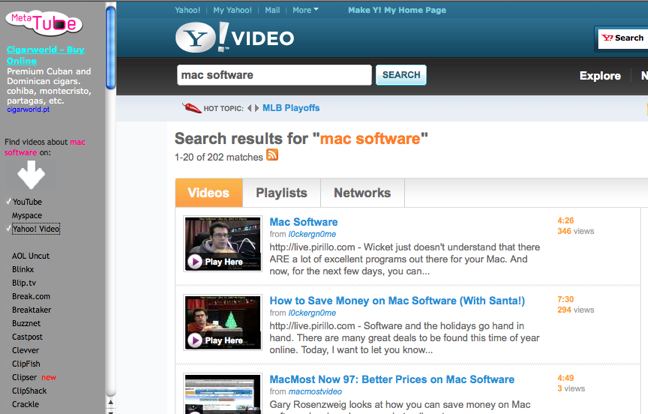
If you want to vastly increase the number of clips you find in one go and download them to your desktop then try using MetaTube. Metatube searches 100 video websites in one go – many of which you’ll probably never even have heard of but contain some unusual, rare and quirky clips that you otherwise wouldn’t find on YouTube. Some of the sites it searches include major ones like YouTube, Dailymotion and Google Video as well as hundreds of lesser known ones like Caspost, Clipfish and Jumpcut. Results from YouTube are displayed by default but you merely have to select on the list of video sites down the left to display them within the MetaTube site. There are no ads, it’s extremely fast and MetaTube saves hours of visiting different video sites.

MetaTube screenshot

Of course a lot of those hidden gems that you find you’ll want to download. The best Firefox extension to use with a site such as MetaTube is definitely VideoDownloader. You can see VideoDownloader in action here but in a few clicks, it allows you to download any Flash based video (which almost all of the video sites covered by MetaTube are). It can also capture MP3 and AVI clips and it’s totally free.

How to: Turn someone into a ghost in Photoshop

Halloween is here again! Many people will celebrate this day with special Halloween parties at their local pub, but if you’re one of those who prefer to stay home and play trick or treat with the kids who come up to your door, we’ve got a nice plan for you. Switch on your computer, open up Photoshop and get ready to transform a nice portrait into a scary ghost with this easy tutorial. Are you ready? Let’s go!

How to: turn someone into a ghost in Photoshop

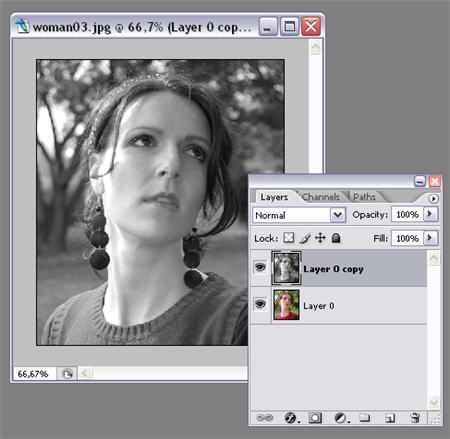
1. Open the photo of your “victim” and duplicate the background layer with Ctrl+J. Then desaturate this copy with Ctrl+Shift+U.

How to: turn someone into a ghost in Photoshop

2. Create another copy of the background layer (Ctrl+J again), go to Filter > Blur and apply a Motion blur effect to this third layer. Make sure the angle is 0 degrees and try different distance values until you obtain something similar to my image. Continue reading “How to: Turn someone into a ghost in Photoshop”

Essential software for the next US president

Pimping the President’s PCAs you’re probably aware, there’s a big election going on in America next Tuesday. This means that by this time next week there will be a new resident inside the White House. Whoever it turns out to be (my money is on either Barack Obama or John McCain) they will probably feel a little nervous and apprehensive on their first day in the new job. My advice to the new president would be to spend the first morning in office installing some essential software on their PC. Not only will these apps help him settle into the job, they might just save the World. Here’s what I recommend fellas:

Homeland security

OK, the first thing you need to realise is that a lot of people may be interested in this new PC of yours. Fair enough, you may only be using it to buy Transformers on eBay or hitting the online casinos, but they don’t know that. Do yourself a favour and get protected with Kaspersky Internet Security before someone steals your barbecue grill recipes.

Electioneering

Now you’re in there, remind yourself of how great you did by splashing your campaign desktop wallpaper across your display. If you’re Barack then get this one, or if you’re John go download yours here.

Foreign policy

OK, now it’s time to get down to work. First up, grab a quick geography lesson with World of Where, which teaches you the location of World countries and cities. Maybe then you won’t have the same fuddled international knowledge as your predecessor, who once said: “We have a firm commitment to NATO, we are a part of NATO. We have a firm commitment to Europe. We are a part of Europe.”

Self-defence

Games can be a good way of training yourself too. In Sam and Max: Abe Lincoln Must Die you’ll be able to hone your powers of deduction and really get inside the mind of a criminal. Best of all, it’s all set in your own back yard (literally). Continue reading “Essential software for the next US president”

MS Office to go online and Windows 7 previewed

Office LiveIt’s been week of a big announcements for Microsoft who yesterday kicked-off their Professional Developer’s Conference and announced that the next release of Microsoft Office will finally include an online version you can use via a browser. According to ReadWriteWeb Microsoft say it will be a “lightweight version” but that it will “still have rich functionality and be comparable to Google’s suite of online office applications.” Quite ironic that Microsoft are looking to emulate Google’s own emulation of their office suite in the form of Google Docs – perhaps this is another example of how far off the pace Microsoft are nowadays. In a survey however, ReadWriteWeb found that almost half of all respondents still use Microsoft Word as their main word processing app so Microsoft could still gain lost ground IF the online version proves as good as the offline one.
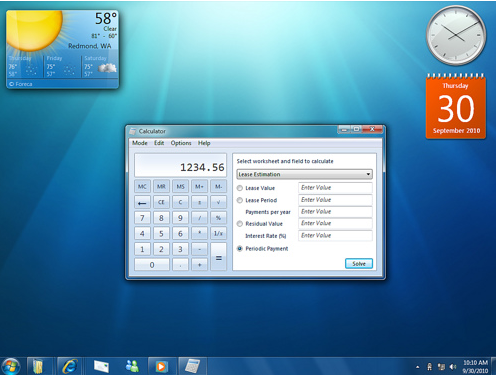
In the same breath, Microsoft also unveiled an early developer preview of Windows 7. As both myself and Elena have already found, it looks very much like Windows Vista so no big surprises there. According to Download Squad, the new OS features a revised taskbar which allows you to perform actions directly by clicking on applications a la Dock in Mac OS (they surely wouldn’t copy Mac OS again would they?). You can also apparently maximize a window by just dragging it to the top of the screen.

Windows 7 screenshot

One big plus is that according to their report, it does seem to use less RAM than memory-guzzling Vista. You can find some preview screenshots taken from the Microsoft Conference in this Flickr gallery.

How to: Create Photoshop actions

Since we launched this blog I’ve written quite a few Photoshop tutorials, and I intend to continue doing so because I simply love this program and the fact that you can always learn something new about it, no matter how long you’ve been using it. This is why I though that today, instead of writing the photo effect standard tutorial, I’d like to learn – and eventually show you – how to use Photoshop actions, one of the many tools this great application features.

Photoshop actions are some sort of automated scripts that can be easily applied to photos as many times as you like, saving you loads of work and time. I already talked briefly about them in this post, but it wasn’t until know that I’ve learned how to create your own Photoshop actions and apply them to any image. Here’s how it works:

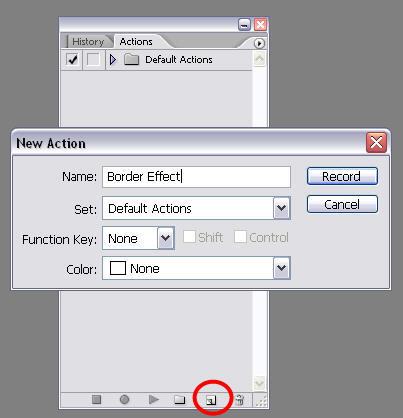
1. For this tutorial, we’re going to use this effect and turn it into an action so that we can apply it automatically without having to repeat all the steps. Go to the Actions tab in the History window and click on the “Create new action” button. Name your action whatever you want and hit OK. You may as well create a separate set to save it.

How to: create Photoshop actions

2. Now click on the “Begin recording” button and start working on the photo in the usual way, like you would if you wanted to apply that effect to that single picture. Notice that if you get stuck or take a wrong step you can always pause the recording, undo the mistake and continue recording again. Continue reading “How to: Create Photoshop actions”

Download the best new Android apps for free

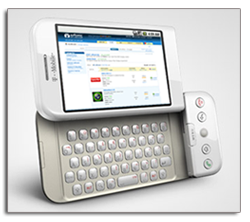
Check out Softonic’s selection of Android appsGoogle’s new Android mobile operating system looks like being pretty popular, if sales forecasts of the first Android-enabled handset, the HTC G1, are to be believed. There are already some great apps being developed for the platform, many of which take advantage of the mapping and positioning tools built into the Android framework.

If you’re looking to power-up your G1 device then check out Softonic’s new Android section, which serves up a selection of some great apps and games for download. Each program has been independently tested and reviewed by our team of mobile software experts, so you can find out if it’s something you’d like before you download it. Even if you haven’t got a G1 phone yet, you can still try out these programs using the Android emulator, to give you a taste of what the OS can do.

The Android software platform adds to the already huge collection of mobile software available on Softonic. The site contains reviews and downloads for all the major handheld formats, including iPhone, Symbian, Blackberry, Windows Mobile, Palm and Java.

Sega turns to online casual gaming

Sega turns to online casual gamingOne of the most popular console manufacturers in the nineties, Sega, has now plunged in what seems to be a fruitful niche in the videogame market: online Flash games for casual players.


Sega has recently unveiled playsega.com, a new site for online games on which they intend not only to offer a wide selection of casual Flash games, but also build a whole gamer community around them. The site doesn’t feature many games yet, but they’re all neatly classified into categories that meet all tastes: sports, arcade, puzzles, word games and more.

However, more than the games in themselves, I think Sega has put the emphasis in the social side of casual gaming. As a starter, you have to create a free user account to be able to play these games. Once you’re inside the community, you can create an avatar and select the so-called “Escape”, a kind of virtual home for your avatar.

Sega turns to online casual gaming

There are also hundreds of objects (clothes, accessories, furniture) with which you can customize your avatar and escape. The trick is that all these objects have a price in the site’s own currency: Sega rings. You earn Sega rings by playing games and obtaining in-game achievements. The more you play then, the richer you are and the more objects you can acquire for your avatar. Continue reading “Sega turns to online casual gaming”

Get CrossOver for free!

CrossOverRoll-up all CrossOver fans. Developers CodeWeavers are bidding one last goodbye to George Bush with their “Lame Duck President Challenge Offer” because he’s only fulfilled one solitary election pledge in his last 4 years in office. According the CodeWeavers:

This is a fully working, fully supported copy of either CrossOver Mac Professional, or CrossOver Linux Professional. No hooks, tricks, timebombs, or gimmicks: it’s the real deal.

To get your free software, simply enter your email here and agree to the terms and conditions. An email will be sent to your email address containing a serial code. Once you receive your serial code, go to the CodeWeavers website and register your software. Once you’ve done that, you will be able to log into your account on CodeWeavers’ web site, and download your product.

CrossOver is an excellent temporary way to run Windows programs within Mac OS although it’s obviously not as good as installing Windows in Boot Camp on with Parallels.

If you’re having problems downloading CrossOver because of the high traffic, you can also download it from Softonic here.

5 reasons why I hate Outlook Web Access

Outlook Web AccessSometimes, if you’re away from the office or have no other way to access your mail, you have to resort to Microsoft Outlook Web Access (OWA). I’ve used OWA a lot over the past few years and I’ve come to the conclusion that it’s quite possibly the worst web based e-mail client I’ve ever used for these 5 reasons (in order of hate):

1. There’s no search tool

How utterly basic is this? If you’re receiving tons of e-mail everyday, there’s simply no way you can survive without a search tool to find key words, contacts or e-mails. I fail to understand how such a thing has been implemented in web based e-mail clients such as Gmail and even Microsoft’s own Windows Live Mail (formerly Hotmail) for years and yet OWA, which has been around since 2000, still hasn’t.

2. No predictive e-mail addresses

One of the most simple innovations in e-mailing still hasn’t arrived to OWA. I can’t always remember the exact e-mail address of everyone I want to e-mail. It’s a huge time saver when you can simply type the first few letters of someones name and their e-mail address magically appear – not so with OWA.

3. It only works properly in Internet Explorer

What a “smart” move this was by Microsoft. If you don’t use OWA in Microsoft’s own Internet Explorer then you lose half the features. You can’t even see your mail folders on the inbox screen for goodness sake. This is because the “Premium Interface” in OWA only works with ActiveX which, what a surprise, was developed by Microsoft and incidentally is one of the most popular entry points for viruses, trojans and other nasties onto your PC.

4. You can’t filter messages in Firefox

Again, this is so basic. Imagine the mess your inbox would be if all of your messages from colleagues just went straight to your inbox. That’s exactly what you have to deal with using OWA for Firefox. In fact, there’s no option to drag and drop mail into folders, rename folders or merge folders using OWA in Firefox. Anything you want to do involves checking and unchecking boxes like you’re back in 1995 or something.

5. No auto-saving of messages

Imagine you’ve just finished a long highly detailed explanatory e-mail to a colleague. You click send and you get a server time-out message. Result? You’ve lost the message entirely. The only way to ensure that you don’t lose e-mails in case of a crash or server failure is to keep copying and pasting the e-mail as you write it which is just madness. DO NOT rely on OWA if you’re writing long or important e-mails.

If there’s one symbol of how antiquated Microsoft really are, you probably can’t pick a better example than Microsoft Outlook Web Access.