Paintbrush is top download for Mac on Softonic this week and even though that’s a bit of a surprise considering all the great programs you can find out there, it goes to show that drawing applications remain popular for Mac users. You can use them to sketch up things for work, as a fun tool for your kids or simply for your own enjoyment. We decided to select the top drawings applications on Mac and let you know what makes each one different from the other. Please let us know if there’s any one we missed or if in particular that you really like.
- DrawIt – Select from one of the multiple templates available and learn how to use tools like Bezier or masks. DrawIt includes up to 40 image filters and all sorts of brushes.
- iDraw – Very intuitive, this application is great to draw up designs or animations. It offers up many shapes and editing tools like scaling, tapering or bulging.
- Intaglio – A simple drawing tool for beginners which builds on the 2D graphics and scripting capabilities of Mac OS X.
- Paintbrush – Basically a clone of Microsoft Paint for Mac, it’s easy to use and great for kids to learn how to draw.
- ArtRage – A cool sketching tool that makes your screen feel and look just like a canvas.
- Lineform – Winner of the 2006 Apple Design Award, this is a beautifully designed tool to create diagrams and illustrations.
- ZeusDraw – Vector drawing at its best with a smooth interface and a great number of brushes to choose from.
 Active Pixels is an excellent photo editor with which you can retouch and optimize your images. It supports layers and features powerful tools, as well as a wide selection of filters and special effects to apply to your pictures. It also includes some extra apps, like a red-eye fixer and a screen capture tool. Best of all, it’s free!
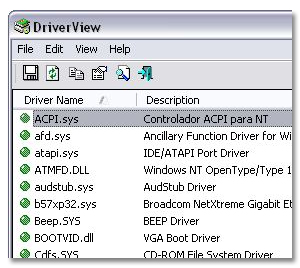 Checking all currently installed drivers on your system can be a lengthy, boring process. You need to access System Properties, click on the Hardware tab and then open each of your devices to check their drivers one by one.
 In view of the fact that
  As one of the most widely used mail clients, Microsoft Outlook is one of the most important pieces of software used in the workplace but how many people ever take time to backup their mail and associated files? Although internal servers often perform their own backups within offices, recovering vital information that way is time consuming and not always reliable.
  If you’re looking for an unobtrusive alarm clock and reminder for your Mac, Pester should probably do the job. The application, presented in an elegant and clear interface, allows you to set timely reminders and multiple alarms. Enter your reminder message, if you want it to repeat and when it pops up. You can choose what sound will play to alert you, even selecting a voice to speak the message out to you.
 mPlayer has always been one of the best and most popular media players for Linux, and the open source app now makes its debut on mobile platforms in the shape of this Windows Mobile software. Although it’s a stripped-down version of the original, this edition still represents a great way to enjoy music and video on your handheld.
 If you need to share files between several computers, you have two options: either you buy a portable USB memory device or you use IDrive’s free backup and storage service: an online 2GB drive where you can keep backup copies of your most important documents and easily share files online. Create an account on IDrive’s site, download the program and it’s all yours!