Photoshop for iPad showcased at Adobe event

The new Photoshop for iPad app has been unveiled at Adobe’s Photoshop World event. This video of the Photoshop for iPad presentation showcases the app’s ability to handle layers, allowing the user to produce creative masterpieces on their iPad.

[youtube]http://www.youtube.com/watch?v=6O4vdxJz6tE[/youtube]

Our highlight of this short demo footage is the impressive layer animation, which is designed to help novices understand how layering in Photoshop works. It looked so cool that you can even here some gasps from the audience in the video.

Photoshop for iPad is still in development stage but as soon as we hear more details about release dates, compatibility…  we’ll let you know!

How to fix Video DownloadHelper errors on Macs

It’s clear from the response to this post that many people are still having problems using the Video DownloadHelper extension in Firefox on Macs. Since a slightly simpler solution has emerged since it was written, here is a crystal-clear guide that may make it easier for some users.

1. Download ffmpegX into a folder on your Mac:

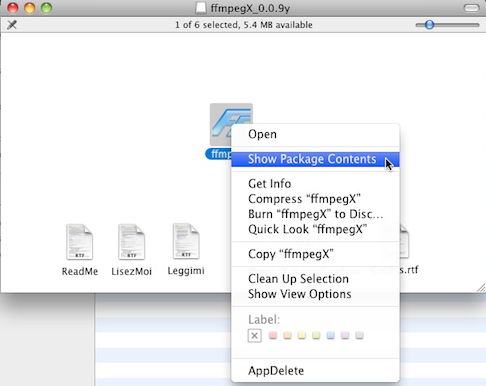
2. Double click on the DMG file. Right click on the ffmpegX icon and select “Show Package Contents”:

Continue reading “How to fix Video DownloadHelper errors on Macs”

Yahoo! Messenger deleting IM chats

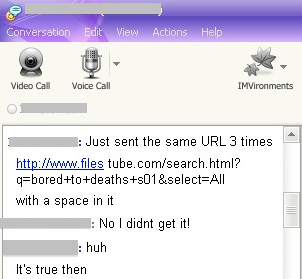
Ever wondered if your Instant Messaging chats are being tracked or monitored? It seems that Yahoo! Messenger is already doing so by automatically deleting instant messages referring to the FilesTube site. According to a report which first emerged on TorrentFreak:

Those who try to paste a FilesTube link to their contacts in the Messenger app will notice that it never reaches its destination. The link goes directly into Yahoo’s dark hole and neither end of the conversation is alerted to this “feature”.

FilesTube is a Polish operated meta-search engine which doesn’t actually host its own material and according to TorrentFreak, even honors U.S. DMCA requests to remove searches related to copyrighted material.

At Softonic, we did our own little test and sure enough, we found that links to FilesTube were not being received in IM chats:

TorrentFreak however claim that the auto-deletion appears to be applied randomly. In their own tests sending FilesTube links to their contacts, they claim they had no problems in getting them through.

Some users may be outraged at what they see as outright censorship but it could be argued that Yahoo! are merely “pre-empting” any risk of them being accused of facilitating privacy in the future. However, this is a difficult argument to make as a) It seems like its only FilesTube that’s been targeted and b) FilesTube is a meta-search engine and doesn’t actually host its own material – there are far worse sites out there when it comes to piracy.

Apart from the questions this incident raises over privacy, auto-deleting certain terms also doesn’t seem like a particularly effective way of stopping users exchanging links from certain sites. The most obvious solution for users would be to use a URL shortening service like TinyURL when sending FilesTube links.

It should be stressed that at the moment, the issue seems isolated to FilesTube links and not to any other sites. However, if you are concerned about Yahoo! censoring IM chats, you can always use an IM service based on the Jabber open source protocol such as Trillian or Pidgin.

Interview: Mozilla VP on WP7, add-on woes and the death of Fennec

Add-ons are a challenge; it’s difficult to balance functionality with performance

Jay Sullivan

Firefox 4 Mobile officially hit the Android Market yesterday. The final release of the mobile browser is designed to enhance the way Android users view the web on their phones.

We caught up with Jay Sullivan, VP of Products at Mozilla Corporation to speak about the new version of Firefox Mobile. Besides giving us the lowdown on why Android users should switch to Firefox, Sullivan also talked to us about some of the wider issues concerning the browser.

Sullivan insists that Mozilla is not planning a version of Firefox for Windows Phone 7, although it may bring Firefox Home to Microsoft’s mobile platform. He also speaks about the headaches of incorporating add-ons into the browser, as well as solving the biggest mystery of all – where did the Fennec go?

What are the advantages of using Firefox 4 on an Android phone?

From a user’s point of view there are a few key things. One is making web navigation easy through tab thumbnails and the Awesome Bar, which recognizes where you want to go when you type something in the URL bar.

Moving the Awesome Bar feature from the desktop to mobile was very important for us, because it’s harder to type on a phone. We went a step further too, because data in the Awesome bar is not only loaded from your phone, but also from your PC, using Firefox Sync. If you sign up for Sync, all your history, passwords, bookmarks are stored the cloud, encrypted.

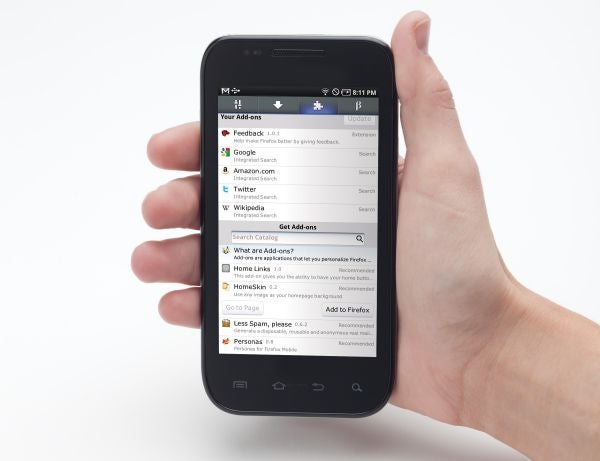
We also support browser add-ons. We are seeing a lot of creativity here – add-ons that are using location, add-ons that do special things because you are mobile. They fix typos as you write. For users, easy navigation, sync and add-ons are key benefits.

Have you experienced any problems with the add-ons?

Add-ons are a challenge; it’s difficult to balance functionality with performance. We have to work better on making sure add-ons don’t slow up starting time. Continue reading “Interview: Mozilla VP on WP7, add-on woes and the death of Fennec”

Top prank apps for April Fools’ Day

This Friday is April Fools’ Day – the one day of the year when misbehaving and cheekiness is actually applauded. If you’re a keen prankster trying to think up something special for the big day then look no further than your iPhone as your tool for tomfoolery.

The App Store is full of practical joke applications to help you trick your friends and family. I’ve rounded up some of my favorites in the list below. Please be aware that I won’t be held accountable for any backlash you get for playing these jokes!

FatBooth

FatBoothThis hugely popular iOS app lets you pile a few pounds onto your pals. Simply snap a photo of them with your phone and FatBooth will inflate their face to make them look like they’ve spent a year locked in a McDonalds. You can then share the results with the world on Facebook, Twitter, or via email. Also available from the same developer are AgingBooth and BaldBooth.

Price: 99 cents

Phone TrackerPhoneTracker Spy

Here’s a good one to play on your paranoid friends. Tell them that you have an app that uses CIA technology to track every phone in the world. When they don’t believe you, enter their phone number into PhoneTracker and watch in amusement as their exact location is shown on a map. Note that this trick will only work if the person is standing next to you. The app is actually displaying your location – obviously this CIA technology doesn’t really exist. Or does it?

Price: 99 cents (Free version available)

Voice Changer Plus

Voice Changer PlusA prank call is a classic April Fools’ attack. Using this voice changing app for iPhone, you can really kid on that you’re someone else. Simply record your voice, then play it back with one of a number of effects applied. Why not phone your boss as an alien and tell him you’ve been abducted and can’t come to work? Or call a cheese shop as a mouse and place a fake order?

Price: Free

Fake-A-Call

Fake a CallThis app lets you trigger a bogus call to come through on your phone at a given time. It’s great for getting out of a conversation you don’t want to be in, but it’s also perfect for pranking. Fake-A-Call includes real voice samples and videos to simulate calls and FaceTime conferences. Get out of work by pretending to get a call that your aunt is sick, or fool your partner to thinking you’re having an affair by getting a mysterious stranger to FaceTime you.

Price: 99 cents (Free version available)

Lie Detector…Free!

There’s great fun to be had with this ‘lie detector’ app. Get your victim to hold your phone and press their thumbs down on the pads. Then ask them an embarrassing question and watch them sweat as the detector flickers into action. Afterwards, a lie-ometer will flash up on screen saying the percentage of possibility that they were telling the truth. Of course, we know that this is all fake but the app is convincing enough to fool your friend otherwise.

Price: Free

Pranks

PranksIf you’re still stuck for practical joke ideas after all of my suggestions, then download Pranks. This provides some ideas of ‘offline’ japes you can play on people. Every time you shake your phone a new prank idea will be displayed. There are some classic Candid Camera-style tricks here, including supergluing coins to the floor, swapping contact names in your friend’s cellphone, or drawing a mustache on your friend while they sleep

Price: Free

18,000 Cool Jokes

18000 Cool JokesApril 2nd can sometimes feel like a bit of a comedown after the hilarity of the day before. Install 18,000 Cool Jokes on your iPhone and the fun will carry on well into May, or even June.  The jokes are organized into a broad range of categories, and the app is packed with one-liners and long set-ups. If you’ve got kids around, make sure you set up the adult joke filter, because some of them can be a bit blue.

Price: 99 cents (Free version available)

How to find diamond in Minecraft

Diamonds are rare in Minecraft, but essential for crafting the most durable weapons and armor in the game. If you want to find diamond ore easily, you can use Mineviewer to help you.

Steps to find diamonds

Step 1: Download Mineviewer

First, download and unzip Mineviewer, then double click the .EXE file. You will then be asked to choose the world you want to view. Once you do this, a block of your Minecraft world will appear. You should recognize it as the place you last saved your game! I have pointed out the start of my mine below.

Step 2: Look around

You can look around with the mouse, and move around with the cursor keys, or WASD. Click on the ‘top’ of the map, then use the comma and period keys to remove slices of the map:

Step 3: Get the diamonds

You’ll see different color blocks on each slice (press K for a block key). Keep going far enough, and you will start to see the round blue blocks that signify diamond! They only exist really deep down, so you will have to mine a lot, but at least with Mineviewer you’ll know where you’re going…

For Mac users

If you’re playing Minecraft on a Mac, try Minecraft X-Ray, which lets you search your world for ore in a similar way.

Mozilla Officially Releases Firefox 4 for Android

The final version of Firefox 4 for Android hit the Android Market today. Firefox 4 Mobile has been around in various guises for a while (release candidates, betas, etc.) but today it got its official full release.

Firefox Mobile

Coming just a week after the release of the desktop version of Firefox 4, the mobile web browser is designed to make browsing the web as effortless and enjoyable as it is on a PC. Firefox 4 Mobile boasts a really clean, intelligent user interface, with a tabs and options hidden away in pop-out panels, so that all the screen space is utilized for viewing pages.

Firefox 4 for Android includes some very useful features, such as Awesome Screen, Firefox Sync, page sharing and a customizable search toolbar. Best of all, Firefox 4 Mobile supports add-ons, meaning you can extend the functionality of the browser in the same way you do with extensions in the desktop version.

Read our full review of Firefox 4 for Android to find out more.

Skyfire for iPhone updated

Popular iPhone app Skyfire has been updated to 3.1.0, bringing with it some really nice features that are sure to please fans of the browser.

First off, Skyfire is now fully translated and localized in seven languages – Italian, French, Portuguese, German, Japanese, Korean and Spanish (obviously in addition to English!), making it even easier for everybody to get in on the action.

The developers also seem to be making a really big effort to find video sites that don’t work well with the browser, fix them, and provide alternatives while you are waiting. To this end there are two great new features. One is the Related Sites feature – if you come across a video website not yet supported by Skyfire, this will provide you with a selection of alternatives to use while they fix the problem. Secondly, they are introducing Video Support Flow, a feature that allows Skyfire users to connect directly with engineers so that they can report issues and focus attention where it is really needed.

Last, but not least, there’s a new User Agent Interface, which gives users the ability to unlock video content and easy toggling between iPhone (Safari), Desktop and iPad view.

Free Browser Game: From Beyond

Have you ever wanted to play god? In the Flash-based game From Beyond, you will do exactly that, although there’s no choice about what sort of divine being you want to be – you’re a malevolent and evil one!

This is a really short game about a supreme being whose aim is simply to destroy everything on Earth! It does this by flinging meteors, UFOs, black holes and more at the unfortunate planet. Control is really easy to get the hang of, and while it is short, there is also a skill to building up really evil scores, which can then be submitted online.

Play From Beyond at The Super Flash Bros site now!

Amazon launches Cloud Drive

Unless you have been asleep under a tree for the last week, you can’t have failed to notice that Amazon has done something pretty impressive – it has stolen Google’s thunder by launching Cloud Drive.

Even though the name is a little clichéd, it does give you a pretty good idea of what to expect. Cloud Drive is a cloud-based file storage service provided by Amazon. You upload the files you want to store and access – music, videos, photos, etc – and are then free to access them whenever you want using the Cloud Player – an internet based service for Macs and PCs, but currently only available in the US.

Cloud Drive is free for up to 5 GB of media – after that, you have to pay. Interestingly, Amazon are providing mobile access, but only for Android, Blackberry and Palm. Thinking back to last week and the release of Amazon Appstore for Android, it seems that the internet giant is intent on targeting the vast market that the iPhone hasn’t yet managed to tap.