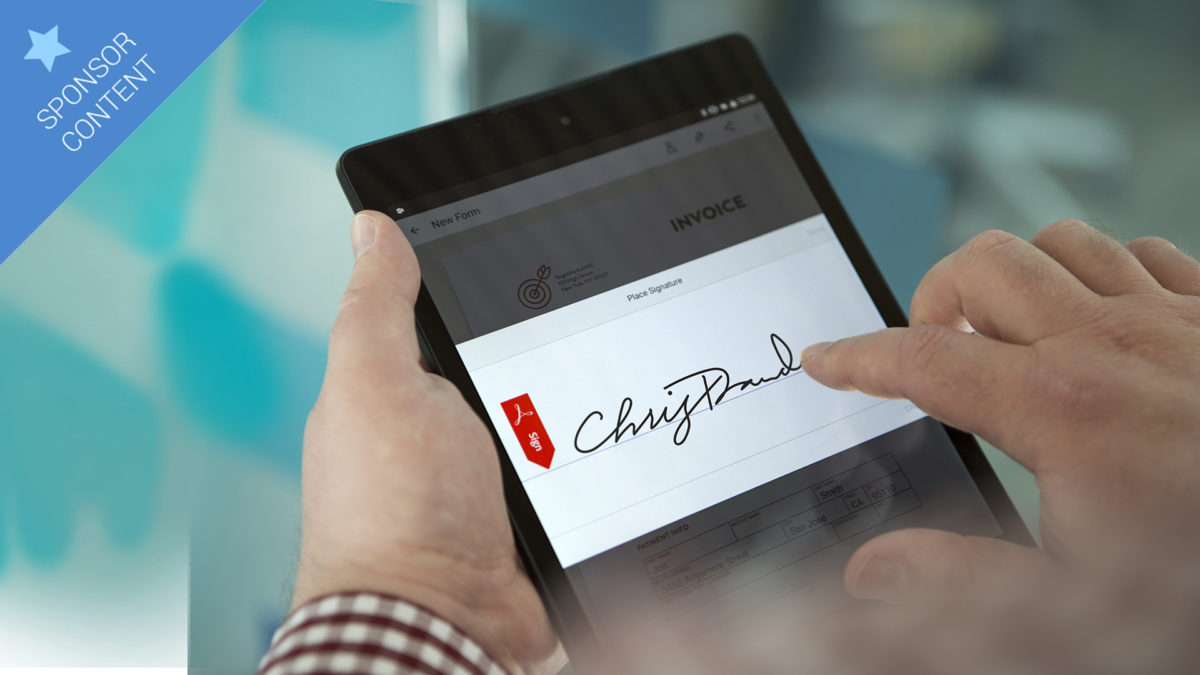
Adobe Sign: Definitely one to sign up to

Consent is an important part of our culture. Within the boundaries of the law people are free to do as they please and both cannot and should not be forced to do anything without first giving consent.

How is consent given in the business world? For hundreds of years consent has been given through the placement of a unique signature onto a physical document. This document then acts as physical proof of whatever agreement has been consented to.

A modern solution to a modern problem

These days, however, we hardly ever deal on paper and agreements are made online via digital communication all the time. These deals are made quickly and the slowest part of the whole process is when physical copies of digital documents need to be printed out so that they can be signed by the relevant parties.

Article1

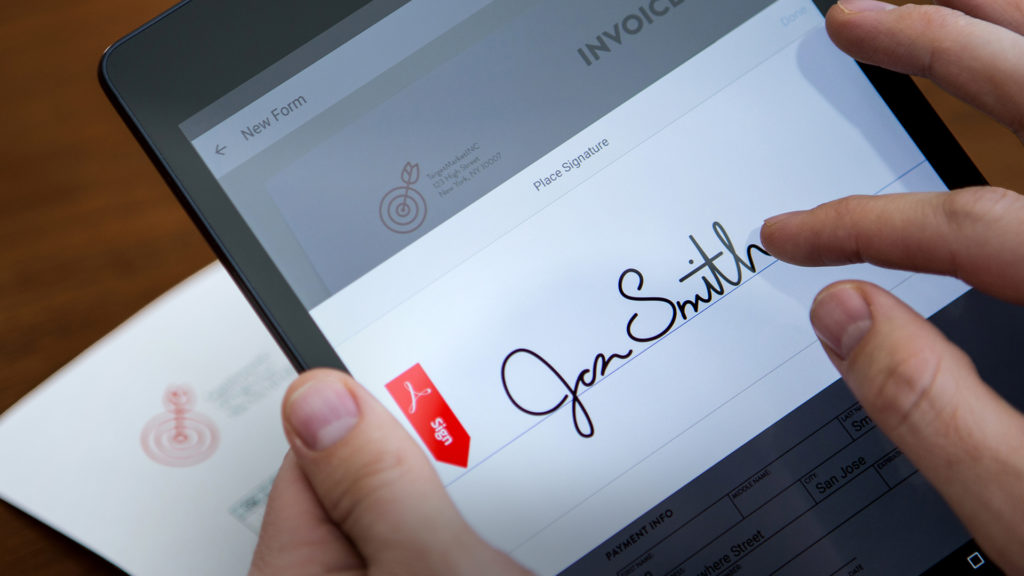
Adobe Sign offers the solution to this rather modern problem. Adobe Sign is a quick, simple, efficient, and legally binding way of adding a digital signature to any documents that need one. Adobe Sign is already working with leading business systems like Salesforce, Workday and Apptus and complies with industry security settings including PCI DSS, SOC 2 Type 2, and ISO 27001.

button_get-adobe-sign

Impressive array of features

Although simple and easy to use Adobe Sign has a plethora of intuitive features designed to make it easier for your employees to offer authorization internally or to deal with clients. It offers a wide range of predefined document templates, the ability to quickly and easily draw up new documents and intuitive tools to make adding signature and form fields as simple as possible.

Article2

As well as sending digital signatures Adobe Sign makes requesting authorization an extremely easy task. Requests can be sent to one or more recipients who can then sign in parallel, in a serial order or through some combination of the two. Recipients will receive an email telling them it is time to sign and then with a few quick clicks they can review and sign no matter where they are or what device they’re using.

Adobe Sign also makes it easy to track and manage your documents throughout the authorization process. Documents can be tracked in real time with notifications highlighting when somebody has signed – with reminders also being sent when nobody does. This simplified and electronic process means documents can be found in a flash and an audit trail is created automatically.

Another feature of Adobe Sign is that it works across a wide range of apps and devices. Your documents will be available for signature at any time of the day, in any location and on all devices. Adobe Sign already enjoys integration within huge enterprise applications and productivity tools such as Adobe Acrobat DC, Microsoft Word and PowerPoint.

Article3

The simple fact is that when using Adobe Sign, signing and approval time drops from days to minutes. Diners Club UK started using Adobe Sign and they cut signature time to 17 minutes and subsequently grew deal volume.

button_get-adobe-sign

A solution you can trust from an industry leader

Adobe have been at the forefront of digital documents for years. Adobe Acrobat has been the go to program for anybody using the PDF format for so long now that you’d be hard pressed to find somebody who has used a computer who isn’t familiar with it.

Adobe are also famous for their renowned and industry leading graphics software suite which includes programs like Adobe Photoshop, Adobe Lightroom and Adobe Illustrator.

When you combine these two distinct types of program and the level of expertise that Adobe has with each, you can see why it is a trustworthy and logical choice for handling your legally binding digital signatures.
Article4

The potential to pay for itself

Adobe Sign’s pricing is structured across four plans: Individual, Team, Business and Enterprise. You can check out the full list of Adobe Sign features that you get with each plan here. Individual accounts are designed for small businesses with only one user whilst a team account can cater for 2-9 users. Adobe Signs Business and Enterprise Accounts have more extensive suites of features and are designed for 10 or more users.

Adobe Sign is a premium service and so consequently it comes with a price. Individual accounts will cost you $9.99 per month, a Team account will cost you $24.99 per seat per month and a Business account will cost $29.99 per seat per month. If you’re interested in an Enterprise account then you’ll have to contact Adobe directly to discuss bespoke pricing and you can do so here.

button_get-adobe-sign

You definitely get what you pay for with Adobe Sign, however, with two clear advantages to be gained from switching to using a safe, secure and quick e-signature program like Adobe Sign.

The first is speed and efficiency. As we’ve already mentioned you can cut you’re signing and approval time down from a period of days to mere minutes. By cutting out the need to for physical signatures Groupon were able to increase the number of contracts they signed by 11% without adding to headcount.

The second major advantage is lowering your Carbon Footprint. By cutting out the need for physical signatures you’ll be using a lot less paper, which in turn means you’ll have no need to store all of the physical copies of digital documents that you’ve been printing simply for the sake of signatures. As well as the bottom line related to the costs associated with physical filing systems it is well documented that taking proactive efforts to reduce your Carbon Footprint can provide commercial benefits these days.

Article6

Definitely one to sign up to

Adobe Sign has been the highest rated e-signature app in the Salesforce community since 2006. It is used by businesses of all sizes – including Fortune 1000 companies, government, financial, and healthcare organizations – to accelerate critical business processes in Sales, HR, Legal, Operations and more. We’ve already mentioned Diners Club UK and Groupon but other global companies like Jaguar, Land Rover, Kia Motors, KLM Airlines, Ricoh and many more industry leaders are already using Adobe Sign. It isn’t hard to see why such reputable companies are taking advantage of Adobe Sign’s ability to accelerate signature processes, improve tracking and centralize management of signed documents.

With Adobe Sign offering so many excellent features to accelerate your business processes, and global industry already taking advantage, the real question that needs to be asked is how long you and your company can afford to stay out of the fast lane.

button_get-adobe-sign

Avast Antivirus 2017: All the new features

Avast is one of the most famous Antivirus programs out there. Well-known for being a true guardian of your security on Windows machines. Each time a new version is released great new features are added to make the newest version of Avast the must have security option for your PC. This year is no exception. Avast Antivirus 2017 has 3 brand new features and several other improvements over last year’s version. Let us have a look at all of them now:

Three great new ways to take control

Avast 2017 includes, in every version (Free, Internet security, Premier and Pro), two brand new modes that’ll be useful on all PCs. Game Mode and Passive Mode. On top of these new modes there is also the new Behavior Shield.

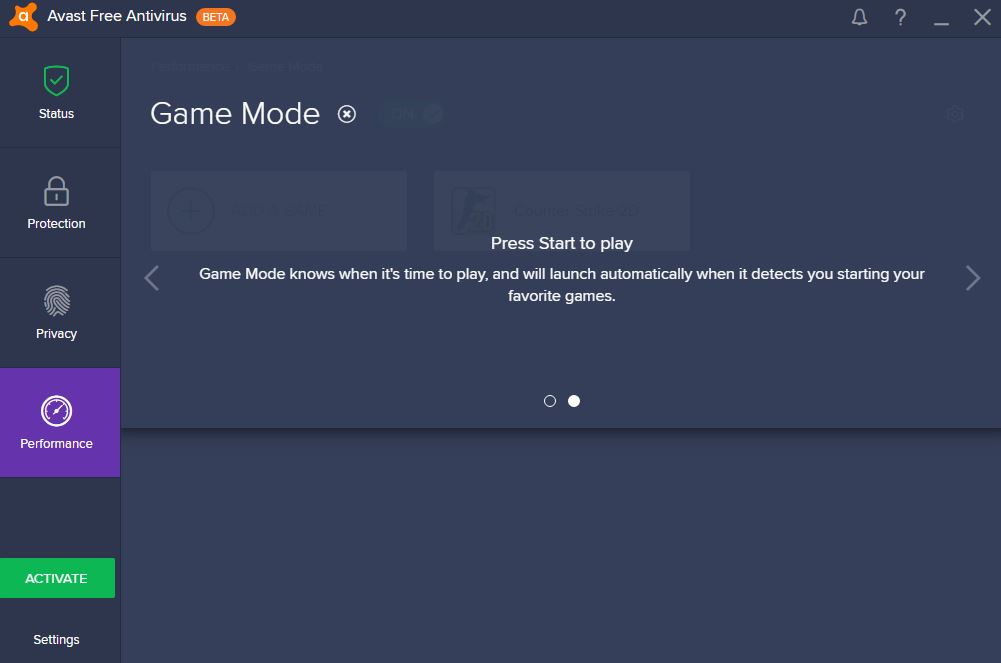
Game Mode is the antivirus setting that every gamer needs. With Game Mode, Avast 2017 will ensure optimized performance whilst silencing all types of notifications during your gameplay.

As well as shielding you from system notifications (vital in online games) Game Mode will optimize your PCs performance by preventing other processes from beginning whilst you’re playing games. No resources will be diverted for running updates for example, they’ll be reserved exclusively for the game that you’re playing.

Activating Avast 2017 Game Mode is really simple. You can find a walkthrough tutorial here that’ll show you the easiest way to get it up and running.

game-mode


Avast 2017’s other great new feature is the Passive Mode, which is perfect for anybody who is enthusiastic about their online security. Passive Mode is designed for use with another antivirus program. You can run Avast in Passive Mode whilst another program is running real-time protection. This leaves you with an enhanced security level without running the risk of a compatibility problem between the two antivirus programs.

Using Passive Mode is easy and intuitive but we’ve put together a tutorial, which you can find here, that’ll show you exactly how to do it.

Another very useful option has been added to Avast 2017, the Behavior Shield. What Behavior Shield does is monitor the other programs on your PC for any suspicious behavior.

behavior-shield


Do you want more? Check out these improvements

Avast are always listening to their customers and year after year they add features and make improvements based on what they want. On top of everything mentioned above Avast 2017 includes security and usability improvements.

One such improvement is to CyberCapture, which prevents your PC from becoming infected with Malware. In Avast 2017 CyberCapture gathers data from over 400 million sensors worldwide and makes daily changes to ensure all threats are avoided.

Another huge improvement in Avast 2017 is the user interface. Although Avast has always been simple to use, some options have sometimes remained hidden or have been unclear. This problem has been solved and Avast 2017 has a clearer and more intuitive interface with configuration options always to hand.

antivirus


What is included in each version?

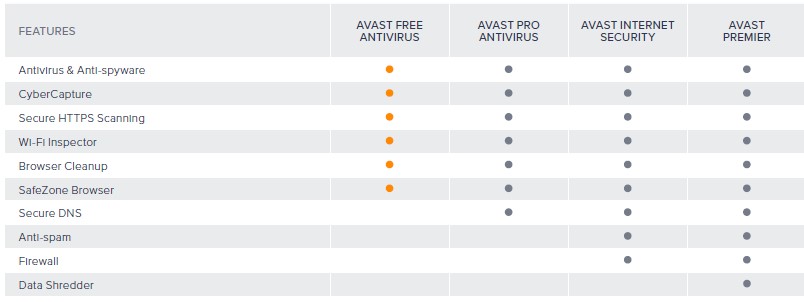
Like every other year’s release Avast 2017 includes various plans to fit your specific needs. The free version will keep you protected from most threats and has all of the new features we’ve already mentioned but there are other extended versions available. You can check out what each version of Avast 2017 includes in the table below.

comparision

Do want to try Avast 2017? Download it now from any of these links:


Download Avast Antivirus 2017 Free


Download Avast Antivirus Pro


Download Avast Antivirus Internet Security


Download Avast Premier


Also, remember that to celebrate the launch of Avast 2017 we’re giving away a laptop worth $1,000. Click here for details on how to enter.

Avast Antivirus 2017: How to use the new “Game Mode”

The 2017 edition of Avast Antivirus comes with a feature that has been designed specifically for gamers. “Game Mode” is optimized to work more effectively with your games.

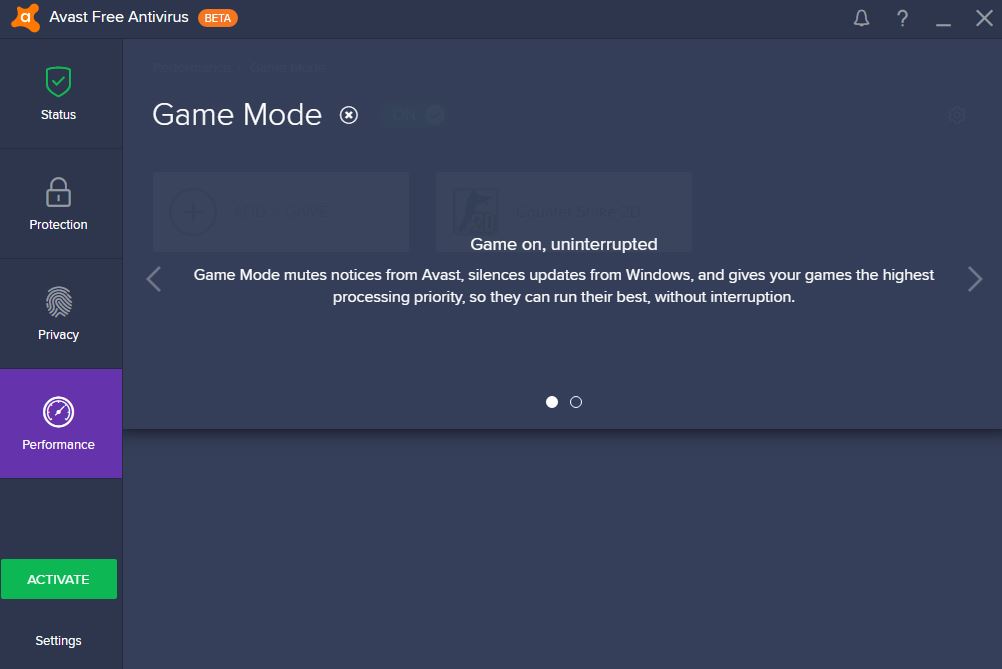
Having lots of programs running on your PC means that you could be interrupted, when playing your favorite games, by notifications or unexpected updates that require a system reboot. Avast’s new “Game Mode” mutes notifications and pauses the update process meaning you can say goodbye to unwanted interruptions in your gameplay.

1

2

Let me walk you through the simple activation process for Avast Antivus 2017’s “Game Mode”

NOTE: These instructions were performed with the beta version of Avast 2017. Changes may have happened since then.


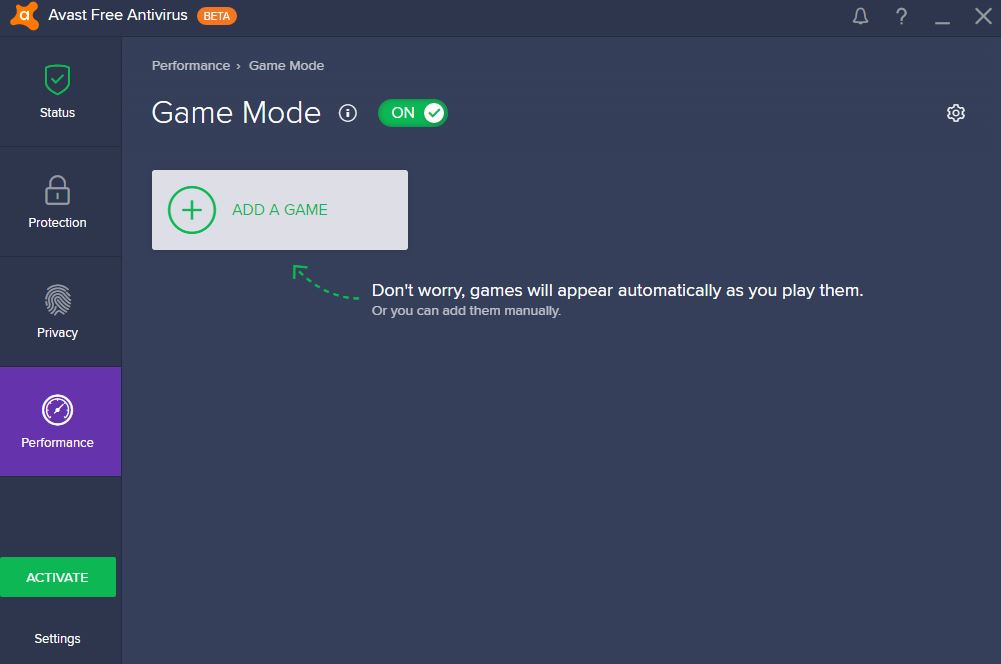
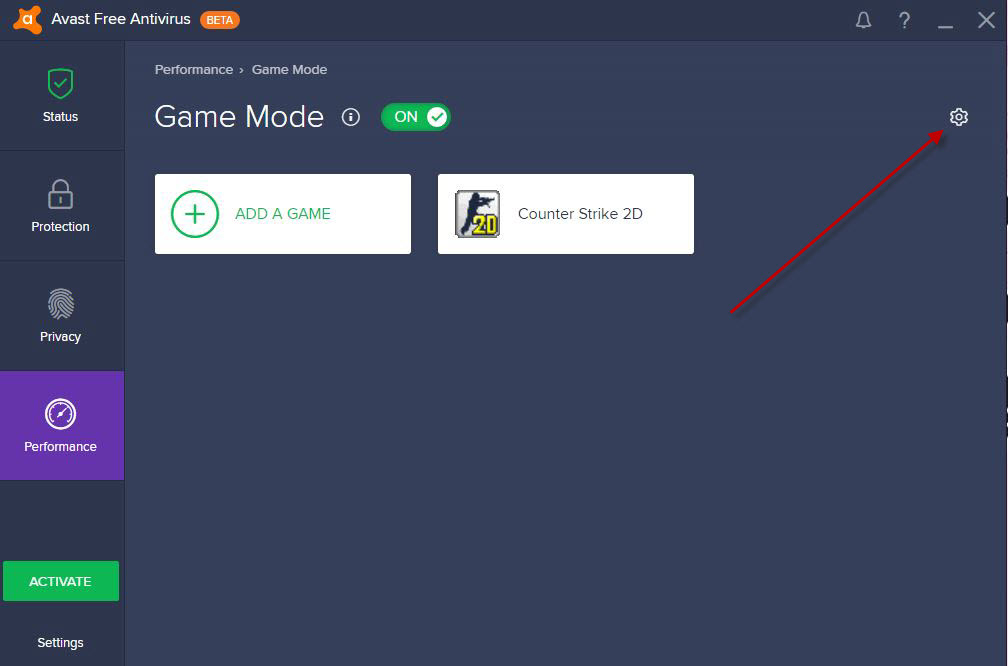
First, go to the “Performance” section in Avast’s sidebar and then select “Game Mode”.

3

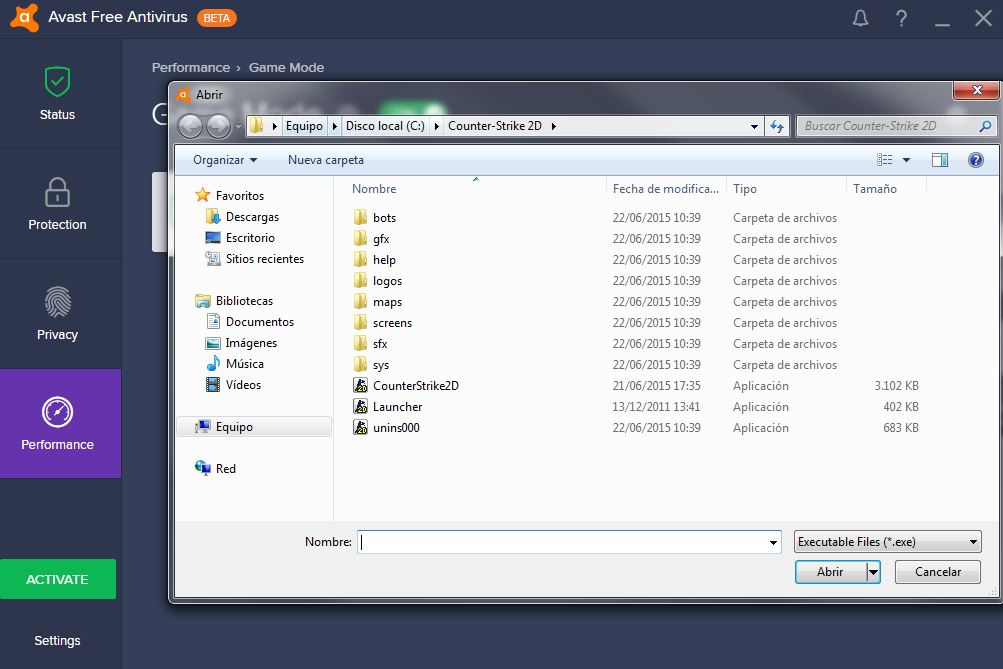
Then click “Add Game” and look for the .exe file that is used to run the game you want to add.

4

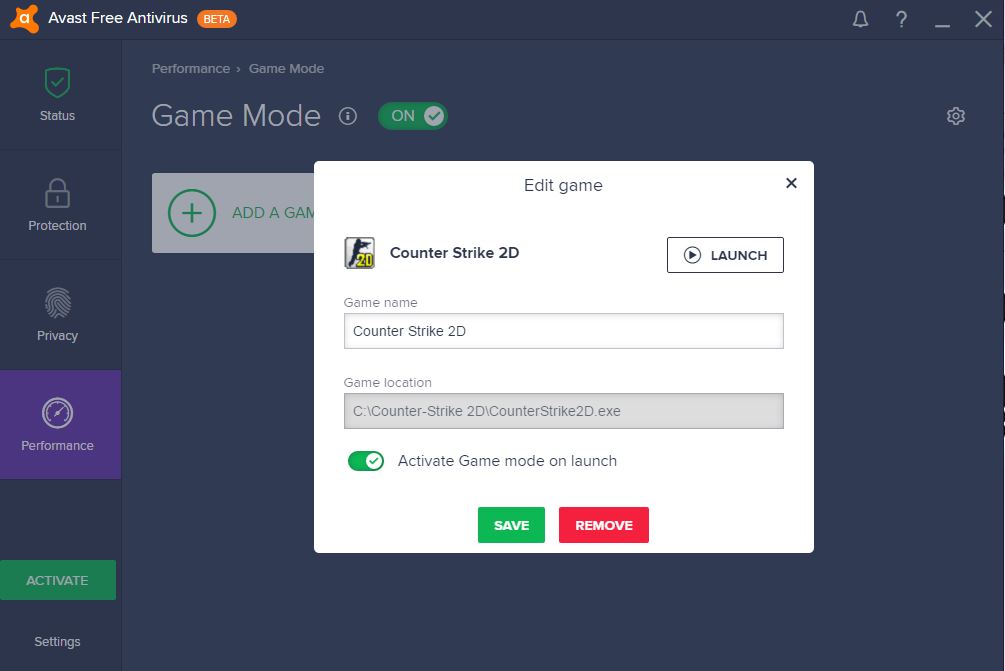
Put the name of the game, make sure that “Activate Game mode at launch” is green and then hit “Save”.

5

There you have it! Every time you play the game Avast will automatically go into “Game Mode”.

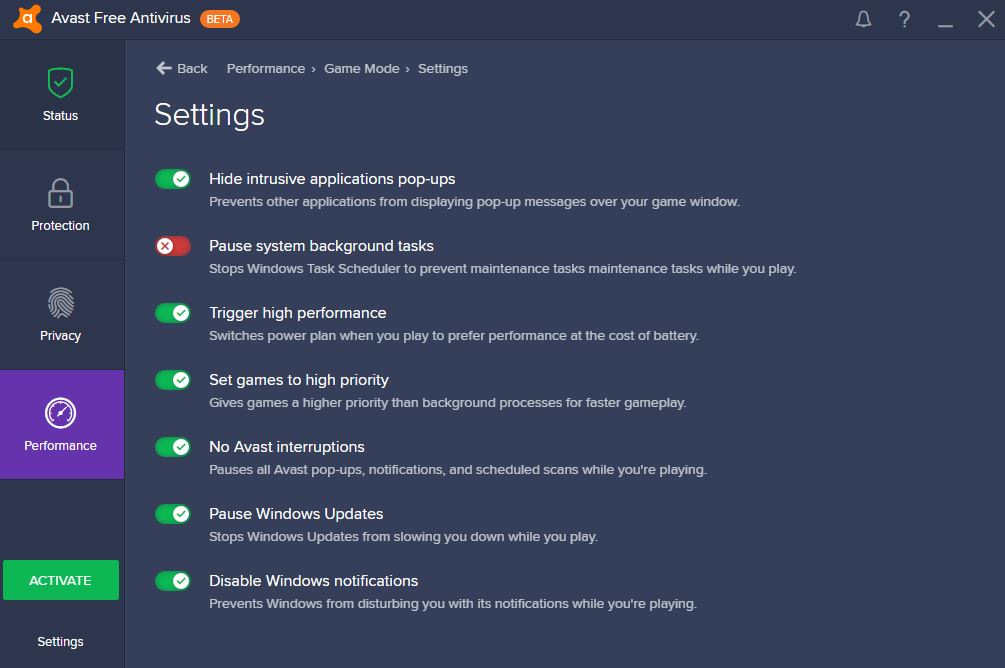
If you want to you can play around with “Game Mode” settings using the icon in the top right.

6

7

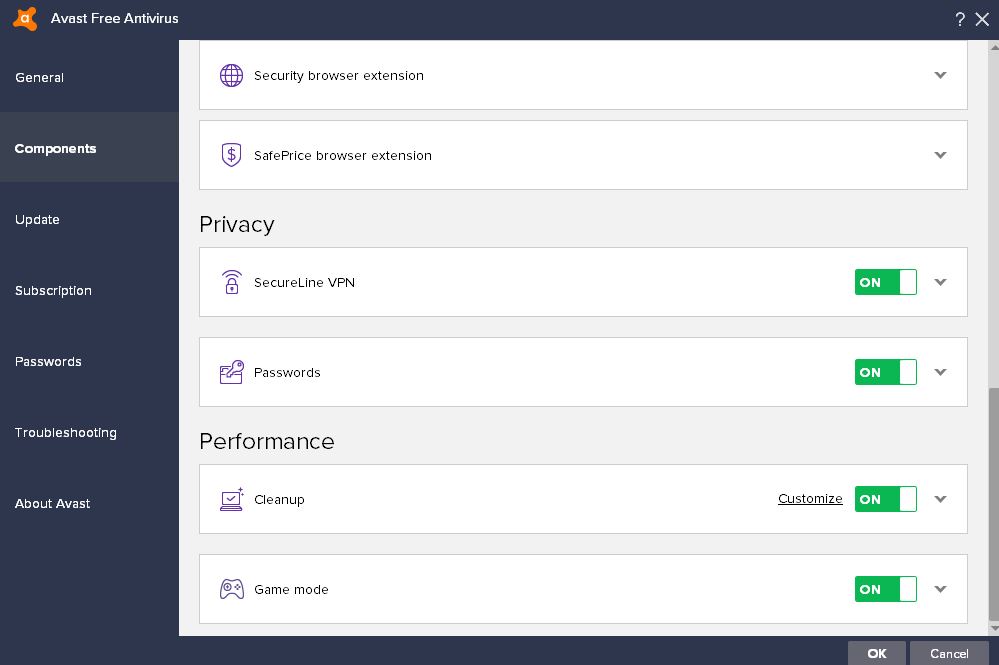
There are other options you can choose that will affect the performance of “Game Mode”. To access them you must click on “Options”, at the bottom of the side menu.

The first option can be found in the “General Options” tab. “Silent Game Mode” means that you won’t receive any notifications from Avast itself whilst playing your games.

9

Another option can be found in the “Components” section of the “Options” sidebar. Here you’ll be able to disable Game Mode altogether if you’re not interested in what it has to offer.

Avast Antivirus 2017: How to use the new “Passive Mode”

The 2017 edition of Avast has a Brand new feature that is perfect for users who have two or more antivirus programs running at the same time. “Passive Mode” disables Avast’s active protection if it detects another antivirus program that could cause a compatibility problem. Let me explain how it works so that you can get the most out of this brand new feature.

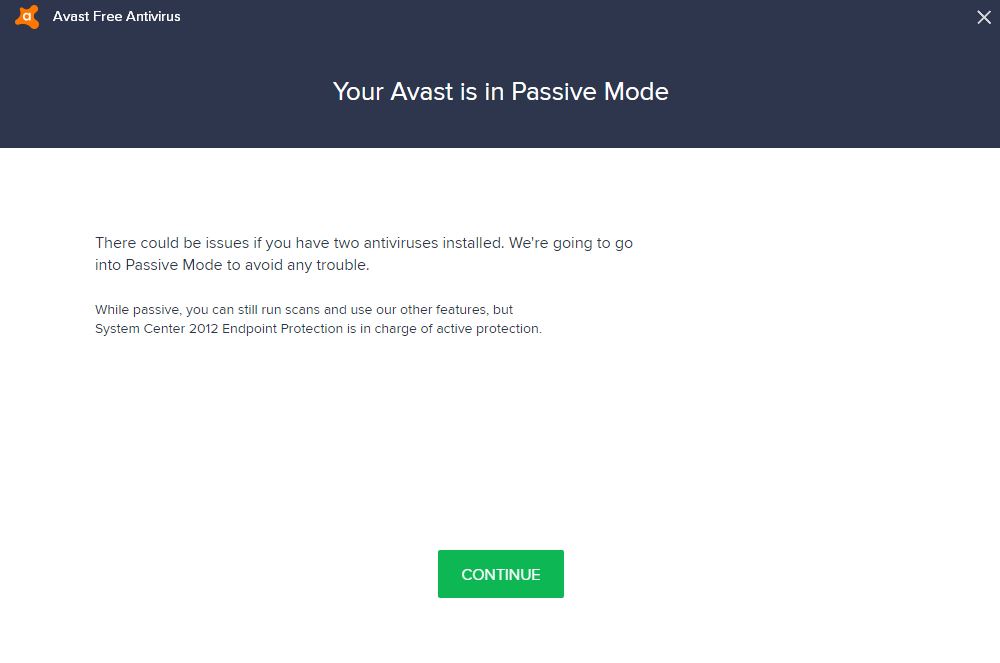
Avast 2017’s “Passive Mode” will show itself when you first install Avast if you already have an antivirus program running on your machine. If this happens you’ll get this warning.

1

“There could be issues if you have two antiviruses installed. We’re going to go into Passive mode to avoid any trouble.” Warns Avast. “While passive, you can still run scans and use our other features, but [Insert name of previously installed Antivirus program here] is in charge of active protection.’

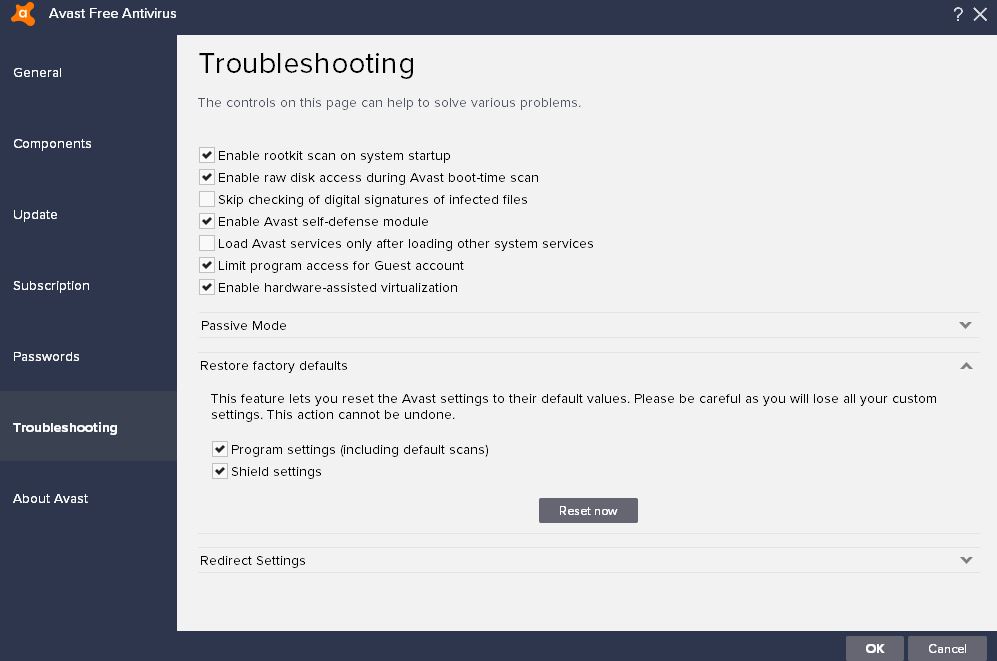
If you want to activate or deactivate “Passive Mode” you must go to the “Configuration” section (in the Avast sidebar) and click on “Troubleshooting”.

2

Here you will be able to activate “Passive Mode”, if you want another antivirus program to actively protect your PC, or disable it if you want Avast to be in charge.

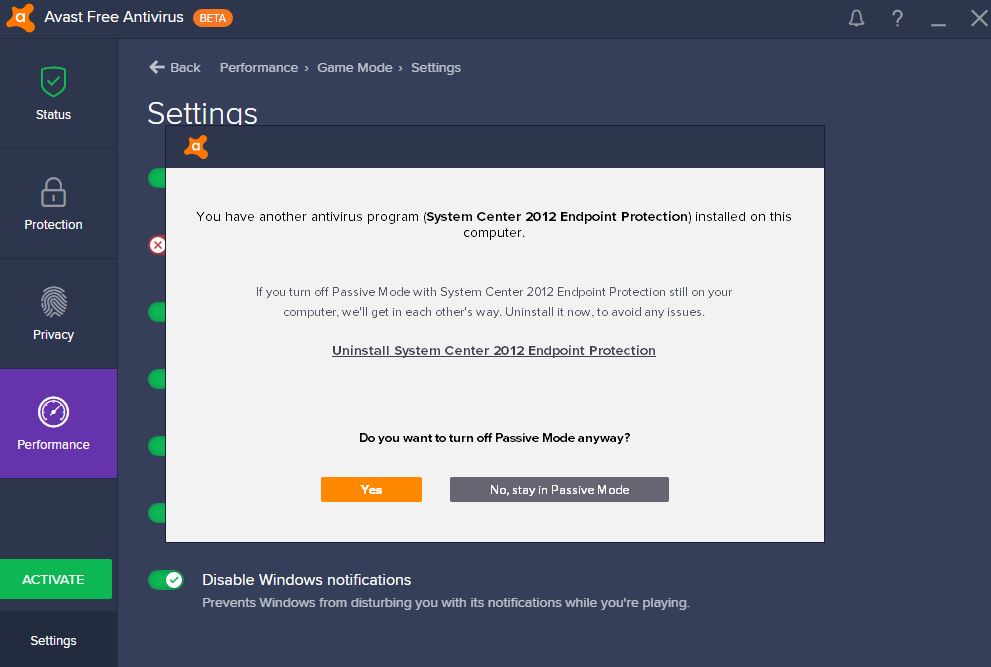
If you want to turn off “Passive Mode” you’ll get this warning:

3

It is up to you what to do next. You can risk it and disable “Passive Mode” whilst the other antivirus program is still running or you can uninstall the “dominant” antivirus program.

If you want more information about Avast Antivirus 2017 you should check out special article, which covers all of its new features.

Adobe Lightroom CC offers something for everyone

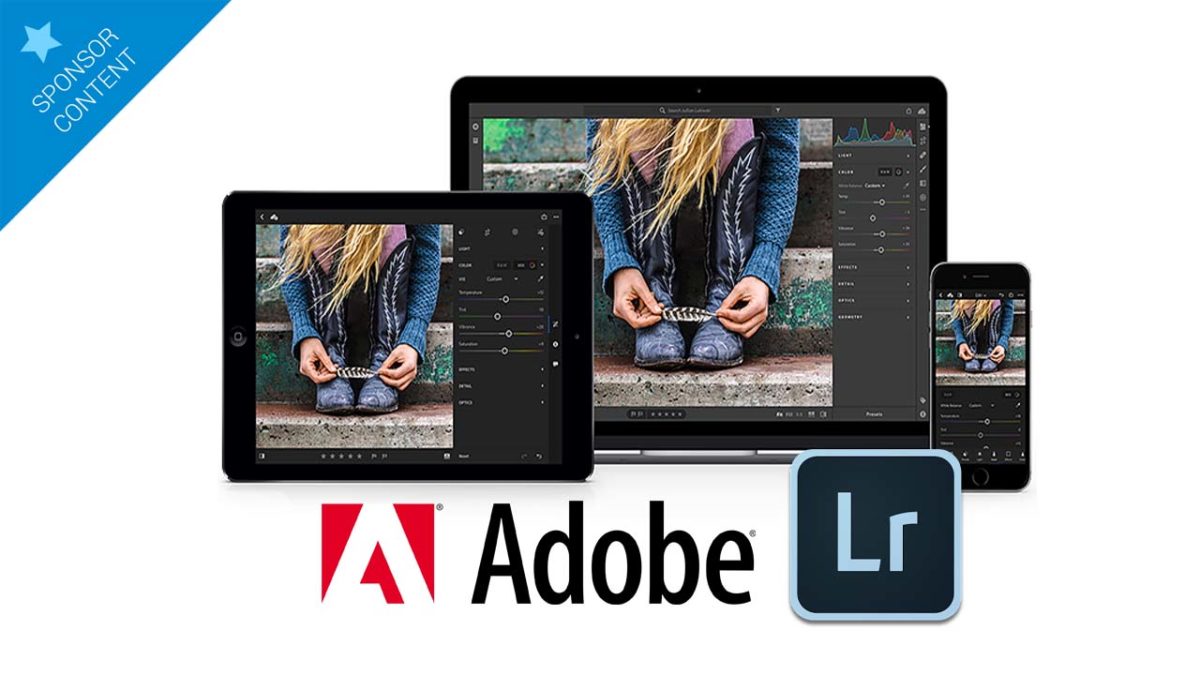
Adobe Lightroom has been a favorite of both professional and amateur photographers around the world. Adobe’s package has always offered a powerful yet simple to use image organization tool that gave users quick access to their entire image library and the ability to edit and manipulate their images at will.

Adobe Lightroom Download Lightroom
7
Adobe Photoshop Lightroom concentrates on photo editing, offering an assortment of tools that correct and enhance your photos quickly and easily, with filters, tags, geolocation, and more.

When we looked at Adobe Lightroom CC in October, we were impressed. We loved how easy it made sharing photos with your friends and loved ones, and how seamless it felt transferring your work from one device to another. Adobe had moved Lightroom into the modern era of the cloud and multi-device support efficiently and successfully.

Another benefit of the move to the cloud and the subscription-based model that sees users paying monthly for access to Adobe’s tools is the consistent rollout of updates. In December Lightroom CC received a pretty big one so we thought it would be an idea to have a look at new goodies Adobe have given us.

Without a doubt, the most significant change that has come to Lightroom CC is the improved Auto mode. We first looked at Adobe Sensei, the new artificial intelligence and machine-learning platform that powers Lightroom CC’s Auto mode, back in November when we looked at the Adobe Creative Cloud.

Sensei marks Adobe’s commitment to reducing the time it takes to go from concept to completion by embedding AI algorithms across its design suite. Lightroom CC already sees a marked improvement in this regard. The new Auto Settings will analyze your photo and then compare it to tens of thousands of professionally edited photos. The results from using the improved Auto on Lightroom CC can be truly stunning.

Lightroom CC’s improved Auto setting is available on all devices, including iOS, Android, Web, and Desktop as well as Lightroom Classic and Adobe Camera Raw.

If we look at the desktop version of Lightroom CC in particular, then we see a number of excellent updates to an already robust program. The Tone Curve and Split Toning tools offer increased control over tone, contrast, and color balance. It is also easier than ever to simulate traditional black and white tints and to stylize your images across a wide range of effects from vintage and retro looks too much more modern stylization.

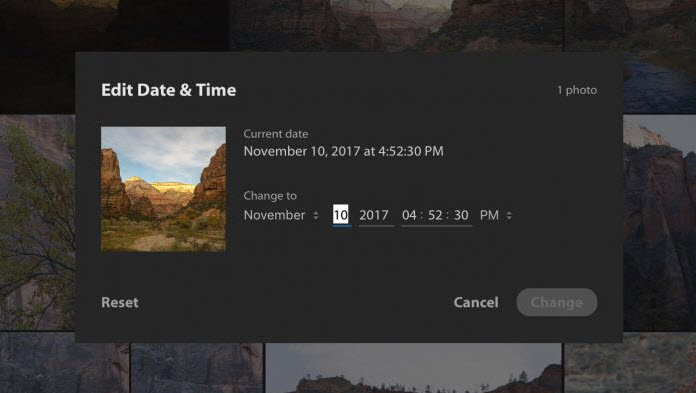
Another great feature added to Lightroom CC is the ability to change the capture time of all images. This seemingly simple change will have a significant effect on workflow as it will make it easier to store and find images based on chronological order. The new full-screen view also adds another common sense feature to an already feature-filled program.

We really like Lightroom CC’s updated features, and we have found that Lightroom CC is now much easier and smoother to use. It is easier than ever to get awe-inspiring results. What is even more impressive is that zero functionality has been sacrificed to achieve this. On the contrary, Adobe Lightroom CC is more powerful than ever. Whether you are a hardened professional photographer or if you are just getting started with photography makes no difference. Lightroom CC makes it easier than ever for amateurs to make their photos look better than anything they have ever created before and gives professional photographers the tools required to take their photos to the next level.

No matter your level of photography skills, if you do not have access to Adobe Lightroom CC you and your photos will not be able to compete with those that do. Sign up today and take your photography forward.

Adobe Lightroom Download Lightroom
7

Celebrate the Launch of Avast 2017 with us and Win a Brand new Laptop worth $1000

Today we’re teaming up with Avast to help them launch the Avast 2017 suite, which is their brand new security product. As well as giving you an opportunity to try it for free we’re going to give you a special gift to celebrate the launch.

Thanks to Avast we’re able to offer you the chance to win a laptop worth $1,000!

All you have to do to enter the sweepstakes is:


The lucky winner of the laptop will be selected from all eligible participants.

The contest is open from February 7th 2017 until February 13th 2017 at 11:59 p.m. (GMT+1)

We will announce the winner after this date and try to contact him/her to organize delivery of the prize.

Full Terms and Conditions can be found here


Good Luck!

Avast Sweepstakes Terms and Conditions

Contest sponsor

AVAST Software s.r.o., a company duly organized and existing under the laws of the Czech Republic, Identification No. 02176475, with its registered office at Budějovická 1518/13a, 140 00 Prague 4, Michle, Czech Republic, registered in the Commercial Register kept by the Municipal Court in Prague in Section C, Insert 216540 (“AVAST Software”).

Participant

Any fan of the Facebook page of Softonic (https://www.facebook.com/softonic.en), who enters the contest during the Offer Period and comments on the post with the hashtag #ILoveAvast and shares the post. Obscene, provocative or otherwise inappropriate content will not be considered. We retain sole discretion as to what constitutes inappropriate content.

Winner

Any Participant that met all conditions described in these Terms and Conditions to be awarded a Prize (on the basis of the conditions described below in Section “How to win a Prize?”).
Offer Period

This contest commences on 7th February, 2017, and closes 13th February, 2017, at 11:59 p.m. CET.

How to win a Prize?

Each Participant must:

  1. Like the Facebook page of Softonic (https://www.facebook.com/softonic.en)
  2. Comment on the post using the hashtag #ILoveAvast
  3. Share the postThe Prize will be awarded to the Participant whose entered the contest in the Offer Period. The winner will be drawn randomly after 13th February, 2017, at 11:59 p.m. CET.

    Softonic reserves the right to disqualify any Participant who attempts to unfairly influence the results or behaves inappropriately in any other way without notice.

    Prizes
    1 x ASUS Notebook or similar

    Prize Eligibility

    Any Participant except Excluded Participants (see below).

Excluded Participants

– Employees of Softonic and AVAST Software and their close relatives (parents, siblings, children, or spouse)
– Softonic and AVAST Software business partners, agencies, distributors, and their employees

Prize Delivery

The Winner shall receive the Prize within sixty (60) days of Softonic receipt of the details of the Winner mentioned in Section “Participant” above.
AVAST Software shall deliver the Prize using reasonably reputed parcel service. AVAST Software shall bear the shipping costs.
AVAST Software is not responsible for any damage caused to the Prize during delivery, nor for non-delivery of the Prize caused by the parcel service or by theft, fraud or other criminal act or by force majeure.
Prizes are non-refundable. AVAST Software shall not provide any alternative award in any case. The Prize is neither transferable nor exchangeable.
Winners are exclusively responsible for declaring the Prize (mainly any taxes levied in relation to the delivery or receipt of the Prize) to their local financial authorities if they are required to do so according to applicable laws and regulations.

How to Collect the Prize 

The Prize will be mailed out to the respective Winner after the Winner has provided Softonic with a valid mailing address.
Winners of the Prize shall be sent an direct message via Facebook, asking them to provide the shipping address. To be eligible to collect the Prize, the Winner must reply to the notification within thirty (30) days from the date of the notice.
Winner’s reply must contain all of the following:
(a) confirmation that the Winner has full legal capacity in the country of Winner’s residence and that he/she is not less than 18 years age;
(b) explicit confirmation that the Winner agrees to these Terms and Conditions;
(c) shipping address to which the Prize is to be delivered;

Softonic may not and shall not be held responsible for any non-delivery of the notification to the Winner or failure to receive the reply thereof due to any technical reasons, including but not limited to spam filters, full mailbox or incorrect email address. If you receive the notification and send your reply, and do not receive the Prize in reasonable time thereafter, please contact Softonic to make sure that Softonic received your reply.
General and legal

Softonic decision is final with respect to all matters relating to awarding of the Prize and shall not be subject to review or appeal by any Participant or by any third party.

Participation in the contest is considered as Participant‘s consent that Softonic and AVAST Software may contact such Participant.

By participation within the contest each Participant unreservedly agrees to these Terms and Conditions which govern this contest and the awarding of the Prize.

By participation within the contest each Participant agrees to release, discharge and hold harmless Softonic and AVAST Software, its legal representatives, affiliates, subsidiaries, agencies and their respective officers, directors, employees and agents from any damages whatsoever suffered or sustained in connection the contest or the acceptance of the Prize.

Softonic and AVAST Software reserves the right, at any time, to verify the validity of claims of any Participant (including such Participant’s identity, age and address) and to disqualify any Participant who submits a claim for a Prize that is not in accordance with these Terms and Conditions or who tampers with the claim process. Failure by Softonic or AVAST Software to enforce any of its rights at any stage does not constitute a waiver of those rights.

Softonic or AVAST Software reserves the right to change these Terms and Conditions or cancel or suspend this contest at any time, in its sole discretion, for any reason and without any resulting responsibilities or liabilities towards Participants.

The Prizes are not legally enforceable and cannot be claimed by means of court or arbitration action. Softonic and AVAST Software alone has the capacity to decide on any claims, complaints and other issues related to this contest and its decision therein shall be final and non-appealable.

The Participant gives his/her express consent with using, processing, retention and maintenance of his/her personal data by Softonic and AVAST Software, for the purpose of the contest and in scope necessary for fulfilment of the purpose of the contest under these terms and conditions. This consent is given for unlimited period.

For any information related to this promotion please contact Softonic: http://get-support.softonic.com/customer/es/portal/emails/new