Today’s downloads for Windows, Mac and Mobile

Download InternetTVWindows: Are you bored of TV programs in your area? Give InternetTV a go and try a different way to watch television. This free application lets you access more than 5,000 TV channels that stream content on the Internet, from many different countries and about a wide array of topics: news, sports, politics, nature and a lot more!

CutX for SafariMac: Worried about what your kids might be seeing on the Internet? The CutX plugin for Safari allows you to block certain words and websites and list only pages you want to allow them to browse. You can also hide Safari preferences and block your kids from downloading. CutX is easy to set up and should ensure your kids aren’t falling on the wrong kind of sites.

Protect your phone from virusesWindows Mobile: If you haven’t got an antivirus solution on your phone it’s high time you did, and Antivirus BullGuard represents one of the best solutions for Windows Mobile devices. The program is very easy to us, providing on-demand scanning, on-access scanning and auto updates.

It’s party time! Or how your PC can help you dance

Party timeSo the weekend is here and you would like to leave all the stress of the week behind you. What’s better than going dancing then? Salsa and ballroom dancing sound fun and stress-free. It’s something we are all tantalized by, but there so many excuses for not actually doing it. Surely not knowing any dance step is a valid justification. For all shy people who wouldn’t attend a course because they feel clumsy, I’ve decided to look around, seeking how our computers can help us improve our confidence and dance skills.

There are loads of videos and web sites you can find online, but let’s start with something you can download and install on your computer. James introduced us to Stepmania and Dance with his post ‘Go dancing on your PC’. When I tried the new version of Dance, I found it rather difficult to follow. Basically, what you have is a representation of you and your partner’s shoes moving on the dance floor. It’s true that there are many different steps to choose from, but there is no music associated. You have to download midi files manually and there is no way to link them to the relative steps.

Although the graphics are rather poor, I’ve found Salsa shine very useful. You have several salsa figures and steps, listed in increasing difficulty. What I’ve found of extreme utility is the slow motion function, which allows you to see movements better. This is the real advantage of a PC course and something you wouldn’t even get from a real class with an instructor . In fact, when taking courses , I’ve always found it difficult to understand exactly where I have to place my feet because teachers move so fast. Instead in this application the teacher is facing the same way as you, so that if he moves the left foot, you don’t have to think of which foot you have to move. It’s simply the left one! I know this may sound silly, but when figures get complicated I can assure you it eases things a lot. With the slow motion, you can finally see exactly where you have to place your foot, saving you some trouble and your partner from bruises.

Looking online there are several resources which may help you improve your style and general knowledge on how to dance. While I’m curious to know what your favorite sites are, I listed the ones which I think can be of some use. Continue reading “It’s party time! Or how your PC can help you dance”

How to: create a polaroid collage in Photoshop

I remember doing collages at school, when I was a kid. I liked cropping pictures, letters and patterns, and then sticking them all on a poster board to create a truly original piece of art. But times have changed and technology has evolved, which means I’ve replaced scissors and glue with virtual cropping tools and layers. So today, instead of a paper composition, we’re going to create a polaroid collage in Photoshop.

create a polaroid collage in Photoshop

Continue reading “How to: create a polaroid collage in Photoshop”

Pretend to be someone else online

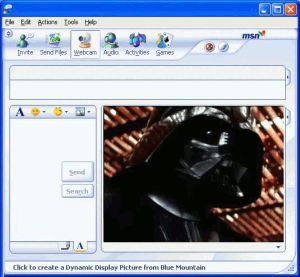
Becoming Darth VaderWe’ve all heard the stories about people who have faked their identity online to catch adulterous spouses or to snare chatroom perverts. But what about pretending to be someone else just for a bit of good old-fashioned harmless fun? I, for instance, have just spent half an hour rolling around with laughter watching my friend believe he was chatting with Darth Vader, after I rigged both my webcam transmission and my voice to mimic the Jedi lord.

This is a lot easier to do than you may imagine. Start by installing Fake Webcam on your PC. This app lets you play pre-recorded videos on instant messengers in the client’s webcam window. In fact, you don’t even need a webcam to use it, and you can broadcast a single video to multiple messengers simultaneously. All I did was to grab some footage of Darth from the Net, then cut it up a bit and looped it using Vivia, before inserting it into Fake Webcam.

For the famous James Earl Jones heavy breathing voice I used Blaze Audio Voice Cloak, which is compatible with all the major IM clients. You can change your voice by playing around with the five-band graphic equalizer, robot voice effect, flange, pitchshift, and chorus. Once you’ve perfected the sound, just get online and let the confusion begin!

Of course, faking yourself online is no fun if the person finds out who you really are, and you could end up with a punch in the face if they discover it’s you. So I carried on the faking theme by hiding my own IP address using Hide Real IP in order to protect my real identity.

New .Mac service coming soon?

Mac accountThe big rumor today is that Apple will make significant changes to their .Mac online service, starting with the name. For those of you that don’t know what it is, .Mac is an online account where you can set up your own website, photo albums, Apple Mail account and even store files. It works seamlessly with iLife and all other Apple applications, but the service those come at a price, starting from $99.95 for a unique yearly membership.

TUAW yesterday reported on two links hinting that .Mac will go through a name change, and maybe even bigger modifications. On one side there’s Todd Ditchendorf, an ex-engineer at Apple who in his twitter suggests something big is coming for .Mac. Then there’s a more substantial blog post from Dmitry Chetsnykh, CEO of Coding Robots, who, after installing the latest 10.5.3 update of Leopard, found hints of renaming of .Mac in the Localizable.strings of iCal, Apple Mail and Safari. In all of these .Mac was replaced by %@.

So will a new .Mac service be one of the main attractions of this year’s upcoming WWDC? It’s been a while since we’ve heard of anything new for .Mac, at least since last August, when new web galleries and 10 GB of storage for all were announced by Steve Jobs. Maybe as TUAW hint it will have to do with extended interaction with the upcoming iPhone 2.0.

Update (02/05/08): Many rumors believe that the new service will use the Me.com domain, which seems to have been recently acquired by Apple.

Top anti-Euro 2008 software downloads

Euro 2008As my workmate and friend James reminded us a couple of days ago, Euro 2008 is just around the corner. I guess he and my other colleagues in the office will be happy to have soccer games every other day and discuss over the referee’s unfair decision about that borderline offside in the last minute of the match… but certainly not me.
I don’t like football at all, which means that during the next couple of weeks I’ll have to look for different ways to amuse myself. However I’m sure software will be very helpful in finding alternatives to Euro 2008:

  • Movies or TV series – I think I’ll grab hold of my Ant Movie Catalog movie database to watch a few good old classics again. And if I grow tired of cinema, I can always use TED to get the latest episodes of my favorite TV show.
  • Reading – What about eBooks? There are literally thousands to choose from and plus you can easily take them anywhere with your mobile device.
  • Exercising – The fact that I don’t like football doesn’t mean I can’t enjoy other sports. This can be the perfect time to start working out and manage my results with SportsTracker.
  • Traveling – High budgets only: run away from Euro 2008 with a good traveling guide like the Schmap ones, also available for the iPhone. Don’t forget to check the weather forecast before leaving!
  • Games – Probably the best software alternative out there! Just check out the impressive games collection at Softonic and choose the one you like most.
  • Other hobbies – There are dozens to choose: from collecting stamps to sudokus, including also crafts like painting and cross-stitching.

40 stunning icon sets for your desktop

Wndows V1 icon set

You don’t have to put up with the same old boring icons all the time. In fact, if you look around, you’ll find there are many sites out there where you can find all sorts of original icon sets to freshen up your desktop.

Take deviantart. One of the most vibrant online communities for artists it showcases all sorts of works, from icon sets to photography, flash or artisan crafts. deviantart is a great place to go and pick up a new screensaver, wallpaper or icon set, as most of the things you find are also completely free and made by extremely talented artists.

You could really spend hours digging around in all the categories that make up deviantart, especially giving that new items are constantly being added. If you’re looking for top notch icon sets I recommend taking a look at the selection made by Noupe. The online resource for web developers has built up an impressive list of 40 amazing icon sets.

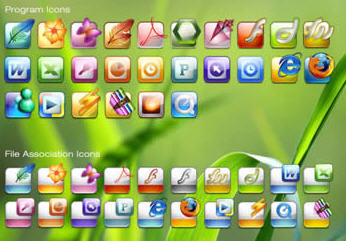
You’ll find many icons specifically for Mac, such as those for the iPhone or for Leopard, but their selection also includes a few sets for Adobe products, with many stunning adaptations of the sober icons that Adobe released with their CS3 series. I also quite liked some of the more original sets like Oxygen, which consists of bubbles covering very minimalistic icons, or the Yoritsuki set of Japanese styled logos. For PC users, I recommend the Windows Icons V1 set, with its rounded, shiny and bright new icons that could actually make a Mac user envy your XP or Vista PC.

Programs to keep you fit and healthy

keep you fitStaying long hours sat in front of a PC, is surely not qualified as the best exercise you can do to stay fit. Although there is a great move of hands and fingers, they don’t really burn as much calories as you would wish.

Nevertheless PCs can actually help you stay motivated, set targets and see exercises you can do to stay fit and healthy.

Fast walking, running, swimming and cycling are all excellent options to keep you healthy, but if you want to get the most of them, a flexible and ‘balanced’ body – in the real meaning of the word – is a must have.

Yoga can help you to achieve that, and good practice of it everyday will ensure you the best results. To know more about this discipline and also start practicing it with a very effective but simple exercise, check out Yoga Freeware 3 and Yoga trainer. The former features step by step images of the Sun Salutation which is the best way to start your day.

As said in Latin, ‘mens sana in corpore sano’, the better way to keep fit is to exercise your brain, together with your body. Brain Practicer provides 7 methods to exercise your intelligence and hopefully improve it. I say ‘hopefully’ not because I don’t think you’re smart, but simply as it’s something we all want to increase.

You have trained your body and exercised your mind, now what else could you do to keep fit? You already know the answer, although you pretend not to. Checking what you eat. CRON-O-Meter helps you keep an eye on your food intake to ensure you get enough vitamins, minerals, proteins and carbohydrates each day.

Continue reading “Programs to keep you fit and healthy”

Adobe launches first CS4 betas

Adobe CS4Following the trend of other software companies that launch their new products in beta before the final version arrives, Adobe has published the first betas of their upcoming CS4 suite.

Unfortunately not all the Adobe-Macromedia applications are available at this point. Only Dreamweaver CS4 (Windows/Mac), Fireworks CS4 (Windows/Mac) and Soundbooth CS4 (only Mac) have been released to the public in order to let users test the new functionalities and, at the same time, provide some feeback if necessary.

The three new betas offer quite an array of new features. Dreamweaver for example now includes integration with Subversion support for Adobe AIR authoring and a new code navigator – all perfectly wrapped up in a totally revamped user interface – together with the so called Live View mode, with which you can view your web pages under real browser conditions while still having access to the code.

Fireworks also boasts a redesigned interface as well, along with CSS and image export, PDF export and AIR authoring as well to create your Adobe AIR apps in Fireworks and deploy them directly to HTML, CSS or Flash.

Last but not least, Soundbooth features support for multitrack sound editing, plus the ability to preview MP3 compression settings before saving and an enhanced Soundbooth Score workflow.

Unfortunately there’s a catch: these CS4 beta versions let you test the programs only for 48 hours (way too strict, in my opinion). This ridiculously reduced trial period can be extended up until the final version comes out, but only if you’re a registered CS3 user. Otherwise you’ll have to make good use of those 48 hours if you want to fully test the new Adobe CS4 betas.

Your media always at your fingertips with Orb

Orb logoA while back I looked at an impressive piece of software called SlingPlayer which basically allows you to watch videos stored on your hard drive, Sky Box or Tivo player anywhere in the world as long as you have access to the internet. As impressive as it was, it does require investment in a SlingBox attached to your media device so it doesn’t come cheap. However, imagine if you could access literally all of your digital media and appliances at home while you are on the move – and not have to spend a cent. That’s exactly what Orb offers – a simple but powerful freeware streaming software that enables users to remotely access all their personal digital media files including pictures, music, videos, webcams and television. The truly great thing is that it can be used from just about any device that has access to the internet including laptops, pocket PC, smartphones, PS3, Xbox 360, Wii and video game consoles.

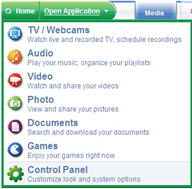
Orb browser screenshot

You simply have to sign-up for an Orb account and you can instantly access your digital devices remotely. All the available media on your device will be available for download with the use of a file explorer plug-in. Orb can be used as a replacement (a much simpler and more effective one too) for Microsoft’s Windows Media Connect software for computers running Windows. So for example, you can use your PS3 or Xbox 360 to watch videos, audio, and images on any PC with the Orb installed. Orb transcodes the video files from the computer, including Windows Media Files, on the fly as as long as the computer running Orb has the correct codec.

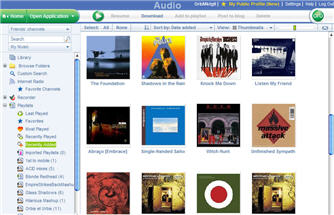
Orb audio screenshot

Perhaps you want to watch TV on your smartphone? If your PC has a TV tuner, Orb can allow you to access it remotely from your phone and even control media devices such as Tivo’s to access your saved recordings. The same goes for your webcam – you can use your webcam as a surveillance device and see exactly what’s going on from your phone, laptop or any other mobile device simply by logging into Orb.

Finally, the Orb also allows you to share data without the need to install P2P software or upload it to another site. Simply select the files you want to share, enter the email address of the person that you want to share it with and they will receive a link providing access to the data whether it be films, music or pictures. Whether you’re looking for a simpler way of sharing your data or ensuring that you can access your media at all time, the Orb is an impressive and powerful piece of software – and best of all it’s completely free! Maybe it’s time to sling away the SlingBox.