Google Earth 6 launches, now with Street View

Google Earth has reached version 6. The revolutionary satellite imagery app, with which you can comfortably travel around the globe, includes a bunch of new features that make it a more interesting – and easier to use – application. Let’s take a look at them.

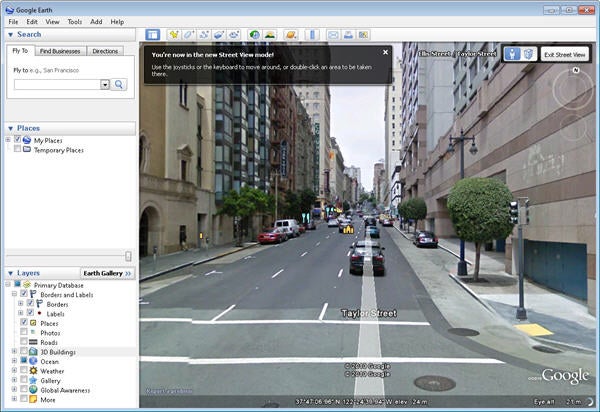
Integrated Street View. The popular Google Maps Street View functionality is now seamlessly integrated into Google Earth. You’ll see Pegman (the little orange guy from Google Maps) on the right side of the program’s interface, beside the navigation controls. To start using Street View on Google Earth, just do the same as in Google Maps: drag Pegman over the area of the map you want to visit, and Street View will be launched as usual.

3D Trees. Besides 3D buildings, Google Earth now supports three-dimensional trees to add even more realism to the environment. 3D trees prevent you from bumping into a tree when following Google Earth’s walking directions, and keep the scenery from looking like an isolated desert in the middle of nowhere.

Improved Historical Imagery. The Historical Imagery feature, added in Google Earth’s previous version, has been enhanced to make it clearer and simpler. Now every time there’s older imagery available from the area you’re browsing, Google Earth will display the date of the oldest images available in the status bar at the bottom of the screen.

Download Google Earth 6 for free here.

Free Browser Game: K.O.L.M.

K.O.L.M. is a cute platform adventure about a lost robot, who wakes up not knowing where he is. His ‘mother’ is there to guide him through the challenging rooms, where he will find robot upgrades necessary to complete the game.

The presentation of K.O.L.M. is really slick, with some great simple effects that really make the game stand out. There are some pretty tricky parts, requiring some pixel perfect jumping, but it’s worth persevering. Fans of the original Metroid series will like this, and it’s atmospheric enough to draw anyone into its robot world. Play K.O.L.M. here. The game requires Flash.

[via IndieGames]

Groupon takes its daily deals international

Groupon has been around since 2008, and has been growing in popularity, especially in the US. Featuring a new deal every day, Groupon targets the specific market you live in and offers a great price on merchandise and services. What makes it really stand out is that the deal descriptions are written in catchy, often humorous ways and it offers a mobile app for your iPhone, iPad, or iPod Touch so you can even check out deals while on the go.

Right now, the biggest Groupon news has been the myriad of rumors that Google intends to buy it. Until it’s confirmed by either company, however, they remain just that: rumors. What is currently tangible news, however, is that Groupon has recently gone international.

With its acquisition of European clone, Citydeal, Groupon has truly become an emerging company to watch with an international presence. In the span of just a few short months, Groupon has gone from only offering daily deals in cities throughout the United States and Canada to adding a whole slew of new cities, this time in Europe.

There are now cities with available deals in the United Kingdom, Germany, France, the Netherlands, and Spain, to name just a few. The deals work in largely the same way as they do in the United States: Groupon contracts with local businesses to offer deals, usually ranging from 40-60% off market price. A certain number of Groupon users must purchase the deal in order for it to be valid and usable. Once that number has been hit, “the deal is on,” as Groupon puts it. You can either print off the coupon online or else simply bring in an electronic copy to be scanned at the applicable business.

This is great news for anyone who travels internationally. As long as you have an internet connection and are in a country where Groupon does business, you can get your daily deals right on your computer or mobile device. Not only is it a great way to save money, it also allows you to experience local business services at a hugely discounted rate. Time to schedule that next European vacation!

Super Meat Boy out on PC Nov 30th

Xbox Live hit Super Meat Boy is coming out on PCs on November 30th, and will be available through Steam with a special character included – the Headcrab from Half-Life. Non- Steam purchases will also get a free character in the sticky shape of a Goo-ball from the magnificent World of Goo.

If you don’t know Super Meat boy, you can check out the original Meat Boy at Kongregate. While that gives you a good idea about the gameplay and style, be aware that Super Meat boy is a big improvement, even while it’s still  sometimes brutally hard! The graphics are better in the Super version, and it’s a really satisfying platformer. Let’s hope it makes the translation to PC in tact!

Play augmented reality games on your iPhone

Augmented Reality (AR) for phones first dropped into my field of vision with Google’s Sky Map on Android. That was the first time I’d ever seen hands-on how AR could actually be a useful tool. Unsurprisingly, it’s the home of the fart app that is now bringing us AR games. Useful? No, but pretty cool!


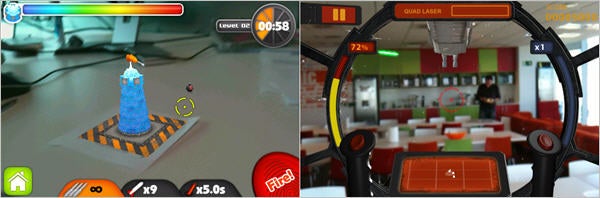
The iPhone’s headline act is Star Wars Arcade: Falcon Gunner. This sees you helming the Millennium Falcon’s guns against waves of attacking Tie Fighters that fly over the view from your camera. Depending on the views you can find, it can be pretty cool. It’s not the best game ever though, and you may ask if the AR party trick is worth the relatively high price.

ARDefender takes a different approach. It’s a super simple tower defence game, which requires you to print out a PDF ‘tag’, which you place in front of you or on the floor. The game builds a 3D tower on this tag, and machines attack it from all sides while you fend them off with guns and missiles. ARDefender is cheap at 99c, but it’s loads of fun and will impress anyone!

There is also an AR laser-quest style game called Gunman, which doesn’t augment reality with any fancy graphics. Assuming your friends all have iPhones and different color shirts, you can run around shooting each other sniper style with your iPhone camera…but you’ll probably want to explain to passers-by what you’re doing!

If you want a taste of AR gaming, get ARDefender. It’s cheap, fun and looks cool. These three games feel very much like the beginning of a technology (and they really eat up your battery!). I’m sure things will get more interesting pretty soon, as the existence of lots of powerful smartphones means developers have a big market to exploit.

Take up a new profession on your iPhone

It’s Friday again and no doubt you’ve had just about enough of work for one week. Or maybe you’ve had enough of it period. Well, why not spend the weekend trying out a new profession? Just grab your iPhone, iPad or iPod touch and go download one of these fun iOS strategy games. See which one you enjoy most, then go tell your boss on Monday that you’re off to pursue your true vocation. (OnSoftware cannot be held accountable for any lives ruined by following this advice. We hope.)

Chef

Tiny Chef

Reckon you could cut the mustard as a gourmet chef? Tiny Chef lets you try your hand at becoming the next Gordon Ramsey, challenging you to run your own restaurant. You start off as a small cafe and must grow your business by discovering tasty new recipes, upgrading your cooking equipment and decorating your restaurant to entice customers.

Train Conductor

Train ConductorIf you’ve always fancied working on the railways, Train Conductor will give you a good idea of how stressful life as a signal operator can be. Your job is to make sure that trains don’t crash into each other, by re-routing them onto empty tracks. The game starts off very gently but soon becomes a nightmare as the number of tracks you have to control increases and ghost trains start to appear. That’s right, I said ghost trains!

Football Manager

Football ManagerPersonally, my ideal job would be as a soccer coach. Getting paid to watch soccer games and shout at a bunch of bumbling jackasses sounds like the perfect profession. Play Football Manager Handheld on your iPhone, however, and you start to realize it isn’t as simple as that. In this comprehensive simulation you have to take control of transfers, training schedules, scouting new players, opposition analysis, and player contracts!

Video Game Developer

Game Dev StoryReckon you could come up with the next Sonic or Mario? Then give Game Dev Story a try. This interesting sim gives you an insight into what happens in the office of a games studio. You’ll be responsible for hiring and firing the right programmers, designers and writers to produce the next hit video game. To succeed you need a good understanding of what the market wants, but also to be creative in your game concepts.

Supermarket Worker

Supermarket ManiaOK, it’s not the most glamorous of professions, but after a few games of Supermarket Mania you’ll be hooked on the strange thrill of stacking supermarket shelves. The game has a nice story arc in which you play Nikki, who together with her pal, is trying to make it big in the supermarket world, despite the growing mechanization of the industry in their town.

Air Traffic Controller

Airport ManiaBeing an air traffic controller always comes near the top of any survey about stressful jobs. Install Airport Mania: First Flight on your iPhone and you’ll realize why. Your roles include guiding planes in safely for landing, sending them to the boarding gate, offloading passengers, loading new passengers, then sending them back to the runway for takeoff. You earn cash, which you can use to upgrade your airports.

Farmer

FarmvilleWorking the land can be one of the most satisfying jobs you can take on. Just ask the five trillion people who play Farmville on Facebook. The iPhone version of the game allows you to connect to your Farmville farm via the web. Plant seeds, acquire machinery and manage your livestock in order to become a successful farmer. Be careful though, because all this gets very addictive.

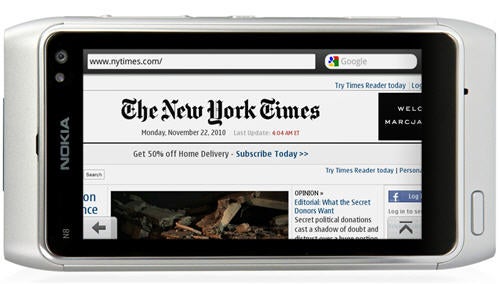
Final version of Opera Mobile 10.1 for Symbian released

Opera has unleashed the final version of Opera Mobile 10.1 for Symbian/Series 60 mobile phones, with a significant improvement in JavaScript performance.

The latest version of Opera’s mobile browser includes a powerful JIT optimization for the Carakan JavaScript engine, which provides a significantly faster browsing experience. In fact, results from the SunSpider JavaScript test prove that this version runs up to nine times faster than the previous Opera Mobile 10.0.

Opera Mobile 10.1 for Symbian

Another outstanding new feature is the support for geolocation – a functionality we’re finding on more and more apps. Thanks to geolocation you’ll be able to get customized, relevant content from web services such as maps, recommendation sites and travel apps, depending on your current location.

Other interesting features you’ll find in Opera Mobile 10.1 are Speed Dial, tabbed browsing, a password manager and the so called Opera Turbo compression, which can shrink websites up to 20% of their original size, thus reducing data transfer, saving you money and cranking up browsing speed.

If you can’t wait to test it, head over to m.opera.com from your mobile web browser and download your copy now.

Angry Birds: Coming soon to a game console near you

You can play it on your iPhone or Android. You can purchase a t-shirt with your favorite character emblazoned on the front. You can even buy them in plush toy versions.

Soon enough, you may be playing the popular Angry Birds mobile app on an actual game console, if Rovio’s chief executive of North American Business Development Peter Vesterbacka has anything to say about it:

The smartphone gaming platform is actually turning out to be the biggest and most played out there. [I]t’s starting to beat the traditional games on consoles and PCs.

Angry Birds will soon be available on Xbox, Wii, and PS3, but Mr. Vesterbacka has not yet confirmed a specific date. He has simply stated that the launch will hopefully take place at some point next year.

And if that wasn’t enough good news for fans, Mr. Vesterbacka also mentioned plans to develop an Angry Birds 2.  If true, it looks like we’ll be seeing a lot more birds and pigs in our respective gaming futures.

Use these apps and save big on Black Friday deals

Black Friday is nearly upon us here in the U.S. Getting anxious to snatch up all those unbeatable deals? Make sure you get a head start on your holiday shopping preparations with these useful Black Friday apps:

Black Friday Wish: A lot of great Black Friday deals are being advertised online and in the newspapers. They’re difficult to organize without making quite a mess, however. That’s where Black Friday Wish can step in to help. Create a wish list based on categories of items you’re interested in purchasing. You can even notify your friends about specific deals via Twitter, Facebook, and email.

Black Friday Survival Guide: Everything you need to know to get the best Black Friday deals comes in this sleek little app. Much like Black Friday Wish, you can organize your purchases into a shopping list. This app goes a step further though, in that all newspaper advertisements have been scanned in so you can view them right on your device. There’s even a news section to keep up with the most up-to-date deals as they’re announced.

Black Friday App: Simple in name and style, yet this app takes Black Friday holiday shopping one step further by allowing you to make online purchases of the deals you find (if the particular store has the option to do so). This app is perfect for people who prefer not to endure the mayhem and endless lines in actual stores this Friday.

TGI Black Friday: Another black Friday app with a great look and features, this app allows you to browse great deals by store, category, or product. Click on an interesting product and visit the store for more details. You can then email the link to yourself or or add it to a list. Take care when using this app, however, as sometimes the prices it lists are not the same as what individual stores are advertising.

Amazon Price Check: This isn’t technically a Black Friday app, but it gets the job done nonetheless. If your device has a built-in camera, you can scan in product bar codes, or even snap a picture of the product you’re interested in. You can also compare prices in stores with Amazon.com’s U.S. inventory and prices. If Amazon has the better deal, buy online through the app in a few simple clicks.

These apps are great supplements to your other tried and true Black Friday strategies, and the best thing about them is they allow you to prepare in advance. Black Friday can be a pretty crazy experience, especially if you don’t know exactly what you’re looking for or where to go to get it if you do. These apps simplify the process, allowing you to organize your shopping expeditions before you set out and, in some cases, even shop from your home instead.

If you’re among the multitudes of people who plan to find the greatest deals possible this Friday, best of luck to you. In the interim, Happy Turkey Day and enjoy the holiday weekend!

How to sync your Google Calendar with your phone

For me, Google Calendar offers one of the best ways to manage your life on the web. It’s so easy to use, and the fact that calendars can be shared with others makes it very practical for organizing business projects, too. But what if you want to have access to Google Calendar through your phone’s calendar? Here’s how to sync your Google calendars on the most popular mobile platforms:

iPhone

The easiest way to do this is by enabling the Google Sync feature and adding a new Microsoft Exchange account with your Google credentials. This process is explained very well in Google Mobile’s helpful step-by-step guide.

However, if you don’t have iOS 4 and already have an Exchange account set up, this feature is not supported. Instead, you’ll need to use the CalDAV feature to sync your Google Calendar with your device. This can be done as follows:

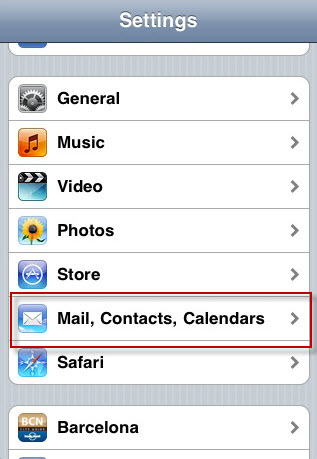
1. Go to the iPhone Settings and choose Mail, Contacts, Calendars.

Step One

Continue reading “How to sync your Google Calendar with your phone”