Rovio to release Angry Birds “Rio”

Angry Birds fans will be pleased to hear that developers Rovio have announced that it is to create a version of the game based on the upcoming animated movie “Rio” due for US release in mid-April.

The “twist” to the hugely popular original game is that the original flock is kidnapped and taken to Rio where they then escape and seek to help their friends – two macaws named Blu and Jewel who will be the stars of the 20th Century Fox film.

Consisting of 45 levels with more available via automatic updates, the game will initially be released on smart-phones and tablets. However, since the original has also recently been released on Mac and Windows, don’t be surprised to see more platform releases if it takes off.

If you can’t wait until then, you can find video previews of the game here.

Boxer Makes DOS Gaming on Mac Simple

Emulation software is too often hobbyist in design, with arcane interfaces that are really awkward. Boxer aims to change that. This native Mac app built on DOSBox makes playing those old DOS games beautifully simple.

Boxer looks good, and even includes a library bookshelf for your game collection, similar to the the iBooks app on the iPad. The best thing about it, though, is that you really don’t need any prior knowledge of DOS at all. Boxer walks you through installation and running files, meaning you really won’t make a mistake. I was going to write ‘how to play DOS games on your Mac’, but Boxer is that tutorial! Just download it, install and you’ll be playing classic 90s PC games in no time. The nice thing about retro PC gaming, unlike say Commodore 64 emulators, is the controls we have today are just the same as back then. You won’t miss having a joystick, as the chances are you never used on with your old PC either.

Check out Boxer’s homepage for more information on where to download DOS games.

Spice up your Tumblr dashboard with Stylish

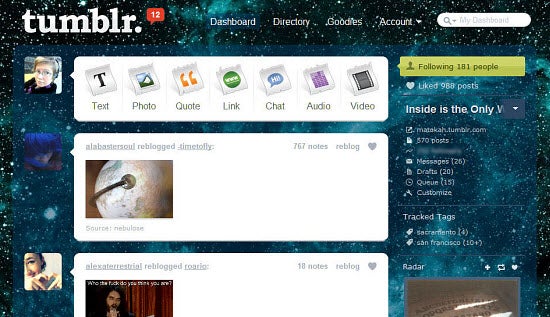
Everyone on Tumblr knows just how many different themes there are to choose from. You can customize your account on the popular microblogging website with virtually hundreds of different options. Apart from a few select days where Tumblr made site-wide color alterations to recognize special events however, user dashboards have always been a relatively uninteresting (and somewhat ironic) shade of Facebook blue.

No more however, at least for Firefox and Chrome users. Now, thanks to the helpful add-on Stylish, you can customize your dashboard as you see fit.

There are lots of different dashboard designs to choose from. My personal favorite place to look is UserStyles, a site dedicated to assisting web surfers in styling the web any way they choose, and making it their own unique browsing experience. As you may have guessed, the site has a page dedicated specifically to designs for Tumblr dashboards.

Installation is a snap. All you need to do is have the required browser and install the corresponding Stylish add-on. Just browse the available design options on UserStyles after that and click the “install” button on the upper left of the screen when you find one you like. In a few seconds, your dashboard will be transformed.

A word to the wise, however: Stylish only currently works with Firefox and Chrome browsers. Also be aware that, while incredibly cool looking, some of the darker designs make it impossible to see text input if you actually have something to post or reblog. If you’re on Tumblr primarily for browsing though, you should be fine. The uninstall process is also very simple if you decide later you’d rather revert back to Tumblr’s default dashboard colors.

Now that your dashboard’s been all prettied up, you should also consider backing up your Tumblr posts. For a site that’s notorious for its “We’ll be back shortly” downtime messages, you can never be too safe!

iTunes Updated to 10.1.2

Last night Apple released a relatively minor update for iTunes which, according to them, provides a number of important stability and performance improvements. In the US, it also adds support for Verizon iPhones.

Otherwise it’s still the same iTunes 10, and the social app Ping hasn’t been improved! It’s still not very connected, still focused on selling you music and, most annoyingly, still recommends you connect with artists that have nothing to do with your iTunes library. Does anyone want to bet Ping will be gone by iTunes 11?

Download iTunes for Mac or Windows here.

Dead Space: the scariest iOS game to date

Finally, there’s a genuinely scary horror game for the iOS platform. Dead Space has brought something completely new to Apple handsets: a fear factor comparable to watching Saw II and The Ring back-to-back in an empty house in the middle of a blackout.

Dead Space is scary

Playing Dead Space on iOS, especially the HD version on the iPad, is a genuinely terrifying experience. Its combination of stunning 3D graphics, horrific sound effects, rumbling cinematic soundtrack, and tense storyline that always has you on edge, give Dead Space the feel of a classic console horror title like Resident Evil or Silent Hill (or indeed, the original Dead Space). As you can read in my full review the only thing that lets Dead Space down slightly is its rather choppy controls. It’s still well worth the money though.

I’ve yet to encounter anything for iOS that gives you the heebie-jeebies like Dead Space does. There are a few I can think of that have their moments, but nothing that has you crying out for mummy throughout the whole game. Here are the scariest I can think of to-date, but feel free to let me know if I’ve missed any out.

Soul

Soul for iPhoneArtistically beautiful, Soul sees you attempt to deliver a dead guy’s soul to heaven though a series of sinister mazes. Although the accelerometer-based controls are a bit clumsy, there are a few moments where you’ll jump out of your skin – watch out for the picture of the girl… Price: 99 cents

Aftermath

Aftermath for iPhoneThe closest thing you’ll find to Left 4 Dead on the iPhone, Aftermath is a stylish zombie game that looks great and plays out like a beautiful nightmare. The atmosphere generated by the artistic graphics and 3D audio is very impressive, as you patrol the streets after dark, with only your flashlight to guide the way. Price: 99 cents

Mystique 2

Mystique 2 for iPhoneGhostly children, abandoned hospitals and mutilated bodies always combine well if you’re looking to scare someone. At so it proves, in Mystique 2, Chapter 2: The Child. Although the graphics aren’t a patch on Dead Space, the mood created by the game is chilling enough to make you keep the lights on when playing. Price: 99 cents

Resident Evil 4

Resident EvilThe king of scary games comes to iPhone in the shape of this lavish mobile recreation of the fourth console version of Resident Evil. There’s lots of tension as you walk around wondering when and where you will get attacked next, and the range of ghastly monsters in the game is very impressive. Price: $4.99

Fallen EP-1

Fallen for iPhoneDubbed the “first 2.5D Survival Horror game” for iOS when it came out, Fallen EP-1 is still one of the most spine-tingling games on the platform. Your mission is to escape from a haunted prison, as you creep your way through a series of dark, bloody environments, picking up clues that could lead to your escape from this living hell. Price: Free

Rage

Rage for iPhoneOne of the most graphically elaborate games you’ll see on iPhone/iPad/iPod, Rage pits you against hoards of flesh eating beasts in a sick and twisted reality TV show gone wrong. Although it’s spectacularly scary, Rage doesn’t quite match up to Dead Space in terms of gameplay, which is let down by its rail-based approach. Price: 99 cents

How to: create a photo mosaic in Photoshop

I’ve been fiddling with Photoshop during the last few days, looking for an easy way to create a photo mosaic. The idea was to divide a large image among a set of thumbnails, so that each of them contains a small portion and they all together make the original photo up. After a bit of trial and error, I finally got it. Here’s how to create a photo mosaic in Photoshop, in just a few easy steps.

1. Open a blank image and fill in the background with any solid color – to work more comfortably. Then create a new layer, draw a square shape on it with the Marquee tool (M) and fill it with white.

2. Create another new layer and with the Marquee tool again, create another square shape inside the original one and fill it with black. You’ll need to deselect (Ctrl+D) the previous one in order to be able to create this shape.


Continue reading “How to: create a photo mosaic in Photoshop”

Crysis 2 multiplayer demo coming to PC!

PC gamers have been feeling a little left out recently, with lots of cross platform releases getting demos on XBox and PlayStation, but not on PC. When it was announced that Crysis 2 was getting a demo on XBox 360, there was unsurprisingly a lot of grumbling. The first game was PC only, and its success was thanks to PC gamers…

Thankfully, EA have announced the demo will also come out for PCs too. Phew! There’s no date yet, but as the game is set for release at the end of March, it must be soon. We’ll have a full review as soon as we get our hands on it. Meanwhile, check out the teaser trailer below:

[youtube]http://www.youtube.com/watch?v=SHLEbuj5x6Q[/youtube]

Champions Online Goes Free for All

Champions Online has been around for a while, and while it wasn’t universally loved on release, developers Cryptic Studios have worked hard to improve it.  Now you can play this comic book super hero MMORPG for free!

Free to play is not a new concept, but many online games like this turn out to be pretty limited in their free versions. Champions Online doesn’t feel limited at all. It’s a hefty 3GB download, but that gives you a really good looking cartoon world to explore, packed with villains putting your planet in peril (and also Canada!). The character creator really lets you express yourself and make a unique looking super hero, if you want. The missions are lots of fun, and while it’s at the simpler end of MMORPGS, the fast paced action and humorous references more than make up for it.

If you’ve never tried an MMORPG, Champions Online is a great place to start, as it puts you straight into the action, forgoing the boring grind so often found in online gaming. Check it out here

Skype 5 for Mac comes out of Beta

Skype for Mac is finally out of Beta today with a few fixes and improvements. Skype 5.0 “Gold” as the developers are calling it, features the ability to resize the user interface, allow full screen video calling and there’s an improvement in visibility of the dial pad and contacts. The sidebar now also shrinks as the window gets smaller when the content area is at its minimum size and Skype also now remembers the last position the user dragged it to. A full list of fixes and improvements can be found here.

Most users probably won’t immediately notice the improvements as they are generally very subtle. I think there are other more important things they could have improved on though. Having now used Skype 5 several times since its Beta release, I’ve got mixed feelings towards it. While things like group video chats have been improved, I’ve sometimes found it hard to get used to the new layout such as accessing contacts while in a video call and sending instant messages

I also don’t understand why developers such as Skype have to rename their releases as “Gold” like they’ve sold millions of albums or something! RealNetworks did the same thing with their free RealPlayer Gold. Skype Gold is also free but using the “Gold” tag may only cause confusion among users that it’s a premium service.

Identify duplicate music files in your library with Similarity

These days, it’s not uncommon for people to store their entire music collection digitally. With the ability to purchase entire albums in one easy click, it’s not hard to see how quickly you can amass files in your library. Unless you’re super organized (or don’t mind a mess, alternatively), it’s easy to end up with an incoherent jumble of music in your library quite quickly.

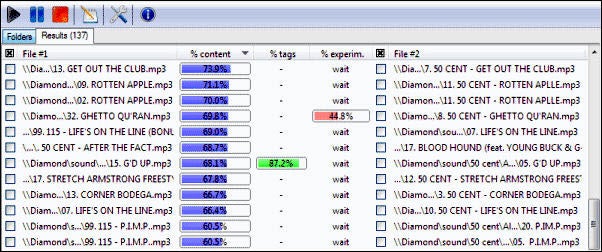
One of the most common problems is ending up with multiple music files of the same song. Maybe you originally burned the song from an actual CD and later purchased it online. Whatever the case, these duplicate files add clutter to your music library and can be a pain to search out on your own. That’s where Similarity, a duplicate music file finder, can be quite helpful.

Similarity searches through your music files and locates duplicates in short order. You can search by song name and also search by the actual sound of each music file. Once identical or similar-sounding music files are located, you can either choose to rename them or delete them entirely. Whatever the choice, Similarity is a godsend for anyone who wants to take control of their messy music library and get it organized quickly and efficiently.