How to master hunting in Red Dead Redemption 2

Ready to hunt? Follow our guide to land the big game in RDR2.

Red Dead Redemption 2 isn’t just about killing outlaws and robbing banks. As a frontiersman in the Wild West, knowing how to hunt is an essential part of playing Red Dead 2. Over 500 species of animal exist in the Red Dead game world, and you’ll have to hunt at least a few of them over the course of playing. As a player, hunting will net you access to valuable resources, challenges, supplies, and unique outfits and rewards. Take a look at the guide below for tips on how to become a master hunter.

How to master hunting in Red Dead Redemption 2

Choose your tools wisely

red dead redemption 2 bow
The bow is a hunter’s best friend.

Before you even set out on your hunt, you’ll want to make sure you’re carrying the right tools for the job. First and foremost, this means weapons. While you can theoretically hunt with any weapon in the game, the effectiveness of the hunt and quality of your kill will depend on your choosing the right weapon for the right game. For example, if you use a double-barreled shotgun to hunt rabbits, you’ll end up obliterating your target and won’t have much animal left to skin or harvest.

For smaller game, the general rule of thumb is to take along either your bow or a varmint rifle. The bow has many distinct advantages. Firstly, it’s totally silent, meaning you won’t necessarily scare off your quarry if you miss. However, it’s difficult to make rapid follow-up shots, as you need to load a new arrow and draw the bow each time. The varmint rifle is more rapid fire, but the loud gunshots will run the risk of driving other game away from you. For larger game, such as bears, shotguns or bolt-action rifles are more appropriate. The large caliber bullet will make short work of larger prey, and the high damage generally means a follow-up shot won’t be necessary if your aim is true.

Red Dead Redemption II DOWNLOAD NOW
10

In terms of other equipment, you may consider crafting or bringing along bait of some kind. This is generally useful if you want to draw out specific prey such as a legendary animal or if you want to set up an ambush in a particular spot. For more serious hunting trips, you’ll also want to make sure you have plenty of ammo, and should also consider cleaning out your satchel to make room for the supplies you’ll be harvesting.

The basics of tracking

red dead 2 scent trail
A scent trail.

Once you’ve chosen your tools and have ridden out into the wilds, your first order of business will be tracking your prey. Use your Eagle Eye ability to take a look around an area. You’ll see animal tracks and trails marked with blue wisps around you, and you can use the R1/RB trigger to focus on a specific track and begin following your prey. Move slow and in a crouch to be sure you don’t scare the animal off.

You’ll also notice that in Eagle Eye you’ll be able to see your own scent in green, blowing with the direction of the wind. Move with the wind to make sure you stay downwind of your prey, or they’ll bolt if they catch a whiff of you. Using a bottle of scent blocking lotion will also mask you so you don’t have to worry about your scent.

red dead redemption 2 hunting
Lining up the shot.

After you’ve trailed your animal, you can study your quarry by holding down the R1/RB button. This will net you important info about the animal you’re hunting, and if you upgrade the ability enough, you’ll be able to see the kill quality on a scale from Poor to Pristine. As a general rule, poor quality animals aren’t worth the time or ammo.

Finally, it’s time to take the shot. When hunting, take your time and always go for headshots so as not to damage the pelt. If you’re using the bow, however, keep in mind that aiming too long drains stamina and will cause you to shake and lose your target. For more daring players, you have the option to call out to an animal. They’ll look for the sound, quickly exposing their head for a moment before bolting. You need to have quick reflexes or a full Dead Eye meter to make use of this high risk, high reward ability.

Harvesting the kill

red dead redemption 2 skinning
Skinning the carcass.

Finally, the most important part. After you’ve killed the animal, approach the carcass and you’ll be presented with a few options. Firstly, you can skin the carcass right then and there. This will harvest any available meat or other resources, and will generally present you with a pelt for you to transport to any nearby vendor. This is a quick and easy method to net immediate supplies from a carcass and get some quick food, but there are a few drawbacks as well. Chief among these drawbacks is that if you do decide to transport the rest of the carcass, it’ll decompose much quicker, and you won’t net as good of a price for it at vendors.

red dead redemption 2 horse carcass
Transporting the kill.

Alternately, you can load your kill onto your horse for transport to the nearest town or trapper. You can also bring it to your camp to give to Pearson, which will net you positive points with the gang and contribute to group resources. Depending on the animal, Pearson can also craft you unique items. Trappers also have a unique collection of craftable items and outfits, and will generally pay better for hunted animals than other vendors.  Since trapper outposts are generally scarce, we recommend loading up your horse with as much game as possible before making the trip.

Again, just keep in mind that game on your horse will begin to decompose over time, which affects the animal quality and how much you’ll be able to sell it for. Also of note is that animals unique to a certain region, like desert areas, will generally sell for more in other regions that the animal isn’t native to.

If you need a few other pointers, check out Hosea’s mission Exit Pursued by a Bruised Ego. This is a hunting tutorial mission available early in the game that will also give you access to a relatively easy Legendary Bear hunt. With these tips under your belt, you’ll become a veteran big game hunter in no time!
Top 4 fun trivia apps

Test your wits with these great free trivia games!

trivia apps

Ever throw a party for different groups of friends? Worried your cousins won’t like your roommates and your improv team and the dudes from your fantasy football league? A great way to break the ice and get everyone comfortable is to play a party game. Skip the board games and get everyone’s brain humming with a battle of trivia!

Top 4 fun trivia apps

1. Trivia Crack
Trivia crack logo

One of the most popular trivia apps to date, Trivia Crack is really fun and easy to use. Connect on Facebook or let the app choose a random player to play against. Then, spin the wheel to choose one of six categories: Science, Sports, History, Entertainment, Art, and Geography. If you answer correctly, you can keep answering until you lose, and then it’s your opponent’s turn. You can play more than one game at the same time, but your game expires after one day of inactivity.

There’s also the Triviathon option. Answer as many questions as you can non-stop. When you get a question wrong, you have to start over. The length of your winning streak determines how many in-game coins you’ll get which you can use to customize your profile picture. You can play for hours without realizing it because this app is so addicting. Available for iPhone and Android.

Trivia Crack DOWNLOAD FREE ►
7

2. Jeopardy World Tour
Jeopardy world tour logo

You can now play the game from the famous television show.  Choose topics worth different amounts of money and if you win, you get the game cash and choose the next clue category.

In the World Tour version, you can go to locations in the app like Los Angeles and Australia to compete against other players. For each location that you win, you’ll get in-game cash that allows you to advance to other levels. You can also connect on Facebook to play against friends. Once you get to level two, you won’t have to deal with any ads during the game. Available for iPhone and Android.

Jeopardy! World Tour Download Free ►
8

3. HQ Trivia
hq trivia logo

HQ  is the leader in the new wave of trivia games. Every night HQ broadcasts a live trivia game. A fun (and sometimes cringy) host asks a total of 12 multiple choice trivia questions ranging from easy to really, really hard. If you get all 12 questions correctly you win real money! It’s not very much since you split the jackpot with all the other players all over the world that win, but there are a few people on the leaderboard who have won hundreds of dollars.

HQ Trivia DOWNLOAD FREE ►
6

4. QuizUp
QuizUp logo

What makes Quiz Up cool is that it offers a ton of topics – the most we’ve ever seen in a trivia app. Start with choosing the three that interest you the most, like Harry Potter, sports teams, or U.S. Presidents and you can add more topics over time. Play on your own or against a friend or random player a choose the right answer from multiple choice questions.

Like most trivia games, the questions are timed, and if both players and answer correctly, the player who answers the most quickly gets a few more points. If you lose you can move on to another topic or request a rematch. Another feature is the opportunity to use in-game coins to enter tournaments, and if you win, you’ll get featured at the top of the app. Available for iPhone and Android.

Time to get those brain gears turning!

3 great dating apps you might not have heard of

Tired of Tinder? Try these great alternative dating apps.

Are you sick of the usual suspects like Tinder and eHarmony? Dating apps should make dating as fun as possible, so check out these three options you might not have heard of before.

3 interesting dating apps you might not have heard of

1. Coffee Meets Bagel

Coffee Meets Bagel is more of a serious dating app than a “hookup” app. On Coffee Meets Bagel, your profile is fully fleshed out. Instead of just a few pictures and a short bio, you create a more in-depth profile. In addition, instead of endlessly swiping through potential matches, you’re sent potential matches, or “Bagels,” every day at noon. The curated matches are based on incredibly nuanced details and essentially friends of friends on Facebook.

Men receive pre-selected matches based on a careful algorithm, and women are only sent “Bagels” that have already expressed interest. Keeping it progressive, LGBTQ members are sent both male and female pre-selected matches. Once you connect, the app even provides a few icebreaker questions! So if you’re interested in finding a true connection with someone, Coffee Meets Bagel is a fun way to find your match!

CMB Free Dating App Free Download ►
7

2. Coupler

Coupler has a catch: the people who use it are already in relationships. But hold up, it’s not what you think! Coupler is a different kind of dating app — instead of pairing up potential romantic partners, it connects couples with other couples based on similar interests. So if you love double-dating, or you and your partner just want to make some new friends, Coupler might be worth a try!

3. Tastebuds

Are you a music lover looking to find a love connection? Tastebuds is a new dating app that uses your taste in music to set you up with potential partners, or simply make new friends should it not work out. Although most of the questions on your profile are centered around music, there are also a few personal questions so that you can get to know people. One unique aspect of this dating app is that you can include clips of songs that you like in your profile. Instead of sending a message to start the conversation, why not send a song?

Tastebuds - Music Chat and Dating Download Free ►
7

If you’re sick of the standard dating apps, you might as well give these unique dating apps a try. Who knows, you just might find true love!

How to set a volume limit on your iPhone

Here’s how to make sure your notification sounds don’t startle the entire office.

iphone volume limit

Your iPhone has so many different features — from messaging, to tracking stocks, to receiving notifications about important news headlines. Your notifications often cause your phone to emit a sound, which is great if you’re in a situation to receive them, but bad if you’re in a job interview or sitting in the front row of “Hamilton.” That’s why it’s time to set a volume limit.

Below, we’ll show you how to set volume limits on your Apple device in just a few simple steps. Read on to learn the ropes.

5 steps to set a volume limit on your iPhone

1. Open your control center by swiping up from the bottom of your screen (or down from the top if it’s an iPhone X or more recent version).

2. Here, move the volume slider, next to the brightness icon, to the full volume amount. This will set the volume level to maximum. If you want it lower, simply slide the bar back down to a volume you’re comfortable with.

iphone volume

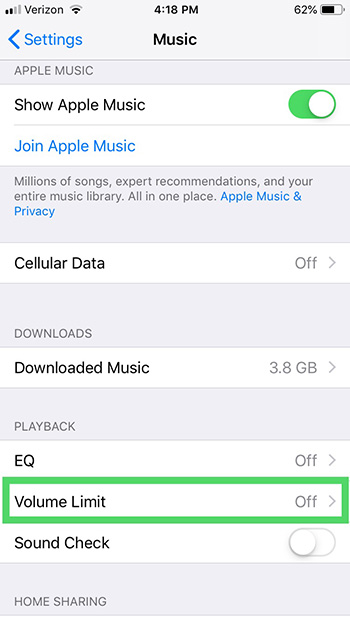
3. Go into Settings and choose the Music module. Tap Volume Limit under Playback and move the Max Volume slider to your desired spot.

iphone volume

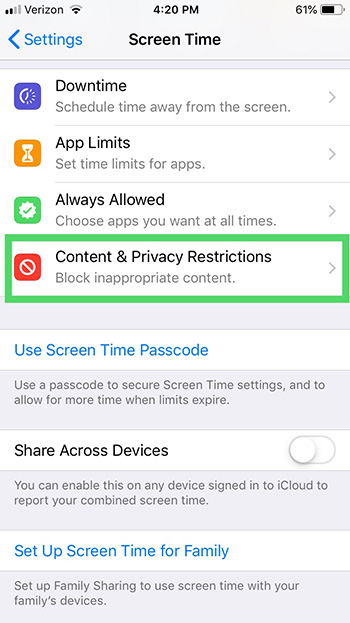
4. Next, with the most recent iOS, what was formerly “Restrictions” under General in your Settings has been updated to “Screen Time” in Settings. Open that.

5. Once in Screen Time, you can tap Content & Privacy Restrictions. Turn those on at that top, and then scroll down to Allow or Don’t Allow changes to your Volume Limit.

iphone volume

It’s as simple as that! This is important for protecting your ears. It’s also an important step for parents to take on their children’s iPhones to keep them from listening to music or obnoxious YouTubers too loudly. Happy listening!

Trick yourself into better time management

Do more in less time with these great strategies.

trick yourself into better time management habits

Humans are natural procrastinators—if we have extra time, we’ll milk it to the very last drop, regardless of how it worked out last time.

Yet, procrastination sucks. It makes us feel anxious, lazy, and stressed.

Where sometimes procrastination is harmless, other times, it can hurt our careers, our personal lives, and of course our well-being.

The worst part is, we often do this to ourselves. Deadlines creep up on us over and over,  yet we fail to plan accordingly.

Below, we’ve rounded up some tips for getting a handle on your productivity, and we promise, they’re not too hard.

How to trick yourself into better time management

Break projects into small tasks

Instead of a sprawling to-do list, you should approach your tasks as bite-sized pieces. Staring down a massive project can be overwhelming, to be sure.

So, break it up.

Your to-do list should contain a few steps at a time, which makes it more manageable. Plus, when you check off each task, you’ll see a record of what you’ve already done.

On top of this divide and conquer approach, we recommend including the learning process on your list, as well. We tend to get frustrated when something is hard, which, of course, leads to procrastination.

Instead, build time into your day that accounts for research, ideation, just grasping new concepts. It’ll make things easier, to be sure.

Set time limits for each item

Setting time limits can be an effective way to blow through tasks. We like this approach for getting smaller items done.

Allocate one hour to sending emails, and that’s it. Maybe 20 minutes go toward doing research, and another hour gets spent on revising a colleague’s latest article.

You should also block in time buffers, as you’ll have a little cushion to finish that blog post or invoicing your clients.

Rethink your approach to the things you don’t want to do

Another reason we procrastinate is that we have to do something that sounds plain awful. While this might seem impossible, you’ll need to think about putting together a report, answering those emails, whatever it is, in a fun or interesting way.

Try setting a timer to see how much you can get done within 20 minutes or an hour. Or, change the process of doing a task to something a little different.

Make a plan

to do list

If you’re prone to procrastination, never go to bed without a plan. Before you shut down your computer for the evening, spend 10-15 minutes making a list of what’s on the agenda for the next day. Then, clean up your workspace, so you’re not kicking things off with clutter.

Before you go to work, or wherever you do — write down your three top priorities. These are the things that need to be addressed that day, for sure.

No exceptions.

Work on those high-priority tasks when you’re at your most productive.

And, by the way, those times may depend on the task. If you have to come up with several ideas for a new content strategy, that time might be in the evening. If you’re editing a piece of writing, approaching it first thing in the morning might be your best bet there.

This two-pronged approach is not very much work, but it will help keep you from starting the day off on the wrong foot. You know, like those kinds of days where you can’t settle on where to start, so you start online shopping or surfing the web instead.

Eliminate that fear of failing

The reason many of us put things off is fear. After all, you can’t fail at something that you don’t do.

This is where a lot of perfectionist-types get tripped up. While perfectionists are associated with attention to detail, that tendency can also hold them back, as they may become overly worried something won’t turn out as planned.

Do your best, turn it in, and move on.

Overestimate how long you need to finish a task

Look, we all like to imagine ourselves as someone who can quickly put together a great project in record time. But how often do you start a task you thought was going to be over and done within an hour, only to find it’s taken all day and messed with your other deadlines?

Allow yourself some extra time, so you don’t overextend yourself, and especially if you’re working with clients, add in an extra day or two at the outset of a project. This will prevent you from falling shy of expectations.

The second part of this, is, you should learn to track your time as you move through these tasks. If there’s a disconnect with how long something takes and what you anticipated, it’s time to gather some data.

With these strategies, you’ll set yourself up for a more productive life. And it’s worth checking in every so often to reset your expectations of what you can accomplish in a day. By establishing some good habits, you’ll reap the rewards for years to come.

5 user-created Snapchat lenses you’ll absolutely love

Snapchat lenses have taken social media by storm. They’re fun to use and exciting to look at, and Snapchat users just like you can create and submit them. We’ll briefly discuss what these lenses are and how they work — and then spotlight five great user-created lenses to enjoy.

5 user-created Snapchat lenses you’ll absolutely love

What are Snapchat lenses?

Snapchat lenses are the graphics that show up on your photos or videos in the app that cover your face, creating a “lens” around your face and virtually turning you into a character. These are a fun way to spice up your Snapchats and to get more enjoyment out of the app.

Snapchat Download Free
8

Pretty much everyone knows about the dog lens, the flower crown lens, and a range of others created by Snapchat itself. There’s even a lens specifically for your cat. But let’s talk about some user-created lenses that are worth checking out.

1. Mouth eyes lens

Mouth in Eyes Lens from r/SnapLenses

Welcome to your nightmares. Use this lens to turn the eyes of anyone in the frame into mouths. The mouth-eyes move as the person moves their real mouth. You’ll never sleep again after using this spooky lens.

2. Create your own thought bubble and fill it

Want to show that your dog is dreaming of chasing cats? Maybe you took a photo of someone sleeping and want to show that they’re dreaming of you! It’s possible with this creative, cute, and funny Snap lens.

3. Security cam

security cam lens

This lens makes it look like the photo subject has been captured on a security cam. It blocks out their eyes and even adds a time and date stamp to the snapshot. Turn your friends into criminals with the press of a button!

4. Burger face

burger face lens

Do you love hamburgers and horrific images? This is the lens for you! Simple yet hilarious, this lens was created by a user with a passion for buns and beef. It puts a burger on your face whenever you use it.

5. X-ray face

X-ray from r/SnapLenses

Need to film a thrash metal video? This lens will come in handy. Show your friends what’s hiding beneath your skin in the form of a creepy face X-ray. Super fun!

These are just a few of the many user-created lenses for the wonderful world of Snapchat. Have fun with these, and if you need more lenses, here’s how to find some of the best.

3 businesses that tried using WhatsApp to help customers

Can WhatsApp be the future of customer service?

whatsapp

The WhatsApp Business API has opened a whole new world for businesses to provide customer support. Imagine the possibilities: Rather than wasting hours of your day on hold with customer support, perhaps one day you can WhatsApp message the customer support representatives for numerous businesses around the world. Here are just three of the innovative companies that have tested WhatsApp to provide customer support.

3 businesses that have tested WhatsApp for customer support

1. Wish

Wish is a shopping app where you can buy thousands of items at steep discounts. The company sells products that are brandless, so you don’t have to pay an unnecessary markup. Reports suggest Wish has tested the use of WhatsApp for its customer support.

The reason the app considered WhatsApp for customer support issues is that a lot of their merchandise is being shipped from overseas. That means it can occasionally get lost or damaged in transit. Successfully using WhatsApp for customer support would save many customers from having to wait around on the phone. The CEO of Wish called WhatsApp “a great solution to cut through the noise and connect with customers in the most critical moments of the purchase experience.”

2. Uber

The popular ride-sharing service dabbled with using WhatsApp for customer support. However, Uber didn’t turn to WhatsApp for its customers — it tested WhatsApp for receiving drivers’ questions.

WhatsApp’s role is to connect drivers to members of its team so they can voice any questions or complaints. This could save drivers a lot of time because messaging via WhatsApp is much quicker than the traditional methods of customer support.

Uber’s Head of Product VP noted, “We’re thrilled to partner with WhatsApp to give drivers in cities around the globe a fast, familiar and reliable way to connect with a member of our team and get their questions answered.”

3. Netflix

Netflix was one of the first business partners to explore the WhatsApp business feature of customer support. Netflix has tested this feature both in India and the United Kingdom. Users can expect more than just the basic customer service features on WhatsApp.

Netflix has designed its WhatsApp customer support specifically to send account messages and suggestions regarding what to watch. This means that you can simply message Netflix on WhatsApp about what TV shows you like and receive suggestions for what shows you should watch next. This is certainly some next-level customer support coming from Netflix.

The future of WhatsApp customer support

These innovative companies are truly pushing the boundaries for what customer service can be. With the help of WhatsApp, many large companies like Wish, Uber, and Netflix are discovering how to deliver amazing customer support through the ease of a smartphone application. And who knows what businesses will one day follow suit?

Best apps to help keep your 2019 New Year’s resolutions

Time to build a better you. Let’s use these free apps to get it done.

new year's resolutions

The end of one year brings a plethora of New Year’s resolutions: things that we promise ourselves we will work on in the next year, but rarely end up actually doing.

This year, however, you can stop the cycle of breaking your resolutions. There are hundreds of apps dedicated to habit change, and many of them are specific to some of the most common resolutions out there. Whether you’re planning to lose weight or to eat healthier, there are apps that will hold you accountable for these promises. That kind of accountability is what many of us need to actually stick with these changes, so they are worth checking out depending on what your resolutions are. Here are some of the best habit change apps out there that will help you keep you keep those valuable promises to yourself:

Best apps to help you keep your 2019 New Year’s resolutions

8. Coach.me

Coach.me

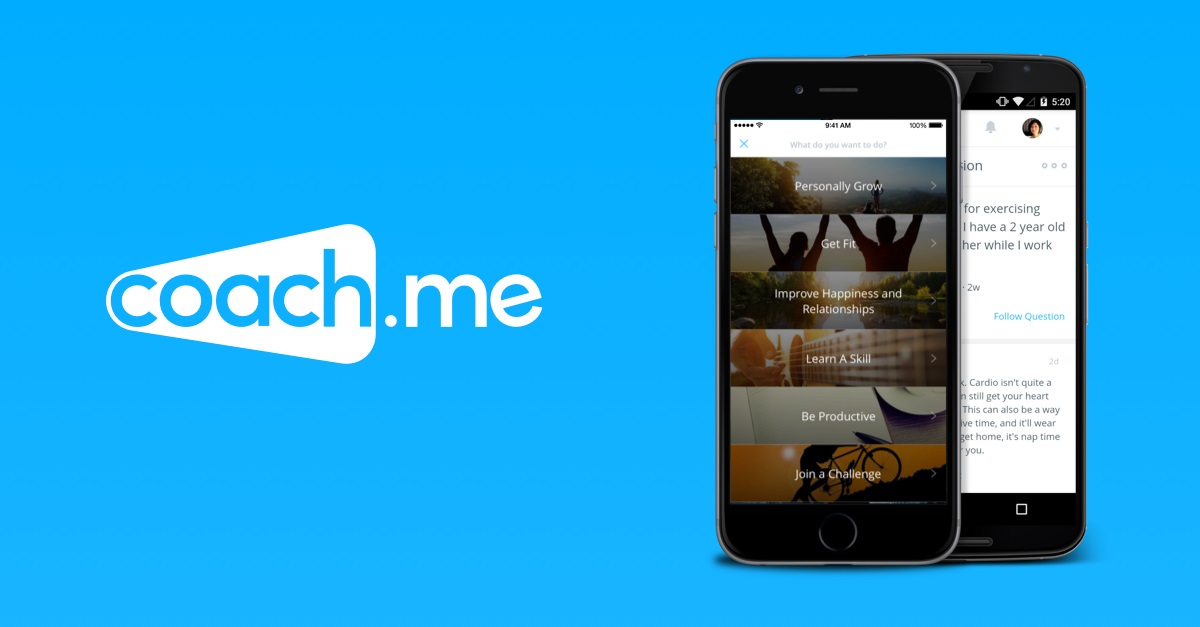
This app focuses on life management and helping you create a better version of yourself. No matter what your resolution is, coach.me can help you keep track of the life changes you want to stick to. It also has the option for obtaining a leadership and/or habit coach, who you would hire as an online life coach. This can help for grander resolution changes that will take a long time and some help to accomplish.

7. Streaks

The premise of Streaks is to try and go 12 consecutive days without breaking a new habit. Whether that is eating better, managing your time properly, or any other resolution you may have, Streaks works to help you maintain a streak of good behavior for as long as possible. It will even go past the 12 days, so if you successfully maintain a streak, you can see how long it’ll go for. Then if you break it, you can work your way back up with a new goal of beating your own time. It is a great motivation tool for helping you develop good habits.

6. My Diet Coach

The most common New Year’s resolutions according to YouGov, have something to do with weight loss. My Diet Coach is the perfect app for tracking your weight loss journey, if this is the resolution you’ve chosen to work on. The app is able to track your food intake, your weight, and your fitness accomplishments as you work on shaving off those pounds. The app is especially helpful to those who are both dieting and exercising, as the app is dedicated to helping you improve your overall wellness.

My Diet Coach Free Download
7

5. Mint

Mint

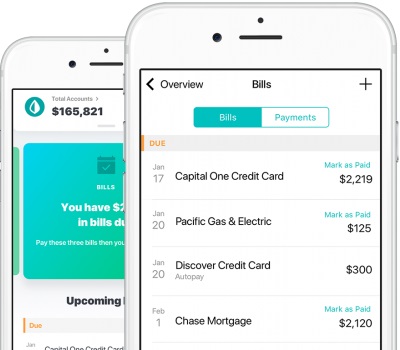
For anyone trying to save some money in the new year, this app is perfect for you. It not only helps you budget out your income, but it also can help prevent needless spending. You can link it to multiple bank accounts, so if you have your money spread out, you can still manage it under the same app. It also keeps you updated on your transactions. So as it helps you maintain your budget, it can also be used for identity theft prevention, since it lets you see when every transaction posts. It is the best money managing app out there.

7

4. Finish

As the name implies, this app is all about teaching yourself to finish tasks on time, or in general. Maybe your resolution is to actually finish projects that you start. Or perhaps you’re worried about whether you can keep your resolution or not. This app gives you frequent updates on how you’re doing, and whether you are falling behind on your task or not. Its main priority is to get you to finish whatever task you’ve set for yourself. It’s the ultimate motivation app.

3. Fabulous

Fabulous

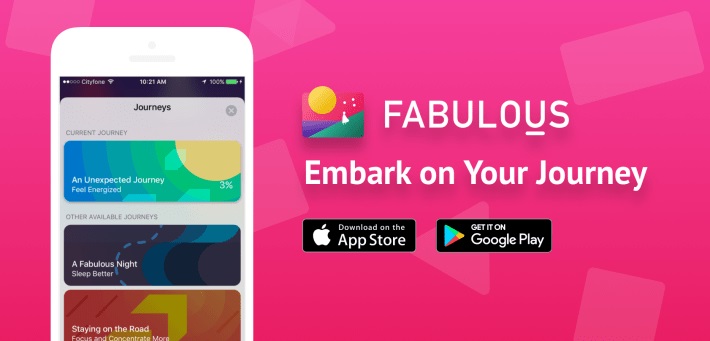
The perfect high energy app for those who need a much bigger kick to prepare themselves for the new year. Fabulous focuses on resetting bad habits instead of creating new ones. By removing your bad habits, it makes way to help you start fresh. If you’re trying to eat healthier, you may want to start by eating less junk food, and this is the app to help you do just that. It also is more exciting, offering positive reinforcement that other habit trackers don’t. 

2. Habitshare

HabitShare

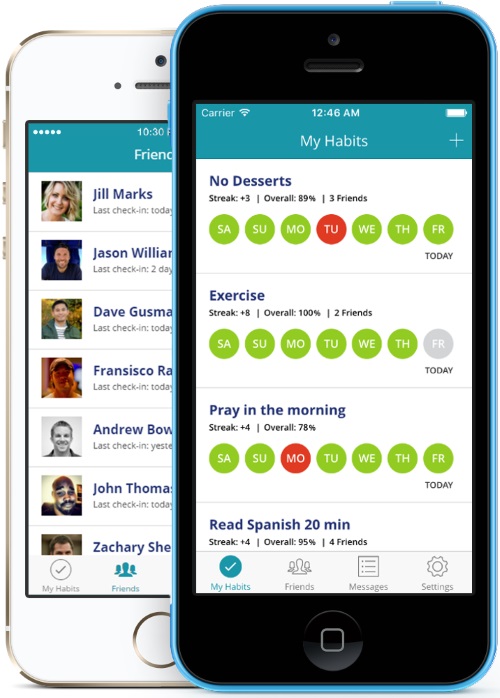
This app is a social habit tracker, that allows you to stay in contact with other people trying to change similar habits. While most habit trackers rely on accountability from self-motivation, and the app itself, Habitshare goes the extra mile by bringing in real people to help you with your changes. They also let message others and see how their progress is going on their habit updates. The app does allow you to create a private account, but we suggest using a different habit tracking app if you wish to go private, since the main benefit of Habitshare is the social networking aspect.

1. Habitify

This is probably the best habit tracker for people who have a lot to do in their day. Habitify prioritizes the habits you need to work on, based on the time of day and what has gotten done. This can help you change any behavior you’re looking to adjust, as well as keep track of your to do lists, all in the same app.

If you’re interested in more apps that can help you stick to your resolution, then you’ll definitely want to check out the suggestions that our Softonic Solutions community put together. You can even put up your own suggestions there if you feel like there is an app we missed. Best of luck reaching your goals in 2019 and beyond!

How to use Mailtrack to see when someone opens your email

Here’s how to know if someone read your email.

email

Do you find yourself wondering whether someone has opened the email you sent them? With the Mailtrack browser extension, you can find that out easily! The basic version of Mailtrack is free. But for just $5 a month (with an annual plan), you can get the pro version, which you can use for several different emails.

Stop feeling so in the dark. Follow these three simple steps to get Mailtrack so you never have to wonder again whether someone opened your email.

How to use Mailtrack to see when someone opens your email

1. Install Mailtrack

Mailtrack is a browser extension that works with many browsers such as Google Chrome, Firefox, and Opera. Also, Mailtrack is compatible with Gmail. Find it online at mailtrack.io/en.

2. Send an email

When you send an email with your Gmail account, Mailtrack will add a check mark next to the email in your Sent box. This check mark next to the email lets you know that the email has been successfully sent to the recipient. If the email bounces or cannot be delivered to the recipient, then the check mark will not appear next to it.

3. Check to see if your email has been read

Finally, once you send an email, you can sit back and wait to see if the recipient opens it. You will know it’s been opened because a second check mark will appear next to the first one and you’ll get a real-time notification.

If you’re looking for an easy-to-use email tracker, give Mailtrack a try.

5 AI programs you interact with every day

AI is lurking in places you may not expect.

artificial intelligence

Artificial intelligence (AI) is probably a big part of your life — far beyond using Alexa or Siri. In fact, many of the most popular apps and websites use AI technology to improve your online experience. Here are some of the many ways you might be interacting with AI without even knowing it.

5 AI programs you likely interact with every day

1. Email

Love the invention of spam filters? You have AI to thank for that. Essentially, your email uses AI software to learn how to detect spam and filter it out so it doesn’t end up in your inbox. You may have also noticed the Smart Reply option in Gmail, too. This option allows you to quickly respond to an email when you’re short on time but need to get a response out.

2. Streaming services

Every time Spotify introduces you to a new artist or playlist, it’s using AI to make that recommendation. Ditto for Netflix and other streaming services. You may feel like some services know you better than others, too. Maybe Netflix always knows just what you want to watch, but Amazon often gets it wrong. But, hey, it’s learning!

3. Google Maps

Google Maps doesn’t just help you get from Point A to Point B. It uses AI to help you get from Point A to Point B in the best way possible — by considering traffic, construction, and accidents in your area. That way, it can suggest the fastest, smoothest possible route for you to take.

AI can also help you to find the right street address. When an accurate address is hard to figure out, Google will analyze Street View images and other data to determine the correct address.

Ever use Google Maps to search for available parking near your destination? Google Maps uses AI to determine the likelihood that you’ll find parking by taking into account the time of day, location, and traffic.

4. Mobile banking

Every time you deposit a check in your bank or want to make a secure transaction, AI is behind the wheel. AI helps banks to decipher your handwriting and correctly deposit a check into your account.

Having a problem with your banking app? Next time you call customer service, you’ll likely be talking to an AI bot, too.

5. Social networking platforms

Facebook can instantly identify your face or your friends’ faces in photos to make it easier to tag photos or find pictures that you’ve been tagged in. It can do all of this with the help of AI. Further, AI helps apps like Instagram, Pinterest, and Facebook to predict which type of content or ads you’re likely to be most interested in. And it also helps Snapchat provide you with that much-loved puppy filter.