8 tips to help you ace that first date

The first date, a “ritual” so intimidating that it melts the toughest of would-be lovebirds into puddles of perspiration. As the proverbial “they” is wont to say, “You never get a second chance to make a first impression.” So with that it´s time to step up your game and make it count. Here are 8 tips (including several apps) to help you ace that critical first date.

Heart chemistryDon’t be a bore: via iStockphoto

The dinner and movie routine is a classic – a classic bore. Be sure to differentiate yourself from the last 10 dates he or she’s been on. You can explore the great outdoors, take a cooking class together, or attend a local music festival.

3 apps for brilliant date idea

Feeling low on creative juices? Try Romantic Date Ideas for some not-necessarily-classic inspiration.

Local events almost always make memorable dates. You can’t miss with Eventbrite.

Or how about that chic new restaurant that only the so-called “cool kids” know about? Like a Local.

Stock hobo

Put on real clothes

You know that one favorite t-shirt and pair of jeans that you wear everywhere you go? Here´s the tip: DO NOT wear that on your date. Put on a shirt (yes, that means iron that shirt first), color coordinate your pants, and make sure your belt and shoes match. Watches are not optional.

3 apps to help you pick that irresistible outfit

Get the most out of what you already have with a personal closet assistant with Stylebook.

Or you could grab something fashionable on the cheap with Gilt.

An interesting way to spruce up a tie might also do the trick. Give Necktie Deluxe a try.

Did you fart?

It’s all about the smell

Let’s get one thing straight, Axe body spray is as much a fragrance as an alligator is a cuddly, loveable pet. Head into a proper shop and ask for something that suits you. Light, fruity scents are best for hot days at casual events, and complex, musky scents should be reserved for posher occasions at night.

2 apps to help you smell good

Can’t decide between Giorgio Armani and Issey Miyake? Try Fragrance de Men.

And if you need help understanding top notes and base notes, use The Ultimate Perfume Encyclopedia.

Be preparedBe prepared

Date night and you’re ready. Impeccably dressed, you drive off to pick your date up, only to realize that they live on 8th Avenue, not 8th Street. But the ordeal is far from over as you realize the restaurant has no valet service and the nearest parking spot is ten blocks away. Congratulations, your bad planning has turned date night into a workout with the promise of a meal.

4 apps to get you there

Make your commute a breeze with Citymapper.

Find available parking spots with one click on Parker.

Checking ahead with LocalMind might just save your night.

Impress your date with a personal valet from Luxe Valet.

Lobster lunchDon’t be a Töltött idiot

You decide that an Italian restaurant is too mainstream and you want to impress your date by showing them just how well-travelled you are. So you pick Hungarian. Unless you want to look like a blabbering fool when the waiter asks if you’d prefer a Töltött Paprikaor (stuffed pepper) or Töltött Káposzta (stuffed cabbage), read up before you try to impress!

3 apps to be a Töltött foodie

Global Eater Food Dictionary will tell you exactly what to expect at even a Hungarian, Honduran or Haitian restaurant.

Not sure where to begin? Foodsome could give you some awesome ideas.

Discovered an amazing recipe that you want to save for an important date? Don’t sleep on Evernote Food.

MixologyAdd sugar, spice and everything nice

Knowing (or appearing to know) your wines and cocktails goes a long way to making a good first impression. Especially if you are bringing your own drinks to an intimate picnic you’ve planned on your rooftop. How do you make a Mojito? Lemons or limes? Merlot or chardonnay?

3 apps to help earn your bartending stripe

8,500+ Drink & Cocktail Recipes Free will keep you very busy, and very “hydrated,” for a while.

If you’re up for a cocktail challenge, try Mixology.

And if you´re someone who appreciates wine, Wine app will definitely help satisfy your pallet.

Bumper carsEnjoy the ride

The joy of dating is in the journey. So sit back, relax, and go with what feels natural. If you´re genuinely having a good time, chances are so are they. So keep the laugher going and just be yourself.

5 apps to help you relax and be yourself

Feeling tense? Take a deep breath and spend 5 minutes with iFunny.

A joke an hour keeps the evening alive. Here are 18,000 cool jokes to pull out of your hat.

Still trembling after you´ve kissed your date goodnight? You could use some Calm.

So there you are, the 8 important tips for a successful first date. Who said dating was difficult?

Did we miss an important tip? Let us know!

Best free tax software

Tax season is here and while many dread doing their taxes, it’s not so bad with the right software. Many people assume you have to pay for expensive software to file your taxes but in reality, there are excellent free options which I will be exploring here.

As a reminder, taxes are due April 15th.

The IRS website lists every available free tax prep software. To apply, you’ll have to have a gross income of less than $60,000 per year. If you make more than that, you can manually fill out IRS forms for free, but you’ll probably want to pay for tax software to make things easier.

For the purposes of this list, I will focus on software that works in all 50 states and only on free filing for federal returns. Filing state tax returns usually have a fee and will differ with each software solution.

One thing to note is that free tax preparation software is mainly for those with simple financial situations. If you own multiple properties or your own business, you’ll probably want to pay for premium software or hire a certified public accountant.

TurboTax Federal Free Edition

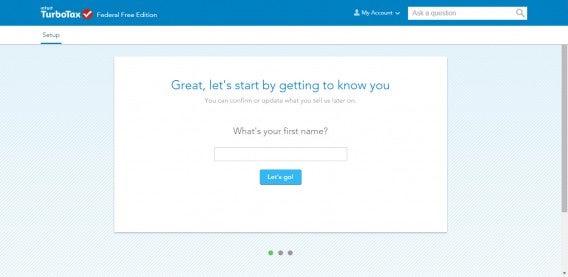
TurboTax getting started

TurboTax is one of the biggest names in tax prep software and for good reason. Even in this free edition, TurboTax is extremely well thought-out and easy to use. Everything is laid out in simple pages so you’re not overwhelmed and it boasts a detailed explanations if you ever find yourself confused.

Just about every tax form is supported, even in this free version. For a full list of supported forms, check out TurboTax’s comparison chart.

One of the things I like most about TurboTax is how many steps it saves. TurboTax has a partner program where employers can sign up to allow the software to auto-import your W-2. You can also import information from last year’s tax return but you will have to pay. This is annoying since TurboTax already has all your information but won’t fill it out for you unless you pay.

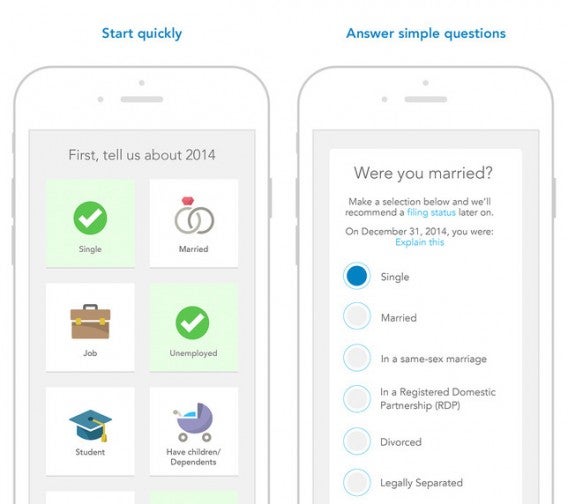
TurboTax for iPhone

For those who want to file on the go, there are TurboTax apps on just about every platform from Android to iOS. These apps make filing a bit easier, letting you import your W-2 by taking a photo.

Get started with TurboTax Federal Free Edition

H&R Block Free Edition

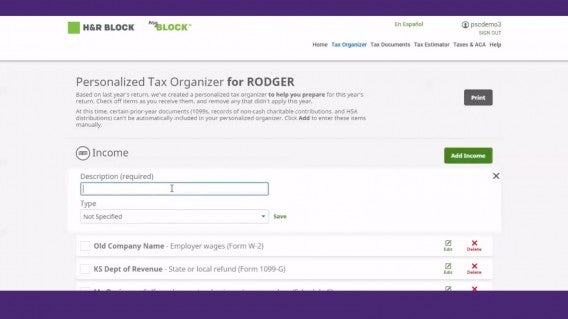
H&R Block free main

You can’t mention TurboTax without also mentioning its main rival, H&R Block. That’s because the two share many similar features so it’s a tossup between the two. H&R Block also includes an auto W-2 import and a very easy to use interface.

H&R block supports basically every tax form. For a full list of supported forms, check out their PDF.

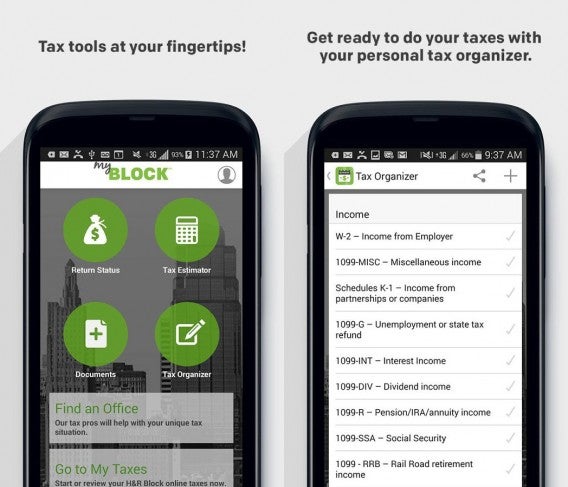
There are H&R Block apps but they’re not very good. User reviews are pretty terrible and the software doesn’t look to be useful for free users. I would stick with using  H&R Block Free in your browser.

H&R Block for Android

Like TurboTax, H&R Block saves time by importing last year’s tax return so you don’t have to manually fill out basic information. H&R Block supports importing from TurboTax, TaxACT and of course your previous year’s H&R block return. This gives H&R Block an advantage over TurboTax, which requires you to pay to import  your old information.

Everything is well laid out and will walk you through confusing questions. If you’re still confused, you can visit one of the many H&R Block offices for help, something TurboTax doesn’t offer.

Get started with H&R Block Free Edition

TaxACT Free Federal Edition

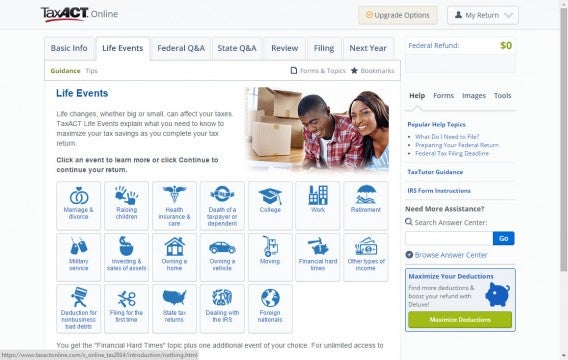
TaxACT Life Events

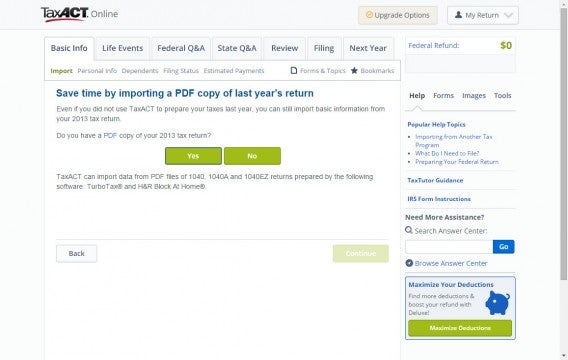
Although not as popular as H&R Block or TurboTax, TaxACT is actually very good. It includes many of the features included with the other two like auto import of last year’s return. You can import via a PDF of last year’s return, even from TurboTax and H&R Block.

TaxACT stands behind its product with free user support. There’s also a great Tax Glossary to help you work through tough terminology. The company also offers audit protection by comparing your tax return to last year’s, looking for inconsistencies. It’s a nice perk but isn’t going to be as helpful as having in-person audit support that’s offered by some of the bigger competitors’ paid products.

TaxACT PDF import

Using TaxACT is simple. Its interface is logically laid out and like other software, it doesn’t overwhelm you with a huge list of options to choose from. Life events are broken down into easy to comprehend icons and everything is conducted like an interview. You also get a live update on the side of how much money you will be getting back with your return.

TaxACT also has apps for Android and iOS for you to file on the go. Like other mobile tax software, your work is synced so you can pick up where you left off on the web or on your tablet.

Get started with TaxACT Free Federal Edition

eSmart Tax

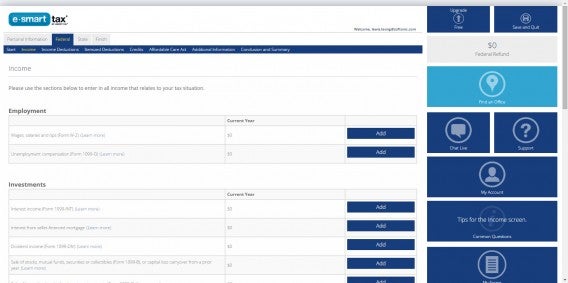
eSmart Tax Federal form

eSmart Tax makes saving time easy. It also imports last year’s tax return but it also can import returns completed with competing software via PDF. This is great if you’re unhappy with the tax software you used last year and want to try eSmart Tax instead.

The interface isn’t as intuitive as some of its other competitors but it’s not bad. On the web, there’s a ton of empty space that could have been better used instead of spreading out text.

In terms of support, eSmart Tax offers live chat on its website, though its clunky and slow. If you want to speak with a human being, eSmart Tax offers in-person tax preparation using Liberty Tax Service.

Get started with eSmart Tax

TaxSlayer Free Federal Edition

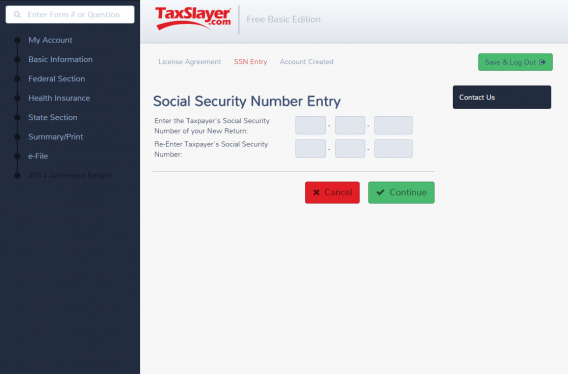
TaxSlayer main interface

I really like TaxSlayer’s interface. Everything is laid out in big, easy to read buttons and text fields. It also provides first time users with an in-depth tutorial, highlighting all of the different features of the software.

However, TaxSlayer Free does have a big downside: it doesn’t import your previous year’s tax return. You’ll have to step up to a paid version of TaxSlayer for the feature, which is disappointing since some competitors include it for free.

In terms of support, TaxSlayer offers free email and phone support, but no online chat. You’ll also have to call in during available hours because 24/7 phone support isn’t available. TaxSlayer will also make sure to check for errors and inconsistencies in your tax return before submitting it.

Get started with TaxSlayer Free Federal Edition

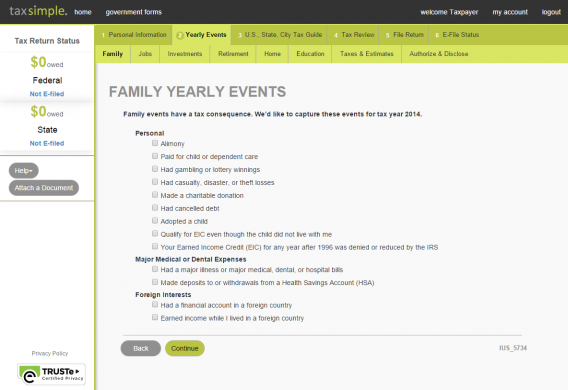
TaxSimple

TaxSimple interface

TaxSimple is my least favorite in this list but it still works well. The main issue I have with TaxSimple is how slow it is. Every action is greeted by a loading screen, which takes a few more unnecessary seconds than it should.

If you can get over its slightly laggy performance, you’ll be treated with a live return status on the sidebar and easy survey-like interface. There’s also live chat if you’re ever confused about something.

TaxSimple also guarantees to pay any IRS fines for inaccurate reporting, which is a nice peace of mind.

Get started with TaxSimple

Wrap-up

As you can see, the tax software included in this list are all extremely similar. The main differentiators between them are their support, accuracy guarantees, and audit protection. The Affordable Care Act will add something new to this year’s return but all of the software covered in this list include sections for the ACA.

If you have a simple financial situation, any of these free tax prep software will work well for you but my favorite is H&R Block. I like H&R Block the best for its ability to import your previous return and its easy to use interface. You’ll also get great support online, over the phone, or in person at one of their many locations. Although H&R Block’s mobile applications aren’t very good, its core website is excellent.

There’s no need to purchase the premium versions as you won’t take advantage of the additional features. But if you have more complicated tax needs, you’re better off paying for premium versions of these apps or hiring an accountant.

Header image credit: Ken Teegardin

Related Stories

Best free Android apps

Best apps for planning your budget ski vacation

Best free cloud storage

Follow me on Twitter: @lewisleong

Five Apps to Try This Weekend – February 27th 2015

Welcome back to Softonic’s Five Apps to Try This Weekend, the show where we offer up a handful of apps to keep you distracted on your days off.

This week we have cheated a little, as we have included the “Do” series of apps from IFTTT – Do Button, Do Note, and Do Camera (iOS, Android) – as a single choice. These convenient tools let you set up command shortcuts for everyday tasks, such as creating a single button that lets you take a photo and post it directly to Facebook with a single press.

Default player


brightcove.createExperiences();

We also have two very different games for you to check out. Bus Simulator 2015 (iOS, Android) lets you live your live long dream of being a bus driver on your mobile phone. However, if for some reason this isn’t your ambition, you may want to try out Resident Evil Revelations 2 – the latest installment in the popular zombie slaying franchise.

Looking for something a little more relaxing? You can try out Kodi. The fantastic, open-source media manager that packages all of your media and entertainment services together in one place. And for all you parents with young kids out there, we have YouTube Kids (iOS, Android) to keep the little ones happy while you chilling out with your own choice of movie.

Be sure to check back next week for a special Mobile World Congress episode of Five Apps to Try This Weekend.

Related Stories

Five Apps to Try This Weekend – February 20th 2015

Five Apps to Try This Weekend – February 13th 2015

App of the Week: YouTube Kids

Follow me on Twitter: @DoFuss

App of the Week: YouTube Kids

Softonic’s App of the Week highlights some of the coolest, most unique, and popular apps that have been released for Android, iOS, Windows, and Mac. This week’s pick is YouTube Kids, Google’s first app designed specifically for children.

Default player


brightcove.createExperiences();

While YouTube has the potential to be the perfect child distraction, it is filled with so much unpoliced connect that it is impossible to safely unleash your offspring on the service. What YouTube Kids offers is a curated app, with approved channels/videos, a simple interface, and parental controls to provide a safe environment for your kids to explore.

YouTube Kids is the perfect distraction for your sugar fueled bundles of joy when you need a break.

Download YouTube Kids for iOS and Android.

Related Stories

App of the Week: Pushbullet

App of the Week: Microsoft Outlook for Mobile

App of the Week: Retrica

Follow me on Twitter: @DoFuss

6 must have apps for Mobile World Congress 2015

With our headquarters located in the beautiful city of Barcelona, here at Softonic we’re perfectly positioned to help make your Mobile World Congress (MWC) experience easier and more enjoyable. Whether you just want to know how to get to the Fira and back (we suspect not), or if you want to eat, drink, and enjoy some Gaudi, we have the apps for you. Just don’t blame us if you fall in love with the city and decide to stay a little (or a lot) longer. It happens.

mytaxi

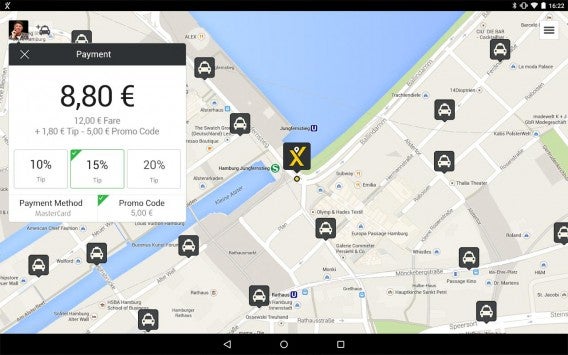
First things first, we assume you will want to visit MWC 2015 at some point during your stay in the city, so you might need some help to get around. While Uber may no longer be able to offer you a taxi service in Barcelona, help is at hand in the form of mytaxi. This completely legal app allows you to pre order a vehicle up to four days in advance; calculate your fare before ordering; select your favorite driver (if you have one and they are available); see the driver’s photo, phone number, license plate, ratings and estimated arrival time; and pay for the taxi ride with the app.

Download mytaxi for Android | iOS

Moovit

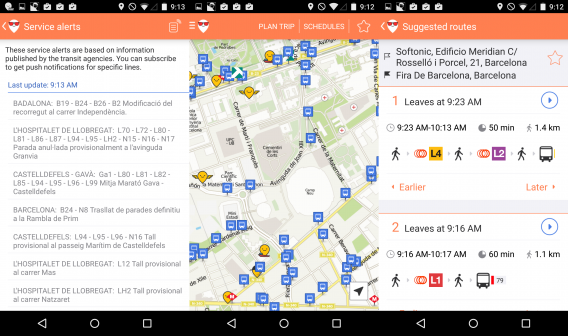
If you’ve decided to ditch the taxi and go for a walk or use public transport, then Moovit will be right up your street. It’s a transport app that has a distinctly social flavor, as it pulls data from its users to update and improve its routes, as well as providing alerts if there is a delay and disruption on your planned journey. It works similarly to Google Maps by allowing you to plan your journey from A to B using public transport, providing options for fastest routes while allowing you to save your favorite journeys. You can also download both city and metro maps, which will stop you eating into data.

Download Moovit for Android | iOS

Evernote Scannable

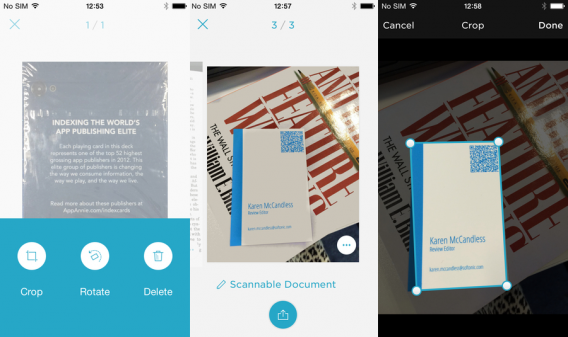
Once you’ve got there, we imagine you might do a bit of networking, make some new contacts, that kind of thing. So you’ll need a way to keep track of all the business cards people will be handing out like sweets. Evernote Scannable is a super easy and fast way of scanning business cards by taking a photo with your camera. It has two advantages over other scanning apps: integration with LinkedIn means you can turn a business card into a contact, and the ability to add the contact directly into Evernote lists.

Download Evernote Scannable for iOS

UberEATS

MWC can be an exhausting event so if you want to order in food and relax at the end of the day then Uber just the app for you. The company hasn’t had the easier of rides in Barcelona, but that hasn’t stopped it launching a food delivery service in the city ahead of MWC 2015. Los Angeles residents will know the service already under the name of UberFRESH, but the company is launching it in Barcelona as UberEATS. If you’ve already downloaded the Uber app, all you need to do is tap the UberEATS icon, enter your location, select your dinner, and your food will soon be with you.

Download Uber for Android | iOS | Windows Phone

Minube

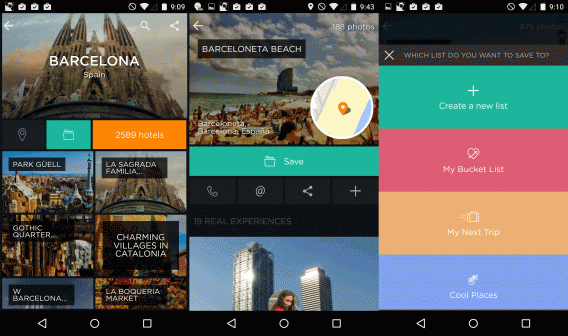
We know that it’s unlikely to be all work and no play when you’re in Barcelona so you’ll need some recommendations about what to see, do and eat. A lot of people might go to TripAdvisor as the default, but Minube is a far more visual and social way of finding inspiration. Once you’ve picked Barcelona as your destination you’re presented with picture squares of “the best”, “to do”, “to east”, and “to sleep” categories. Each entry has a picture and text review from a real-life member of the community, which you can save to your list for future use, as well as check out the website or leave a tip of your own. Then when you’re back home and feeling sad because you had to leave, you can relive your trip by creating a photo album automatically tagged with dates and locations.

Download Minube for Android | iOS

Camera360 Ultimate

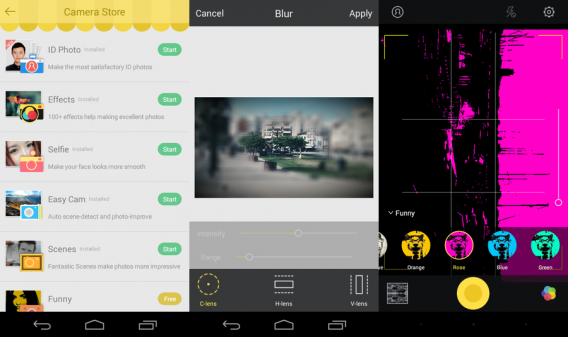
If you’re going to create these memories, you’ll need a camera app to take the all-important photos. Camera360 Ultimate not only improves the basic photos you take through its “Easy Cam” setting, you can also choose a huge variety of other “cams” to create unique and interesting pictures automatically. There are also plenty of post-shot editing effects if you don’t get it right first time.

Download Camera360 Ultimate for Android | iOS | Windows Phone

Related Stories

What to expect at Mobile World Congress 2015

Google’s most popular apps and games of 2014

Best free Android apps

Follow me on Twitter: @karenmccandless

How to use WhatsApp on Windows


WhatsApp offers a great way to chat with friends for free from your phone. But did you know you can also use WhatsApp on a Windows PC?

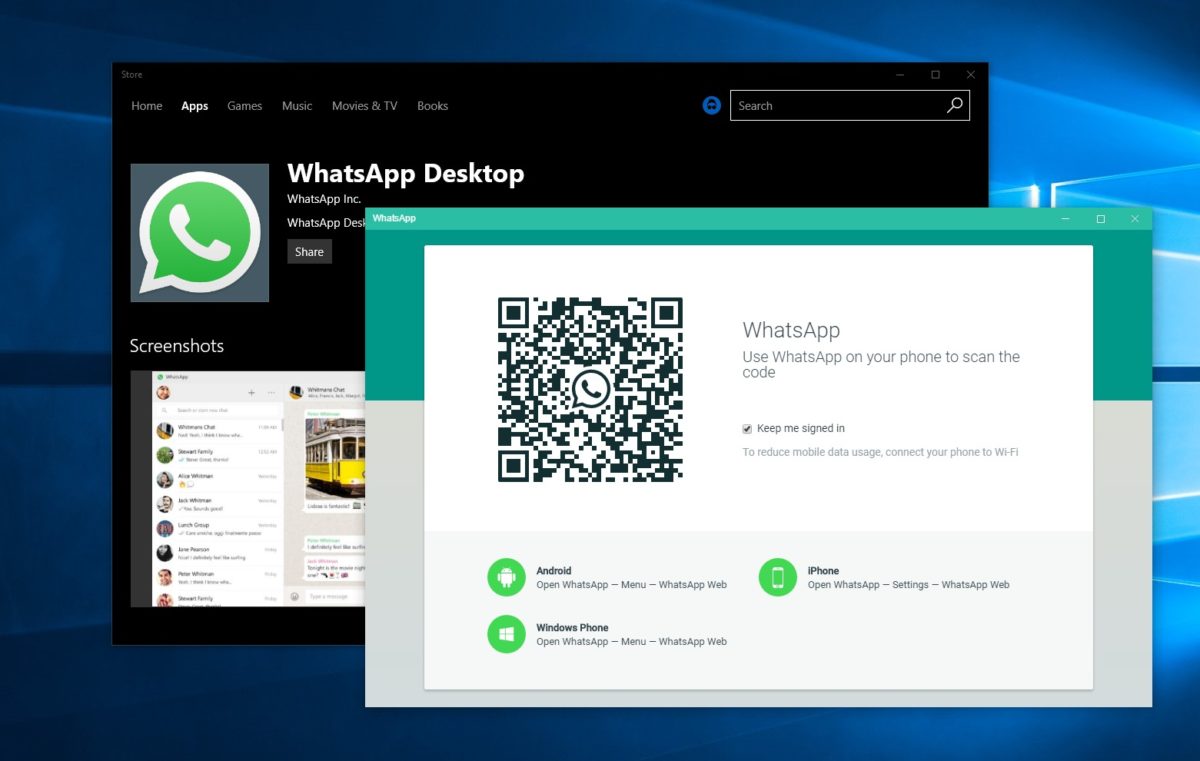
Using the BlueStacks App Player for Windows, it’s possible to install WhatsApp on your computer. This gives you the ability to send and receive WhatsApp messages without having to pull your phone out of your pocket.UPDATE: WhatsApp has come out with an easy way to chat from your computer. It’s called WhatsApp Web and you’ll need Chrome, Firefox, or Opera and the latest version of WhatsApp for Android, BlackBerry, and Windows Phone. Learn more about WhatsApp Web and how to use it here. If you prefer to download WhatsApp on your computer, have a look at WhatsApp for PC instead!
[materials]–>

How to install WhatsApp on a PC

To get WhatsApp on your computer you first need to download and install BlueStacks App Player. This is a free program that emulates Android applications on your PC. You can use it to run many Android apps and games through a windowed interface on your computer. Don’t worry, it’s very easy to use, as you’ll see.

The next thing you’ll need is a mobile phone number. This is used to verify your account and the app looks at your mobile phone contacts to find out which are using WhatsApp. If you already have WhatsApp installed on your phone it won’t work, since you can only run one instance of the app per phone number.

<!–[/materials]

–>

[body]–>

Setting up BlueStacks

Once you’ve installed BlueStacks App Player you’re ready to get WhatsApp onto your Windows PC. Here’s how it’s done:

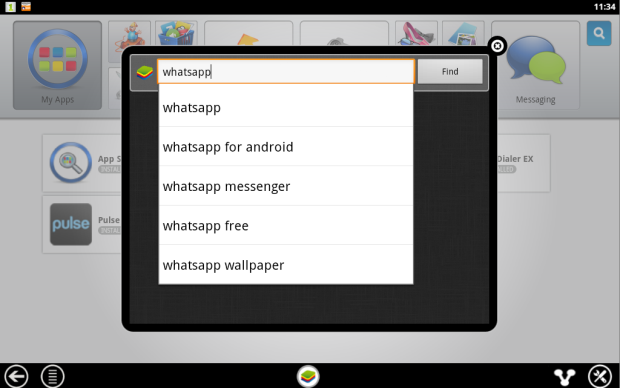
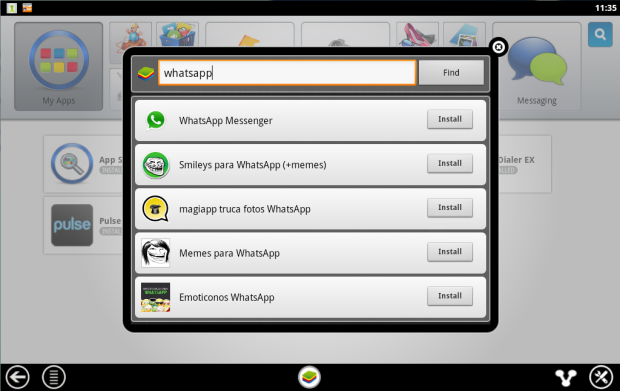
1. Click on the App Search icon in BlueStacks and perform a search for “WhatsApp”. Click Find.

2. In the results list you should see WhatsApp Messenger as the top result. Click Install.

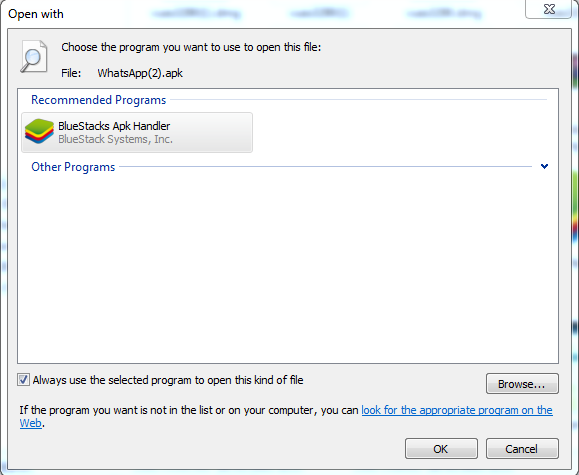
3. If you can’t find WhatsApp Messenger in the BlueStacks search, or if it won’t install, go download the WhatsApp APK file from the official site. Right click on the icon once downloaded, select ‘Open with…’ then choose BlueStacks Apk Handler. Click OK and WhatsApp will be installed in BlueStacks.

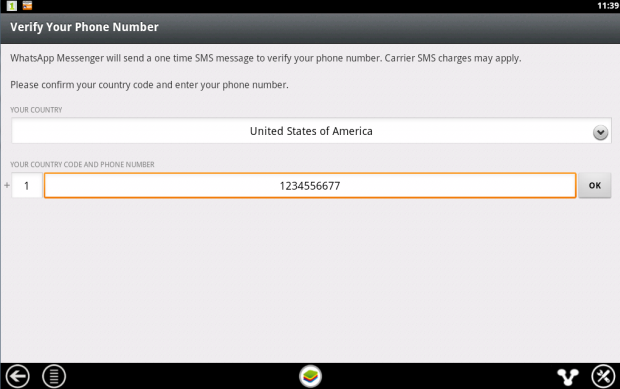
4. Once installed, clicked the WhatsApp icon in BlueStacks to launch it. When you run it for the first time you’ll be asked to verify your phone number. Select your country followed by the phone number you want to use for WhatsApp.

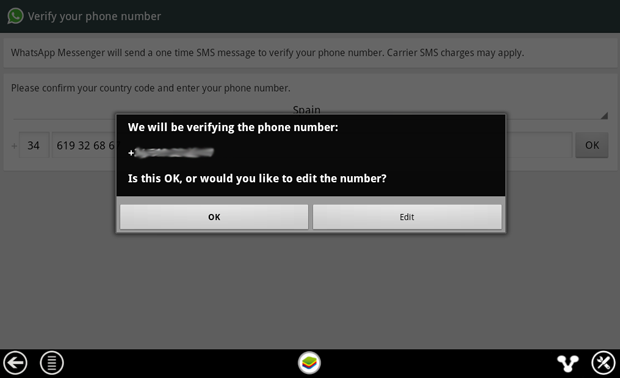
5. When confirmation of your number comes up, make sure the number is right then click on OK to proceed.

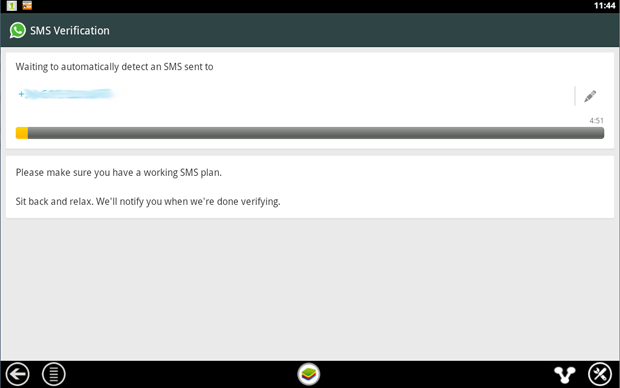
6. WhatsApp will now attempt to send you an SMS verification message. This will fail but you need to wait until it’s finished anyway.

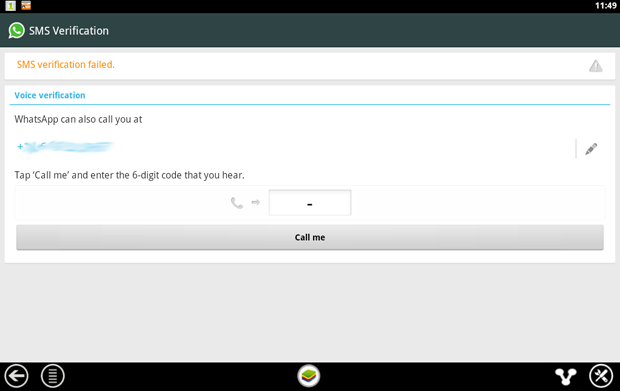
7. When the SMS verification fails, you’ll be given the option to be contacted by phone with the verification code. When you click the Call me button your phone will ring after a few seconds and a recorded message will read you the code. Type this code into the space provided.

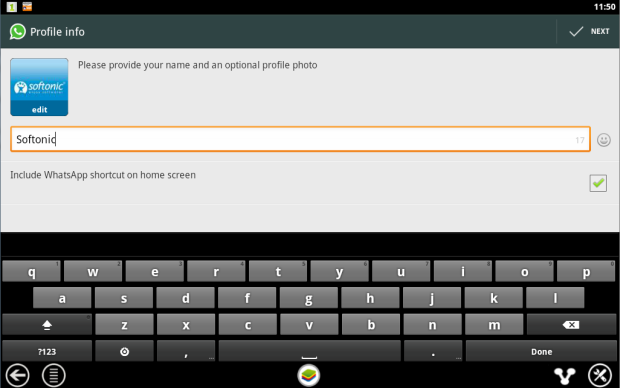
8. When you’ve correctly entered the code you’ll be prompted to set up your profile information. Enter a name and add a profile picture if you like.

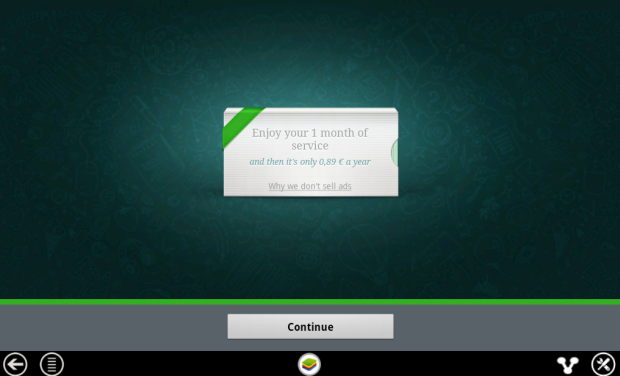
9. You’ll be reminded that WhatsApp is free to try for a month, after which time you need to pay on an annual basis.

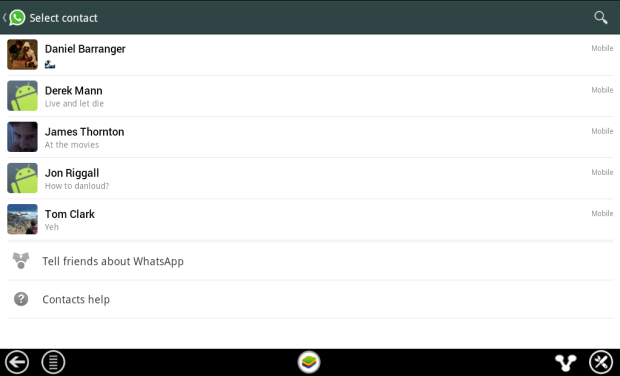
10. After clicking Continue your WhatsApp contacts list will be loaded. This is based on your phone contacts (on the number you used) who have WhatsApp installed. Click on a contact to start chatting to them.

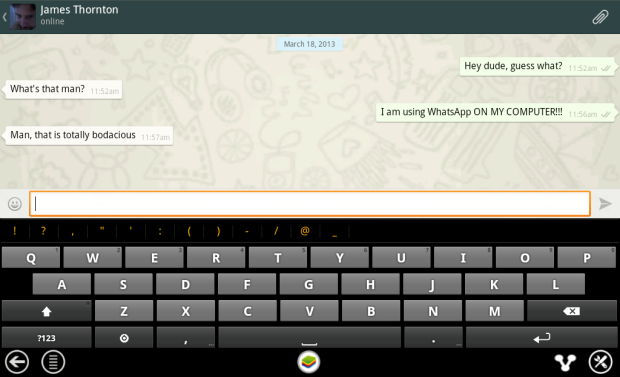
11. Now you can chat away to your contact on WhatsApp, in just the same way as you would on a mobile device. You can switch between the keyboard and emoticons using the icon next to the message input box.

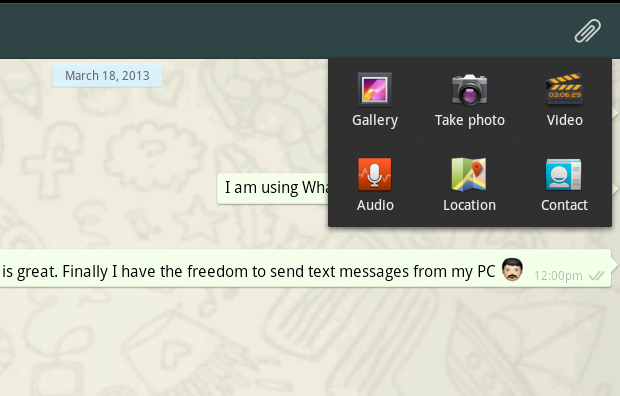
12. It’s possible to use some of the file sharing features of WhatsApp on your PC. In our tests we were able to send photos, video and audio. To send files using WhatsApp click on the paper clip icon in the top-right corner.

<!–[/body]

–>

Conclusion

There you have it! That’s how you can run WhatsApp on your PC. While it might be a work-around, it performs well and will tide most users over until WhatsApp decides to release a desktop client.

Diary of a fat man – weight loss and fitness apps

Welcome to my weekly column in which I  make use of diet and fitness apps to try and get (back) in shape. Each week will alternate between a diet and an exercise app, and you can follow my progress on Twitter @DoFuss. Also, please keep in mind that I have previously had a high fitness level, if you are just starting out please take it slowly and see a doctor before making any major changes.

I have always struggled with my weight. Even as a baby, I was big. It never really bothered me until I turned 15 and my mum joined a popular weight loss club, at which point I decided that I wasn’t going to let her be thinner than me. As a young male the weight melted off, and before long I was playing rugby, weightlifting, and rowing in a body none would have guessed had once been XXXL.

But time and lifestyle changes have taken their toll (who would have though a life in tech journalism would be bad for one’s health). For a time this seemed okay, as my general well being seemed to hold strong thanks to my previously active lifestyle. Now, at 35, life has caught up with me. The health credit I built up when I was young has all been spent, and I am starting to feel it – even when I’m only climbing the six floors to my apartment.

And so my mind turns to apps, the solution to (and often cause of) many of my life’s problems. There are hundreds of programs out there that provide advice and help track your eating and activity habits. I intend to cycle through these to find the best, and get myself back in shape.

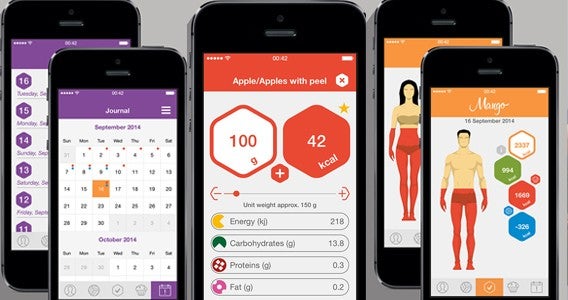
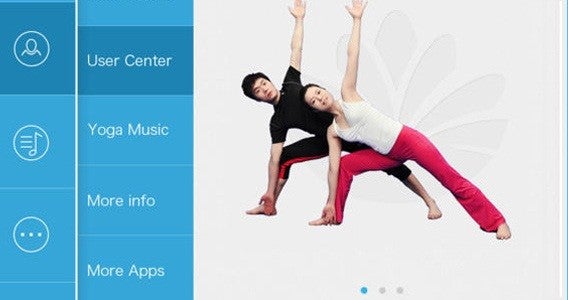
My first two apps are Mango – Calories Counter & Diet Tracker (iOS), and Daily Yoga – Lose Weight, Get Relief (Android and iOS) – 8 fit (Android and iOS).

Mango is designed to track calorie consumption, and could well be an app that I stick with across all of my subsequent diet apps. As a starter for the first week, this seemed like the ideal way to see just how far I have strayed.

Daily Yoga is quite self-explanatory, but I have chosen it because it provides low impact daily exercises that will ease me back into the more rigorous regime I hope to eventually return to. I will give this two weeks before I revisit it.

Check back next week to see how scared Mango has made me.

Related Stories

The best health and fitness app of 2014

Comparison: Health & fitness apps for your smartphone

What can I do with my tablet: cook

Follow me on Twitter: @DoFuss

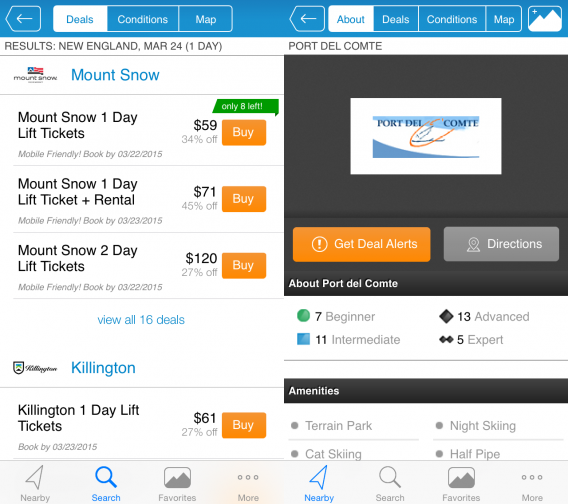
Best apps for planning your budget ski vacation

In the first in a series of articles profiling the apps that can help you plan your holiday on a budget, we look at skiing. While there is still plenty of time left to hit the slopes before the end of the season, many people will be put off by the perceived high cost of this type of vacation. There is so much more to think of than just booking flights and a hotel, and picking up a good guide book.

Best apps for travelling on a budget

If you’re looking to pick up a cheap skiing break, these apps will help you do everything from finding the best flights, to getting discounts on lift passes to downloading maps that save you from racking up a huge data bill through to getting the best deals at resort restaurants and bars.

Kayak

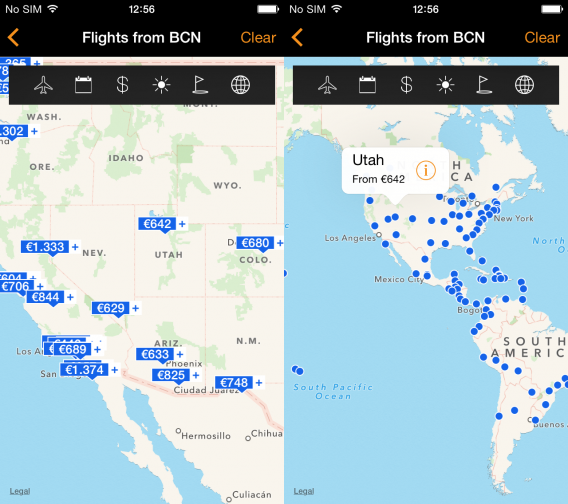
While there are several flight comparison apps out there, Kayak is the only one to offer search functionality tailored specifically to ski destinations through its smartphone offering. When you chose the ski option from within the Explore Deals menu, the app presents you with a range of pins across a map of the world that provide an overview of the best deals for that particular resort.

Download Kayak for Android | iOS

Airbnb

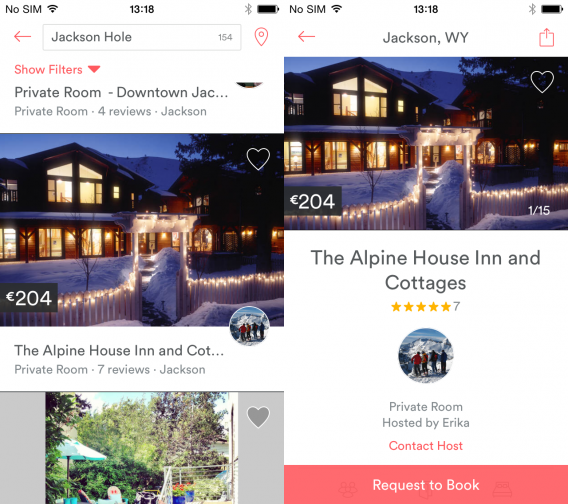
When you’ve found your perfect (budget) snow destination, you’ll need somewhere to stay, and where better for finding a good deal than Airbnb. There are ski chalets galore in all the top resorts you can think of and the mobile app makes the booking process smooth and simple. If you’re feeling a touch adventurous, you could even spend a night in a ski cable car at 9,000 feet courtesy of Airbnb.

Download Airbnb for Android |iOS

Liftopia

Buying a lift pass in advance can help you keep costs down and Lifetopia is just the app to do it with. Simply search for your destination and check out what deals they have to offer. You can then buy the passes directly from within the app. No deals available for your destination of choice? Click on “Get Deal Alerts” and Liftopia will notify you when an offer becomes available.

Download Liftopia for iOS

OnTheSnow Ski & Snow Report

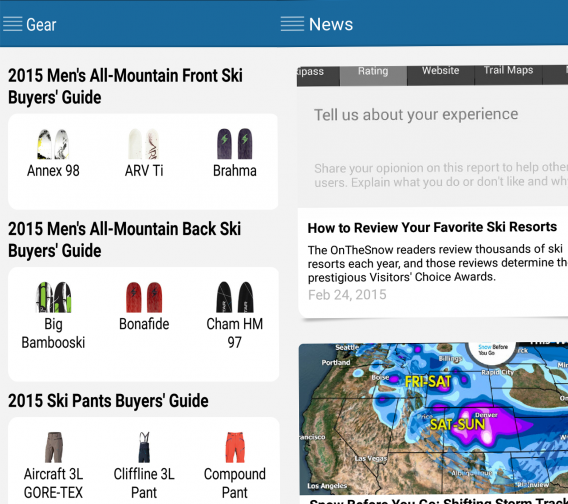
There are several ways this multi-functional app can save you cash on your skiing break. Like Liftopia, it offers deals on lift passes, but also throws in money off ski breaks and the opportunity to buy your equipment and clothing before you go. If this is your first ski break, you may want to hire rather than buy, but if you’re a seasoned pro the comparison of elements such as versatility and stability can help you make an informed choice and get the best gear at the cheapest price.

Download OnTheSnow for Android

Ski Tracks

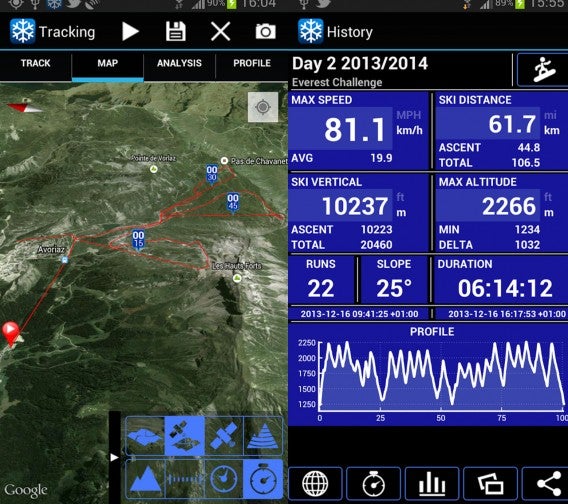
If you want to boast about your skiing prowess but you’re worried about eating into your data allowance, Ski Tracks allows you to record all your runs on the slopes without a phone signal or using any cellular data. It also provides downloadable maps so you can plan your journey. Don’t be put off by the ugly interface, it’s actually a highly-rated and very useful app.

Download Ski Tracks for Android |iOS

Ski School Intermediate

While ski lessons delivered through an app are by no means a substitute for the real thing, if you want to refresh your technique before you get on the piste again, Ski School Intermediate can help. There are video demos that explain the basic techniques, while you can use the in-app camera to compare your own runs with that of the experts.

Download Ski School Intermediate for Android |iOS

Tripster Ski

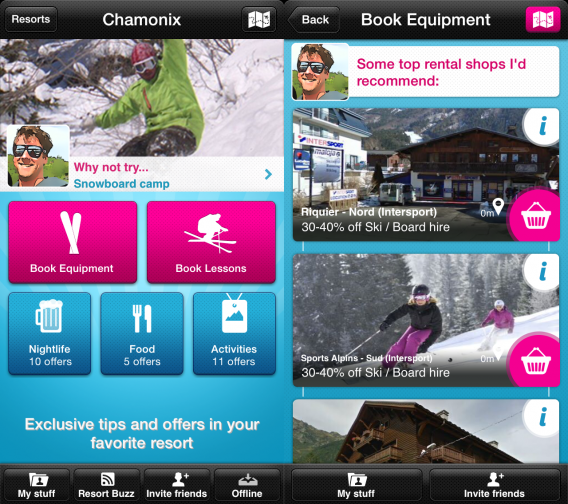
If you’re heading to Europe to take that all important ski break, Tripster Ski is a must have app to enjoy tons of discounts on everything ranging from booking equipment to reserving lessons to getting money off eating and drinking. The discounts available very much depend on the resort but Chamonix, for example, offered all of the above plus money off massages, paragliding, and resort transfers. With an attractive and intuitive interface, this could be the most important app for securing that cheap ski holiday.

Download Tripster Ski for Android | iOS

Related Stories

The best travel and transport apps of 2014

Google’s most popular apps and games of 2014

Best free Android apps

Follow me on Twitter: @karenmccandless

What to expect at Mobile World Congress 2015

While the spotlight at Mobile World Congress (MWC) 2015 may be on Samsung, HTC, Google, and Sony as they launch their latest flagship smartphones, there is much more happening in Barcelona that doesn’t involve a 20 megapixel camera. From apps challenging hardware’s dominance at the event, mobile wallets and securing your data on wearables, we take a look at what will be revealed next week.

Apps

While MWC has traditionally been seen as a hardware-centric event where companies announce their flagship devices, apps are playing an ever more important role. In its sixth year, App Planet is bigger than ever and will play host to more than 200 exhibitors in Hall 8.1. The pavilion is sponsored by HP and Microsoft while other leading names with booths include Samsung Electronics, Nvidia, and Sony Mobile.

Mobile wallets

Apple Pay wallet

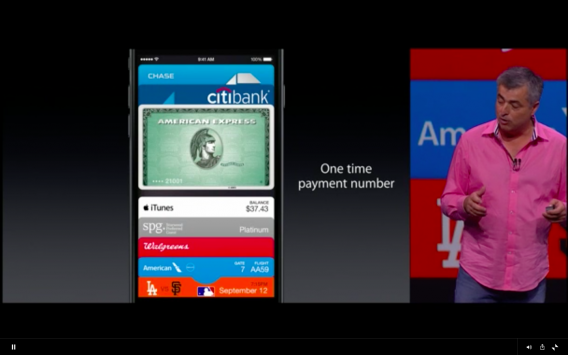
Samsung is expected to demo its new mobile wallet called Samsung Pay on its Galaxy S6 smartphone following its acquisition of mobile payments technology company LoopPay. Google is also currently ramping up its Google Wallet activities ahead of the show and Apple Pay will continue to make the headlines following its US launch in 2014.

Wearables and data privacy

Wearables

This year the focus for wearables will be not just on the benefits these devices and apps provide, but also the data security and privacy risks they pose for users.  Setting the scene for MWC, Jeff Jenkins, chief operating officer and co-founder of APX Labs, said at CES 2015: “…you have to make sure you’re thinking security first and you’re thinking about the information that’s being generated by them. You have situations where it’s no longer just personal data that may be exposed or compromised, but also potentially operational data, that could be sensitive in nature”.

Windows 10 for phones

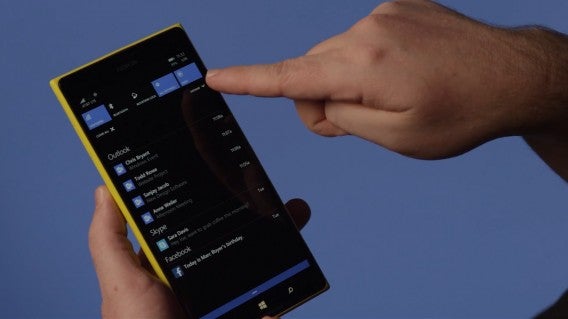
Microsoft is keeping its plans for MWC 2015 under wraps, but the company will likely go into more detail on its Windows 10 for phones, which it recently unveiled as a technical preview. This the first attempt by Microsoft to build its mobile operating system with the same core as its desktop equivalent. The company is hoping that this strategy will mean the depth and quality of its apps will significantly improve, given the build once deploy across multiple form factors approach it will enable.
MWC 2015 will also see the first Windows 10 for phones smartphones make their debut with both Microsoft and its hardware partner Acer expected to launch their own range of devices running the mobile OS.

Connected sports

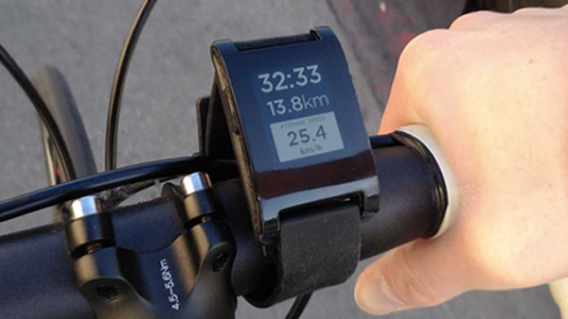
In MWC’s newly renamed Innovation City area (formerly Connected City), there will be some interesting demonstrations of the advancements in mobile sports technology. Sports motion capture tech company Xensr and Red Bull BMX stunt riders will show real-time 3D spatial mapping technology, biometric wearables and connected point of view camera integration. Tennis brand Babolat will also demonstrate Babolat Play, the world’s first connected racquet, which can synchronize your data with your smartphone.

A look into the future

New for 2015 is the “4 years from now” program, which takes a look at upcoming trends. This year these include connected home, wearables, privacy and security, hyper-local services, and quantified self.

Related Articles

Video Recap: Mobile World Congress 2014

What to expect at GDC 2015

WhatsApp to ‘stay independent’, says CEO Jan Koum at MWC

Follow me on Twitter: @karenmccandless

Windows more secure than OSX? Not so fast.

A report published by GFI Software, a security software developer, revealed which operating systems have the most vulnerabilities. Shockingly, Apple’s OS X and iOS topped the list of the least secure operating systems with Windows handily beating them. But are OS X and iOS really more vulnerable than Windows?

Let’s dive into the data.

What the report says

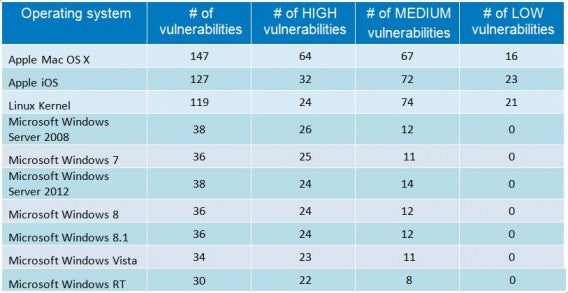
The study is based on data from the National Vulnerability Database (NVD), which is a government run repository for security compliance and vulnerability data. GFI used data from the NVD reports and compiled some interesting data. Here’s what we learned from GFI’s report:

GFI report OS chart

– There is a steady increase in the number of vulnerabilities spotted year over year. Between 2013 and 2014, the number of vulnerabilities increased by 2,244, a 47% increase in just one year.

– Third party apps account for over 80% of the reported vulnerabilities. This is significant as the study doesn’t point to the inherent security risks inside an operating system. Only 13% of vulnerabilities were attributed to the OS.

– OS X and iOS both topped the charts with the most vulnerabilities and the most vulnerabilities labeled as high risk.

– Linux is more vulnerable than Windows. GFI cites recent security issues like Heartbleed for this outcome.

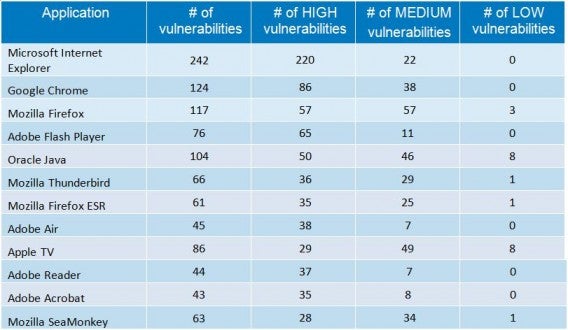
GFI Application Chart

– Microsoft’s Internet Explorer is the lease secure browser, followed by Chrome and Firefox.

An incomplete picture

While these figures are shocking, it paints an incomplete picture of the current security landscape. “Basically it’s like staring at a bunch of garden walls to see how many footballs come flying over the top – it doesn’t say much about the height or quality of a given wall, but maybe something about how many people are on the other side and what kind of games they’re playing,” Virus Bulletin Chief of Operations John Hawes.

footballs wall postImage credit: Christopher Park

It’s tempting to simply agree with GFI’s findings as Apple just had a record breaking quarter selling 74.5 million iPhones, making the iPhone a prime target for attackers. Studies show that iPhone users are also more likely to pay for apps than Android users, making iOS users a more lucrative target for hackers.

The story is much the same for Mac users. They are more likely to spend money on applications and are usually wealthier individuals who don’t mind paying a premium for Apple’s design and easy to use software. Exploiting Mac users could also mean more lucrative returns for hackers. Still, OS X only makes up 7% of the desktop OS market share as of January 2015 according to Net Applications.

“Basically it’s like staring at a bunch of garden walls to see how many footballs come flying over the top.”

“Nowadays Macs are booming,” says Hawes. “The same of course goes for iPhones and iPads, which have built up a reputation for being well-secured as well as a huge and largely well-off user base, again making them a top target for attack by both bad actors and those who see the act of penetrating the impenetrable as a great challenge.”

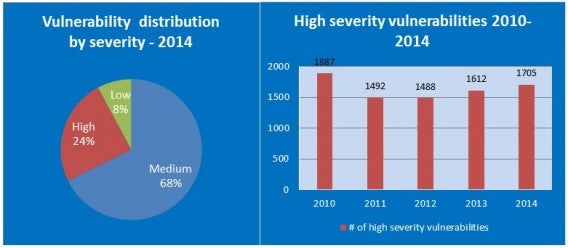
GFI-high-severity-vulnerabilities

Hawes also notes that the data provided by the NVD only accounts for vulnerabilities that have been disclosed. Hackers or even the federal government often don’t disclose discovered vulnerabilities in order to use them later or to assist companies in patching them before making the vulnerability public.

The data provided by GFI is also strangely presented. While Windows is broken down into sections for different versions, OS X and iOS are bundled as one homogeneous operating system. Android is also strangely absent from the list, which historically has been a major source of vulnerabilities.

There also seems to be a little contradiction in the data. Windows beats OS X in the number of vulnerabilities but Microsoft’s Internet Explorer is far and beyond the most insecure browser according to the study. Since Internet Explorer only runs on Windows, doesn’t that make Windows more vulnerable by default? Interestingly, Safari isn’t even listed in GFI’s data.

The takeaway

What we can take away from GFI’s report is that we need more data. It’s easy to just point fingers and laugh at OS X and iOS users but doing so would be flippant.

I’d like to see more data about user behavior and how quickly vulnerabilities are patched. For example, Mac users may be so used to not running any security software that their behaviors are riskier than Windows users.

The terminology of the study also poses some issues. While I don’t doubt the number of vulnerabilities reported by NVD, it doesn’t tell me if these vulnerabilities have been exploited. It’s one thing to find a supposed vulnerability but another thing to actually exploit it.

With so many high profile security attacks in the last year, it’s no surprise people are interested in security data to see which platform will help protect them the best. Truth of the matter is that no operating system can fully protect you. While companies have to step up their security efforts, you’ll also need to step up yours. Know what to look for in a phishing email and download software only from trusted sources. Never reuse the same passwords and just exercise common sense when browsing the web.

For more security tips, check out our stories below.

Source: GFI Software

Related Stories

Anthem health insurance hacked. Here’s how to protect yourself.

‘Masque Attack’ security flaw lets hackers replace your iOS apps with malicious ones

Best free antivirus

How to configure Avast 2015 to maximize speed

Should I be afraid of the Shellshock bug?

Follow me on Twitter @lewisleong