The Game Boy turns 30. Here’s how it changed gaming forever

Here’s how the handheld console changed video games forever.

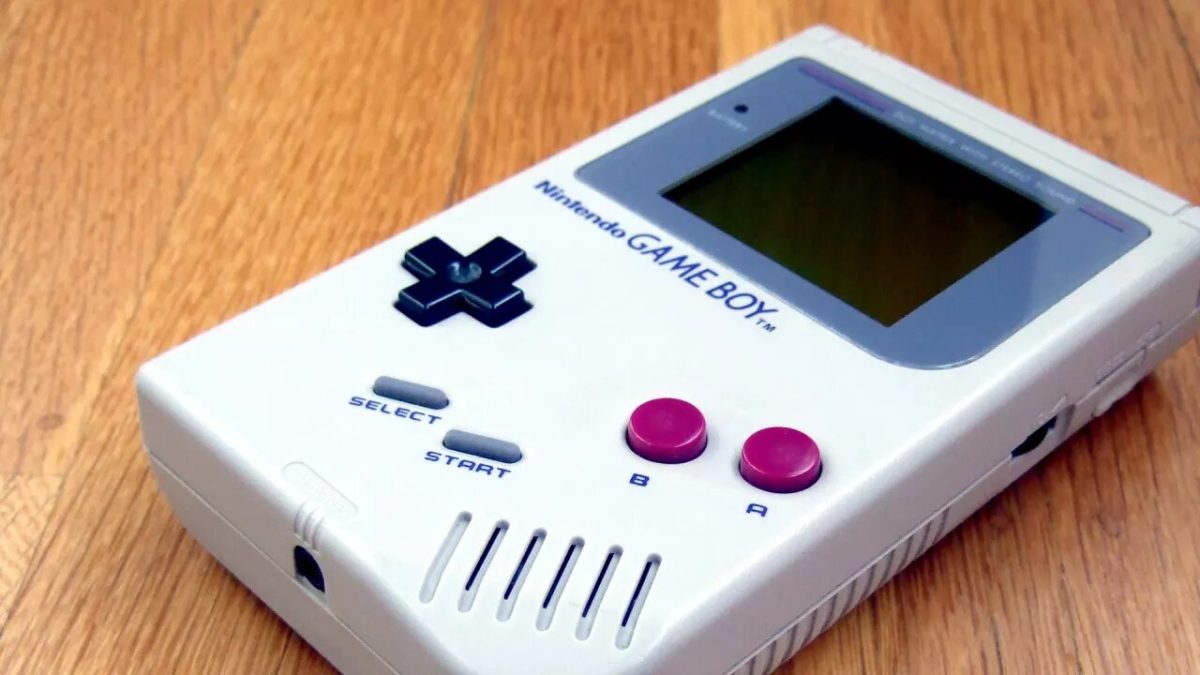
Considered to be one of the most iconic consoles ever, the Nintendo Game Boy turns 30 this year. Though it was hardly a technological powerhouse even back in the day, the lovable gray brick would go on to become one of the most popular consoles of all time. To celebrate, we’re going to take a look back at what made the Game Boy so special.

How the Game Boy was designed

gunpei yokoi game boy

The Game Boy was primarily designed by Gunpei Yokoi, the same man behind popular toys like the Ultra Hand and the Love Tester. Yokoi additionally helped create Nintendo’s original portable gaming system, the Game & Watch series, after watching a bored businessman fiddle with a calculator on a train.

The success of these toys and the Game & Watch series led to a lot of goodwill from Nintendo toward Yokoi, who had a lot of freedom in designing the Game Boy. He designed the system around the idea of “lateral thinking with withered technology”, which basically means taking slightly outdated technology and repurposing it into something new and innovative. The reasoning behind this was that the Game Boy would be built using technology that is already easily understood, affordable, and energy efficient.

The design of the Game Boy proved to be extremely popular due to its low price, long battery life, and durability. Competing portable systems like the Sega Game Gear boasted more power and color displays, but their high price point and monstrous battery consumption proved no match for the Game Boy. What really helped the Game Boy stand apart, however, was its amazing lineup of games.

The most iconic games ever, on the go!

tetris game boy

The huge library of quality Game Boy games led to an explosion in sales. Of the launch titles, Super Mario Land amazed gamers by providing a console quality Mario game on the go. However, the launch title that really catapulted the Game Boy into a pop culture icon was Tetris. The Game Boy version of the timeless puzzle game was many people’s first introduction to the series, and the game would go on to become the best selling video game of all time. Tetris was bundled with the Game Boy and became the system’s first true killer app. An even bigger killer app, however, was just over the horizon.
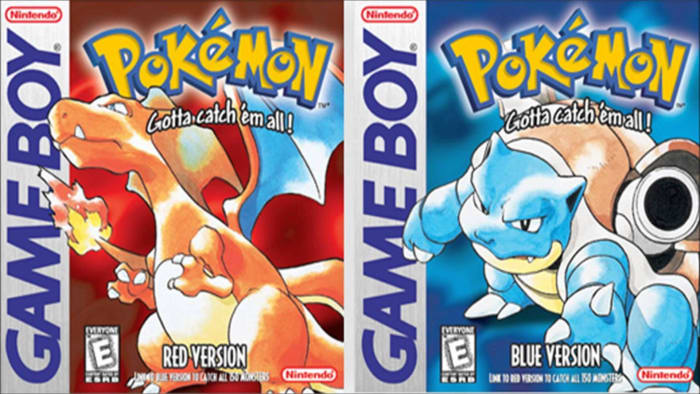
pokemon red blue game boy
You might’ve heard of this one before

The arrival of Pokémon Red and Blue in the late ’90s laid down the groundwork for what would become a multibillion-dollar franchise. The game’s collection of 151 lovable creatures attracted gamers from all across the world. The addictive gameplay loop of battling and catching Pokémon led to the birth of the creature RPG genre, which is a style of game that Pokémon dominates to this day. Kids on the playground spent all day trading secrets of where to catch powerful secret Pokémon. More importantly, they used the Game Boy’s Link Cable to connect their systems, allowing them to trade and battle Pokémon. Pokémon’s unique social gameplay systems encouraged players to meet up with people in real life to get the most out of the game, making the game a treasured part of many people’s childhoods. Pokémon is currently the biggest media franchise in the world, surpassing Star Wars, Harry Potter, and Marvel.

With games like Tetris, Super Mario Land, Pokémon, and Link’s Awakening, it’s no wonder the Game Boy sold as it did. Instead of featuring neutered console ports like its competitors, the Game Boy instead focused on unique experiences that took advantage of the console’s unique portable design.
A long line of successors

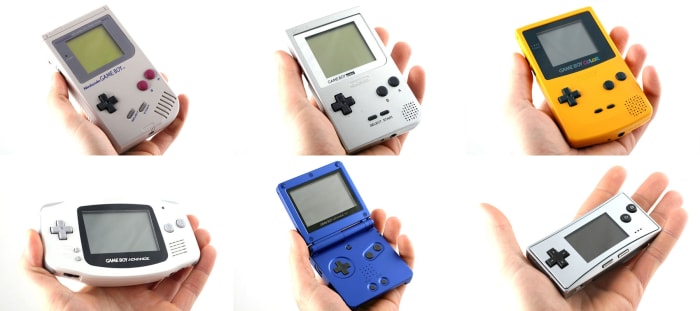
game boy line

The runaway success of the Game Boy inevitably led to numerous upgrades and revisions. The Game Boy Pocket, also designed by Gunpei Yokoi, was the first of these upgrades and featured a smaller, lighter design, in addition to a true black and white screen as opposed to the original Game Boy’s green monochrome screen. It used two AAA batteries as opposed to the original Game Boy’s four and featured an LED light that would turn red when the batteries were running low. A few years later, the Japan-exclusive Game Boy Light solved the Game Boy’s most frustrating hardware problem: its unlit screen.

Next up, the Game Boy gained its first true successor in the Game Boy Color. The Game Boy Color had its own library of games that took advantage of the consoles color palette and more advanced processor, though it was still backward compatible with original Game Boy games. It was functionally a portable NES and served as the final 8-bit portable console to ever be released.
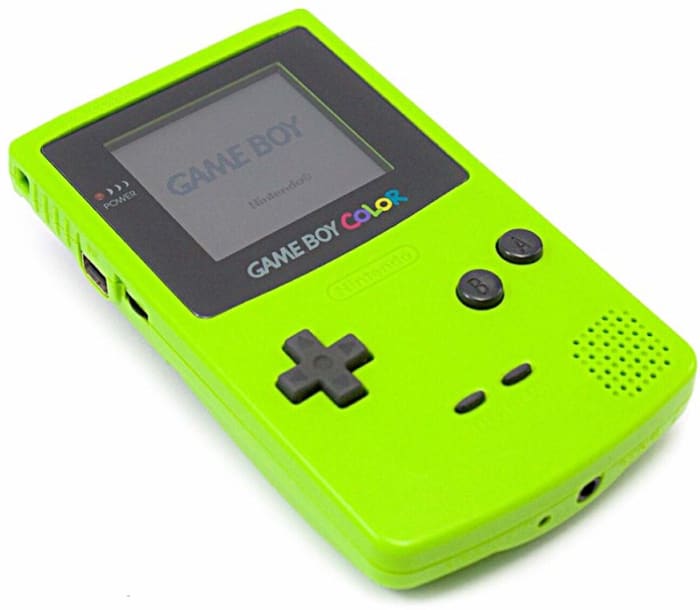
game boy color

The release of the Game Boy Advance saw a major upgrade to the Game Boy family. Featuring a wide design, a higher resolution screen, and a 32-bit processor, the Game Boy Advance dazzled audiences with SNES quality portable games. The Game Boy Advance was still backward compatible, allowing it to play Game Boy and Game Boy Color games.

game boy advance

The Game Boy Advance received its own revision in the Game Boy Advance SP. It had a unique clamshell design, a rechargeable battery, and a backlit screen. A spinoff of the Game Boy Advance, the Game Boy Micro, was made for trendy urban audiences. By far the smallest Game Boy yet, the Micro was about the size of an NES controller and featured a backlit screen.

gba sp

When the Nintendo DS was being developed, Nintendo avoided calling it a new Game Boy upgrade. They did this because the DS was such a new and innovative piece of hardware, that if it didn’t catch on, they could continue the Game Boy line. Of course, we know now that the Nintendo DS became a smashing success, outselling even the Game Boy. But Nintendo wouldn’t be where they are now in the portable gaming space without the Game Boy paving the way. The Nintendo DS, 3DS, the Nintendo Switch, and all future Nintendo handhelds owe their existence to that iconic grey brick.

What are your favorite Game Boy memories? Let us know!

10 remarkable facts about Black Panther

Learn what you never knew about the groundbreaking action epic.

Black Panther

Marvel’s “Black Panther” is widely regarded as one of the most groundbreaking superhero films of all time. The movie follows T’Challa (Chadwick Boseman), king of the fictional African nation Wakanda. Under the moniker Black Panther, T’Challa defends his nation from a variety of outside threats, including the ruthless rogue black-ops soldier Erik Killmonger (Michael B. Jordan). Read on for some little-known facts and fascinating bits of trivia about the making of this blockbuster film.

10 remarkable facts about Black Panther

1. Chadwick Boseman took inspiration from legendary African leaders

chadwick boseman black panther t'challa
Image courtesy Marvel Studios

To prepare for the role, Boseman threw himself into some intense research. He based his character on a number of real-life figures, such as Nelson Mandela, Shaka Zulu, and Patrice Lumumba. He also made multiple trips to South Africa, where he met with local tribal leaders and studied various forms of martial arts and other combat styles.

2. Killmonger’s scars aren’t CGI

black panther killmonger scars
Image courtesy Marvel Studios

That’s right, the scars that cover Erik Killmonger’s body are totally real. Each scar is a piece of individually sculpted silicone. There are over 90 scars covering his body, which took roughly two hours to apply. Actor Michael B. Jordan would have to spend an additional two hours to have them removed after a day of filming.

3. Danai Gurira shaved her head daily for her role

danai gurira black panther
Image courtesy Marvel Studios

Fans know actress Danai Gurira for her role as zombie hunter Michonne on AMC’s “The Walking Dead.” For her role as bodyguard Okoye in “Black Panther,” Gurira was required to re-shave her head every day to apply her tattoo makeup. All told, the process could take up to three and a half hours.

4. Angela Bassett’s wig was incredibly intricate

angela bassett wig black panther
Image courtesy Marvel Studios

Actress Angela Bassett plays Ramonda, T’Challa’s mother. For the role, she wears a striking waist-length silver wig. That wig is actually made from 120 pieces of hair. The hair was then hand-rolled into dreadlocks to create the finished wig.

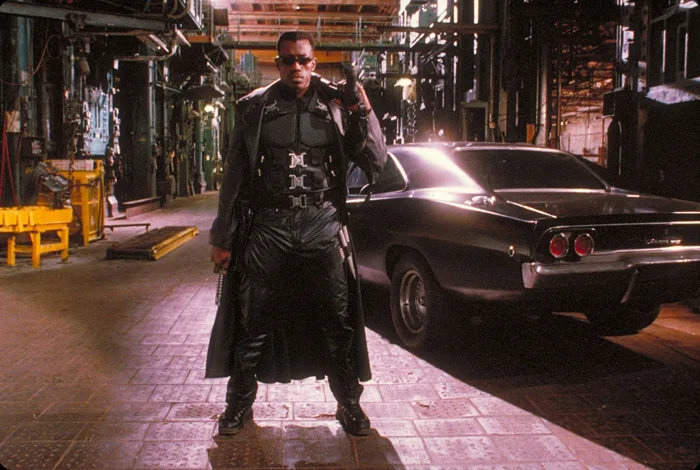
5. Wesley Snipes almost played Black Panther

wesley snipes blade
Image courtesy Amen Ra Films

Back in the 1990s, actor Wesley Snipes began production on a Black Panther movie as a personal project. The production was eventually scrapped for a number of reasons, including the fact that Snipes was already playing vampire hunter Blade, another Marvel character. When production began on the 2018 version of “Black Panther,” Snipes was quick to give his blessing to the project.

6. Wakandan is a real language

black panther wakanda
Image courtesy Marvel Studios

The language of Wakanda is actually based on a real language. The dialect is primarily based on Xhosa, one of the eleven official languages of South Africa. Star Chadwick Boseman was taught the language by actor John Kani, who portrays T’Challa’s father in “Captain America: Civil War.”

7. The movie’s composer compiled multiple sources for the soundtrack

black panther battle
Image courtesy Marvel Studios

To write the movie’s Oscar-winning soundtrack, composer Ludwig Göransson made a lengthy trip to South Africa. While there, he spent several weeks working with local musicians to research the sound he wanted to create for the movie. He also worked to incorporate a variety of traditional African instruments into the soundtrack, such as the talking drum.

8. The movie broke Twitter records

black panther chadwick boseman
Image courtesy Marvel Studios

Hype for “Black Panther” reached epic proportions on social media. On Twitter, in particular, the movie was tweeted about an estimated 35 million times. This made “Black Panther” the most-tweeted about movie ever, with an average of about 559,000 tweets made about the movie in a single day. To put that in perspective, the average film only garners about 100,000 tweets per day.

9. It also broke a 35-year movie ban in Saudi Arabia

black panther costume
Image courtesy Marvel Studios

“Black Panther” also broke down other barriers across the globe. As part of a series of strict traditionalist policies, cinemas had been outlawed in the nation of Saudi Arabia since the early 1980s. After the ban was lifted in late 2017, “Black Panther” became the first movie to be shown in the nation in over three decades. The premiere was attended by a host of diplomats and influential figures from around the region, including Saudi Arabia’s Minister of Culture and Information.

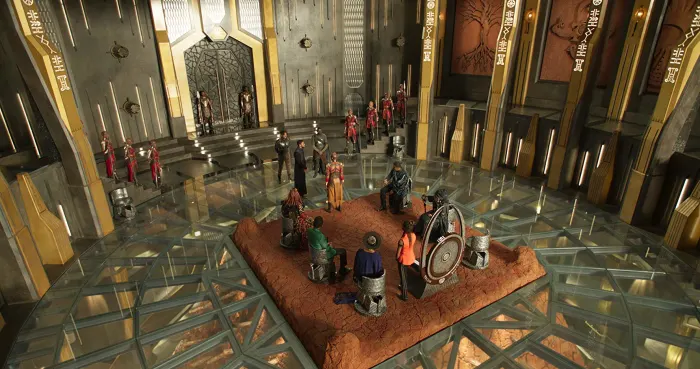
10. Hundreds of costumes were made for the movie

black panther throne room
Image courtesy Marvel Studios

The intricate costumes of “Black Panther” drew inspiration from a variety of sources. Costume designer Ruth E. Carter combined elements of traditional African tribal garb with more modern influences from the likes of Yves Saint Laurent and Donna Karan. In particular, the dress of Tuareg, Zulu, and Xhosa tribes heavily inspired the movie’s clothing styles. Over 700 different costumes were created for the movie by Carter and her team. Thanks to her imagination and skill, Carter became the first African American woman to win an Oscar for costume design.

10 spooky facts about Shaun of the Dead

Discover what you never knew about this horror-comedy classic.

Shaun of the Dead

“Shaun of the Dead” is the horror comedy directed by Edgar Wright that started “The Cornetto Trilogy”  off with a bang. Or at least started it off with gurgling discontented moans of the living dead. The trilogy features Simon Pegg and Nick Frost against hordes of angry fill-in-the-blanks with spectacular results (like getting drunk during a bar crawl and facing off against alien body-snatchers).

These movies are wacky, and wacky comedies always have stories going on behind the scenes – odd tidbits and unexpected moments that bring the shoot together. Here are 10 facts about the first film in the saga, “Shaun of the Dead.” If you haven’t seen the film, live stream it right here!

1. The Winchester used to be an actual pub

Winchester Pub

The famous Winchester Pub from the film was an actual place until recently. It was closed down and repurposed into flats a few years back. The names “John and Bernie” who ran the Winchester are actual names of the landlord and landlady who ran Pegg’s favorite bar in Highgate.

2. Tyres is a z-word!

Tyres Spaced Shaun of the Dead

During the zombie mob scene later in the film there’s a prominent zombie wearing a bright yellow hat. If you’re familiar with “Spaced,” a sitcom from Wright, Pegg, and Frost, you’ll recognize Tyres, the bike messenger/raver from the show.

3. Spaced inspired more than just a Tyres cameo

Spaced 1999 Simon Pegg

There’s an episode of Spaced where Pegg’s character stays up all night playing Resident Evil and starts hallucinating he’s in the game. Looking at the opening scenes of “Shaun of the Dead,” you can see the inspiration!

4. Why are your zombies so slow?

Shaun of the Dead opening

After the movie was released, an interviewer asked Simon Pegg why the zombies in “Shaun of the Dead” moved so slowly. Pegg responded, “Because death is not an energy drink.”

5. A legendary weapon

Shaun of the Dead winchester propWright and Pegg wanted multiple homages to horror films of yore, and one that they got to include was the Winchester rifle used in the pub scenes. The prop was the same rifle used in “Night of the Living Dead.

6. The news anchors in the film are real

While the actual news reports are clearly fiction, Wright hired actual newscasters for the televised warnings that play early in the film. The added touch of authenticity made the sequence even funnier.

7. They really love this game

Nick Frost arcade game Shaun of the Dead

A true gaming enthusiast, as soon as Ed enters the Winchester he starts playing this random arcade game. Turns out that same machine made it into some pub in every film in the Cornetto Trilogy.

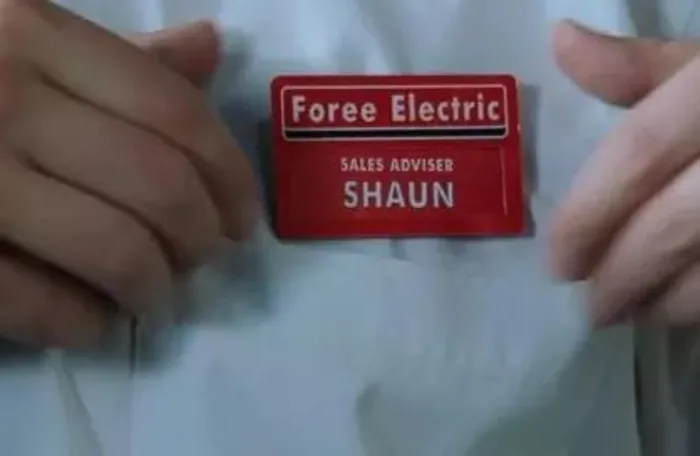
8. Foree Electric is a real place

Foree Electric employee tag Shaun of the Dead

Every film in the Cornetto Trilogy is at its heart the story of a man struggling to grow up and take on his role as an adult. In “Shaun of the Dead,” the titular character works a retail job at a small appliances shop (when he deigns to show up on time). The shop is an actual place in Tally Ho, North Finchley, called Garland Electronics. They called the place “Foree Electric” as a nod to Ken Foree, who starred in “Dawn of the Dead.

9. The one scene that made Pegg cry

Simon Pegg bar mum scene Shaun of the Dead

While most of the deaths in “Shaun of the Dead” are played for laughs, there was one scene that actually did hit Pegg in the feels. Shaun has to shoot his mother Barbara once she’s infected, and according to Wright, the actor played the scene like it was his own mom. As soon as the scene was shot, both Pegg and Frost burst into tears.


10. Cornetto is the best hangover food?

Simon Pegg Nick Frost cornetto Shaun of the Dead

The decision to have Nick Frost eat a cornetto first thing in the morning didn’t come out of nowhere. Edgar Wright once did the same after a bad hangover. “It’s the weirdest thing you would want to eat at that time in the morning,” said the Director. “When I was in college, I got very, very drunk once, and I had a Cornetto in the morning and I felt a lot better. So, it became my hangover cure, and it still is.”

Hope these facts will make your next viewing even better, and let us know in the comments below which film in the trilogy is your favorite!

How to use the AliExpress shopping app

If you’ve never used AliExpress to shop, you’re in for a treat.


AliExpress

AliExpress has been around for quite some time now, but the Chinese shopping portal is still clouded in mystery. In many ways, AliExpress is comparable to a Chinese version of Amazon, but in other ways, it is completely different. The differences come from AliExpress’s genesis as a retail version of the wholesaling website Alibaba, while the similarities come from being able to buy pretty much anything from a single site/app.

What is the difference between Alibaba and AliExpress?

With China famous for its immense manufacturing sector that can build almost anything, it makes sense that a wholesaling platform established itself so that the millions of Chinese factories would have somewhere to sell their wares. Alibaba is China’s leading wholesale platform and you can find everything on it, from DIY basics like nuts and bolts to the latest consumer tech via fashion and accessories. It is all built for business, however, with minimum orders often starting in the thousands. For personal users, this is no good. Who wants to buy 5,000 phone cases when you only have one phone?

How does AliExpress compare to Amazon?

This is where AliExpress comes in. While it is possible to find factories on AliBaba that will sell you a single unit, it is rare. AliExpress, on the other hand, is designed for vendors or retailers to sell single units. AliExpress is where you go to buy one phone case while AliBaba is where you go for 1,000 phone cases.

AliExpress homepage
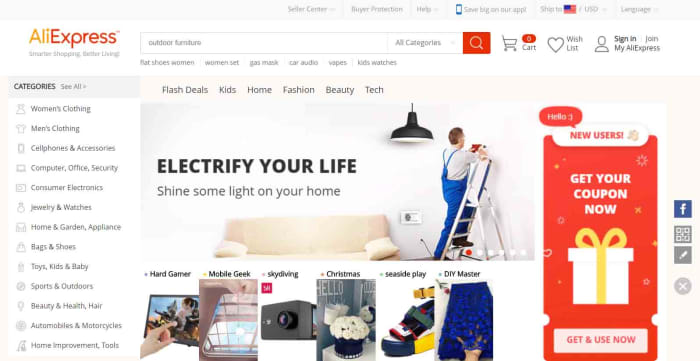
The AliExpress homepage for desktop

This means that AliExpress ends up as a mix between eBay and the Amazon marketplace. When you buy things off AliExpress, you’re buying them from individual stores and vendors rather than off a centralized store. You can search for items or you can search for stores.

Since AliExpress was founded, it has grown to become the world’s largest online store. Its proximity to factory supply lines allows it to offer extremely competitive prices compared to local retailers and online retailers like Amazon. If we look at phone cases again, just as an example, it is easy to find them on sale for as little as 30 cents, which is a lot cheaper than you’ll find them at Best Buy.

Things to consider when buying off AliExpress

Seller feedback on AliExpress
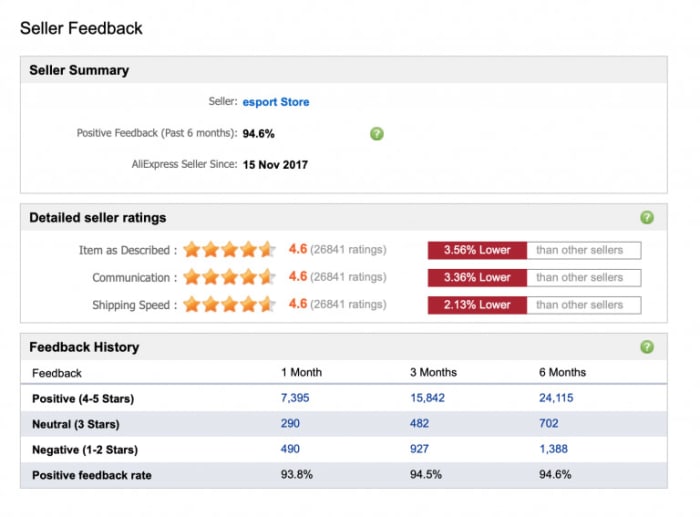
Image via: AliExpress – You need to make sure you can trust the vendor you’re dealing with when you’re shopping on AliExpress

If you’re thinking of buying something from AliExpress, it is likely the low prices are what caught your attention. When buying from AliExpress, however, you need to consider more than just the retail price of whatever you’re looking to buy. The main things you need to be aware of when shopping on AliExpress are the trustworthiness of the seller, shipping times and costs, and potential import fees. Another thing you might want to look at, if buying a branded item, is whether or not you can guarantee its authenticity. Fortunately, AliExpress has created a guide on how to check for all of these, which you can read here.

How to use the AliExpress app for Android and iPhone

Now let’s have a look at how to use the AliExpress app. AliExpress has an app available for both the iPhone and Android smartphones and you can download them both here:

AliExpress Download free ►
9

Navigating the AliExpress app homepage

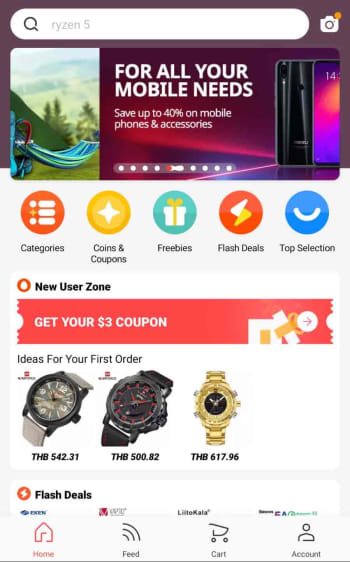
When you first open the app, you’ll find something that looks rather similar to the homepage you’ll find on the AliExpress website. In the middle of the screen, the app shows scrolling special offers and various buttons including coupon codes, flash deals, freebies, and searchable categories. You’ll also be able to scroll up and down the page to see different shopping sections filled with many different types of items like USB cables, sports footwear, makeup, and toys.

homepage of the AliExpress app

At the top and bottom of the homepage, you’ll find the function keys that will help you navigate the app, your account, and the shopping process. You’ll see a search bar at the top of the screen and a toolbar at the bottom. The toolbar includes a home button, a feed button that gives you a personalized feed based on your shopping history, a shopping cart button, and an account button. Whenever you click on an item or a store, the toolbar will disappear, but you’ll be able to find all the toolbar buttons by clicking on the three dot icon that appears in the top-right of the screen.

Next to the search bar across the top of the app, you’ll find a camera button, which activates some very interesting features.

The AliExpress camera app

AliExpress camera search
The AliExpress image search function is rather impressive

Clicking the camera icon in top-right of the AliExpress app homepage gives you three options. AR scan and QR code scan use your smartphone’s camera to scan for links to AliExpress items and pages. The really cool feature, however, is the image search feature, which can detect what you’ve taken a picture of and search for similar products or accessories. In all our tests this feature worked really well and was able to determine things like the brand of the item we’d snapped and, in some cases, even the model.

How to buy things using the AliExpress app

Step 1 Sign up

The first thing you need to do when buying something on the AliExpress app is to create an account. This process is simple, and similar to how you’ve signed up to a million other online accounts. You can even use your social media account details to create your account for you. You can do this using your Facebook, Twitter, or Google accounts.

AliExpress app sign up page

Step 2 Add items to your cart

You can find what you’re looking for using all of the homepage tools we highlighted earlier. Once you have an item you want you can either add it to your cart or hit the buy now button.

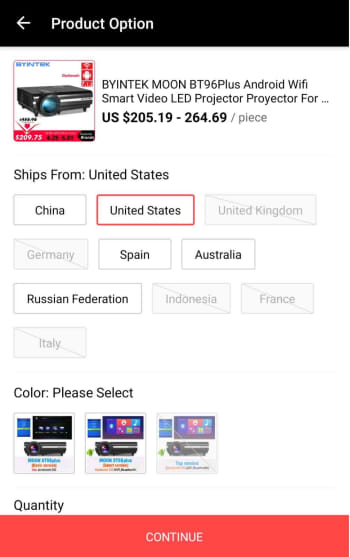
Depending on what you’re buying, you might have to select a few extra options at this point. This could include where your item will be shipped from. Here, it may be more expensive to have the item shipped from the U.S., but then you won’t have to worry about long shipping times, import duties, and taxes. This decision is up to you. You can find information on importing goods into the U.S. from abroad here.

where do you want your AliExpress item shipped from?

Step 3 Select the items you want to buy

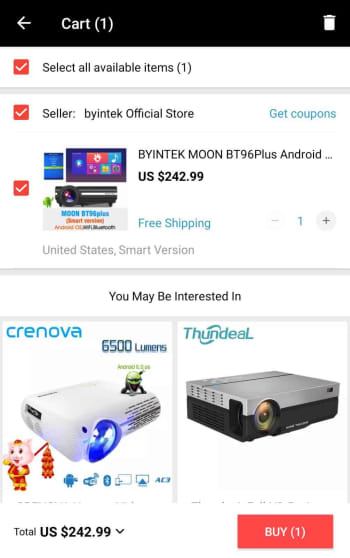
The AliExpress cart works a little differently to other online shopping carts. Rather than automatically selecting all the goods in your cart for purchase, you’ll have to select the items you want to buy by selecting the box next to each item.

confirm the items you want to buy

Step 4 Add shipping address and place order

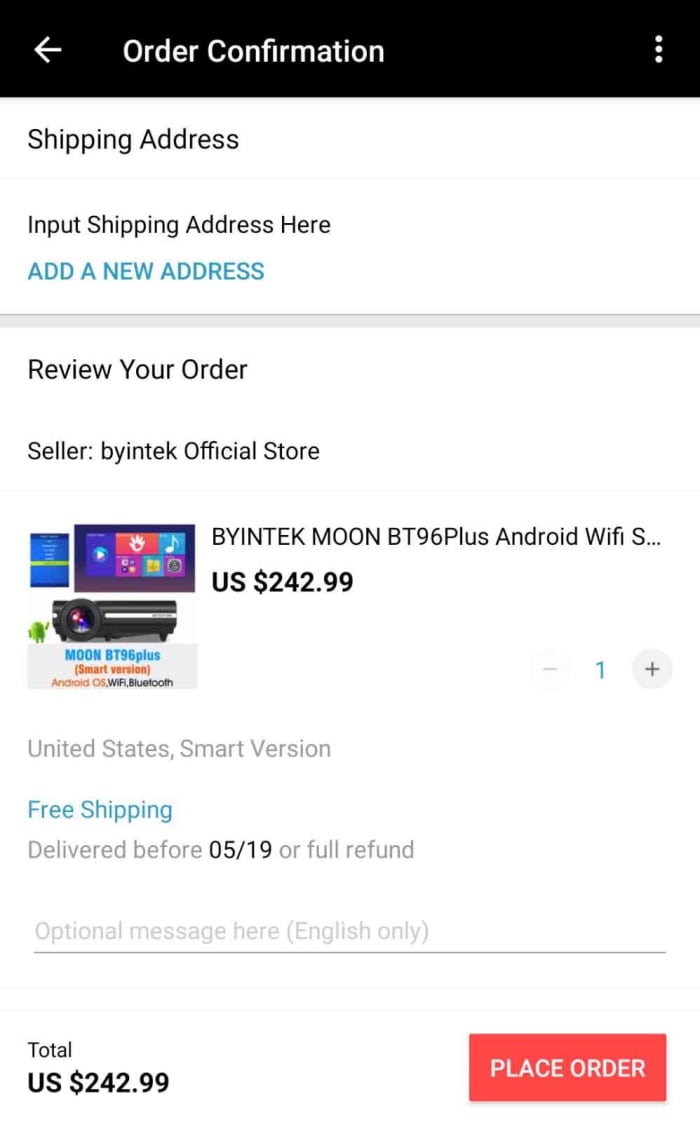
Once you’ve confirmed the items you want to buy, you’ll be taken to an order confirmation screen where you need to input your shipping details and check all of the information relating to your purchase. This will include any potential discount coupons and will also inform you of whether there are any shipping-related issues attached to your item. Sometimes you’ll see the seller offering a full refund if it hasn’t arrived by a certain date.

Ad your shipping address to your AliExpress order

Step 5 Payment details

After you’ve input your shipping details, you’ll need to enter your payment details. AliExpress accepts a number of payment methods including its own version of PayPal called AliPay, card payments, and bank transfers as well as a host of other payment methods including WebMoney, Western Union, Yandex.Money, QIWI, DOKU, MercadoPago, Ticket, and American Express. For full information on all the different payment methods available on AliExpress and the risks attached to them click here.

Conclusion

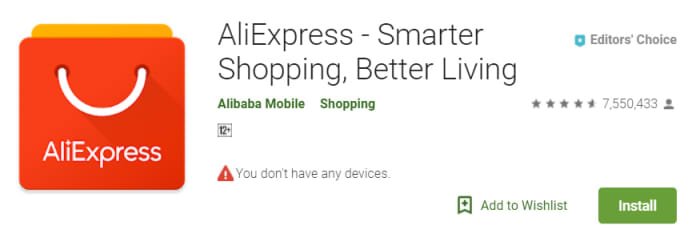
As you can see, using the AliExpress app itself is very simple. It is intuitive, easy to use, and also offers some cool and innovative features. This is reflected in the high ratings the app has on both the Apple app store and the Google Play Store. The app has an impressive 4.6 rating on the Play Store even after more than 7.5 million downloads.

AliExpress on the Google Play Store

The tricky business relating to shopping with AliExpress, however, is the mystery of it all. This is why we’ve gone through a bit of context for you to show you how the company operates and where it came from.

There are things you need to consider when you’re buying from AliExpress, and first and foremost you need to ensure that the vendor you’re dealing with can be trusted. Secondly, you need to consider shipping times, costs, and any import duties and taxes you may be liable for; we’ve also pointed out, however, that this might not always be necessary as the vendor may also ship items from your region. If you’re confident in the seller and understand all the shipping details, however then you should think of AliExpress as another viable option when you’re looking to buy something online.

AliExpress Download free ►
9

How to use Gmail’s new email scheduling tool

This is how to schedule an email on Gmail.

Gmail background

On April 1 Google announced that it was finally adding a “Schedule email” feature to Gmail. The feature has been rolling out since, but as there are over 1.5 billion Gmail users around the world, it is taking a while for everybody to get the update. Don’t worry though, it is coming and if you haven’t got it yet, you’ll have it soon enough.

Gmail’s new Schedule email feature will work on both personal and enterprise Gmail accounts and allows users to schedule emails up to a whopping 49 years in advance. Yep, if you think you’ll have the same email address in the year 2068, you can schedule an email to yourself to see how things are going in the future.

Gmail Access now
8

How to schedule emails on Gmail on the web

The new scheduling feature for Gmail is simple. So simple that it should kill off all those third-party apps and extensions that popped up over the years trying to fill the scheduling void that Google had left in Gmail. They’re simply not needed anymore. All you need to do to schedule an email using Gmail is:

Step 1

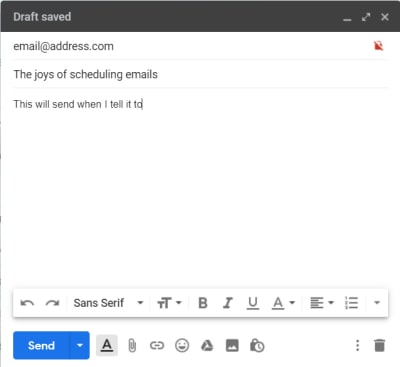
Writing an email on Gmail

Write out your email as you normally would.

Step 2

The new Gmail Send button with the schedule arrow

Then, when you’re ready to schedule it, click the small arrow icon next to the Send button.

Step 3

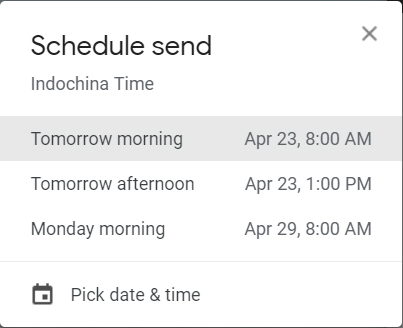
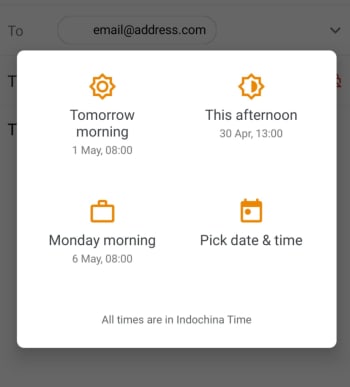
The new Schedule send menu for Gmail

Clicking Schedule send will bring up the menu that lets you decide when you want the email to arrive in the recipient’s inbox.

Step 4

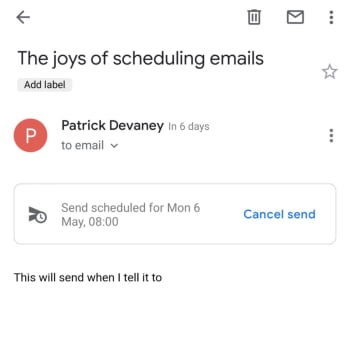
Send scheduled for on Gmail

Once you’ve decided on the time and date, click Schedule send and rather than seeing the usual “Email sent” you will see the “Send scheduled for…” message including the time and date you’ve selected.

This is how to schedule an email on Gmail using the app on your phone

Step 1

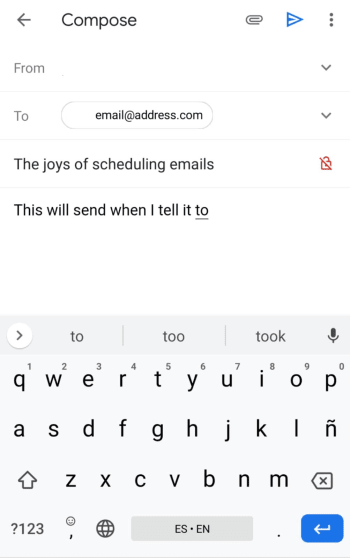
write an email gmail mobile

Write out your email as you normally would.

Step 2

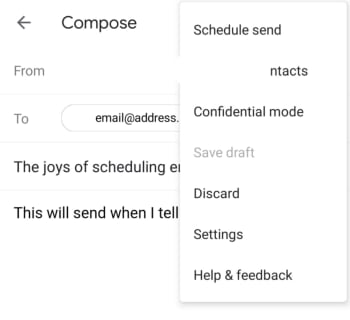
gmail schedule send mobile

Hit the three vertical dots icon next to the Send button and select Schedule send.

Step 3

gmail schedule email mobile

This will bring up the menu that lets you decide when you want the email to arrive in the recipient’s inbox.

Step 4

schedule an email using gmail on mobile

Once you’ve decided on the time and date, click Schedule send and rather than seeing the usual “Email sent” you will see the “Send scheduled for…” message including the time and date you’ve selected.

The new feature is also good if you’re the type of user who constantly notices mistakes once you’ve sent the email. Scheduling an email will save it as a draft, so if you always schedule your emails to send an hour after you’ve written them, you’ll be able to check everything a little later on before Google pings it off to the recipient.

To check an email that has been scheduled all you need to do is click Scheduled in the side menu and then select the email you want to check. You can then edit the email to change out any mistakes or delete it and cancel the send altogether. At this stage, you can also change the time and date the email is scheduled to send.

Windows 10 update to require at least 32 GB

The Windows 10 May update will require at least 32 GB of hard disk space.

Windows 10 on a red brick wall

Windows 10 updates have had somewhat of a controversial history. From downgrading user licenses to deleting users’ files there have been plenty of controversies since Microsoft started forcing us to update our main operating system periodically. Fortunately, Microsoft is aware of the frustration Windows 10 updates can cause and has been working to make them less annoying and work a little quicker.

The software giant, however, is still determined to have Windows 10 as a continuously evolving operating system so updates are here to stay. Not only that, but it looks like they’re getting bigger too.

Windows 10 Download Windows 10
8
The latest and greatest version of Microsoft's operating system.

The Windows 10 May update will require at least 32 GB of hard disk space

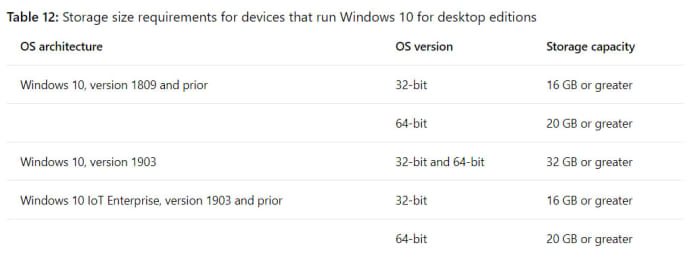
Microsoft has released an advisory note on the minimum hardware requirements for Windows 10, including past and upcoming updates to the OS. Unfortunately, there is bad news for anybody who has limited hard drive space on their PC. The minimum requirement for both the 32-bit and 64-bit versions of the upcoming Windows 10 update has doubled from 16 GB to a massive 32 GB of disk space.

If you add this to the recent news that Windows will be reserving 7 GB of disk space for future updates, you can see that Microsoft really is starting to put a strain on users’ hard drives.

This is how big Windows 10 updates are
Image via: Microsoft

This problem will likely affect users of older PCs, which have smaller hard drives, but modern devices will also likely be affected by the change. With new Solid-State Drives (SSDs) offering much higher read and write times than traditional hard drives, many PCs and laptops have been sold with smaller SSD drives working as the primary drive. These often start 128 GB, which means the changes to the Windows 10 updates will take up a fair chunk of the primary drives found on many modern machines, too.

Unfortunately, it looks like this change may just be the beginning of the trend, with update sizes likely to increase further going into the future. Windows specialist Paul Thurrott believes it won’t be long before the requirement doubles again. He said, depending on what you need your PC for, 256 GB could now be a more appropriate minimum primary hard drive size. Thurrott wrote, “… given the way storage is trending, I’m surprised it took so long to get to 32 GB. And I see a 64 GB minimum happening in the near future.”

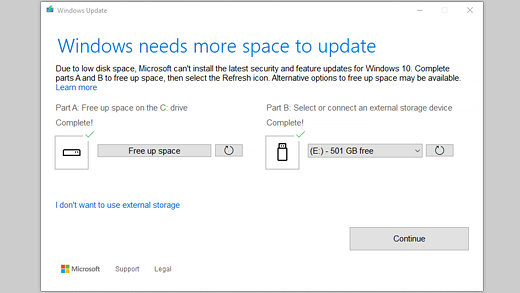
a screenshot of windows update
Image via: Microsoft Support

The increased minimum will mean that future devices will need to be built with an eye on increased capacity. This is positive news if you’re in the market for a new PC or think you will be soon. If, however, you’re not looking to buy a new computer but only have limited space available on your hard drive, it might be time to start thinking about an upgrade.

You can find a Microsoft guide on freeing up hard drive space to prepare for the Windows 10 update here.

This Chrome extension makes Gmail easier to use

Simplify has been designed by one of Gmail’s former lead designers and cuts down all the clutter.

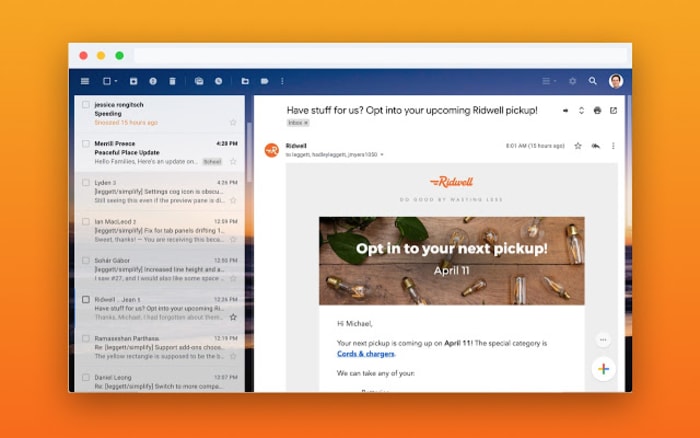
Simplify Chrome extension for Gmail

Gmail has a whopping 1.5 billion users worldwide, so Google has obviously done something right. If you ask any of those 1.5 billion users, however, we’re sure each of them would have their own little gripes as Gmail also has its fair share of problems. One of the major gripes would be that Gmail is too complicated.

There is good news though, for anybody out there who thinks Gmail has too much going on. If you only ever press a tiny fraction of the buttons you can see when you open Gmail, and don’t even know what half of the Gmail features are for, you might want to simplify Gmail, which you can now do thanks to a nifty little extension for Google Chrome.

Gmail Access now
8

Simplify has been designed by one of Gmail’s former lead designers and cuts down all the clutter

Between the years of 2005 and 2018, Michael Leggett was at the forefront of the tech world, working as a designer for both Facebook and Google. One of his major projects was working as a lead designer on Gmail. He’s since left the two titans of tech to work on a project that aims to reverse climate change, but he also has a pet project. In his spare time, Leggett has been working on an extension for Google Chrome that simplifies the Gmail interface on desktop.

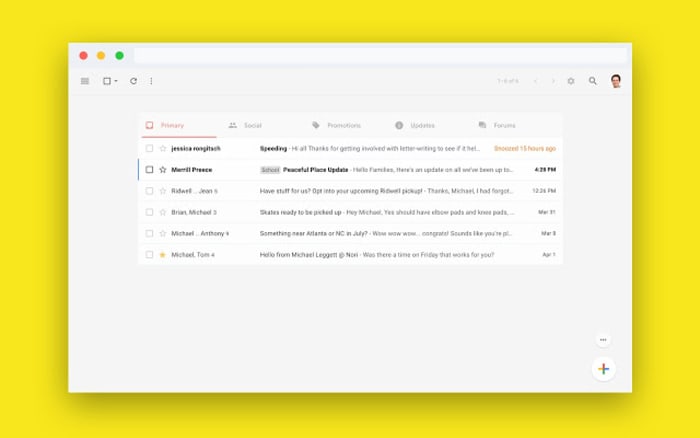
Rather imaginatively, Leggett has decided to call his extension Simplify, presumably because that is what it does. It takes the Gmail interface and makes it much simpler by moving around a few key features and making it easier to hide others that aren’t used much at all. The search bar has been moved up to the top-left of the screen, rather than going right across the top and all the sidebar options have been moved into drop-down and pull-up type menus. Another cool change is that Simplify moves the primary functions bar to the top of the screen rather the top of the inbox.

A screenshot of the new Simplify extension for Chrome
The sidebars can be removed altogether to offer a much cleaner interface

Another big deal about Simplify, considering it is an extension that works with your email inbox, is that doesn’t collect any data and won’t serve up ads. The Simplify page on the Chrome web store says, “Simplify is mostly some CSS plus a little Javascript to apply the CSS. There are no trackers. No data is sent or shared.” If you’re ever downloading anything that will have access to your online accounts, you need to make sure you’re not handing over too many permissions. That Simplify clearly states it won’t collect any of your data is reassuring.

A look at a simpler Gmail interface
Simplify states that it has no trackers and will not harvest any user data

All in all, Simplify is a solid extension for anybody who feels a little overwhelmed any time they open their Gmail inbox. If you miss the recently dropped Inbox, you should give it a try. You can add Simplify to your Chrome browser by clicking here.

WhatsApp Web: Will calls be added to the desktop version of WhatsApp?

WhatsApp is working on adding calls to WhatsApp Web.

WhatsApp logo

The Facebook Developer Conference kicks off today in San Jose. It is fair to say that Facebook has had a very bad year with scandal after scandal rocking the social media giant. The annual F8 conference then could be a good way for Facebook to divert eyes away from its shady past and towards its future.

In truth, however, this year’s Facebook Developer Conference doesn’t seem likely to include a headline-grabbing announcement that could distract the masses. There’ll likely be talks on AI, as well as privacy and encryption. There’ll also likely be news on an Oculus update and new takes on augmented reality, and we’ll likely see something about what Facebook is doing with blockchain. Nothing too exciting, though.

What we’re hoping for, however, is nothing to do with Facebook itself, but rather Facebook-owned WhatsApp. What we’d most like to hear at F8 this year is confirmation of some of the many WhatsApp updates we’ve seen added to the WhatsApp beta over the last weeks and months. These include a new dark mode, improved security features, stickers 2.0, and a vacation mode. On top of these, however, we’d love to hear about another feature we’ve only just learned has been added to the beta.

WhatsApp is working on adding calls to WhatsApp Web

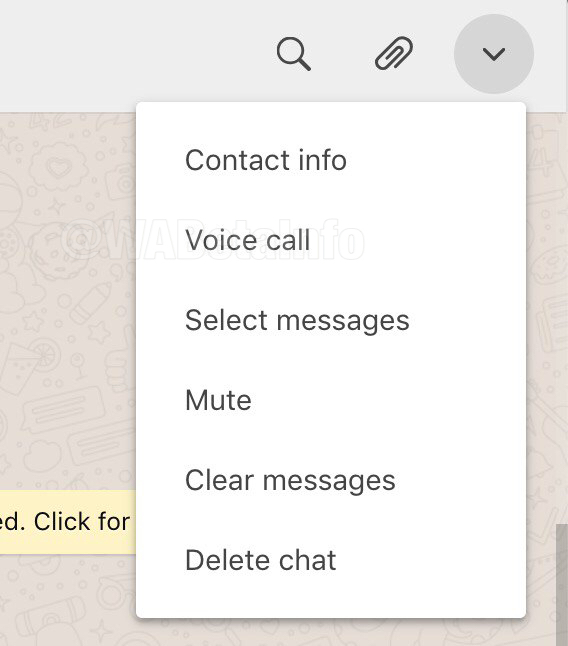
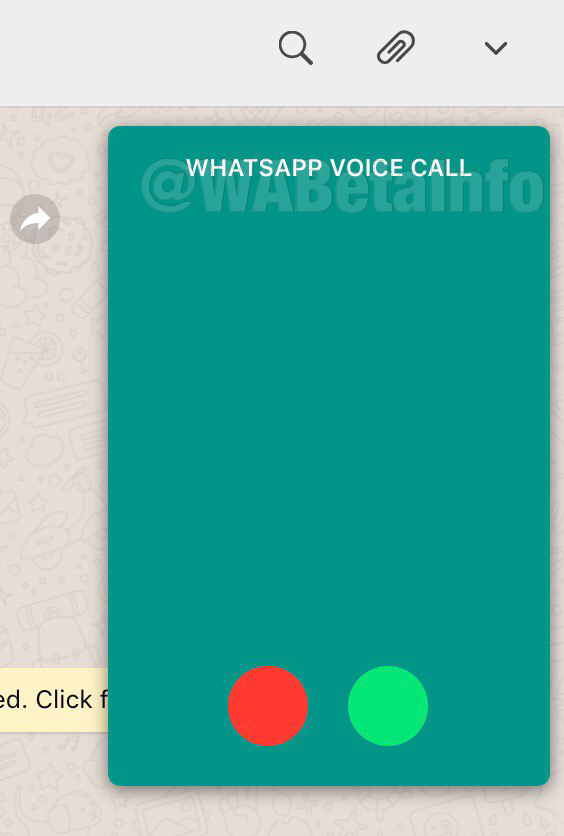
The new calls feature for WhatsApp Web is still in the very early stages of development, but a few screenshots of the feature in action have been leaked onto the internet thanks to WABetaInfo. These are only images of the voice call feature, however, as the video call feature for WhatsApp Web is still in the alpha development stage.

New voice call feature for WhatsApp Web
Image via: WABetaInfo

The calls feature on WhatsApp Web will be activated by clicking the settings menu icon found in the top-right of any chats screen. You’ll simply open the chat of the contact you want to call, click the icon in the top-right, and then hit voice call. It is a safe assumption that once it moves further along the development path the video call feature will also be found here.

WhatsApp voice calls on desktop

This feature is still a long way off from a general roll-out, however, as the screenshots show. Even the voice call feature is incomplete as WhatsApp still has work to do before it can release a full version to the beta community.

Even though the new calls feature is still a way off from completion, there is still a chance it might come up at the Facebook Developer Conference. Should we hear anything from the conference on calls or any of the other WhatsApp features we’ve reported on over the last few months, we’ll make sure you hear about it first.

Google bans developer with over half a billion app downloads from the Play Store

Almost 50 popular apps like ES File Explorer have been removed from the Play Store.

a banned stamp over Google Play Store logo

Google has moved to ban a massive app developer from the Google Play Store and is working to remove all apps connected to the developer from the Google Play Store. DO Global had more than 100 apps on Google’s store but most have already been removed and the internet giant is also looking to remove apps from any subsidiaries connected to the developer.

The reason behind the ban and the purge is ad fraud on a grand scale and abuse of user permissions. Apps connected to the developer had been clicking on ads without user consent in an attempt to drive up revenue. The news of individual apps being taken from the Play Store first broke earlier this month, but it is only in the last few days that Google has moved against all DO Global apps that have violated Google’s terms in this way.

Almost 50 popular apps like ES File Explorer have been removed from the Play Store

The Google Play Store is the biggest app store on the planet. Accordingly, security risks, malware-infested apps, and fake app scams are regular on the Play Store with Google constantly having to take action against malicious actors like hackers or cyber-criminals. The move to ban DO Global, however, and remove all of its apps from the Play Store is one of the biggest such moves yet.

DO Global header image

DO Global had over 100 apps on the Play Store and could lay claim to over 600 million downloads. This has now all changed with Google having removed 46 DO Global apps from its app store and actively looking at subsidiary developers that are linked to DO Global. ES File Explorer, for example, which has now gone from the Play Store was developed by ES Global, but listed on the website of Du Global, which is a subsidiary of DO Global. Another issue Google had with the apps that have been removed is that they made it difficult to see that DO Global was behind them, which also violates the Play Store policy.

Speaking to Buzzfeed News on the breach of trust by the developer behind generic sounding apps like “Selfie Camera” and “Photo Artist Studio” a Google spokesperson said, “We actively investigate malicious behavior, and when we find violations, we take action, including the removal of a developer’s ability to monetize their app with AdMob or publish on Play.” If Google is stopping you from placing ads on apps in the Play Store, then you know you’ve done something seriously wrong.

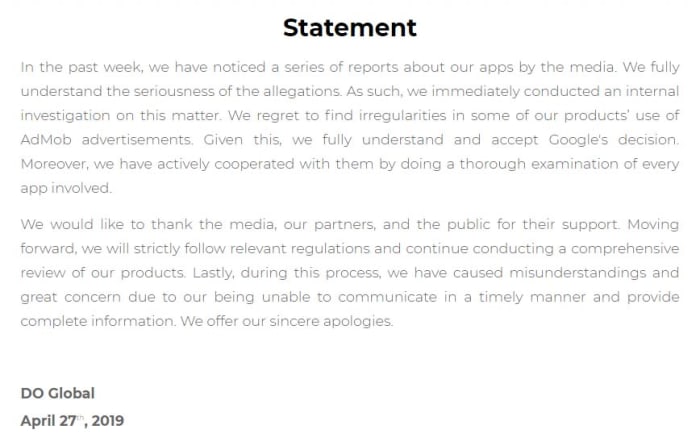
DO Global's statement on the matter

According to a report by XDA Developers though, there is a chance the apps could come back to the Play Store, if a few adjustments are made. It could be in this regard that DO Global has posted a statement on its website apologizing for the breach and saying that it supported Google’s decision. This means it might not be long before the apps in question find their way back onto the Play Store.

Massive personal information database discovered online

A database including sensitive information about millions of Americans has been discovered online.

Two security researchers at the VPN testing site vpnMentor have stumbled across a massive open database filled with sensitive information belonging to millions of Americans. The database is hosted by a Microsoft cloud server and contains extremely detailed information. As yet, they’ve been unable to figure out who the database belongs to or what its purpose is and they’re reaching out to users to help them get to the bottom of it.

A database including sensitive information about millions of Americans has been discovered online

A computer with a warning sign

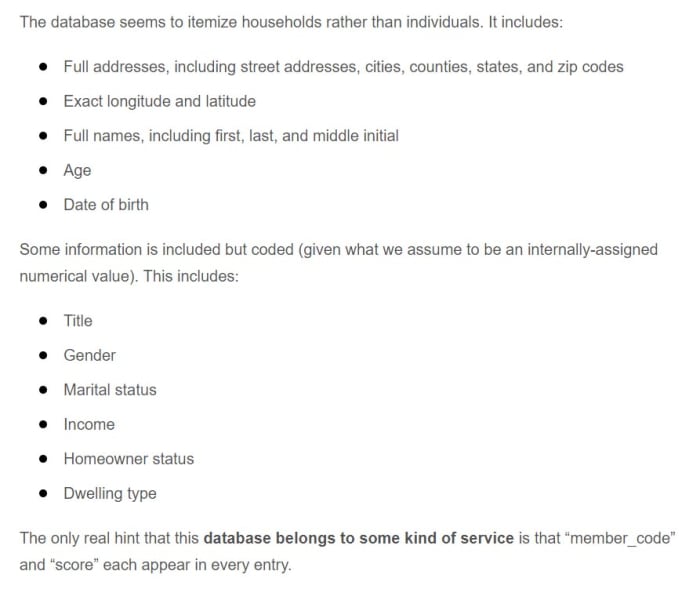
Noam Rotem and Ran Locar found the database while carrying out research for vpnMentor. The massive file, containing a staggering 24 GB of data, has a wide range of sensitive information including addresses, GPS coordinates, full names, age, and date of birth. Other coded information includes title, gender, marital status, income homeowner status, and type of dwelling.

The database focuses on households rather than individuals but, incredibly, it holds information on 80 million American households, which is upwards of 65% of all households in the US.

included information in the online database
Image via: vpnMentor

The research duo has been unable to determine who the database belongs to, although they were able to highlight a few clues. The addition of a member ID could mean that the database belongs to an organization or company offering a service, and the income category is something you’d expect to see from an insurance provider, or a healthcare or mortgage company. In a bid to decipher the mystery, the pair have reached out to all readers with a riddle. The answer to the riddle could well be who the database belongs to.

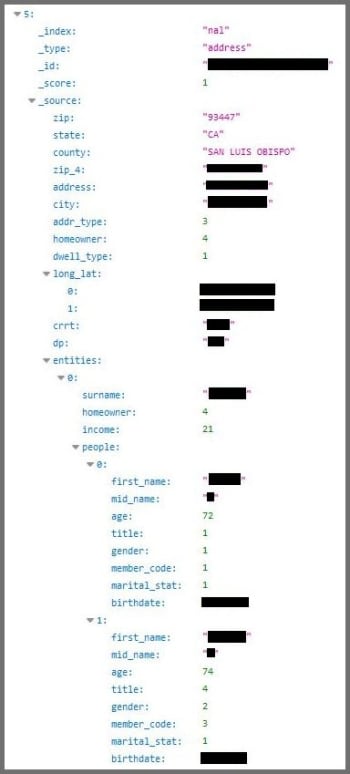
A screenshot of the massive data breach
A screenshot of the database via: vpnMentor

“What service is used by 80 million homes across the U.S. – but only the U.S. – and only by people over 40? What service would collect your homeowner status and dwelling type but not your social security number? And what service records that you’re married but not how many children you have?”

Fortunately, the massive database doesn’t contain any truly dangerous information like social security numbers or credit card information, but it would still be seen as a treasure trove for cyber-criminals and identity thieves. It could make it easier for hackers to guess your email address and bombard you with phishing scams.

Another scary possibility is related to the recent outbreak of widespread ransomware attacks. If the attackers had access to your income details, they’d know how much you could afford to pay in a ransom demand if they encrypted your personal data.

Other risks posed by the database include the potential for thieves learning your whereabouts via social media and cross-checking that with your address via the database. They could use this information to figure out when your home is empty and make plans to break into your house. The fact that that the database includes age brackets could also allow potential attackers to target aging households where the occupants might be more vulnerable.

These threats all go beyond the obvious, which is that much of the information listed in the database marks common answers to online account security questions. The only things missing are the names of first pets and mothers’ maiden names.

If you want to take action to try and help close this massive data breach, you should try to solve the riddle above. If you can come up with an answer, contact Rotem and Locar here.