Updated Safari now displays PDFs

Safari for Mac and Windows has been updated to version 5.1.2 with stability and security fixes and now allows you to view PDF documents within web pages.

From now on, in you want to view a PDF document in Safari you can just click on it and it will open within your browser window.

Also, if you’ve been experiencing hang-ups and excessive memory usage with Safari, this latest update makes it considerably more lightweight and stable.

Download Safari for Mac and Windows.

6 iPhone and iPad toys that will amaze you

Looking for high tech gift ideas this Holiday Season? There are some really cool iOS toys out now that will impress anyone with an iPhone or an iPad.

Here are my top six iOS gift ideas for the holidays. All of them consist of an app, plus a toy or gadget that interacts with the application in some way. They all serve to highlight how far augmented reality applications have come in the last year.

Disney AppMates

Fans of the Cars movies will love these innovative iPad toys from Disney. Put the toy cars on your tablet and move them around and you’ll interact with the virtual world that appears in the app. The Cars characters are the first in Disney’s new line of AppMates, which could revolutionize the way we play games on our devices. Price: toys from $12.99, app free

[youtube]http://www.youtube.com/watch?v=VaNzbCtxtcY[/youtube]
Continue reading “6 iPhone and iPad toys that will amaze you”

Try 3D puzzle game English Country Tune

Indie developer Increpare is extremely prolific, and has made some of the most unusual games around. His latest project is the highly polished 3D puzzle game English Country Tune.

It’s typically abstract, but really playable. You control a square that flips around 3D puzzles, moving objects to complete them. Check out this trailer for a better idea of how it works!

English Country Tune looks cool, and is really atmospheric. I’ve enjoyed playing it, but be warned – it’s hard! While there is help and concepts are introduced gently, English Country Tune quickly gets tough and will really make you think. You might find that refreshing, as games tend to be easy these days, but you equally might find it frustrating!

Luckily there’s a demo for PC and Mac so you can find out for yourself if you’re mentally tough enough! English Country Tune is available for PC, Mac and iOS. Check it out and tell us what you think! You can read my full review here.

Win 10 free copies of McAfee Total Protection

If you’ve read Jon’s review of McAfee Total Protection, you’ll know that it’s an all-in-one anti-virus suite that’s packed with tools and scan options. This makes it a really flexible piece of weaponry to have in your malware armor. To get the weekend off on the right foot, we’ve get 10 fabulous free licenses for McAfee Total Protection to give away.

How to win a free license

It’s the weekend. You’re probably tired after a long week, or you’ve eaten so much turkey and pumpkin pie that you simply can’t get off the sofa. We’re not going to make this difficult for you. In order to win one of our free McAfee licences, simply tell us:

How many computers can you install McAfee Total Protection on?

You can find the answer here. Just send the correct answer to ask@onsoftware.com, and Softonic will contact you to give you your free license. Good luck!

How to: Force Android to automatically install apps to SD card

Wondering why your HTC Android phone keeps running out of memory? One of the answers could be that it’s crammed full of apps. By default the Android Market stores all of your apps on your device’s internal memory, rather than your larger SD card.

Don’t worry though because with a bit of patience and the help of the Android SDK it can be done. Start by downloading the following tools:

What you need to perform the ‘hack’

Now, on your phone, go to Settings > Applications > Development and activate USB Debugging.

1. Install the SDK and Platform-tools

To start, install the Java JDK, then the Android SDK. After having installed the SDKs, open the Android SDK Manager and check the Android SDK Platform-tools package. Then hit the Install button.

This package of tools contains the Android Debug Bridge (ADB), a utility that allows you to communicate with an Android device via command line. This is what you need to be able to tell Android to automatically install apps to a memory card.

2. Connect your phone to your computer

Now connect your Android phone to your PC using the USB cable in HTC Sync mode. If the HTC Sync program opens automatically in Windows, shut it down from the Task Bar (Right-click on the icon and click ‘Close’).

Bear in mind that not all USB cables are valid with all devices. In some cases, they won’t connect your phone to your device. Have more than one to hand just in case.

3. Open a command console and carry out checks

Go to Start > Run in Windows, or hit Windows+R and type cmd. In the command console that appears, switch to the directory ‘Program files (x86)’ or ‘Program Files’ and enter the path: Android/Android-SDK/Platform-tools. Once you’re here:

  • Type adb devices to see if your device is connected and recognized
  • You should see your device with its serial number listed
  • If it doesn’t show up or appears as offline, try with a different USB cable
  • Type netstat and check if port 5037 is in use
  • It’s this port that uses the ADB. If it’s in use, kill the process which is using it

Before continuing, it’s recommended that you deactivate any firewalls or antivirus on your system, because this can interfere with the ADB connection process.

4. Run the command to force apps to install on SD card

Android has a parameter that describes how to install applications on the mobile by default. This parameter is called setInstallLocation, and accepts three values:

  • 0 [auto]: Lets the phone decide the best location for an app
  • 1 [internal]: Installs everything on the internal memory
  • 2 [external]: Installs everything on the memory card

As you might have guessed, you now need to change the value from 0 to 2 in setInstallLocation. To do this, run the following command:

  • adb shell pm setInstallLocation 2

If no error message appears, disconnect the phone, turn it off and reboot it. From now, all applications will install automatically on the SD card. If you want to revert back to the previous way, repeat the process, changing the 2 for a 0.

A word of warning

Certain applications, such as widgets, don’t run well from the memory card. If you experience problems you should move these apps from the SD card to the phone.

Have you been having problems with space on your Android device? What method do you use to free up space?

[Via Softonic Spain]

Is Voxer the next WhatsApp?

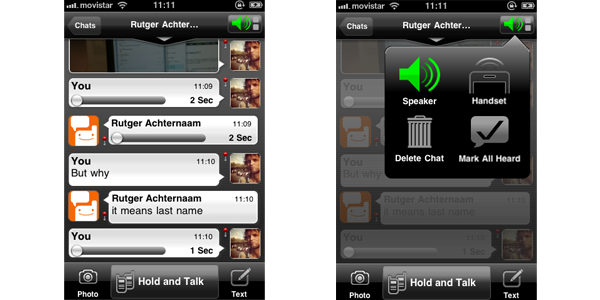
Free messaging apps for smartphones are nothing new, but Android and iPhone app Voxer brings something new to the table. It’s a free ‘walkie-talkie‘ service, that uses 3G or WiFi. You can text, send photos and best of all send voice messages.

Voxer is free on both iOS and Android; you just download it and sign up. You can also connect to Facebook, which I did without getting any resulting spamming of my friends. Contacts already using Voxer will automatically appear in your Voxer friends lists, and you can send messages to any Facebook friends and phone contacts inviting them to get the app.

Getting people involved is always the tricky part with these things, but once you do, using Voxer is simple, and the Walkie-talkie element is great fun. Open a chat, touch the ‘Hold and Talk‘ button then speak. Once you let go, your voice message is sent. Whoever you’re chatting to can also listen to you live whenever you have the walkie-talkie button pressed.

Sending short voice messages is quicker than writing a text, although less discrete, and I find Voxer is much easier to use than my phone’s voicemail. According to Techcrunch, Voxer has been getting really popular in Brazil, and it starting to gain traction in other markets too. I think it’s got great potential to steal lots of users away from WhatsApp too. Why not download it and see what all the fuss is about?

The Powder Toy: an awesome sand game

Despite the strange name, The Powder Toy is an awesome falling sand game that manages to be entertaining and, dare we say it, pretty educational.

A Powder Toy creation

So what’s it about?

The Powder Toy is an experimental falling sand game for PC and Mac. That’s great if you know what an experimental falling sand game is, but not so cool if, like the rest of us, you have no idea.Think of it this way: The Powder Toy is a blank mini-world where you create your own fun by combining elements – from the organic (wood, goo, water, soil) to the electronic (conductors, electrodes, wires, transmitters) and the chemical (radioactivity, anti-matter, photons, uranium) to tools (air, water, heat, gravity).

These elements act like they would in real life, so, for instance, if you mix an explosive and a heat source, you’ll get a very convincing explosion. Likewise, if you hook an energy source up to a conductor and build a generator, you’ll be able to power it. It may sound like a cliche, but with The Powder Toy, the only limit is your imagination.
Continue reading “The Powder Toy: an awesome sand game”

Google announces shutdown dates for apps

Google has announced definitive dates for the closure of several web apps including Wave, Gears and Knol.

Google says the apps ‘haven’t had the impact we’d hoped for’ and although it had already announced closure of them, specific dates have now been set as follows:

  • Google Wave: As of January 31st, 2012 will be read-only. April 30 will be shutdown completely.
  • Google Gears: On December 1st, 2011 Gears will stop working. Later in the month it will be no longer be available to download.
  • Google Knol: Google’s answer to Wikipedia will work up until April 30 2012. From May 1st to October 1st 2012 Knols will no longer be viewable although they can be downloaded. After October 1st it will no longer be available. An open source project called Annotum is being developed to host the content.
  • Google Bookmarks List: Will end of December 19th, 2011. Bookmarks within lists will be retained and labelled for easier identification.
  • Google Friend Connect: Will be retired for all non-Blogger sites on March 1st, 2012. Users are encouraged to create a Google+ page instead.

In addition, Google Search Timeline and Renewable Energy Cheaper than Coal will end although no specific date has been issued for either.

Most of these apps have been made redundant by the arrival of Google+ but it’s also an acknowledgement by Google that sometimes things don’t work out as well as they hoped.

5 fun new ways to watch YouTube

There are more ways to browse and watch YouTube videos than you might expect!

YouTube is working hard to offer people fun new ways to enjoy its huge selection of videos. The site now includes a range of different features designed to help you discover great videos, and watch and interact with them in new and interesting ways.

Check out YouTube’s TestTube section, which the site describes as its “ideas incubator”. Here’s where the site tries out all its weird and wonderful new features, and there are some real gems in here. Here are my favorite YouTube secrets that you just have to try!

Cosmic Panda

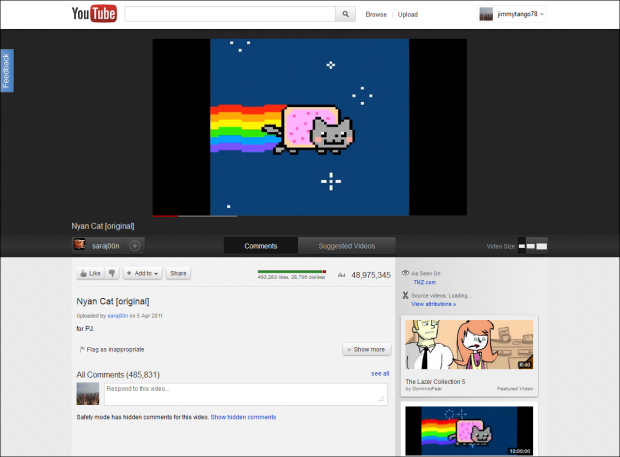
Also billed as the ‘Channels and Watch Experiment’, Cosmic Panda is a completely redesigned version of YouTube. It aims to make it easier to find, watch and highlight new or interesting content.


Continue reading “5 fun new ways to watch YouTube”

View Ski resorts and slopes on Google Maps

With winter fast approaching, Google Street View has started to add snow covered Ski resorts to the locations you can visit in Google Maps. All the current locations are from resorts in the US and Canada, and allow you to explore some famous ski slopes without fear of breaking anything.

What is missing from these Street View ski resorts is some direction – movement doesn’t look quite as slick as in urban settings, because it’s not easy to see which direction you should be going! Nevertheless, there are some great images here, and it means you can get a good idea of what to expect if you take a holiday there. Here’s hoping Google adds some more worldwide resorts, too.

You can view everything from the Google Street View ski resorts gallery, as well as a collection of some of the more unusual places they have photoed.