Facebook Graph Searches now include status updates and comments

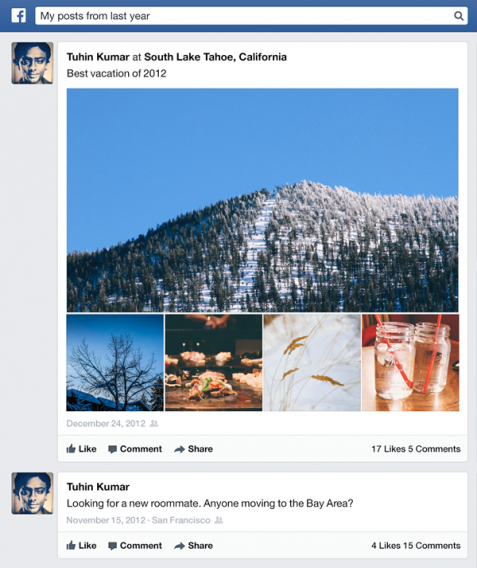
Facebook’s semantic search is getting a little smarter today. Graph Search will now include status updates and comments, making it easy to find that post from years ago. Previously, Graph Search could only look up information from listed personal details, likes, and photos.

Privacy, of course, is something Facebook is very concerned about with Graph Search so only thing that are publicly posted or shared directly with you will be searchable in Graph Search.

FB graph search posts

As with other Facebook products in the past, the updated Graph Search will be rolling out slowly to Facebook users so it could be quite a while before you see the update. Facebook doesn’t provide a specific timeline for a complete roll out.


RELATED STORIES


[Source: Facebook]

Windows 8.1 uses SkyDrive to search text in photos

Search in Windows 8.1 is about to get a bit smarter with the power of SkyDrive. Microsoft is rolling out optical character recognition (OCR) to SkyDrive users, allowing Windows and Windows Phone users to search for text within a photo. This makes finding your photos much easier.

OCR for cloud storage is nothing new and is something that Google already does with Drive. Still, integrating SkyDrive into Windows universal search makes user content more accessible, requiring only one search to find results from many sources. Windows 8.1 will be able to leverage OCR to extract text from photos, reducing the space a whole photo takes up.

In addition to rolling out OCR to SkyDrive, Microsoft has detailed that its “smart files” in Windows 8.1 uses 80% less space than requiring users to keep everything locally. SkyDrive allows users to select which files to store locally and those that are stored online only will have its thumbnails and file information stored offline for quick access.


RELATED STORIES


For more information about smart files and SkyDrive, check out the source link below.

[Source: Inside SkyDrive Blog]

Samsung’s ChatON messaging app reaches 100 million users

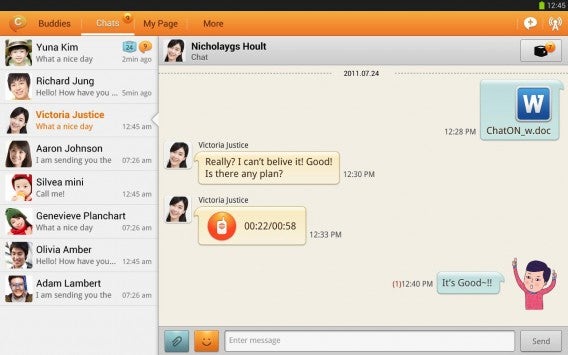
ChatON, Samsung’s own multi-platform messaging app has reached 100 million users. The company has doubled its user base in four months. While this sounds impressive, keep in mind ChatON has been around since 2011 and that ChatON comes installed on most of the company’s Galaxy line of devices. The sheer number of handsets the company has sold does wonder to bolster its user base.

ChatON, like many other messaging apps, supports a myriad of platforms including Android, iOS, Blackberry, Windows Phone, and Windows. Users are required to create a Samsung account to use the service. As Samsung works to create a tightly integrated software ecosystem, ChatON will surely be a selling point for its integrated services.

chaton tablet

Samsung cites steady growth in India, China, and the US while gaining more steam in Europe and the Middle East. The company also points to ChatON’s 63 different languages as an the reason why it’s doing so well overseas.

While ChatON is gaining momentum, it faces tough competition from messaging app giants like WhatsApp, LINE, and Facebook Messenger.


RELATED STORIES


[Source: Samsung]

Torrex Lite: The Torrent Downloader for Windows RT & Windows 8

With Windows RT, classic torrent downloaders like uTorrent won’t work. However, with Torrex Lite there is another powerful torrent downloader.

We’ll show you how to set up the software correctly.

1. Download and install Torrex Lite

2. Set Torrex Lite as the Default program for .torrent files

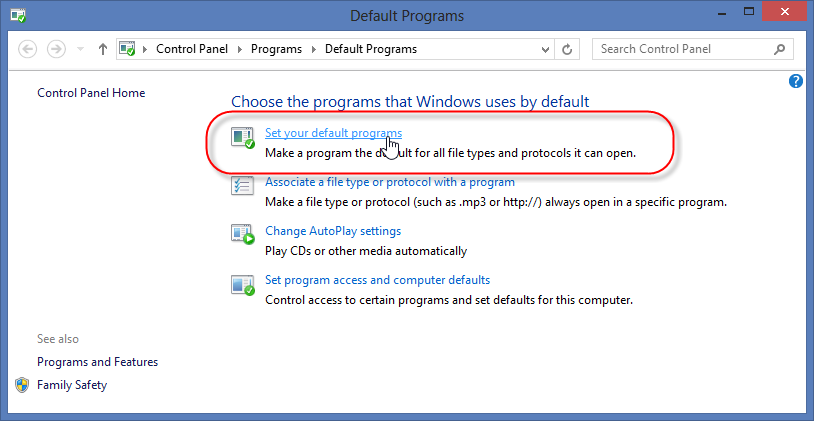
Search on the Start menu for “default programs” and click on the search result.

This will open the Default Programs window. Click “Set your default programs“.

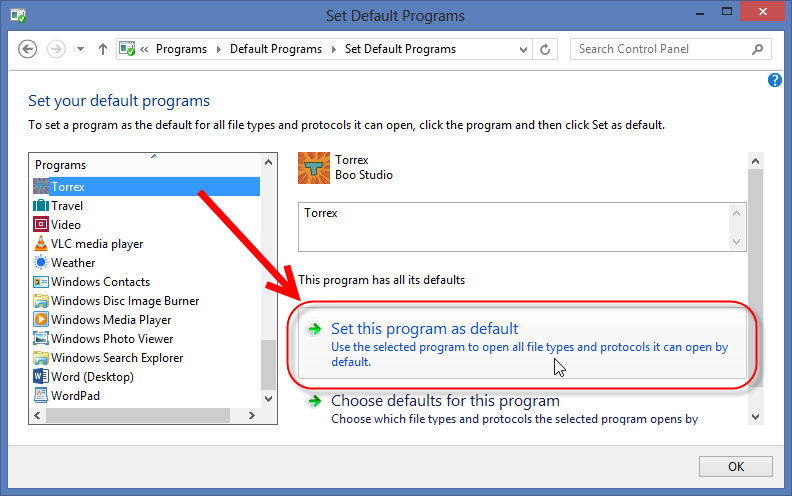
Windows displays a list of installed programs. Select Torrex on the left and then click on the button “Set this program as default“.

3. Download a torrent file and Torrex will start automatically

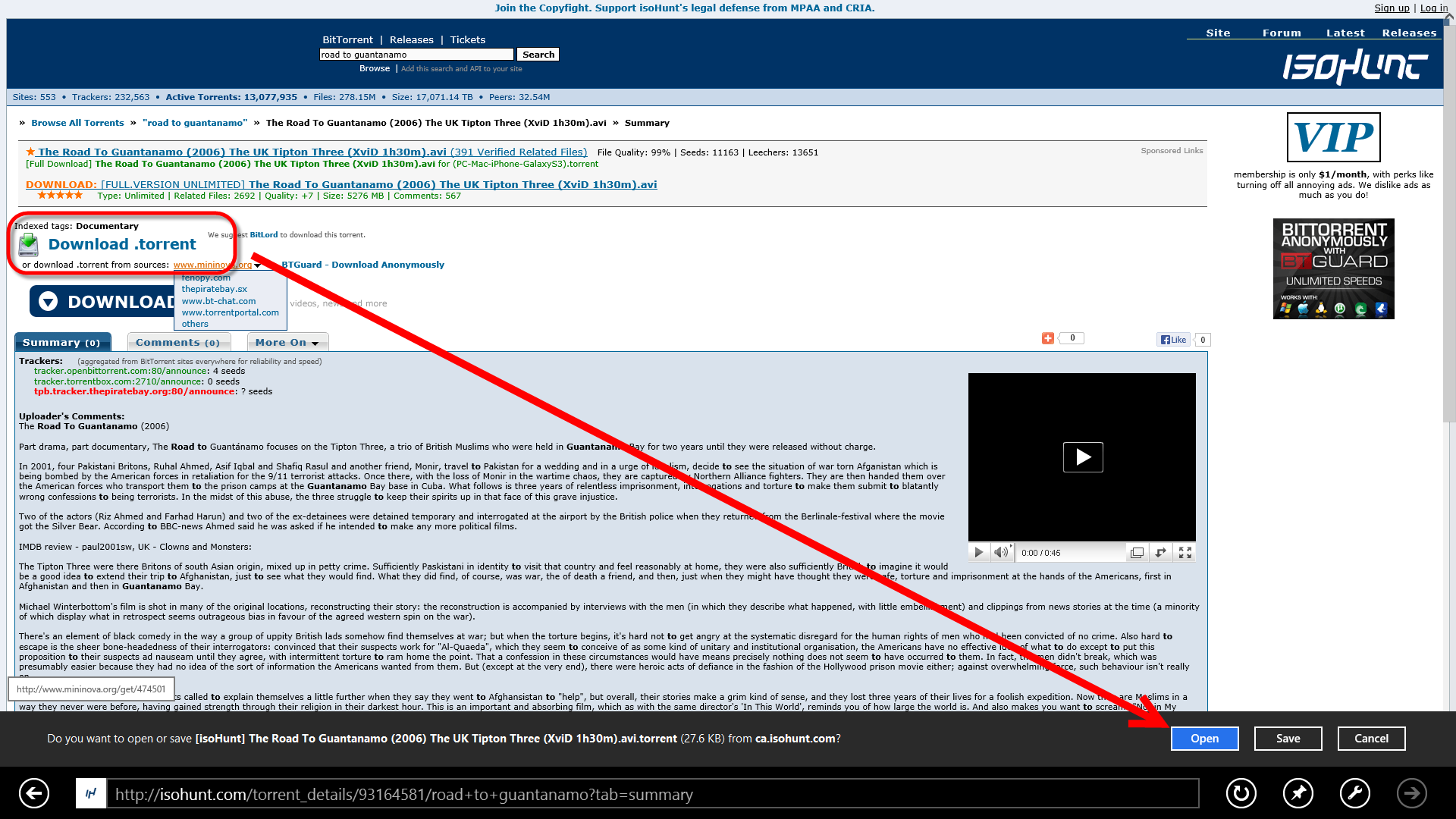
In Internet Explorer, you can now download a Torrent file and start the download automatically with Torrex. In Internet Explorer, click on the appropriate link below and then on “Open“.

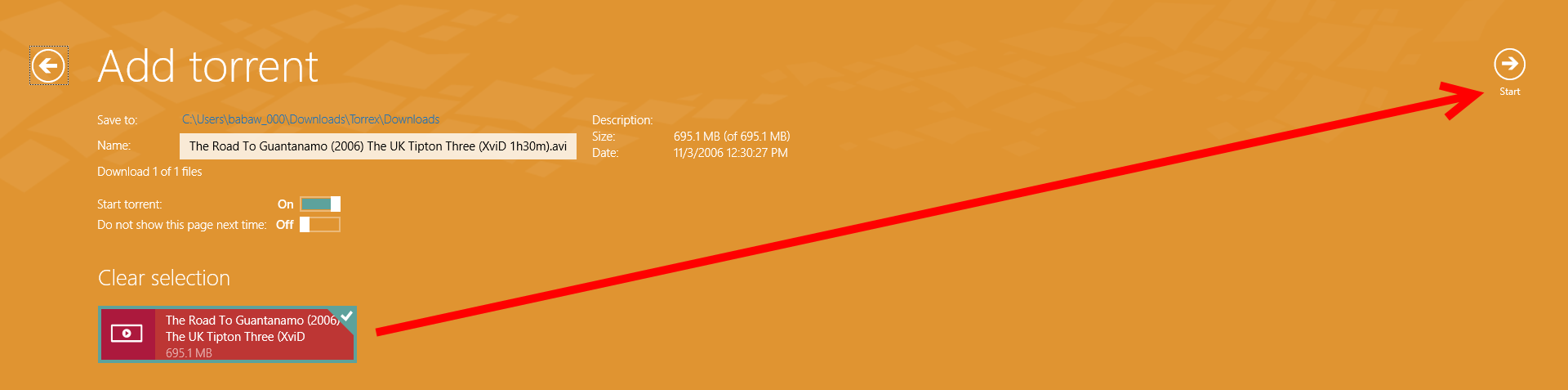
It automatically opens Torrex with the desired torrent file. A prompt on Start ensures the download loads correctly.

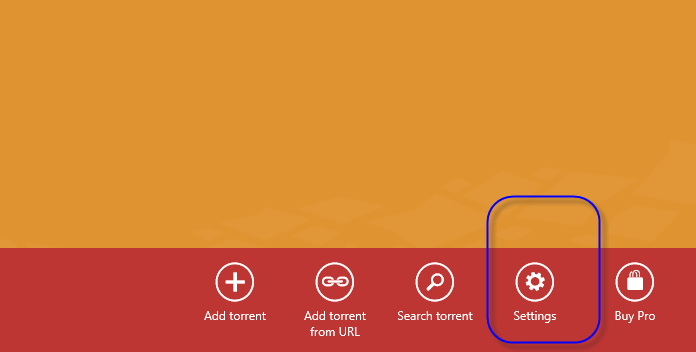
At the bottom of the screen, you’ll see a bar with more options.

Here you can set the speed limits for uploading and downloading and the maximum number of simultaneous connections for uTorrent and other torrent downloaders.

Read more about Windows 8 with our Windows 8: Essential Guide

Infographic: iOS 7’s impressive growth

According to Apple, iOS 7 has had the fastest adoption rates of any operating system. We looked at our users and found that its growth has indeed been impressive, reaching almost 40% of all iOS visitors in less than two weeks. Check out the infographic below.

We combined the figures for the minor versions of each iOS. The older ones, iOS 3 and 5 are pretty stable, probably running on devices incompatible with newer versions. But the drop in iOS 6 users mirrors the massive jump seen with iOS 7. That suggests that people were not scared off by the new look and new functions at all.

Have you installed iOS 7 yet?

Read more about iOS 7:

Microsoft publishes data on law enforcement requests

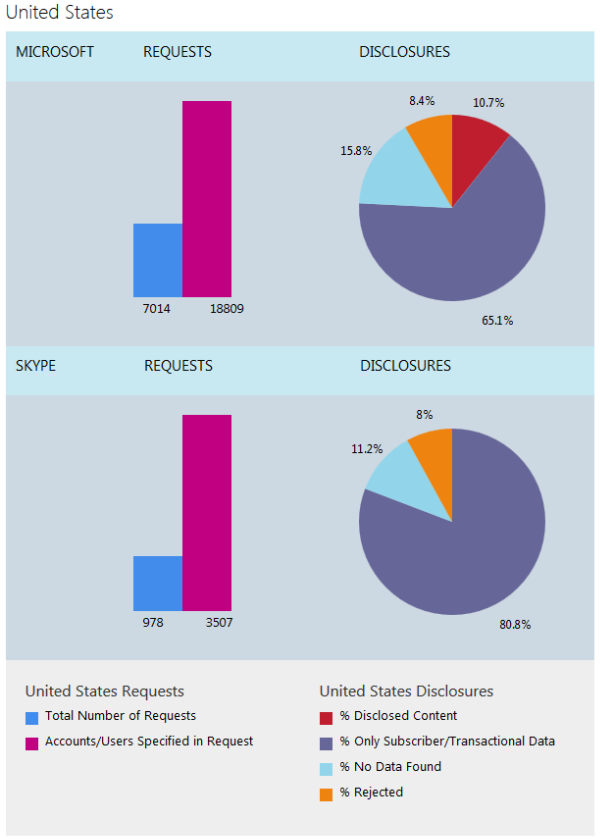
Microsoft has released its second Law Enforcement Requests Report, showing all the requests the company received from Law Enforcement Agencies around the world. It follows a similar report published by Facebook in August.

You can download the complete report, and it’s pretty detailed. One interesting point made is that it does not include data for national security orders in the US, like FISA. You therefore can’t see how many requests are made by the notorious NSA. Companies are are legally prohibited from releasing this data, but it’s interesting that Microsoft mentions the fact, unlike Facebook’s Global Government Requests Report.

The report splits requests made to Microsoft and Skype. Of all the requests made to Skype, non resulted in disclosure of content, but data like usernames, billing addresses and IP history were included. Overall less than 0.01% of accounts are ever affected by legal requests for data, but the majority of those come from the United States, Turkey, Germany, the United Kingdom, and France.

Download the full PDF report.

Read more about the NSA, PRISM and data

[Source: Microsoft]

    Watch the new Windows 8.1 video

    On October 18th, Windows 8 users will be able to update to Windows 8.1. It’s a major update with lots of improvements addressing some of the criticisms the radical operating system has received since it’s release last year.

    A new ad showcases the new features, like the returning Start Button and greater personalization options. Various apps are getting a facelift, including the Windows Store and Xbox Music, and there are new apps like Bing Food & Drink and Health & Fitness.

    Default player


    brightcove.createExperiences();

    The much talked about return of the Start Button is not what you might think. The new Start Button gives you an easy way to switch between the classic and Modern UI desktops, but it doesn’t bring up the extensive menu Windows users are used to. One of the most popular changes in Windows 8.1 could be the option to start the system in classic desktop, instead of the tiled Modern UI.

    Read more about Windows 8.1

    [Source: Microsoft]

    Ads are coming to Gmail on Android

    The latest update for Gmail on Android has evidence that ads are coming to the app. There are already ads on the web version, so it’s not a huge surprise that Google would integrate them with its mobile apps too.

    Android Police took a look under the hood of the Gmail 4.6 APK file, and found a library called ‘ads’. It looks like you’ll be able to save any ads you like, which will then become part of your normal inbox. We don’t know when Google plans to roll out ads for Gmail on Android, as they are not active yet.

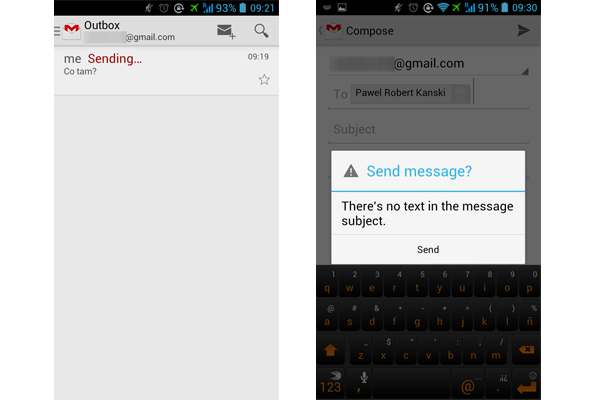
    The latest update also removes the Cancel button from the Send Message card, and adds a warning to your Sent folder when there are unsent messages stuck in your Outbox.

    The concern with bringing ads into a service is always how intrusive they might be. When users get used to an ad-free environment, it can be unsettling when they are introduced. Often the fear of ads is much worse than the experience, so Google will have to tread carefully to roll out the service without incurring the wrath of the internet.

    Read more about Gmail:

    Download Gmail for Android

    [Source: Android Police]

    The best alternative keyboards for Android

    What’s the best alternative keyboard for Android? You have no idea what we’re talking about, do you? Well, some applications allow you to boost your keyboard and use it in ways that many would call a bit…unconventional.

    With Android 4.2, swiping your finger to type is already a reality. Following on from this, for application developers, the competition was even fiercer in the search for new functions.

    The truth is that asking which application is better is like asking who you like more: your mother or your father? A question which is, in most cases, complicated. There are people who like to slide their fingers to type, people who likes keyboards that predict their words or even those who miss the 9-key keyboards! 😉

    In the end, the important thing is to find an application that suits your needs. So we created this article! Check out:

    Perfect Keyboard

    This application is nothing special, but it has two important strengths: it is fully customizable and offers a T9 keyboard, one of the alphanumeric keyboards.
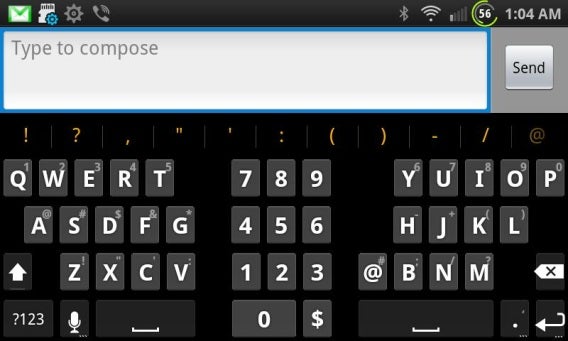
    It may seem hard to believe, but there are many people who just can’t get used to the QWERTY keyboards. If you’re on this list, Perfect Keyboard is the ideal solution:

    Best bits

    • T9 keyboard
    • Customization capability (themes, wallpapers, etc.)

    Worst bits

    • Predictive text
    • Doesn’t have “swype” – typing by sliding your finger across the screen

    Download Perfect Keyboard

    GO Keyboard

    GO Keyboard is one of the most downloaded keyboards for Android on Softonic. Part of its success is down to the fact that the app offers a solid keyboard and it works very well. Also, it allows you to write letter by letter or slide your fingers, “drawing” words.
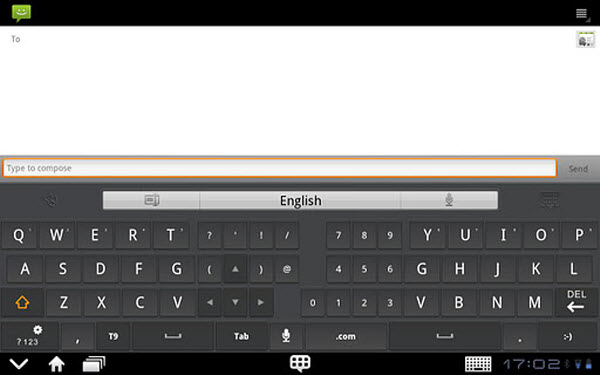
    Best bits

    • Practical and solid keyboard
    • Two types of typing

    Worst bits

    • Memorable predictive text!
    • The language packs and themes are in different apps

    Download GO Keyboard

    Touchpal Keyboard

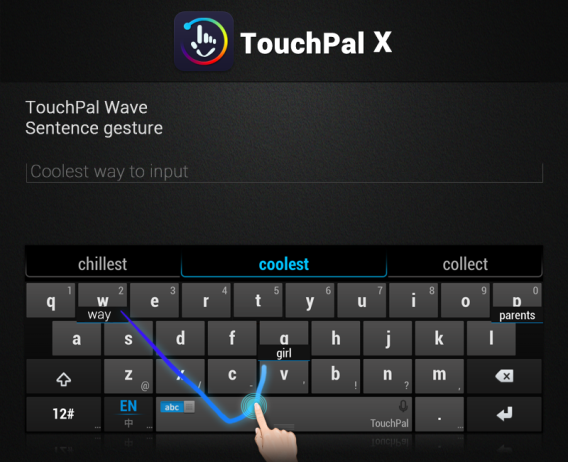
    There’s no doubt that the great strength of this app lies in the speed with which you can type. TouchPal Keyboard combines letter by letter typing with “swype”. This, combined with a good auto-suggest, works very well, and makes the app one of the best on the market.

    It’s totally free, it allows you to add extensions and the voice recognition is very efficient. The phone display is also really well organized, which is a plus.
    Best bits

    • The speed you can achieve whilst typing
    • Distribution of screen elements

    Worst bits

    • The language packs are installed separately

    Download Touchpal Keyboard

    Swype

    As its name suggests, Swype is the king of “swype” – typing by swiping the letters. There’s no other application that uses this method so effectively. Furthermore, the auto suggest works really well and the spelling of words is excellent.

    Best bits

    • The best “swype” on the market
    • Incredible speed

    O pior

    • The language packages could be better

    Download Swype

    SwiftKey

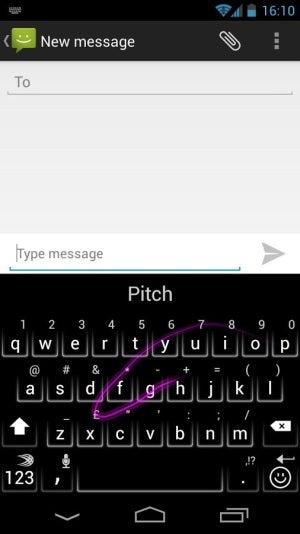
    If Martians landed on earth today and asked 10 Earthlings which is the best keyboard for Android, SwiftKey would certainly be one of the most talked about.

    The auto suggest works like a charm – sometimes, it seems like the keyboard reads your mind! Even when you type a T and a P, SwiftKey somehow knows you wanted to type Anthropology!
    Best bits

    • The auto suggest is amazing
    • Lots of configuration options

    Worst bits

    • “Swype” could be better

    Download Swiftkey

    Snapkeys SI: a trickier option

    If you try to use Snapkeys Si you’ll probably not even be able to write the word “home”… because this application is strange, unlike any keyboard you’ve ever come across!

    It only has four blocks of letters on the screen, it doesn’t display the entire alphabet, but with a lot of patience and various combinations of movements, you can reach absurd speeds. It is by far the cleanest keyboard out there.

    Don’t forget though, it requires a lot, really, A LOT, of patience!
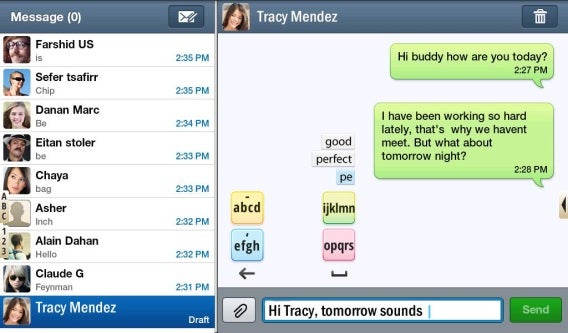
    Download Snapkeys SI

    Do you use an alternative keyboard on Android? Which one? Tell us in the comments!

    Original article by Felipe Pessoa, published on Softonic BR.
    How to remove ads in uTorrent

    uTorrent is one of the most popular P2P clients. It uses few computer resources, it’s fast and it has everything a good torrent program should have. But since uTorrent is a free app, it also means that it also comes with some unwanted additions, like annoying ads!

    When BitTorrent Inc. announced its plan to make uTorrent supported by ads, users wanted control over this option and luckily, uTorrent has made it really easy to turn off ads.

    Here’s our mini-guide to help you turn off ads in uTorrent:

    1. Open the Advanced Settings

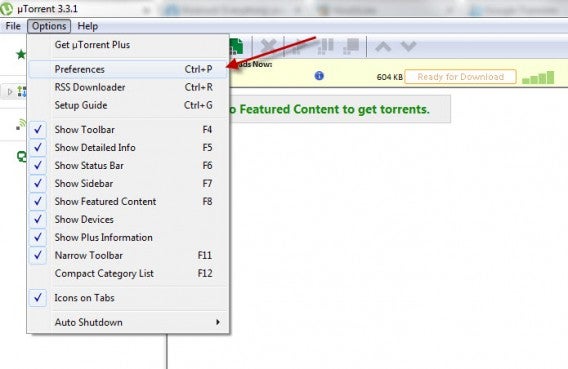
    To do this, select Options > Preferences. Then select Advanced.

    2. Filter the Advanced options

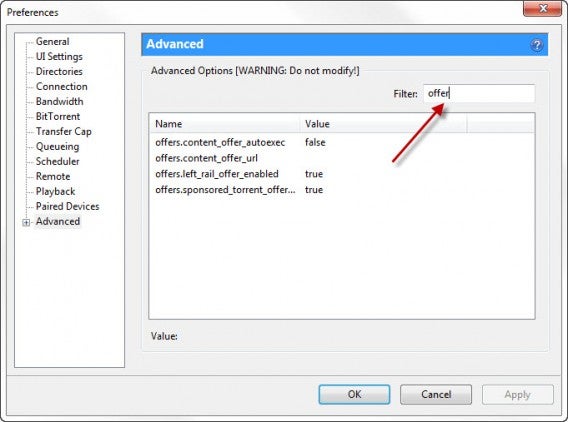
    In the Filter box, type offer.

    3. Change the value

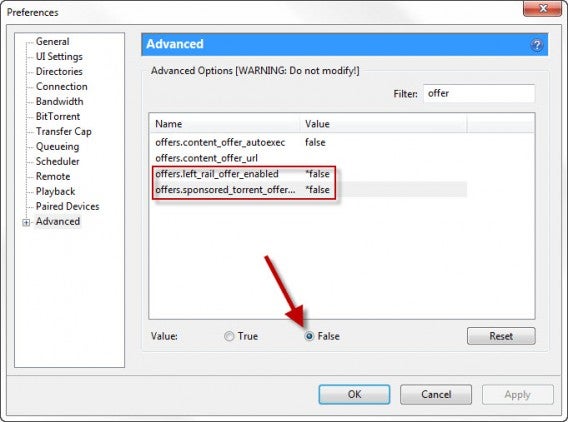
    Click on the left_rail_offer_enabled option and click False below, if it’s not already set. Repeat this action for any name / value pair you wish to set.

    And that’s it! You should be rid of ads on uTorrent!

    Download:

    Original article written by Radek Grabarek for Softonic PL.