Give Windows Mobile a makeover

Winterface has long been one of the best ways to pimp your Windows Mobile, ridding it of that weedy frame it sits upon. Good news for fans of this app – there’s a new version out that adds even more customization possibilities. Winterface 2.0 includes a number of neat enhancements that bring the style and usability of other mobile operating systems to Windows Mobile. For instance, you can now swipe through menu pages like you can with Android, and there are clickable, iPhone-style dots beneath each page. There’s even an iPhone-esque feature whereby if you tap and hold the screens the icons wobble around and you can move, rename, enable or disable them.

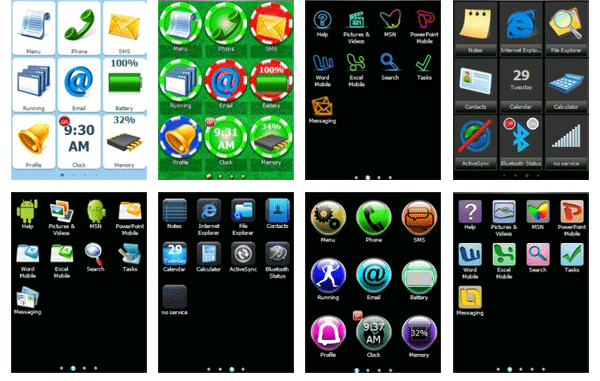
Perhaps the juiciest editions though are the new skins, and there are some truly gorgeous new faces as you can see from the screenshots below. There is now also the option to download new skins from Winterface. The great thing about Winterface is that it also lets you tweak backgrounds within these skins and customize the headings for yourself. This app has got to be the best way to make Windows Mobile look and feel like a modern mobile operating system. And heaven knows it needs it.

Selection of cool skins for Windows Mobile

How to recover a damaged Acer with no CD/DVD drive

Acer logoYesterday I made an appeal to OnSoftware readers and you came through in flying colors. The appeal was to help fix my Acer Aspire laptop which, after an over zealous cleaning session with CCleaner, refused to boot.

Even safe mode wouldn’t work and to make matters worse, my CD/DVD drive is damaged meaning I couldn’t boot from a Windows disc. Fortunately, one of you pointed out that most Acers usually have a “hidden” recovery utility known as PQSERVICE which can be activated by pressing “Alt” and “F10” on startup.

I’ve had the Acer Aspire 1414 for over 4 years now and had no idea this facility existed. For some strange reason, the bios does not allow you to boot from the USB drive in Acers (at least on my model) so PQSERVICE was my only hope. PQSERVICE is actually a hidden partition of your hard disk designed for exactly these kinds of emergencies. Note: activating it wipes your entire hard disk – any files, folders or programs you had installed will be automatically deleted.

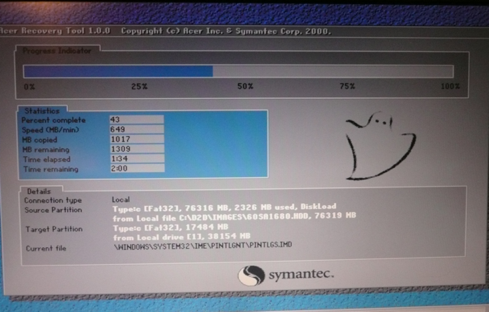
As soon as I saw the bios screen, I pressed Alt-F10 and it immediately launched “Acer Recovery Tool 1.0.0” a rough screenshot of which you can see below.

PQSERVICE Acer Recovery Tool

It appears to be a Symantec tool which works very smoothly and quickly. Within 10 minutes and a few auto-restarts, I had a completely new clean install of XP and wasn’t prompted to enter the Windows XP CD key at any point. It was a darn sight faster than reinstalling XP from a CD.

Although I lost some of my non backed-up files, folders and photos, it was a small price to pay to regain a functioning laptop which would otherwise have had to be thrown-away. Thank you OnSoftware readers and Acer – all is forgiven.

The dangers of using CCleaner

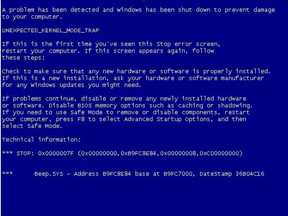
Blue Screen of DeathHere’s a conundrum for you. Normally we’re full of hints and tips at OnSoftware but this is an appeal for help from you the readers and also a warning of the dangers of using  CCleaner. Basically, I’ve got myself into a lot of bother after an over zealous cleaning session with it and can’t start Windows on my Acer Aspire 1414. Since my CD/DVD drive is broken, I can’t use a Windows XP disk to boot so the only option available to me is to perform a Network Boot.

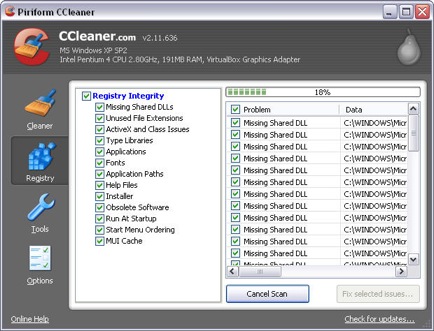
Unfortunately, I have no idea how to do this which is why I’m appealing for help. Why on earth the bios won’t let me boot from a USB drive I have no idea but it’s a glaring error by Acer. The problem started after using CCleaner to uninstall programs, clean the hard drive and “fix” the registry. On restarting, my Acer Aspire booted as far as the Windows XP logo before going straight to the blue screen of death and now won’t even let me start in Safe Mode. The Acer bios gives me only one other boot option – a Network Boot – which I’ve been unable to figure out. A search on the internet reveals network booting involves a scary world of PXEs and DHCP which I’ve found very hard to understand. All that I know is that I have to connect my Acer laptop to another laptop with an ethernet cable!

CCleaner registry cleaner

The blue screen of death error code I’m getting is a “C000021a (fatal system error) The session manager initialization system process terminated unexpectedly”. It’s clear that the problem is related to the session login part of Windows startup i.e. the bit where you click your username and enter your password to use Windows. I don’t see why this should stop me at least starting in Safe Mode but if I ever do get it started again, I’m going to remove the session manager completely. Beware all those that currently use it and CCleaner at the same time. Continue reading “The dangers of using CCleaner”

Microsoft Security Essentials review

Operating system, web browser, office suite, media player… Microsoft had everything covered, except for a security application. A few months ago they surprised us with Microsoft Security Essentials, their first attempt at developing a stand-alone security application for home use. Today, Security Essentials has come of age, leaving the beta stage behind and launching its first final version.

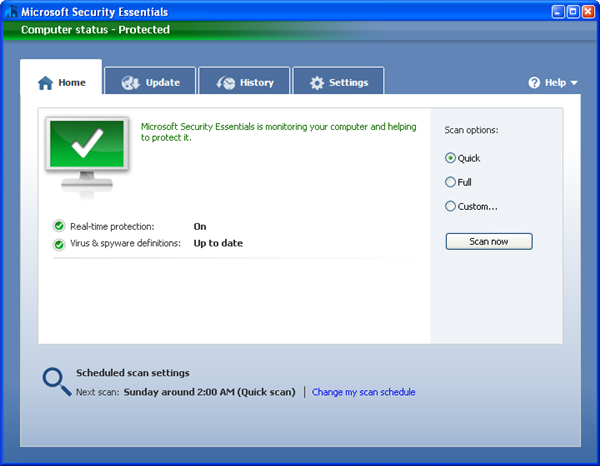
Microsoft Security Essentials review

It seems that the three months of beta testing have been as calm as a millpond. At least that’s what you infer from the differences between the beta and the final versions, which are basically none. Microsoft Security Essentials features the same clear, easy-to-use tabbed interface and pretty the same tools and functionality.

Microsoft Security Essentials includes three types of scans: Quick, which scans those areas in your system that are most likely to get infected; Full, which scans your whole computer; and Customizable, which lets you select which specific folders and files should be scanned. Continue reading “Microsoft Security Essentials review”

The fun way to become a better speller!

Ask any English learner who’s just realized that ‘rough’ and ‘gruff’ rhyme but are actually written like words from different planets: English is a hard language to spell. It’s no wonder then that even native speakers need a little help from time to time, and if it’s a little help you’re looking for, then you’ve come to the right place!

The rules of English spelling are so varied that learning them off by heart is a difficult task. Rather than sitting down with the dictionary and a very strong cup of coffee, it might be a good idea to learn while doing something else and there’s no better way than reading. If you’re looking for an occasional alternative to the books, however, you’re in luck, because spelling games are some of the most widely available, both on and off the computer. Watch out for crosswords, word searches and hangman games and play them whenever possible. Even if you find them hard at first, keep trying; they get easier with repetition, especially if you concentrate on just one, such as doing the crossword in a particular newspaper every day.

When you’re surfing the web, make sure you have a spell-check/dictionary add-on so that you can learn as you browse. DictionarySearch is one that you can customize with whatever online dictionaries you like best, while Firefox Add-Ons have a selection of spellcheckers that will check text while you write. Don’t get too dependent on spellcheckers though, because although they will catch any incorrect spellings, they won’t realize when you have used the wrong word in a sentence or accidentally crossed paths with a homophone (words that sound the same but are spelled differently, like here and hear).

comp_img.png

There area also plenty of games that will make the task more fun. It has to be said that as a category, spelling programs are not the slickest in cyberspace, but that doesn’t mean they won’t keep you entertained. If you think that that traditional is best, there are plenty of crosswords and word searches out there. There are also lots of games that manage to combine spelling with a variety of other methods to keep you busy. One of my favorites is Find A Word, while Speak N Spell is also a bit of fun. If you’re looking for something more flashy, you could take a look at WordGrid, Letter Rack 3D or Word Up, but bear in mind that some of the more colorful games are clearly aimed at children. This doesn’t really matter for practice, but after a while you might find yourself wishing uncharitable thoughts towards the singing worms and dancing books they usually contain!

Part 1: Introduction

Part 2: Math

Part 3: Reading

First look at WinZip 14 Beta

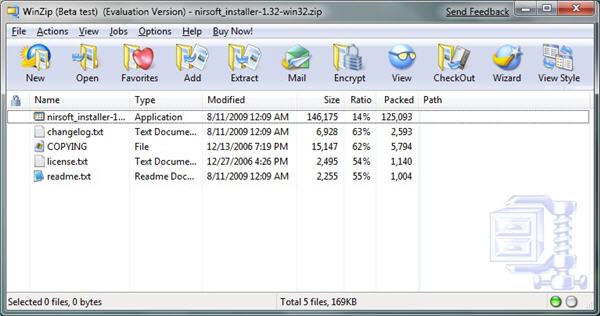
Windows 7 is scheduled to be launched in less than a month, and in anticipation of this important date, many developers have been working hard on new versions of their programs that take full advantage of all the enhancements included in Microsoft’s new operating system. One of them is WinZip, which announced the release of WinZip 14. The popular archiving and compression tool is now available for downloading as a pre-release beta version that lets you have a sneak peak at all its new features and check how well it works with Windows 7. And you know, I just couldn’t resist the temptation!

First look at WinZip 14 Beta

WinZip does look great on Windows 7. But it’s not only about visual appearance: it also takes advantage of all Windows 7 special features. You can, for example, access the most frequently used tasks in WinZip from the Jump lists in the Start menu, or the taskbar. Continue reading “First look at WinZip 14 Beta”

Play classic DOS games on your PC

It seems strange to think that it was just over a decade ago that you had to run PC games through DOS. Many of us remember fondly these first forays into the world of computer gaming, when all adventures started with a flashing command prompt.  If you’re tired of this modern world of flashy 3D graphics then take a trip back to when it all started by revisiting DOS. Here’s a simple guide to how to enjoy DOS gaming on your PC.The first thing to do is get hold of the game files. There is a fairly wide selection of abandonware sites where you can pick up DOS games for free. Abandonia offers probably the most comprehensive choice, and each game is reviewed by the site. You can even download instruction manuals and box art. If you don’t find what you’re looking for here you could always try Dosgames.com or Free Game Empire.

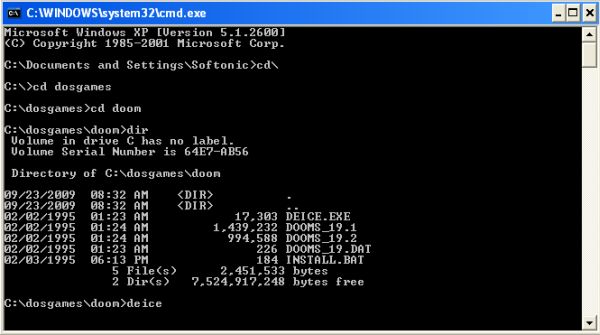
Nine times out of ten you’ll find that the game downloads come packaged as a Zip. Create a folder on your C drive game and call it ‘dosgames’. Unzip the game files into a folder within the dosgames folder and make sure the name of this folder is no longer than eight characters. Now it’s time to pay a visit on our old friend the command prompt. Do this by clicking Run from the Windows Start menu. Make sure ‘cmd’ is showing in the text field and click OK.

Set up DOS for gaming

Switch to the root directory by typing cd\

Navigate to the games folder by typing cd dosgames (or name of your folder)

Now switch to the saved game folder by typing cd foldername (where folder name is the name of the game folder)

Next, you’ll need to look for the EXE file, which you can do by typing dir and hitting Enter

Type the name of the EXE file and hit Enter. You’ll now be transported back in time to a land where blocky graphics and MIDI audio ruled supreme.

Continue reading “Play classic DOS games on your PC”

Google Translator vs. Bing Translator

I’m a big fan of online translators, not only because I’m interested in languages in general, but also because they make my work easier every day. Google Translator has been sitting on my Bookmarks Toolbar for a long time, as it is the translating service I use more often. However I recently found out that Microsoft’s Bing has launched its own translating tool, so I decided to give it a go. You have to try things before judging them, don’t you?

Google Translator vs. Bing Translator

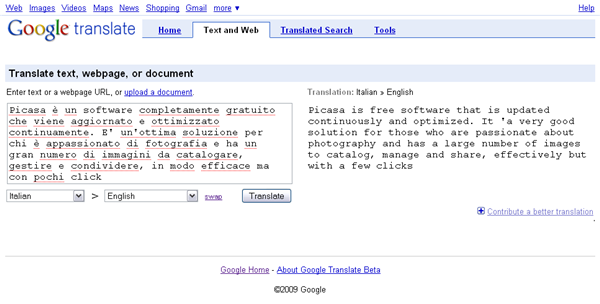
The first obvious difference between Google and Bing is precisely their translating powers: while the first supports more than 50 different languages, the latter features only 20. But the truth is that when Google Translator was launched it didn’t support that many languages either, so I wouldn’t be surprised to see Bing Translator adding more languages in the future.

One thing I love about Google Translator is its ability to detect source language automatically, so I don’t have to select it every time I use it. Luckily Bing Translator offers the same functionality. Also, besides direct translations, both Google and Bing offer some extra tools, such as a widget to offer a translated version of your website (both), a special utility to perform translated searches (Google only) or a translating bot to assist you in multi-language chats (Bing only).

Google Translator vs. Bing Translator

Now, what about translations themselves? Honestly, I didn’t find much differences between them in my tests. I tried several language combinations with Spanish, English, German and Italian, using different texts and swapping the source and target languages in order to test the translating engines. The results were surprisingly similar, in both ways: when Google Translator obtains a good translation, so does Bing; and when Bing produces a completely absurd text, Google doesn’t succeed either.

Oddly enough, both seem to be better at translating into English: as soon as you pick another target language, results are a bit distorted. Both are also equally fast: you hardly have to wait for more than 5 seconds to have your text translated. The only difference I noticed, if any, is that Bing seems to be slightly better at certain expressions, providing you with the correct translation instead of a meaningless word-by-word equivalent.

Generally speaking though, both Google and Bing feature similarly powerful translating engines. So if you work with different languages on a daily basis and need to do frequent translations, I’d suggest you take advantage of both of them!

Review: Mozy Online Backup for Mac disappoints

The problem

The more digital content we store on our computers, the more important reliable backup solutions become. For example, my iMac has about 50GB of music and photos on its primary disk drive. While much of the music could probably be replaced, any photo not yet uploaded to Flickr would be lost forever if that disk failed. So, like many other Mac users, I use Time Machine to maintain a secure copy of all my files, albeit on a potentially unstable portable hard disk in the same room as my Mac.

It was this potential unreliability of my Time Machine disk that got me interested in online backup options. What could be better than being able to backup to a remote server, safe in the knowledge that should any disaster befall my Time Machine disk, everything would still be OK. At least, that was the theory.

mozy-logo-1.png

Solution found!

After some research and a little help from OnSoftware, I settled on Mozy for Mac – generally regarded as being a great online backup tool. I signed up for the $4.95/month unlimited backup plan: I thought (and still think) that $5 a month is a pretty good price point for total peace of mind. After setting up my account – a really simple process – and installing the Mozy desktop client – also a breeze – I let Mozy get to work on its initial backup. It was about eight hours after this that I spotted the main flaw in Mozy’s design: you have to complete an entire backup in one go right at the beginning, without any interruptions whatsoever. You can’t go restarting your Mac (not that I did), and you can’t lose connectivity for even a short time, which seems to have happened to me.

Around this time, my Mac was acting a little weird. I’d narrowed the problem down to a graphics driver error, but the truth is that my Mac was freezing from time to time. This meant that every time the driver error reared its ugly exception, I’d have to start from scratch on the Mozy backup. That’s not Mozy’s fault, nor is the occasional eccentricity of my ADSL connection. But Mozy could come up with a way of resuming backups, even for the initial backup process.

In order to be fair, I tried running Mozy after I’d fixed the driver issue and done a clean install, to see if it performed better under optimal conditions. Left overnight, I expected Mozy to be up to about 25% when I checked it in the morning. Unfortunately, Mozy had failed for some unknown reason at some point during the evening… all I could do was start it again. Then it failed again during the day. So I canceled my account, disappointed by a product that I’d been planning on loving.

Two things Mozy could do to win me back

Find a way of resuming backups. When backing up 100GB of data, it’s just ridiculous that an interruption causes the whole process to be canceled. Building a decent file index at the beginning of the backup operation should allow for Mozy to pick up where it left off, and then look for changes after the initial backup is complete.

Clearer error messages. One of the biggest problems I found was that when Mozy’s backup process failed, the information available about what had happened was very limited. More information, on the web side of the user interface, if necessary, would make it easier to diagnose and fix problems preventing the backup from working properly.

Today’s downloads for Windows, Mac and Mobile

Play Snake on your iPhoneiPhone: If you’re one of those people who used to spend more time playing Snake on your Nokia brick phone than you did making calls then check out this modern take on the old classic. Snake XT is a graphically-rich iPhone version of the addictive game that takes the gameplay to a new level. There are two different game modes: arcade and challenge.

Download Google ChromeWindows: Short after its first anniversary, Google has launched version 3 of its web browser. The new Google Chrome 3.0.195.21 includes all the exciting features that were already tested in the Developer and Beta builds: New Tab page redesign, support for themes, improved Omnibox, HTML5 capabilities and a faster speed to render web pages.

bluephoneelite logoMac: As mobile devices advance, there’s an increasing demand for software that facilitates closer integration between your phone and your Mac. BluePhoneElite (now updated to version 2.2) is probably one of the most powerful out there, breaking down the barriers between the two devices. Amongst the many benefits of it are that it allows you to extend the functionality of both your Mac and Bluetooth mobile device.