
How to choose the right content for small screen experiences

Presented by:

iStock by Getty Images

For many years, we’ve added images to our websites and blogs to splash some color on the walls of text.

But things have changed and we are starting to realize that images and videos have the ability to unlock the richness in content and deliver messages better than plain text ever could. Visuals have now evolved into primary tools that brands and companies use to define their personalities and drive the connection with their users.

And as we all progress into mobile-first entertainment, it is important to start to rethink how we can create compelling experiences for smaller screens. Do we use the same tried and tested images as the big-screen PCs and TVs? And how do we get around the limitations of the smaller screen? iStock by Getty Images, the leading stock content provider, shares the best methods for choosing the right content for the mobile-first generation.

Why are images important?

The numbers are staggering. Done right, images can increase engagement by up to 94%, and because visual material is processed about 60,000x faster than text, much more content can be communicated in much less time.

That’s why apps like SnapChat and Instagram are quickly overtaking text-based Twitter, taking selfies and sharing pictures have become key features in new products, and the excitement around camera drones and action cameras like GoPros is palpable.


First person point of view

When it comes to mobile devices, not only are we dealing with smaller screen sizes, but also screens that are usually held much closer to our eyes than a PC or TV. This opens a new opportunity for brands to free users from the distractions around them, and lets them jump into a visual experience from the first person point of view.

Powerful first person visuals, such as an exhilarating bungee jump, or a journey through a new country, or even re-picturing an everyday experience like riding a bicycle around town, move away from being narrative to being easy to relate to – so that you feel like you’re actually there. This encourages users to participate and engage with your content.

First person POV


So how do we spice things up? By mixing the perspectives. It doesn’t always have to be a person’s point of view. Playing with the unexpected, like running across a field from a dog’s perspective, or climbing up a flight of stairs from a baby’s perspective will offer a relatable setting with a unique and stimulating point of view.

First person POV

Super sensory

Super sensory takes you beyond looking at a picture, into invoking the senses of sight, taste, touch, smell, and hearing to help you live the experience.

The most obvious way to super sensory is to stimulate more than just sight and sound. For instance, the trailer of the TV show, Homeland, combined thrilling video with tactile effects. So when a bomb goes off or when a car crashes, the viewer feels the vibrations as they see the events unfold.

With still images, the senses have to be stimulated by association by using up-close and personal images of familiar subjects. Much like how we salivate at a picture of a chocolate lava cake, or recoil at an image of a metal grinder throwing up sparks.

Smell the images

But to truly create an all-round sensory experience, don’t just paint big broad strokes, dive into the detail. For instance, users don’t just want a panoramic picture of Paris, they want to be visually stimulated with the bright colors at the farmers’ market, want to reach out and feel the iron of the Eiffel Tower, to vividly hear the sound of clinking champagne glasses, and to smell the butter from a freshly-baked tray of croissants.

button-1

Use code NEWSTONIC12 to get 12% off

Tasting rain

Smartphone users want experiences that are less mediated to interact with the world around them. If we focus on one subject and one sense at a time, we amplify the experience and take away the screen that is standing between them and the experience.

What do people want?

Wonder, awe, inspiration, travel are the most searched terms for images for business, and for good reason. Travel narratives are powerful because not only do they make great plots, they are great metaphors for personal journeys. They play on our desire to see more, do more, and be more.

Epic perspective

Images depicting epic perspectives are especially sought after. These images do not necessarily include people in them, but perspectives to show how small we are on this planet.

For instance, Airbnb, who is technically an accommodation platform, displays breathtaking sights and amazing destinations on their website. They don’t look like a typical travel brochure, but they inspire visitors to explore the unknown and try something different. It’s a similar story on their Instagram feed where they showcase personal experiences and stories, and not pictures of their apartments as any other accommodation platform would.

Space imagery has also continued to grow fast, riding on our fascination with new technology and science, and it is also a timeless metaphor for curiosity and wonder.

Space

These images work well for mobile not only for their breathtaking qualities, but because they usually leave plenty of space for copy and action buttons.

What’s the takeaway?

Put simply, images for mobile is a new ballgame. There are many considerations to be made around the limitations of small screens, but also opportunities to unlock new experiences that were never possible on larger screens.

Sourcing content doesn’t need to be difficult. iStock by Getty Images offers over 8 million exclusive images & 4K video and for a limited period are offering new customers 12% off credits for their first purchase with code NEWSTONIC12. Sign up today! (offer expires October 31st 2016)

button-1


CyberGhost 6: A Powerful VPN Service That is Easy to Use

VPNs are a big deal these days as users want to accesstheir content when travelling outside of their country and to generally feel feel secure whilst browsing the internet. CyberGhost 6 provides both of these services very well and offers many more secure VPN services from its simple and easy to use interface. Today we’re going to look into the features that a premium license of CyberGhost 6 would give you access to.

This article is brought to you by CyberGhost VPN – A simple and secure VPN service.

button

How do VPN Services Work?

Every computer has an IP address which is assigned by your Internet Service Provider (ISP). This can then be used to discover the geographic location of your Internet Service Provider. VPN services like Cyber Ghost override this IP address and replace it with one from a number of services that they have in various locations.

Simple Layout

CyberGhost have 650 servers in 30 countries available for users of its service. This gives users a huge amount of freedom and control when it comes to accessing the internet. It also complicates matters, quite considerably, with plenty of options to consider when controlling your internet connection. For this reason CyberGhost have put a lot of effort into creating a user-friendly interface that is easy to understand.


screenshot-1-copy

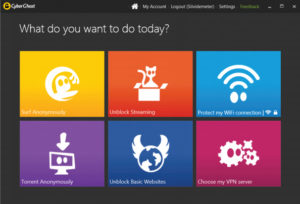
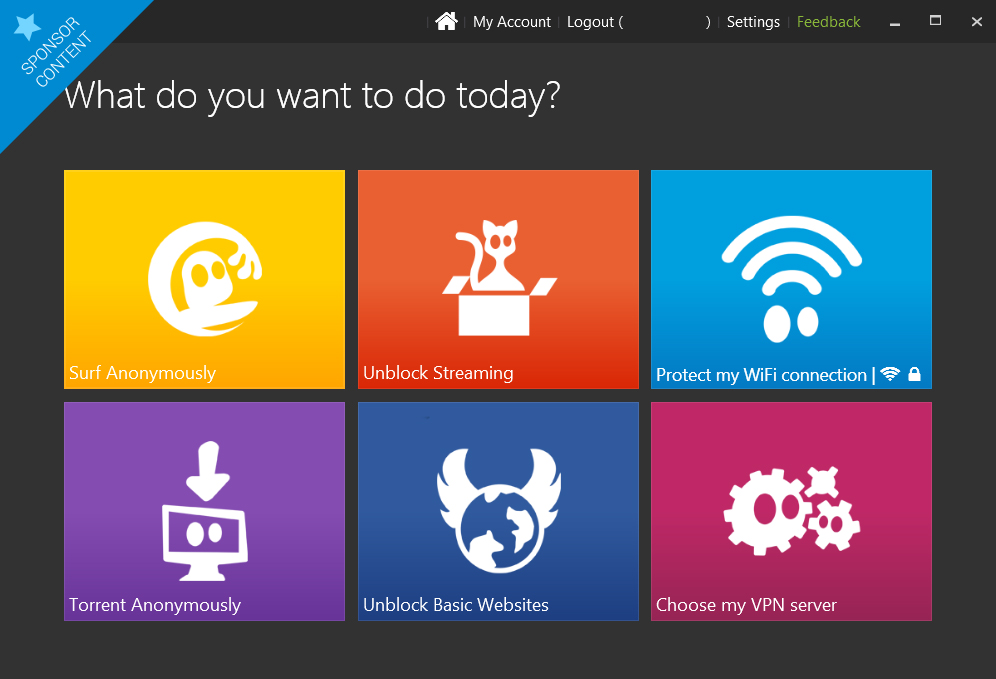
What Do You Want to Do Today?

The CyberGhost Home Screen has 6 tiles that each represents a single VPN profile. Each profile has been curated by CyberGhost to perform some of the most common uses for a VPN. If you’re a more advanced user the 6th tile offers you the chance to choose your VPN server yourself. The Home Screen is easily accessible from your system app tray meaning you can easily switch between profiles depending on what you’re doing.

untitled-4-copy

If you’re not too sure about how to use VPN services these curated profiles are really helpful:

  • SURF ANONYMOUSLY will enable all of CyberGhost’s protection components and will start your browser in incognito mode. It also allows users to manually change the pre-set features, according to their own preference.
  • TORRENT ANONYMOUSLY will select the fastest Peer2Peer (P2P) compatible server (at the time of the release) and will activate the appropriate protection measure for P2P sharing.
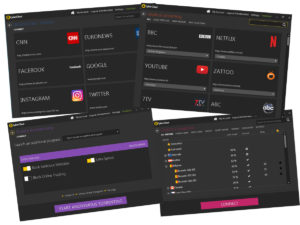
  • UNBLOCK STREAMING gives you a list of streaming sites that CyberGhost can give you access to no matter your geographic location. This is fully automated, meaning you don’t have to search through different servers in the hopes of catching your favorite TV program.
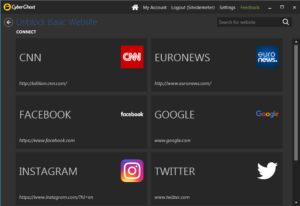
  • UNBLOCK BASIC WEBSITES is available to all CyberGhost users and allows access to basic websites that may be censored in various parts of the world.

unblock

  • PROTECT MY INTERNET CONNECTION will automatically connect you to servers in your own country. As well as that it’ll remember any wireless networks you’ve accessed and provide you with the same amount of protection you selected last time you used it.
  • CHOOSE MY VPN SERVER is for more advanced users and gives you total control over your internet connection. If you’re a little more comfortable playing around with the VPN settings this is for you. It allows you to manually select the server you’re using and gives you the option to narrow down the list to include only the types of servers you’re looking for. If you’re looking for the fastest servers for example or for servers that are P2P compatible you can simply select from them from the upper menu.

connectinh

button

Fully Customizable

Each of profile has a number of features activated within them designed to facilitate optimized browsing in line with your needs. These settings can be customized, however, using the simple switches found on the control panel of each profile. The settings that you select, including the country you’re browsing from, remain selected every time you connect using that profile.

untitled-1

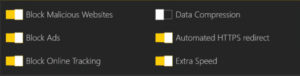
A useful feature is the Ad-Blocking feature which gives you control over which websites you’ll support by allowing their ads to be shown. This can be used in conjunction with Data Compression, Malware Protection and Online Tracking Prevention to save on data costs whilst using a mobile connection.

Mobile Protection

The Premium license, which cost $4.99 a month, gives access to all of CyberGhost’s profiles and features on 1 device. This means that you’re able to use all of the features on your mobile device as well as your home computer as long as you’re not logged in on both devices at the same time. If, however, you’re looking for hassle free experience and would like to protect more than one device the Premium Plus License, which costs $7.99 a month, allows you to run all of CyberGhost’s Features across 5 devices simultaneously.

Free Version Available

There is a free version of CyberGhost 6 available which will give you full access to all that CyberGhost has to offer for 3 days. After the trial period is over you’ll receive lifelong access to the “Unblock Basic Websites” profile. This is due to CyberGhost’s policy of wanting to free up basic information to web users all over the world.

button

Future Proof

The true power of the application, however, lies in the Premium and Premium Plus Licenses. These give you complete control over your internet connections and can even help you save on data costs if you’re using a mobile connection to access the internet. The Premium and Premium Plus Licenses also include free upgrades to any future versions of CyberGhost.

Simple to Use and Powerful VPN

All in all CyberGhost 6 Premium offers you a powerful VPN package that gives you complete control over your internet connection. The level of control is up to you with CyberGhost’s user friendly interface and curated profiles meaning anybody can take advantage of the features it offers. More advanced users are able to exert more control over the program and with 650 servers in 30 countries there is plenty of control to be had. The free version allows you to experience all of CyberGhost’s features and profiles for a short amount of time but if you’re after a long term solution, whether it be for streaming services or anonymity, the Premium and Premium Plus Licenses will give you full access to a simple but powerful VPN service.

CLICK HERE to try CyberGhost 6.

Google & Apple big launches preview – Our final thoughts

It is finally September, which means Google and Apple are getting ready to launch their newest, shiniest products to drain our pockets, dump our 1-year-old phones, and provoke arguments with our partners. But that is ok because Mr. Smith from the bank will soon be calling about your maxed-out credit cards and he’ll be probably up for a chat.

Let’s round up what you can expect this week, starting with Apple.

iPhone 7

Apple raised a storm when rumors first suggested that they were doing away with the headphone jack on their latest iPhone. If it’s true, then as Steve Jobs and Tim Cook would say, “this changes everything”. And in some ways it would. Apart from that, expect the obligatory 50% faster this, 30% better that, just enough to make you feel that the iPhone 6S is as cutting edge as Sony Walkmans.

iOS 10

iOS

It’s going to better than iOS 9, obviously. I mean, there’s no doubt that there’ll be many new features, but we’re expecting a nip and tuck more than a lose-50-pounds, dyed-your-hair-blue, get-a-nose-ring kind of massive overhaul. You should look forward to the new notifications screen, and the ability to delete stock apps (like that useless Tips app). For more, see here.

And on the other side of the ring, and some would say the tastier option to fruit, Google.

Android Nougat

Nougat

Nougat, however you pronounce it – Nugget, Noogah, Newget, Nuggit, is Google’s greatest and gooeiest version of Android. Under the wrapper, expect to find a brand new app drawer, split-screens, battery-saving doze mode, and many more new features. The update is currently being rolled out to Nexus devices, and for the rest of us, it’ll depend on your smartphone manufacturer and mobile service provider. For more, visit here.

Nexus Phones

And if you crave to sample the sweetest Google treats before everyone else, then getting a Nexus device is like a lifetime VIP ticket to the Super Bowl. Just around the corner are the latest generation of Nexus devices and although nothing has been officially revealed yet, plenty of rumors are making their rounds. Such as it being HTC-made, latest Snapdragon processors, 4GB RAM, possible a QHD screen, but most excitingly, a pressure sensitive feature like Apple’s 3D touch. If you’re planning on getting a new Android phone, it’d be wise to starve off the craving at least for a few more weeks.

What are your thoughts and predictions? Share them in the comments below.