Create your own cartoons with Softonic

Yes, folks, it’s summer again. Which can only mean one thing: another instalment of the Shrek series is in theatres now! Animated films have come a long way in the last few years and the huge improvements are mainly due to software. In fact, if you’ve ever considered making your own cartoons, there’s never been a better time to start. We’ve collected together the very best animation software for you, so what are you waiting for?

Another regular feature of summer’s arrival is a spike in the number of people joining gyms. A lot of people feel under pressure to get fit at this time of year, but not so many worry about how their computer’s doing. Elena selected some light alternatives to popular, heavy software which should help your PC by taking up less space and consuming fewer system resources.

Tony Blair has just left office after more than 10 years as British Prime Minister. We thought that before he gets his next career underway, he might have some free time on his hands. We reckon that our list of Tony Blair’s timewasters would be enough to keep any former world leader occupied.

Finally, we took a closer look at one of the most popular programs on Softonic. Fruity Loops is a powerful music creation app which is used by amateurs and professionals alike. James found a comprehensive library of sound samples to expand and improve FL Studio even more.

Top 10 audio converters

Sound studioMP3, AAC, WMA, WAV, Ogg….the list of audio formats is endless. Every now and then though, you’ll need to convert your track to another format, just to be able to play it on such or such MP3 player.

The best solution in this case is to install a converter. If this type of application is good you’ll barely lose any sound quality. The difficult thing though is actually finding the converter that you need. We’ve patched up a list of 10 audio converters that Softonic users consider worthy of recognition:

How to detect if you have the right codecs

afreeCodecVT ScreenshotIt’s really annoying when you’ve downloaded a film or video and you can’t play it. The most common reason for this problem is that you don’t have the right codecs installed. Codecs basically allow your media player to decompress sound and image into something that it can play. Once installed, the codecs should work on all of your media players. But identifying which ones you need can be tricky…

Fortunately, there are a few tools out there though that analyse your audiovisual files and can tell you exactly which codec they need for playback. The most popular by far is afreeCodecVT. The reason being is that is analyses your files, tells you which codecs you need but also links you to the appropriate codec on it’s website.

One of my favourites though is GSpot. The program performs an instant analysis of your files and tells you the name of the codec you need. For me, this has worked in almost every instance although in some cases, it can’t tell you because the file is either unreadable or the compression standard is unknown. It can also diagnose playback problems that are caused when you’ve got too many codecs installed.

DVdate is another similar utility except this allows you to view information, including what codecs the film is using, during playback. It also includes other information such as the number of frames per second and aspect ratio. This program is useful if you have a batch of films that you want to analyse because it allows you to load several at one time.

Any one of these tools should ensure that your playback problems are a thing of the past.

Top PC tennis games

Dream Match tennisWith the Wimbledon tournament now in full flow, we thought we’d help you emulate your favourite players by highlighting some of the best tennis games around. Although, for me, nothing can ever match quite up to Super Tennis on the SNES, there are plenty of games around that will get you serving and volleying like a champ without having to set foot on a real-life court. Here’s our top five:

Tennis Elbow – Fun, realistic and addictive tennis game

Dream Match Tennis
– Play tennis against opponents across the World

Tennis Titans – Play like a pro in this easy-to-learn and fun tennis game

Pong Multiplayer for Firefox
– Have a game of tennis retro-style

OnCourt – If you’re serious about your tennis then this database app will help yout record and track all the tennis results and standings

An easier way to tag your MP3s

Mp3 Tag LogoTagging your MP3s with the right data makes managing your music collection easier in all sorts of ways. It makes your playlists easy to organise and it enables your MP3s to retrieve information more accurately from the internet such as lyrics and album info. However, going through your collection one-by-one, changing the tags is a time consuming a painstaking process.

That’s why I was pleased to discover PicardTagger which does the job for you. It basically automatically tags your MP3s with information about most well known albums. The only things it doesn’t retrieve are the artwork or genre information which is difficult to calculate with some music types anyway.

The process couldn’t be any easier. Once installed, make sure that ‘Audio Fingerprinting’ is selected and you simply drag yourMP3s into the ‘New Files Folder’ of the PicardTagger interface. To organise your collection, simply click on the ‘Cluster’ icon to group all the MP3s together by album. Obviously, the more obscure your collection, the less likely that the tags it assigns are correct but it’s remarkably accurate with mainstream music. I’ve managed to clean up hundreds of tracks which were badly tagged.

The program is written in Python so it’s available on both Windows and Linux – Mac support will be added soon according to the developers.

Block search engine spiders

Kill those spidersMany people are scared of spiders but when it comes to the kind sent by search engines, webmasters are generally happy to let them crawl all over their site. Of course, it’s a good thing for your ranking to have these little pieces of code looking at your pages regularly to check for updates. Recently though, site administrators have been getting a little ticked off with Yahoo!’s new spidering tactics. By using a different IP address for each page the search giant checks, many people are now finding their bandwidth being choked.
It looks as if Yahoo! isn’t in a rush to change its new spidering techniques, but thankfully, if you’re being blighted by a plague of spiders there are measures you can take to block them. One measure is to use the following meta tag to talk to the spiders: “” You will need this META tag on every page in your Web site that you don’t want indexed. Obviously if you have a lot of pages on your site this may take a while, so grab yourself a decent HTML editor like Arachnophilia, which allows you to perform a global search and replace and add an HTML header tag to every Web page that you open in the program.

An alternative to this method is to download one of the spider-blocking scripts from TechPatterns to help you cut down on the amount of traffic search engines like Yahoo! are sending to your site.

SMPlayer – a new rival for VLCPlayer

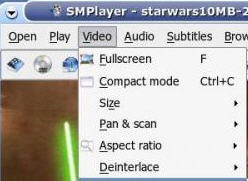
SMPlayer ScreenshotI’ve never felt the need to change VLCPlayer for anything else because it plays just about any format with minimum fuss. That was until I tried SMPlayer which does everything VLCPlayer can and more.

For a start, it seems to support subtitles and stream video from the internet much more intuitively than VLCPlayer which I find very hit and miss where these two things are concerned. It also remembers where the most recent playback of a DVD or DivX file was stopped even if you close and re-open it – great for when you don’t have time to watch something in one go. Other cool features include audio track switching and seeking by mouse wheel.

The interface is also a lot sleeker than VLCPlayer. One of my biggest gripes with the latter is how plain and simple it is and SMPlayer looks a lot more modern with icons in the toolbar and glossy playing controls. It also gives you a huge amount of control over the image which is lacking in VLCPlayer including a video equalizer which allows you to adjust the brightness, contrast, saturation and gamma of the video image. I won’t be going back to VLCPlayer for a while.


Alternative uses to the iTunes rating system

iTunes mood playlistsWe all know the iTunes system for rating songs: five stars are for the greatest hits of all times that you’ll never stop listening to, while one star goes to those horrible songs that inexplicably got listed in the iTunes library. Between these two opposite poles, there are three more intermediate ratings to describe your music collection.

However, there are other ways to use this rating system. Some people, for example, use it to mark low quality songs that may need some optimization work done on them. So, while listening to music on the iPod, if you come across a damaged track you can give it a one-star rating to fix it later on.

Another interesting alternative usage is rating songs according to their mood, so for example, romantic songs would get one star and dance songs would get five, with three more stages in between to create three extra mood categories. Then, by using the iTunes Smart playlist tool and this rating system you could easily create custom playlists according to your mood in a given moment.

Play a variation of backgammon

screenshot_5.jpgAcey Deucey is a variation of backgammon with differences in rules, opening position and end play. Absolute Acey Deucey lets you try this variant on a nice playing board right on your Mac desktop. The game stays challenging and entertaining thanks to 5 different skill levels and 3 player personalities to choose from. Absolute Acey Deucey can also give you advice, show stats, tell you how many rolls are left or show an instant replay of your last move.
A dead simple, highly addictive logic game

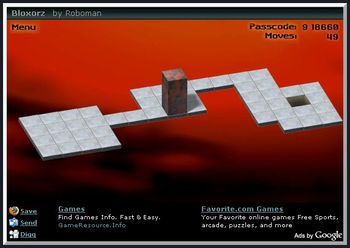
BloxorzLooking for some easy entertainment? Then click here and play Bloxorz, but be aware that you may end up spending way too much time with it! This incredibly addicting game will take you through 33 levels with a very simple goal: put the squared block through the hole at the end of each stage.

Using your arrow keys, you’ll have to move the block making it fall on its sides or its ends until you reach the hole. You’ll have to calculate each movement carefully so as not to fall over the edge. Some other obstacles you’ll find are switches to activate bridges, fragile tiles that won’t stand too much pressure and special teleporting switches that will split your block into two pieces. Are you ready to take the challenge?