Wednesday Timewaster: Demolition City

Demolition City

You surely know about games that challenge you to build cities… but what if they asked you to do exactly the opposite? Demolition City is a surprisingly addictive Flash game that turns you into a demolition specialist with a clear objective: tear buildings down to pieces with a limited amount of explosives and make sure the debris stays under a certain height. The game features a bunch of levels, in which difficulty is progressively increased with varying amounts of explosive and harder height limits. You’ll be suprised to see that destroying a city can be as difficult as creating one!

Keep New Year resolutions all through 2010

Keep New Year resolutions all through 2010The end of a year and the beginning of a new one include a bunch of traditions: family dinners, special toasts, endless parties and of course, New Year’s resolutions.

Whether you take them very seriously and try really hard to accomplish them, or you think it’s just another useless holiday tradition, it’s something we’ve all done at some point in our lives. And believe or not, technology can also help you keep those resolutions all throughout 2010!

Here’s a handful of programs and online tools that you can use as an incentive – or a simple reminder – in order to make these three traditional New Year’s resolutions come true.

  • Quit Smoking – This is not only the most repeated resolution every January 1st, but also a healthy choice any smoker should make. For those of you who have already made up your minds, Quit Counter can be quite useful: a small app that keeps track of various statistics and displays customizable inspirational texts to encourage the user every time you reach a milestone.
  • Get Fit – Another popular New Year resolution that usually ends up being forgotten after two months. If you actually want to do more than just paying a monthly gym fee, SportsTracker can lend you a hand. This tool lets you record your sporting activities, no matter what they are. You can create as many custom categories as you need, and generate diagrams and statistics with your results.
  • Learn a New Language – It may be difficult to find time to study a new language, but I assure you it’s worth it! Plus, having software like Lingoversity makes it even easier. This program helps you pick new vocabulary and improve your pronunciation in several foreign languages with an innovative that motivates the student and makes learning actually fun!

Besides desktop software, there are also a few online tools that can work as reminders or encourage you to keep your resolutions all through the next twelve months. One of them is 43things, where you can create a list with your resolutions and see how many people share them with you. Another handy online app is Habitforge, which uses email to help you turn your resolutions into habits – according to them, it takes only 21 days!

tunesBag, a new way to store and share music online

We have iTunes, Spotify, Grooveshark… so what else does tunesBag have to offer? tunesBag is a new music storage and sharing service that enables you to upload all your music to ‘the cloud’ and access it from anywhere in various ways – as long as you have an Internet connection, that is.

tunesBag

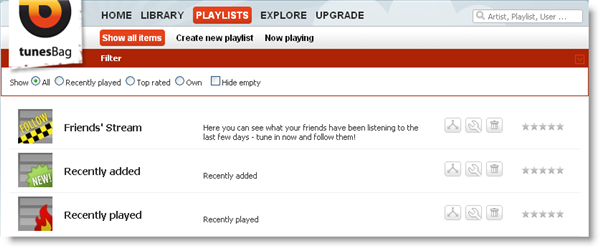
Once you’ve created a user account on the tunesBag website you’re ready to start browsing playlists or uploading your own music.  You can create a new account (it’s free and takes less than one minute), or use your login credentials for Facebook, Twitter, Windows Live, MySpace, Yahoo! or Google. Playlists are either created and shared by other tunesBag users, or generated by the system itself with the latest additions, the top rated songs or the recently played tracks.

tunesBag

In order to upload your own music, you can either use a web-based uploading tool, a special desktop uploader (that must be downloaded and installed on your PC) or even send the songs via email to a personalized tunesBag address. Continue reading “tunesBag, a new way to store and share music online”

The Evolution of Windows interfaces

Going back to the past is sometimes the only way to understand the present – and even the future. Now that we’re about to enter 2010, blogs and newspapers are starting to publish their own analysis of this first decade of the 21st century. But what about software? Can we trace it back to its origins and see what it looked like five, ten or twenty years ago? In the case of Windows, the answer is yes. We’ve been able to find images from all the versions of Windows released up to now, from 1.01 to Seven.

Windows 1.01 (1985)

Windows evolution
You might not have been born yet when Windows 1.0 was released. Don’t complain about it though. With such a tacky combination of colors, this first version of Windows wasn’t really something worth viewing.

Windows 2.03 (1987)

Windows evolution
It took Microsoft two long years to release the second version of Windows. Windows 2 was supposed to improve the first version, but the color combination didn’t get any better. The most outstanding feature, however, was the Control Panel, with an overbloated menu of three options.

Continue reading “The Evolution of Windows interfaces”

Today’s downloads for Windows, Mac and Mobile


Wallpaper

Windows: More and more people work with dual monitor PCs today, and while this can help productivity, it’s not always easy to find nice wallpapers wide enough to stretch between them. This pack of 20 Dual-Monitor Wallpapers gives you a wide selection of high quality images to choose from, designed specifically to suit dual monitors.

Flip4MacMac: If you haven’t installed Flip4Mac WMV on your Mac yet then how on Earth have you survived without it? Flip4Mac WMV is an essential collection of QuickTime components that allow you to play, import, and export Windows Media video and audio files on your Mac using your favorite QuickTime-based applications.

Christmas SoundsiPhone: If you’re trying to stir up some Christmas spirit then I recommend you take a look – or rather a listen – at Christmas Sounds. This is a collection of 16 different festive noises and music, all available to play by clicking on an icon. Each icon is decorated with a fun seasonal image that represents the audio hidden behind it.


OnSoftware advent calendar 2009 – Day 23

Just two more days until Christmas and that’s two more days in which to check out great software before you get  interrupted by the festivities. Have a look behind the window to find one of Niamh’s top apps of the year.

Day Twenty Three

xxx is a great application that allows you to create stick figure animations that range from the simple to impressive – with a little time and patience. Working on the normal basics of stick figure animation, create individual frames of action and then view them in sequence, producing the animation. Move over Disney, xxx has come to town! – Niamh

Today’s downloads for Windows, Mac and Mobile

Download System ExplorerWindows: The default Task Manager shipped with Windows is often not enough. In these cases, you should use System Manager, a complete task management tool that includes information about everything that’s brewing in your system: active processes and services, installed drivers, start-up apps, network connections and more.

Firefox BetaMac: The latest version of Firefox 3.6 (Beta 6) is now available gives you a taste of what’s to come from the best web browser out there. There aren’t really any revolutionary changes in Firefox 3.6 Beta as the look remains the same but some handy new features have been introduced such as integration with Personas and a new intelligent add-ons manager which updates automatically.

KindleiPhone:Since Amazon introduced its Kindle device, the whole World has gone eBook crazy. Trains are now full of commuters gazing at digital displays rather than thumbing through paperbacks. If you haven’t got a Kindle and want to know what all the fuss is about – or if you have a Kindle and want to enjoy the books you’ve already purchased for it on your iPhone – then install the free Kindle for iPhone app.

OnSoftware advent calendar 2009 – Day 22

As we roll towards the end of our advent calendar, here’s a fun game that Jon seemed to be glued to the whole year. Take a peek behind the window to reveal what it is…

Day Twenty Two

You control a guy on a pogo, and have to jump on the pigs and bats to score, against the clock. High scores can be racked up by executing combos. The mechanics of xxx are simple, and work well. While it’s a really simple concept, it’s surprisingly addictive, and the online scoreboard gives you the urge to push for even greater high scores – Jon

10 Best Symbian apps of 2009

Seeing as everyone seems to be in the spirit of writing end of year round-ups, I thought I’d compile a run-down of my favorite Symbian mobile apps of 2009. This time last year, things were looking bleak for fans of the OS, and many feared that developers may shun the platform and opt to concentrate on iPhone and Android instead. Thankfully, these concerns never became reality. In fact much of the great innovation in mobile applications in 2009 was Symbian flavored. Here are ten great apps from this year that I now regard as essentials.
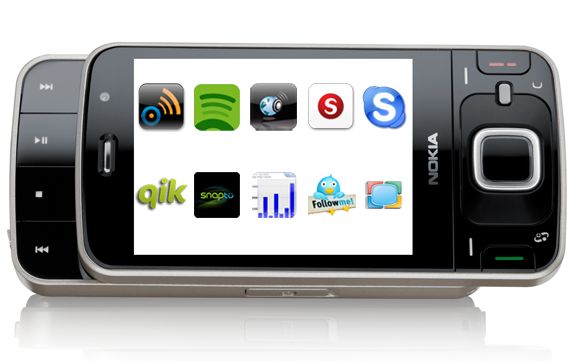
 

What are the best Nokia apps of 2009?

Vlingo – If Michael Knight had a Nokia, he should probably ditch K.I.T in a lay-by and use Vlingo instead. Just speak a command into your phone then Vlingo will oblige, be it opening a web page, taking a text note, or starting up a utility. Plus, it doesn’t answer back like the smug, patronizing car from the 80s series.

Spotify – Everyone has gone Spotify crazy this year. Now you can carry the music player around with you on your Symbian phone, effectively converting your device into an MP3 player with infinite memory. You need never pirate an album again!

Nokia Internet Radio – Another great audio app, this time from the Nokia development stable. This small program lets you browse hundreds of radio stations from across the planet. You can peruse stations by genre, by country, or by language, meaning Nokia Internet Radio will take over your life.

Skyfire – Finally, a decent competitor to the superb Opera Mobile. Version 1.0 of Skyfire touched down in May and blew us away with its streamlined interface design, customizable start page feeds,  and its ability delivers pages to you faster than a paperboy with a jetpack.

Skype – My respect for telephone operators disappeared a long time ago. Then along came Skype, to show that it is possible to offer a telecoms service with a smile and a sense of fun – and what’s more, to make it free! Skype for Symbian is one of the best things to happen to the platform for quite a while.

Qik – An essential for anyone who didn’t get through the Big Brother auditions, Qik lets you broadcast live video (and audio) of yourself to the Internet through your phone. Next year, expect plenty of celebrities to ditch Twitter in favour of this new way of getting in our faces.

Snaptu – I’m a member of so many social networks, I think I know almost everyone on the Internet. Having so many accounts and being so damn popular can be a hassle. Not with Snaptu though, which pulls all of your networks into one place to make things easily digestible.

Nokia Step Counter – Previously known as Nokia Activity Monitor, this little app could be the secret to a new you. Install it on your phone then walk around as normal, and Nokia Step Counter will tell you exactly how many calories you’ve burned off. I’m hoping a future version will count how many are going into your mouth.

Twittix – Arguably the best Twitter client on the Symbian platform. Twittix comes with a beakful of features, including quick photo uploading, a timeline that’s easy to navigate, and SMS forwarding of tweets. Armed with this, you’ll never be out of the loop.

Spb TV – People don’t watch enough TV these days, so I recommend everyone to go and download Spb TV on their mobile. The app lets you watch live TV without paying a subscription, and includes a bumper choice of channels from around the World. So now you’ve got no reason to miss the latest Mongolian mud wrestling matches.


Happy Holidays from Softonic and OnSoftware

This is just a quick post to let our readers know that nearly everyone at OnSoftware will be in holiday between now and the new year. We’ll publish a few posts but not as many as we would normally.

In the meantime, don’t forget to send in your questions and suggestions to ask@onsoftware.com

We wish you all a very happy holiday season and an awesome-software-packed 2010!