 Sometimes you may have a file on your computer but you don’t have the necessary application to open it, or Windows doesn’t know which one to use. These “unknown” files are easily noticeable as they don’t display any recognizable icon, but use a generic symbol instead.
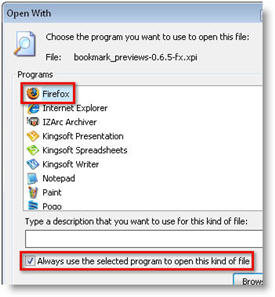
The trick to open this sort of file is really simple: double click on it as if you were going to launch it and Windows will display a message to ask you for the appropriate application to open the file. Choose the “Select the program from a list” option and click on OK. On the next Window, move along the list of available apps or click on the “Browse” button to find the program you want to open this file with. Once the program’s name is highlighted on the list, make sure the “Always use the selected program to open this kind of file” option is enabled and click on OK. Windows will automatically recognize the file type, and will use the application you’ve chosen to open it from now on.
One last tip: if you ever want to change any current file association, right click on the file while holding the Shift key, and select “Open with…” in the context menu. This will bring up the program selection dialog again, enabling you to select another program with which to open those files from that moment on.
 Imagine if you could harness all the new music released on networking sites such as
 You know that you can see all the different drives and devices connected to your Mac either on the desktop or by opening up the Finder. Wouldn’t it be nice to have them in the Dock too? You could then rearrange them in one of the multiple ways that Leopard now offers, like in a list, fan, grid or automatic. It looks cleaner and gives you right away an idea of which drives and devices are connected too.
 The trouble with this display is that you won’t be able to eject them from the Dock. What you’ll have to do is open up the Volumes folder and eject the selected volumes one by one. It’s probably easier to just drag them from your desktop to the trash.
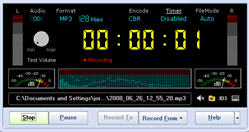 MP3 is by far the most widely used audio format for most PC users. Whether it’s CDs that you’ve ripped to your hard drive or podcasts that you’ve downloaded, chances are that the files are in MP3 format. The problem is, sometimes you may stream audio from the radio or listen to audio via YouTube that’s not in MP3 format.
 If you’ve got a lot of big files such as video clips that you want to access anywhere you’ve got three options. You either transfer it to an external device and carry it around with you which is cumbersome. You can upload it to a server but that will cost you. Or, you can upload it to a free storage site such as
 It’s funny how only a few years ago, most DJs still carried around their turntables and lugged their big heavy bags of vinyls everywhere they went. Cut to now, and most of them have all switched to powerful laptops and creative mixing software. The versatility and intuitiveness of technology have taken over from the rugged, physical contact with records. I lament the loss of this time in some ways, as I’ve always enjoyed the imperfections and grainy sound of vinyls, and the pure enjoyment of spending hours in a record store, taking records out of their sleeves to listen to them on the turntable.
 If you ever find yourself reading your friends’ blogs, sending a couple of tweets here and there, updating your Facebook profile and checking your personal email during working hours, don’t feel guilty about it: we’ve all done that some time. But bear in mind that your boss may not be as understanding as your friends at OnSoftware, so you’d better take some precautions when browsing non work-related websites in the office.
 It was always on the cards that a software giant like Adobe would eventually launch themselves into the world of online desktop publishing, especially in view of their pioneering development of Web 2.0 in the form of