4 online scams you’d never think to check

Most of us are accustomed to receiving emails from strangers hailing from far-away nations who want to transfer money, and we know not to fall for the trick.

We’ve also gotten used to reporting emails that appear to come from our banks and other service providers but ask for passwords or bank card numbers.

However, online criminals know they have to continually come up with new ways to fool unsuspecting people. That’s why some online scams — like those listed below — catch even well-informed individuals off guard.

1. A bogus website for retrieving valuables lost in taxis

The transportation authorities in New York City undoubtedly realize people often misplace their valuables by leaving them behind in the yellow and black vehicles. That’s why many people thought it made sense that there’d be a website to report lost items.

Mark Jakubczak decided to set up such a site — despite not having any affiliation with New York taxi regulators. He charged people $47 to use the site to give details about missing items. Although some thought the fee was strange, others assumed it was a processing fee.

After paying, people’s name and phone numbers got posted on the site, along with descriptions of their lost items.

Eventually, Jakubczak added a disclaimer on the website to clarify he wasn’t connected to any city agency, but that didn’t happen before people became irate and demanded that genuine officials investigate.

One of the reasons why this scam was so effective is because Jakubczak was apparently very well-versed in SEO practices and URLs that seem authentic.

People said his site was the first one they saw after going online to find out to recover items lost in cabs. Also, the URL, YellowCabNYC.com, seems legit.

2. Inflated charges for emergency garage door repairs

In the case above, a scammer preyed on desperation. People were so eager to get their valuables back that they didn’t always think things through or read the website carefully.

Scammers played a similar trick on people who need urgent fixes for their garage doors — such as when the doors won’t open. Like legitimate companies, the entities with less-than-honest intentions typically advertise online and are visible on the first pages of search results.

However, instead of charging customers fair prices for services performed, they run up the rates by carrying out unnecessary repairs with parts the clients don’t need.

Besides capitalizing on desperation, the companies that engage in this scam know most people don’t understand how garage doors work or know the prices for common parts.

That lack of knowledge makes people fall victim without realizing it. However, doing additional research by reading service provider reviews can alert consumers about potentially deceptive practices.

3. Non-authentic booking procedures for hotel rooms

If you think about the last time you were getting ready to go on a fun trip, the hotel booking process might have been one of the most exciting parts. There’s just something about it that signifies the excursion is happening soon.

However, it’s common for people to get carried away during their room reservation attempts and unintentionally place bookings at websites not operated or authorized by the respective properties.

Legitimate third-party sites like Trivago and Booking.com make it clear people aren’t reserving directly from the hotel.

However, some unscrupulous web designers build sites that could be entirely fake but seem associated with hotels. Some include the hotel’s name in the URL but have additional, vague phrases like “hotel reservation headquarters” in the address. The bogus sites frequently don’t have secure connections, either.

When booking with any hotel online, always look for pop-up windows, redirects or any other aspects that suggest you’re going away from a property’s main site or a third-party provider you trust. Also be aware when you’re making a non-refundable reservation.

4. Companies sending unqualified locksmiths to customers

If you need a professional to change your locks after breaking up with an ex or need help due to locking your keys in your car, performing an online search for a nearby locksmith seems like a logical move.

However, some of those search results could be for companies originating in other states or countries.

The people who orchestrate this kind of scam trick Google’s algorithms into thinking the establishments are local. Then, when customers call them, they send contractors who are often untrained and ready to charge more than necessary.

The individuals who contact these businesses usually get quotes over the phone or via text but find the contractors demand several times as much for the service upon arrival.

The scammers are out there

People often exclaim, “I would never have thought!” when they begin talking about how they got scammed or heard about a victimized friend.

This list demonstrates why that’s so often the case. Criminals evolve and work in ways that seem above board at first — until the unsuspecting individuals realize they’ve been had.

Image by Wes Hicks

A beginner’s guide to Steam

Long gone are the days of PC gamers waiting in line for the latest releases, desperately hoping that the store will have enough copies to go around. Now, with the invention of the Steam platform, gamers can simply log on to a virtual marketplace, select the title they want, and voila! They can enjoy a brand new game without leaving the comfort of their swivel chair.

Running the games on the platform, users also have the added benefit of having round-the-clock assistance if they encounter any problems. There’s a highly social element, too, which means that Steam users can interact and compete with their friends. And with Steam, you won’t have all of the tedious physical parts – things like manuals, fold-out posters, and the occasional soundtrack CD – so you can speed up the process of getting a new game to play.

What’s more, there’s a huge back catalog available on Steam, so you can look forward to throwing yourself back into some classics with complete ease. To help you get started, we’ve put together the ultimate beginner’s guide to Steam.

Get started with Steam

To start with, let’s look at how you can get signed up and in a position to start shopping.

How to download Steam

  1. Download Steam for PC or Mac. Once you’ve downloaded the file, the installer will guide you through all of the steps necessary to get Steam up and running on your computer.
  2. You’ll be invited to join the Steam community by signing up for an account. Fortunately, doing so is friendly and straightforward and has many benefits. As a member of the growing and passionate community, users can interact and discover new games that they may not have heard of before.
  3. Once you have created an account, you’ll be able to browse the catalog that is available on the platform.

How to use Steam

Now that you’re up and running with Steam and you’ve created your profile, you’ll need to find some games that will run on your PC or Mac. Of course, while developers aim to make games as compatible as possible, some games are exclusive to specific operating systems. What this means, of course, is that you’ll need to pay careful attention to the requirements section in the description of each title.

If you’re a bit of a novice and are at all unsure if your device will run a particular game, it’s well worth doing a little searching on Google to figure out the best course of action. It’s always best to be 100% sure before parting with any money.

buying a game on Steam

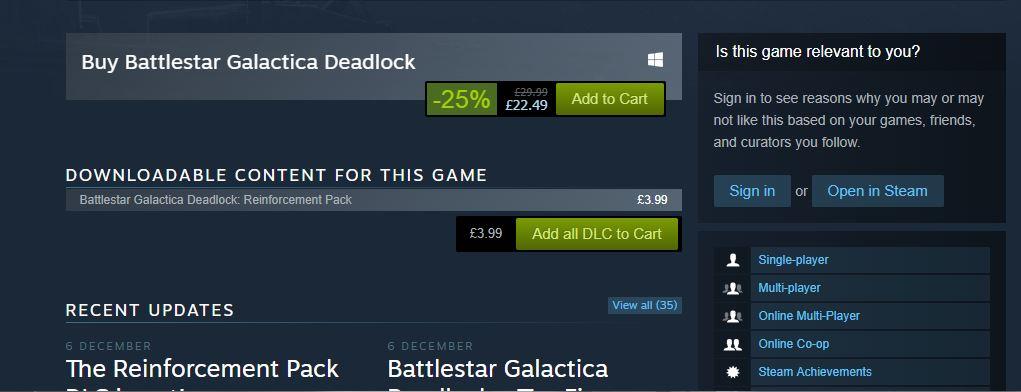
  1. After finding a game on the Steam store, simply click the Add to Cart button, which is located beneath its description. Just like any other online store, you’ll then need to click through to your cart to evaluate your selection and choose which payment method you’d like to use.
  2. If you want to keep things entirely digital, you can pay for your game using PayPal – or, if you’re a little more traditional, you can pay with any major debit or credit card. Bitcoin was recently removed as an option, but it may return in the future.

And just like that, you’ve bought your first game via Steam. You’ll receive an email notification that serves as a receipt should anything go wrong in the next few steps leading up to your gaming.

Downloading a game on Steam

Once you’ve purchased a game, you’ll need to download it to your device so that you can get playing. Again, this is a pretty straightforward process:

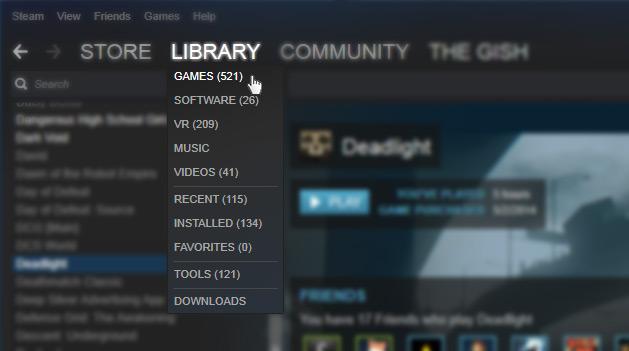
  1. Click the Library tab.
  2. You’ll see your recent purchase and the button download next to it. Click this, sit back, and wait for the game to download onto your computer.
  3. Once the game has finished downloading, you’ll need to open the file and select the Install option to complete the final stage of the process.

Playing a game on Steam

Now that you’ve installed a game from the Steam store, you’re probably wondering how you can start gaming! All you need to do is return to your library, select the game, and launch it from there.


You might also be wondering why you have to play the game on the Steam platform, rather than as a stand-alone program as though you had installed it from a disk. Though it is possible to play your games in this way, there are many benefits to remaining inside of Steam. Indeed, there are some Steam-exclusive trophies that are awarded to players who complete certain tasks. These can be shared with other users of the platform to show off your prowess.

It’s also worth noting that you can select Offline Mode in the top right-hand corner if you want to play a single player game that does not require network connectivity. As your progress is stored locally, you don’t need to worry about losing data.

How to use the Steam controller

While you might be a seasoned PC gamer who enjoys using a keyboard and mouse, it’s a fact that some titles on Steam are more enjoyable when played with a controller.


Available to purchase from the Steam website, the flagship controller was designed especially for PC games. As such, its touchpad allows for a great deal of flexibility when it comes to using it with more traditional games. There are other hardware accessories available for use with Steam, and it’s  worth taking a look at those for sale on the site.

Providing family access to your Steam account

In the old days, it was possible for an entire family to enjoy playing the same game. Of course, that meant each had to install it on his or her computer with the disk. Steam also makes this kind of sharing possible; up to five computers can be authorized to share the same library.

To do this, you’ll need to download and log in to your Steam account on the computer you wish to share with. Then you’ll have to head to settings and then select the Family tab and the Authorize this computer button at the bottom. This can be repeated up to five times, so everyone will be able to enjoy the benefits of the games library.

How to buy a game for a friend on Steam

Totally forgot it was your friend’s birthday? Need a last-minute present for the person who has everything? Steam has you covered, thanks to its gift-giving service.

To buy a game for someone else on your Steam account, you’ll need to follow all of the steps we’ve outlined above, but hit the Purchase as a gift option when it comes to payment.

Making things even better, the recipient doesn’t even need to have a Steam account of their own for you to do this. All they will need is an email address to which the link can be delivered. Once in their inbox, they will be taken to the Steam site to download the software for themselves.

A few hints and tricks before you go

Now that you’re up and running with Steam, we’ve compiled a few hints and tricks that help make your experience even more enjoyable. Of course, more enjoyable often means less expensive, and the best way to sport a bargain on Steam is to download the Chrome extension Enhanced Steam.
Flagging all of the genuine steals to be enjoyed on the platform (and not just the ones that have a 75% sign next to them), this is a handy way of getting some of the best games at prices you’d never get to enjoy in-store.

Another good tip is to consider getting the Steam app on either your iPhone or Android, as this will allow you to make purchases and manage your library while you’re on the move.

Equipped with all of this knowledge, you’ll now be able to get the most out of Steam and all of the services it provides.

How to encrypt your internet traffic

There are many reasons why you might want to encrypt your internet traffic. You might want to conceal your internet browsing from ISP tracking, for example, or perhaps you’d like to improve your security on the internet and shield your information from cybercriminals. Whatever your motivation, we’ll explain what encryption is, why it’s important, and how to do it.

A guide to internet encryption


Why is internet encryption vital?


Encryption of internet traffic has become a critical need for many users, in light of the recent information maintenance laws around the globe that have allowed the ISP to record and maintain clients’ information. Free connectivity and openness is the right of internet users, and yet there are numerous countries and organizations that would limit this freedom by tracking users’ activity and censoring access to content. In such cases, internet traffic privacy is essential.


Encrypting your internet traffic gives you the ability to conceal your online activity from the checking of ISP, ensuring that delicate information like passwords and Visa points of interest are not passed to ISPs and potentially from there to governments or other organizations. This is one reason it is so vital to encrypt your internet traffic.


There are numerous approaches to encrypt internet traffic: VPNs, https, interfacing with Tor programs, utilizing encrypted messaging applications and browser extensions. Let’s go through each of these now.

Virtual private network – VPN


As the name suggests, a virtual private network, or VPN, is a private and encrypted route to connect over the internet to another private system. It requires initial setup and validation in order to work, and after that, it encrypts all the activity between the third-party servers. Using an encrypted VPN tunnel enables the user to browse the web using a masked IP address that seems to be coming from the VPN server, making it difficult to distinguish the user.


Your internet traffic can be seen, adjusted, and logged by the VPN services themselves,  however. Though many VPN services guarantee that they don’t keep logs of your internet traffic and utilize extra security defensive measures, this is a difficult claim to verify. And in fact, a recent investigation revealed that many VPN apps for Android contain malware designed to track users. So do your homework before choosing a VPN provider.


Tor – the onion router


Tor is a distributed relay system that routes the movement of internet traffic by encrypting the IP address at each bounce point in the relay. At each relay, only the last and next IP station are accessible to enable routing.

Tor is one of the most secure browsers in the world since it conceals your activity from the ISPs. When you are are using a Tor browser, your ISP will just see that you are associated with a Tor system, but it can’t determine your destination.


Tor can dodge recognition from all but the most capable state-controlled monitoring machines. Even the NSA has some difficulty breaking Tor. So it’s a good solution to protect your browsing for most activities, though if an organization needs to invest the energy and assets to watch you, they can and will.


Browser extensions


Browser extensions are also useful security tools. Extensions are available that let you control your internet traffic, block ads on the websites that you visit, and kill the cookies and traces that could share your information without your knowledge. This does not imply that you can completely depend on these extensions to do everything for you, but they are good to have in your toolbox.

7
Chrome is a young, fast browser that can browse any web page. It supports all major technologies and standards such as HTML5 and Flash.


Even if you do use browser extensions, you should check to see if your DNS has a leak. DNS leaks can be a big security risk, as it might give your internet traffic data to your ISP. You can use DNS leak test to determine whether or not this is an issue with your device.


Encrypted chat apps


Many modern chat applications are encrypted using a method called end-to-end encryption, which ensures that your chats are secure from monitoring. The structures of end-to-end encryption make it virtually impossible to unravel the data being passed. For example, connections that use end-to-end encryption can’t pass on their customers’ messages to third-parties. If you’re using a chat client and you are concerned about privacy, make sure that your messages are getting encrypted.

8


Encrypting your internet traffic is fundamental, especially in an era of government monitoring and the rising danger from cybercriminals. Using these simple strategies will keep prying eyes from your data and won’t require much work from you.

Techwaways – The week best bits in 4 bites

Acoustic tractor beams could levitate humans

Source: University of Bristol 

The idea of sound taking you higher and higher might not be limited to the dancefloor. Scientists at the University of Bristol in the UK have found a way to trap and move objects with an acoustic tractor beam.

The technique is not new, but this is the first time it’s been demonstrated with objects bigger than the wavelength of the sound waves doing the lifting.

Right now, acoustic beams are limited to levitating 2mm polystyrene balls, but researchers think it’s only a matter of time before much bigger objects – and even humans – could be floating around on sound.

So if scientists find a way to turn the volume up to 11, we could soon all be dancing on the ceiling.

Torturing scumbag targets human rights group over loss of Instagram account

Source: Yelena Afonina/ Tass/ Getty Images

Snaps of the leader of the Russian republic of Chechnya Ramzan Kadyrov dressing up as a chicken or a medieval lord and cuddling a tiger cub made him an IG superstar, with over three million followers.

But thanks to his record of (strictly offline and physical) abuse, Instagram recently shut down his account.

This infuriated Kadyrow, who immediately blamed Memorial – the only human rights organization in Chechnya. Memorial has since had its offices torched and one of its senior members arrested on trumped-up drug charges.

It seems the right to express yourself freely in Chechnya is limited to the leader himself. Say or do the wrong thing in his fiefdom and you could find yourself imprisoned and tortured

Amazon Go is the retail giant’s cashless (and cashierless) new store

Source: David Ryder / Getty Images

There’s no cash, no waiting, and no opportunity to shoplift at Amazon’s new pilot store – but you will need an Amazon account to shop there, plus the Amazon Go app.

Just waltz in, scan a QR code at the turnstile, and take what you want. The store’s electronics will know exactly what you picked up, and will bill you and provide a receipt electronically.

Not happy with your purchases? The Amazon Go app should reimburse you without even a return visit. And of course, if you’re looking for a career in retail, there will still be plenty of shelves to stack and floors to mop.

But for cashiers, it’s a matter of Amazon Go find yourself another job.

Your face pasted onto a porn star? Don’t look to the law for protection

Source: Motherboard (Screenshot from SendVids)

If you’re thinking that life online is becoming unbearable, here comes another digital trend that will encourage you to unplug, head for the hills, and live in a tinfoil-lined yurt.

AI and machine learning make it possible to swap people’s faces on porn movies, so you can barely see the join. As a result, Taylor Swift, Gal Gadot and others have already become unwitting skin stars.

Now the technical threshold for producing Face/Off filth has been lowered to the point where we’re expecting an avalanche of the stuff – plus a brand-new wrinkle on revenge porn.

But unlike traditional revenge porn (did I just write that phrase?) there is no legal protection – in the US, at least.

Troubleshooting common problems when using Code::Blocks

So you’ve created and debugged your first program in Code::Blocks. But something’s still not working right. What do you do next? Let’s go over some common problems that many programmers run into when getting started with Code::Blocks. We will also review frequently used troubleshooting suggestions and tips.

Common issues with Code::Blocks

I’m unable to build my project

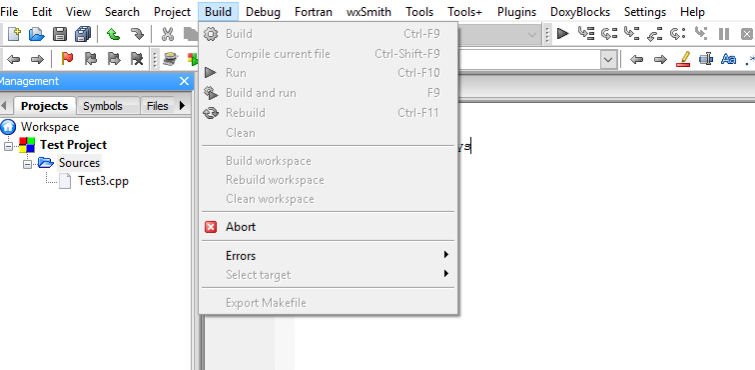
Problem: All of the Build-related options are grayed out.


Solution: Code::Blocks checks the file extension for individual files before allowing them to be compiled. Save your file with the correct file extension (*.c or *.cpp). More often it is useful to create a project so that Code::Blocks can manage the entire build.

I’m unable to compile my project

Problem: Syntax. Syntax errors, incorrect errors in formatting of code, and accidental typographical errors will not allow the program to run correctly. You may see errors that do not allow you to build or compile.

Solution: Methodically check the syntax of the programming language that you are using. You can do this by reading your code. You can step through your code line by line, or you may choose to set break points and watches to isolate segments of your code. If needed, consult documentation for the specific programming language that you are using. Sometimes the smallest error can disable an entire program.

Multiple undefined reference errors

Problem: Every time I build, Code::Blocks reports multiple undefined reference errors. Example:
undefined reference to `WSACleanup@8
undefined reference to `WSACleanup@0
Solution: Check to see if the required library is not linked with your project. Go to Project->Build options…->Linker settings (tab) and add the required library or libraries.

If the error includes a line number, it is likely that this is a problem with your code. Track down your function declarations and implementations. Ensure they all match up, are spelled correctly, and have the correct scope resolution.

A Code::Blocks option I expect to be able to find is missing

Problem: The option I was looking for is nowhere to be found in Code::Blocks.

Solution: Many features of Code::Blocks are implemented by means of plugins. Open Plugins->Manage plugins… and ensure that the one you are trying to use is not disabled. If the plugin you are looking for is not in the list, it’s possible that you removed or disabled it on installation. To acquire the plugin, reinstall Code::Blocks (double checking that the desired plugin is included).

These are some of the most common errors that you may run into when using Code::Blocks. To learn about other errors or problems, consider checking http://stackoverflow.com or https://en.wikipedia.org/wiki/Code::Blocks. In addition, when using any software program, app or utility, it’s always a good idea to familiarize yourself with the documentation on the developer’s website. Further documentation is available at http://www.codeblocks.org/.

You are now well on your way to building and managing complex programs and applications using the complete and extendable Code::Blocks IDE.


________________


Sources:
http://www.codeblocks.org/
https://en.wikipedia.org/wiki/Code::Blocks
http://stackoverflow.com

More:

Download Code::Blocks

6 Chrome extensions to make you more productive at work

Workplace productivity is something most people struggle with from time to time.

However, did you know Chrome has numerous extensions to help you tackle your time-wasting techniques and get back on track?

The options below are some of the standout choices.

1.      OneTab

If your computer has low memory, it may stop you from running multiple programs at once or even prevent opening crucial programs. Also, when you have dozens of tabs at the top of your browser, it’s hard to find the content you need quickly.

In short, tab clutter and reduced computer memory both hinder productivity. This addition conquers both by turning your tabs into a list you can share with other people or export to your smartphone and tablet.

OneTab also lets you reorder the content and group the tabs into intuitive categories, and you won’t lose the material if the browser crashes. (Free)

2.      Weava Highlighter

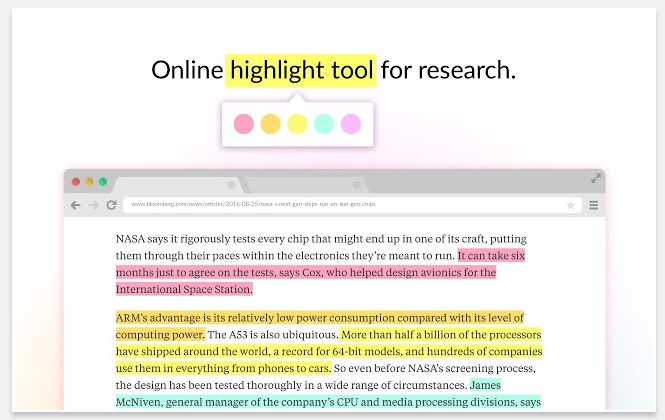
No matter what you need to call attention to online, the Weava Highlighter extension simplifies your research process and giving you multiple or single-colored highlighters to mark PDFs or webpages.

Then you can send the material to team members with the highlights you’ve made.

It’s also possible to organize highlighted material into collections for faster retrieval and even make a citation for each highlight in common styles, such as MLA and APA.

When using this tool, you can easily skim for important information, which could be helpful when getting ready for a presentation or another significant workplace event. (Free, with premium version starting at $5.99 per month)

3.      Checker Plus for Gmail

Despite the convenience of your Gmail inbox, it can be a major time sink. How many times have you told yourself you’d only check the inbox for one email you’re expecting and then get back to whatever you were doing, only to spend at least five minutes clicking through other emails, too? This Chrome extension allows you to monitor emails without opening  Gmail.

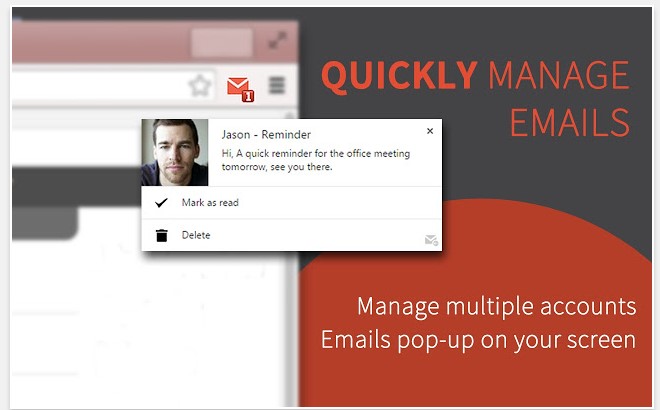
When new messages arrive, a notification pops up on your screen and lets you see the sender’s name and part of the message. You can set it to read notifications out loud, too.

There is also a Do Not Disturb feature that mutes notifications until your specified time. It’s particularly helpful when you’re trying to buckle down and finish a tough task.

If you prefer, this extension can run in the background even after you close Chrome. (Free)

4.      Noisli

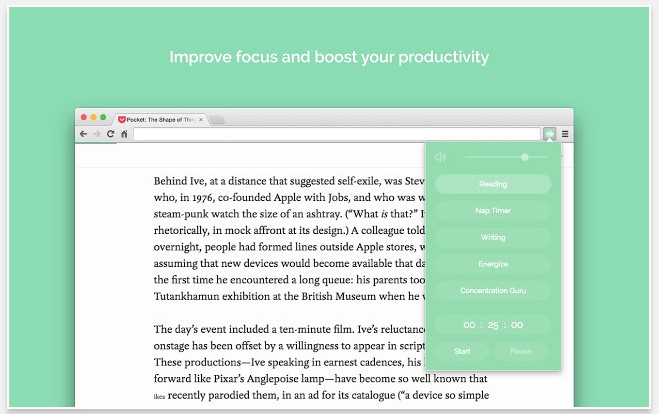
You might not think of sounds as colorful, but people who study them do. They know white noise is great for helping people concentrate because it covers all frequencies and tends to make other noises in the environment disappear.

Noisli is a Chrome extension that lets you turn on a soundtrack of white noise — as well as brown and pink noise, plus nature sounds — while you work.

Change the volume and even create mixes to combine favorite sounds. Also, use the timer function to hear audio for a preset time and use that period to boost focus once you’ve segmented your schedule into blocks. (Free)

5.      Limitless

Maybe you have good intentions to become more productive but don’t know which improvements to make for the biggest impact. Limitless could help — at least with work done online.

It offers a beautiful dashboard that shows how long you spend doing particular tasks and breaks your internet time into categories, such as browser-based work and social media. You can create custom categories based on how you typically use the internet, too.

In addition to gorgeous photography that livens up your desktop, this extension offers productivity tips to help you spend time wisely, and also provides inspirational quotes.

After using Limitless for a while and paying attention to the feedback provided, you might be surprised at how easy it is to make positive changes that last. (Free)

6.      Email This

Like many people, you probably come across interesting articles while working.

Even though they’re not related to your current task, you might stop and read them immediately. It might not seem like it, but that practice cuts into the time you have to devote to other things.

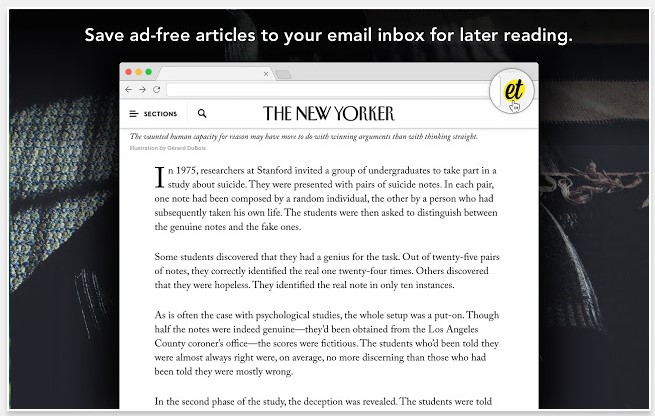
The Email This extension saves ad-free versions of articles so you can read them later. It does so by delivering an email containing the content, allowing you to read it during your downtime instead of at work.

Once you find something worthwhile, just click the Email This extension in your browser bar to generate the message.

Being able to read articles later enables you to focus on the material when you genuinely have time to do so, not while you’re trying to eat lunch and read a proposal from your colleague at the same time.

Also, because Email This removes the ads, it reduces distractions to help you focus on the text. (Free)

By using these Chrome extensions — or even one of them — you could make the most of your workday and stop wasting time.

Image by Burst

20 Twitter tips: Become a social media pro

Whether you’re looking to grow an impressive list of followers or simply get your content in front of the right eyes, we’ve assembled 20 tips to get you using Twitter more efficiently – whether you’re new to Twitter or you want to build up your following and get the most out of this impactful platform.

20 tips for Twitter

Check your hashtags

Hashtags can be found virtually everywhere. While they may be ubiquitous, it’s worth taking a minute to understand how to best use hashtags on Twitter.

A way of grouping tweets together, hashtags allow users to join conversations and have their content discovered. For example, if a user has an opinion on “America’s Got Talent,” by adding #AmericasGotTalent to their tweet they will show up for anyone searching for the show.

So by using relevant hashtags, you’ll be able to connect with people interested in the same things as you are. This is a particularly useful strategy if you are tweeting on behalf of a business and want to get your products in front of consumers likely to want your product or services.

Get your bio right

While Twitter’s unique selling point has everything to do with brevity, the biography (bio) section is large enough to give everyone an idea of what you’re about and what your aims are for Twitter.

For example, if you’re interested in sharing and discovering new music, make sure that you explain this in your bio. If you’re using Twitter as a business tool, then be sure to include the web address so that users can be sent directly from your Twitter page to an online store.

Be social

While the clue might be in the phrase “social media,” it’s worth a reminder that it pays to act socially. Engaging with anyone who reaches out to you is worth the effort. Indeed, by replying to tweets that you receive on your account, you’ll gain greater exposure on other users’ feeds – which will increase the likelihood of you acquiring followers.

For businesses, it’s also an opportunity to gain some free PR. Anytime you have a positive interaction on Twitter, anyone who sees it will come away with a favorable impression of your brand.

Follow the right people

To get the most out of Twitter, you need to follow the right people. If you’re interested in classic cars news, search all of the related terms to find people tweeting about this subject.

Not only does following the right people provide you with a feed of relevant content. It also increases the chances of you getting a follow back and increasing the size of your network.

Choose good profile and header images

Images are the first things users will notice when looking at your profile. Make sure to select different images for your header photo and your profile photo. Choose high-quality and relevant pictures that show who you are or reflect the image of your brand.

Keep it brief

While Twitter now allows people to post tweets that are twice as long as its original 140 characters, research has shown that shorter posts are more likely to attract the attention of other users. So try to keep posts between 120-30 characters.

Figure out the right times to tweet

When it comes to tweeting, success is all about timing. Do you want to have people actually read your thoughts about your favorite sports team? Then tweet when they’re playing, which is when other users are likely to be searching their name in the search bar.

Run a competition

Nothing gains followers faster than the promise of a giveaway. Whether you’re a business or an individual looking to make a name for yourself,  by asking users to retweet and follow you for a chance to enter a prize drawing, you can be sure that your Followers list will grow and grow.

Tweet pictures

Sure, witty words might make you famous on Twitter. But there’s nothing like a striking image to get people talking. It’s important to make sure the images you post are high-res and look good on both desktop and mobile versions of Twitter.

If you’re feeling a little more adventurous, you might consider posting videos, too. With videos as with words, brevity is key.

Use the app

If you’ve been using the browser-based version of Twitter, why not try the app?  Available for iPhone and Android, the app allows you to quickly tweet on the go and upload photos directly from your mobile. The app also boasts a user-friendly interface.

Reach out

One of the most overlooked features of Twitter is the search bar located in the top right-hand corner. By entering a word or term here, you’ll discover all the tweets that relate to your chosen subject. Searching is a great way to find users to follow or identify potential customers.

Retweet relevant content

Whether you want to be seen as the authority on a particular subject you enjoy or you have found something useful you think your followers might appreciate, be sure to retweet it.

Retweeting works similarly to replying, but since it’s public it also allows you to become a part of the broader Twitter community.

Set a good pace

Just like in real life, users on Twitter don’t want to feel drowned out by one voice. Instead, they want to hear from you when you have something exciting to share or some information which will benefit them.

In practical terms, this means spacing out your tweets so that you don’t flood anyone’s timeline but remain present enough to be remembered. Tools such as Buffer and Hootsuite can help you to schedule tweeting times for your messages.

Get people talking

Rather than simply expressing an opinion or sharing a link, consider how you might start a conversation when you tweet.

If you’re looking to find out about the latest movies, for example, it might be worth stating which ones you’ve enjoyed yourself. You could follow that up by asking your followers which films they’ve enjoyed recently. In fact, you could talk to multiple followers via your tweet; just include @username within it.

Host a poll

Can’t decide between restaurants to eat at tonight? The Twitter poll feature can take care of that for you. As simple as clicking the poll tab beneath the tweet box, you can have one up and running in seconds. This feature is also another sure-fire way to get people interacting with you.

Pay attention to trending topics

If you take a look at the left of your Twitter screen, you’ll see a range of revolving hashtags grouped beneath a Trending Topics headline. These hashtags refer to popular subjects being talked about at any given time and allow you an opportunity to join global conversations.

Beware of tweets that include Trending Topics hashtags but seem to be unrelated: Twitter spammers sometimes use these hashtags to get more visibility.

Use direct messages

The best way to form a more personal, one-to-one connection on Twitter is by using the direct message function. Sending a direct message is a good  way of saying thanks for getting a conversation rolling; businesses should be mindful of the opportunities afforded by this feature.

Tag your location

If you’re dining in a new restaurant or visiting a new country, consider tagging the location of your tweet so that users are able to find you and possibly suggest things to do when in the area.

The location feature is broad, so you won’t be revealing your exact location. However, do consider the fact that tweets are public, so tagging your location could alert strangers to the fact that you are not at home. In general, it pays to be careful about how much information you reveal publicly.

Trim the fat

Every once in a while, it pays dividends to perform a spring cleaning. By unfollowing users who have become inactive, you can ensure that only relevant information appears on your Twitter timeline.

What’s more, people will often browse through the list of people you follow if they enjoy your content. So it’s best practice to provide them with a list of useful users to discover.

Be yourself

Yes, we said it – the biggest cliché of them all. But it is the perhaps the best piece of advice for Twitter users who want to expand their engagement. By being yourself and infusing your tweets with individuality, you’ll become a memorable user who attracts attention and grows followers.

Happy tweeting, friends!

Softonic Speaks to… Zig founder and CEO Josh James

At first glance, Josh James looks like yet another music executive leaping into the technology space. And why not? From Dr. Dre and Jimmy Iovine’s bite of Apple to Snoop Dog’s investment in the sports conversion app GameOn, the technology check is large and seemingly limitless. As former SVP of Live Music for Warner Music and founder of BaseCamp Productions where he brought in mega-talent like Pearl Jam, Linkin Park, Jay Z and Kendrick Lamar, Josh James was clearly the go-to guy in music. But his new venture, ZIG plays more to his passion for digital media consumption than computer app cliché.

9
One of the great things about ZIG is that the news is updated regularly so that there is always something new to learn. The app boasts a special algorithm that identifies the types of content that users are interested in and presents those types of stories at the top of their news feed so that they will not be missed. In addition to news stories, users can see photos, videos and much more, while the interactive feature gives users the chance to have their say and let others know what they think

During my recent interview with James, he was both humble and giddy about the recent launch of his new venture, ZIG. ZIG is a mobile media content platform that collects millions of articles, photos, videos and other published content and in real-time, prioritizes and remixes the content into an immersive, user-centered content stream. Co-founded by Adam Platzner and John Tornow, ZIG is intuitive and initially draws from the social media history and most viewed content sites of each user. From there, a patent-pending algorithm customizes the user stream so that only published content of interest shows up in user streams. The “ZIG react” feature is a cool interactive component where users can superimpose a personal photo or GIF directly on top of the content and share their feeling and opinions across existing social media platforms, texts and emails!
James, a self-described media junkie said that he came up with the idea partly out of frustration and utility. “I was going to the same social media sites for fifteen years. Why didn’t they know what I wanted to see and what I didn’t,” questioned James? “During the holidays a few years ago I watched my wife and my nieces and nephews scouring over different social media sites to find content that they wanted. That gave me the idea,” said James.

And what an idea it was! After early buy-in from A-list investors former Vanity Fair, Editor-in-Chief, Graydon Carter and music icon Quincy Jones, James and his team raised the money to launch ZIG and secure the domain. “We were extremely fortunate to have Graydon and Quincy onboard early. It was much easier to get meetings,” quipped James. “Quincy told me that the ZIG domain was available. As you know, it’s extremely difficult to get a three letter domain name that people could easily recognize. Again, we were quite fortunate,” said James.

The goal of ZIG is to disrupt the publishing model while delivering user-centered content streams that are on target and interactive. “It’s been four days since we’ve launched and although it’s too soon for download numbers, we are happy with the activity that we’ve seen,” commented James. “ZIG is a win for publishers and a win for users,” added James. And based on his vision and the ZIG team execution, ZIG is destined to be the go-to app this year!

Tina Tyler is a veteran broadcast journalist and syndicated writer. She is the host of Tina On Tech, the only weekly radio/TV technology program produced and hosted by an African American woman with distribution in the United States and the United Kingdom. Tyler is a member of the Society of Professional Journalists, National Academy of Television Arts and Science, and recently has been nominated for a Women In Technology Award. www.tinaontech.comtina@tinaontech.com.

 Facebook          Twitter          Instagram           LinkedIn


The basics of debugging in Code::Blocks

So, you’ve successfully created your first program in Code::Blocks – that is, you have written your source code, made any changes needed, and compiled and built your code. Maybe you got lucky and your program came out just right on the first try. But more likely you’ll need to make edits and debug your code in order to come out with a finished product that works properly.

So let’s learn how to debug in Code::Blocks, which is a popular IDE that many developers use to create code with C/C++ and other languages.

How to debug your program

Debugging your program in Code::Blocks might seem daunting at first, but after we review the process it will become second nature. The process of debugging involves tracing the program operation step by step. You also use the debugging process to place breakpoints where you wish the program to pause. A debugger can pause your program and you can watch the values of the variables that you have defined. This will help you to isolate errors or mistakes in the code. First, let’s talk about using breakpoints.

Using breakpoints

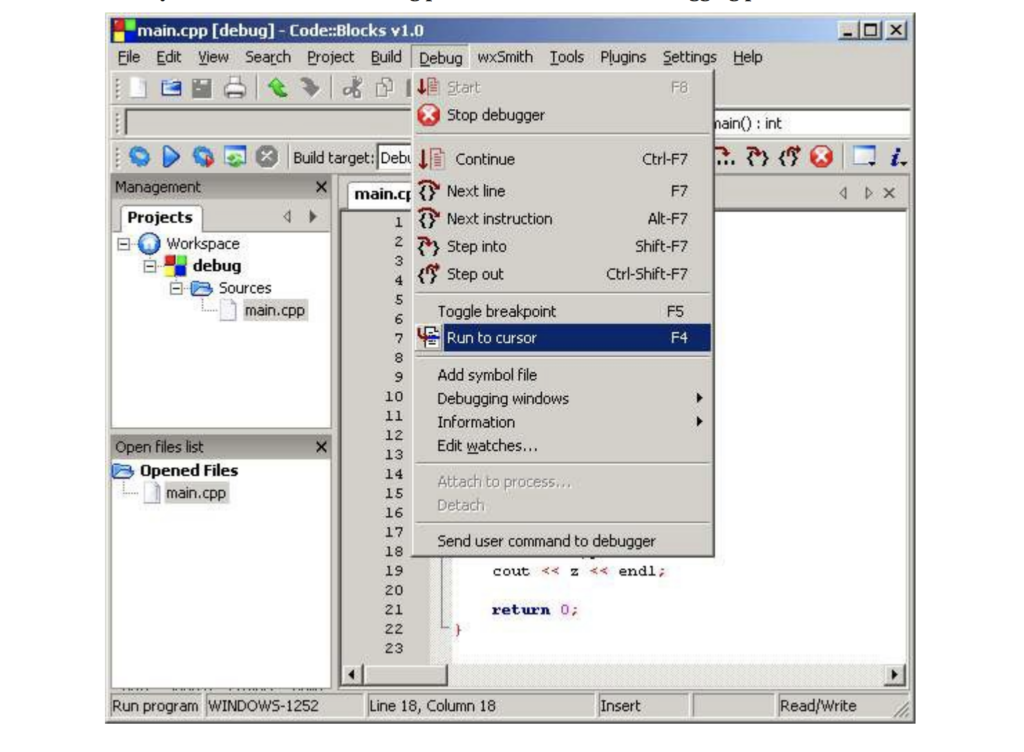
  1. Set a place in the code to have the program pause. To do this, pull down the Debug and click Run to cursor. The cursor should be over the first line of code where you plan to start the tracing process. 
  2. Move the cursor over the line where you want your program to stop. This is called a breakpoint. Now you can tell the debugger to run the program up to the cursor’s position, or line number. This allows you to see the point where your program malfunctions.

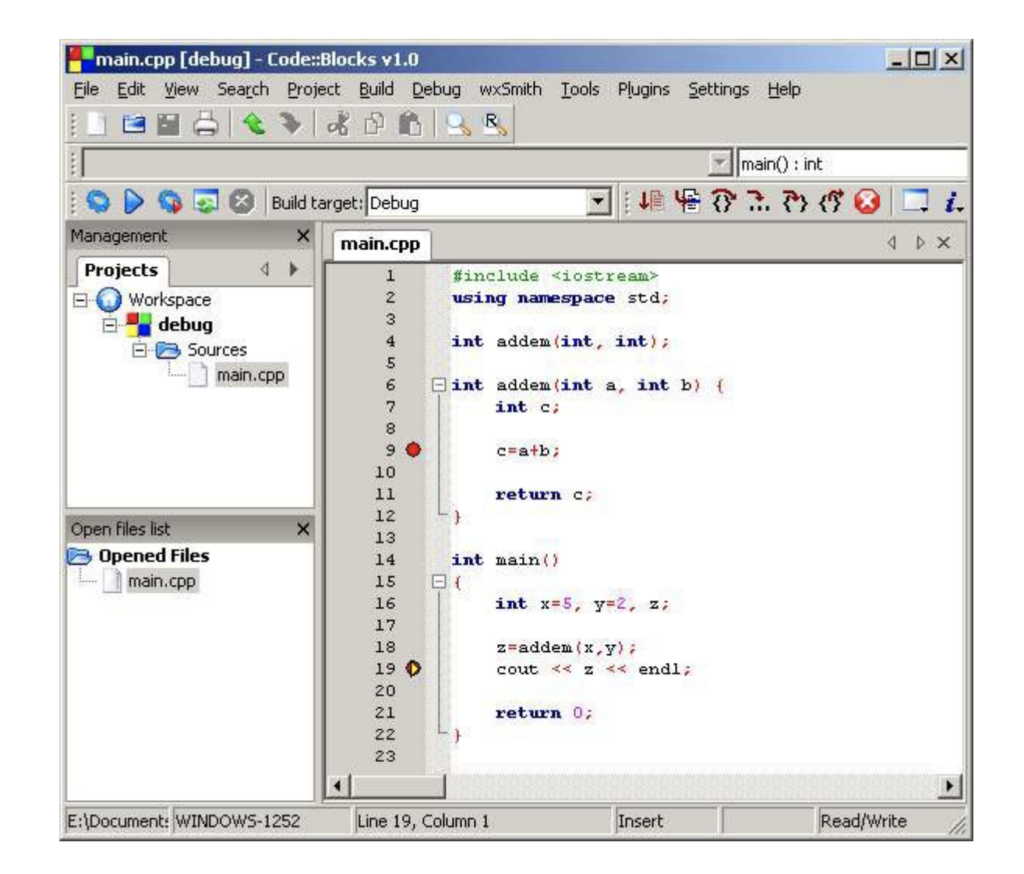
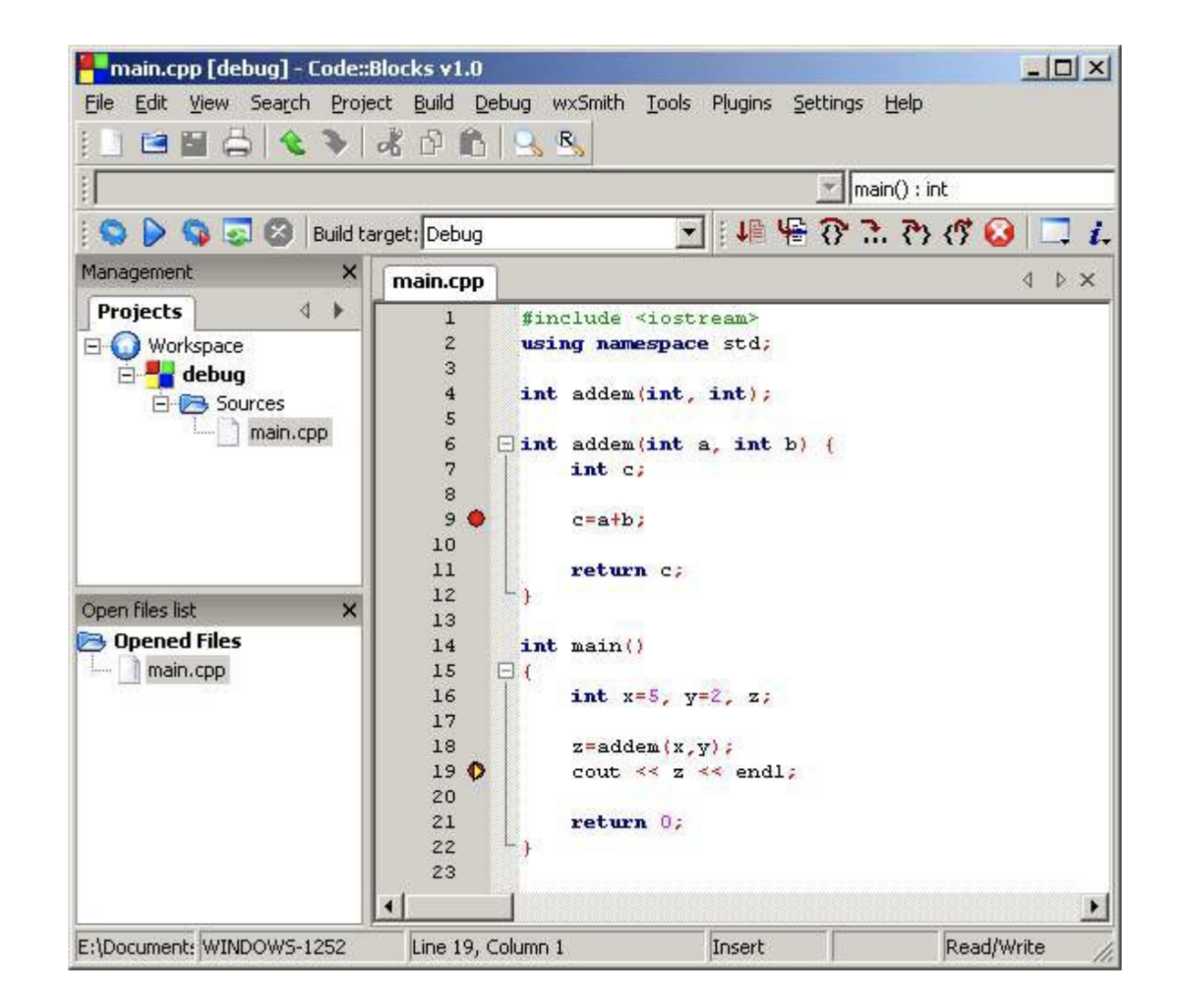
When the debugger detects a breakpoint, the program pauses and the debugger allows you to inspect your code. The breakpoint remains until you remove it. It can be toggled on and off by pressing F5. (Prior to running the program in debug mode, breakpoints will be marked with a red circle. )

Problematic areas of code can now be isolated between breakpoints for easier identification.

Using watches to monitor code variables

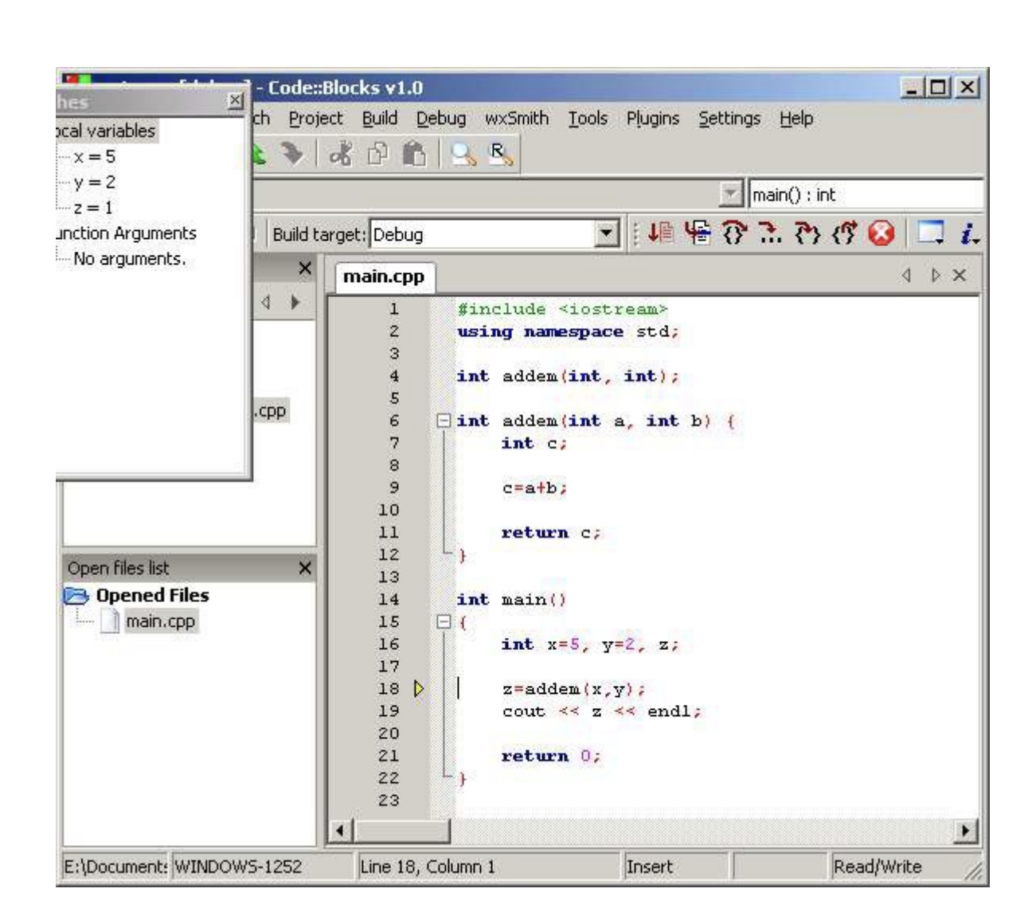
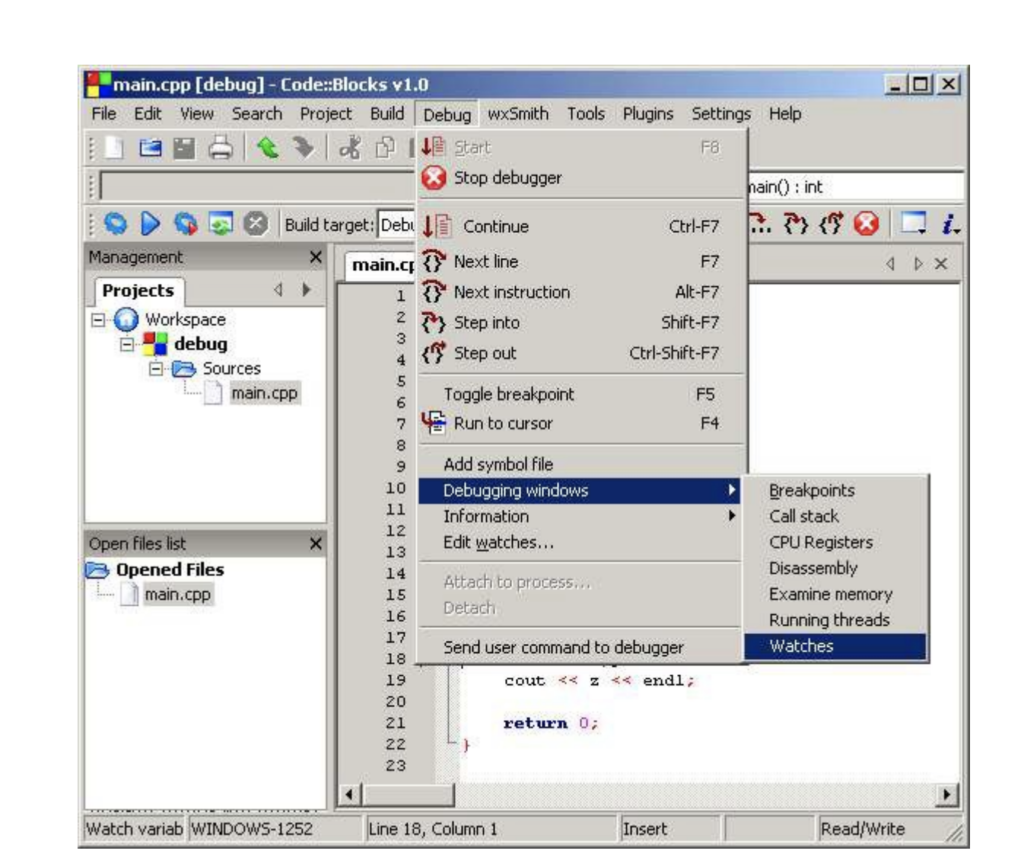
To monitor specific variables during the execution of the program, you should open the Watches window. This will highlight the variables in your code.

Do this by going to the Debug pull-down menu. Click Debugging Windows and then Watches. The Watches menu shows a list of the variables in your code. If nothing is next to the listed variable, there is currently nothing assigned to it in the program.

Debug tips

Yellow markers are displayed on the left side of the screen beside the location of breakpoints in the code when the running program has paused. This lets you see the exact location of the breakpoint.

To advance to next line of code, select Next line from the Debug menu. You can also use the F7 key as a keyboard shortcut to accomplish the same task. This allows you to walk through your code line by line in search of errors. This reduces troubleshooting time greatly.

When you are finished debugging, click Continue, and your program will run to the end. If your program is stuck and will not advance, you have the option to choose Stop debugging from the Debug menu.
When you run the debug process, the yellow triangle will show you where the breakpoint has stopped the program from running. The red circle will show the various locations that the breakpoints have been placed throughout the code.


Now that you understand the basics of debugging in Code::Blocks, you are on your way to completion of a successful program. When you have completed the debugging process Code::Blocks will ask you if you want to save your workspace. If so, click yes; it is now safe to exit the program.

Sources:

http://www.codeblocks.org/

http://www.sci.brooklyn.cuny.edu/~goetz/codeblocks/codeblocks-instructions.pdf

https://en.wikipedia.org/wiki/Code::Blocks

Related links:

Download Code::Blocks

The week’s best bits in 4 bites

Instagram gets more features – but you might not like all of them

Source: Klaus Vedfelt/Getty Images

Plenty of changes great and small, good and possibly bad are coming to Selfie Showoff Land, AKA Instagram.

The app now displays how long it’s been since you last used it, and whether you’re online right now. Thankfully, this new Activity Status snooping can be turned off via the gear icon menu on your Profile screen.

On the positive side, if you want your IG fix without the pix, the new Type feature will let you share written messages without the need for photos on Instagram Stories.

And if you’re in Indonesia, The Philippines, or Brazil, you’ll be able to use Giphy for animated gifs for Stories. Hopefully we’ll all be able to join the fun soon.

EU microwaves produce as much carbon as 7 million cars – but the comparison is clickbait

Source: Huw Jones/Getty Images

Microwaves are cooking the planet. That was the immediate takeaway from dozens of articles last week reporting on a recent University of Manchester study, which found that Europe’s microwave ovens consume 9.4TWh of electricity annually.

Generating that amount of power adds as much carbon to the atmosphere as 6.8 million cars.

So it’s time to chuck the microwave, right? Well, no – because microwaving is actually the most fuel-efficient way to cook anything (even kittens, but don’t try that at home).

A microwave oven actually consumes less energy during its lifetime than a low-power bulb left on 24/7.

In fact, you’d need to use 17 microwaves at once before they start killing the planet as efficiently as your gas-guzzler.

Drone stops a drowning down under

Source: BBC News

Local lifeguards in New South Wales, Australia, had barely gotten to grips with their new life-saving drone when the call came in – two young swimmers were in trouble 2,300ft (700m) out to sea in rough conditions – and this was not a test.

The lifeguards sent the Little Ripper UAV drone to drop a life raft for the boys to grab. They soon got to the shore, exhausted but unharmed. Drones in New South Wales, which have cost $340,000 so far, also help protect swimmers by spotting sharks.

A little cheaper at $149 is the Flybrix kit, which lets you build your own working toy drone out of Lego. The great advantage of this is that when the inevitable crash happens, you just rebuild your flying machine.

Trains bark like a dog to deter deer death

Source: AP

Oh, deer! It seems Bambi and friends can’t stop wandering onto the railway tracks and making a horrible bloody mess of themselves all over Japan’s high-speed trains, causing delays for passengers.

Desperate rail operators have tried several approaches to stop the carnage – and have recently hit on recorded dog-yapping as a deer deterrent, which scares large numbers of the hoofed herbivores out of harm’s way,

First, the train broadcasts a three-second recording of a deer snorting. Once they have the deer’s attention further down the track, the train plays 20 seconds of dogs barking.

If trials continue to get positive results, the snorting barking train will become a reality across Japan by the year end.