Make free 3G iPhone calls with Skype – for a while

Skype logoiPhone users can now make to make free Skype calls over 3G, thanks to the latest update of the popular VoIP software. Previously, free Skype-to-Skype calls could only be made over WiFi, but version 2.0 now lets users call any Skype contact utilizing their 3G contract.

Unfortunately, this magical era of free calls to anywhere in the world isn’t going to last. Skype has announced that it is only offering free 3G calls until the end of 2010, so make sure you get all of your talking done before then. The developer hasn’t revealed how much it will cost, but it has said that it’ll be a monthly subscription rather than a one-off fee.

It seems that this isn’t good enough for those freeloading iPhone Skype users. Today, Skype’s App Store page has been flooded with complaints from disgruntled users, moaning that they will have to pay for the service. This is the service that didn’t exist until today. The service that is being offered for free for six months. The service that a couple of years ago no one thought would even be possible, such was the resistance towards VoIP from mobile operators. Ungrateful lot!

Quit Facebook? Learn to adjust privacy settings instead

In case you didn’t know, today is Quit Facebook Day: a date many Facebook users have chosen to abandon the popular social network. Their reasons? They seem to be  unhappy with the way Facebook is dealing with their data. According to the official statement, Facebook “makes if extremely difficult for the average user to manage their data” – that is, decide what’s visible and what’s not. They’re also worried about “the usage Facebook could make of these data in the future”.

Quitting Facebook? Learn to adjust privacy settings instead

With all due respect, this is just nonsense. If you’re worried about online privacy, why did you join Facebook in the first place? You don’t need to be there, just because everyone else is. Want to find old friends from school or keep in touch with workmates? There are plenty of other ways you can use: email, IM clients, Twitter… not to mention Google’s recent social tools like Buzz and Wave. You can also use these to send interesting links, share videos or exchange messages.

In any case, if you still want to be on Facebook but don’t want to be concerned about privacy, you only need to configure your profile settings accordingly. Luckily Facebook has made it easier for the user – maybe in response to people threatening to quit their service. Simply click the Account link on the top right corner of the Facebook main page and select Privacy Settings. Continue reading “Quit Facebook? Learn to adjust privacy settings instead”

The best Facebook World Cup applications

We’ve already shown you how to follow the World Cup on your computer and on your iPhone. But there’s plenty more football fun to be had if you head onto Facebook – and I’m not just talking about posting taunts on foreign friends’ walls. Facebook is now full of applications relating to the World Cup (there are well over 100 at the moment). Obviously a lot of them are complete guff but there are a several that are very handy for following the tournament or just for a bit of soccer-related fun. Here are some of our favorites:

Fantasy BettingFantasy Football Betting – If you fancy a flutter on the World Cup, this application is perfect because it allows you to bet for pretend money. For each match, you bet on who you think will win (or if it’ll be a draw). If you’re right, you win twice the money you put down, if you’re wrong then you lose it all.

World ChampFootball World Champ – With this app you can try to win the World Cup for your country. After choosing you country, you then pass the ball to a friend on Facebook. If they have the same team it’ll count as a pass, if they have a different team it’s a goal. The country with the most goals overall wins the cup.

GalacticosGalacticos World Cup – This is game in the style of Football Manager. Your task is to assemble a team from the World’s top players and take on other players on Facebook to achieve international glory. It’s a bit unrealistic being able to select a player from any nation for your country, but it’s still fun.

PlannerWorld Cup Planner – It’s important to get your viewing schedule mapped out before the tournament starts, and World Cup Planner lets you do this very easily. The app offers locations and kick off times, and you can search by team, group, date, etc. It even shows which UK TV channel will show each game.

International BadgesInternational Badges – Want everyone to know exactly who you’re rooting for at the World Cup? Then install the International Badges application, which places the team crest of your favorite country onto your Facebook profile. All 32 countries’ badges are available to choose from.

Puzzle SoccerPuzzle Soccer – If you like Puzzle Bobble-style games then give Puzzle Bobble a try. It puts a football spin on the classic puzzle game, challenging you to burst the balls by making combinations of matching colors. You pick a country and must do battle against other nations.

Visa Match PlannerVisa Match Planner – Another handy tracker, this app lets you chart the progress of the tournament as it unfolds. Sections include Schedule, Events and Results. It’s also worth checking out the Goooal! area, where you could win a trip to the next World Cup.

Eurosport appMy List of 23 + 1 – This official Eurosport Facebook application challenges you to pick your best squad and your dream starting line-up from one of six countries. You can pick a coach and select a formation, before dragging and dropping the players onto the pitch.

Create an alias for your bookmarks in Firefox

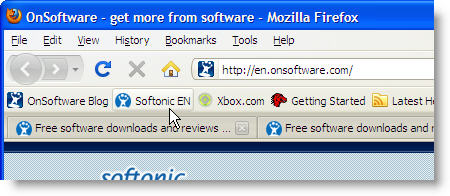
If you visit the same websites regularly, it’s a good idea to bookmark them so that you don’t have to enter their address in the browser every single time. You can then add these links to the bookmark bar, and open those websites with just one mouse click.

Firefox bookmarks

But there’s a trick to open websites up in your browser that’s even faster and easier than clicking an icon on a toolbar: adding a keyword – that is, an alias – to each web page you bookmark in Firefox. Simply open the Bookmark Manager in Firefox (Bookmarks > Organize Bookmarks) and search for the website you want to create an alias for.

Firefox bookmarks

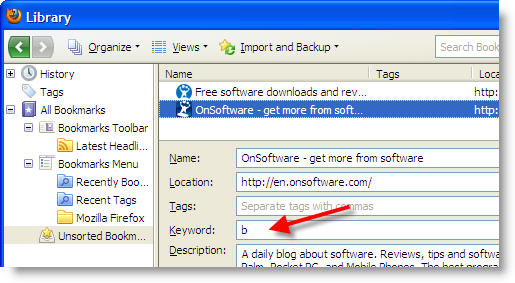
Highlight the selected bookmark with the mouse and click the black arrow button besides “More” at the bottom of the window. This will display more text fields, including one that reads “Keyword“. Enter the alias for the website here – you can use a word or just a single letter.

Firefox bookmarks

Close the Bookmark Manager and you’re done! Now every time you enter that letter or word into the address field in Firefox, you’ll be immediately taken to the associated website.

Follow Eurovision 2010 with Google

As a goodwill gesture for forcing my girlfriend to watch every World Cup match coming this summer, I’ve agreed to let her turn on the Eurovision Song Contest on Saturday. I’m not normally one for monster rockers or dancing turkeys but I thought I’d at least try to get into the swing of the contest this year.

I’ve just discovered Google’s Eurovision Predictor gadget and it’s really helping my preparations for the world’s campest contest. The tool provides a real time forecast of who is going to win the tournament based on searches for all the different artists on Google. You can view graphs of the search evolution, to chart the acts’ popularity over time. Best of all, the Eurovision Predictor includes YouTube videos so you can familiarize yourself with all the songs ready to belt them out loud on Saturday night. Um, not that I’ll actually be doing that, you understand.

Eurovision

Last year, Google was spot on when its gadget predicted that Norway would scoop the title. So, according to this year’s forecasts, it should be Germany’s Lena who claims Eurovision glory. Maybe we’ll even find out where she picked up that ridiculous English accent.

[youtube]http://www.youtube.com/watch?v=8QSgNM9yNjo[/youtube]

Is Microsoft now officially irrelevant?

stock market dive.jpgIt seems that now more than ever, when the markets speak, the world listens. And what the markets said yesterday is that Apple is now the biggest IT company in the world.

Apple’s market valuation of $221.4bn passed Microsoft’s $218.3bn on the New York stock market yesterday marking a depressing new low for Microsoft and firmly drawing the battle line between Google and Apple – Microsoft is set to be nothing but a footnote in the IT world.

The decline of Microsoft is all the more amazing when you consider that at the beginning of 2000, the company was worth $556bn compared to Apple’s paltry $15.6bn. Then, Steve Balmer took over Microsoft while Apple co-founder Steve Jobs returned like a prodigal son to Apple which almost went bankrupt in 1997 and started the long road to Apple’s recovery. As a result, much of the blame for Microsoft’s decline has been laid at the feet of Balmer who has been helpless in the face of Job’s ingenuity and innovation.

[youtube]http://www.youtube.com/watch?v=wvsboPUjrGc[/youtube]

To add insult to injury for Balmer, even more spectacular has been the rise of Google which was nothing but a loss-making search engine back in 2000. It’s now worth $115.bn making it bigger than Hewlett Packard and only a shade smaller than Cisco and IBM. Google is very much in the ascendancy and it’s surely only a matter of time before it leapfrogs Microsoft on the stock market over the next few years.

But even though Google may still lag a few places behind Microsoft financially, it’s already miles ahead in the software world. While Apple has destroyed Microsoft in the hardware stakes with iPods, iPads and the increasing popularity of Macs, Google has destroyed it in the online advertising business courtesy of Google AdSense which has outstripped Microsoft’s loss making Live services. Even in the mobile industry, Microsoft Windows Mobile can’t compete with either Google’s free Android operating system or the iPhone.

chromium2.png

Microsoft’s saving grace remains Windows and Office, the two most widely used computer applications in the world. Courtesy of these two products alone, Microsoft still makes more profit that Apple or Google even if its market valuation is plunging. However, the writing is on the wall for these two flagships too. As in the mobile world, why should consumers and manufacturers pay for a license to use Windows when operating systems such as Google Chromium and Google Docs offer a competent free alternative?

Microsoft’s failure to innovate and embrace open source or free software has been its ultimate downfall. In an increasingly competitive and desperate economic climate, both consumers and businesses will ultimately end-up ditching expensive options such as Windows and Office thus finally consigning the company to the history books.

[Header image from Hooray for Change]

All you need to know about Photoshop brushes

You may have been using Photoshop for a while now, but you may have not noticed all the possibilities hidden behind one of Photoshop’s most powerful tools: the brush.

Photoshop brushes

Brushes in Photoshop are much more than just a tool to draw. They can be used to create decorative frames, add pre-made shapes and customize your images in many different ways. But if you want to make use of all the potential in this tool, you need to know how to configure and use it properly.

Like all other tools in Photoshop, brushes have their own settings in the top toolbar: Size, Mode, Opacity and Flow. Continue reading “All you need to know about Photoshop brushes”

Best weather forecasting software for Windows

In case you hadn’t noticed, summer is on its way (at least, it is here in the Northern hemisphere). This means barbecues, beaches and burnt bits. Or at least, that’s what we hope.

If you want to make the most of the good weather then you can turn your PC or laptop into a personal weather station so you know exactly when to plan your outdoor pursuits. There are scores of weather forecasting programs available for Windows, and some are more reliable than others. Here’s our top five:

The Weather ChannelThe Weather Channel Desktop is a comprehensive desktop weather station with a bevy of prediction tools. You can get hour-by-hour, weekend or 10-day forecasts, including information about ambient temperature, air pressure, humidity and wind direction. The Weather Channel Desktop minimizes to the taskbar, displaying just the current temperature. You can then open it by double-clicking, or right-clicking to navigate the menu.

Meteo FusionMeteo Fusion is an altogether simpler weather forecasting tool. The widget-style application stays open on your desktop at all times, showing you the current conditions outside and giving you an up-to-date outlook for the coming days. You can pimp the app with different themes and change the transparency of the interface, so Meteo Fusion looks really cool even when it’s baking outside.

YoWindowYoWindow is by far the most attractive weather app on the block. YoWindow features a colorful, fully-animated window that displays jaw-dropping landscapes, and changes according to actual weather conditions. It displays the current situation, plus temperature, wind, pressure, and humidity. All these conditions are reflected in an customizable animated background – which you can replace with your own photos.

My Free WeatherMy Free Weather allows you to view the sky in any city in the world and track local weather. You can track a moving storm & weather patterns via satellite and radar. Naturally, you can also view daily and detailed forecasts, local time and date for any location worldwide, plus alerts for severe weather. It also shows other information such as wind speed and direction, humidity and visibility.

Global WeatherGlobal Weather 3D is the most scientific-feeling application out of the bunch. Instead of displaying the usual geographic map with weather symbols, the program makes use of an attractive, zoom-able, three-dimensional Earth to show the current position of clouds on our planet, marking their density with a color code. You can display geographical textures, day and night zones, and countries’ names.

Create custom jumplists in Windows 7

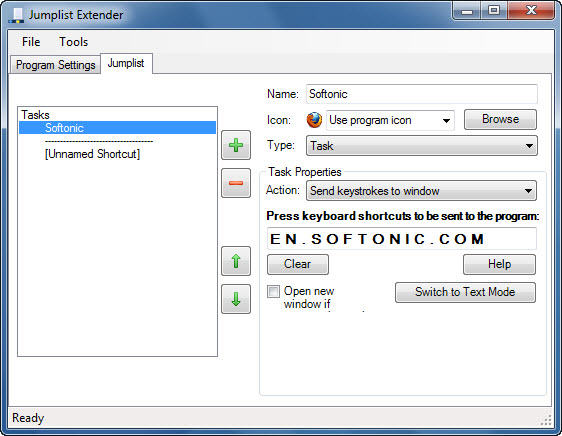
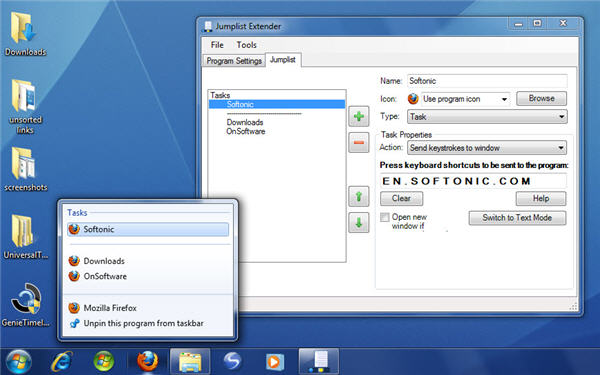
Jumplists are one of my favorite features in Windows 7. They make apps easier to use by providing direct access to their most frequently used tasks and files. Unfortunately, jumplists are not available for all programs, which is why I’ve been searching for a way to add them to my favorite software – until I found Jumplist Extender.

Create custom jumplists in Windows 7

With Jumplist Extender you can easily create custom Windows 7 jumplists for any program, with the commands and files you use most. I have to say the program is a bit rough around the edges – meaning sometimes it takes a while to make the jumplist work – but in general terms it’s exactly what I was looking for.

Configuring Jumplist Extender is very easy. Launch the program and click “Start a new jumplist“. Then select the executable file of the application you want to create the jumplist for. Jumplist Extender will ask you to click on its window, and will then let you start adding commands to your custom jumplist.

When you’re done, go to File > Save and Apply to Taskbar and the jumplist should appear right on top of your app’s icon in the taskbar, whenever you right click on it.

Create custom jumplists in Windows 7

Now, I found a few glitches while testing the program. Creating a jumplist from scratch works fine, but editing it is a completely different story. Most of the times changes won’t be saved until you “reset” the list by disabling and enabling it again. Besides those bugs, however, it’s still a very useful app for all of us who miss jumplists everywhere!

Timewaster: Paint it Red 2

Paint it Red 2 is an extremely relaxing art game where the objective is simple: paint the screen red!

Guiding a cursor around to spread paint, which is sometimes red, sometimes mixed with other colors, and behaves in many different ways, is both addictive and relaxing. Losing an hour with Paint it Red 2 isn’t difficult! Every level works slightly differently, and there are no instructions, you just have to experiment.

Every level has a Red percentage to aim for before you can move on, while your current percentage is displayed. This draws you right into the game, and playing through the many levels on offer is good fun. Paint it Red 2 just requires Flash and your browser.