A simple hack to watch YouTube in high quality

You may have noticed on YouTube that you can now watch some clips in a high quality. To do this, you have to click on “Watch in High Quality” which is situated below the clip. However, the “Watch in High Quality” option is not visible for all clips but with a simple change to the video’s URL, you can watch any clip in either High Definition or High Detail format.

To change the clip to High Definition, simply add &fmt=6 to the end of the clip’s URL. To change the clip to High Detail, simply add &fmt=18 to the end of the clip’s URL.

Here is a snapshot of a YouTube clip in default quality:

youtube-high-definition.png

Here is the same clip in High Definition:

manics1.png

And finally here is the clip in High Quality:

youtube-high-quality.png

As you can see, the sharpest results are in High Definition mode and the sound seems better too. Obviously, much depends on the quality of the original clip uploaded – you can’t make a silk purse out of a pig’s ear but this is a simple but effective hack to enhance your YouTube viewing.

Make Songbird sing your tunes

Start using Songbird if you haven’t alreadyYou should be used to being told not to use Internet Explorer anymore – it may be the default for the majority of users, but the existence of three better competing browsers means there are no excuses anymore. We all get used to programs, and don’t always notice if our traditional choice has stopped being the sensible one. Is it time iTunes went the same way as Microsoft’s mess of a browsing application?

But what, I hear you say, could possibly be wrong with iTunes? Aren’t we supposed to love Apple? Well, maybe we are, but I for one feel iTunes is turning into a behemoth – excess feature fat without functionality. Take the Genius Bar – it slows down iTunes a ton, and it’s rubbish. Cover flow may be pretty, but it’s hardly the easiest way to browse your library.

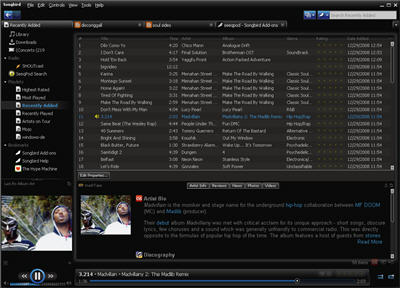
This year saw the first proper release of the open source media player Songbird, which is starting to look like it could be to iTunes what Firefox is to IE. Like Firefox, songbird is highly customizable with lots of add-ons available, so you can make it work the way you want it to.

A bunch of add-ons are bundled with the installation, giving you iPod support, a concert search tool, a Last.fm scrobbler and more. Adding more is easy and can be done from within Songbird – it has a browser (and any time you visit a page that has MP3s, they’ll be listed in a pane at the bottom so you can easily listen to or download them). From the add-ons page you’ll find a host of interesting tools. Here are a few cool ones:

The Exorcist is something iTunes is seriously missing. Anyone with a big library is likely to have listings which no longer exist and duplicate files. As your library grows, sorting out this mess can become an insurmountable task of epic proportions. Luckily, The Exorcist will just list both for you, making cleaning your library a breeze.

Last.fm is a great resource for music info, so why not take advantage? Music Recommendations lifts similar artist ideas based on what you’re listening to, and if like me you don’t have much album art saved with your music, Last.fm Album Art will find the artwork for your albums as you play them and display them where you’d see them in iTunes. Incidentally, if you really do miss iTunes, you can download an iTunes style skin. Feel better?

You can integrate a lyrics bar with LyricMaster, which will find lyrics from the web and show them in the right-hand side bar. Now there’s no excuse not to entertain your workmates with your vocal talents. There is also a seeqpod add-on so you can easily search for tunes to download if you’re not too worried about the legal side of things…

There are some reasons to keep iTunes – it does integrate better with your iPod for instance, but give Songbird a try and you might find you migrate there for everyday listening purposes.

2008 top lists round-up

Whenever New Year is around the corner, the Web is flooded with top 10s, best-of lists and all sorts of summaries and rankings that try to encapsulate a whole year in only a few lines. Web sites and blogs around the world create their own themed lists according to their main topic, so I thought it would be a good idea to create a meta-list; that is, a list with the most interesting lists you can find these days on the Internet. It’s certainly a good summary of the year that’s about to finish.

Top 2008Most under-hyped apps
In this list published by Lifehacker, Gina Trapani includes a series of apps that she considers deserved more attention during the last twelve months. Songbird, Picasa 3, VLC Media Player and Opera are among them.

Top 2008Best of Last.fm
The online music service has published a list with the most popular artists, albums and tracks of 2008, based entirely on users’ scrobblings. Coldplay has the most scrobbled song and album, while MGMT top the Artist ranking.

Top 2008Top searches in Google
In keeping with tradition, Google has published its Google Zeitgeist, a list of the most searched-for terms during 2008. The list varies from one country to another, but the global ranking is topped by Sarah Palin. Kudos to her!

Top 2008Most downloaded iTunes apps
The App Store features a list where you can see the top downloaded apps of 2008. The list is organized in several categories: games, entertainment, utilities, social networking and music, all in free or paid versions.

Top 2008Most beautiful icon sets
The design blog Noupe has gathered an impressive collection with the 50 most beautiful icon sets created during this year. You’ll find icons for blogs, for the iPhone, for social networks… and many of them for free.

Top 2008Best photos of 2008
The top photos of 2008 in Flickr is being created by users themselves. Flickr has asked all Flickr users to choose the best photo they’ve taken this year and add it to the special group “Your best shot of 2008“. Really worth a look!

Top 2008Top 10 Videogames
Published by the Time magazine, this list includes the top videogames of 2008, though I must say I don’t agree with most of it – except for GTA IV’s first place, that is. The wooden spoon award is for Spore.

Top 2008Most Pirated PC Games
Funnily enough, Spore does reach number one in the Top Pirated PC games list published by Joystiq. Other games in this list are Assassin’s Creed, Call of Duty 4 and Fallout 3. Not something to be specially proud of, I guess.

Two free ways to convert videos to DV for iMovie

DV logoiMovie is a great video editing tool but I’ve learned through painful trial and error that it’s very fussy when it comes to formats. It won’t even accept videos in MP4 or AVI format. Try importing one and although it will say it’s generating thumbnails for that clip, iMovie will hang or the process will just go on and on until you fall alseep.

The problem is that iMovie is designed specifically as a DV (or HDV) application. Therefore the only format it works properly with is DV. If you’re importing video from a digital video camera, then the format will already be DV or HDV and you’ve got nothing to worry about. However, if the footage is from any other source – such as a ripped DVD, YouTube or mobile phone, then your only option is to convert it to DV.

Unfortunately, there are very few applications out there that allow you to convert to DV. However, here are two worth trying:

MPEG Streamclip logoMPEG Streamclip My tool of choice although be prepared for a long wait because it takes absolutely ages to convert to DV. A 20-minute DVD rip sample in VOB format took around an hour to convert to DV format. The customisation options, however, make it a really professional tool that gives you control over absolutely every aspect of the conversion. Best of all, you can select in and out points for only those parts of the clip that you want to convert.

Drop2DV logoDrop2DVD A very quick and simple tool that can be very hit and miss and lacks a GUI. Conversions are performed simply by dragging your video clip into the Drop2DVD icon before the Terminal is automatically launched. The conversion process is fully automated but you have absolutely no control over how it’s performed. In my case, the conversion completed successfully but there were lots of error messages relating to the frame rate which meant the file was unplayable.

Problems embedding video in WordPress?

Video Embedder logoWordPress is the best blogging platform out there in my opinion. Nothing else comes close in terms of ease of use, sophistication, customisation and general all round elegance. You feel like you’re working with a professional tool and yet it’s all for free. However, one big downside is that WordPress can be notoriously fussy when it comes to embedding video. The reason, as Robin Good explains, is that:

Unless the embeddable code is specifically designed for WordPress, once you have placed and published the code, things tend to run havoc: when you edit the post the embedded code is not there anymore, the published page breaks up the layout, the first time is there but not the second one… you know well how it goes.

MSNBC is a good example. Although finally they now provide embedding code with their video clips, the code doesn’t work in WordPress – it simply disappears when you add it whether you’re in Visual or Code view. There are solutions to these problems but it depends on how your blog is hosted. If you have your own domain to host your blog e.g. “www.yourdomain name.com” you can download plugins for the problem and upload them to your plugins folder. However, if it’s hosted by WordPress e.g. “www.mydomain.wordpress.com” you can’t do this and you have to rely on external sites to provide a solution.

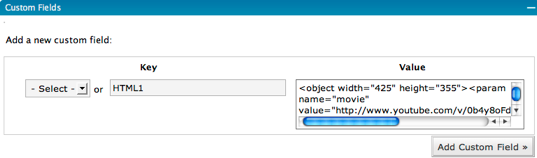
If you have your own hosting service then try EmbedIt. Once uploaded, the plugin allows you to create a custom tag HTML1 and paste the code you want to embed it. Just write [HTML1] in your post where you want to embed the code in Visual or Code view.

EmbedIt

Another possibility is Video Embedder which provides video support fora far greater number of video sites than WordPress normally does such as Revver, DailyMotion and Break. Where you want to insert the video, simply type the name of the site in parenthesis with the ID of the video in between such as “[videosite]f19GKcZU1vg[/videosite]”. If it’s a Flash video that you’re having trouble embedding, and you know a little about XHTML but not enough ot fix it, then try XHTML Video Embed which also ensures videos posted to your site are XHTML validated cleanly and securely.

If your blog is hosted on WordPress, then your options are very limited. In fact, unless you know how to tinker with the HTML code until the video works, your best bet is probably Vodpod. Vodpod alows you to add a button to your browser tool bar that you can click whenever you find a site with video that you’d like to post to your blog.

Vodpod screenshot

It then translates the code into something WordPress friendly and sends it to your blog instantly in a separate post. From there you can copy it into the post you are writing or you can even publish directly onto your blog from Vodpod. It doesn’t work for all video players but it’s one of the few solutions that blogs hosted on WordPress can turn to.

Let’s hope that in the next major release of WordPress, the developers will finally address this issue so that WordPress becomes much more video friendly.

Tip: Make Firefox remember your Google preferences

I’ll start off by saying that I’m very stuck in my ways when it comes to Google. I have three main search preferences that I just have to set on any computer I’m using: use Google.com (although I’m in Spain, I hate the results that come up with a .es query); display 100 results per page; open results in a new tab.

CustomizeGoogle

As far as I’m concerned, these preferences are essential. So I was pretty annoyed a couple of months back when my Google preferences started to ‘disappear’ about once a week. This was happening in Firefox (pretty much the only browser I use for day-to-day work) and it was happening at work (Windows XP) and at home (OS X).  For a while I wondered what could be causing the problem – I never tell Firefox to delete my cookies when ending a session – then I decided to look for a way of fixing this annoying bug so I’d never again have to go through the hassle of resetting my search preferences.

The best solution I found is the Firefox addon CustomizeGoogle which includes a feature aptly named ‘Sticky Google Preferences’. This feature allows you to ‘force’ Google to use your preferred language and locale, SafeSearch settings, number of results per page, opening results in a new window and query suggestions. Choose your optimal settings and you can then delete your Google cookies as often as you like without losing your configuration.

CustomizeGoogle

In addition, CustomizeGoogle lets you tinker with plenty of other Google tools and features, including optimising search results, hiding ads, forcing secure connections,  custom site filters and much more. It’s a great add-on and well worth a look if you’re interested in honing your daily Google experience to perfection.

Fix Internet Explorer security flaw – install Firefox!

Never touch this icon again!Microsoft has revealed that there is a major security flaw in Internet Explorer. Experts are warning that the vulnerability could open the door to malicious code that could be used to run data-stealing applications on a user’s system. Microsoft is currently working on a patch to fix the bug, which affects version seven of the browser, and has issued details of settings you can tweak to help you avoid the problem. But if you’re fearful of someone rifling through your passwords and confidential information, perhaps it’s time you switched browsers completely.

All you need to do is install Firefox. It’s that simple. As an alternative to Internet Explorer, Firefox is much safer because it’s constantly being worked by the security experts in the open source community to ensure that your private data remains private, as well as having powerful anti-phishing and anti-malware tools built in. Plus, when you make the switch to Firefox you also get to enjoy faster browsing, powerful extensions that give you added functionality, a skinnable user interface, better support for web standards, an integrated ad blocker, and much more. So if you’re reading this in Internet Explorer click here to get Firefox now – before it’s too late!

How to fax from your Mac

PageSender LogoOne of the lesser known features of Mac OS is the ability to send and receive faxes over any internet connection. Using an online faxing service such as eFax, jConnect and EasyLink, you can send faxes via a small application called PageSender. PageSender presents a fully-functional fax service allowing you to easily send, receive and manage faxes.

It’s completely integrated with Address Book, Entourage and all Palm devices with Palm Desktop installed. It allows you to automate faxes via AppleScript and it has a handy cover page designer to help you create professional looking faxes. You can even attach PDF documents. Note that if you don’t want to use a web service you can also fax from mac using a modem.

Using it is simple:

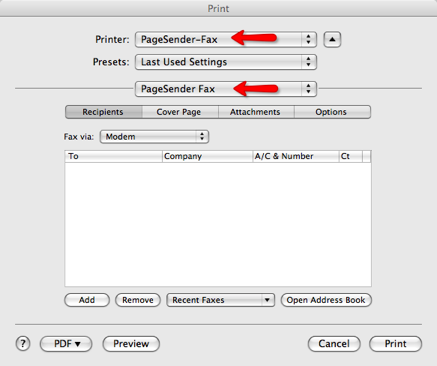
  1. Select “Print” from the file menu in any application you’re using
  2. In the print dialog that appears, make sure that “PageSender-Fax” is selected in both your printer and presets box.

PageSender Fax Dialogue

3. If you want to add a cover page, click the Cover Page tab Continue reading “How to fax from your Mac”

Top ten downloaded free apps in iTunes Store

December is the month of summaries, top rankings, compilations and all sorts of lists with a common purpose: to make a round-up of everything that has happened along the year. Now that 2008 is about to finish, the guys over at the iTunes Store have decided to join the trend and have published a list with the top downloaded apps in the App Store for iPhone and iPod Touch.

The list is divided into several categories (games, entertainment, utilities, social networking and music, both in free and paid apps) but we’ll have a look at the overall free app top list and see what people downloaded most to their iPhone and iPod Touch over the last 12 months.

Top downloaded free App Store appsPandora
Enjoy yor favorite artists on the move. You can create genre-based personalized music stations or simply use your Pandora web account from the iPhone.

Top downloaded free App Store appsFacebook
Only for real Facebook-addicts! With this light version of Facebook you can view your wall, check your messages, see photos and follow your friends’ activities.

Top downloaded free App Store appsTap Tap Revenge
If you like Guitar Hero, you’re going to love this game. Test your rhythm skills while trying to follow the chords on the screen of your iPhone or iPod Touch.

Top downloaded free App Store appsShazam
Believe it or not, Shazam is able to recognizes almost any song,  anywhere. It’s perfect to identify that song that’s been stuck on your head for weeks!

Top downloaded free App Store appsLabyrinth Lite Edition
A revamped digital version of the traditional wooden labyrinth. I tried this game myself and got so insanely addicted to it that I ended up buying the full version.

Top downloaded free App Store appsRemote
With Remote you can control music on iTunes in your computer or on your Apple TV. Remote displays album artwork, works with Genius and lets you edit playlists.

Top downloaded free App Store appsGoogle Earth
A jaw-dropping app that includes incredible satellite imagery, shows millions of geolocated photos and can find your current position in a few seconds.

Top downloaded free App Store appsLightsaber Unleashed
Lightsaber Unleashed emulates a lightsaber on the screen of your iPhone or iPod Touch. The emulation includes sound effects and even a duelling soundtrack.

Top downloaded free App Store appsAIM
Keep in touch with family and friends at all times. It works with 3G or WiFi and can connect with all AOL networks worldwide.

Top downloaded free App Store appsUrbanspoon
Discover new restaurants with Urbanspoon! Enter your search filters and shake the phone to activate the restaurant slot machine.

The funny thing about these top apps lists is that they change according to the different countries from which you can access iTunes Store. So in the case of Spanish users, instead of downloading Urbanspoon or AIM (which are more oriented to a North-American audience), they preferred to download Flashlight and iPint – strange combination, huh?

Finally, as an iPod Touch user myself, I’m surprised that my favorite Twitter client Twitterrific didn’t achieve a higher position, and that a great adventure such as Aurora Feint didn’t even make it to the top 10 downloaded games. At the same time, I find it simply amazing that such an absurd app as Lightsaber Unleashed is among the ten most downloaded tools in 2008. In any case, these lists will surely help you find some interesting new apps to try.


ALLPlayer – the ultimate media player for subtitles?

Imagine the scene. You’re just about to settle down to a film on your PC but because it’s in a foreign language, you need subtitles. You spend the next half and hour searching the internet for the right subtitle files only to find that everything you try either doesn’t work or is badly out of sync. In the end, you’re too tired and frustrated to bother watching it anymore so you go to bed and curse the subtitle world.

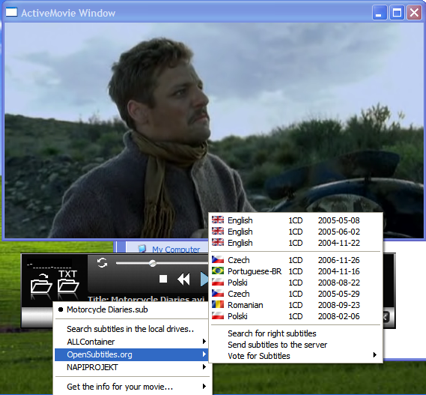
If this scenario is familiar to you then you should try ALLPlayer which has the best support for subtitles in any media player I’ve tried. ALLPlayer is a refreshing change as far as media players go because it not only automatically retrieves film subtitles based on the movie file’s title but it can even “speak” the subtitles back to you – albeit in voice that sounds rather like Robocop. ALLPlayer uses the excellent database at opensubtitles.org to match your file name with the appropriate subtitles meaning it does the searching for you.

ALLPlayer Subtitles Access

OK, the results are not always perfect and sometimes it doesn’t find anything at all but it’s a darn sight more efficient than going on a wild goose chase for them yourself. It retrieves the subtitles in no more than a few seconds, downloads them to your film folder and you can activate them immediately.

ALLPlayer also handles subtitles differently from most average players. Using something called “IQ text” it can detect the length of a phrase of sentence and make sure that the subtitles are kept on screen long enough for you to read them. Unless you’ve only just started learning a language however, and can’t read very quickly, this soon becomes annoying as the subtitles appear to be out of sync all the time.

Although there are skins available through the LiveUpdate feature (which also supposedly updates the codecs for you although the database doesn’t always work), AllPlayer doesn’t feel quite as slick as something simpler like BSPlayer but this can be forgiven for the subtitle features. Some other more basic features yoo – such as full screen mode – are not as obvious as they should be either. Nevertheless, ALLPlayer is an excellent choice for all those that rely on using subtitles with their films.