Best free shopping apps

In the past you would get the newspaper and read weekly ads to find deals. Then online stores made it unnecessary to go to a store. Now brick-and-mortar stores compete with online-only stores with mobile apps.

There are a lot of different shopping apps and this list includes some of the biggest retailers. And the best part? Some of them price match so you can buy an item at a competing store for the cheaper price. You’ll have to search for each store’s price matching policy.

Amazon
amazon

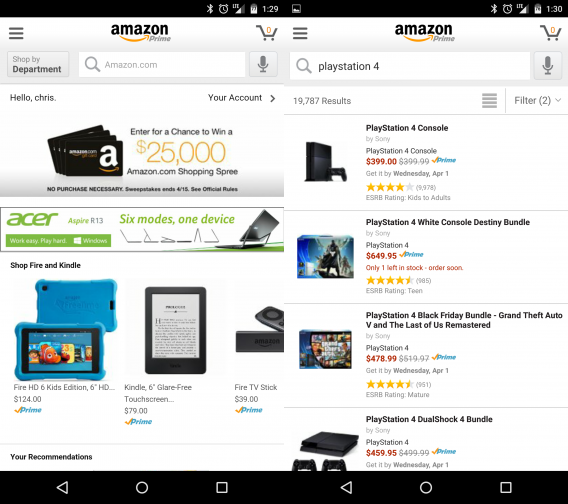
If you need something, Amazon probably has it. The online retailer has a worldwide presence with warehouses everywhere. In the US, an Amazon Prime subscription gets
free two-day shipping, access to Amazon Instant Video, and other perks. Amazon’s customer service makes it easy to return or exchange orders if something is wrong. Unless you need to see a product in person, Amazon is the easiest way to get what you want.

Download for Android | iOS

Best Buy

best buy

Best Buy used to be the best place to get Blu-rays and DVDs. The stores have taken a hit from the growth of online stores like Amazon, but it’s still a good place to find deals. If you need to demo a product in-store, Best Buy is a good place. Best Buy also price matches Amazon which is great if you need something that day. The app is a great way to keep track of weekly deals and see what else is on sale.

Download for Android | iOS

Etsy

etsy

Etsy is an online store for creators. Sellers on Etsy create products they sell and you can find really unique items. There are mainly arts and crafts for sale, but spend a little time searching and you can find some interesting things.

Download for Android | iOS

Instacart: Grocery Delivery

instacart

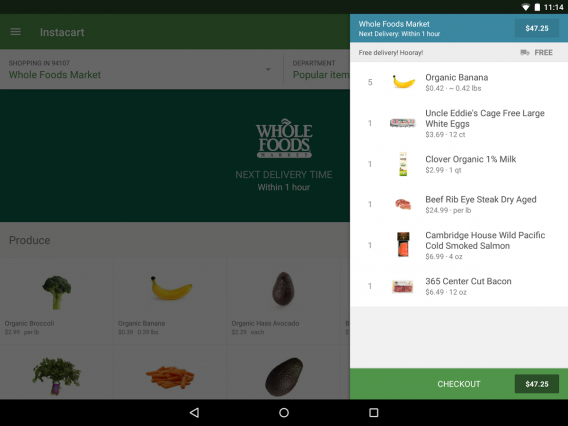
Going to the grocery store can be a hassle. After working all day, the last thing you want to do is pick up ingredients for dinner. Instacart solves that problem. You can order groceries from stores like Costco and Whole Foods and get your entire list delivered to your door at a specific time. If the store is missing an item, you can leave a note for alternatives.

Download for Android | iOS

Newegg Mobile

newegg mobile

Buying computer supplies isn’t easy because there are usually too many options to choose from. Newegg is one of the best online stores for all your electronics needs. Whether you’re building a computer or just upgrading, you will find everything you need.

Download for Android | iOS

Poshmark: Buy & Sell Fashion

poshmark

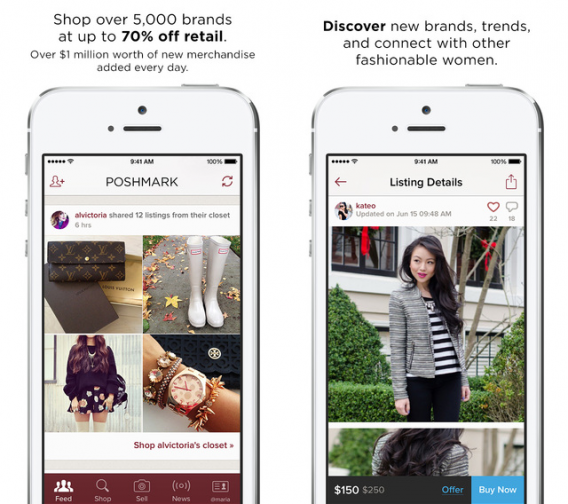
Buying clothes is one of the most difficult things to do. Depending on the brand, sizes can vary. But the biggest concern is getting clothes at the best price. Poshmark is an online marketplace with clothes from big brands at a discount. If your closet is overflowing, you can also sell clothes on consignment.

Download for Android | iOS

Shopkick

shopkick

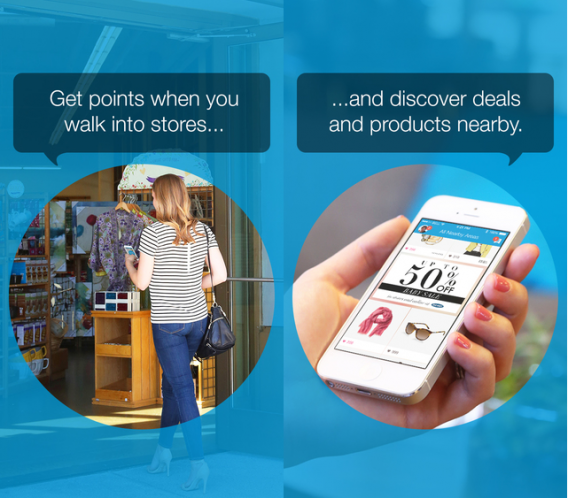
There are a lot of stores inside a mall. You won’t always know if there’s a deal going on though. Shopkick is an app that can show you deals in stores like Macy’s, Target, and Best Buy. You can also earn free gift cards by using the app, giving you a reason to go to the mall more.

Download for Android | iOS

Target

target

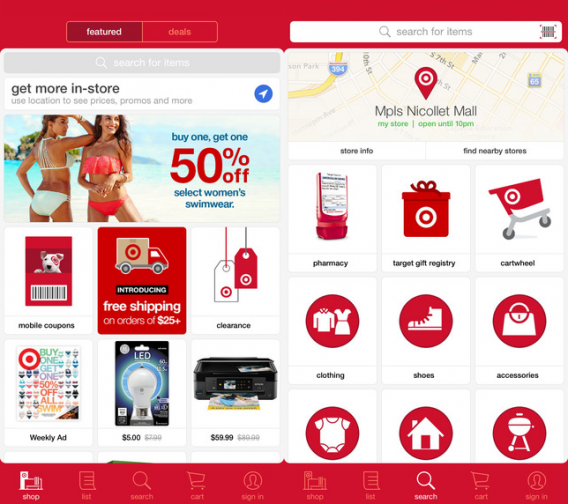
Every college student knows the beauty of Target. It’s easy to find a nearby store and get Target-brand supplies at a discount. Target is also great for picking up a few groceries with its food section. The app contains items that aren’t sold in stores, but you can still have them shipped to your house. When you start a new college semester, Target is in the top list of places to go shop.

Download for Android | iOS

Walmart

walmart

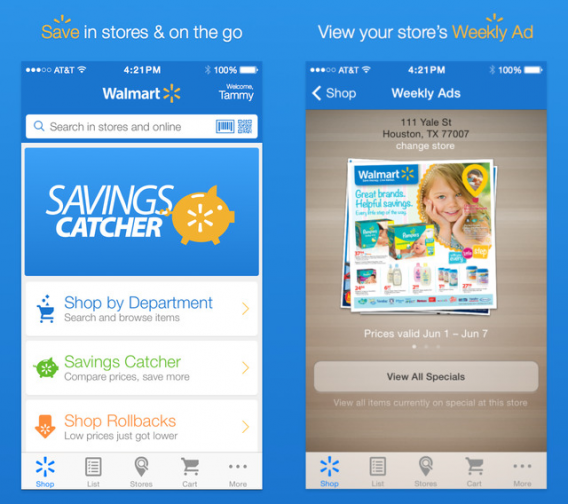
Walmart is huge, but it doesn’t have stores everywhere. Walmart’s biggest draw is its 24 hour superstores where you can buy cheap and questionable food at 3 AM. Walmart has basically everything you could want. The app has a cool feature that scans your receipt and compares prices to other stores. If there’s a lower advertised price, Walmart refunds the difference on a Walmart Rewards eGift Card. If you live in the South, there are even stores with a gun section.

Download for Android | iOS

Zappos

zappos

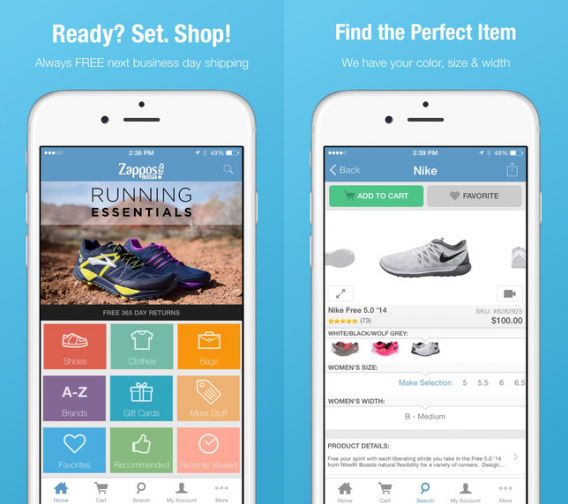
Zappos originally was the best place to buy shoes online. It expanded to selling clothes and accessories. Zappos sells major brands so you can find everything you’re looking for. Even better for app users, Zappos offers free one business day shipping if you complete your purchase through the app.

Download for Android | iOS

Related Articles

Best apps for clothes shopping

Apps for good – the charities embracing smartphones to deliver their message

Diary of a fat man – Fitivity

Follow me on Twitter: @chrislikerobot

Project Spartan: the start of a new era of web browsing?

Default player


brightcove.createExperiences();

Windows 10 will not only mark a renewed attempt by Microsoft to regain share in the operating system market, but it will also see the introduction of its new browser codenamed Project Spartan that the company hopes will be taken seriously.

Currently only available in the latest build of Windows 10 (10049), Project Spartan will replace Internet Explorer (IE) for most users, with Microsoft previously confirming the death of its browser. IE will live on for a while as legacy support but it’s clear Microsoft’s efforts are centered around Spartan. Both are still available in the Technical Preview of Windows 10.

Microsoft also wants to provide a consistent experience across all devices running Windows 10, whether on a phone, tablet, or computer. With Project Spartan, the company is focusing on several key areas that it hopes will stem its browser decline.

Simplicity

Project Spartan has been redesigned with the aim of cutting the clutter from Internet Explorer. Its interface has been stripped back to include the bare minimum. It also includes a new “reading mode”, which simplifies web pages to make them easier to read when your internet connection is poor. You can also save these web pages to consume in the future through the “reading list” feature.

Speed

Built on a new rendering engine, Project Spartan is designed to provide a much fastest browsing experience. In a blog post, Microsoft’s Joe Belfiore explained that: “Project Spartan’s new rendering engine is built around the idea that the Web “just works,” while being fast, more secure and more reliable.”

Personalization

By integrating Cortana, the idea is for the virtual assistant to be able to respond with faster and better results based on information that you have already provided. Instead of being a generic browsing experience, Project Spartan wants to provide a personalized and customized way for you to navigate the web.

Usability

As Microsoft is now building Windows 10 from the same core no matter the device, it is aiming to provide a consistent Project Spartan experience, whether you’re scrolling with your finger on a phone, using a pen on a tablet, or using a keyboard and mouse with your desktop PC.

Collaboration

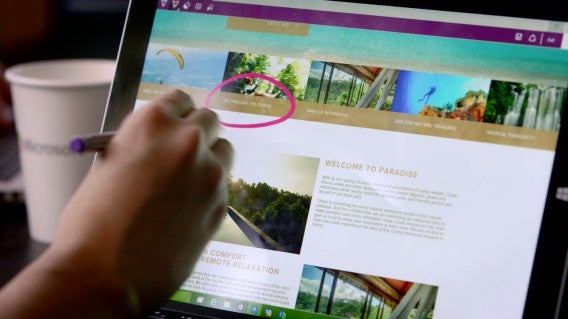
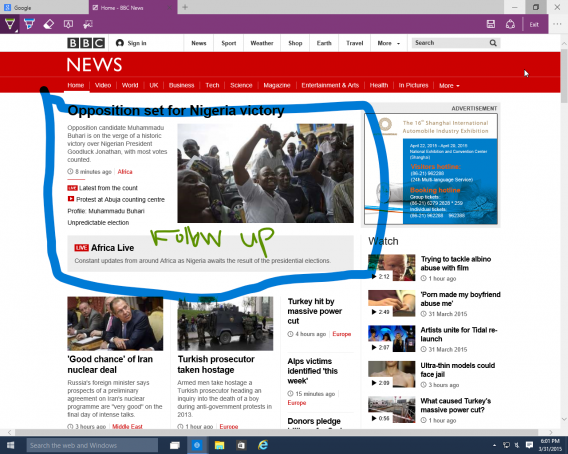
With the ability to make notes on web pages, as well as highlight different sections and share these thoughts with friends, Project Spartan is designed to be a more collaborative browser. This feature seems particularly useful for users who are browsing on tablets that support pens (ie Microsoft’s Surface tablets), but whether it will widely adopted cross-device seems doubtful.

Want to try Project Spartan yourself? Download the latest build of Windows 10 to get access to the new browser.

Related Articles

Internet Explorer is dying: a history of the world’s most hated browser

Microsoft will fight Windows 10 piracy by giving it away this summer

Here’s your first look at Spartan, the next version of Internet Explorer

Follow me on Twitter: @karenmccandless

WhatsApp free voice calls rolling out to Android now, other platforms coming soon

Although it’s yet to be announced officially, Android users should find they can now make free voice calls with WhatsApp. You don’t need to update the app, as the change will happen automatically.

iOS users should get the feature within a couple of weeks, according to comments made at the recent Facebook F8 conference. And there has been no mention of Windows Phone or other platforms so far, but we’d assume the timing will be similar for all of them

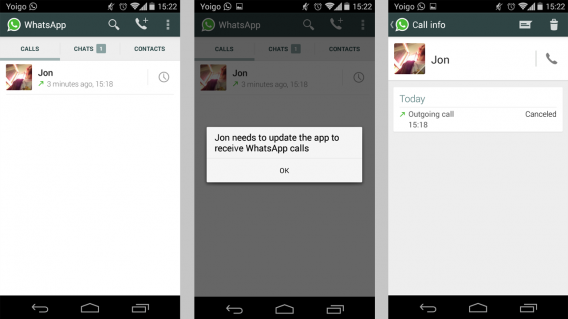
From our own tests, it seems that currently you can only call other users using WhatsApp on Android. Calling an iPhone, we saw a message saying that the user needed to update their version of the app (which was fully up-to-date, see below). This probably explains why the update has not been announced properly – WhatsApp has always prided itself on being stable and cross platform: a feature that only works across one platform breaks this experience.

But the Android update shows us what it will look like: whereas previously you could tap call on a contact in WhatsApp to exit the app and make a normal call with your device, now you can make a call within the app itself. Voice calls with WhatsApp are available and only cost you the data you use.

WhatsApp has been teasing and testing this feature for months, but it really is nearly here for everyone now. Watch this space!

Download WhatsApp for Android

Related Articles

This is what WhatsApp’s call feature will probably look like

WhatsApp for PC – a popular Facebook scam in Spain

Rumor: WhatsApp voice calling feature coming soon

Follow me on Twitter: @jonathanriggall

Diary of a fat man – Fitivity (sometimes walls get in the way)

For last seven days I have been trying out Fitivity (Android|iOS), and it has been a great week. The bodyweight focused exercise programs is far more closely matched with my interests and usual workouts than my previous trials – which may explain why I found it so successful.

If you are unaware of bodyweight training as a concept it is quite simple, you use your body’s natural (in my case considerable) bulk… to provide the resistance for training. Some common examples of these are push-ups, crunches, and planking, but these are just a tiny selection of the exercises that can be included in a routine.

Easy layout and menus

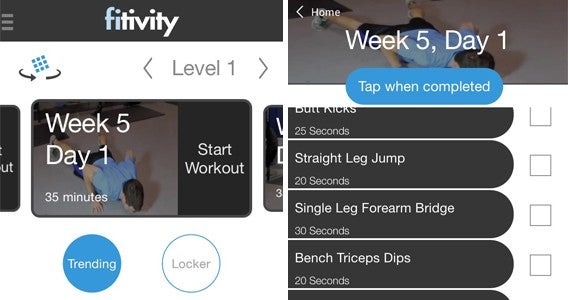
For me this was perfect because – bar one or two exercises – I knew all of the exercises listed (at least in the Home Bodyweight Program that I selected). With most of the routines being fairly simple circuits of five or six repeating exercises, each with a fixed duration. This meant all I had to do was look down to remind myself of the exercises and the timing, and away I went.

You may remember that my last physical training tool was Daily Yoga (Android|iOS), and I think it is only fair that I revisit a point I made there. One of my big problems with this app was that I didn’t know the positions, a fact that made it difficult for to follow each stage of a routine. However, the spoken explanation that ran throughout meant a lot was done to accommodate the less experienced.

Easy examples

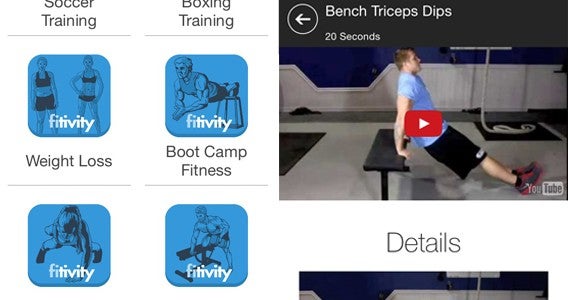
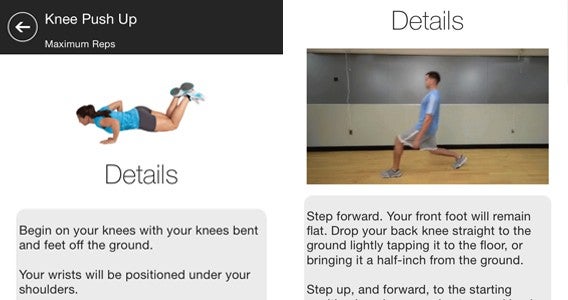
By comparison Fitivity’s app comes up short. When I didn’t know a specific exercise I had to tap on it to bring up an explanation – not a hard process thanks to the easy to navigate menus – but enough to break the flow of the routine. This is a real issue as the point of the training is to maintain a high heart rate for short periods, tough if you are constantly stopping. This never proved an issue for me, but I can imagine it would for newcomers.

Even knowing the exercises proved to be problematic, however. While timings for each exercise were listed, there was no in-app timer. My only method of actually measuring time (at least where I exercise) is on my phone. This led to an odd situation for me of having to write out exercises and timings on a sheet of paper and then timing them from a stopwatch app.

Tricky exercises for me

For me, the best thing about the Fitivity is that the routines are good. The app features quick hitting exercises that never get boring and most of which can be done with ease at home. I say “most” because I did find a few issues with certain exercise. The first issue was space, with exercises like the Walking Lunge having me across my apartment before I’d even taken two steps (I am 193cm). The other problem I hit was the term “to exhaustion” for the Knee Push Ups exercise because my knees began to hurt long before I reached exhaustion.

Push it

Fitivity sets a good routine, with a good interface and explanations of exercise. As someone who knows most of the routines, it would be near perfect with the simple inclusion of an in-app timer.

I am out of the office for the next two weeks, so my diary is about to take a short hiatus, but I will be back on the 16th with how Noom Coach (Android|iOS) has helped me out. And who knows, I may even keep on with my Fitivity training while I am away.

Related Stories

Diary of a fat man – MyPlate (sometimes life gets in the way)

Diary of a fat man – Daily Yoga

Diary of a fat man – Mango

Follow me on Twitter: @DoFuss

Five Apps to Try This Weekend – March 27th 2015

It is Friday the 27th of March, and we are back with another Five Apps to Try This Weekend.

This week we have Makeup Genius (Android|iOS), the app from L’Oreal that lets you apply make-up digitally to try out their products. It’s a funny little thing, but underlying the process is some impressive facial recognition tech.

We have two options for photo buffs this week. First up we have Enlight, the incredibly versatile photo editing tool that allows you to edit and touch up your photos with dozens of options. We also have Layout from Instagram, the app that lets you easily create collages – although as this is only available on iOS, Android users my want to give Photo Grid a try… So, I guess we technically have 3 photo apps this week.

Finally we have two very different games for you. Cities: Skylines is a city management sim that invites you to build your very own metropolis, while Battlefield Hardline is a first person shooter that asks you blow a city up as you fight crime on the streets of Miami.

That’s it for this week, do let us know if you enjoyed our recommendations in the comments. We will be back next week with another five apps, and it you want to be sure you never miss an episode just subscribe.

Related Stories

5 Apps to Try This Weekend – March 20th 2015

Five Apps to Try This Weekend – March 13th 2015

Five Apps to Try This Weekend – March 6th 2015

Follow me on Twitter: @DoFuss

Best Windows Antivirus Comparison 2015

Which is the best antivirus program for Windows in 2015? We’ve analyzed the results of four independent comparisons to bring you the winners.

For many people, the PC is still the place where we keep our most important files and what we use for a large part of our work and leisure activities. Protecting your PC is the equivalent of protecting the value of your digital identity.

A good antivirus is the cornerstone of security in Windows. While the industry may be in crisis, especially as Windows has improved its own security defenses, most of us still need an antivirus program.

To save you time and effort, we’ve analyzed the result of the most prestigious independent benchmarks. The results, together with our interpretation, will help you choose the best antivirus for 2015.

Which comparisons did we use?

AV-Comparatives

This Austrian company has been carrying out a monthly analysis of the best antivirus programs on the market since 1999. Its comparison involves testing infecting websites. For this comparison, we used data from August to December 2014. We also used the results of the performance test, which measures the time it takes a PC to carry out various operations such as copying archives or opening a PDF.

AV-Test

In its German lab, the team from AV-Test analyzes many antiviruses each day. Its security test uses a proprietary program, which verifies if malware has been blocked, and how this is done. We’ve used data from December 2014 here. AV-Test also analyzes performance, measuring how long it takes to perform 13 common actions, such as downloading archives, installing programs, or opening Office.

Dennis Technology Labs

Dennis’s antivirus labs uses its own methodology to analyze the best antivirus software. The test not only measures how many threats are detected, but also how many false positives show up. The test’s score indicates the accuracy of each antivirus scan. The most recent results from the period October to December 2014 give scores for the ten most important antivirus programs.

Virus Bulletin (VB100)

Since 1989, VB has been one of the leading authorities on antivirus programs and malware analysis. Its VB100 test subjects antivirus software to the most rigorous of tests, which takes into account false positives and failed attempts. For the comparison, we’ve taken data from its Reactive and Proactive (RAP) test, which measures the percentage of previously unknown viruses that have been successfully blocked.

Protection: which program best detects malware?

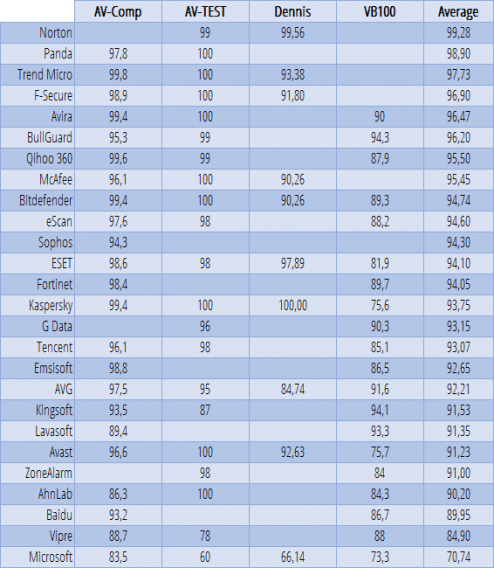
How effective are antivirus programs at detecting newly emerging malware? The average of the four benchmarks was used to produce global protection scores for each of the antivirus programs analyzed.

Below are the results of the 26 antivirus programs that have been analyzed, ordered according to their average score. Only six antivirus programs – Avast, AVG, Bitdefender, ESET, Kaspersky, and Microsoft – feature in all the benchmarks.

Protection score from 0 to 100. A higher score is better

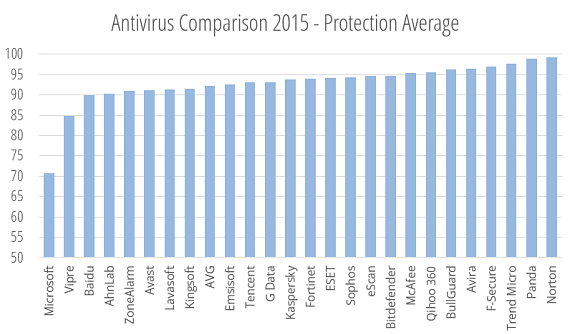
The antivirus programs that scored best in the protection category were Norton, Panda, and Trend Micro. Bringing up the rear was Microsoft, with its Windows Defender program scoring a mediocre 70. It’s worth noting that Norton isn’t involved in either the AV-Comparatives or the VB tests.

Antivirus programs ordered by protection score. A higher score is better

Performance: which ones least impact your PC’s performance?

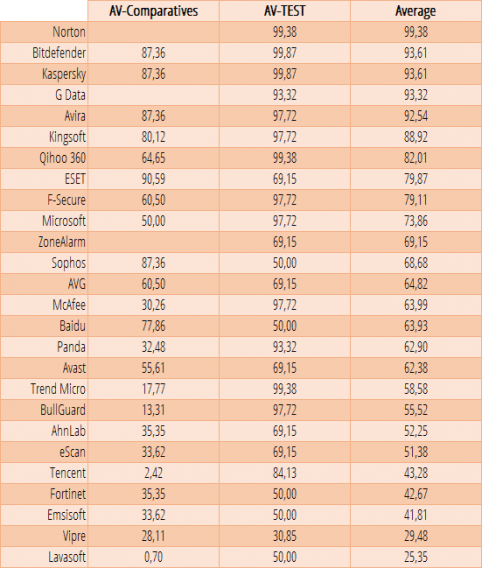
Does antivirus software affect the performance of your PC? To find out, we converted performance scores from AV-Comparatives and AV-TEST into percentages and took an average.

In the table below, you can see the results of the 26 antivirus programs we analyzed. Only Solo G-Data, Norton, and ZoneAlarm are missing from AV-Comparatives’ performance test.

Antivirus programs ranked by performance scores. A higher score is better

Norton took first place again, followed by Kaspersky and Bitdefender. Microsoft achieved a mid-table position, while Vipra and Lavasoft brought up the rear.

Global scores and comparison winners

In this year’s benchmarks, we decided to only use protection and performance data (an approach we also took in our browser comparison). The same weighting applies to both: 50%.

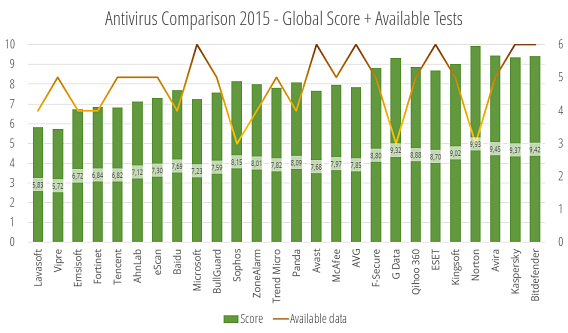
The result is shown below on a scale of 0 to 10 (the green bars), together with the number of protection and performance tests that each program featured in (represented by the orange lines).

As it wouldn’t be fair for an antivirus to win if it only appeared in two tests compared to others that feature in six, we’ve applied a correction factor where we add or subtract points accordingly.

This means that the only antivirus programs that were penalized were those that only featured in three tests: G-Data, Sophos, and Norton. This significantly altered the final result.

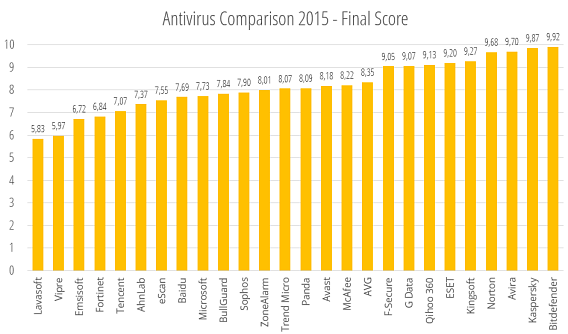
Final scores after adding the correction factor according to how many tests programs feature in

Bitdefender wins, followed by Kaspersky and Avira

There was a clear winner: Bitdefender, followed by Kaspersky and Avira, two solid antivirus programs. The presence of Qihoo isn’t particularly surprising: the company’s 360 Total Security program is one of the most popular antivirus suites at the moment.

Avast, AVG, and Panda were all mid table, while Microsoft showed itself to be an acceptable solution in terms of performance, but it comes up short when faced with a large percentage of malware.

Gold for Bitdefender, silver for Kaspersky and bronze for Avira. All three are outstanding antivirus

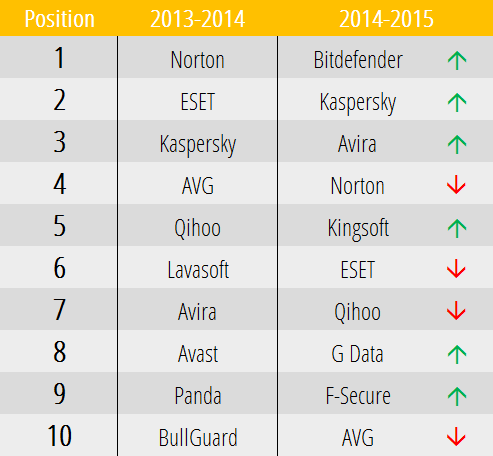
How do the top 10 antivirus  programs rank compared to last year? You can take a look for yourself in the table below.

The rise of Bitdefender has been spectacular. Kaspersky and Avira have cemented their positions, while Qihoo maintains its spot in the first division. AVG and ESET lost ground, while Avast lost its top spot and slid down the table, accompanied by Lavasoft, Panda, and BullGuard.

In the current climate of antivirus crisis, the programs that emerged as winners were those that focused on performance: today’s user doesn’t want to sacrifice speed for security, especially when it’s not always effective.

Which antivirus program would you recommend for 2015?

Related Stories

Softonic’s big antivirus comparison: Software to stay safe in 2014

Comparison: Free Antivirus suites 2012

Best free antivirus

App of the Week: Battlefield Hardline

Softonic’s App of the Week highlights some of the coolest, most unique, and popular apps that have been released for Android, iOS, Windows, and Mac. This week we are looking at Battlefield Hardline, EA’s spin-off to their popular shooter franchise.

Unlike previous Battlefield games, the latest installment moves away from a military setting. Instead, Hardline throws you onto the streets of Miami to fight crime as police officer Nicholas Mendoza through its single-player campaign. Broken into 10 “episodes” the story plays out almost like a TV mini-series and adds significantly more depth to its characters than previous games in the franchise.

Despite this new focus on single player story, the multiplayer has not been ignored. The new setting provides a new look to the environments and maps to explore.

This is defiantly one for shooter fans looking for something a little different to check out.

Download Battlefield Hardline

Related Stories

App of the Week: Avast Grimefighter

App of the Week: Office 2016 for Mac

App of the Week: YouTube Kids

Follow me on Twitter: @DoFuss

Facebook Messenger now supports apps. Here’s why it matters.

Facebook Messenger is evolving into a platform to expand Facebook’s dominance. On the surface, apps in Messenger may seem trite, it’s actually a very bold and smart move by Facebook.

Messenger has been struggling to get people to use Messenger instead of apps like Hangouts, WhatsApp, and Asian competitors like KakaoTalk, LINE, and WeChat. When Facebook couldn’t compete with WhatsApp, it finally bought the app for a staggering $22 billion.

By letting app developers build around Facebook Messenger, Facebook hopes to attract users from other chat apps. Some notable apps for Facebook Messenger include Giphy, Fotor, and Pic Stitch. Facebook also developed its own apps for Messenger like Selfied, which lets you create stickers of your different emotions to send to friends. There are over forty apps at for Messenger at launch, though most of them do the same thing. For a list of notable apps to try, take a look at Chris’ roundup.

Jon selfie

Apps install through the App Store or Google Play and look like standalone apps on your home screen. Unfortunately, they only work with Messenger so you’ll see Messenger specific apps installed on your phone. For example, if you have Pic Stitch already installed, another Pic Stitch app for Messenger will also be installed.

Some may find this redundancy annoying, something that’s already a problem for Facebook. The company previously angered users by removing Messenger from the Facebook app, forcing users to download a separate app.

Giphy for Facebook Messenger

Facebook may be an American company but it has sights set on a global level and has to compete with chat apps from around the world. Apps like LINE, KakaoTalk, and WeChat dominate Asia and Facebook is trying hard to replicate the success of these apps by becoming more than just a messaging app. Asian chat apps morphed from traditional chat apps into sprawling platforms for different types of interaction like buying stickers and playing casual games, a direction Messenger seems to be going. Don’t think these apps are a threat? Just look how Apple highlighted WeChat running on the Apple Watch.

Facebook wants Messenger to become a platform where celebrities and brands can easily reach people. KakaoTalk lets users follow their favorite pop stars and brands for updates. With the revamped Messenger, Facebook is allowing brands and companies direct access to its users. Imagine companies providing support and shopping updates via Messenger. This allows companies to have a more human approach.

Kakaotalk follow celebrities

However, these new features are still experimental. Facebook has no idea how users will use Messenger or if they’ll find the additional features useful. The company will be carefully monitoring user behavior to see what’s successful with Messenger and bring those features to WhatsApp. While Messenger will be Facebook’s platform for trying new things, WhatsApp will stay conservative for now. Developers are begging WhatsApp to open its doors to developers but WhatsApp is playing it safe, worrying that opening itself to developers would result in unsolicited communications.

Meme app for Facebook Messenger

It’ll be interesting to see which features and apps resonate with users and which ones don’t. What works in Asia may not work in America and it’ll be Facebook’s challenge to balance both cultural sensibilities in its app. By turning Messenger into a platform, Facebook has the freedom to turn its chat app into anything it wants. Now excuse me while I annoy my friends by replying exclusively with GIFS.

Related Stories

5 Apps to Try This Weekend – March 20th 2015

App of the Week: Avast GrimeFighter

Diary of a fat man – MyPlate (sometimes life gets in the way)

Nintendo will finally make games designed for smartphones

Internet Explorer is dying: a history of the world’s most hated browser

Follow me on Twitter: @lewisleong

Best Facebook Messenger apps

Facebook Messenger (Android | iOS)  is becoming more than a chat app. Now it allows other apps to integrate and share photos, videos, GIFs, and more. Facebook Messenger compatible apps allow you to share a lot more strange things beyond standard photos, stickers, and videos.

Here’s a list of the best apps for Facebook Messenger.

Action Movie FX

action movie fx

Action Movie FX lets you add Hollywood-level visual effects to the videos you shoot. With Facebook Messenger, you can share these with your friends and surprise them with your editing skills.

Download for iOS

Camoji

camoji

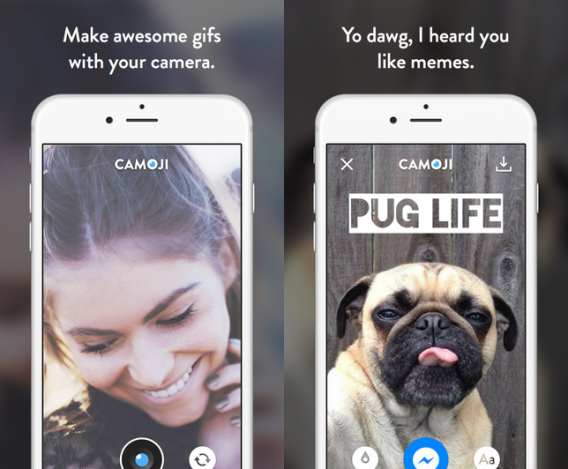
Instead of sending boring photos, Camoji has the ability to create personalized GIFs. Add filters, edit the speed, and even create memes.

Download for iOS

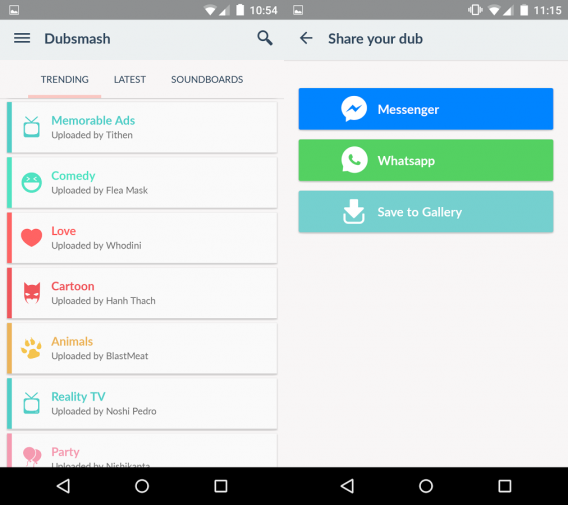
Dubsmash

dubsmash

Dubsmash lets you choose a sound from its library or upload your own. Then you record a video with it and share it with your friends. It sounds simple, but it’s only limited by your imagination.

Download for Android | iOS

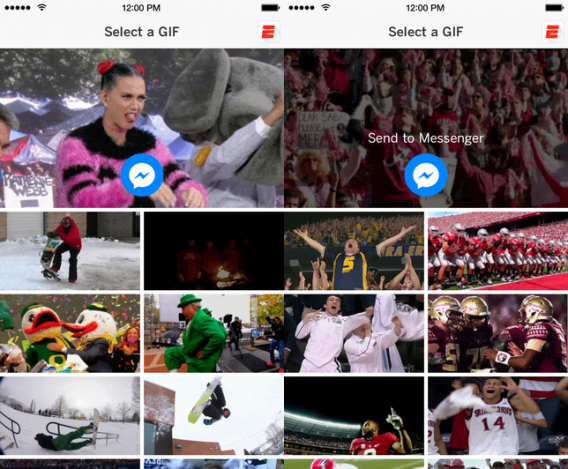
ESPN

espn

While I thought ESPN would let you brag to your friends about how your team is winning, the ESPN app for Messenger lets you share GIFs and memes from shows and games. That’s it.

Download for iOS

Giphy


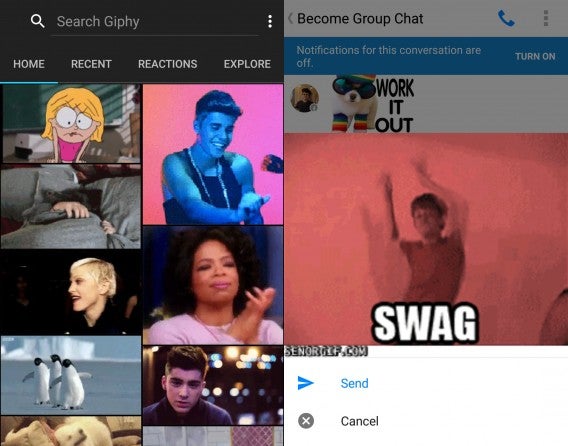
Giphy is an excellent site for searching GIFs. Now you can share GIFs with your Facebook friends and they finally animate inside chat.

Download for Android | iOS

Imgur


Imgur has a gigantic collection of collection of GIFs, memes, and photos. Now you can share those with your Facebook friends.

Download for Android | iOS

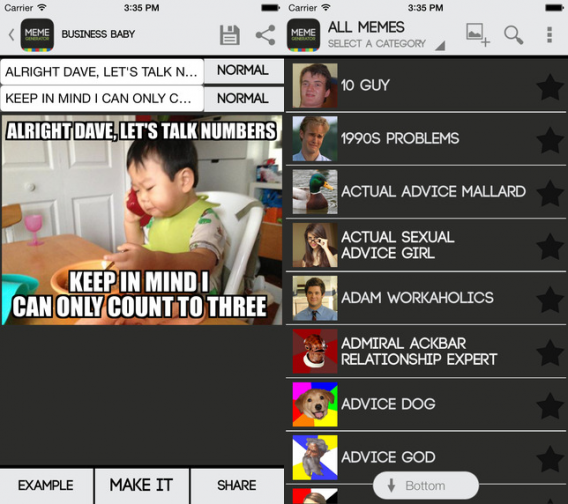
Meme Generator

meme generator

If you can’t find the perfect meme, create it yourself. Meme Generator give you a ton of options to create the best meme in the world.

Download for Android | iOS

PingTank

PingTank is a different. It uses your photos, but lets you add 2D and 3D animation on top of it. Create your custom video and share it.

Download for iOS

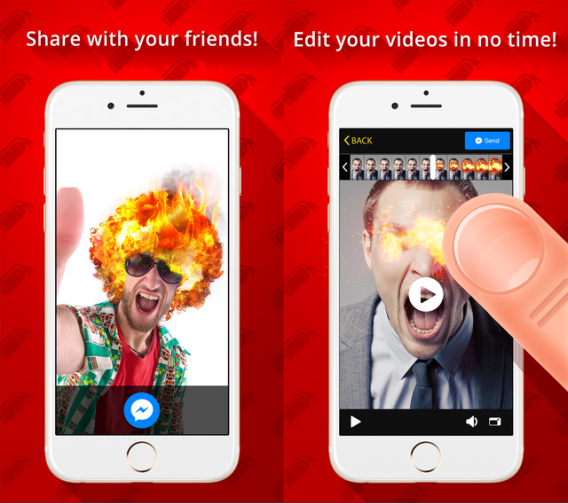
Pyro

pyro

Think your photos or videos are boring? Then add fire to them with Pyro. It’s a simple idea, but when you can have fire for hair, you know there are even more possibilities.

Download for iOS

Score! for Messenger

score

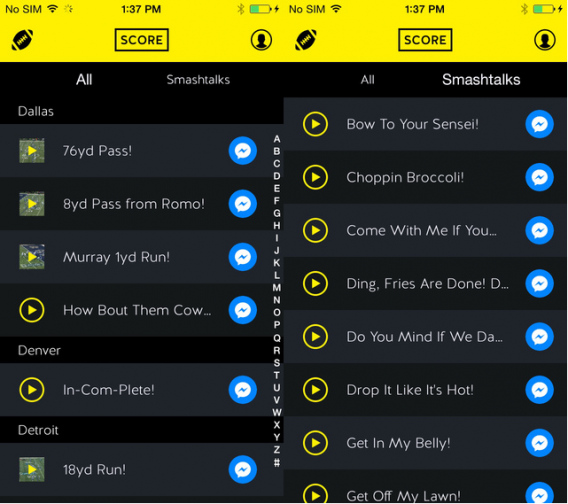
Sports fans need this app. It lets you trash talk to your friends by using an audio or video highlights. If your favorite teams are playing each other, send a video of a touchdown.

Download for iOS

Talking Tom

Talking Tom is an app that tons of kids have probably used. Talking Tom for Messenger lets you record video using different Talking Tom characters and send it to your friends.

Download for Android | iOS

Tempo

tempo

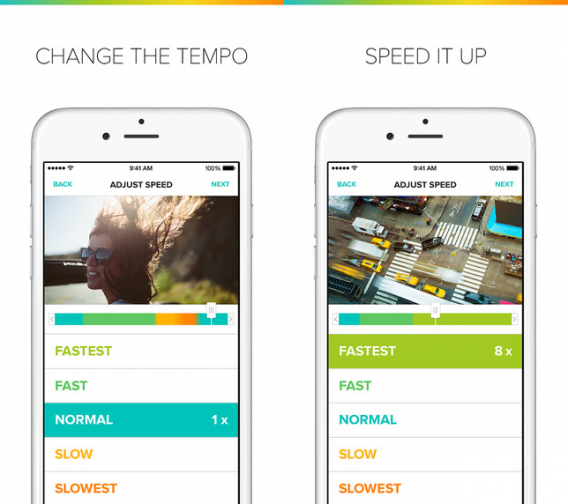
What’s better than slow motions and time lapse? Adding them together. Make your videos and share them on Messenger.

Download for iOS

The Weather Channel

weather channel

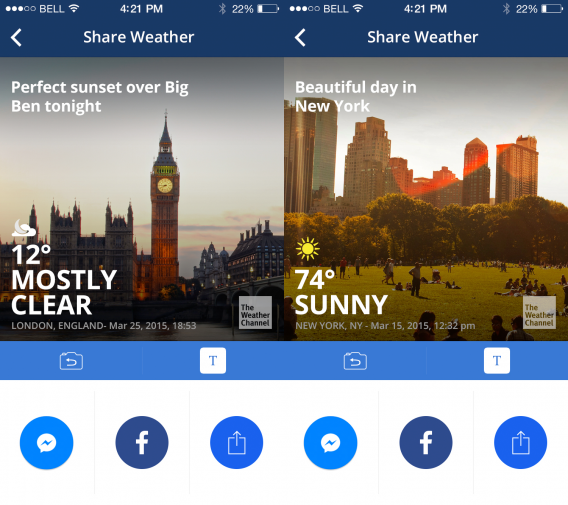
Everyone wants to know the weather and sometimes you share it with friends. The Weather Channel lets you use a photo and add the current weather conditions. It seems simple, but sometimes a visual reference is helpful.

Download for Android | iOS

Ultratext

ultratext

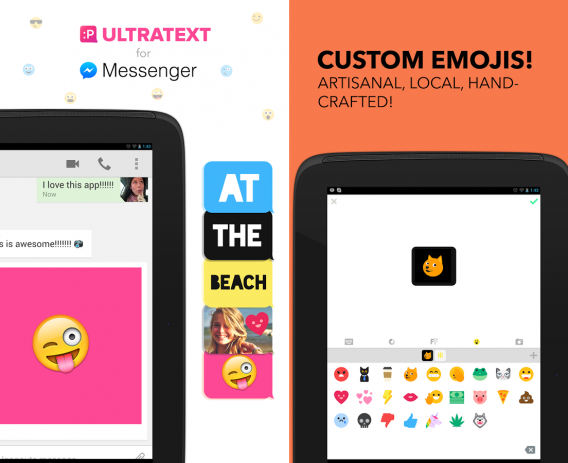
Sometimes your friends don’t understand the importance of a reply. Ultratext changes that by adding bright text or backgrounds so you know they understand what you mean.

Download for Android | iOS

Related Articles

App of the Week: Avast GrimeFighter

Internet Explorer is dying: a history of the world’s most hated browser

What’s new in Office 2016 for Windows

Follow me on Twitter: @chrislikesrobot

Splash Damage tries free-to-play with Dirty Bomb

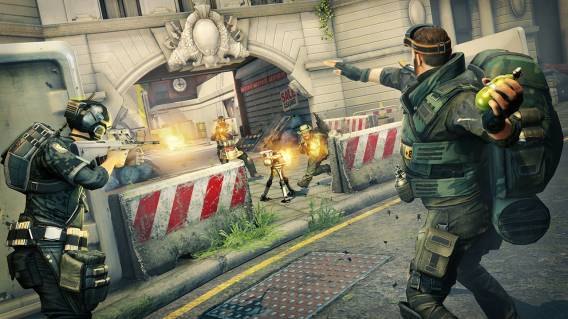
Splash Damage, developers of Enemy Territory: Quake Wars, Brink, and Batman: Arkham Origins multiplayer, released a new first person shooter called Dirty Bomb. Splash Damage took its experience with FPS games and teamed up with Nexon to create this free to play game.

Instead of going for a new gameplay style, Dirty Bomb is a throwback to run-and-gun shooters where you fire from the hip and use the keyboard to strafe and jump, and use the mouse to aim. It’s a strange transition if you’ve been playing console games for years and go back to the mouse and keyboard.

Default player


brightcove.createExperiences();

Back to basics

The core of Dirty Bomb features five versus five or eight versus eight matches. Currently the game has two modes: Stopwatch and Objective. Stopwatch is a timed objective mode where one team has to complete objectives before the timer runs out, Objective mode gives you different tasks to complete, like escorting a vehicle, while the other team tries to destroy it. Even with these two modes, the gameplay is all about killing the other team as quickly and frequently as possible.

Dirty Bomb

The main gameplay rule that Dirty Bomb promotes is “DON’T BE A DICK.” This means that teams need to work together to win. Playing the lone wolf will result in you dying a lot because you need the entire team to work together.

Mercs defined by cards

There are different characters (Mercs) available, each designed after a specific class. Similar to other FPS games, there are assault, support, medic, and sniper classes. Each character has different secondary attacks that uses a cooldown. For assault classes, you can have a deployable turret and support can call for an airstrike. It all depends on the specific character that you choose.

You can’t customize the Merc loadout. Instead you earn different character cards with different loadouts. These can be bought using in-game currency or real money transactions andthis makes Dirty Bomb a little frustrating. You can’t choose your preferred loadout until you get that specific card for that specific character. There are also Equipment Cases that contain different loadouts.

During gameplay, you can choose three different characters that you can switch between when you respawn. This makes matches a lot more unpredictable. Depending on how well a team works together, you can use an entire team of assault characters to try and rush an objective. It’s an interesting mechanic that will benefit teams who play together.

Shooting is satisfying, running to objectives is boring

Splash Damage’s demo was a preview of Stopwatch on the Terminal level. The first objective was to destroy a wall with C4 and the second was to destroy two subway cars all with a countdown. The map did have multiple pathways in each objective area, but there were a lot of choke points that gave either side an annoying advantage.

Dirty Bomb

Dirty Bomb’s gameplay is quick, sometimes even fast. But that’s only when you’re in combat. There is a lot of downtime waiting to respawn or running to an objective. The shooter part of Dirty Bomb is great. It requires reflexes meaning strafing and jumping while keeping aim at the enemy. The secondary weapons are fun to use, though it’s easy to find exploits for specific weapons like the turret. I liked the support class’ airstrikes because when aimed well, it can almost take out an entire team.

What slows down Dirty Bomb was the actual movement. It’s not as noticeable when you’re shooting, but moving back from a spawn point is excruciating. There’s a general run and then there’s a sprint button. Why not have characters sprint all the time?

Dirty Bomb

The first match was very much figuring out the controls and exploring the map. The second match was better because everyone had an idea of the objectives and different lanes the other team could use. I enjoyed attacking and defending these different objectives, but I don’t know if I would have actually sought out Dirty Bomb as a new game.

Good, but not compelling

Dirty Bomb’s core gameplay is good. It’s got quick action and a lot of replayability but it’s focused only on the PC FPS player. Since it’s free, there’s little to lose other than your time. Right now it’s a little limited in variety other than the different Mercs and loadouts you can earn. Splash Damage is going to listened to the community as it continues work on Dirty Bomb but there’s a lot more it could add right now. If you’re looking for a quick FPS game, it’s one to try.

Related Articles

Watch our video review of the terrifying Five Nights at Freddy’s 3

The best of GDC Play 2015

OlliOlli 2 review

Follow me on Twitter: @chrislikesrobot