Apple conference rumors, Instagram changes, and Windows 10 news

If you feel like you missed some of the big tech news last week, then the Softonic Roundup is here to help with rumors about the next iPhone, the latest Windows 10 news, and everything that has happened with Instagram.

The big Instagram (Android|iOS) news is that the photo-based social network now allows you to upload your pictures and videos in portrait and landscape formats. This means your carefully crafted composition can now go up in its natural form. Source: Instagram Blog

Our Apple information this week is all speculation in advance of their conference on September 9th. Of course the new iPhone is a large part of this, but the bigger rumors surround Apple TV. With the possibility of Siri and the App Store being added, Apple TV could become a far closer cousin to other Apple devices – possibly providing a sneaky way for the company take over your living room. Sources: MacRumorsTechCrunch

But even before the Apple event starts it has been grabbing people’s attention by allowing you to stream the conference over Windows 10’s Edge browser – rather than limiting it to the company’s own products. Maybe this is due to the new OS’s huge install base, or maybe we can expect some surprises. Sources: The Verge & Windows Blog

In other Windows news; there is a new Windows 10 build for Insiders to try, and Windows 7 and 8 updates that include monitoring tools similar to those in Windows 10. Sources: WinBetaGhacks

Finally this week, Minecraft’s creator Notch has revealed that since selling Mojang to Microsoft for 2 billion dollars he has felt sad and lonely. I guess you don’t know what you’ve got ‘til it’s gone. Source: ReCode & Twitter

Subscribe so you don’t miss any of our great video shows, and I will see you on September 14th with more news.

Related Stories

Camera apps and Google Experiments that you should try

Volume, Final Fantasy VII, and Horizon Chase: let’s Click-Swipe-Play

Pac-man 256 and Mozilla Webmaker top our recommended apps

Follow me on Twitter: @DoFuss

Camera apps and Google Experiments that you should try

Welcome back to Five Apps to Try This Week, the show where we outline the best and most interesting apps from last week and encourage you to give them a go. We have fewer games than normal this week, but only because we have given them their own home over on Click-Swipe-Play – go and have a look.

That said, our first pick this week is Championship Manager: All Stars (iOS|Android), a game that invites you to try and guide a soccer team to victory. This one should keep you going all season.

Second we have GIPHY CAM (iOS), the official app of the popular site giphy.com. This camera app enables you to easily turn short videos into GIFs, complete with colorful decorations and bizarre filters.

Lip Swap (Android) is our third pick. The idea of this one is to take picture of a face, erase the mouth, and then film a video of your own lips in the hole to bring the face to life. Its silly fun, but it also offers plenty of creative options if you are feeling imaginative.

Fourth we have Tunnel Vision (Android). This camera app applies strangely beautiful and psychedelic filters to your video. The results are a bit hit and miss, but it can result in some truly beautiful accidents.

Finally we have another lip based app, called – unimaginatively – Lipp (iOS|Android). This lets you dub your own audio over any of its huge array of clips. With an ever growing library of scenes – from movies to celebrity interviews – we are sure this could lead to some online comedy gold.

That’s our five. Remember to check out Click-Swipe-Play, and we will be back next week.

Related Stories

Volume, Final Fantasy VII, and Horizon Chase: let’s Click-Swipe-Play

Pac-man 256 and Mozilla Webmaker top our recommended apps

Spotify’s controversial new Terms and Conditions and other news: The Softonic Roundup

Follow me on Twitter: @DoFuss

Instagram now has horizontal and vertical mode. No more cropping photos and videos!

Instagram no longer restricts photos and videos to a square format 1:1 format. The latest update to its Android and iOS app lets you upload your images and recordings without having to cut them down to size. The square is dead, long live the rectangle.

One of the first accounts to take advantage of this has been the official Star Wars’, which has posted a new teaser for ‘The Force Awakening’ in its original landscape format.

How do I upload photos and videos in the format I want?

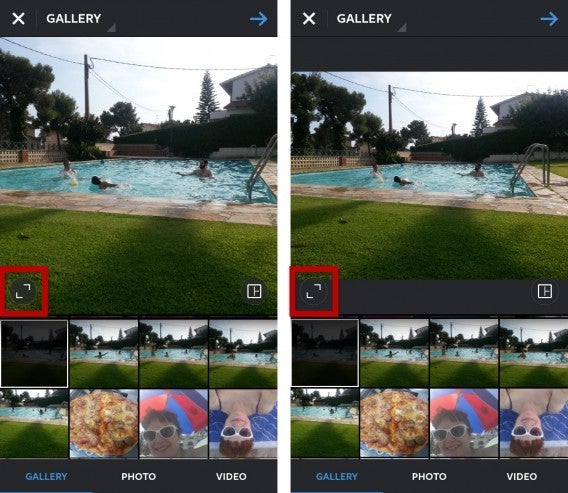
To enable this feature, enter and browse Instagram’s Gallery option. Choose from your camera roll the photo or video you want to upload, then tap the new button in the lower left corner. This button lets you select if you want to publish the photo or video in the old square format of Instagram, sacrificing parts of the image, or in its original rectangular form.

instagram-select-format

After activating this option you can edit your photo or video in the traditional way, adding effects, filters, etc. before publishing it to your account.

Here is a how a horizontal image is displayed on the app.

And here is one displayed vertically.

Furthermore, you are not limited to the original format or a square – the app now lets you zoom and crop photos however you choose. So, you can select exactly what you want to show, in whatever format you desire.

Cut! (Or don’t, it’s up to you)

With this update Instagram will eliminate the need for external editing apps to frame full images and create custom crops. That said, for now this change is only supported in the app and not the main Instagram site. Hopefully that will change soon.

Find out more with our comprehensive Instagram guide.

Follow me on Twitter: @MariaBaeta

Volume, Final Fantasy VII, and Horizon Chase: let’s Click-Swipe-Play

Welcome to Click-Swipe-Play, Softonics new gaming show. I am going to bring you three reviews in under three minutes – and then make sure that you are primed for next week’s big games.

And as if to celebrate the first show, every game this week is great.

I start with the classic Final Fantasy VII, which has just been released on iOS allowing you to play on the move the game that popularized the Japanese RPG genre in the West.

The retro racer Horizon Chase is my second choice. If you ever played Outrun then this game should be instantly familiar, yet it also has a stack of intelligent updates for mobile gaming.

My last game this week is the brilliant Volume, a stealthy puzzle game with a striking art style. The game’s abstract environments allow for lots of visual clues to aid your escapades, remove the vagaries that so often ruin the genre.

And we wrap up with a reminder of next week’s releases, including Metal Gear Solid V and Lara Croft GO.

Related Stories

Pac-man 256 and Mozilla Webmaker top our recommended apps

Volume review and video

Horizon Chase review and video

Follow me on Twitter: @DoFuss

Spotify’s controversial new Terms and Conditions and other news in the Softonic Roundup

On this week’s Softonic Roundup we talk about Spotify’s controversial new Terms and Conditions, Google Maps’s photo service, and a few intriguing Android and iOS bits.

Our first story is about how Google Maps is to take on Foursquare with its new food photos service. That’s right, now if you take a picture of a tasty treat a prompt will appear asking if you would like to upload it to Google Maps, then ask for a review – slowly building picture of restaurants in the area. Source: Android Police

In iOS news, you can now sync your iPhone WhatsApp account with the web version of the service. True, this has been an option on Android for a while, but better late than never. Source: Whatsapp Blog

Android users may be pleased to hear that Google is to preload fewer apps on their devices, allowing you more space to fill up with photos of food. Unfortunately, phone manufacturers can still install whatever they like. Source: Android Central

In other Google news, the company’s plans to bring internet to the world continue a pace, with the release of an Infinix’s HOT 2 – a $90 mobile phone that will be sold in six African nations. Source: Engadget

Lastly this week, are Spotify’s controversial new Terms and Conditions. By agreeing to these you will be giving the company access to your photographs, videos, contacts, location, and voice commands. The reaction to this on social media has not been good, leading to the company CEO, Daniel Ek, posting an apology on the official blog. Source: Forbes

That’s if for this week, we will be back next week with more tech news.

Related Stories

Pac-man 256 and Mozilla Webmaker top our recommended app list

The artist formerly known as Google, and other news – The Softonic Roundup

Five hidden Windows 10 tools

Follow me on Twitter: @DoFuss

Pac-man 256 and Mozilla Webmaker top our recommended app list

We are back with another five apps for you to try – including one designed to make you think about how much we are making you use your phone.

Kind of doing ourselves out of a job there, but c’est la vie. Webmaker from Mozilla (Android) is first this week, an app that lets you design your own website with ease. The results aren’t complex, but they work well and should have your site up in moments.

Next up is Pacman 256 (Android|iOS), the game that brings a little endless fun to the classic, arcade maze game. With the screen always forcing you forward you will need quick reflexes to work your way up that high score table.

Third we have Cooking Mama Let’s Cook (Android|iOS), a game that has you try and prepare the perfect meal from start to finish. It’s a tasty little game, but the free version only comes with a few recipes.

We also have MSTY (Android|iOS) a messaging app with mood music.Choose the contact, photo, and message you want, then the app lets you add a track from its library of emotionally themed categories.

Finally we have Quality Time (Android). This runs in the background monitoring what apps you use, how much, and when. You can then monitor your usage and set alarms if you think that you are over doing it.

We will be back on next week with more videos, subscribe to make sure you don’t miss them – see you then!

Related Stories

The artist formerly known as Google, and other news – The Softonic Roundup

Five hidden Windows 10 tools

Score! Hero, Manowar, Square Quick, Bestie, and Farming Simulator 16

Follow me on Twitter: @DoFuss

Five hidden Windows 10 tools

Microsoft’s new Windows 10 operating system has been downloaded by millions of people, so we already have a good idea of its many strengths. But with Cortana, virtual desktops, and the new start menu, all garnering some much deserved attention, it can be easy to miss the smaller improvements.

These more subtle improvements are there though – and many of them will add just as much, if not more, to your Windows 10 experience. Here are the five best.

Disk Manager

Yes, Windows 10 now makes it easier than ever to see how you are using your hard drive space. By going to Settings > System > Storage you can choose the disc you want to analyze the quickly see how much room each individual folder and file is taking up – you can even delete files directly from this menu.

Integrated video capture

Window 10 makes it easy to capture what’s going on in your open programs. Starting a recording is as easy as holding the Windows, Alt, and R keys.

Alternatively, if you are more interested in recording a game, then you have Xbox application. Holding Windows and G will bring up the Xbox widget to let you start recording.

Battery Monitor

Designed to run on desktop, laptops, and tablets, Window 10 offers you even more power management options. Going to Settings > System > Battery Saving > Battery lets you see your battery usage over the last week, two days, and 24 hours. It even shows how much power individual apps are using, letting you cancel the more resource intensive ones.

Command Line

The command line is hardly new, but Windows 10 has improved the functionality of this tool. Opening up the app’s properties now allows you to alter the window’s opacity, and the text’s color, size, and font to make it easier to read. You can even copy and paste from other programs – which I can attest is a huge deal from all the time I have struggled to transcribe lines of what looks like gibberish.

Wi-Fi Sense

If, like me, you are a horrible person who feels put out every time you have to search for your Wi-Fi password for a friend to connect, then Wi-Fi Sense may have the solution. This app looks at your Outlook, Skype, and Facebook contacts, then automatically connects your Windows 10 using friends through your device.

Related Stories

How to get the most out of Cortana, the Windows 10 virtual assistant

Making Cortana and Google get along

10 tips for customizing Windows 10

Follow me on Twitter: @DoFuss

The artist formerly known as Google, Windows 10 updates, Kaspersky suspicions, Android Fallout, and Dark Souls on Twitch

Welcome back to the Softonic Roundup, where we wrap-up all of last week’s tech news and present it to you with a bow on.

Google was the big news last week, as it announced it is to become Alphabet. Google will not cease to exist, but it is to be just one part of the larger parent company. This is to allow Google to focus on its core business, such as the Google OS and Gmail, while other companies will be able to grow unfettered by expectation under the Alphabet umbrella. Source: Mashable

In one slight twist on the story, it seems Google forgot to google Alphabet before settling on the name. The URL is already owned by the car giant BMW – and they aren’t selling. Source: Mashable

In Windows 10 news, Microsoft’s new OS has now been downloaded onto 50 million devices. Source: WinBeta

They are still keen to improve the system though, and they have just released their third update for it – just three days after the second. Source: TechCrunch

There is also now a version of Windows 10 for Raspberry Pi 2 and other small devices. Known as Windows 10 IoT Core, this streamlined OS seems to be enabling some pretty fun experiments. Head over to the official site for more information. Source: ZDNet

The antivirus developer Kaspersky also made headlines last week. Two former employees of the company are alleging that – in an attempted to discredit its competition – it mislead other antivirus developers into thinking benign PC files were dangerous. This caused the other companies to create software that would delete or disable computer functions. Kaspersky is refuting these claims and an investigation is underway. Source: Reuters

In gaming news, Fallout Shelter has finally come to Android, which should be good news for Google gamers who want to watch their minions rebuild civilization after the apocalypse.

Continuing this voyeuristic theme, Twitch is playing Dark Souls. There are currently 2,500 people trying to control a single character by entering text commands into the chat, while another 700,000 look on – presumably laughing. At the time of writing they are about three and a half days into the experiment and have just (accidentally?) restarted the game for the third time that I have seen. If you want to watch the chaos, head over to Twitch.

We will be back next week with more news, be sure to subscribe so you don’t miss that or any other Softonic videos.

Related Stories

Gamescom, YouTube, and Windows 10 news in the Softonic Roundup

Farming Simulator 16 is making magic from manure, and its our App of the Week

Score! Hero, Manowar, Square Quick, Bestie, and Farming Simulator 16 are our Five Apps to Try

Follow me on Twitter: @DoFuss

Score! Hero, Manowar, Square Quick, Bestie, and Farming Simulator 16 are our Five Apps to Try

On this week’s Five Apps to Try I check out three games, try two photo apps, and regret one choice of shirt.

We kick off this week with Score! Hero (iOS). This soccer game doesn’t make you play entire matches, but instead focuses on having you orchestrate single, pivotal moments to build your reputation as a star player.

If sports aren’t your thing and you want something a bit more cerebral, then we have Manowar (iOS). This nautically themed puzzler has you trying to blast all of the cannon balls off a galley. It might be frustrating, but that doesn’t stop it being incredibly satisfying every time you solve one of its conundrums.

Next is one for all you Instagram fans, Square Quick (iOS|Android). This little app helps make your picture squares to be displayed on the photographic social network. But, rather than cropping your carefully posed piece, Square Quick offers dozens of boarders to help you reach that 1:1 ratio without losing any of the image.

Bestie (iOS|Android) is our fourth app, and it has turned me into a selfie convert. This fun little photo app lets you apply filters that are perfect for portraits. Once you have snapped yourself, you can then edit and improve your visage with its editing options, to beautiful – or comical – results.

Finally, we have Farming Simulator 16 (iOS|Android). No, I never saw the fun in these either, but it turns out we were wrong. Playing the latest version of this simulator on my iPhone has me won over with its great mix of resource management and hands-on agricultural action. This could keep you busy for weeks.

That’s it for this week, be sure to subscribe and I’ll see you next time.

Related Stories

Gamescom, YouTube, and Windows 10 news in the Softonic Roundup

Farming Simulator 16 is making magic from manure, and its our App of the Week

Minecraft Windows 10 Edition, Musical.ly, Prune, and Outfit7’s latest game – Five Apps

Follow me on Twitter: @DoFuss

Farming Simulator 16 is making magic from manure, and its our App of the Week

Working a full day in the fields doesn’t sound like that much fun, but we have just discovered that Farming Simulator 16 (iOS|Android) adds some Zen tranquility to the task.

In Farming Simulator 16 your goal is to manage your farm. That means both tending its daily task such as fields, crops, and livestock, while also overseeing it finances.

You start with a handful of essential tools and land, but over time you must expand this. Purchasing additional land and machinery will improve your efficiency and profits, allowing you to further expand. With 50 vehicles and tools to purchase – including tractors and trailers – it takes a while to full equip your countryside cartel.

Balancing your time between selecting your crop rotation to match market demands, and actually sowing your fields, reaping the harvest, and delivering them in a timely manner keeps you incredibly busy.

If it all gets to be a bit much you can call on a friend to help with the local multiplayer option (allowing two devices to connect over Bluetooth and Wi-Fi), or employ a farmhand with a tap of the screen – providing you have the cash to pay.

Despite how much you have to manage though, there is something in this mix is quite relaxing. Whether it is the calming pace off the machines you drive, the fact you have time to consider your choices, or just that you feel like you are just spending some time in the countryside Farming Simulator 16 is enjoyably mellow and in-depth.

Related Stories

Farming Simulator 16 review

What’s new, and what’s missing, from the Minecraft Windows 10 Edition Beta

Gamescom, YouTube, and Windows 10 news

Follow me on Twitter: @DoFuss