How to: Download and install themes in Windows 7

One of the new features introduced in Windows 7 is the use of themes to customize the system’s appearance in a very easy way. Themes enable you to personalize wallpaper, screensaver, window color and system sounds in just one click. Then, if you want, you can change small details inside the selected theme and create a new custom version of it.

How to: Download and install Windows 7 themes

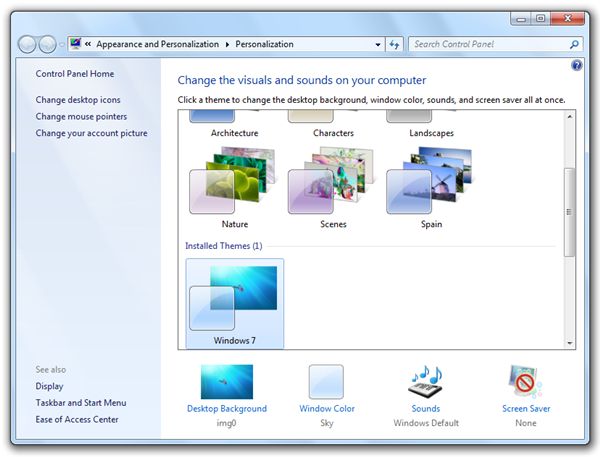
Themes can be selected from the Personalization window, which you can open by right clicking anywhere on the desktop and selecting Personalize. Switching to a new theme is as easy as clicking the theme’s thumbnail. The theme will be immediately applied to your system, so you get the full preview before formally applying it. You can then click on any of the customizable elements at the bottom of the window (desktop background, window color, sounds and screensaver) and change them to suit your taste. Continue reading “How to: Download and install themes in Windows 7”

Create instant photo collages online with Shape Collage

There are several ways to create a collage with your digital pictures: doing it yourself from scratch with Photoshop (which obviously requires a certain Photoshop knowledge), using an automated Photoshop action that does almost all the hard work for you or simply turning to easier, more specific collage-oriented tools like Shape Collage.

Create instant photo collages online

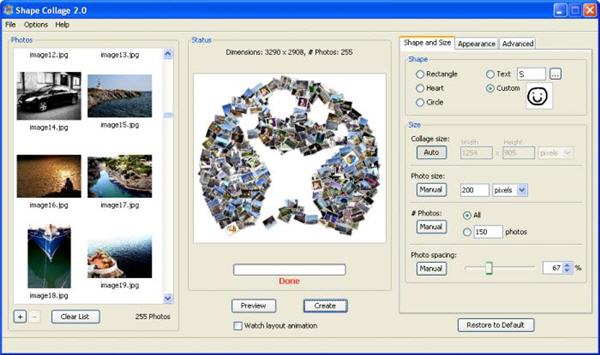
This awesome program lets you create completely customizable photo collages in just a few minutes, and without any artistic or technical skill required. As long as you know how to select photos from your hard drive, and tweak a few simple configuration settings, you’re good to go. Shape Collage is completely free for personal use, and works on Windows, Mac and Linux.

But if you’re the kind of person who prefers not to install software if there’s a web app that does the same job, we’ve got good news for you: Shape Collage has just launched an online version! Shape Collage Online is a stripped-down version of the desktop app, with less options and reduced functionality, but it works perfectly fine for the occasional photo collage. Just select the photos you want to use in your collage (they must be all online, either as standalone photos or photo galleries), pick a shape for your collage and hit ‘Create’. After a few seconds, your collage will be ready!

Create instant photo collages online

Hey Google, what about us?

In this brave new world of the internet, the planet, we have been told, has shrunk. Yet for Google, it seems old geographical realities still hold true.

Google Voice sounds wonderful, but I’ve heard so much about this amazing service I can’t use that I’m beginning to hate it. And Onebox music search – it sure is lucky no one in Europe listens to music, or we might be a bit annoyed at Google’s new search feature we don’t have. Thanks for making these tools available everywhere, except in Asia, Australasia, Antarctica and Europe. What’s this all about? When did the US become the world?

North America only accounts for 15% of internet users, so when are the majority going to get some of this stuff? Europe’s a bigger market, and just as developed as the US. I’m surprised that a music search service should need any local restrictions – with streaming services like Spotify there are licensing issues, but search?

With Google Voice, obviously there will be differing telecoms law, but Google has presence everywhere and there seems to be no movement at all. As we follow events around the world with complete ease, the idea of waiting months for something just doesn’t fit. So come on Google, there’s a whole world out there, and we don’t like being ignored! One day, you might wake up and find we’re all using Bing.

Today’s downloads for Windows, Mac and Mobile

Download Skype PortableWindows: Do you like Skype? Then you’re going to love Skype Portable! This is a special version of the popular VoIP client that doesn’t require installation and can be taken anywhere on a USB pendrive. Skype Portable works just like its desktop brother, features great audio and video quality, and has everything you need to keep in touch with your beloved ones!

The best racer for iPhoneiPhone: It’s been a long time coming but iPhone gamers at last got a decent driving sim. Firemint Real Racing GTI is a Volkswagen-sponsored racing game which makes wonderful use of the iPhone’s hardware to deliver a high-octane, realistic driving experience. The control system is probably the most refined, yet simple you’ll find anywhere on the iPhone platform.

VMware FusionMac: The ability to run Windows on Macs has massively increased the reach and popularity of Apple computers. But you need a virtual environment to do so and the choice usually comes down to either Parallels or VMware Fusion. For developers this ability is absolutely essential, allowing you to run Ubuntu, WinXP and now even Windows 7 (in fact this latest release 3.0 has been optimized for it) all at the same time.

Play Champions Online for free this weekend.

Like the idea of “Massively Multiplayer Online Games”, but put off by all those orcs and demons? Cryptic Studios are making their new comic book inspired Champions Online free this weekend. Boasting excellent character design, you can create your own super-hero and enter a colorful world where the Earth is of course in peril. Help save us all from Doctor Destroyer!

Like their City of Heroes before, this promises a much more light-hearted take on the role-playing genre. You can sign up here and download the client in preparation for 10am Friday (30th Oct) US Pacific time (5pm GMT).

[Via: Eurogamer]

Snow Leopard is Apple’s Vista

X Incompatible logoOne thing you can usually guarantee with Apple’s OS releases is that they will work properly. That wasn’t the case with Snow Leopard – released exactly two months ago today – and the compatibility problems that have dogged it hark back to Microsoft’s disastrous release of Vista. I’m not for one minute arguing that the functionality of Snow Leopard is as bad as Vista and the incompatibility problems are far fewer. But the number of problems being discussed by users on this site alone suggest that for the first time in Apple OS releases, they got it badly wrong.

Apple Mail in particular has caused a huge number of problems as the comments following a post I wrote addressing Snow Leopard incompatibility issues with it prove. Mike’s frustrations are typical of many:

Massive problems here. Mail crashes occasionally, Aperture crashes all the time, especially when trying to export. CS3 has crashed. I mainly see the crashing when going into the dialog boxes (i.e export etc). I am not going to go into work-arounds, that’s not my job, I paid a fortune for all of my apple gear to get away from this type of issue. Apple should have gotten this right before releasing it.

He’s absolutely right to be so angry. The least Apple users deserve is that Apple’s own software works with what was merely a revised version of Leopard. And as he found out, it’s wasn’t only Mail that caused problems. Adobe’s CS3 was a well publicized victim of Snow Leopard. Since we update programs on a regular basis here at Softonic, it’s been unavoidable for us to notice the large number of updates rushed-out by developers in the wake of Snow Leopard’s release and the volume of frustrated users finding that programs suddenly aren’t working anymore.

InformationWeek reported that at least 100 applications were incompatible with Snow Leopard on its release. Users at Wikidot are keeping track of those programs still incompatible including at the time of writing major packages such as Adobe After Effects and Adobe ColdFusion. And to complete the surreal Vista-esque scenario, there were even security issues on Snow Leopard’s release. We had the security hole created by Guest Accounts and a vulnerability in Java both of which put your Mac at risk of hijacking.

Don’t get me wrong. Snow Leopard was far less problematic than Vista on balance. Minor incompatibility problems are to be expected with completely new OS releases but Snow Leopard was hardly a revolution – it was merely a tweak of Leopard so it shouldn’t have been hard for Apple to get it right. That is, unless they rushed it out in advance of Windows 7 which seems like the most likely reason for the problems.

For many Apple users, the release of Snow Leopard will forever be remembered as the mark of the devil – 10.666. Let’s hope they get it right next time.

Today’s downloads for Windows, Mac and Mobile

Download Windows 7 Easy Transfer for Windows XPWindows: Are you planning to upgrade to Windows 7 from Windows XP? Microsoft has developed a special tool to make this process much easier. It’s called Windows 7 Easy Transfer for Windows XP and lets you copy all your documents, music, photos, user settings, bookmarks and more to a new computer with Windows 7. Oh, and there’s also a version for Vista!

KasperskyMac: If you think Macs don’t need a virus checker then think again. Although the risk of virus attack is very small compared to Windows, Mac viruses are on the increase and this will continue as Macs become more popular. Kaspersky Anti-Virus for Mac offers quick and thorough scanning options as well as real-time scanning of files download from the internet, via email, etc.

Phones: Hangman Classic Free is an iPhone version of the classic game, in which you need to figure out what a word is by guessing letters. Simply tap a letter on the screen and if it’s in the word it will be displayed, if it’s not then another body part will be drawn onto the hanging stickman. Guess the word before the drawing is complete and you win, or else you die. It’s that simple.

5 stress-free alternatives to Photoshop

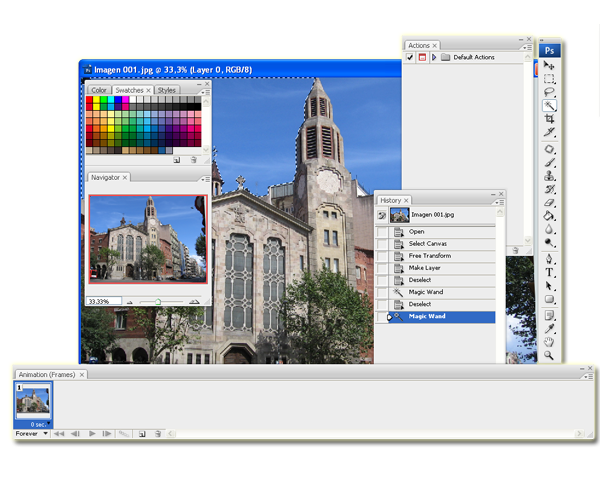
Adobe Photoshop is a legend of a program. Unfortunately, it is also legendarily complicated and expensive, which makes things difficult for the average user. Even if you get past the intimidating price tag, Photoshop’s maze of layers, masks and magic tools can make even the bravest prospective user doubt their ability. Surely there’s an easier alternative?!
photoshop_final.png

Luckily for us, there is. Most people don’t actually need a photo editing program of such epic proportions, which is why developers have created a raft of alternatives that area easier on your wallet AND your blood pressure.

PhotoscapePhotoscape has to be number one on any list of free and easy alternatives. Full of features, simple to use and, best of all, completely free, this program is pretty much freeware’s image editing poster child. Come on, with over three MILLION downloads in the last two years on Softonic alone, it has to be doing something right!gimp_final1.png

GIMP – In second place comes GIMP. Somewhat of a giant, despite the odd name (it’s actually an acronym of GNU Image Manipulation Program), GIMP scores slightly below Photoscape because its installation process can be a little scary. Since we’re looking for stress-free alternatives, this means it loses a few points, but once you get GIMP safely installed on your computer, you’ll find it’s full of features and has an impressive range of cool plug-ins that are almost sure to meet your editing needs.

Photofiltre Photofiltre scores high in terms of price – it’s free – but a little lower on ease of use. Like Photoshop, its interface is a bit overwhelming at first glace, but the learning curve isn’t half as steep and it is an ideal starting point for budding graphic designers who might well move on to Photoshop in years to come.

PhotoImpression ArcSoft PhotoImpression come in at number 4 because its major pro is counterbalanced by a major con. This Photoshop-like program is full of features, but way, way easier to use than the original. It’ll give you good practice for the ‘real thing’, helping you to learn the basic concepts of more advanced image editing. The major con? Well, it’s not actually free, but you can try it out and get used to the basics. When you have them down, you can move onto the more complicated tools.

Before looking at the last program in our run-down, ask yourself a question. Do you really need a tool like Photoshop? Although you might want to crop a few photos, tweak color balance or create a fancy slideshow, you probably don’t need to go as far as seamlessly adding an image of Bigfoot into the pictures of your family’s last camping trip in the woods. Photoshop is for professional level photo editing, and most people really don’t need such power.

picasa_final.png

Picasa – If you need a simple and effective photo editor, but not exactly an alternative to Photoshop, give Picasa a try. The newest version of the Google tool is better than ever, and provides some really slick features for ordinary photo editing. It has none of the headache-inducing options of the more advanced editors, but will still give you fantastic results.
Today’s downloads for Windows, Mac and Mobile

Go bowling on your iPhoneiPhone: What do the three comedy greats Homer Simpson, Fred Flintstone and The Dude from The Big Lebowski have in common? The answer, of course, is that they all love bowling. Guys, if any of you are reading this and have an iPhone then make sure you check out iBowl. This game is perhaps the closest you’re going to get to bowling without actually getting out of the house and going to the lanes.

Download uTorrent PortableWindows: If you already have uTorrent as your favorite torrent client, wait until you see its portable version! uTorrent Portable features the same characteristics as its desktop counterpart (clean interface, fast connection, easy to use), only that it doesn’t require installation and you can take it anywhere with you on a USB memory device.

Grappling HookMac: Grappling hooks have often played a big part in comic book fiction and games like Bionic Commando, but they have never caught on in real life. Grappling Hook is a novel 3D first person game where the excellent device is essential. It starts with little explanation, but a computer communicates to you along the way that you are in some kind of test, and all you have to do if find the right teleporter to finish.

How to: Stream video from Mac to Xbox

I watch lots of videos on my MacBook: movies, documentaries, TV shows… but after looking at a 13-inch laptop for 2 hours you really start thinking about how much better that movie would look on a larger screen, like my own TV. The only question was, how could I transfer all the media stored in my MacBook to my TV?

The first obvious answer was buying a multimedia external drive, but I already have enough gadgets plugged to the TV and besides, I didn’t want to spend a cent on this project. Having an Xbox 360 at home, I though about the possibility of streaming video from the computer to the Xbox. You can already use the Xbox 360 to stream video to your TV via Windows Media Center, so why shouldn’t I be able to do it from my MacBook?

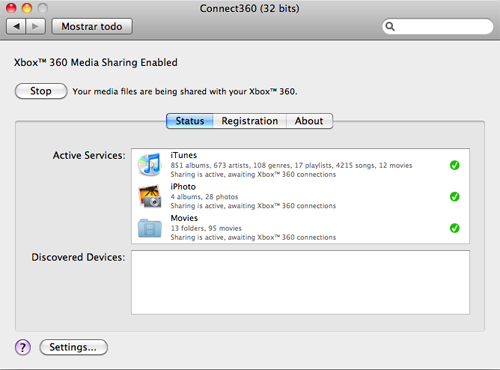
After a bit of googling, I found the answer in Nullriver and their awesome Connect360 utility. This little great tool is added to the System Preferences panel, under the Other section, and enables you to share your iTunes library, iPhoto albums and of course, all the contents in your Movies folder with your Xbox 360.

How to: stream video from Mac to Xbox

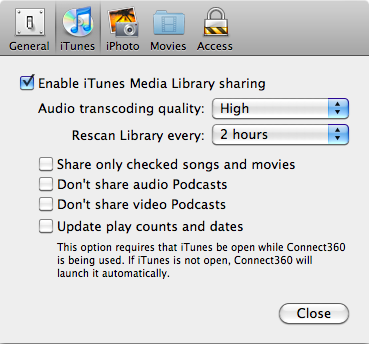
The program is really easy to use and doesn’t require any complicated configuration. All the options in the Settings menu are, as you can see, very simple – mainly dedicated to selecting the data you want to share between your Mac and your Xbox.

How to: stream video from Mac to Xbox

Once Connect360 is running on your Mac, switch the Xbox on and the program will recognize it immediately. Right after that, Connect360 will start indexing all the content you’ve selected to share. Continue reading “How to: Stream video from Mac to Xbox”