Create animated GIFs from YouTube videos

The popularity of animated GIFs still hasn’t let up, and one of the easiest ways to create your own animated GIF is by using YouTube videos and free online GIF converters.

When it comes to creating GIFs from your own video clips, Softonic Editor Jan-Hendrik already took us through the process of creating your own GIFs on both Mac and PC using web apps or a webcam to record things live. If you’re already found the perfect video online, however, there’s an even easier way to make your own GIFs. With any one of the three online converters below, you can create your very own animated GIFs from a YouTube video.

Gifsoup

With Gifsoup, you simply copy any YouTube link into the text box, and then click Create Gifs.

Then, you can use any section of the video up to ten seconds. Select the section by picking a start and end time within the clip. Then, click on Generate Animated GIF to create the GIF file.

There aren’t any other options, so creating the GIF is incredibly easy. The only downside: Gifsoup adds its own watermark to your creation. With a paid premium account, you can create animated GIFs that are up to 30 seconds long with no watermark.

MakeaGIF

MakeaGIF works on the same principle as Gifsoup, but offers a slightly fancier interface. A slider lets you select the start time and specify the desired duration of your GIF animation. If you register for free, the maximum playing time is 10 seconds. Otherwise, you have a limit of 5 seconds.

Unlike Gifsoup, MakeaGIF displayed no watermark and creates longer animated GIFs, although the web app works much slower.

IMGflip

A more comfortable online converter for YouTube videos is IMGflip. Like MakeaGIF, this service offers free access, as well as premium access for an additional charge. The free version will generate 10 second GIFs with dimensions of 260 or 360 pixels with watermark, with the option of making 100×100 square images as well.

Especially practical about IMGflip is that before making your GIF, you can set the expected frame rate and file size You also have the option of adding small text messages at any point in the animated GIF. The paid version (IMGflip Pro) creates clips of any resolution and up to 40 seconds long, without watermark.

While there may be a ton of GIF websites out there, sometimes it’s still impossible to find what you’re looking for, and with these three services, you can create GIFs that perfectly express your emotion.

If you still can’t get enough of GIFs, make sure to check out our article on How to make animated GIFs on Mac and PC.

Google Hangouts doesn’t require a plugin in Chrome

Google is making using Hangouts even easier by building it into its Chrome browser. I reported this feature would be coming, but it has finally arrived in the experimental versions of Chrome.

If you’re running Chrome Canary or other developer build of Chrome, you can get this feature today. The rest of us will have to wait a few weeks until Google fixes all the bugs.

Users of other browsers like Firefox, Opera, and Internet Explorer will still need to install the plugin for Hangouts to work.

Source: Victoria Kirst (Google+)

Follow Lewis on Twitter @lewisleong

RELATED STORIES

Facebook experiment that manipulated user emotion sparks outrage

A recently published study revealed Facebook manipulated the News Feed of nearly 700,000 users to test emotional contagiousness. The experiment, which took place in 2012, involved scanning posts for positive and negative words and rewording them to fit each emotion. Facebook then measured the emotional impact of positive vs negative News Feeds.

The results of the experiment showed limited effects. The study concluded that users shown negative posts only exhibited 0.1% fewer positive words in their posts. Those shown positive news composed updates with 0.07% fewer negative words.

Still, users are outraged that users were unknowingly part of Facebook’s experiment without having the option to opt-out. Some argue that Facebook’s experiment could have had real world consequences. Users suffering from depression may have been negatively affected by negative posts.

So was this Facebook study legal?

Absolutely. By agreeing to Facebook’s terms of service, users are relinquishing their data to the social network for experiments like this. Although Facebook isn’t transparent about its data experiments, it’s Data Use Policy does allow it.

Was the study unethical?

It depends who you ask. While Facebook had an internal ethics review, it didn’t ask an independent institution like the Institutional Review Board to look at the experiment.

Facebook data scientist Adam Kramer expressed regret about the experiment.

“I can understand why some people have concerns about it, and my coauthors and I are very sorry for the way the paper described the research and any anxiety it caused. In hindsight, the research benefits of the paper may not have justified all of this anxiety.”

The scary thing is that many companies are doing the same thing without telling its customers. For a more in-depth look at the morality of A/B testing, check out this TechCrunch article.

Source: PNAS

Via: Forbes

Follow Lewis on Twitter @lewisleong

RELATED STORIES

Harley Quinn story pack revealed in leaked GameStop ad

We have more information about what role Harley Quinn will play in the upcoming Batman: Arkham Knight game. A leaked GameSpot ad reveals gamers will get to play as Harley Quinn in her own “Story Pack.” Pre-orders for the game will receive the Harley Quinn DLC for free.

The leaked ad also reveals the DLC will include “4 Exclusive Challenge Maps” and Quinn’s own unique weapons. ComicBookMovie speculates the DLC will be a mixture of a side story and extra challenges. The story follows Quinn as she tries to track down Ra’s Al Ghul to enlist his help reviving Joker from the dead.

Batman: Arkham Knight will be released sometime in 2015 on PC, PlayStation 4, and Xbox One.

Source: ComicBookMovie

Follow Lewis on Twitter @lewisleong

RELATED STORIES

Google to remove Quickoffice for Android and iOS

Google’s popular offline productivity suite will be removed from Google Play and the App Store in the coming weeks. With new apps for Google Docs, Slides, and Sheets, there is no longer a need for Quickoffice.

Quickoffice was Google’s app for editing Microsoft Office files without conversion. Google announced native Office document support during its Google I/O conference last week, making Quickoffice obsolete.

Slides just debuted for Android, but there’s currently no app for iOS yet. I expect Google to release Slides for iOS before discontinuing Quickoffice in the coming weeks.

Quickoffice users can continue using the app but won’t be able to download it again once its removed from the app stores. Development will stop as well so don’t expect updates or support for Quickoffice in the future.

You can download the replacement apps for Quickoffice below.

Download Google Docs: Android | iOS

Download Google Sheets: Android | iOS

Download Google Slides: Android

Source: Google Apps

Follow Lewis on Twitter @lewisleong

RELATED STORIES

9 surprising features in Google Hangouts

In the world of VoIP calls and free video, a war started ages ago between Skype (owned by Microsoft), mobile chat applications like Viber or LINE, and Hangouts, the offering from the giant of Mountain View, Google.

If I could only keep one of these, I’d opt for Google Hangouts. Beyond the simple fact that Hangouts works fantastically, even during video conferences with 10 people, it’s the other little bonuses of Hangouts which make it a must-have.

Here are 9 of the best features of Google Hangouts that you may have missed, but which could forever change the way you use the service.

1. Register your call or conference on YouTube

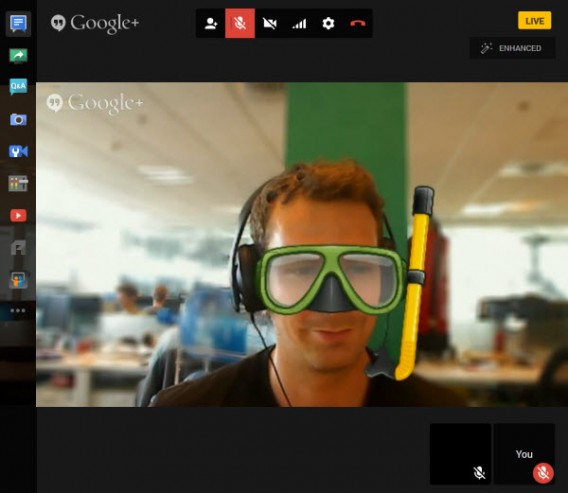
The first little-known, but very handy feature: Hangouts live, which lets you record your calls as YouTube videos.

Hangouts on Air live

As its name suggests, videoconferencing is broadcast live on YouTube, but by paying attention to the privacy settings, you can significantly restrict access to your video conference.

Once the call and the live broadcast have ended, the video is automatically saved in your YouTube account. To see it again, go to the Video Manager section in YouTube.

2. A mini control room in real-time

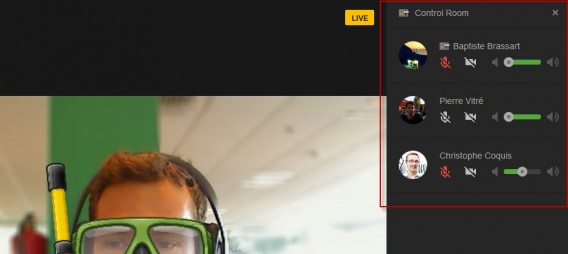
The Hangouts live feature offers another significant advantage: it allows you to access a control room from the options menu.

Governed Hangouts live

Using this control room, you can turn each videoconference participant’s microphone or webcam on or off.

The tool has already been adopted en masse by YouTubers and other podcasters all over the world because it severely reduces post-production work.

3. Manage your Circles to launch calls quickly

As part of the Google ecosystem, Hangouts is closely linked to the Google + social network. This means that to use this VoIP service effectively, you need well organized Google + circles, which will significantly save you time.

Circles Hangouts

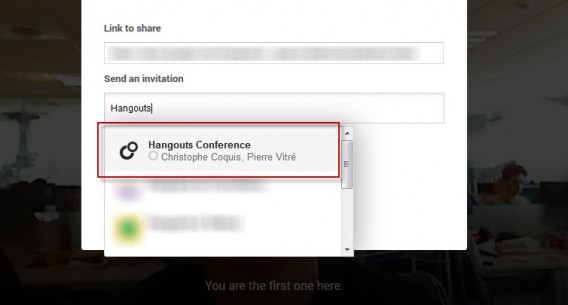
If you often have videoconferences with a group of friends or colleagues, consider creating a circle so that you can start the conversation quickly and without having to add the participants one by one.

4. Schedule your Hangout times

Hangouts NotificationsYou can plan a video call in advance with Google Hangouts. More than a video conference, this is like creating an upcoming Google + event and inviting all the participants in advance.

Hangouts details

When creating the Hangouts call, you’ll  find your Google + Circle of friends and can add a description in the Details field. Then, the Google+ notifications system takes over to keep you informed of developments related to the event.

5. Applications and Games for Hangouts

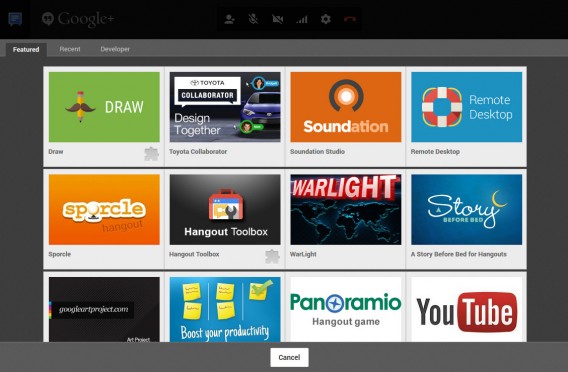
As well as the YouTube videos module and collaborative working via Google Docs, which I’ll discuss below, Google Hangouts includes a dozen other third party applications, all of them free.

Apps Google Hangouts

To use them, simply download the module corresponding to the service. The icons are then added to the control center on the left of the screen, and can be viewed by all participants in the video call.

Sound design with Soundation, short stories with A story before bed, or even a visual quiz with Panoramio are all add-ons that offer something to liven up your Hangouts conversations.

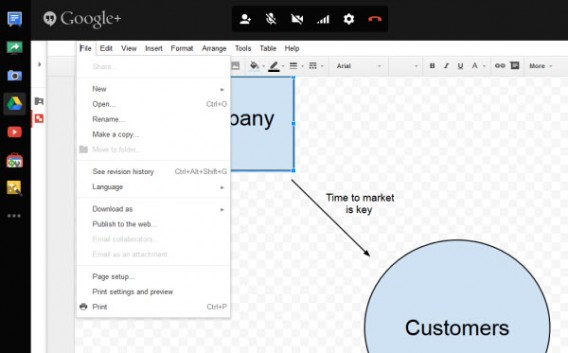
6. Collaborative working via Hangouts and Google Docs

Google Hangouts Drive

If screen sharing has become a standard function over time for all video conferencing services, the same can’t be said of collaborative working. Google Docs scores points where services like Skype can’t even compete.

Several people – up to 10 – can edit a document during a call. To do this, you need to download the module, and then create a new document or open an existing one. Once completed, the document can be saved locally, or in your Google Drive.

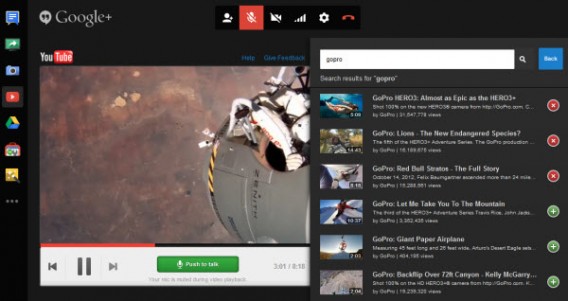
7. Watch YouTube videos with others

YouTube Hangouts is another app that’s definitely worth checking out. It can broadcast a video in a window in the center of the call, making the video visible to all participants.

YouTube Hangouts

Google has paid close attention to detail with this function, even muting the microphone of your contacts as soon as the video starts to play. To watch a clip or the latest trailer, search for the video from the search engine and then add it to the playlist module.

In the mood for a Podcast? Prepare your playlist of videos in advance, publish your show on YouTube with Hangouts live, and avoid all those tedious post-production tasks.

8. Change the bandwidth

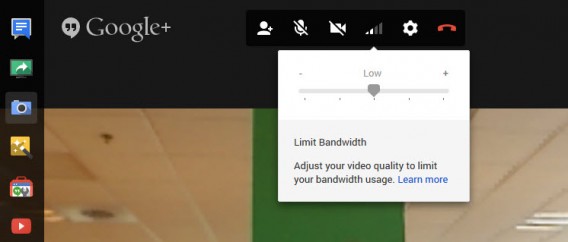
Once the call starts, you may struggle to get online access because the bandwidth given to videoconferencing might be too big. To correct this annoying side-effect, click the internet connection symbol between the cogwheel settings icon and the webcam disabling icon.

Limit bandwidth Hangouts

By reducing the amount of bandwidth given to video calling, picture quality is reduced, but it will let you continue surfing the web, playing online games, and downloading things while on the call. Note that although the video quality drops, you shouldn’t notice any lag between audio and video.

9. Shuffle button for Hangouts effects

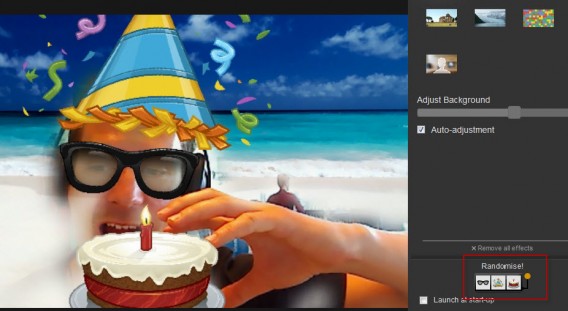
You may or may not remember the famous MSN winks, but Google Hangouts has its own handful of animations that are just as funny as they are kitsch. The feature is called Google Effects and is installed by default.

Randomize effects Hangouts

What you perhaps didn’t know is that Google lets you randomly modify effects. The button is hidden at the bottom right of the window, and fortunately, there’s nothing too ridiculous to share online.

Clearly, Google Hangouts has a few more things that some of the other VOIP services have to offer, and if you’re tired of plain old Skype, make sure to give Hangouts a spin.

If you’re still into Skype, check out our tutorial on using Skype group chats.

Follow me on Twitter @bbrassart

Boom Beach: Tips and tricks for beginners

Boom Beach has finally arrived on Android, and its creators Supercell are hoping to recreate the success of its other titles, Clash of Clans and Hay Day, with Boom Beach. It’s already gotten a head start with the iOS version, but chances are that it’ll blow up even bigger now that it’s on Android. If you want to get the most out of the game, there are certain tricks that’ll put you on the right track from the start.

Boom Beach is set on an archipelago of tropical islands. One of these islands is where you’ll set up home base, from which you’ll fight the the sinister Blackguard, who enslaves its islands’ inhabitants.

The key to starting any game, of course, is strategy. Well thought-out tactics at the beginning of the game will give you a huge advantage over your opponents. Below, I’ll tell you what to look for from the beginning in order to start the game off with a huge boom!

Materials

At the beginning of the game, you’ll have access to two basic raw materials: coins, supplied in the Residence building, and trees, produced by the Sawmill. When you reach level 6 Headquarters, you’ll get a new material–stone– but you’ll have to wait until you reach level 6 to use it.

You’ll have a stone storeroom, which can be useful for attacking other players, as well as for controlling the island with the computer. You’ll have access to a quarry only once you reach Headquarters in level 7, and at a more advanced level, Boom Beach introduces yet another material, iron, available from level 9 Headquarters.

You can also acquire diamonds throughout the course of the game. Larger quantities can also be purchased with real money at the store, which you can use to reduce construction time, and to replace deficient resources.

Coins are used to pay for soldiers, to expand the reach of radar on the world map, and to further train soldiers, which is done in the Armory. At the beginning of the game, you pay for constructing buildings with trees, followed by stone, and later, iron.

Steady growth

Steady and rapid growth at the beginning of the game is very important, but you need to prioritize; the highest priority in every game of this type should be economic development so that you can finance the development of a military and a government.

At the beginning, you’ll be very focused on securing a supply of raw materials. You can do this by raising buildings which produce coins, wood, and stone to higher levels. But that’s not all. If you retake an island from the hands of the Blackguard, its residents will be sent to you with gratitude, and construction materials.

One small island might not make a difference, but 20-30 definitely will. Unfortunately, the villains of the Blackguard will systematically try to take back the islands. Then, you’ll have little choice but to once again send your soldiers to enemy islands.

Discover the map in Boom Beach

You might pay dearly to discover the world map, but it’s worth it!

A key tip is to keep exploring the world map. Every little piece costs a lot of money, but it’s worth doing because you’ll be able to find a Resource Base, giving you a much larger supply of wood or stone. Unfortunately, the peace won’t last long: other players will try to take it from you.

The more a base of raw materials passes from one person to another, the higher the level of defenses you’ll need. In this case, it may happen that someone takes the resource base and improves their defenses, leaving your expeditionary forces without enough strength to take it back , at least not without raising it to a higher level or increasing headcount.

Boom Beach resource base

Master the resource base and fight for it tooth and nail

Find the diamonds

On the same world map where you’ll find the islands that you need to attack, randomly and occasionally you’ll  find boxes with diamonds. It’s worth casually scanning the map to find these treasures. By doing so systematically, you won’t have to buy diamonds at all (or at least if you do, you can buy much less).

Remove trees and rocks

In your home base or seized Resource Base, you should remove trees and rocks if you have excess cash. After removing a tree, you will, of course, get the raw “tree” material. The same goes for rocks: remove them to get stone. Not all trees, however, can be removed at once. Older and larger trees can only be cut down once you have your Headquarters at an appropriately high level.

Crystals and statues

From level 5 Headquarters, you can create a new building– the Sculptor. What does it do? Once you liberate an island from the Blackguard, you’ll start receiving strange crystals. When you collect 7 pieces of the same shape, a sculptor can make a statue of them. Once they’re built, you’ll get bonuses for different stats.

Types of statues and crystals in the game

In the early stages of the game, you’ll only see green crystals (Life), which help increase the production of raw materials. Later, blue crystals (Ice) will appear, and building statues with them will give bonuses to help defend the base. Red crystals (Magma) give bonuses that improve the performance of your soldiers, while purple crystals (Dark) support many other statistics.

Winnings after a battle

Gains after winning the fight – raw materials and crystals

The game limits the number of statues that you can put in your base to one type, but there is a way around it: overflowing statues will be turned into precious crystals in higher levels.

Guard the Headquarters

Headquarters is a key building in Boom Beach. Its destruction by the enemy automatically destroys all the other buildings in the database, giving the opponent victory. In short– protect this building at all costs. Set it in the center of the base, and evenly protect it with machine guns, mortars, and sniper towers.

Direct soldiers using flares

The attacker soldiers suddenly come out of the forest, guided by flares.

Once attacking soldiers land, they’ll move in a straight line to the closet buildings, so it seems logical to set up defenses on the first line, closest to the beach. Using flares can, however, direct the line of attacking soldiers elsewhere. If your defense is concentrated on the beach, for example, it could be easily avoidable and allow for attacks from behind.

Examine the power of defense and its range

Before attacking an island, you can get a sense of its level of defenses. To do so, choose the island and click on Scout, but don’t rely solely on an overview showing enemy fortifications: check every cannon and machine gun turret. Check to see how many points it has and how far it reaches. Then, consider which side you want to land your troops, and which defenses will protect shots from a cannon on the deck of a destroyer docked at the shore.

Attacking rocket launchers

Boom Beach rocket launcher

The range of rocket launchers and its points are huge.

Rocket Launchers are powerful defensive tools with a lot of points and a huge range. Sometimes, they’ll hide behind trees in the farthest corner of the base. Before you deal with other towers, you’ll be under non-stop rocket fire. The only way to the Rocket Launchers is to approach it as close as possible.

With the help of flares, you’ll have to set your troops so that they aren’t within firing range of other defense towers. In the first phase of battle, it’s worth releasing a unit that has a lot points– it’ll include a soldier with a giant machine gun.

Use flares!

Soldiers jumping out of the landing craft will go in a straight line to the nearest building, in turn shooting at ordinary buildings or defense towers. To give direction to their actions, it’s worth shooting a flare: marked buildings will immediately become targets for all your troops.

It’s often worth using flares to bypass enemy defenses and attack from the side, where the defense is less concentrated.

Points of attack – energy

During the first attack, you should eliminate the opponent’s defenses, but it may not be worth it to go from one tower to the next sniper machine gun: your arsenal will have some other tricks up its sleeve.

Each attack begins with certain energy points that you can use to fire a cannon, deploy flares, or treat troops. Demolishing simple bases that aren’t shooting at you increases the number of available energy points.

In the end, it’s worth steering your troops in order to maximize the number of energy points to use at the most opportune time.

Get off to a good start

Like Clash of Clans and Hay Day, Boom Beach is a strategic game where getting off to a good start is important for a successful game. Making using of resources, directing troops, and properly protecting your assets are just a few key factors that can help you make the most (and get the furthest) in the game. Finally, Android users can join in on the battle for tropical islands.

If you want more from Supercell, check out how to sync Clash of Clans between Android and iOS devices.
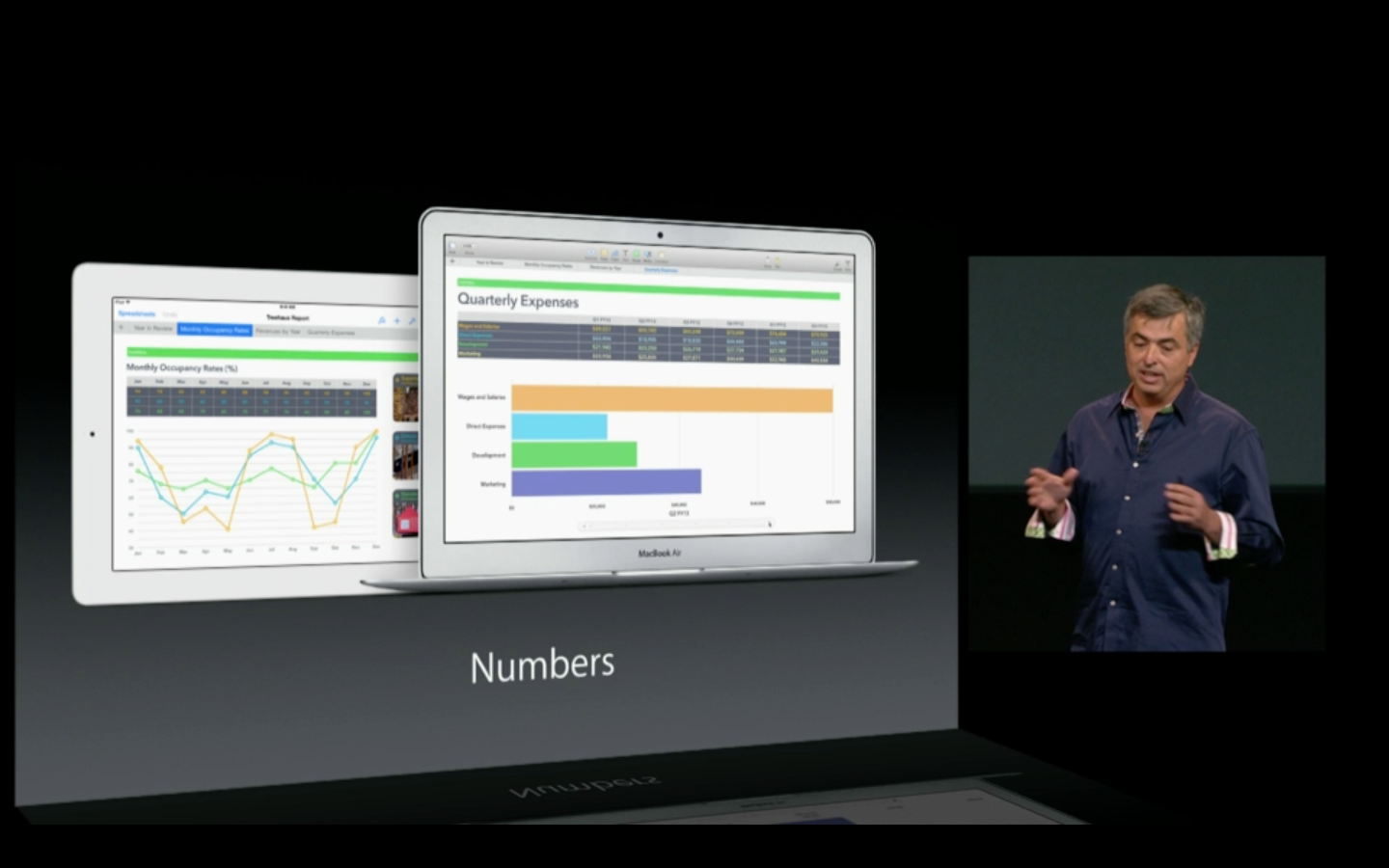
Apple to kill Aperture and iPhoto

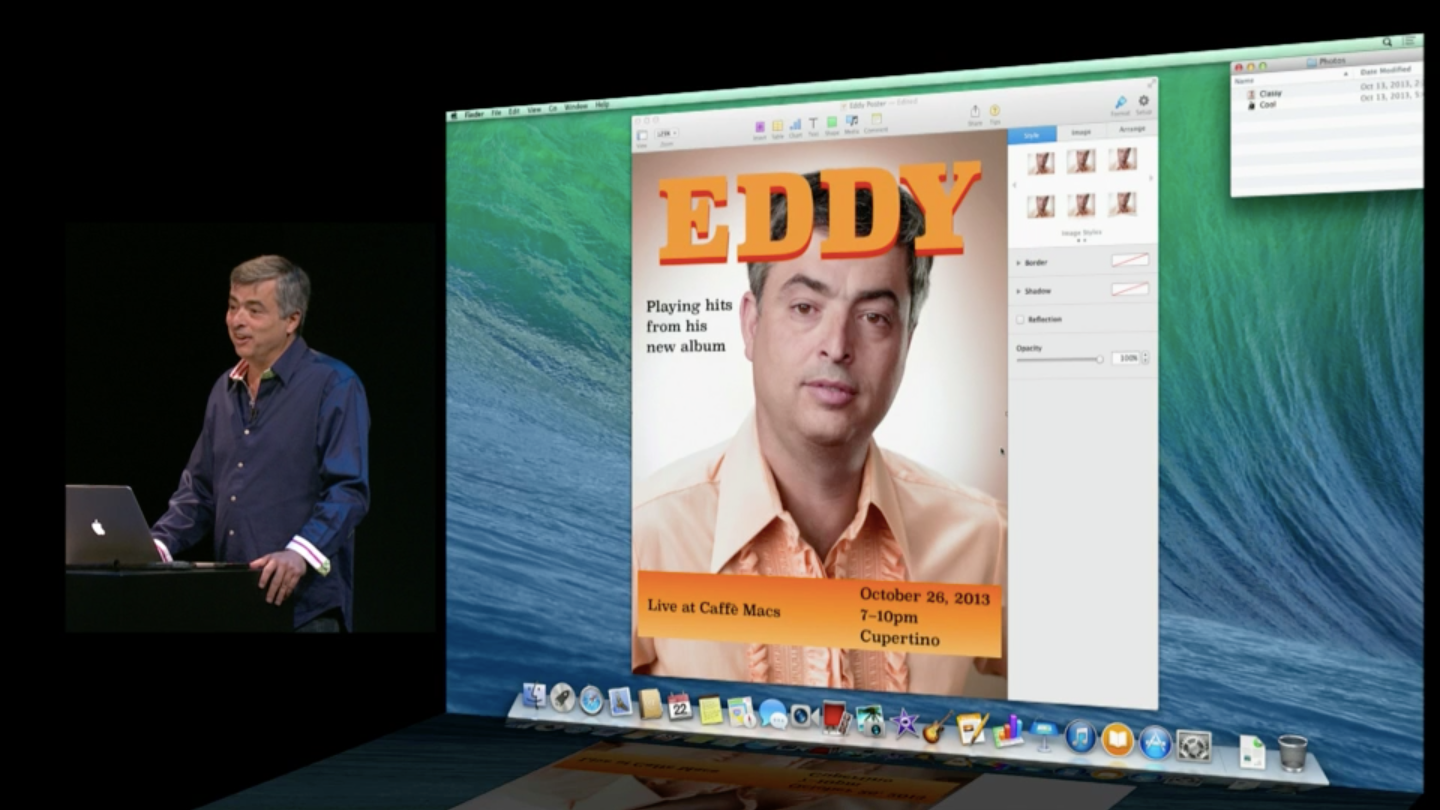
Many wondered what would happen to iPhoto after Apple announced its new Photos app for OS X Yosemite. Today, TechCrunch reports Apple is planning on killing iPhoto and Aperture in favor Photos.

“With the introduction of the new Photos app and iCloud Photo Library, enabling you to safely store all of your photos in iCloud and access them from anywhere, there will be no new development of Aperture…When Photos for OS X ships next year, users will be able to migrate their existing Aperture libraries to Photos for OS X,” said an Apple spokesperson.

It makes sense for Apple to replace iPhoto with Photos but killing off Aperture will surely upset professional photographers. From the brief preview of Photos during Apple’s WWDC event, it appears Photos bridges the gap between casual and pro-level editing features. The switch will undoubtedly upset photographers who have invested their time and money into Aperture.

Aperture will be updated to work in OS X Yosemite but development will stop. Apple is even working with Adobe to help Aperture users migrate to Lightroom.

Even though Aperture is dead, Apple wants to reassure pro users that Logic Pro and Final Cut Pro are sticking around.

Source: TechCrunch

Follow Lewis on Twitter @lewisleong

RELATED STORIES

The Softonic Minute: Skype, PES 2015, Android L, and Google

Skype starts forcing updates, PES 2015 trailer debuted, and Google I/O previews Android L and new platforms like Android Auto, Android Wear and Android TV. Check out this week’s hottest software news in The Softonic Minute.

Default player

<!–
By use of this code snippet, I agree to the Brightcove Publisher T and C
found at https://accounts.brightcove.com/en/terms-and-conditions/.
–>

<!–
This script tag will cause the Brightcove Players defined above it to be created as soon
as the line is read by the browser. If you wish to have the player instantiated only after
the rest of the HTML is processed and the page load is complete, remove the line.
–>
brightcove.createExperiences();

Skype to issue mandatory updates for Mac and Windows

Microsoft will require Skype users to update to the latest version “over the next few months.” The company released a blog post Friday, saying it will “retire” Skype for Windows 6.13 and below as well as Skype for Mac 6.14 and below. Continue reading…

Pro Evolution Soccer goes next gen

Konami released a trailer for Pro Evolution Soccer 2015, taking the popular soccer game to next gen consoles and PC.
The trailer is short, only showing a clip of gameplay. What we do see is vastly improved graphics, AI and more realistic physics. Luckily, we did a hands-on preview of PEs 2015 at E3 to fuel your addiction.

Google teases the next version of Android

While we won’t be seeing a new version of Android just yet, Google teased the upcoming operating system at Google I/O 2014. In addition to the major Android redesign, Android “L” will focus on polishing the operating system. Continue reading…

The 7 most important announcements from Google I/O 2014

Google’s annual developers conference wrapped up with a ton of announcements from the company, ranging from the highly expected Android Wear, to Android Auto, and Android TV, and we were there to get the scoop. Check out editor Chris’ thoughts on the event.

Make sure to check out all of our past Softonic Minutes.

Android Auto: Simplified Android for your car

There’s nothing really amazing about Android Auto. The idea is pretty basic – connect your Android phone to your car, and the Android Auto app will lock your phone and show a set of controls designed for use while driving. This includes phone calls, messaging, music, and connected car diagnostics.

At Google I/O 2014, there were a few car makers showing off cars that supported the new Android Auto platform. Since I’m not big into cars, I only recognized the Honda Civic and Audi S3 that were being used to provide short demos. The ten minute demo showed the same features from the keynote, but when sitting inside a car, it’s a little more interesting.

Android Auto Honda Civic

Touchscreen and in-car controls

The keynote showed an example of a driver using the touchscreen for Android Auto. But in the S3, it doesn’t support touchscreen, instead using the Audi MMI system. It doesn’t seem as intuitive as using a touchscreen, but Audi owners are probably used to the system. I was told that it’s up to the car manufacturer regarding what system will be used.

Your phone displayed in the car

I decided to get the demo in the Audi S3 because it’s a luxury car that I’ll probably never own. Getting in the car, an Android phone was connected to the car through USB and immediately the phone locked to show the Android Auto logo. Connection to the car is through the Android Auto app, meaning it’s not necessarily a native connection.

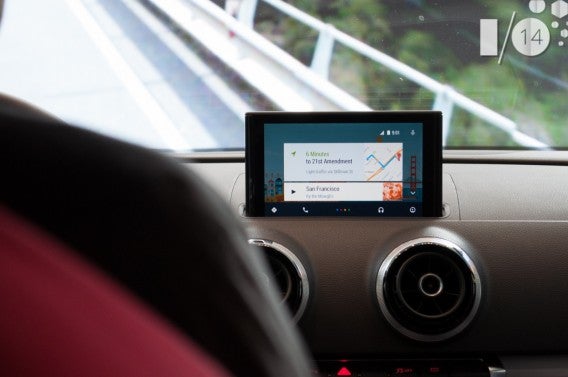
Android Auto Audi S3

The interface looks like Google Now. It can show relevant information like saved direction searches and appointment information. With voice recognition, you can search for locations, and the app is designed to give you the most important information like the operating hours of a restaurant. It won’t load information like the restaurant menu, however, because Android Auto is all about keeping your focus on driving.

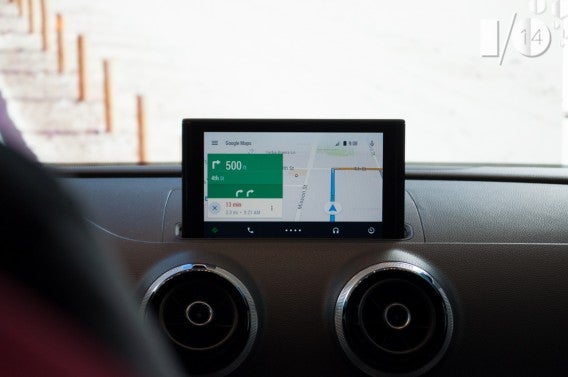
The in-car screen is a simplified interface with a bottom row of icons for actions. The supported features are the most obvious. Navigation through Google Maps, calls and messages, and music are the most basic. Interestingly, the icons don’t necessarily apply to first party apps; it looks like you’ll be able to use any app that supports Android Auto. The option to choose apps is under different nested menus.

Android Auto Google Maps Navigation

Since the phone is connected to the car, any audio will play through the car’s audio system. With a lot of current cars supporting phone calls without headsets, it’s possible to chat or use voice recognition to send messages.

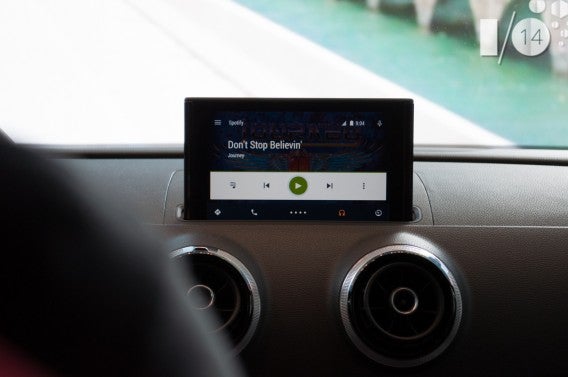
The music apps shown were Spotify and Google Play Music. I did ask if locally stored files would be playable, and was told that local storage was supported. The Android Auto team doesn’t want you to have to worry if you don’t have a stable network connection, like in a parking garage.

Android Auto Spotify

Calls through voice were demoed, but the feature isn’t really new and has been available for in-car systems for some time.

Car diagnostics

The feature I think is most interesting is the diagnostics section that Android Auto hasn’t really shown off. Being able to know more about various diagnostics on screen will be great for drivers who usually don’t pay attention. How much information car makers will display is unknown, but enthusiasts will probably enjoy it.

Still a lot unknown

The demo was shown by connecting the Android phone to the car through USB. Android Auto hasn’t explained the exact process of how the phone will connect to the car, other than that it will use the Android Auto app. It would make sense for the phone to connect wirelessly.

My colleague Lewis, a car enthusiast, is also curious if Android Auto will be compatible with older cars, because he’s “not going to buy a new car just for Android Auto.”

Android Auto Audi S3

Android Auto could be a great platform. The support from car makers is a good sign, but the question now, is how can apps integrate into Android Auto and be useful?

The first cars with Android Auto are expected before the end of the year, and the Android Auto SDK will be available for developers to design apps for the platform. But Android Auto will need some sort of legacy support to really be adopted.

If you want more, check out my roundup of events and announcements from Google I/O.

Follow me on Twitter: @chrislikesrobot