Regin, Twitter, Assassin’s Creed and CCleaner 5 in The Softonic Minute

Norton discovers a dangerous trojan called Regin, Twitter starts tracking your apps, Assassin’s Creed apologizes with free DLC, and CCleaner releases version 5.0. Check out all of this week’s hottest software news in The Softonic Minute.

Default player


brightcove.createExperiences();

Regin – the software that’s been spying on users since 2008

Security company Symantec has discovered an advanced trojan used for spying, called Regin. A complex piece of software, it has “been used in spying operations against government organizations, infrastructure operators, businesses, researchers, and private individuals,” says the firm. Regin is described as “truly groundbreaking and almost peerless.” Click through to read more about this scary new discovery.

Twitter’s app graph checks what you have installed on your device

Twitter has a tracking feature called ‘app graph’ that collects a list of all the apps you have on your mobile device, in order to ‘build a more personal Twitter experience for you’. Basically, this means giving you better targeted advertising. See what Twitter’s app graph is all about.

Assassin’s Creed Unity apologizes with free DLC

Remember all of the Assassin’s Creed Unity bugs we talked about a few weeks ago? Ubisoft recognized that the game was released without being fully polished, and has asked for forgiveness by gifting gamers with Dead Kings, an expansion pack set to come out soon. If you’ve already purchased the full Season Pass, you’ll get another Ubisoft game for free.

Download Assassin’s Creed Unity

Download the new CCleaner 5 now

f you want to clean up your Windows PC, there is a good chance you’ve tried CCleaner at one point. We’ve always rated this free app very highly, and now, there’s a brand new version with a brand new interface. See what else is new in the new CCleaner 5.0.

Download CCleaner 5.0

Make sure to check out all of our past Softonic Minutes.

Follow me on Twitter @suzieblaszQwicz

Rumor: Microsoft to unveil more Windows 10 features in January

Microsoft is rumored to be holding an event in January 2015 to present the consumer features of Windows 10. So far, we’ve heard more about its business and professional applications.

This could also see the release of a ‘Windows 10 Consumer Preview‘, a fuller featured version of the Windows 10 Technical Preview that you can already test.

Microsoft’s first Windows 10 announcement was a relatively low key, short affair. This next event could be much bigger, going into much more detail about Windows 10 and its new features, including its new touch interface ‘Continuum’. The exact date of the event should be announced before the end of this year.

If you want to check out Windows 10 early, you can download and install the Windows 10 Technical Preview. Be warned that it will only operate until April 15 2015, and it’s not recommendable to install it on your primary computer, as it may have bugs and be less reliable than earlier versions of Windows.

Download Windows 10 Technical Preview

Source: The Verge

Related Stories

Microsoft: all Windows Phone 8 Lumia devices will get Windows 10

Critical Windows bug was hidden for 19 years

Windows 10 Technical Preview updated with new gesture controls and more

Follow Jonathan on Twitter: @jonathanriggall

Game of Thrones Episode 1: Iron from Ice released next week

Telltale Games has announced that its next release, Game of Thrones: Iron From Ice will be released next week.

December 2nd sees the game out on PC/Mac and PlayStation 4 (North America), while Xbox One/360 and PS 4 (Europe) get it on December 3rd. Game of Thrones: Iron From Ice comes to iOS on December 4th, but there is no mention of an Android release yet.

Telltale’s Game of Thrones: Iron From Ice is an adventure game, similar to those the company is famed for. From updating classic franchises like Monkey Island, to its highly acclaimed Walking Dead series, Telltale has almost single-handedly given a new life to the point-and-click adventure that had all but died since the rise of 3D graphics.

Game of Thrones: Iron From Ice sees you play as characters relating to House Forrester, which has not appeared in the popular HBO series. However, you will interact with characters you know from the show, as screenshots of Tyrion have shown. Telltale has shown that it doesn’t shy away from drama and tough choices in its games, so we expect it to be every bit as challenging as the original stories.

Related Stories

Here’s your first look at Game of Thrones Episode 1, ‘Iron From Ice’

Telltale Games announces details of its Game of Thrones series

Learn Dothraki from Game of Thrones with this new app

Follow Jonathan on Twitter: @jonathanriggall

App of the Week: Clean Master for PC

Softonic’s App of the Week highlights some of the coolest, most unique, and biggest app releases for Android, iOS, Windows, and Mac. This week, a beloved Android cleaner finally comes to your PC in the form of Clean Master for PC.

Among cleaning apps like CCleaner and JetClean comes Clean Master, a popular Android app that developers have brought to PC. Like any cleaner, it’s job is to find and remove junk files from your PC, and while it may not have as many advanced options as other cleaners, in terms of ease of use and design, it stands out from the crowd. Check out the video below to see Clean Master for PC in action.

Default player


brightcove.createExperiences();

Download Clean Master for PC and Android.

Check out some of our past App of the Week features:

App of the Week: Game Assistant

App of the Week: DU Speed Booster

App of the Week: Yet Another Cleaner

Follow me on Twitter: @suzieblaszQwicz

Watch Star Wars: The Force Awakens via iTunes Trailers this Black Friday

Tomorrow sees the launch of the Star Wars: The Force Awakens trailer in theaters, but it will also be shown on iTunes Movie Trailers, which you can view on the web or via the official iTunes Trailers app.

The trailer will clock in at 88 seconds, showcasing some of what director J.J. Abrams is making. Originally, it was announced that the trailer would only be shown in 30 theaters across the US, so fans will be happy to be able to watch it online.

The iTunes Movie Trailers app is only available within the US, but international users can direct their browsers to Apple Trailers to watch it. While we know that the trailer for Star Wars: The Force Awakens will be released on Black Friday, so far no time has been announced.

US users can download the iTunes Movie Trailer app here.

Related Stories

Angry Birds Star Wars II out today

EA and DICE resurrect Star Wars: Battlefront

Star Wars Pinball out now for iOS

Follow Jonathan on Twitter: @jonathanriggall

Twitter’s app graph checks what you have installed on your device

Twitter has a tracking feature called ‘app graph‘ that collects a list of all the apps you have on your mobile device, in order to ‘build a more personal Twitter experience for you’. Basically, this means giving you better targeted advertising.

You may not notice this new feature, but you can choose to deactivate it in settings. Read more below.

App Graph is designed so that Twitter can tailor its experience to you, including “improved who to follow suggestions, adding tweets, accounts, or other content to your timeline that we think you’ll be interested in, and more relevant promoted content.”

App Graph doesn’t collect any data on what you do with your apps, just which apps you have. However, if you find that to intrusive, you can turn it off by going into Settings. Tap the Me tab, then the gear icon, then Settings. Choose the account you want to change, then under Privacy you can toggle ‘Tailor Twitter based on my apps.’

We have reached out to Twitter to ask whether ‘adding.. accounts’ means you may automatically follow some accounts due to app graph.

Download Twitter for iOS and Android.

Source: Twitter

Related Stories

Telegram for iOS and Android gets new privacy features

Telegram creator accuses WhatsApp of copying features

WhatsApp double blue check marks may be optional soon

Follow Jonathan on Twitter: @jonathanriggall

Download the new CCleaner 5 now

If you want to clean up your Windows PC, there is a good chance you’ve tried CCleaner at one point. We’ve always rated this free app very highly, and now, there’s a brand new version with a brand new interface.

Happily, the basics of CCleaner are unchanged. You can use it to clean up temporary files taking up space on your hard drive, clean up your registry, or use it as a startup manager, among other things. The new flat interface means CCleaner now looks the part on a Windows 8 (or 10!) PC.

As well as a new interface, CCleaner 5 also manages your Google Chrome plugins and extensions. The app has always been able to do things like cleaning history and caches, but now it extends to managing what you have installed on Chrome too.

CCleaner is still one of the best cleaning and optimizing tools for Windows. Download it here.

Related Stories

The top 7 download managers

The gamer’s kit: improve the performance of your PC

Goat Simulator 1.1 update out in June, brings more goats

Follow Jonathan on Twitter: @jonathanriggall

Best podcast apps for iOS and Android

The success of Serial may have you hunting for a good podcast app that’ll ensure you don’t miss an episode. Whether you’re a heavy podcast listener looking to manage your array of audio content, or a newbie simply looking to discover some new or interesting podcasts that can capture your attention, there are plenty of great options for iOS and Android that’ll help you make the most of what’ll most likely turn into your new obsession.

The stock Podcast app on the iPhone is decent, but it’s pretty basic when it comes to extended features or customization. While a lot of podcast apps offer the same standard features, some are better than others at helping you find, manage, and playback podcasts. Here are the best podcast apps for iOS and Android.

Paid

Overcast (iOS) – $4.99

As far as podcast apps go, Overcast is one of the simplest yet greatest apps on the market, attributed in part to it’s clean interface. It’s easy to maneuver and even easier to find new or related podcasts, and you can even connect your Twitter account to get recommendations from people you follow on the social network. There’s also ‘Starter Kit’ podcast bundles grouped by category if you’re new to podcasts and aren’t totally sure what you’re looking for.
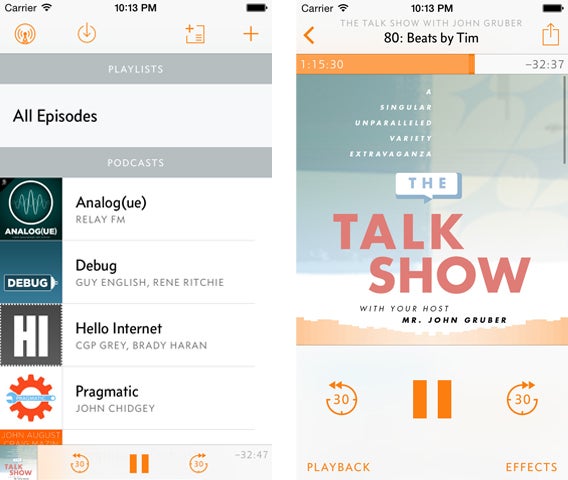
While the download itself is free, you’ll need to pay $4.99 to unlock the premium features, which really make the app what it is. This includes cellular downloads, unlimited playlists, a sleep timer, and playback speed control with exceptional sound quality, one the best features of the app (and better than a lot of the ones on this list).

Download Overcast for iOS

Pocket Casts (iOS and Android) – $3.99

Pocket Casts has gotten a lot of love from users. Like Overcast, it’s simple, intuitive, and has a really great interface, making the experience seem almost native on iOS and Android. The experience is based on seamlessness, meaning you can set automatic downloads (like when you’re connected to Wi-Fi), set how many podcasts you want to keep at a time, and sync between Android and iOS devices with support for both Airplay and Chromecast.

You can also customize playback speed (from 0.5x to 3x) and choose a custom time frame for skipping ahead or going back. Custom filters make it easy to sort through un-played episodes and create your own categories.
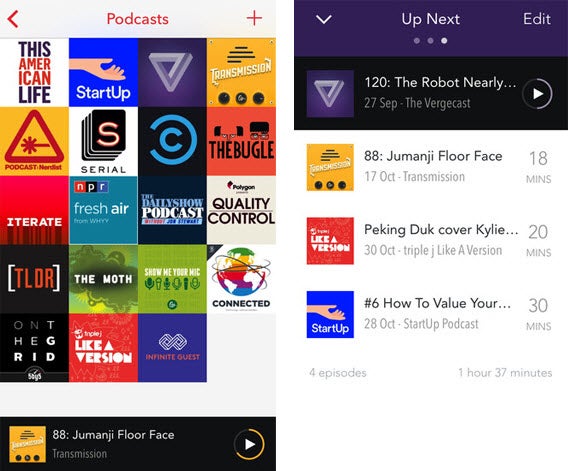
iOS users have the option of controlling podcast playback from the Control Center and lock screen, while Android users have the added bonus of a widget.

Download Pocket Casts for: iOS | Android

Downcast (iOS) – $2.99

Although not as visually appealing as Overcast and Pocket Casts, Downcast is still a great alternative for listening to podcasts on your iOS device. It’s bottom toolbar will look familiar to iPhone users, making navigation really simple. Aside from standard features available in other apps like playback speed control and auto download, you can also rename podcast titles to manage them easily.
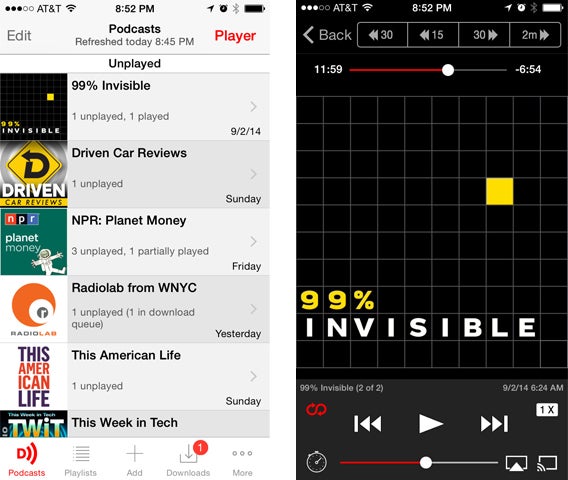
A big plus is a desktop app for Mac that lets you sync your podcasts via iCloud.

Download Downcast for iOS

DoggCatcher (Android) – $2.99

DoggCatcher is one of the most robust Android podcast apps out there, letting you manage both your podcasts and news feeds in one app. It’s got a ton of options for finding podcasts, including support for RSS feeds and a bunch of podcast directories, giving you plenty of options to find and get what you’re looking for.

Within the app, you have a separate sections for Feeds, Audio, Video, and News to let you manage your podcasts a bit better. DoggCatcher also remembers the play position of your file so that you can continuously go back to your podcast without worrying about losing your place.
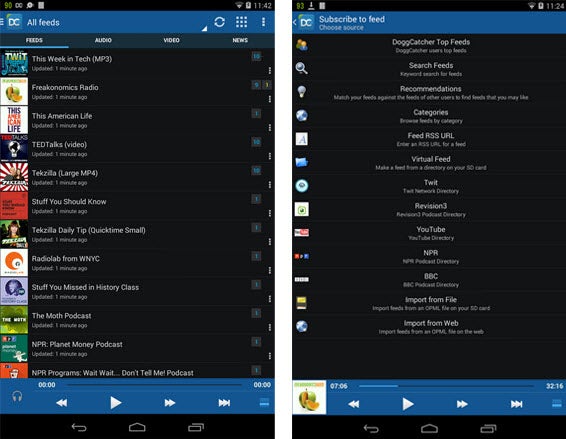
Unique to DoggCatcher, it has a really active user community, which helps keep the developers busy, constantly improve the app.

There’s a lite version of DoggCatcher that you can try before taking the plunge with the full version.

Download DoggCatcher for Android

Free

Instacast (iOS)

Instacast is a fairly basic but useful podcast app for iOS. Similar to Overcast, it’s got a really nice user interface with a great media player, but not as many options. In the 5.0 version, you’ll see a complete redesign and a dynamic playlist feature that lets you queue episodes to play back to back.

If you click to add a podcast, you’ll see the most popular podcasts, a section for authors, genres, and the option to search for something specific. You can also set the app to search podcasts from 1 of 18 languages.
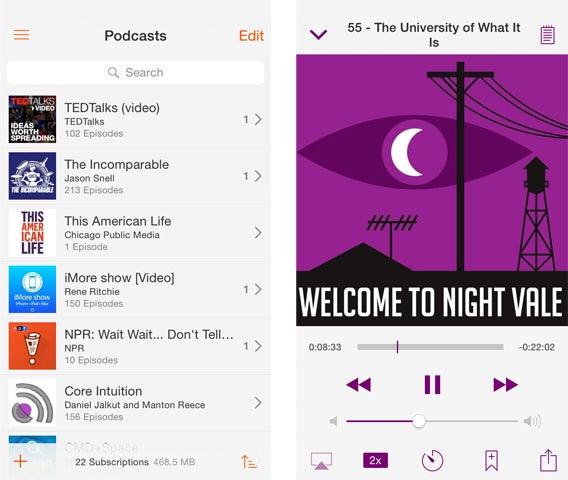
While the app is free, a few paid extensions will give you Night Mode (white text on a black background) and let you search for keywords within podcasts.

You can also download the accompanying Instacast app for Mac to sync with your desktop and sign up for an Instacast Cloud Account.

Download Instacast for iOS

Podcast Addict (Android)

Podcast Addict is like a free version of DoggCatcher, a robust Android app for managing your podcasts, chockfull of features.

Podcast Addict is best for its customization, letting you change themes, customize widgets, customize each individual podcast, and change display modes to either list or grid mode. Not only can you manage your audio and video podcasts, but you can also integrate RSS feeds and YouTube channels within the app, as well as use it as the default media player on your Android device, making it a one stop shop for your audio/visual content. You’ve also got all the standard options, like controlling playback speed, a sleep timer, and a fully customizable widget.
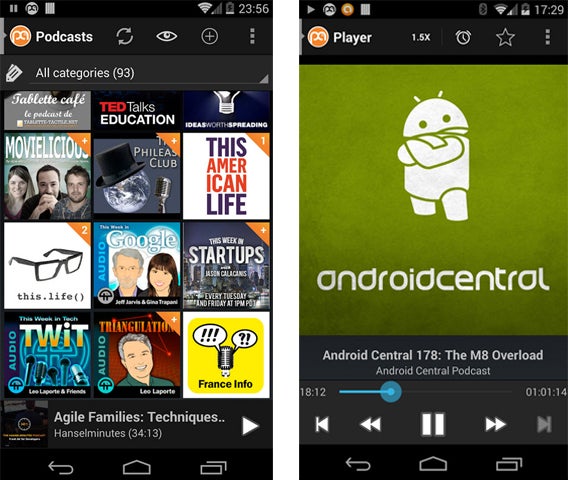
Podcast Addict integrates with Android Wear and supports Chromecast.

Download Podcast Addict for Android

Stitcher Radio (iOS and Android)

Bringing together radio channels and podcasts, Stitcher is really handy when it comes to finding and managing all your audio content in one app.

One of the best features is the Front Page, which you can filter by headlines, new content from your playlists, or recommendations, to get the most relevant and new content as soon as you open the app. If you click on an audio file from the Front Page, you’ll get continuous playback with the next item in the feed. Within the audio file itself, you have the option to share it, comment via Facebook login, or save it to ‘Listen later’, as well as a recommendation feature showing what other users are also listening to.
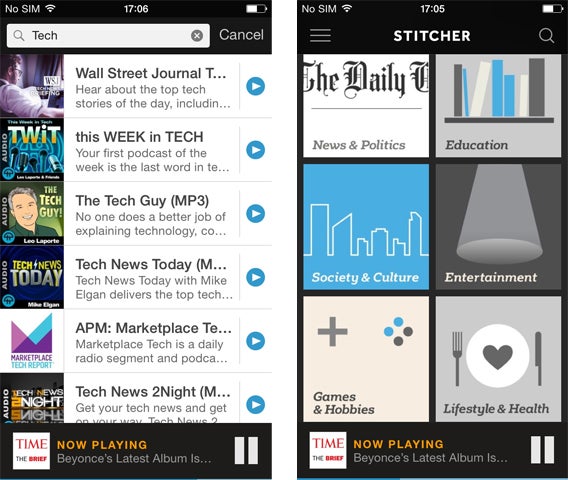
In terms of use, a bar at the bottom of Stitcher shows ‘Now Playing’ and quickly lets you pause or stop the audio while you’re browsing. The interface isn’t great, but with few options, it’s still pretty easy to navigate.

Overall, Stitcher is a really great app if you don’t want to limit yourself to podcasts.

Download Stitcher Radio for: iOS | Android

TuneIn Radio (iOS and Android) Free

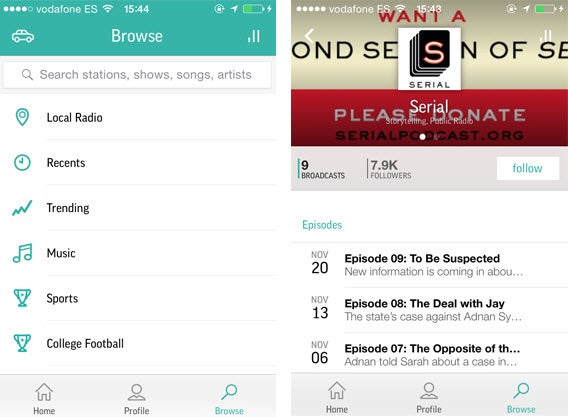
While it may not be your immediate go-to function when thinking about TuneIn, the free app for iOS and Android has a section for top podcasts, and a search function that’ll help you find them. You can follow the podcast for it to show up in your profile, where you’ll be able to access episodes, but that’s about the extent of it.

It’s not ideal if you’re a heavy podcast listener because it’s not optimized for managing podcasts or even categorizing different types of content, but the app itself is easy enough to use so that if you’re a heavy radio listener that dabbles in podcasts (or if you don’t want to download a separate podcast app), you can get them from TuneIn Radio.
Download TuneIn Radio for: iOS | Android

Whether you’re a podcast newbie or a seasoned vet looking for a better way to manage your audio content, at least one of these apps is certain to cater to your podcast-listening needs.

Related articles:

Best free messaging apps

Best free iPad games

Best free iPhone apps

Follow me on Twitter: @suzieblaszQwicz

You haven’t installed a toolbar – Firefox has a new search interface

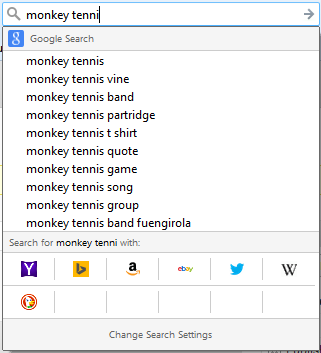
If you have Firefox auto-updates switched on, you may have noticed a change in the search box. Instead of the usual drop down results, you’ll get a new box with suggested results and alternative search engines.

Seeing it for the first time immediately after installing a new Firefox Add-on, I assumed I’d managed to install some kind of toolbar by accident that had hijacked the search box, but this is just the newly designed search results for Firefox.

You can toggle suggested results on or off, and below that you’ll see a list of alternative search engines. You can also add sites to go directly to your search term on that site (like Wikipedia). It’s not the most attractive interface, but it is functional, and will be more useful in the coming months. As we reported, Firefox is changing its default search engines in some regions next year – US Firefox users will find themselves with Yahoo Search, and this new search interface makes changing that more obvious.

Download Firefox for Windows and Mac

Related Stories

(Updated) Firefox removing Google as its default search

Mozilla bringing DuckDuckGo to Firefox 34

Firefox 33 for desktop improves performance and restore feature, Android version coming soon

Follow Jonathan on Twitter: @jonathanriggall

Geometry Wars 3: Dimensions out now for PC on Steam

Geometry Wars 3: Dimensions is now available on Steam, as well as major consoles. It’s the latest in the series of the psychedelic twin-stick shooter, which started life as a mini-game in the Xbox racer Project Gotham Racing 2, in 2003.

The sequel, Retro: Evolved came out in 2008, and now with Geometry Wars 3: Dimensions, the game finally comes to PCs and other platforms, as well as introducing three dimensions to the frantic gameplay.

We’ll publish our review shortly. For now, the reviews that are coming in are very positive, with a handful of perfect 10/10 scores, and nothing below 8/10 so far. Some reviewers feel the new modes, with their three-dimensional levels, are not quite up to the standards of the original’s more simple arenas. But Geometry Wars 3: Dimensions also includes the original modes too, with all the online leaderboards you could want, making it a great game for competitive play.

Default player


brightcove.createExperiences();

If you haven’t played Geometry Wars before, it’s a neon-lit arcade shooter that nods to retro gaming, while being totally modern at the same time. It’s fast paced, addictive, and is the closest you’ll ever get to having a firework display on your monitor. Watch the trailer above.

Source: Reddit Games

Related Stories

Farming Simulator 15 available today for Mac OS X

Goat Simulator goes MMO in upcoming update (trailer)

Top 10 naval battle games for PC

Follow Jonathan on Twitter: @jonathanriggall