iOS 4 – A Week In


As soon as it was available last Monday, I updated my iPhone 3GS with iOS 4, Apple’s revamped mobile operating system. I resisted writing about it immediately, as an OS is no small thing and it takes time to form a proper opinion. So was it worth the hype? Here are my reflections after over a week’s use.

Speed: First things first, iOS 4 is noticeably quicker on my phone. It feels as if it’s been cleaned and oiled, apps open faster and everything seems to have added zip.

Multitasking:  Double tapping the home button pops up the apps that are running at the time. I never thought it was that necessary, as apps opened and closed really quickly anyway. However, for those apps that do have a longer loading time and don’t save their state on exit, this is a great idea. Unfortunately, not all apps support it yet – The Guardian‘s app, for example, still won’t restart on the page you left it. Over time, multitasking should be better supported, but at the moment it’s not that impressive.

Folders: These are great – you can easily create folders of apps, which saves bunches of space while looking good too. I now only need two pages for all my apps, which is great.

Wallpaper: I was skeptical about this before I saw it, and I’m still not sure. The supplied wallpapers range from boring to horrible – in my opinion – and black still looks like the best background to me.

Camera: The added digital zoom feels good, but digitally zoomed images are never that great, as you’ll see if you zoom in as far as possible. It doesn’t work with video, either.

Playlists: This is better! Finally we can create playlists directly from the iPhone! This makes the iPod player feel much more useful, as syncing with iTunes just to add a playlist was a pain.

Stability: Never an issue with 3.x, I now get occasional crashes in some apps, even in some native ones like Safari. I’m hoping that these will be ironed out by iOS 4.1 – although it’s an excellent upgrade overall, the introduction of crashing and hanging isn’t welcome!

Overall, the good developments outweigh the niggles, and I’m especially pleased it runs so quickly, as my main worry was that it might only run well on the new iPhone 4. Multitasking is the biggest let down, as it barely changes my experience at all.

I do think iOS 4 keeps Apple at least one step ahead of Android, which is still not quite as smooth or user friendly. It will be interesting to see who ups the ante next!

Timewaster: Easy Joe

Easy Joe is a great looking free puzzle game, that won’t take too long but is quirky and fun enough to be worth playing. With bold, stylish graphics and a weird sense of humor, backed up with a nice jazz soundtrack, this is a very relaxing summer game. Too hot to concentrate or move? Easy Joe is exactly what you need!

All you have to do it click objects in the right order to help Joe explore.  There’s no sense of urgency and you have infinite lives, so it really is easy! Play here, right in your browser.

[via rockpapershotgun]

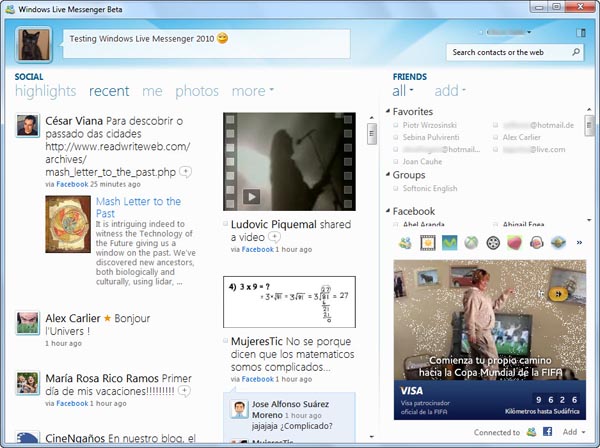
New features in Windows Live Messenger 2010

Windows Live Messenger 2010 is finally here. The long-awaited new version of Microsoft’s chat client was launched a couple of days ago, featuring a load of new features: redesigned interface, new emoticons, easier photo sharing…

New features in Windows Live Messenger 2010

But if there’s one thing that characterizes this new version of Windows Live Messenger, that’s its integration with Facebook and other social networks and online services. The lack of connectivity with social sites was an issue in Microsoft’s instant messenger, especially as other IM clients (such as Yahoo! Messenger, ICQ, Trillian or Nimbuzz, to name a few) were already hooked up to the big social networks.

Continue reading “New features in Windows Live Messenger 2010”

Find the nearest bathroom using your iPhone

Toilet FinderHow many times have you been busting for the restrooms in a strange neighborhood wondering where the heck you can relieve yourself? Install Bathroom Finder on your iPhone or iPod touch and you’ll never get caught short again.

Bathroom Finder is a free app that shows you the locations of the nearest public conveniences, wherever you are (unless, of course you’re in a desert or a forest or something, but then, who cares?) The app lists local toilets and shows you where they are on a map.

You can view more information about the bathrooms, such as their distance, disabled access information and whether or not you have to pay to use them. The lavatories listed even have a rating system, so you can see what other users thought about them.

If you really take going to the toilet seriously then you could also install the practical, if not pretty gross, Poo Log app, which allows you to monitor your bowel activities on your Apple device.

Incidentally, Seinfeld’s George Costanza will be fuming that his idea for an iPhone app has been taken off him (again). If you haven’t seen George’s iToilet invention in Curb Your Enthusiasm you’d be potty not to go check it out.

[youtube]http://www.youtube.com/watch?v=oP7mnJCBnq4[/youtube]

Is the new iPhone 4 glass really that resistant?

When Steve Jobs announced an iPhone 4 with its breakthrough super-resistant glass everybody was wondering if it’s really that hard and resistant. My first iPhone glass died because of a heavy landing on my kitchen’s tiles so I was really doubtful about the new super technology and its extraterrestrial powers.

The first iPhone 4 teardowns confirm that the new wonderful glass used to build the new Apple device is Corning Gorilla Glass. This is good news because this is a product we actually know. During the Mobile World Congress 2010 in Barcelona, I had an opportunity to test the Gorilla Glass and chat a little bit with people from Corning.

Stronger and thinner

Gorilla Glass looks like the normal glass we are used to seeing in all sorts of mobile devices. The only difference is an incredible thinness and low weight which can reflect on the lower weight of the whole device, and of course on its size. This magical glass is also incredibly tough. I had an opportunity to compare it with a normal type of glass. I didn’t have to exert myself to break a glass plate using a metal rod. Conversely, I was unable to damage the Gorilla Glass. I am not the weakest person and was not the only one to try the strength of the glass. No one succeeded in breaking it.

reduced-mg_1722.JPG
Hi we’re the scratches, and you can’t see us

We also tried to damage the Gorilla Glass with the keys and again failed. It is really promising. Actually it appears that the key leaves the scratches on the surface of the glass but because of its structure they are very shallow and can only be seen under a microscope. That leaves us with some worry that the scratches could accumulate and become visible after some time of use. Continue reading “Is the new iPhone 4 glass really that resistant?”

The best Wimbledon apps for iPhone

With all the hubbub surrounding the World Cup it’s easy to forget that Wimbledon is now in full swing (if you’ll pardon the expression). If you’re a tennis fan with an iPhone then there are several free apps you can install to follow the tournament wherever you go, ensuring that you never miss a moment of the action.

Wimbledon 2010

Wimbledon 2010 is the official app of the tournament and it’s a real delight to use. The application lets you track the latest score in every match that’s being played, as well as serving up news from off the court, including Twitter feeds from players and pundits.

There’s plenty more to Wimbledon 2010 than this, too. You can access the order of play, check out biographies of every player, and watch video highlights from each day. Best of all though, is the Radio Wimbledon feature, which provides live commentary from the matches on Centre Court and Court One, plus live coverage of the rest of the matches.

Wimbledon 2010

Wimbledon – Live Feeds

Live FeedsGiven the extent of its features, you won’t find an app with better coverage of the tournament than Wimbledon 2010. However, it might be worth installing Wimbledon – Live Feeds, as well. The app gives you access to news stories from the tournament even when there is no EDGE/3Gor WiFi coverage available. This means that you needn’t be missing out on the tennis gossip while you’re sat on the subway. Continue reading “The best Wimbledon apps for iPhone”

How to upgrade to iOS 4.0

If you haven’t upgraded to the new iPhone operating system yet, then might I suggest you drop whatever you’re doing and do it now. The new iOS 4.0 will make your iPhone or ipod touch an altogether sweeter machine. Upgrading will add new functionality to your device, giving it many of the features of the sexy new iPhone 4.

Installing the new iPhone OS

To upgrade, you must first ensure that you have version 9.2 of iTunes installed on your computer.

iOS1

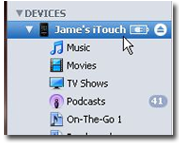
Connect your iPhone or iPod touch and click on its name in the Devices section of iTunes (on the right-hand side of the interface).

iOS2

With the Summary tab selected, click on the Update button to download iOS 4.0. Continue reading “How to upgrade to iOS 4.0”

YouTube video editor now available

YouTube has recently released an online, in-website video editor so that you can crop, merge and add a soundtrack to your videos.

Even though the initial interface looks a bit confusing, it’s really simple to use. Drag and drop your videos onto the timeline, crop them by clicking on the scissors icon that will appear when you mouse over and add audio by clicking on the audio tab underneath the YouTube logo.

overview1.png

There’s a good selection of music available, so you’re sure to be able to find a soundtrack you like. Just remember that adding an audio track will erase all of the original audio! Changes are applied immediately, and you can preview everything in the window to the right. When your creation is ready, give it a name and hit Publish. Continue reading “YouTube video editor now available”

How to: Rip songs from MySpace

Want to download a song from MySpace? Well, it’s not as straightforward as you’d think. Trawl the internet and you can find several hacks that purportedly work. Techniques I’ve tried include extracting download links and pasting to Notepad (failed), using MusicGrab.org to pull songs off MySpace (failed), and downloading via File2HD (you have to pay a fee per song). There are also a few hacks described on the FHN network, none of which I could get to work either.

After almost giving up hope, I stumbled across WonderShare Streaming Audio Recorder, which works a treat. The process of ripping MySpace music is very simple using this software, which is available to download free as a 7-day trial.

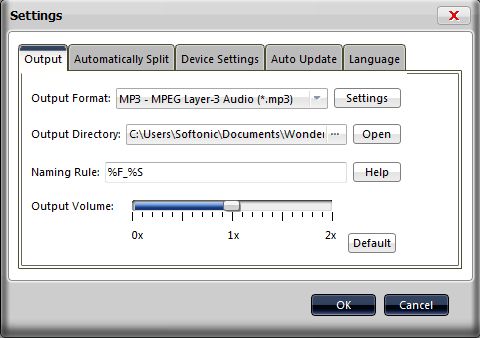
1. Start by clicking the Settings icon at the top of the interface. Now select the format you want to save the track in from the drop down list. Supported output file types include MP3, WAV, OGG and AAC.

Step One

2. Visit MySpace.com and load up the page with the song you wish to record. Start playing the song. Continue reading “How to: Rip songs from MySpace”

Office Web Apps vs. Google Docs

A couple of weeks ago I had a first look at Office Web Apps, the online version of Microsoft Office 2010. Today I’m going to compare this newly launched service with another online productivity suite that’s been in the business for quite some time now: Google Docs.

Office Web Apps vs. Google Docs

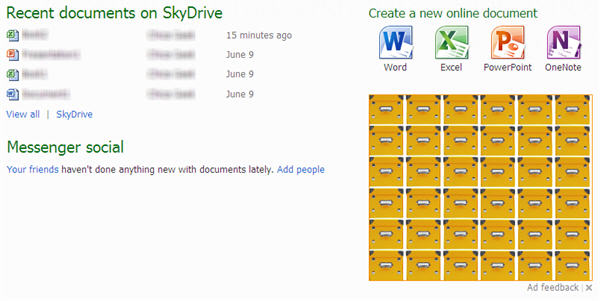
To begin with, the main interface in Google Docs looks much better than the one in Office Web Apps, ruined by the presence of a huge, highly distracting banner. Google Docs is clearer and simpler, just like Google’s style.

Office Web Apps vs. Google Docs

Both suites have a similar structure on this main page, with document categories on the left and a list of all the files you’ve created so far. The list on Google Docs lets you select multiple documents at the same time to perform bulk operations such as deleting, hiding, starring or exporting. The list on Office Web Apps, however, only lets you manage files one by one, and doesn’t let you delete files – you have to click More > Properties, and then select Delete. Continue reading “Office Web Apps vs. Google Docs”