How to: Create a calendar for 2011

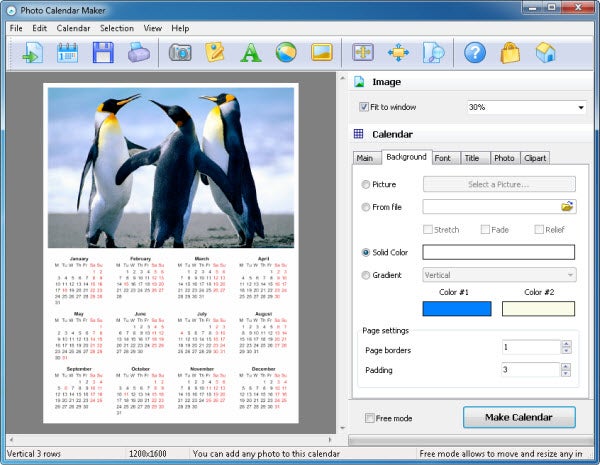
Last Christmas I wrote a tutorial on how to create calendars for 2010 with Calme. This year I wanted to follow that tradition, but using a different program – so here’s a tutorial that will teach you how to create a custom 2011 calendar with Photo Calendar Maker.

First of all, a word of warning: Photo Calendar Maker is try-before-you-buy software, with certain limitations: the program can only be launched 30 times, and the calendars you create can’t be saved or printed. But the trial version, together with this tutorial, will be more than enough to decide if you really want to buy the program.

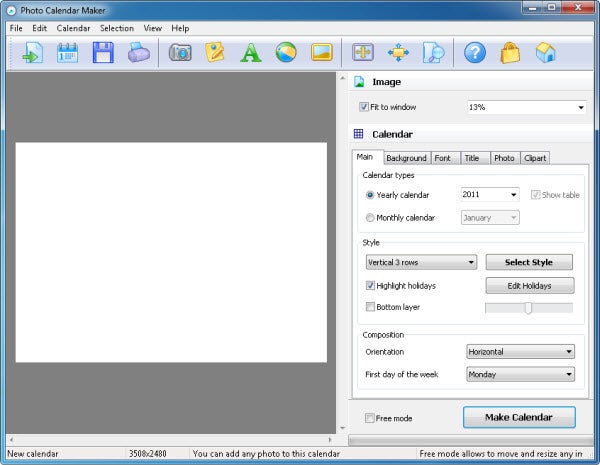
Photo Calendar Maker lets you create calendars in seven different languages (English, French, German, Italian, Spanish, Portuguese and Russian) and with Monday or Sunday as the first day of the week. The program’s interface is quite simple: a toolbar on the right side includes all the options and settings you need to create your calendar, while the main area to the left shows a preview of  the calendar – for which you’ll have to click the Make Calendar button every time you change something in customization settings.


Continue reading “How to: Create a calendar for 2011”

Free Browser Game: Blitz to the Future

Telltale Games just released the first in their series of Back to the Future adventure games. To accompany that there’s a fun free Facebook game, Blitz to the Future.

Essentially a Back to the Future themed Bejeweled, Blitz to the Future sees you matching chains of colored jewels for points against the clock. There are little vocal samples, and lots of themed achievements along the way. Of course being on Facebook means you can easily share it with your friends, and compete with them for the highest scores. While you might not want to bug them, it is a fun game, and the Back to the Future touches are neat! Play Blitz to the Future here – requires a Facebook account.

LastPass acquires syncing service Xmarks

Xmarks, the bookmark syncing service that announced a permanent shutdown in January 2011, has been saved in the last minute. The popular syncing tool has been acquired by LastPass, as announced on its official blog. LastPass, in case you don’t know, are the developers of a powerful cross-platform password manager.

This is undoubtedly great news for all Xmarks users, who can now rest assured that the service will stay online – and will continue to be developed and improved in the future. According to the press release published on the Xmarks blog, the service will transition to a “freemium” business mode; the browser add-on and the basic functionality enjoyed by the vast majority of users will remain free, but there’ll be also a paid planXmarks Premium – for $12 a year, with extra features such as iPhone and Android mobile apps, and priority support.

Xmarks Premium is already available, and can also be acquired bundled together with LastPass Premium at a reduced price. Though both services still keep distinct websites and require separate downloads, there are plans to integrate them together in the future.

5 Essential free apps for your new Mac

Yeah, yeah, you got a new Mac for Christmas. Lucky you. I suppose you want to install some software on it now too?

There are few better feelings in computerland than setting up a new Mac. And while Macs come loaded with plenty of really great software (iLife, for example, is a multimedia suite that would cost hundreds of dollars to replicate properly on a PC), there are some pretty essential free apps I can recommend:

Google Chrome – Apple purists will argue that Safari is just as good (or better). I disagree. Chrome beats Safari in browser speed tests and has a slicker, more modern user interface. Google Chrome is also a more stable and resource-friendly piece of software, both on Mac and PC. Finally, Chrome is more extensible. And while it’s not up there with Firefox yet, this does make a difference.

VLC Media Player – An uncontroversial choice, this. VLC is an absolute must have for anyone intending to play or work with video files on their Mac. It can play pretty much any video file you throw at it, and can even fix dodgy AVI indexes, meaning that it’ll repair files that are too broken to work elsewhere. Added to that, its advanced transcoding and playback controls make it a more customizable player than QuickTime.

TweetDeck – I resisted installing TweetDeck on my latest Mac (a living room MacMini) for some months. My rationale was that I didn’t want to spend too much time using Twitter on my TV. Then I realized that I was spending loads of time tweeting either from the Twitter website or from my cellphone. So I gave in and installed TweetDeck. It’s not the lightest piece of software out there but you can avoid all the extraneous stuff. Anyway, TweetDeck’s the best Twitter client on the market.

Transmission – I’m not a big fan of torrents. It might be something to do with my internet provider but I’ve noticed far more problems with my home connection when torrents are downloading. But if I do need to download a torrent, the only app I’d use to get it would be Transmission. A native Mac app, it’s extremely light, quick and easy to use. A must-have for any torrent freaks out there.

FaceTime – In the light of Skype’s recent disastrous outage, it’s always a good idea to have a backup chat app. Apple’s new FaceTime beta is only available for Macs and iPhones so you can’t currently use it to chat to friends who only have PCs. That said, it’s a powerful and attractively designed video chat app which any Mac owner should have installed.

Five essential apps for the iPad

So you got an iPad for Christmas? Congratulations! It’s really a state-of-the-art gadget, wonderfully designed and with lots of apps available to customize it. Talking about apps, this may be the first question that pops into your head when you start using your iPad: which apps should I download? There are literally thousands of them on the App Store, so let us recommend just five – the five essential apps you should install on your brand-new iPad.

Instapaper – An excellent tool that saves web pages for later offline reading. Instapaper is the perfect way to read those long articles you never have time for, while commuting, queueing or waiting for the doctor. The articles in Instapaper are optimized for perfect readability, and can be sent from over 130 other apps.

Flipboard – Check social networks like you never did before. With Flipboard you can see what your friends are up to on Facebook and Twitter, read the latest articles on your favorite Google Reader feeds and see the most recent photos shared on Flickr in a totally different way: a completely customized magazine, created on the spot for you.

Air Video – If space is an issue to watch videos on the iPad. AirVideo is the solution. With this awesome app you can watch all the videos on your computer without having to sync them with the iPad. Video is streamed over air and converted in real time! Air Video works with almost all video formats and is packed with features.

Kindle -The iPad version of Kindle is optimized for this gadget’s gorgeous screen, enabling you to read Kindle books on a neat, easy-to-use interface. You have access to the entire Kindle catalog with over 750,000 titles, including best-sellers and new releases. Plus all your books, notes, bookmarks and more are synced via Amazon.

Plants vs. Zombies – There are excellent games for the iPad, but Plants vs. Zombies is probably one of the best you can get. The HD version looks amazing on the 6” screen, and the game is as insanely addictive as its iPhone version. Will you be able to get rid of all 26 types of zombies threatening your home?

Skype users may be offered credits due to recent outage

The popular video calling program Skype experienced a massive outage yesterday. As yet, no cause has been determined, although Skype insiders have not yet ruled out a purposeful attack of some sort. Skype’s video calling and instant messaging services were unavailable for most of yesterday, and a good majority of users were unable even to log into the program.

Skype’s CEO Tony Bates has made assurances that he and the rest of the Skype team are working tirelessly to ensure all users are brought back online soon. In addition, Bates has said that Skype may be offering credit vouchers to users of their paid service who were affected by the outage. In response to inquiries, Bates has said that he understands what a large impact the outage has had on many loyal Skype users and hopes to rectify the situation as soon as possible.

Currently, about 16.5 million users are back on and using Skype, which is about 80% of the normal traffic rate for this time of day. Skype is focusing on repairing its core services, such as text instant messaging and its online audio and video calling services. There is no word yet on when Skype expects to be operating at full capacity. The progress they have made in getting their service entirely back online, however, has been positive and prompt.

The best recipe apps for Mac

If you like cooking and have a Mac, but you haven’t yet decided to combine the two, you really need to take a look at some of recipe software right now. To take the pain out of the process and maximize your time in the kitchen, we’ve done the hard part and whittled the field down to the very best.

MacGourmet is, as Nick so succinctly puts it, a cook’s dream. Designed to look and feel a lot like iTunes, it’s easy to use and very customizable. Sharing is definitely its strong point – you can use it to publish directly to blogs, and export easily to your iPhone, so making shopping lists couldn’t be easier.MacGourmet comes with recipes to get you started, and also has a feature for taking notes on your wine and food, so you’ll always be sure to get the most out of your time in the kitchen.


YummySoup! – pretentious name aside – is another attractive, easy-to-use option, but the major attraction here is the ease with which you can use it to import recipes from websites, which is perfect if that’s where you do most of your foodie research. It also comes with an impressive selection of recipes pre-included, which means that as soon as you install YummySoup!, you can get cooking.

SousChef is a great looker, and makes it very easy to import recipes with drag and drop and excellent tagging. In addition, it has a major feature that you don’t get in other similar apps – a text to speech function so you can have the recipe read out as you cook, keeping your greasy fingers far from your shiny Mac! It even supports voice commands or a remote, so you can start and pause the recipe as you need.

Yum! is a very popular cooking app on Softonic. It’s not quite as slick as some of the others, but it’s obviously doing something right to make it to the top of our download rankings. It makes adding and creating a very visual experience, with lots of editing options and a feature that lets you add your own images of the delicacies you cook up in the kitchen.

Recipe Box is by far the lowest-tech app on the list, but that’s because some people, quite rightly, like to keep things simple. This app lets you add and edit recipes, and makes it easy to print. You can also make up shopping lists, and unlike other apps, comes with ingredient, preparation and measurement dictionaries, so you can keep your cooking offline if you want or need to.
Protect your personal data while web browsing with Disconnect

Social media and networking sites are great. They help us connect with our friends and family, and are an ideal source for current news. The problem with  these sites, however, is that they tend to disseminate the personal information you give them to third parties while you’re browsing the web.

Every time you visit a site that uses Facebook Connect, for example, Facebook receives a notification through its servers. The information about your visit that Facebook receives is subsequently used to personalize the ads you see while you are using Facebook itself. Google also personalizes your search experience by using information you’ve provided them. By now, internet users are so accustomed to this that it’s often easy to forget it’s happening in the first place. Information such as your name, birthday, email, and location that you input into these sites can jeopardize your personal privacy if it ends up in the wrong hands.

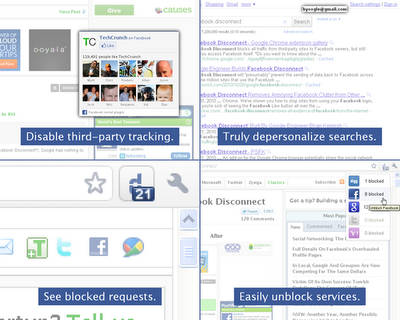
That’s exactly why ex-Google developer Brian Kennish originally created Facebook Disconnect.  It’s an extension for Google Chrome that blocks third party sites from sending your information to Facebook servers. The extension still allows you to access Facebook itself, however. Facebook Disconnect has been installed by nearly 75,000 users since its creation in October and is a top-ten-rated Chrome extension.

Now Kennish has gone one step further and created Disconnect, an extension that works on both Chrome and Rock Melt browsers. Much like its predecessor, Disconnect disables tracking and information gathering by third party websites back to Facebook servers. It also goes a step further, however, by doing the same thing with other popular social networking sites like Digg, Google, Twitter, and Yahoo. And it does all this while not significantly degrading your web browsing experience. Responsible internet users are now one step closer to ensuring their private information does in fact remain private while browsing the web.

FCC to impose content delivery laws on ISPs

The US Federal Communications Commission (FCC) is today set to make a major move in controlling exactly how Internet Service Providers charge for and manage their services.

The Order Preserving the Open Internet will be voted on today and if passed as expected, will give the US Government more authority over how ISPs are regulated. So far, Internet Service Providers have been largely self-regulating in the way they monitor and manage content delivered via their infrastructures.

Depending on the country and provider for example, some ISP and mobile networks offer differently priced internet packages depending on how much you use the net, while others just have a flat rate which users can use as much as they want. The FCC bill gives the US government more say in exactly what providers can and cannot do. In particular, it aims to prevent mobile internet providers from blocking content from competitors but also implements laws which allow ISPs and mobile providers to charge users for heavy bandwidth content such as Netflix and YouTube.

On the one hand, the rules are necessary because as mobile content providers such as Verizon roll out 4G networks that are faster than most fixed broadband connections, it opens up the possibility that they can abuse their power to favor their own media content and restrict or even block that of competitors. However, the prospect of even more “metered” internet usage for users – such as the way your water and electricity are metered – risks driving a greater divide between those who can afford to enjoy rich amounts of internet content and those who can’t.

How to manage access to ever expanding 3G and 4G mobile networks is still very much an evolving issue and was brought into focus earlier this year with Google and Verizon’s controversial Open Internet plan.

More Christmas sales on the App Store

There are many good things about the Holiday Season, and one of them is the amount of sales and special offers you find on the App Store these days – from paid apps being considerably cheaper, to top games available for free for 24 hours.

After EA’s massive sale last week, it seems that Gameloft is following the same path by announcing their own sale. The Gameloft special Christmas offer includes a bunch of great titles such as Real Football 11, NFL 11, Settlers and Assassin’s Creed: Altair’s Chronicles, for only $0.99.

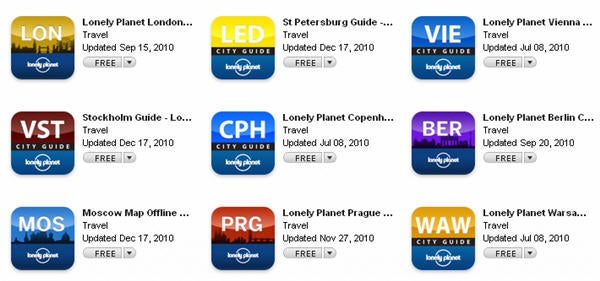
But Christmas sales on the App Store are not limited to games. Lonely Planet offers a dozen city guides for free, covering all major cities in Europe: Berlin, London, Paris, Vienna, Munich, Prague, Copenhagen and more. Just bear in mind that all of them are over 20MB downloads, so you probably want to get them over WiFi or via iTunes.