7 best wedding planning apps and websites

Planning a wedding can be scary and expensive! Try these apps to make the process smooth.

Putting a wedding together can be scary. There are hundreds of factors to consider, and it’s often on a time crunch. It’s suppose to be the most important day of our lives, yet the planning alone can make the whole experience a nightmare. Thankfully, there are some apps out there that can really take away the stress of planning a wedding, and help you to enjoy the build up to your special day. Here are some of the apps you can use so you have a stress-free wedding.

Best wedding planning apps and websites

wedding

Put A Ring On It

If you haven’t bought your wedding bands yet, or maybe even your engagement ring, Put A Ring On It is a great app for helping you decide what to get. The app lets you virtually try on different rings so you can see which one looks the best on you. It’ll digitally insert the ring onto a photo of you, making the entire experience much easier. This can save you a lot of money and frustration in the long run.

Put A Ring On It DOWNLOAD FREE ►
7

Azazie

There aren’t as many websites dedicated to wedding outfits as one may think. Finding the best wedding dress out there can take weeks, but this app really takes all concerns out of the equation. Not only does it help you find wedding dresses, but you can also use it to find bridesmaid and flower girl dresses as well.

Pinterest

The only social media site specifically designed for brainstorming ideas, Pinterest is the perfect place for wedding inspiration. It doesn’t matter what aspect of the wedding you are struggling with, someone has created a useful pinboard for you to check out. Dresses, venues, floor plans, etc, Pinterest has it all.


Pinterest Download free ►
8

Zola Registry

Probably the most popular wedding registry, Zola’s app is a great way to add things to your wedding registry on the go. This can make the experience quick and easy, and also turn it into a leisure activity, instead of forcing yourself to sit down and go through everything you may want. It can turn a somewhat stressful activity that involves money, into the exciting experience it’s supposed to be.


wedding

Wedding Spot

The ideal website for finding your perfect wedding venue. The Wedding Spot features thousands of venues across the U.S., with pictures and prices for all of them. You can filter your search settings to find a place that fits your exact needs. You can even use the site to contact venues, so you don’t have to do any external research. Whether you want a small wedding in a park, or an extravagant castle, Wedding Spot features a venue for anything you could imagine.

Wedding Planner by The Knot

This is probably the first app you’ll find if you search “Wedding Planner” in the app store, and for good reason. While the primary use for this app is to create a well-organized checklist for your wedding, the app is able to help you take care of some stuff on that list all by itself. For example, you can create a guest list, budget, and even create registries for various wedding sites through the app. It really is the closest thing you can get to an all-in-one app for your special day. And TheKnot.com is one of the biggest names in weddings, so it’s a reliable source of information.

Wedding Planner by The Knot Download Free ►
8

Appy Couple

Similar to the Wedding Planner app, Appy Couple is useful for a variety of things. It is best used for creating designs for your wedding. Whether that be the invitations or the floor plan, anything visual can be put together with this app. Along with this, it can help you get connections with photographers, designers, and even other useful sites and registries. This is a great app to check out for the creative types who want intricate designs for their wedding.

Appy Couple download free ►
8

For more wedding apps, you may want to check out our Softonic Solutions page. You can even suggest your own wedding apps there, if you feel we left any out.

Fortnite Season 8: First Look

Season 8 brings huge changes. Let the treasure hunt begin!

Avast, mateys! Fortnite Season 8 has finally dropped anchor and revealed its piratical new theme. Season 8 has brought about some massive changes to all aspects of the game, from huge new areas to new weapons and more. Read on to discover everything that this new season has in store.

Fortnite Season 8: First Look

New Story

fortnite season 8 first look story
Image courtesy Epic Games

The leadup to Season 8 was loaded with speculation and rumors, brought on by the mysterious Prisoner and his history with the Ice King. As expected, the tremors brought about with the Prisoner’s escape from the Ice King’s palace led to a massive volcanic eruption in the northeast corner of the island. The prisoner’s identity as the Fire King has finally been revealed, and his rivalry with the Ice King is still going strong. This all coincides with a mysterious treasure hunt.

Fortnite: Battle Royale Download Fortnite: Battle Royale ►
10

The opening cinematic for Season 8 reveals some new players entering the fray: a crew of pirates hunting for gold and glory, as well as a faction of martial artists led by the Fire King and based in the volcano.

The Ice King, the Fire King, and the Pirate Captain have all come into possession of a mysterious map of some kind, pinpointing the location of a buried treasure somewhere on the Battle Royale island. The true nature of this treasure has yet to be revealed, but whatever it is, its valuable enough to attract the attention of these three powerful factions. Now it’s a race between each group to find the treasure and unlock the secrets buried within.

It remains to be seen what role exactly this treasure is going to be playing in the season itself. First introduced in Season 8, the Prisoner skin came with different styles that could only be unlocked by keys scattered across the map. Perhaps a similar treasure hunt is in order, with clues slowly being revealed as the season progresses.

New Map

fortnite season 8 first look volcano
Image courtesy Epic Games

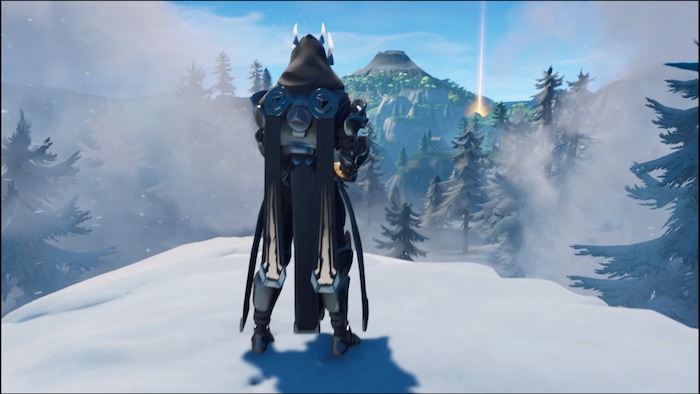
As expected, Season 8 brought some huge changes to the Fortnite map. As many had speculated, the earthquakes that began towards the end of Season 7 finally culminated in a massive volcanic eruption. As a result, the entire northeastern corner of the map has been totally reshaped.

Lazy Links, Wailing Woods, and Tomato Temple are all gone, replaced by the volcano and surrounding areas. These areas include a pirate cove and a complex of Aztec-style temples tucked into a thick jungle area. The volcano itself is the centerpiece, and can be entered to explore the magma-filled tunnels and temple within.

As a result of the volcanic eruption, new volcanic vents have opened all over the map. These vents behave just like jump pads: stepping on one will fling the player skyward, which is handy for quickly traversing the map or making a quick escape.

Players will also be able to find cannons in different areas of the map. A cross between a weapon and a vehicle, these hefty pieces of artillery can be moved and repositioned, and can inflict heavy damage against structures and even other players in a pinch.

Finally, pirate camps have sprung up across the island, serving as outposts for the pirate crew. Usually, they can be found built on top of existing structures, and are filled with plenty of booty. Keep an eye out for the flying pirate flag to track them down.

New Interface

fortnite season 8 first look challenge interface
Image courtesy Epic Games

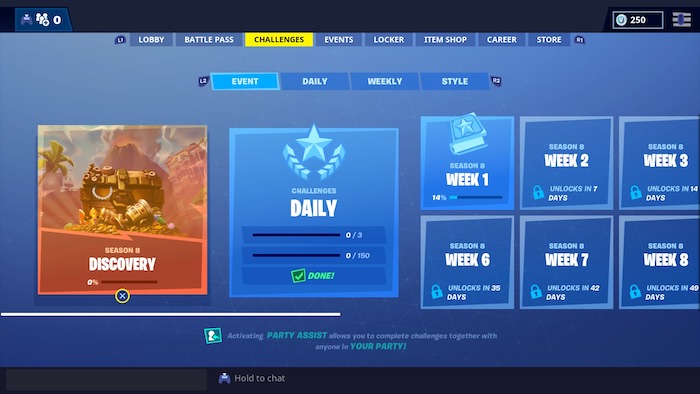
In addition to changes to the game world, players will also notice some major overhauls have been made to the Fortnite interface as well. The Challenge menu has undergone a total overhaul, as seen in the screen above. Weekly and Daily challenges have been organized into more accessible categories, with submenus for character-specific challenges, event-related challenges, and Season-specific challenges. Players will no longer have to take the extra step to “claim” Daily challenges; once completed, any Battle Stars will automatically be obtained.

In addition, changes have been made to the in-game HUD; with the addition of new map icons and player icons for Squad modes. Players with sharp ears will also notice that some sound effects have also received an upgrade, with most sounds upgraded to crisper, sharper versions. In particular, most weapon sound effects have received an upgrade. They’re small changes, but add up to a much more accessible player experience. The game feels like it’s received a shiny new coat of paint.

It’s time to dust off your eyepatches and cutlasses. There’s treasure to find and enemies to eliminate, and if the Season premiere is any indication, big things are in store for Fortnite Season 8. Be sure to check back with Softonic for weekly challenge guides and more Fortnite related updates as the season progresses.

Fortnite Season 8: All Battle Pass Skins

The humanoid banana is… really something.

Fortnite Season 8 is all about treasure, or more specifically, a treasure hunt. The Ice King, the Fire King, and the Pirates are all racing to discover the location of a buried treasure hidden somewhere on the Battle Royale island. The skins included with Season 8’s Battle Pass represent members of these competing factions.

Fortnite Season 8: All Battle Pass Skins

Blackheart

fortnite season 8 battle pass skins blackheart
Image courtesy Epic Games

Tier Unlocked: 1

Description: Blackheart is the captain of the newly arrived pirate crew. He’s got an absolutely mind-blowing amount of styles and customizations. His styles range from dashing pirate rogue to a ghostly skeletonized swashbuckler, complete with a spooky glowing eye and mystical aura.

Fortnite: Battle Royale Play Now
10

Hybrid

fortnite season 8 battle pass skins hybrid
Image courtesy Epic Games

Tier Unlocked: 1

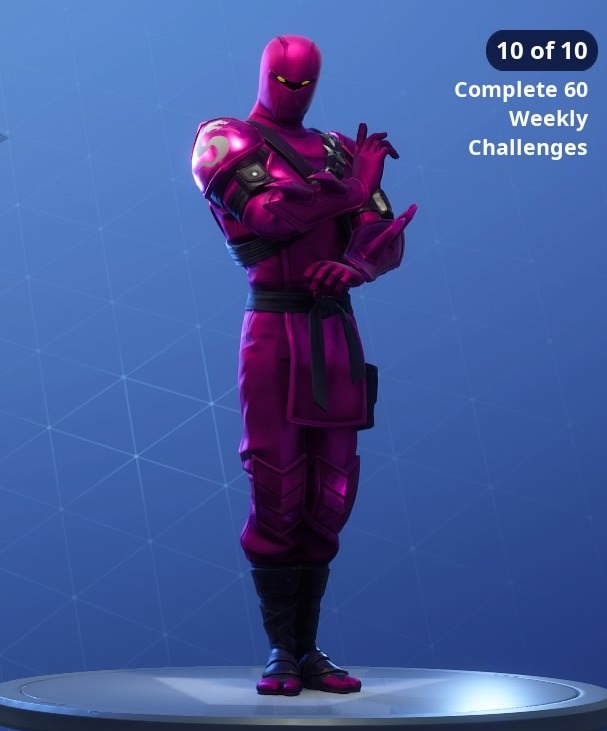
Description: Hybrid isn’t your average ninja. As you unlock more styles for him, he’ll begin to morph from a masked assassin to a dragon-like reptile creature. You’ll be able to unlock a wide selection of color options for his skin as well.

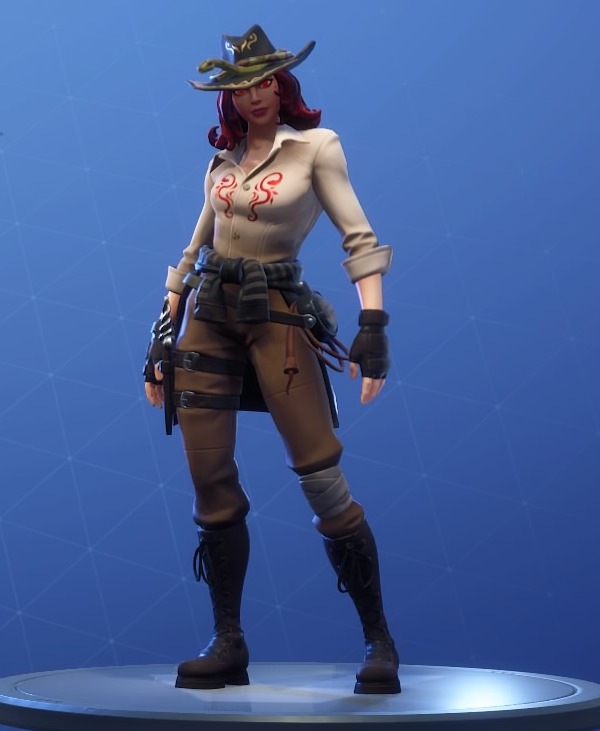
Sidewinder

fortnite season 8 battle pass skins sidewinder
Image courtesy Epic Games

Tier Unlocked: 23

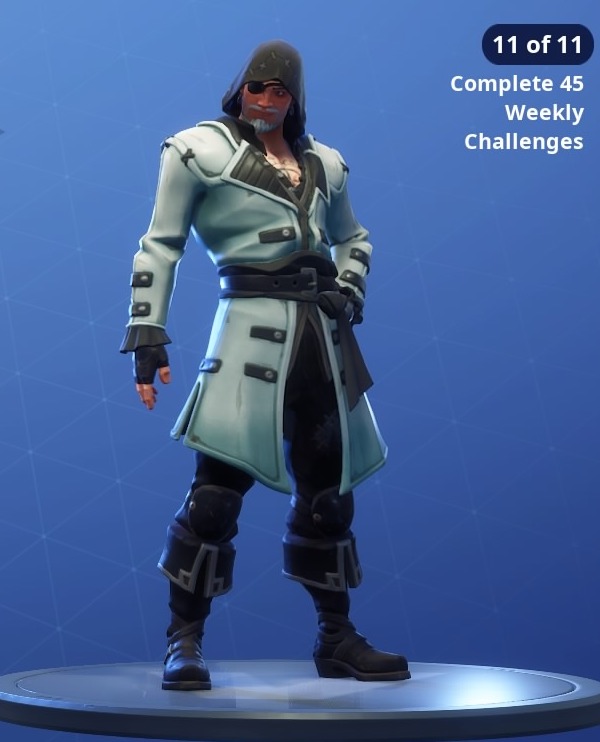
Description: Sidewinder is a fortune hunter with a penchant for reptiles. An outfit that Indiana Jones himself would be proud of, this skin is perfect for exploring the thick jungles and ancient temples that now litter the northeastern edges of the map.

Peely

fortnite season 8 battle pass skins peely
Image courtesy Epic Games

Tier Unlocked: 47

Description: What you see is what you get with Peely: he’s a giant humanoid banana. Peely is a reactive skin, and you’ll see his skin change colors as he literally ripens over the course of the match. Just don’t be tempted to turn him into banana bread.

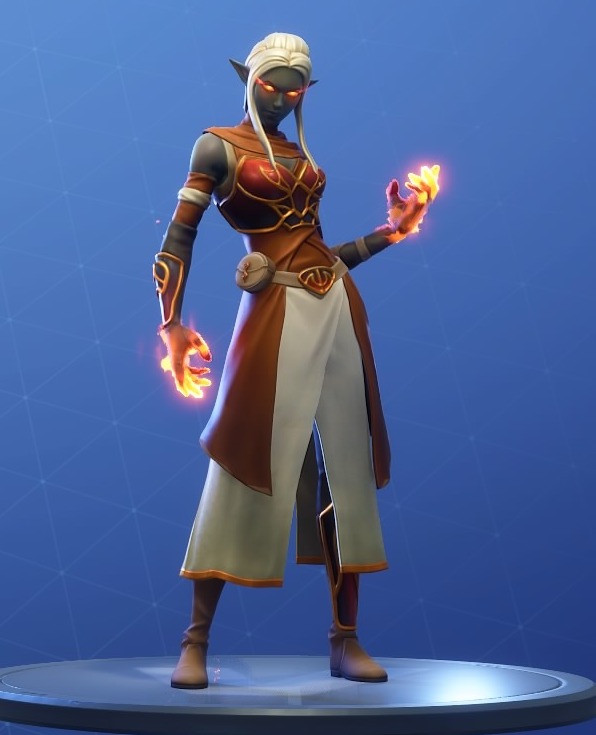
Ember

fortnite season 8 battle pass skins ember
Image courtesy Epic Games

Tier Unlocked: 71

Description: Ember looks like she wandered straight off the set of the latest World of Warcraft update. This Dark Elf is ready to bring the heat as part of the Fire King’s faction, with smoldering eyes and a fiery touch.

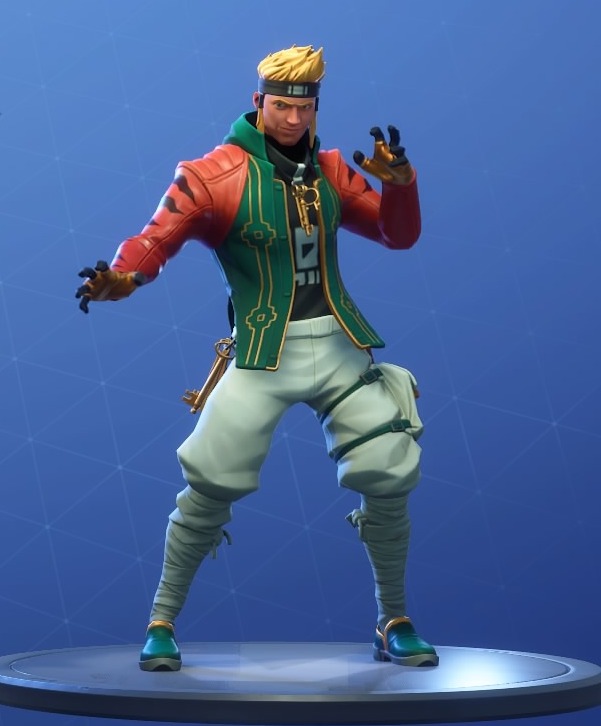
Master Key

fortnite season 8 battle pass skins master key
Image courtesy Epic Games

Tier Unlocked: 87

Description: Master Key, as his name implies, is an expert in all manner of martial arts. His skin comes alongside several unlockable styles… and no, that isn’t a pun.

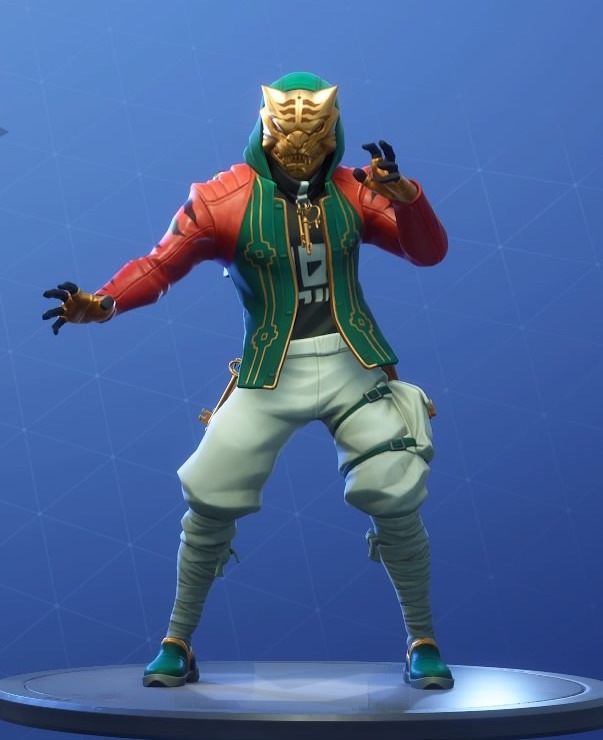
Master Key Masked

fortnite season 8 battle pass skins master key masked
Image courtesy Epic Games

Tier Unlocked: 99

Description: An additional style for Master Key, this time he dons a fearsome golden tiger mask to protect his identity.

Luxe

fortnite season 8 battle pass skins luxe
Image courtesy Epic Games

Tier Unlocked: 100

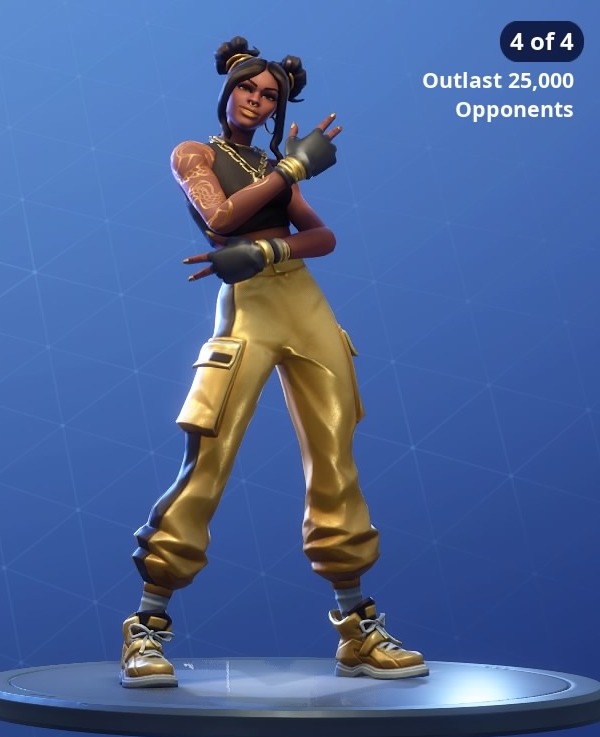
Description: As the final unlock of the Battle Pass, Luxe is the rarest skin of the bunch. Combining hip-hop fashion sense with martial arts mastery, Luxe is someone you don’t want to mess with.

Fortnite: Battle Royale Play Now
10

This is how Netflix can help you learn new languages

Netflix really can help you learn that language you’ve always wanted to learn

netflix

Languages are the gateway to the world. When you learn a language, you unlock a path to the heart of the society and culture that helped create it. This is a two-way street, however, as consuming culture from another society is a great way to learn the language. Need proof?

Poorer countries show movies and TV shows produced in English with their original soundtrack and native language subtitles. Richer countries create a brand-new soundtrack in their native language and then dub it on top of the English language soundtrack. You’ll hear English more often in poorer countries than in wealthier countries where they can afford the re-dub.

8

Learn languages with Netflix

One way to learn a language is through passive consumption: watching movies in their native language and reading the subtitles. But you can learn faster with the Learning Languages with Netflix (LLN) Chrome extension. It uses the foreign language soundtrack of Netflix’s movies and shows to expose you to the language you’re trying to learn, and it uses the subtitle track to teach you the meanings of those words.

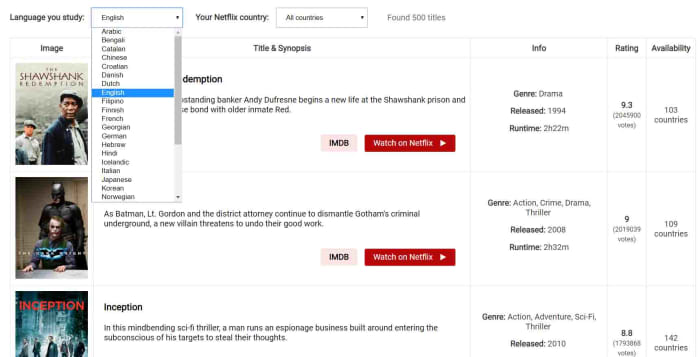
Learn languages with Netflix language catalog

The LLN extension has a catalog of all the Netflix titles that come with high-quality subtitles in the language you’re learning, and also tells you about a few issues you should consider. For example, Netflix has high-quality subtitles for the original audio track, but whenever the soundtrack has been dubbed the subtitles might not always match.

Learn languages with Netflix at the right level

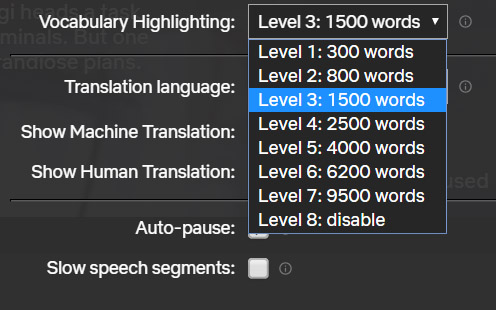
The extension works by giving you the option to select your translation target language and then select a vocabulary level based around the number of words you know in that language. This will then only highlight the words suitable for your current level of learning. This allows you to tier your learning, no matter how complicated the language in the movie or show you’re watching.

Subtitle learning with netflix

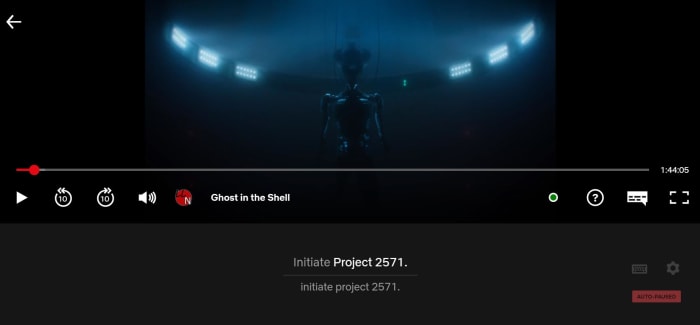
When activated, the LLN extension will show as a small icon in the Netflix control bar whenever a movie or show is playing. Then all you have to do is select the subtitle track for your target language in the normal way and hit the LLN icon. This will open up the subtitle track, which will run almost like a karaoke song with the word being spoken in the soundtrack lighting up as you hear it. This makes it very easy to match the sound of the word to the spelling.

You can use this method with subtitles showing your own language to expand your vocabulary or with subtitles in your target language to reinforce your learning. This reinforcement makes it easier to remember.

learn languages netflix keyboard shortcuts

As well as highlighting the words being spoken, the extension also offers a dictionary, so you can delve further into the meanings of the words you’re reading and hearing.

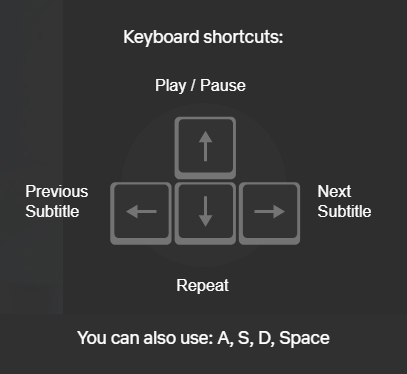
Another cool feature of the extension is keyboard shortcuts that make it easier to focus on particular words, phrases, and structures. This makes repeating phrases, skipping subtitles, and pausing on particular phrases as simple as pressing a key.

All in all, the LLN extension is a very interesting tool for anybody learning a new language. It gives you ease of control over the language you’re consuming when you watch shows and movies on Netflix. It also makes it easier to distinguish between different words being spoken in your target language, which is particularly useful for anybody just starting out with their language learning. Finally, it puts at hand in-depth explanations about the new vocabulary you’re consuming.

When it comes to language learning, practice is as important, if not more important, than the lessons themselves. The LLN extension makes it easy to practice your target language while watching Netflix, which should make a big difference for anybody trying to open that gateway to the world.

How to start Windows 10 in safe mode

This is how to start your Windows 10 PC in Safe Mode.

windows 10

Computers are complex machines and that complexity means they don’t always work exactly how we want them to. Problems arise on PCs all the time and when they do, starting the machine in Safe Mode is a great way to troubleshoot the issues that could potentially be stopping your machine from working correctly.

Windows 10 Download Windows 10
8
The latest and greatest version of Microsoft's operating system.

What is Safe Mode?

Safe Mode for Windows is a basic version of the Microsoft operating system that enables diagnosis of potential problems. When Safe Mode is running only essential programs and services are allowed to boot. This basic state allows for testing while much of the computer’s software remains dormant. This means, if the computer works normally in Safe Mode then the problem isn’t connected to the basic drivers, but lies elsewhere.

According to the official Microsoft Windows Support page, there are two different types of Safe Mode for Windows 10. Safe Mode and Safe Mode with Networking. Both are very similar, with the only real difference being that the latter also runs the network drivers and services your PC needs to access the internet and other networks. The Microsoft Support page also highlights three ways to start Windows 10 in Safe Mode.

Windows Defender Free Download ►
7

How to start your Windows 10 PC in Safe Mode from Settings

1. Press the Windows key and I to open Settings. You’ll also find the Settings menu by hitting the Start button.

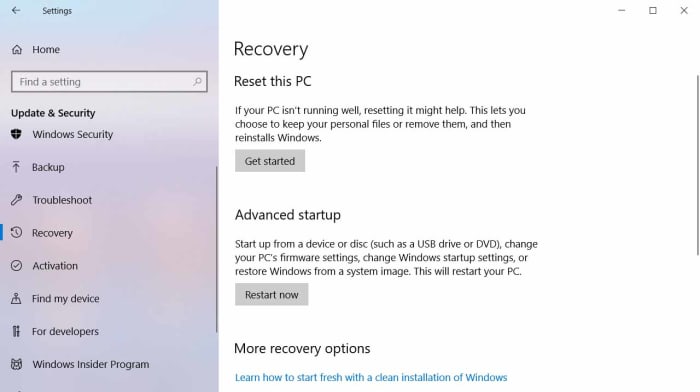
2. Select Update & Security > Recovery.

Win 10 Settings Recovery menu

3. Under Advanced startup, select Restart now.

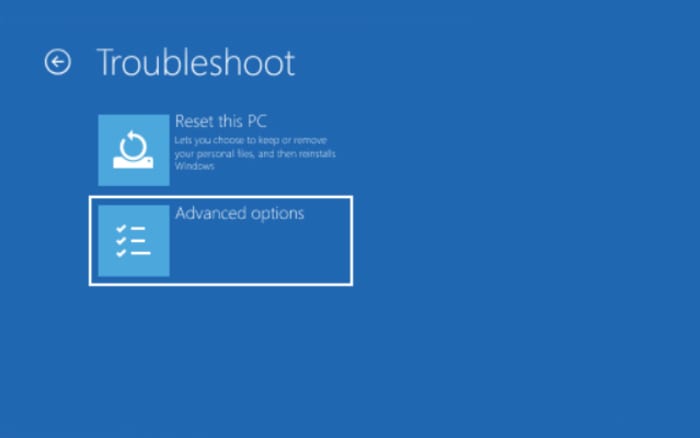
4. After your PC restarts, you’ll be at the Choose an option screen, select Troubleshoot then Advanced options then Startup Settings and finally Restart.

Windows 10 troubleshoot

5. After your PC restarts, you’ll be presented with a list of options. Select 4 or press F4 to start your PC in Safe Mode. Or if you’ll need to use the Internet, select 5 or press F5 for Safe Mode with Networking.

How to start Windows 10 in Safe Mode from the sign-in screen

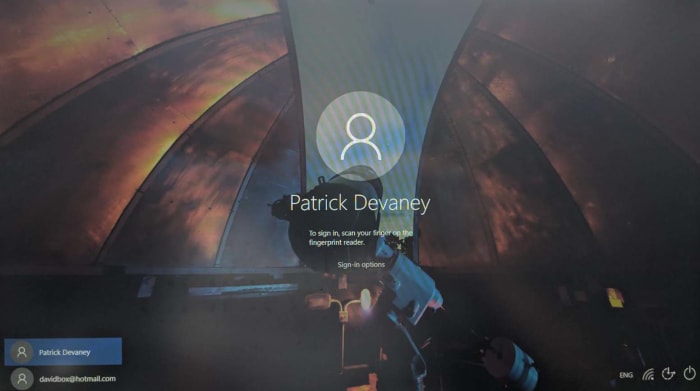
1. Restart your device by holding the Shift key and pressing the Power button in the bottom right of the sign-in screen.

windows sign in screen

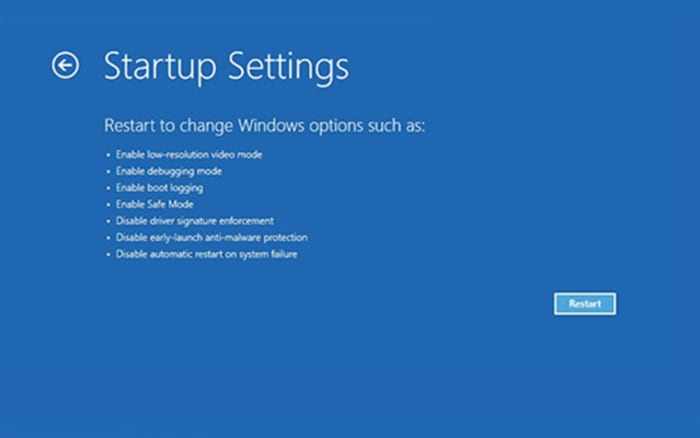
2. Your PC will restart to the Choose an option screen. Here, select Troubleshoot > Advanced options > Startup Settings > Restart.

Windows 10 startup settings

3. After your PC restarts, you’ll see a list of options. Select 4 or F4 to start your PC in safe mode. Or if you’ll need to use the Internet, select 5 or F5 for Safe Mode with Networking.

How to start your Win 10 PC in Safe Mode from a black or blank screen

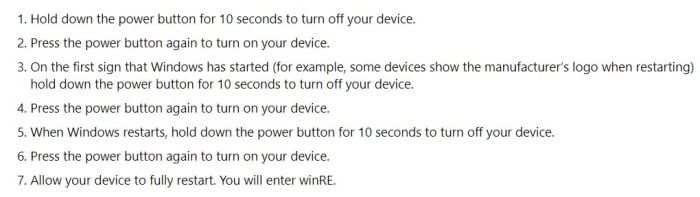
If your computer has frozen or crashed, this method will show you how to access Safe Mode. First, however, you’ll have to enter the Windows Recovery Environment (winRE). Microsoft lays out how to do this here:

instructions for winre

Once in winRE, this is how to start your PC in Safe Mode

1. At the Choose an option screen you need to select Troubleshoot > Advanced options > Startup Settings > Restart.

2. After your device restarts, you’ll see a list of options. Select option 5 from the list or press F5 for Safe Mode with Networking.

How to turn on Bluetooth in Windows 10

A beginner’s guide to Bluetooth on Windows 10. How to find Bluetooth settings in Windows 10 and how to connect a Bluetooth device to your Windows 10 PC.

bluetooth

Bluetooth is the seemingly magical technology that has taken us from the wired past into a wireless future. Thanks to Bluetooth we can run all sorts of wireless devices on our mobile phones, tablets, Macs, and PCs. I’m writing this very guide using a Bluetooth keyboard, in fact. Bluetooth is everywhere and isn’t just limited to keyboards. You can also get your hands on Bluetooth headphones, speakers, mice, and a whole host of other devices.

With Windows 10, Microsoft has made it easier than ever to connect Bluetooth devices to your Windows PC. Let’s look at how to do it.

Windows 10 Download Windows 10
8
The latest and greatest version of Microsoft's operating system.

How to find Bluetooth settings in Windows 10

Before you can connect a Bluetooth device to your Windows 10 PC, you’ll need to turn on Bluetooth. To do this you have to:

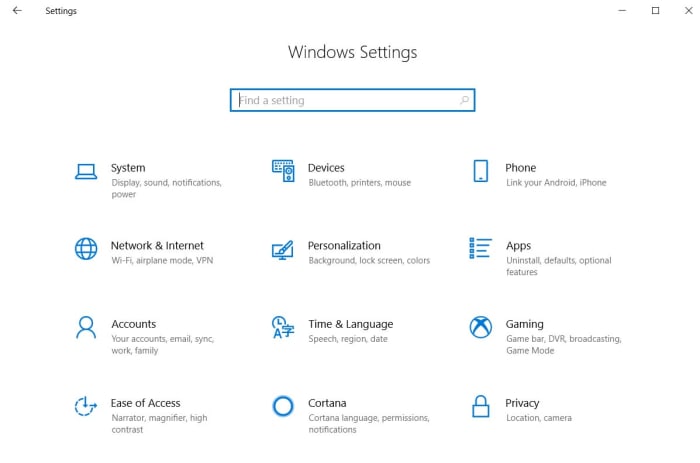
1. Hit the Windows key and I together to open up the Windows 10 Settings menu. You can also open up Settings by clicking the Start button and hitting the Settings icon, which looks like a cog.

The Windows 10 Settings menu

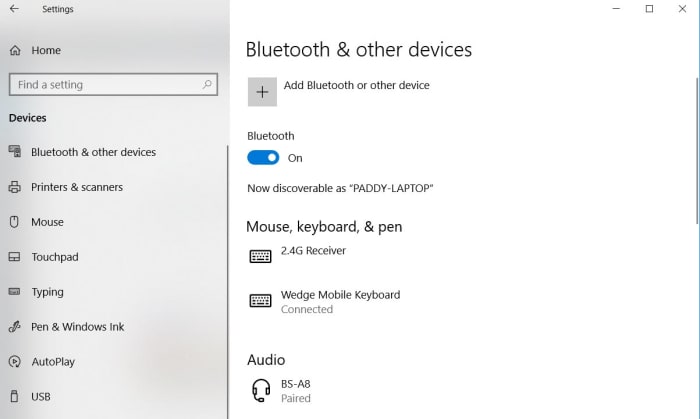
2. Once you’ve opened Settings you need to hit Devices and then Bluetooth and other devices.

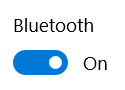
3. In the Bluetooth menu, you’ll see a toggle button. Hit this button to the on position and your Windows PC will be discoverable to other Bluetooth devices.

Bluetooth button on Windows 10

Another way to activate Bluetooth on your Windows 10 PC is to use the Action Center on the right of your screen. To do this you need to:

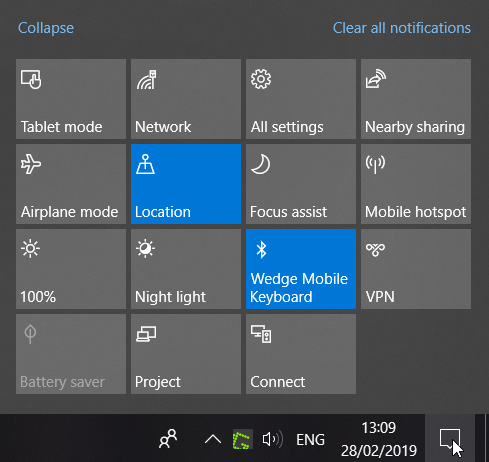
1. Move your mouse cursor to the bottom right-hand corner of your desktop and click the message icon to open up the action center.

The Windows 10 Action Panel

2. Here you’ll find many options for controlling various aspects of your PC, including a Bluetooth button.

3. Right-clicking this button will toggle Bluetooth on and off. If you left-click this button it will give you the option to open the full Bluetooth settings menu.

The bluetooth menu on Windows 10

How to connect a Bluetooth device to your Windows 10 PC

Once you’ve turned Bluetooth on, you’ll be able to connect your Windows PC to other peripheral devices. To do this you:

1. Go to the Bluetooth settings menu using one of the methods outlined above.

2. Turn on the Bluetooth device you want to connect to your PC and make sure it is discoverable to other devices.

Add Bluetooth Device

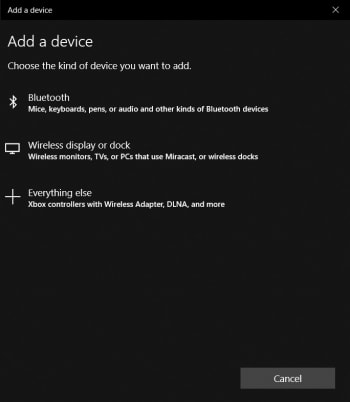
3. On your Windows PC in the Bluetooth settings menu click Add Bluetooth or other device.

4. Click Bluetooth and your PC will begin searching for discoverable Bluetooth devices in the area. Once it finds your device, click on it to pair it with your PC.

Securitry code for Windows bluetooth pairing

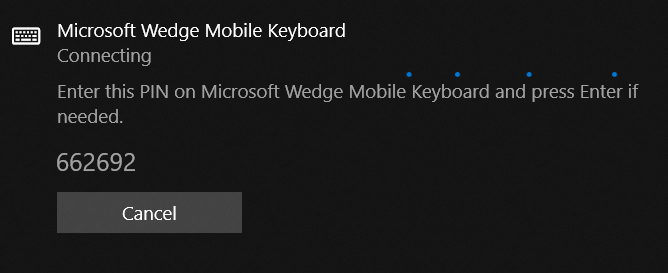
Depending on the device you’re pairing with your PC, you may need to carry out some sort of security procedure. For example, my Bluetooth keyboard requires that I enter a numerical code before I can pair with my PC.

WhatsApp search is finally being upgraded

WhatsApp is developing a new advanced search feature.

If you’ve ever been frustrated because you’ve been searching through old messages on WhatsApp and you couldn’t find what you were looking for, good news could be on the horizon. It isn’t that the current WhatsApp search function is bad, it is just that it is very basic and has been due an upgrade for quite some time. It looks like that upgrade might finally be on the way.

WhatsApp is developing a new advanced search feature

New advanced search feature coming to WhatsApp

As usual, WABetaInfo has been poring through the latest WhatsApp beta code to find out what the messaging app is working on. The new WhatsApp advanced search feature has been spotted in the iOS beta version of the app, meaning it is likely that iPhone users will see the feature before Android users do. The WABetaInfo report, however, does quote ‘sources’ as saying the feature will come to Android, too.

WhatsApp Messenger Download WhatsApp ►
8

Unfortunately, this feature is still at a very early stage of development, which means even members of the WhatsApp for iOS TestFlight beta program still can’t access it. All that has been spotted so far is the code that indicates that the advanced search feature is on the way.

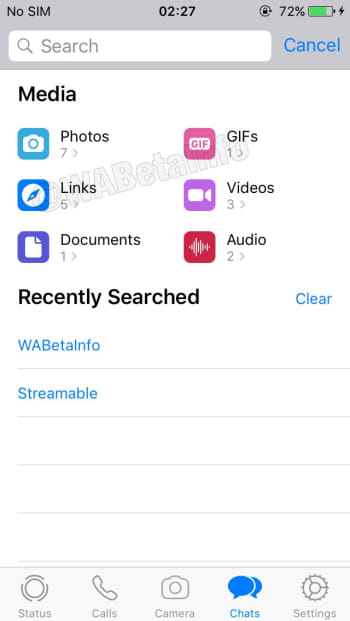
a screenshot of the upcoming WhatsApp advanced search feature
Image via: WABetaInfo

The advanced search will be different from basic search in a number of ways. First off, rather than merely searching text messages, the advanced search feature will allow you to search through different types of messages. These include Photos, GIFs, Videos, Documents, Links, and Audio. The advanced search feature will also show how many messages of each type you have in your WhatsApp storage, and a recent search history.

Another nice feature of the new advanced search is the ability to click on the different types of messages to open up lists of that particular type of message. For example, if you click photos, you’ll see a list of all the different photos you’ve received including previews. This works for all the different types of message and WABetaInfo reports that the preview option will even work for voice notes when advanced search gets a full roll-out. If WhatsApp later adds titles to voice notes, this would make the app a competent voice recording app, too.

As we’ve already said, the advanced search feature is still a long way off, but it is good to see that it is in development. Being able to search through your past messages in an important part of any messaging app. When it does land, the advanced search feature will give WhatsApp one of the best search functions available across all the major messaging apps.

You could soon earn money just by posting memes to Reddit

Reddit is currently testing a real-money inter-user tipping system.

If you use Reddit, you’ll probably know about Reddit Silver, Gold, and Platinum. These coins or badges, depending on how you see them, give users a way to reward other users whenever they make a particular post that they absolutely love. Reddit coins show up next to the post they’ve been awarded to and some of them bestow particular bonuses upon the user who receives them. A Gold award gives a week’s free access to Reddit Premium while Platinum gives a month’s access.

Whereas access to the ad-free Reddit Premium certainly has its perks, there is nothing in this world like hard cash-money. The big news? Reddit is working on a tipping system that will allow users to give other Reddit users real cash.

Reddit is currently testing a real-money inter-user tipping system

Reddit is testing a tipping feature

The new tipping feature is currently only available in one subreddit and only a single user on the whole site is currently able to receive tips. The subreddit in question is r/shittymorph and that lucky user is, well, u/shittymorph.

The new feature was announced in a post on the shittymorph subreddit and laid out just how it will work. The post reads, “Anyone in r/shittymorph can now tip u/shittymorph for the content he posts to this subreddit. Tipping is only available on new Reddit. Furthermore, this is an experimental feature available only in this subreddit, and no other community… Tip payments are handled entirely by Stripe. We don’t store any of your payment information.”

Tips received for a comment show up where you’d normally see Reddit Silver, Gold, and Platinum awards and at the time of writing r/shittymorph had received $81 in tips for his top comment on the post.

Below each post r/shittypost makes, there is now a new tip button. Clicking the button opens up a tip box, which shows four tipping options. Users can tip $3, $5, $10 or select other and tip anything up to $100. According to the post announcing the new feature, the recipient will receive around 78.5% of all tips given. Reddit will receive a massive 18.5% and Stripe, which handles all the payments will take 3% of every tip.

When users decide to make a tip, the tip box will give the option to input credit card details and then Stripe will handle the transfer.

There is no news yet about a general roll-out but this is a very interesting feature for Reddit to be testing. The Reddit community is vast, and conversations cover all sorts of topics. Some of the most heartwarming Reddit stories, however, come from users seeking financial advice during times of hardship and other users responding with offers to send food or even cash. It’ll be interesting to see if tips will soon be sent in such situations.

There’s also the potential for some shady activity, as Reddit is often a promotional tool for adult models, who are already asking fans to support them financially in exchange for certain photos or videos. We’ll have to stay tuned to see how this all plays out.
St Patrick’s Day 2019: Where to get clothing, music, and booze

The best places to find St. Patrick’s costumes and outfits.
God Bless the Irish!

The Emerald Isle is a beautiful place and sure enough, once you’ve visited its luscious green shores and sampled its hearty fare, it’ll never leave you. No matter where you go from that special day onward, one truth will present itself again and again. All the best places in the world remind you of Ireland. If you’ve been, you’ll know what we’re talking about but if you haven’t, not to worry. For that special day of the year when Ireland comes to you is just around the corner. St. Patrick’s Day is upon us.

Now as parties go, St. Patrick’s Day is up there with the best of the best. Paddy’s day parades and Irish bars galore, sing-songs and dancing, Guinness and Whiskey (that E is how you know it’s Irish whiskey), and cities up and down the country going mad. When St. Patrick’s Day does come, will you look the part? That is why we’re here today. To help you look your best this March 17. No matter how extravagant you are or aren’t, we’ve got something green for you.

The best places to find St. Patrick’s shirts, costumes, and outfits

A wee bit of green

Irish t-shirts

St. Patrick’s Day T-Shirts from Target

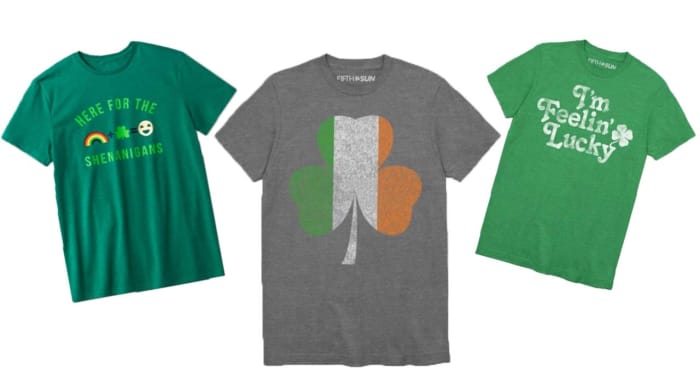
If you want to save all your money for Guinness and whiskey, or a fine bowl of Irish stew, you should take a look at the excellent range of Irish T-shirts Target has on offer for the bargain price of $10. These t-shirts say you’re in the mood for some Irish shenanigans while showing off your casual nature. T-shirts being T-shirts, there’d be nothing wrong with spilling a fair bit of the black stuff down the front of these.

How to look the feckin’ part

Shinesty party suits st patricks day

Shinesty Party Suits

T-shirts are great and all, but when it comes to St. Patrick’s Day partying, they don’t give the occasion the respect it deserves. If you really want to give your all for the Irish holiday, you should be checking out the St. Patrick’s Day special outfits Shinesty has to offer. Shinesty has all bases covered from St. Patrick’s Day Hawaiian shirts to Lucky Charms suits and dresses. We especially love the O’Doyle Rules short-sleeve blazer and shorts suit, but there’s so much more on offer.

short suit for st patricks day

Even if you’re just looking for a subtle touch, Shinesty has you covered with a full selection of men’s and women’s outfits, suits, costumes, dresses, and even Paddy’s day underwear and socks.

The little things that make a big difference

St Patricks Day paraphenalia

Badges, hats, wigs, and more on eBay

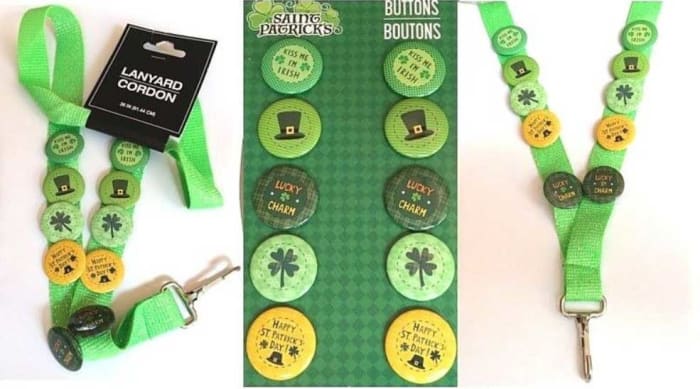
When you’re out on St. Patrick’s Day, you’ll always see somebody wearing or carrying something you’d love to have yourself. Whether it be a wig, or a hat, a tiny pin, or a special piece of Guinness memorabilia, every year, you see something you wished you’d bought yourself. This year, you should try and get ahead of the game, and there is no better place to do that than eBay. You’ll find everything there to make yourself the king of your St. Pat’s party.

Your fiddle and flute

Spotify st patricks day playlist

Your Irish playlist on Spotify

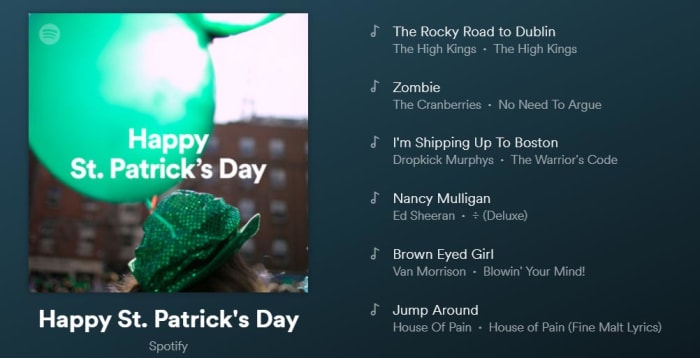
An Irish party is nothing without music. Click here for a playlist of 125 of the best Irish songs that will have you dancing and dropkicking until the wee hours of March 18.

A wee tipple

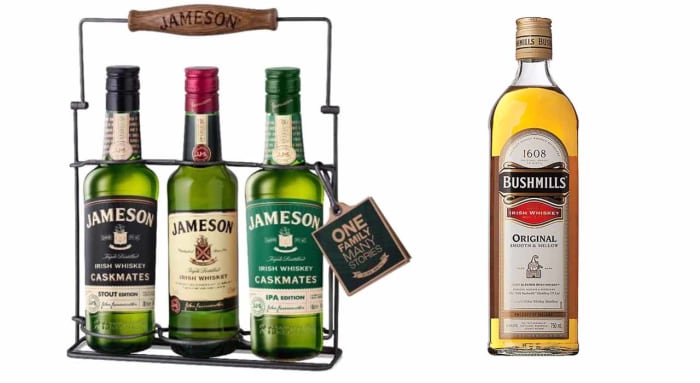
Good ole Irish whiskey

You can get your whiskey from The Liquor Barn

Now you know that you need to see an E to know you’re drinking a good Irish whiskey only one question remains. Will you be drinking Jameson’s, a good Catholic whiskey, or Bushmills, which is Protestant whiskey at its finest?

Get home safely

Of course, we want to remind you to party responsibly. If you find yourself the least bit impaired, pull up one of these great ride-sharing apps to get home in one piece. After all, you have many more years of parties ahead of you.

Anakin enters EA Star Wars Battlefront 2

It’s time to unleash your Dark Side with Anakin Skywalker himself!

Who’s got two thumbs and is on the council but not granted the rank of master? This guy! (Also, one of the thumbs is robotic.) Fans of EA Star Wars Battlefront 2 have been waiting for this day for almost a year, and the wait is finally over: Anakin Skywalker has been added to the roster of playable heroes (yes, he’s on the good guys’ side) in-game, along with a variety of new clone skins.

Unlock Anakin EA Star Wars Battlefront 2
Like Obi-Wan, Grievous, and Dooku, The Chosen One can be unlocked with 35,000 credits

Following Dooku’s release about a month ago, Anakin is the final hero we’ll be getting in the game – at least for a while – topping off the 20-character lineup with perhaps the strongest addition yet. Here are the details:

EA Star Wars Battlefront 2 Collection, all heroes unlocked
Here’s the complete roster unlocked

Anakin’s Battlefront 2 abilities

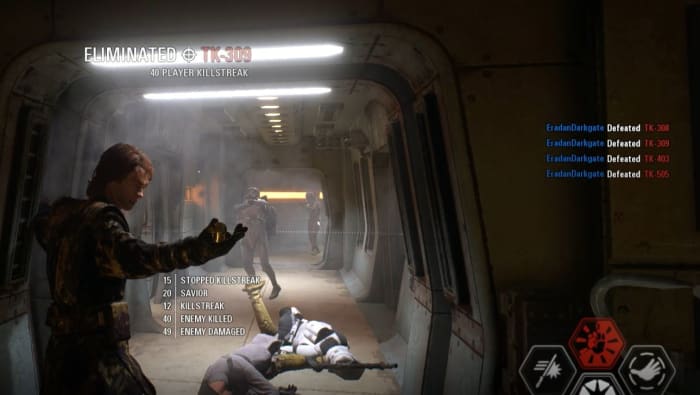
Anakin is the only hero so far to be given four abilities instead of the usual three: Passionate Strike, Pull Dominance, Heroic Might, and Retribution. The Retribution ability is activated by pressing ‘2’ (‘Y’ or ‘Triangle’ on the controller) and can only be used in certain circumstances, so it’s not like Anakin’s running around with more powers than everybody else. Still, he’s one of the higher-tier heroes for sure. Here’s an in-depth look at his abilities:

Anakin Skywalker abilities EA Star Wars Battlefront 2
Anakin’s abilities, as described by EA and DICE

Passionate Strike

The most straightforward of his moves, Passionate Strike is the mighty hit we’ve seen Anakin perform during his fights with Dooku, and later with Obi-Wan. The move is a highly damaging block breaker that can deal ridiculous damage to Enforcer units or enemy heroes.

Anakin Passionate Strike
Deal high damage and break enemy blocks with Passionate Stike

It’s especially useful in Heroes vs. Villains when you’re going toe-to-toe with another lightsaber-wielder.

Pull Dominance

For fans of Kylo Ren, this move will look very familiar. Similar to Kylo’s Pull ability, Pull Dominance is a wide conical AoE that yanks targets towards Anakin.

Anakin Pull Dominance
Pull Dominance is similar to Kylo Ren’s Pull

Useful for closing the distance, stunning enemy heroes, and throwing people into nasty traps and pitfalls, this is a situational move at the best of times, and a multi-opponent stun at the very least. Careful, though; lightsaber-wielders can block this.

Heroic Might

Heroic Might is most similar to Luke’s Repulse. It’s a wide AoE that puts Anakin at the center of a big crowd-clearing knock-back effect that deals high damage. The difference is that while Luke’s Repulse is a quick ground-pound, Anakin’s starts with a slow, dramatic animation that looks cool but leaves you very exposed.

Anakin Skywalker Heroic Might
It’s a force repulse … but cooler.

The good news, though, is that while that animation plays out, Anakin receives a huge defensive buff that lasts as long as the ability charges. The strength and range of the final AoE effect are amplified by how much damage Anakin takes while charging.

Retribution

Anakin Skywalker Retribution charging
Retribution charges as you and your close teammates take damage

Our favorite ability, we think Retribution is the move most appropriate for Anakin’s character. As Anakin and his nearby teammates take damage, this fourth ability begins to charge up. You can see the icon on his HUD slowly filling up, eventually flashing red when it’s ready. The accompanying number indicates how many enemies will be affected by the power when you use it. Our advice? Go for broke – try and squeeze in as many foes as you can.

Anakin Skywalker Retribution activate
You don’t want to be caught in this blast – trust us.

When you unleash the ability, Anakin freezes everybody nearby, lifting them into the air and choking them, eventually dishing out a powerful repulse similar to Heroic Might, but more deadly and with a longer fuse.

Anakin appearances

Anakin appearances EA Star Wars Battlefront 2
Left: Default; Right: Robed

Additionally, Anakin comes with two appearances: His default appearance from his Mustafar fight with Obi-Wan, and another where he’s sporting a Jedi robe (we wish the hood was up!). The robed appearance is an Epic costume and costs 40,000 credits (or 1,000 crystals).

Anakin emotes and victory poses

Emotes

Fans of the Clone Wars animated series will be excited to learn that Matt Lanter has returned to reprise his role of Anakin Skywalker for Battlefront 2. This 10-year veteran expertly captures the ambitious spirit and brash eagerness of the Chosen One, and adds his characteristic prideful confidence with a number of familiar lines.

Matt Lanter
Bless this man

Fun: “This is where the fun begins”
Diplomatic: “You call this a diplomatic solution?”
Grumpy Master: “Obi-Wan’s gonna kill me …”
Wise Jedi: “A very wise Jedi once said ‘nothing happens by accident.'”

Victory poses

Anakin Victory pose I Am Ready Anakin Victory pose OnwardAnakin Victory pose I'll Take You Now Anakin Victory pose Brace

Anakin’s Star Cards

Anakin comes with the usual 9 star cards, unlocked at levels 2, 5, 10, 15, and 20. They are as follows:

Anakin Skywalker Star Cards
Anakin’s Star Cards bolster his abilities and play to his aggressive style

Tenacious (2): Anakin Skywalker has increased health
Massive Strikes (2): Anakin Skywalker deals more damage with his lightsaber attacks
Pressure (5): Passionate Strike deals more damage
Control the force (5): The base radius of Heroic Might is larger
Reprisal (10): Anakin Skywalker receives 20 health per kill, more for villains
Fierce Fighter (15): The cooldown of Passionate Strike is reduced
Attraction (15): Pull Dominance has a greater range
Raw Strength (20): Heroic Might deals more base damage
All of them (20): Pull dominance deals 50 more damage if a minimum number of targets are affected

More Chosen One updates

The Chosen One update also added new clone skins, most notably the iconic blue-streaked 501st legion that accompanied Anakin when he stormed the Jedi Temple on Coruscant in the infamous “Revenge of the Sith” scene.

Battlefront 2 501st Legion Assault skin
Fans of the 2005 Battlefront 2 will remember this skin well

Another niche (but awesome) addition is that Yoda can now block Dooku’s lighting with his block ability. Unleash can then be triggered to fling the lightning back at him, just like in “Attack of the Clones.” Note that this ability still only works against Dooku – as of right now Yoda cannot absorb or re-channel Palpatine’s lighting.

Battlefront 2 Yoda Dooku lightning
Yoda can now absorb and redirect Dooku’s lightning.

February has been a big month for Battlefront 2 fans, and DICE is not done yet. With more updates on the way as well as the hugely-anticipated Capital Ship mode, be sure to stay tuned for details as they come in. In the meantime, get Anakin today and we’ll see you on the battlefront!