First impressions: Apple Music

Apple Music was launched today, but don’t look for a new app. It’s part of the Music app in iOS, and iTunes on desktops.

To get Apple Music on iOS, you have to update to iOS 8.4. Eventually your device will prompt you to do it, but otherwise you can go to Settings > General > Software Update, where you can download and install the update.

Once installed, you’ll notice the Music icon has changed from blood red to white. Tap this, and you’ll be introduced to Apple Music. You can choose to start the 3 month free trial, or not, and just go to your music library.

Starting the trial means you’ll automatically start paying for Apple Music from your Apple ID account after the trial is over, unless you turn automatic subscriptions off. I had hoped instead of this, Apple would prompt us to start paying once the trial is over. This method could result in plenty of people forgetting and paying for something they don’t want.

Either way, you’ll find the Music app has been redesigned, and it makes a good first impression. It’s clear and bright, with lots of images. There are new buttons at the base of the interface: For You, New, Radio, Connect, Playlists, and My Music. The last two are where you find the music you synced from iTunes or bought in the store, your ‘old’ music library. The others are all Apple Music features.
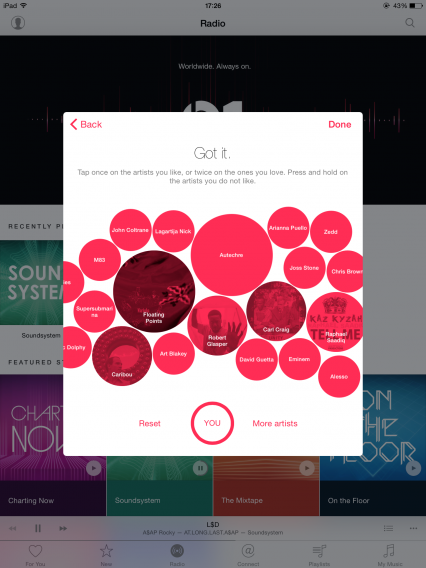
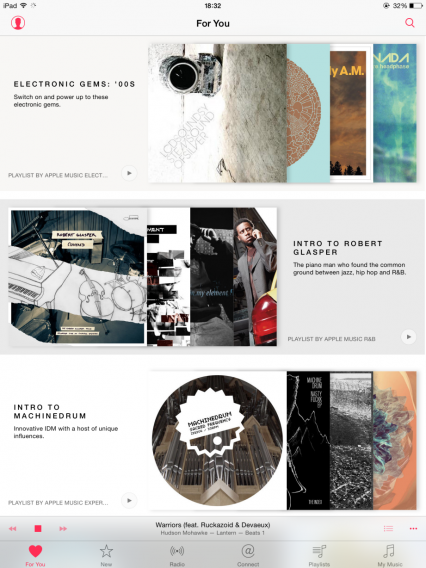
For You gives you recommendations and stations based on genres and artists you like. As with Beats Music, Apple Music asks you to pick a few genres and artists you like so it’s recommendations can begin. Beyond that, it should learn what you like based on what you listen to via Apple Music, your own library, and of course the new Beats Radio. I was disappointed to see playlists like “intro to…”, as these were based on artists I told Apple Music I like, so I hardly need an introduction to them, right?
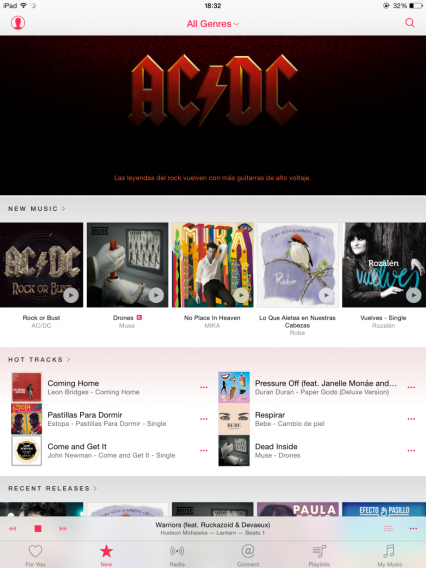
New shows you the latest releases in Apple Music, and for now they don’t seem to be curated for your own tastes, so expect to see big names, as well as some local flavor based on where you are.
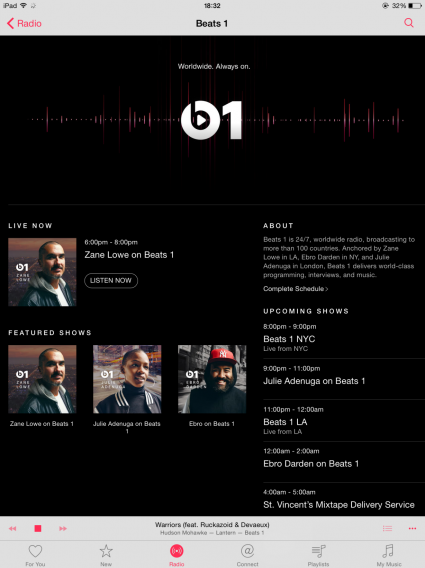
Radio is split into stations based on genre, as well as its flagship Beats 1, hosted by world famous DJs like Zane Lowe. Beats 1 sounds very much like a radio station – it’s live, DJs speak and you’re at their mercy in terms of selection. How much you enjoy Beats 1 depends whether you like the DJs’ tastes.

So far, and this may change, the genre stations are simply mixes of music from Apple’s huge music library. Here, you can skip tracks forward, but not backwards, though you can listen again to any song you hear via your listening history. If you really like a song, you can start a station based on that song. I did that with The Smith’s There Is a Light That Never Goes Out, and it was followed by songs by Blur and then Electronic. There’s a star button under all tracks, which allows you to advise the app to play more or less of this kind of song, or add it to your iTunes Wish List.
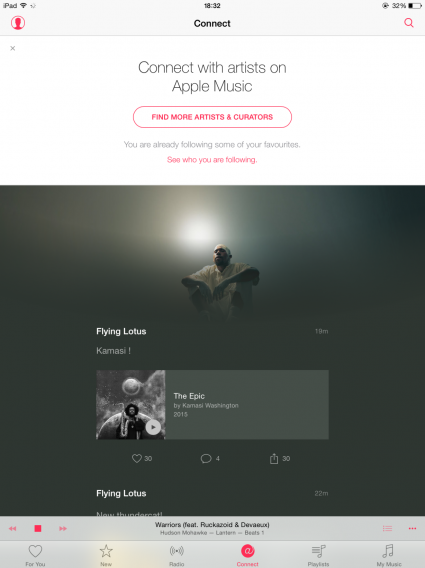
Connect is where artists share content with you. Pictures, songs, video, and more, in a feed. The artists are mixed from genres and artists you like. This is probably the biggest experiment in Apple Music. Social media has proved very successful for many artists, whether its Facebook, Tumblr, or Twitter. Connect looks like Apple’s attempt at giving them the same opportunities from within Apple Music. How successful it is depends on artist engagement. You can comment on posts, like them, or share them on your social networks as well. Watch this space, as they say.
An impressive start

The addition of Apple Music to the iOS Music app makes it possibly the most complete music app around. I still feel the lack of Spotify style community features is a mistake, but it’s still an impressive package. It’s almost intimidatingly large, and will take some getting used to, regardless of whether you’re already a Music or iTunes user.

Apple Music is available right now on iOS, and should come to iTunes on Windows and OS X in the next few hours. An Android app will be released in the Fall.

Related articles

What are Connected Cars?

Apps for women: breaking down gender stereotypes

Grad gift guide: high school grads

Follow me on Twitter @jonathanriggall

App of the Week: Batman Arkham Knight

Our App of the Week this week lets you become the brooding hero of a crime filled city. Donning the mantel of the bat, Batman: Arkham Knight lets you step into the heavily armored bat-boots of Gotham’s greatest hero.

This is developer Rocksteady’s final entry in their Arkham trilogy. It brings an appropriately dark end to the events of the franchise, with Batman having to face his failings while he deals with famous DC super-villains.

If you have played the previous Arkham installments you will know the three gameplay pillars that made this series so popular, all of which return here – exploration, stealth, and vicious combat.

However, the latest game adds a forth element to this mix – the iconic Batmobile. This super-car/tank hybrid has two forms, car and battle, and lets you switch both at the press of a button. Like the rest of the game, this gives you lots of versatility to deal with situations however you choose to.

To ensure that Batman: Arkham Knight is unmissable, it looks sensational – especially if you your PC is beefy enough to turn up all of the graphics settings.

It is the perfect end to one of the most consistently stunning game series of recent years.

Please note, some players have reported issues with the game on PC. We experienced no problems during our testing, but please check the official Warner Bros. blog for updates.

Related Stories

App of the Week: Google Photos

App of the Week: Tysdo

Batman: Arkham Knight review

Follow me on Twitter: @DoFuss

Five Apps to Try This Weekend: featuring Mucho Party and Simple Machines

In this week’s Five Apps to Try This Weekend we focus on a problem most parents experience – keeping your children appropriately entertained while travelling. Whether you are in a car or a plane, the point comes when you become bored of playing Eye Spy or explaining just how much longer the journey will take, and that is where these apps come in.

First up is My Talking Ginger (Android|iOS|WP). Part of the ever popular My Talking Tom family of virtual pets, this cute little app has an adorable kitten repeating everything you say. Plus, while having fun, this game teaches the value ​​of responsibility and care.

If you have two children, and only one tablet, then Mucho Party (Android|iOS) is the perfect app to keep both of them happy.  This collection of hilarious multiplayer mini-games should have everyone laughing – unless the children in question are particularly competitive.

Simple Machines (iOS) is our third pick. It is a great looking app that teaches your children the basic concepts of physics and engineering – such as slopes, levers, and pulleys – though a series of beautifully designed puzzles.

If your child has more of a flare for the creative then we recommend Junimong (Android|iOS). With this app you can draw on the screen of a tablet or phone with digital versions of all the tools you would expect to find in a well stocked pencil case – and a few others beside.

Finally, we have Camstar (iOS). We all like taking photos, and this app not only lets you take a snapshot, but also twist and contort it to your will. It’s simple, effective, and incredibly fun.

That’s it, you are now ready to travel. We will be back next week with another five apps, be sure to subscribe so you don’t miss it.

Related Stories

Five Apps to Try This Weekend: featuring Apple Watch

Five Apps to Try This Weekend: featuring Facebook Lite, PES Club Manager, and LEGO Worlds

Five Apps to Try This Weekend: featuring Office Lens, Heroes of the Storm, and Lara Croft: Relic Run

Follow me on Twitter: @DoFuss

With UR 3D Launcher, personalizing your Android device has never been so easy or fun

UR 3D Launcher isn’t just another Android Launcher. This application lets you personalize your Andriod OS to a mind-blowing degree, including a huge gallery of animated 3D wallpapers, dozens of icon packs, smart folders that organize your apps more efficiently, and a memory optimizer for your device. And all this is free.

One of the advantages of Android is the ability to personalize the system and set up your device — whether cell phone or tablet — the way you want. In addition to changing how things look — such as new wallpapers and icons — you can also change system settings and even include extra features. Launchers were developed to help you do this, but the downside is they’re not always easy to use. Not with UR 3D Launcher and their new user-friendly interface. Everything is done with just a few clicks, and it’s all intuitive, making your device even more fun to use.

Homescreen

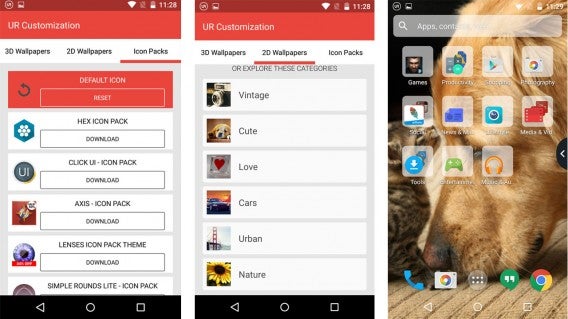
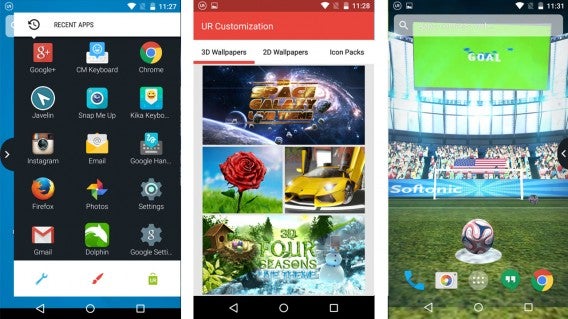
UR 3D Launcher offers customization that starts with your home screen. This is where you can always find the apps you use the most, so that you won’t have to spend unnecessary time trying to find YouTube hidden amongst a huge list of apps, for example. To give your device a look that reflects your own style, the app includes 25 3D animated wallpapers and more than 100 2D images, divided into categories such as “Vintage,” “Love,” and “Nature.” Several icon packs are also available to complete the transformation.

And there’s more: UR 3D Launcher offers extra features to make it even easier to navigate the operating system. Just install and start up Launcher, and it will create a series of smart folders that separate your apps by type, such as “Games,” Social,” “Photography,” and “Productivity.” Each folder offers recommendations for new apps in that category for you to discover and download.

Store and sidebar

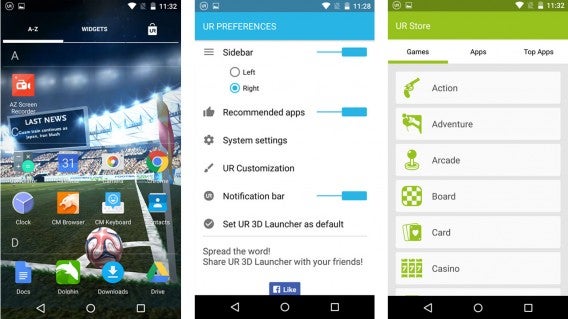
Another new feature is the sidebar, which you open by sliding your finger to the right or left, depending on your preference. This space contains your most recently used apps, and also offers quick access to the UR 3D Launcher settings and customization screens, as well as the Launcher’s very own Android app store. UR 3D Launcher also makes the search bar at the top of the screen smarter and more powerful, with the ability to search through apps, contacts, and the web, all in one place.

The developers at UR 3D Launcher know that many of us run out of storage space on our devices from saving photos or installing new apps, so they’ve gone beyond customization to include a memory optimizer. UR Booster Lite frees up space on your device with a simple tap on the screen.

Setup

But what if you get tired of UR 3D Launcher’s “special effects”? Don’t worry! With UR 3D Launcher, it’s also easy to restore the default style of your phone or tablet without having to turn off the application or restore it to the original factory settings and run the risk of losing everything you’ve saved. A few intuitive taps on the screen is all it takes – this application is truly this easy to use!

UR 3D Launcher offers a complete set of personalization packs and features. Although you’ll need to individually download wallpapers and icons — which actually helps save space on your device — the app offers everything you need to set up your device with your own style, free of charge and free of hassles.

Download UR 3D Launcher for Android

Signs Your Website is Crashing – and how to prevent it

Your website is the face of your business, connecting you to your customers and enabling you to complete transactions and provide services. Keeping it running smoothly is absolutely essential, and a crash or slowdown will mean losing customers.

While you’d probably think that your host provider has your back, the fact is, most hosting companies only send alerts in the aftermath of a crash, which is akin to having a fire alarm that only goes off when the building has completely burnt to the ground. You need to be able to recognize the telltale signs that your website is about to crash, and a good Performance Monitoring tool can make it dramatically easier for you to watch out for these symptoms.

In this article, we will be using the SolarWinds Server and Applications Monitor as an example of one such tool.

Here are some signs that your website is crashing and what you can do to avoid it:

Poor Performance

Whether it’s CPU or memory spikes, disk corruption or application failures, poor performance or even global Internet outages, a myriad of issues can cause your website to under-perform. While some of these issues are beyond your control, many others have symptoms that you can monitor for, and spot in time to take action or alert your host before it becomes a major issue.

Performance issues are probably the most difficult to triage. A slow website may be caused by a faulty hard drive on your server, or it could be the result of a software bug. Ruling out performance issues with your server should be the first step you take, and can easily be accomplished with your performance monitoring tool.

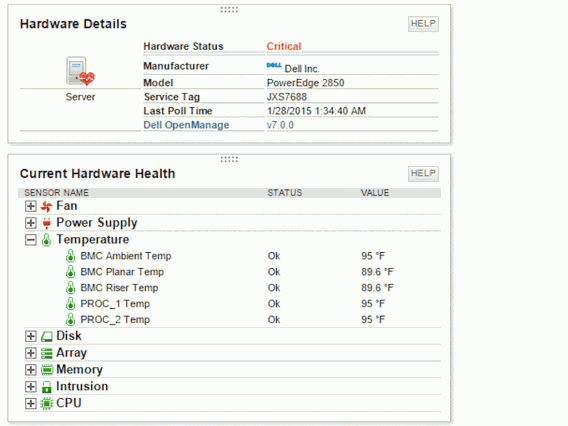
Let’s take a look at a hardware snapshot from the SolarWinds performance monitoring tool.

This is an example of server monitoring done right. Notice that the hardware components that are at risk of failing are flagged with red indicators. If this was your website, you could quickly call your host or your IT administrator and catch the problem before it becomes a disaster.

Difficulties Remote Controlling

Windows uses a service called Remote Desktop (RDP) to give you the ability to control your web server from anywhere in the world. RDP is important when you want to install new software on your server or when you need make new changes to your website.

RDP runs in the Windows background and when you make a “call” to the server, it responds with a login request. When performance wanes, you’ll notice difficulties with either RDP itself or navigating within the RDP window. Problems such as lockouts, application freezes, or dropped connections to the server are signs that something serious is happening and your website might be on a verge of a crash.

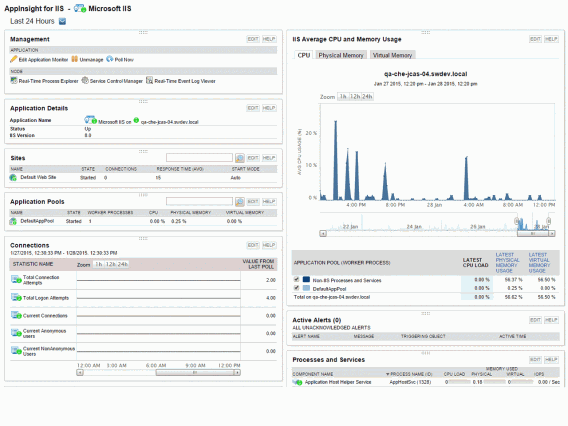
A good performance monitoring tool identifies the processes running on your server and gives you clues to identify which applications are taking too much memory or CPU resources. Take a look at the screenshot from the SolarWinds performance monitoring tool below.

Notice the section that indicates CPU usage. See the spikes? These spikes are normal, but too many spikes, or spikes that last too long, slow down the server and your website will eventually crash. Monitoring for these abnormalities means that you can schedule a server reboot to temporarily stop your website from crashing, and checking your monitoring log will help you perform a root-cause analysis.

Application Timeouts

Just like your personal computer, applications crash when your server’s resources are depleted. While a crash could simply mean that you need more resources, it could also be symptomatic of failing memory or a corrupted hard drive – both of which are difficult to diagnose without a performance monitoring tool.

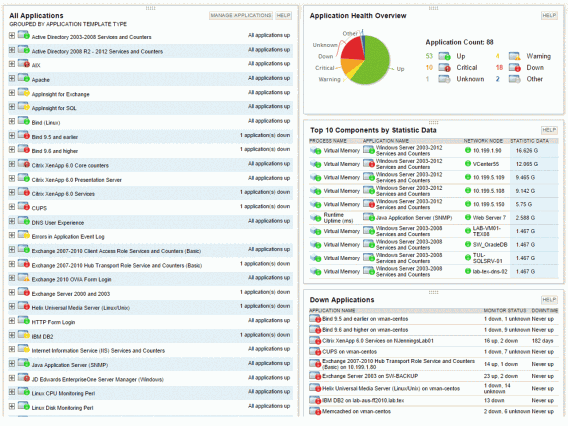
Here is another SolarWinds example.

Notice that this SolarWinds tool displays all the applications that are running on the server, and it flags the applications that have failed to run. “Down applications” aren’t necessarily a bad thing as you can choose to keep some applications from running for various reasons. However, some applications could rely on these “down-ed” applications, which would result in website crashes or errors.

With a good monitoring tool such as SolarWinds, you can review the list of “down” applications that are affecting your system’s workflow and quickly restart these applications before a dramatic event happens.

Random Disconnects

Finally, a server that doesn’t have enough resources will have trouble handling your website’s visitor traffic. Let’s say about 1,000 people want to visit your website every day, and about 1% of these people eventually go on to buy something. Having a website that cannot accommodate all your traffic means it is possible that you might lose all 10 paying customers when trying to accommodate the 990 other people.

Your website server uses memory and CPU resources to respond to each of these users as they navigate throughout your website. Once these resources are used up, the website starts to refuse connections to new visitors. These disconnects would be represented in several ways -The loading icon spins indefinitely, the page loading incorrectly or incompletely, or a “Connection Refused” message appearing in the browser – none of which are part of a recipe for happy customers.

While server resources aren’t the only cause of random disconnects, it is the one thing that you can quickly check and rule out, before combing through countless logs and reports to find a software error.

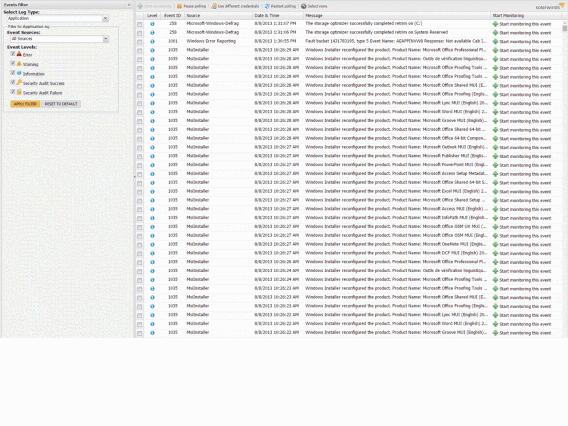
Here’s an example of how SolarWinds uses a graphical representation to help you monitor user activity on your website to spot recurrent disconnection issues.

Looking at this list of running events, you can quickly identify if any user connections are returning an error.

Wrap up

A crashed website is probably one of the most catastrophic events that could happen to your business. Apart from lost customers and revenue, it impinges on your reputation of delivering your product or service reliably and professionally. Investing in a proper Performance Monitoring tool, such as SolarWinds Server and Application Monitor, could save you from buckets of tears and perspiration, and a potential crisis from boiling over.

App of the Week: LEGO Jurassic World

This week’s app that reaches into the imagination of an eight year old, pulls out what it finds (namely LEGO and dinosaurs), and makes a game out of it. That right, this week we are featuring TT Games’, LEGO Jurassic World.

Developer TT Games have long had a template for their LEGO games, but in no way has that muted their charm. The formula encourages exploration and puzzle solving, perfect for the Jurassic franchise. Add to this some light hearted slapstick humor, and you have a game that is perfect for the whole family.

The adventure takes place over 20 levels, five for each of the movies (including the new Jurassic World). These can be visited in any order from the hub world and visit all of the major scenes from these beloved films. This includes lots of chase sequences, including the iconic T-Rex attack form the original Jurassic Park.

To successfully navigate the blocky world you can use any of the hundred plus unlockable characters on offer. Each has their own combination of skills to help you make your way past various obstacles and puzzles. These include the botanically-inclined Dr. Ellie Sattler, who can grow a variety of plants, and Jon Hammond the park owner, who can access any door.

As in previous titles, making your way through each level you can find plenty of LEGO studs to collect in order to unlock the full cast of heroes. LEGO Jurassic World, however, also adds chunks of DNA to find. These unlock dinosaurs for you to control. You can then visit your digital dinosaur zoo, take them apart, and rebuild them as your very own monstrous lizards.

Add some multiplayer, and you have a game that will keep both kids and adults entertained for weeks.

Related Stories

App of the Week: Google Photos

App of the Week: Tysdo

App of the Week: Phind

Follow me on Twitter: @DoFuss

Five Apps to Try This Weekend: Featuring Apple Watch

This week on Softonic’s Five Apps to Try This weekend, we are focusing our attention on the Apple Watch and our favorite apps for it. So strap it on, and enjoy this week’s video.

We kick off with Citymapper, the best map app we found with Apple Watch support. It allows you to access maps from your wrist, as well as letting you easily find your way to destinations you have pre-set (such as “home”).

Another familiar app that has been well adapted for the Apple Watch is Wunderlist. This companion app lets you access all of your lists without needing to take your phone out of your pocket. Great for ticking things off while your shopping.

Exercise apps are hugely popular, and very useful, on a watch. We found RunKeeper to be the best of these. Letting you start your run, check your time, kilometers traveled, interval speed, and pause your run without having to take your phone from your pocket.

If you want something playful, then Rules! is for you. This game has some unique mechanics designed to test your brain, asking you to solve logic puzzles that look simple, but demand you use all of your concentration and memory to avoid mistakes.

Our final recommendation is Day One, a notebook and journal app with Apple Watch integration that is both elegant and convenient. It gives you the power to add entries to your vocal diary simply by talking into the watch, which it then tags with location and date. You can even add an image, perfect.

Those were our favorite five applications for Apple Watch – but if you have others please let us know in the comments. See you next time.

Related Stories

Five Apps to Try This Weekend: featuring Facebook Lite, PES Club Manager, and LEGO Worlds

Five Apps to Try This Weekend: featuring Office Lens, Heroes of the Storm, and Lara Croft: Relic Run

Five Apps to Try this Weekend: featuring Google Photos and My Talking Tom

Follow me on Twitter: @DoFuss

Connected Cars: the future

We now know where connected cars are today, and what’s on the horizon. How will connected cars change our lives in the next five to ten years? In the name of safety and efficiency, it seems we are headed for more and more automation. Being a driver may become a thing of the past.

The self-driving car – should you worry?

Self-driving cars are almost inevitable. Google has shown over six years of testing that they are viable, and moreover, that they make better and quicker decisions than human drivers. The main obstacles to driverless cars coming to our streets are road regulations and public perception.

With regulation, laws have been made with human drivers in mind. Computers in charge will mean regulation designed especially for that. Regulation being a government area, don’t expect a super fast response.

Fear of robot controlled cars seems widespread. Even if, as Google claim, robots are safer and do the job better, we worry that a computer might decide to kill us instead of killing other people in the case of an accident. This is fairly illogical, and misunderstands how self driving cars work and why accidents occur.

Most accidents are the result of human error, not technical failure. Human error usually results from lack of concentration, disregard for rules, slow reactions, or being under the influence. All of these disappear with self-driving cars that act in a predictable manner, cannot be distracted, and are programmed to respect the rules of the road. And they don’t get drunk.

The logical problem with stories that ‘cars might have to be programmed to kill you’, is that they obviously wouldn’t. They will be, and are, programmed to avoid accidents, and won’t make a decision based on killing or not killing anyone. Stories like this make a good headline, but have, at least currently, no basis in reality.

How manufacturers go about convincing people to let go of the wheel, is another matter – it’s not easy being told a machine is better than you!

How self-driving cars will improve your life

Bosch have showcased a system where your smartphone and car interact. When you arrive at a destination, your car will park itself, and when you want to leave, you can use your phone to tell the car to pick you up. That might sound like the Batmobile or Knight Rider, but it really seems to be just around the corner.

We may like to be in control, but let’s face it, highway driving is dull. Assisted or automated cars mean you’ll be able to relax instead of trying to stay awake staring at a repetitive, boring road. The more assisted cars we see on the road, the safer you’ll be too. Studies show that up to 90% of accidents can be directly attributed to driver error, and computer controlled cars will be able to react faster than human drivers when avoiding accidents. So, highway pile-ups should stop being a problem.

Away from automated driving, connected cars will increasingly be aware of their surroundings and nearby events. So, if any accident has been reported on your route, you and your car will know about it ahead of time and be able to avoid it, or at least be prepared. The same goes for approaching congestion.

Connected cars will send data back to central servers that will help other connected cars react to their environment as early as possible.

Environmental pollution and greenhouse gases have made cars unpopular in certain circles in recent years. But it looks like it’s not the car that’s going to go the way of the dinosaurs. It’s the driver. So enjoy driving – safely – while you can, as it may not be something you have to do in ten or fifteen years!

While we may take industry reports about driverless cars with a pinch of salt, it’s becoming difficult to ignore that travel would be easier, safer, and more relaxing if we didn’t have to drive. Not being able to call your car when your mobile battery dies could be irritating, though.

Read more about Google’s self-driving car project here.

Related articles

Connected cars: the near future

What are Connected Cars?

Google I/O 2014: Android Auto coming later this year

Follow me on Twitter @jonathanriggall

FIFA 16: hands-on preview

We got our hands on FIFA 16 on June 4th at an event in Madrid, Spain. We can tell you right away, before we go into the new features of the game, that EA Sports seems to have learned lessons from last year’s game. FIFA 15 was too focused on next-gen graphics rather than improved gameplay. The result? Defenders were weak, goalkeeper artificial intelligence was.. not intelligent, the center of the field was devoid of action, and huge defeats (or wins) were the order of the day. And that only scratches the surface of gamers’ complaints.

Scheduled for a September 24 2015 release, FIFA 16 solves these problems, adds new ideas to the series, and pays much greater attention to gameplay. FIFA 16 producer Sebastián Enrique explained how the essence of this year’s gameplay is getting the balance right between risk and reward in matches.

Stronger defense

Top players like Ronaldo and Messi felt almost invincible in FIFA 15, and it was far too difficult to dispossess them of the ball. This year’s defenders are more agile and it’ll be easier to hunt down superstar strikers. There are more ways of defending, too, with a greater variety of moves available. When you do get the ball back, your teammates will be quicker to respond, changing to an attacking formation faster.

Let’s go to the darker side of FIFA – tackles are now more effective. Again there are more animations and movements, but most importantly, you can now stop moves midway through. In FIFA 15, once you started a move, you were stuck until the animation was completed. In FIFA 16, you can change your mind partway through a movement, meaning you (and your players) can react much faster.

In the past, it almost wasn’t worth trying to get the ball from your opponent. You would just cross your fingers and hope they made a mistake you could capitalize on. This ends with FIFA 16 – improved tackling means you can take more chances dispossessing your opponent. In the demo I played, instead of giving up when I saw the other team running towards my goal, I kept trying until the end. FIFA 16 makes this feel worthwhile, and games are less predictable as a result.

A new era for goalies

Whats up with goalkeepers in FIFA 16? EA has admitted that it messed up in the previous game, and has worked on improved goalie AI (Artificial Intelligence), which gives them better awareness of the space around them.

In FIFA 15, keepers sometimes ignore balls aimed straight at them, apparently deciding the ball isn’t going to cross the line, so who cares? With FIFA 16, goalies will focus on collecting the ball when it’s in the area. Much more sensible, and true to the sport.

Thanks to the improved AI, I never won or lost a game in FIFA 16 by a huge margin. Spying on the other journalists over three hours at the event, there was apparently only one rout of 12-0. Most games had much more realistic scores, making every shot on goal tense and exciting.

The battle for midfield

FIFA 16

The center of the pitch in FIFA 15 was a corridor between goals. But in FIFA 16, it’s the battlefield it should be. It’s not easy to run at your opponent’s goal any more. This is due to a relatively small gameplay change – players have more control over the direction of the ball, and more strength. The result is more creative gameplay, and more time spent fighting it out in the midfield.

Attacking magic

Next up, what’s changed up front? In FIFA 15 it was too easy to adopt a single attack strategy, rinse, and repeat. But thanks to the improved defense and keepers, you have to be more creative and think on your feet. It’s much more exciting.

FIFA 16 still lets you feel the magic of Messi confounding defenders, but it’s not as easy to do as in previous games. You must master the game if you want to see Messi truly dominate – giving a genuine feeling of satisfaction when you do. New techniques for shooting and heading the ball also help give you a sense of achievement.

Yes, this means learning new techniques for FIFA 16. But, before you think it’s all getting a bit complicated, remember that you managed to learn to play earlier games without any problems. You’re just gonna have to learn again! Thankfully, there’s FIFA Trainer, which helps you do that.

FIFA Trainer, your new favorite coach

FIFA 16 seeks to emulate football training with Trainer. FIFA Trainer is an organic tutorial, which is completely optional, and fits to how you play. When enabled, it shows you two possible actions whenever you are controlling a player. Once you’ve performed its suggestions a few times, a newer, more advanced suggestion will appear. This keeps you playing and learning at the same time.

I tested FIFA Trainer during EA’s presentation. Playing with a less FIFA-experienced journalist, I won the first game 2-0. But he was using Trainer and so, by the second game, he managed to hold me to a draw. This in turn forced me to use Trainer as well, to learn some more advanced tactics!

According to FIFA 16’s gameplay producer, Aaron McHardy, FIFA Trainer is not only about reaching more players, but also a tool to help experienced FIFA fans reach new levels of professionalism. It’s a great way to learn things you maybe weren’t aware of, and you can even manually select the things you want it to teach you.

A more inclusive FIFA

FIFA 16 includes 12 national women’s soccer teams, a first for the series, and an addition that hopes to make the game more attractive to everyone. I tried a few games with women’s teams, and found the main differences to be greater agility, but reduced power. Like in the real world, you cannot play a female team against a male team. While there was the unsurprising online backlash about the inclusion of Women’s soccer in FIFA 16, it’s honestly impossible to see this as anything but a good development. We hope to see more next year – as 12 teams is just a drop in the ocean of teams available to FIFA.

The truth about ‘momentum’

While I’m a big fan of FIFA, I did take the opportunity to ask the man behind the gameplay about ‘momentum‘. In FIFA, many players believe there is an algorithm that changes your chances of winning if you’re on a winning streak. Some players see themselves winning, but missing shots – giving their opponents a chance to claw a goal back. And when things go wrong, they suspect foul play by the game itself. Is FIFA programmed to cheat?

McHardy laughed as I asked the question, saying ‘momentum’ does not exist. FIFA is all about emergent gameplay, and there is no algorithm trying to fix results in the background.

But, after seeing videos on YouTube of so called ‘evidence’ of momentum, McHardy did recognize there was a problem. But it’s not a problem of design, rather it is a bug or an error that creates a bad refereeing decision or causes the ball to act erratically.

This contributed to FIFA 16’s focus on gameplay. EA did not want bugs and errors that spoiled gameplay in this way, and it hopes that FIFA 16 will not generate any more conspiracies.

The next gen FIFA we have been waiting for

Although there are many more details about FIFA 16 we still do not know, like what changes are coming to FIFA Ultimate Team, it’s looking promising. FIFA 15 upped the visuals to take advantage of next-gen consoles, but the gameplay did not keep up. With FIFA 16, we hope that we’ll get the game we wanted FIFA 15 to be. Great looking soccer, and gameplay you can trust and believe in.

Five Apps to Try This Weekend: featuring Facebook Lite, PES Club Manager, and LEGO Worlds

Welcome back to Softonic’s 5 Apps to Try This Weekend, where we have once again scoured the app stores make sure your days-off aren’t dull.

This week we start with WeChat, the mobile messaging app that is now available for Windows PC. Already proven on mobile devices, the home computer version is already remarkably full featured.

For social media fans we have Facebook Lite. This official app is smaller than the standard Facebook app and uses less data – ensuring that you can share photos of food wherever you are.

We also have Word Dream, the app that turns your words into beautifully designed compositions, which you could then share with Facebook Lite. Perfect.

Next we have PES Club Manager (Android|iOS), Konami’s first jump into the soccer management genre with its popular PES franchise. This one is for sports fans and spreadsheet enthusiasts, if you are both you will really love it.

Finally, we have LEGO Worlds, a build it yourself game in the same vein as Minecraft. You can build mini-figures, medieval castles, even spaceships. Unfortunately, LEGO Worlds is still in Early Access, so it is not quite finished yet. But if you want a more complete LEGO experience, there is always LEGO Jurassic World, which is also out this week.

That’s it, hope you find something there to keep you happy. We will be back next week.

Related Stories

Five Apps to Try This Weekend: featuring Office Lens, Heroes of the Storm, and Lara Croft: Relic Run

Five Apps to Try this Weekend: featuring Google Photos and My Talking Tom

Five Apps to Try this Weekend: Skype Translator, Ice Age Avalanche, and The Witcher

Follow me on Twitter: @DoFuss