
Cozy alternatives to hotel stays during the holidays and year round

Make your next vacation extraordinary with the help of these 3 sites.

travel

Holiday season is prime time for traveling. Maybe it’s to visit family, plan a romantic Christmas getaway, or to escape the cold weather and spend a cozy vacation on a sunny beach far from any threat of snow. Whatever your reason might be, you’re going to have to figure where you’re lodging! There are a number of hotels you might try, but perhaps you’re looking for something a little more adventurous – something that will make this season a holiday to remember.

If you’re looking to escape the confines of a hotel, book a relaxing trip with confidence, and find a unique locale that really captures the essence of what you’re craving in a trip, then we’ll start you off on the right foot with these three travel sites.

Best websites for lodging other than hotels

1. Give Airbnb a chance!

Unless you’ve been living under a rock, you’ve heard of these guys. What you may not know is just how many homes are available via Airbnb by now; there are over 4 million Airbnb listings worldwide, and on any given night around 2 million people are staying in one that they’ve they’ve rented.

Is it safe? Short answer: Yes. If you’re new (and feeling dubious), check out these seven tips for first-time renters or look up safety policies on their FAQ. The bottom line is that there are nearly 5 million listings in 191 countries to choose from, which is more than the top five hotel chains combined.

Their success is made possible by a thorough system of account protection, secure payments, watch list and background checks for any hosts, and risk scoring every reservation, making sure you know what you’re getting into. You can even communicate with your Airbnb hosts without having to send your private email address to prevent scams and avoid maintaining contact with a host you later choose not to follow through with.

Airbnb offers more choice of lodging than your typical hotel or apartment complex. See a location from a new angle!

As for the kinds of places Airbnb offers, there are three basic listings: A private room, a shared room, or an entire place. That said, Airbnb’s versatility is through the roof, ranging from tiny rooms where you’ll spend a night or two to entire islands if you’ve got the money to burn. Check here for listing information and here for more detailed search options and filters.

2. VRBO promises to help you build the best vacation ever

Vacation rentals by owner (VRBO) launched in 1995, about 15 years before Airbnb, so it’s had a longer time to work out any kinks that might leave you skeptical about Airbnb. Another advantage that VRBO has is that since it was originally used as a home-sharing market that prioritized ‘second home’ or ‘vacation home’ type locales, that’s largely what you’ll be finding there.

Sure you’ll likely be able to find the same spots on Airbnb, but VRBO will probably be more scenic and closer to the action, since it was designed with tourism in mind. For a more thorough comparison between VRBO and Airbnb, check this video:

Since VRBO caters more towards vacation stays, their website is very up-front and user-friendly with showcasing popular destination spots like New York, Venice, Hawaii, or Paris. Again, VRBO offers apartments, houses, boats, cottages, chateaus, cabins – whatever you’re looking for. Just click more filters on the top of the page and you’ll be able to distinguish all kinds of facets, including price, nearby activities, location, and number of bedrooms.
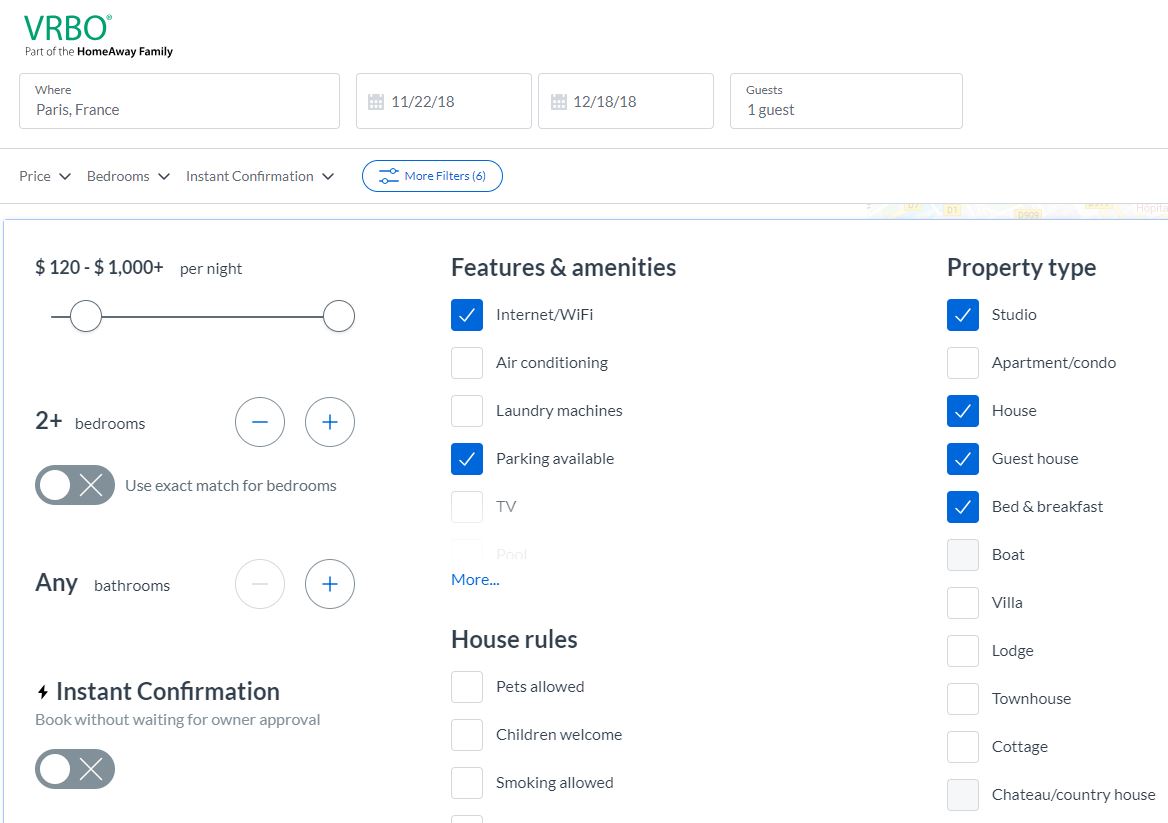
VRBO lets you adjust filters 'till your heart's content

3. Booking.com gives more options

Booking.com offers a variety of getaway options just like our previous two options, but it additionally offers hotels as well. If you’re not opposed to hotels being listed in your options, but still like the chance of getting an Italian villa or a jaunty gîte in France, then booking.com will cast a larger net. The website is growing in popularity (particularly for destinations in Europe), but even something as simple as Ocean City has over 880 vacation rentals!
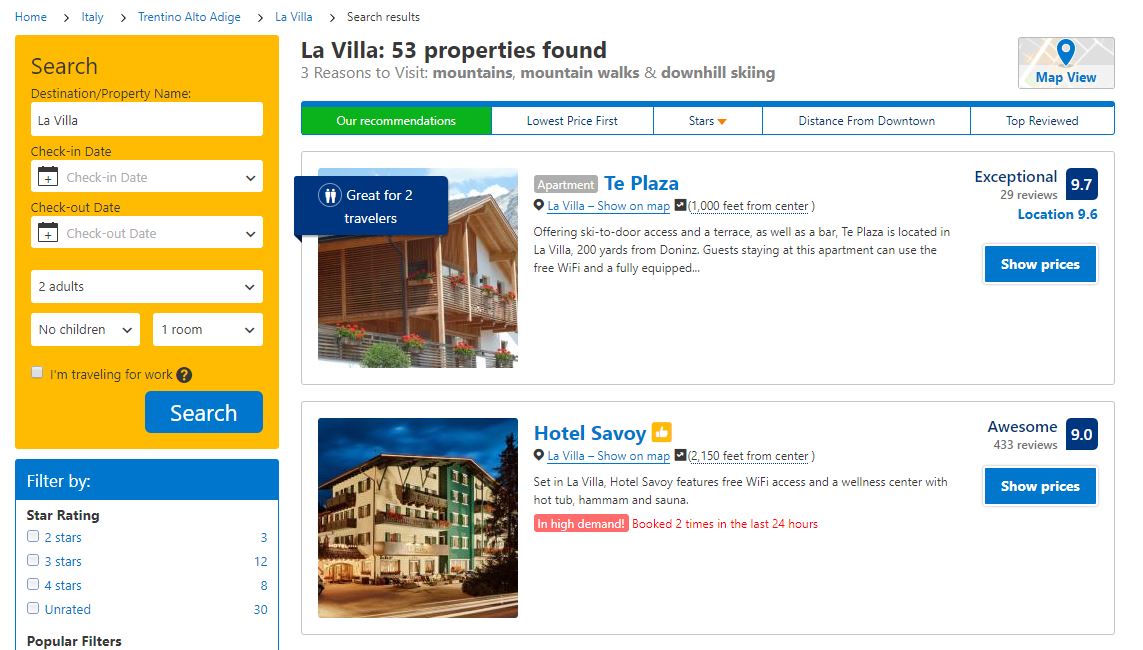
Booking.com has hotels and practically every other kind of lodging under the sun

Booking.com has more options available to its users, which is why its website is so useful. There’s a number of articles to help you narrow your search that are available (and free to browse!) right on their home page. There’s a food lover’s guide to southern France, top 5 hiking spots in Germany, and even a list of pet-friendly adventure locations. If you want low prices and unique lodging options but aren’t sure specifically where you want to go, we recommend starting with this site, then running the location through either VRBO or Airbnb afterward, to crosscheck your options and compare prices.

We hope this guide has gotten you excited to travel. Let us know which site you find to be the most useful, and if there’s any that we missed!


6 perfect apps for exploring new places

Before you head out on your next vacation, pack these apps on your phone!

travel

Traveling isn’t just a fun escape from your day-to-day life — it’s actually good for you. Research shows that people who vacation regularly are healthier and live longer than those who don’t. Traveling for pleasure can also improve your mood, inspire your creative side, and make you smarter.

If we’re being honest, though, traveling can also be stressful. Sure, there are plenty of apps that promise to help keep you sane — but not all of them are as helpful as they seem. However, these six apps really deliver on their promises. Try one out before your next trip so you can minimize the chaos of travel planning and focus on enjoying your well-deserved holiday.

6 perfect apps for traveling to new places

PackPoint Premium Packing List Download Now ►
7
Do you really need an app to help you pack your travel bags? Well, kind of. This simple app is actually very helpful. PackPoint creates a packing list depending on where you’re going, how you’re getting there, and how long you’ll be staying. You can customize your list based on factors such as what activities you’ll be doing, the time of year, and more. Don’t feel like making your own? Check out lists posted by other travelers heading to the same place you are.
7
GeoSure helps you stay on top of any health or safety concerns as you travel abroad. The app compiles data from multiple sources, including the World Health Organization, the United Nations, the Centers for Disease Control, and local agencies. This information is used to create a safety score based on factors such as crime, political unrest, environmental hazards, and other potential risks to your health and safety. Besides all the official stuff, GeoSure also helps you get the word on the street. You can tap into crowdsourced info about what’s happening right now in your travel destination, right down to the neighborhood you’ll be visiting.

travel apps

TripIt: Travel Planner Download Free ►
6
TripIt is one of many similar travel planning apps. However, it’s a standout because of its comprehensive features and user-friendly functionality. Instead of giving TripIt access to your inbox (which is the case with many comparable apps), you just forward your confirmation emails to them. TripIt will then use this information to create a detailed itinerary for you. This interactive itinerary includes the dates, times, confirmation numbers, maps, weather forecasts, and everything else you need to stay on track while you travel.
CalConvert: Currency Converter Download Free ►
7
It’s a calculator, it’s a unit converter, it’s ... both! Sure, you should always have a calculator available, but the conversion features are what makes this iOS app a must-have for world travelers. CalConvert can instantly show you the current exchange rate for over 150 currencies. Plus, you can use it to convert foreign units of measurement into familiar increments.
9
If your travel plans involve a road trip, GasBuddy wants to be your new best friend. This simple but useful app helps you find the best gas prices near you, no matter where you go. Available in Canada, Australia, and the United States, GasBuddy will also help you plan your fuel stops and calculate your travel cost.
Guides by Lonely Planet Download Free ►
7
If you’re on the hunt for Instagram-worthy attractions, Guides by Lonely Planet will help you find them. Along with the dreamy photos of gorgeous places near your destination, this app offers location-specific advice, information, and travel guides. Taking the kids? Get family-friendly itineraries. Thirsting for adventure? Find out where the biggest local thrills are. You can even book excursions and activities through the app.

No matter where you travel, be sure to take lots of pictures to make your friends jealous! And if you need tips to make sure those Instagram posts reach the widest audience, we’ve got you covered there, too.

Best hotel sites for travel

Find the perfect hotel at the perfect price with our picks.

There’s no place like home for the holidays, but if you’ve been bitten by the travel bug (or if you’re travelling to see family or friends elsewhere) then you’re in for a holiday of travel. Here’s the hard part: Figuring out where you’re staying, and booking that sweet reservation!

Holidays aside, no matter your reason for travel, discovering that perfect hotel can be a challenging, irksome, and tedious business – especially if you’re travelling on a budget, won’t have transportation, or are just plain finicky. Luckily we’ve got four websites that will make your job much easier and much less stressful. Check them out!

4 best websites for booking hotels

Bring the holiday with you wherever you go

1. Can’t be simpler than Hotels.com

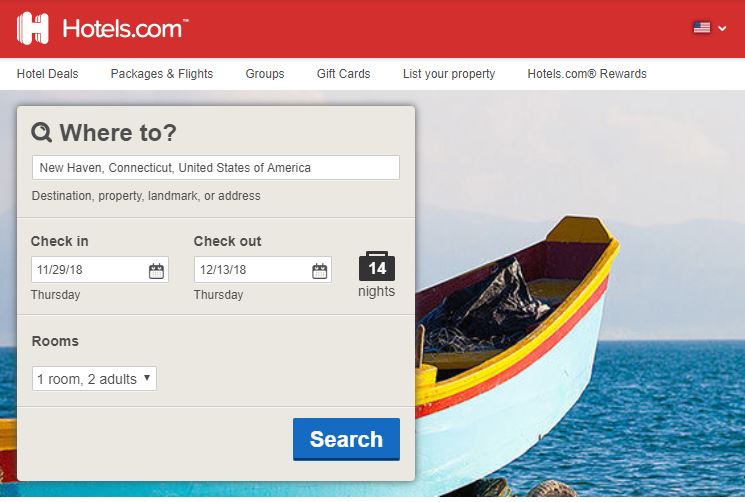
The name of the website says it all: You want hotels fast and easy? You got hotels fast and easy. As soon as you open the page, there’s a prompt right up top that lets you write where and when you’re going, how long you aim to be there, and how many people you’re looking to room. Click the blue search button and let hotels.com work its magic.

hotels.com should be your first choice

We also like this site for more than just the holiday season, and if you’re a frequent traveler this could be your new favorite thing; you can use the Rewards system to eventually accrue points towards free nights, and secret prizes, which could save you a lot of money, depending where you go. Hotels.com also has new deals pretty frequently, ranging from package deals to timely holiday sales.

2. Bidroom.com is tailor-made for return guests

What makes Bidroom so great is that it offers sweet deals to members – another great resource if you’re a frequent traveler. If you’re looking for that one-shot trip to grandma’s for Christmas then you’re probably better off with hotels.com, but a membership with Bidroom will save you more money in the long run:

Join the Bidroom membership community  and you’ll not only get a huge variety of location and lodging choices, but you’ll also save up to 25% on every booking! Bidroom scouts for all the lowest available rates on the biggest hotel booking websites and then compiles them, leaving you with a discount on those prices. It works similarly to Chrome’s Honey extension, but specifically with room booking. Their slogan? “Same hotel. Better pricing.” You can even start a free trial!

3. Booking.com gives more options

Want to stay someplace besides a hotel? Booking.com is your best bet.

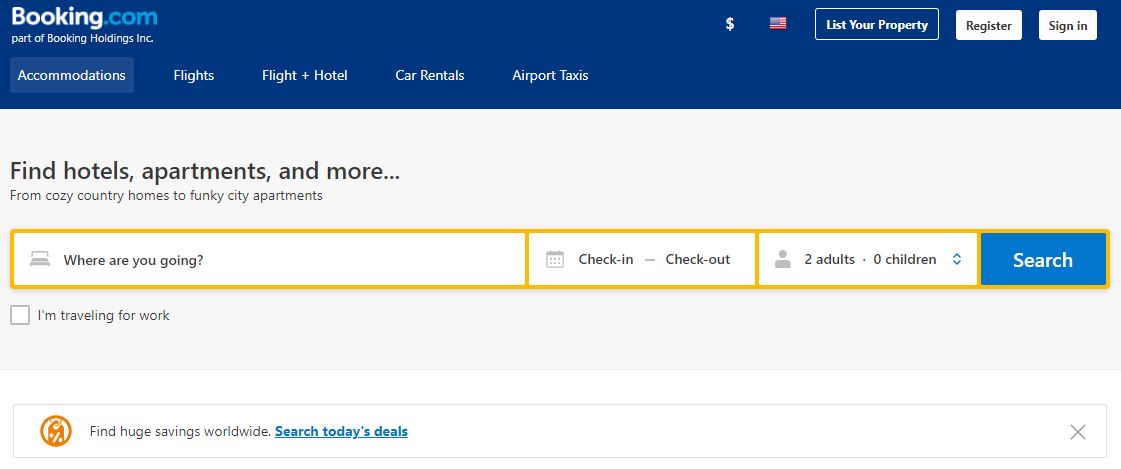
Booking.com finds you hotels just like our previous two options, but has an extra advantage: They’ll offer you lodging besides just hotels. Want a resort in Italy? They’ve got it. A cabin in Denmark? They’ve got that too. Cottages in France, Motels in Las Vegas, this website has a ton of style options to choose from, and it’s all on one intuitive website. Ocean City alone has over 880 vacation rentals! Is it better than hotels.com? Check out this video and decide for yourself:

More options mean more decision-making, which can be really daunting for some people. That’s why Booking.com also has a number of travel articles to help persuade/dissuade you. There’s a food lover’s guide to southern France, top 5 hiking spots in Germany, and even a list of pet-friendly adventure locations. If you want low prices and want to meet specific interests while indulging in unique lodging options, this is probably your best bet.

4. Reservations.com has hundreds of thousands of choices

If you’re looking to cast the net wide, but still want options to pinpoint that perfect fit, Reservations.com offers you the niche versatility and a variety of filters that will help narrow that search down to the best choice for you. Like hotels.com, Reservations has a super simple UI that lets users pinpoint destinations, check-in/check-out, and rooms, and you’ll instantly have access to over 250,000 choices. But the difference here is that right below the search portals you’ve also got options to set filterspopular options, luxury, or cheap. That helps you narrow down the type of lodging you’re most interested in reserving (we recommend “popular”).

Easy UI? Tons of choices? Sign us up!

Reservations also has a number of holiday deals (perfect for this time of year), an instant confirmation policy, customer reviews, 24/7 customer support, and secure checkout options that’ll get you booked in just a few minutes.

Let us know which option you’re going to be using this season! Sure there’s no place like home for the holidays, but when finding hotels is this easy, that travel itch can sure be convincing!

The Legend of Zelda: Ocarina of Time turns 20. Here’s how it changed gaming forever

You could make a case it’s the greatest game ever made.

On November 21, 1998, The Legend of Zelda: Ocarina of Time hit store shelves and became an instant phenomenon. When Nintendo’s acclaimed Zelda series made the leap to 3D, critics were dazzled; to this day, many consider Ocarina to be the greatest game of all time. The seminal game turned 20 years old last week, so we’re going to take a look at what made Ocarina special, and how it changed gaming forever.

How The Legend of Zelda: Ocarina of Time changed video games forever

A Whole New Dimension

Younger gamers might not be aware of this, but the leap from pixelated 16-bit consoles to 3D, polygonal 64-bit consoles was mindblowing. It was perhaps the greatest technological leap the gaming industry will ever see. Developers had to assure people who watched gameplay footage that yes, they were watching an actual game and not a prerendered movie.

But the switch to 3D came with more than just fancy new graphics. The ability to move freely in 3D brought with it several new obstacles in game design never had to be considered in the 2D era. How should a player move around? Should the z-axis be taken advantage of? How big can and should the world be?

Nintendo first honed their 3D game design with Super Mario 64. Creating a Zelda game, however, was a whole new challenge. Zelda games are slow, immersive, and deeply atmospheric, unlike Mario. The games heavily rely on massive worlds and detailed environments that the players must observe in order to find solutions for puzzles.

Designing the controls came first. The ability to move freely in 3D wasn’t enough to enthrall gamers, the movement had to actually be fluid and fun. Super Mario 64 proved that Nintendo knew how to create fun movement in a 3D space. Like Mario, they gave Link a set of basic moves, including rolling, running, and an adjustable camera. However, the wide variety of puzzles, obstacles, and gadgets present in a Zelda game meant that Link had to have a much wider variety of available actions than Mario did.

Nintendo solved this problem simply and gracefully with the contextual button. While the B-button always makes Link swing his sword, the A-button does whatever its icon says on screen. This gives Link a huge variety of available actions, including picking up and throwing objects, talking to people, climbing a ledge, or pushing blocks. While a contextual button with a wide variety of uses may seem like standard fare today, its ability to allow Link to seamlessly and naturally interact with the world around him was revolutionary back in the day.

Link’s gadgets also received an overhaul to fit their new 3D environment. In Ocarina Link gained the ability to assign items to three different buttons, allowing him to switch quickly between them as the situation demands. Returning gadgets like the hookshot, bow, and boomerang were updated to take full advantage of the new z-axis. Link could use any of his aim-able objects from a first-person perspective, allowing for precise aiming and adding a sense of verticality to the gameplay.

The game’s most enduring and imitated gameplay innovation is the Z-targeting system. The ability to lock onto enemies is an absolute must for any 3D action game worth its salt, and Ocarina was the first ever game to implement this system.

Basically, when an enemy is nearby, the player can lock onto enemies by pressing the Z-button. While locked on, Link will constantly face the enemy. While moving around, Link will strafe, constantly keeping the enemy in view and keeping track of its attacks. This revolutionary system led to intense sword fights with enemies and bosses, where careful footwork, shielding, and sword strikes were all necessary to emerge victoriously. If you enjoy the ability to lock onto enemies in 3D games, be sure to thank the Ocarina development team.

A Vast World to Explore

Once players progress enough to leave Kokiri Forest and enter Hyrule Field, they see for the first time the massive scope of the game’s world. Through some clever visual tricks and tight game design, Nintendo made Hyrule field look absolutely massive while making it simple and quick to actually get to where you want to go. The field is very hilly, with various hills giving the player a viewpoint beyond the parts you can actually access. Being able to see a vast expanse over the horizon made the world feel open and alive rather than a giant 3D room.

The player can also see massive objects in the distance like Hyrule Castle and Death Mountain, incentivizing them to explore and progress the story so that they can visit these locations. The open-world game design philosophy of “Go anywhere, do anything” was started by Ocarina of Time and its large but densely packed world.

The game’s day-and-night cycle and time travel mechanic (more on that later) kept the world feeling fresh and alive by changing it every so often without totally transforming it and making the player feel lost. Major locations like Kakariko Village, Lon Lon Ranch, and the Castle Market are populated by memorable characters who follow their own miniature stories as the game progresses. The characters react to the advancement of the story, which helps the player feel like they’re making a tangible difference in the world.

A Story That Crosses Time

The amazing world created by the developers help prop up the game’s story. The overarching story is relatively simple: The prophetic Link must do anything he can to stop the evil wizard Ganondorf from destroying Hyrule. Nintendo took this time-tested and simple premise and added enough twists to keep the story engaging.

The prominent twist that Nintendo puts on the good versus evil formula is the time travel system. When the game begins, you play as child Link. The world is cheerful and idyllic, with Link and Zelda’s quest to stop Ganondorf being portrayed more as a childlike game than a serious, world ending quest.

However, as the story progresses you eventually fall into a seven-year coma, waking into a changed world. The happy Kokiri Forest village you once called home is now infested with deadly monsters, forcing the once carefree villagers to isolate themselves in their homes. The formerly bustling Castle Market now lays in rubble and ruin. The crowds of energetic townsfolk are replaced with ReDeads, undead moaning monstrosities who paralyze Link with fear if they get too close. These bleak depictions were shocking and dark, especially considering Nintendo’s family-friendly image.

Many games choose to build their world as either happy and whimsical or beaten down and apocalyptic.  In adventure stories, an idyllic setting is used to show the hero the grand world they need to protect, while apocalyptic settings show ruined worlds that the hero must fight to restore. The problem with basing a world off of one of these settings is that the viewer has no point of reference for what the world would look like if it was ruined or saved.

Through its time travel mechanic, Ocarina fuses the two settings together, solving this problem and strengthening them both. When you see beloved locations you loved exploring as child Link get ruined by Ganondorf in the future, it gives you real motivation to take him down as an adult and restore the world to its rightful place.

The time travel mechanic adds to both the gameplay and the story, highlighting the game’s theme of growing up and the loss of innocence. As Link moves beyond Kokiri Forest, saying goodbye to his best friend Saria, he meets unimaginable conflict and a vast and confusing world. Ocarina of Time’s story excellently portrays the relatable feeling that comes with growing up quickly and being thrust into a world you don’t understand or trust. While the world is filled with people to meet and adventures to be had, you meet conflicts that you never could have dreamed of as a child. Still, through bravery and some help from your friends, these dark times can be overcome, culminating in a grand adventure.

Even though Link is sent back in time at the end of the game, he can never truly relive his childhood with the knowledge and world experience he now has. Ocarina of Time displays the unavoidable life step of growing older, and how it can be confusing and terrifying. But as draining as it can be, leaving childhood and going through the rest of your life is an adventure that’s worth having, because not knowing what’s is lurking around the corner is the most exciting journey any of us will go on.

A Timeless Legend

Through all of its innovations, Ocarina of Time stands tall as one of the best video games of all time even 20 years after its release. The game’s blending of inventive game mechanics, layered story, and an unforgettable world would heavily influence future classics like Dark Souls, Half-Life, and even Minecraft. It’s nothing short of a miracle that Nintendo nailed the 3D Zelda formula on its first try, creating not only a worthy successor to the franchise but an amazing adventure that would thrill players for decades to come.

Have you played Ocarina of Time? Do you think it deserves the praise? Let us know!

Watch: new technology lets paralyzed people text their thoughts

Get a look at this jaw-dropping tech.

New Brain Implant Lets Paralyzed People Text Their Thoughts

Life just got a little bit easier for those suffering from paralysis.

A new brain implant called BrainGate2 allows for people suffering from limb loss or neurological damage to interface with tablet devices, allowing them to easily enjoy activities like browsing the web or streaming music.

The BrainGate2 uses microelectrodes implanted directly into the brain’s motor cortex, which controls motor function. The implant then receives natural commands from the brain to move limbs, which the BrainGate2 sends to a wireless mouse attached to a tablet.

A user simply thinks about where they want the cursor to move, causing the cursor to move automatically. This allows paralyzed people to use tablet devices just as easily as a neurologically typical person would, letting them message friends, browse Twitter, or binge some Netflix. The technology is incredibly intuitive and smooth. You can watch footage of the BrainGate2 in action below:

While brain-computer interfaces are nothing new, an incredible advantage of the BrainGate2 is that it works right out of the box with any tablet or device compatible with a wireless mouse. Removing the need for additional specialized equipment is a huge help financially and practically for BrainGate2 users.

Do you think this tech will see widespread use in the future? Let us know!

What’s in store for Fortnite Season 7

Bundle up for Fortnite Season 7!

As Fortnite’s spooky Season 6 comes to a close, speculation is rampant as to what Season 7 might have in store. So far, details have remained pretty tightly under wraps with regards to what Season 7 might bring in terms of new weapons, changes to the map, and new skins. That said, here’s everything we’ve managed to dig up about Fortnite Season 7.

What’s in store for Fortnite Season 7

fortnite deep freeze bundle
Image courtesy Epic Games

Season 7 is coming hot on the heels of some big events in the Fortnite world. Season 6 focused largely on the arrival of a mysterious purple cube, known only as “Kevin.” Kevin traveled around the map, emblazoning certain areas with purple glyphs, before finally submerging into the depths of Loot Lake. The cube then rose from the Lake, taking an entire island with it, before floating above the map and opening portals using these mysterious glyphs.

Fortnite: Battle Royale Download Fortnite: Battle Royale ►
10

The cube’s enigmatic behaviors finally culminated in the Fortnitemares Halloween event, which saw hordes of zombie-like cube monsters pour forth from these portals and into the Battle Royale map. The event finally ended with the cube exploding in a spectacular flash of light, sucking players into an alternate dimension filled with spectral butterflies. After this brief and cryptic bit of reality-bending, players were teleported back to the map to find that Kevin was gone, and Loot Lake had been replaced with a peaceful, Stonehenge-like monument. This is where the world of Fortnite stands on the verge of Season 7.

fortnite season 6 fortnitemares cube finale
Image courtesy Epic Games

It remains unclear whether the cube shards will be affecting the map going forward. If Fortnite holds true to form, though, they’ll likely have some kind of game mechanic associated with them. Fortnite has made a habit of carrying over the mechanics of previous seasons into new seasons, such as the Hop Rocks from Season 4 and Rifts from Season 5. If this tradition holds true, it seems safe to assume that the cube shards left on the map will allow players to take on the Shadow Stone’s ghost form. This was a central mechanic from last season that allowed players to phase shift into a spectral ghost, teleporting through walls and moving faster around the map.

What else can we expect for Season 7? Well, it looks like a storm is coming… literally. Hop into the Fortnite map and you’ll see a massive wall of storm clouds heading directly for the map. It seems we’re in for bad weather, and those close seem to indicate one monster of a blizzard. This and other major clues point to Season 7 being winter themed. The release of the arctic-themed Deep Freeze skin bundle seems to indicate this, as does the fact that Fortnite’s last few seasons have had seasonal themes. This would mean the return of winter-themed skins from previous seasons, as well as the addition of new ones.

fortnite season 7 holiday
Image courtesy Epic Games

One last major discovery: intrepid Redditors have discovered something massive concealed in the blizzard clouds. Check out this Reddit post to see it:

The iceberg wont be accesible this season cause you cant collide with it. HUGE thanks to u/aprotis for the method on getting here! from r/FortNiteBR

That’s right: there’s also a colossal iceberg on a collision course with the map, and that includes a tower or fortress of some kind perched atop it. This, as well as the storm itself, means at least part of the map will be blanketed in snow.

So, when will all this winter-themed wonderment kick off? Officially, Season 6 is set to end December 5, but Epic has been flexible with release dates before. Season 5, for example, was extended by several days to allow players one last chance to collect Battle Pass rewards. So, though we don’t know exactly when, it’s safe to say players will be able to snag their Season 7 passes and start their snowy frolicking by the beginning of December.

Best online classes for leveling up your tech skills

Bulk up your resume from the comfort of your couch.

Best Online Classes for Leveling Up Your Tech Skills

If you work in marketing, tech, or really any industry, change is the only constant. So, the idea that education stops upon earning a certain number of credits is just plain silly.

But while most of us can acknowledge the benefits of becoming a lifelong learner, it can be hard to find the time or the money to head back to school. Luckily, there are plenty of online courses that allow you to level up your skills in just about any topic you could think of.

With that in mind, here are some valuable opportunities for anyone looking to add a few more lines to their resume that will actually make a difference.

Best online classes for leveling up your tech skills

Introduction to Artificial Intelligence, EDX

This course provides a high-level overview of AI and machine learning, explaining how AI is becoming the driving force behind smarter apps and more efficient organizations.

As part one of the Microsoft Professional Program in AI, the course will show you have to build basic machine learning models. You’ll use Azure Machine Learning and the Microsoft Bot Framework. While this all sounds super high-tech, you don’t need to be a coding expert to start playing around with the technology. The EDX website mentions that a high-school level statistics understanding and a working knowledge of Python are recommended, though not required.

Learn to Code for Data Analysis, Future Learn

Coding for Data Analytics

Data analysis is becoming an in-demand skill that may come in handy when you try to negotiate your next raise. Still, Learn to Code for Data Analysis will be easier to grasp if you know your way around a spreadsheet and are fairly good with numbers.

This course focuses primarily on Python–covering assignments, variables, expressions, functions, basic data types, and if-statements. You’ll practice programming in Jupyter Notebooks, writing and testing your own code.

The final component of the course is analysis. Students will use pandas to read Excel and CSV files, as well as clean, aggregate, and filter data into simple, readable charts.

Of course, the class will be easier if you have some knowledge of coding or data analytics. However, we like that this is an approachable “in” for data science beginners hoping to keep up with the latest technologies.

Video Editing, Lynda

Video Editing Course -- Intro Lynda

Lynda is a good source of online classes of all stripes. But, the video editing course stands out, because no matter your industry, this interactive medium has become essential for marketing and engagement across all channels.

Even small businesses need to learn to run a camera and splice together some behind-the-scenes clips or video tutorial here and there.

Lynda’s video editing course is about three hours and shows you the basics of good video editing. You’ll learn about transitions, composition, pacing, and post-production effects.

While you’ll need to continue your video education after the course is over, this is a great primer for people looking to build on their online content skills.

Diploma in Web Design, ALISON

Diploma in Web Design

ALISON is something of an aggregate for online courses. The site is a central hub that showcases courses from colleges and digital learning platforms, so it’s easy to compare programs during the research phase.

ALISON’s module allows you to sort through their courses based on career goals, which makes it easy to find a new skill that will come in handy down the road.

This particular program allows you to learn web design at your convenience, free of charge. Here, you’ll learn how to use Dreamweaver to create websites with HTML, CSS, Flash, and JavaScript. You’ll also learn the basic basics like registering a domain name and choosing a hosting provider.

Like Hubspot, Google Academy, and MOOCs from MIT, Harvard, and others, ALISON allows you to purchase a digital diploma, which you can show to potential employers.

General Assembly Dash Program

General Assembly is a for-profit educational resource with locations based around the US. Unlike Trump University or ITT Technical Institute, General Assembly provides workshops and longer-term programs that allow professionals to get their tech skills up to speed.

The Dash program, however, is an online course, offered free that teaches development in HTML, CSS, and JavaScript. We like Dash, as it’s a nice starting point for those who don’t know much about coding—build your foundation before signing up for more advanced courses.

Code Academy Web Development

Web development continues to be an in-demand skill, and Code Academy’s user-friendly approach to teaching you the basics of building web apps and sites is one of our top picks.

This course follows a structured curriculum, they’ll teach you HTML first, then venture into CSS fundamentals, JavaScript basics and go from there. By the end of the course, you’ll be able to put together interactive sites.

What’s more, the website promotes these self-paced paths that allow you to customize your coding journey.

Courses are offered on a subscription basis—$19.99 per month or you can pay $199 per course.

Hubspot Social Media Certification

Hubspot Dashboard Social Media Certification

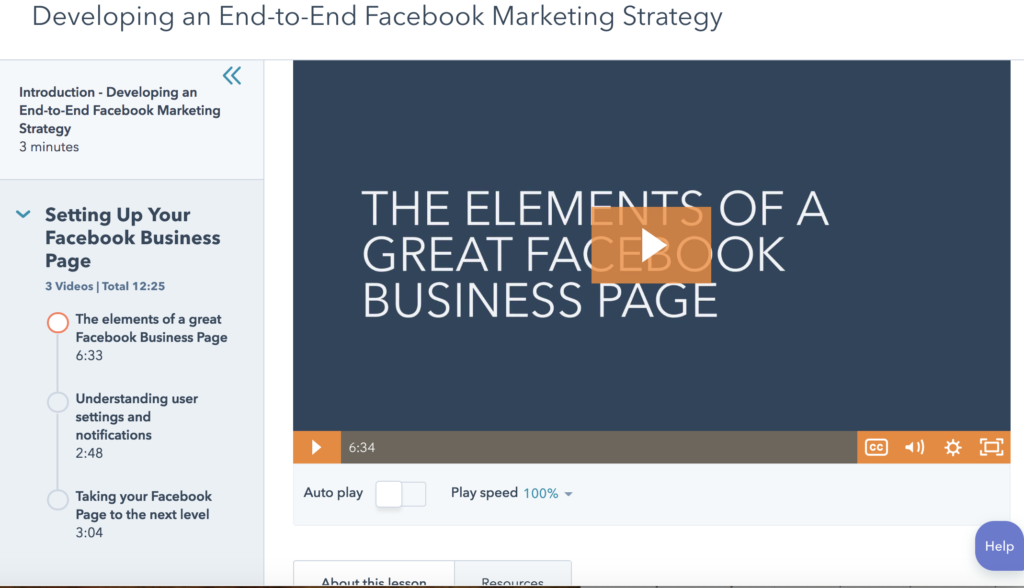
Hubspot offers a number of certification programs on their site for free, but the social media course is a good one for marketers—or anyone—who wants to gain a better understanding of how to use social media to drive business.

The curriculum is broken down into eight chapters, each with a few short video lessons. You’ll learn to develop a social media strategy, understand the importance of social listening, and learn to expand your reach on social. You’ll also look at things like digital advertising and how to measure your return on investment.

While you might know the basics already, it’s nice to get a quick refresher on just what metrics we should be measuring and how to hone in on a strategy that aligns with your brand.

Wrapping Up

Beyond the courses listed above, each of their home platforms, as well as Coursera, MIT Open Courseware and others provide a long list of options to professionals looking to expand their skillset.

And, with many of these courses being either free or fairly low-cost, there’s no excuse not to explore some new pathways. You may just find a new passion.

A third of big tech workers believe they’re being spied on — should we be more concerned?

Is your boss watching what you type?

worker surveillance

According to a report by the Blind app, employees of over 26 of the biggest companies in tech were surveyed with a true or false statement: “my company goes to unreasonable lengths to monitor employees.”

More than a quarter— 25.8% of participants — responded “true.” Booking.com employees doubled the survey average—with 54.12% stating that they felt the company spied on them.

Rounding out the top five, were Intel (43.45%), Snapchat (40%), PayPal (38.6%), and Veritas (37.74%) with notable percentages of employees feeling that their employer crossed a line with it came to privacy,

For those who don’t know, Blind is an anonymous social network for working professionals. The app gives workers a place to leave honest feedback about what it’s really like to work for companies like Apple and Google, without risking retaliation.

And while the companies themselves haven’t added their two cents post-survey, a whopping 67% of companies take part in some form of electronic monitoring.

Electronic monitoring is easier and cheaper than ever, so it’s not really a surprise that workplaces of all kinds are testing out new technologies. But just because it’s accessible doesn’t mean that its the best way to get results from employees. Though billed as tools that facilitate empathy, communication, improved customer relations, spying is spying.

Which brings us to this question…

Should we be more concerned about electronic monitoring at work?

office camera

What are the more common uses of surveillance on the job?

The modern workplace has gotten, well, weird.

Not only are in-office workers increasingly thrust into collaborative open office plans, expected to engage all day, and still meet deadlines, there’s also a decent chance they’re being watched as they make it through their to-dos.

But the thing is, working under pressure stresses us out.

And with electronic monitoring, there’s an added pressure element, making us feel like we’re being watched. According to Psychology Today, productivity suffers when we believe we’re being monitored for quality.

In general, studies have shown that employee monitoring lowers morale and can create additional stress and alienation at work.

Despite the fact that these adverse effects are well-documented, workplace monitoring has ramped up and there’s no clear line between what’s appropriate and what’s invasive.

What’s actually allowed?

Employers monitor for all kinds of reasons, and there’s no law in place that prevents employers from monitoring their employees.

Courts typically find that when employees are at work, they should expect that privacy is somewhat limited. For example, employers have the right to monitor activities on their computers, as they own the property.

Email monitoring is par for the course as well.

If employees are using a workplace email account, then messages sent within that system are subject to review. This includes chats, as well as Gmail missives.

However, when employers start tracking us after hours via GPS or listening in on conversations with clients and colleagues—things get a little murky.

The Fourth Amendment actually protects Americans from unreasonable searches, but it only applies to government actions. So if law enforcement needs to search your house, they’ll need a warrant before moving forward. But, if your boss tracks your phone, there are little protections in place.

While it makes sense to use GPS technology to keep tabs on company cars during business hours, tracking an employee’s whereabouts during off hours or while working from home isn’t especially clear.

office surveillance

And then there’s the issue of workers who object to being tracked. A lot of people are okay with it, according to a TSheets (a time-tracking platform) survey from 2017.  It may be because a lot of us don’t feel like we have much to hide.

Still, there’s the issue that if someone goes to a pregnancy center or a lot of doctor’s appointments, or a gay bar, employers could look for other ways to oust that staff member.

The point is, while an employer can’t lawfully discriminate against staff for any of the examples above, they might look for other reasons to get rid of someone based on that knowledge.

Quantified workspace

The idea of the quantified workspace is sort of the HR version of the Quantified Self movement.

Fast Company lays out the concept in a 2015 article, citing tools like Meeting Mediator that alerts you when you’re talking too much on a call. Or, apps that push out automated requests to introduce your colleagues over Slack, instead of email.

And then there are examples like Cogito, a tool that monitors call center agents for tone and phone demeanor. Wired highlighted its use at the MetLife offices, quoting a woman who mentioned a coffee cup graphic that shows up on the screen each time the program detects a hint of fatigue in her voice.

The idea behind these automation tools isn’t insidious at its core, and there are certainly some key benefits involved.

Analyzing phone calls can help staff identify better ways to connect with people, by highlighting interruptions, a change in tone, or subtle things we might not ever think about.

However, there is a concern for privacy. In the case of a tool like Cogito, employees know they’re being monitored, and may be okay with it. The issue is, all of these little human things — fatigue, sickness, and inevitable irritation — are reduced to an algorithm.

The boss receives a report at the end of the week, quarter, etc. and evaluates soft skills with hard metrics. It’s this use of big data that could have some scary implications down the road, with managers scoring their staff against a robot’s set of standards.

Wrapping up

In the end, there’s no doubt that the pros and cons of workplace spying both pose compelling arguments. However, employers should keep in mind that too many pieces of tracking software can frustrate employees, leading to burnout and turnover. If productivity and consistency are the ultimate goal, perhaps it’s better to look toward the bots.

How to personalize your Apple News feed

Make the Apple News feed better with these simple steps.

apple news feed

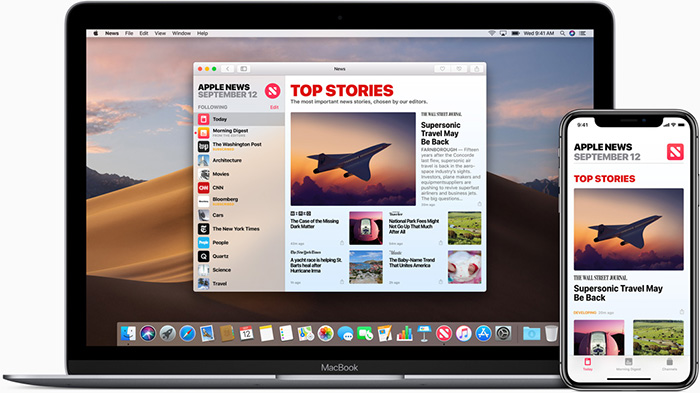
Everyone likes to receive news in different ways. Some learn about the latest headlines on Twitter, others prefer to watch their favorite station on television, and still others may go the old-fashioned route by reading a newspaper. But millions of Apple users rely on their Apple News feeds to stay up to date on world happenings.

While everyone has different preferences for how they consume the news, the same is true for the type of news that they are interested in reading. For that reason, Apple has made it easier for users to customize their news feeds according to their interests. Below, we’ll take a look at how to do just that.

How to personalize your Apple News feed

7 steps to personalizing your Apple News feed

1. Open up the Apple News app on your iPhone.

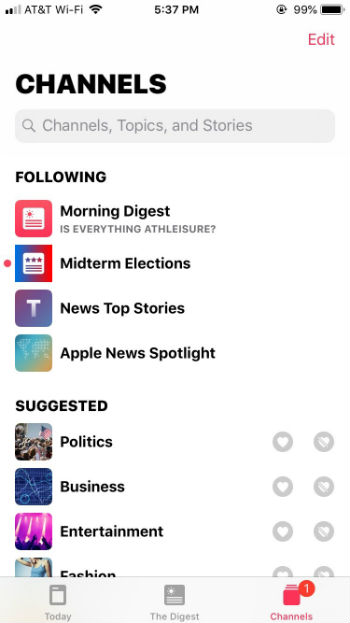
2. To personalize your news feed, click on “Channels” in the bottom-right corner. You’ll see a list of the channels you’re currently following, followed by a “Suggested” list of channels to follow.

If you don’t want to follow “News Top Stories” or “Apple News Spotlight,” click “Edit” in the upper-right corner and click the minus (“-”) button on the left side to remove them from your list.

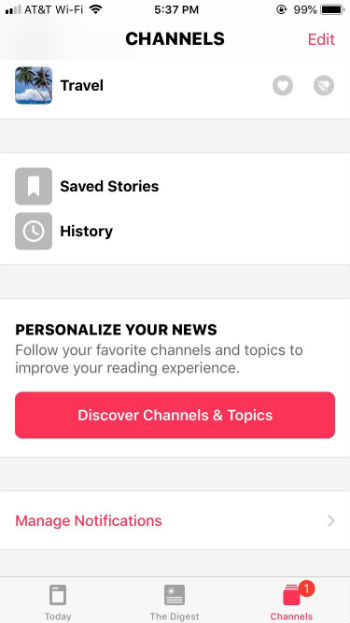
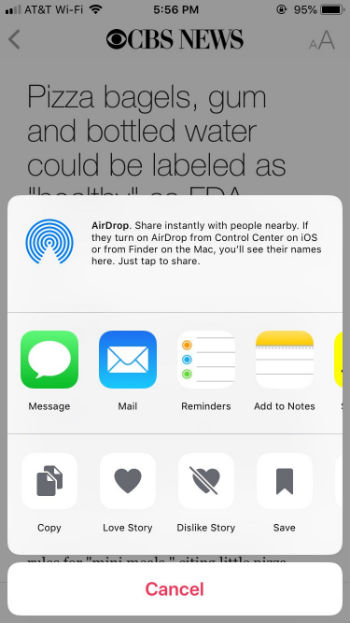
3. If you want to follow a suggested channel, click the heart icon next to the topic you’re interested in. If you’re not interested in a channel that the app suggests, click the icon with a crossed-out heart so that the app knows you don’t want to see channels related to that topic in the future. This channel will then be moved to “Blocked Channels & Topics,” which will appear at the bottom of the Channels section, right below “Manage Notifications.” From there you can easily remove a blocked topic if you clicked the crossed-out heart by accident.

4. If there’s a particular channel or news source that you want to follow that wasn’t in the suggested section, scroll down to the bottom of the Channels section to click on “Discover Channels & Topics.”

To follow a topic or channel, tap on the news channel that you’re interested in to “heart” it. Once you’ve selected all of the channels you’re interested in, they’ll show up in the “Today” tab on the bottom-left corner of the Apple News app. Scroll down and you’ll see an organized list of news topics from each channel you’re following.

5. If you want to save an article to read later, you’ll want to click on the icon of a box with an upward-pointing arrow. You’ll see this icon to the right of a headline or in the bottom-left corner of the screen after clicking on an article (next to the heart icon).

Click the box icon and then select “Save.”

To view your saved articles or article history, go back to Channels and scroll down to “Saved Stories” and “History.”

6. The more you customize your Apple News app, the better it will learn your interests and behavior. To do this, click the heart icon (“love”) or the crossed-out heart icon (“dislike”) so that Apple News will be able to better personalize your news feed. You can also swipe left on an article headline to save, share, or “love” a story. Swipe right on a headline to “dislike” that topic (and see less of it), or report an article.

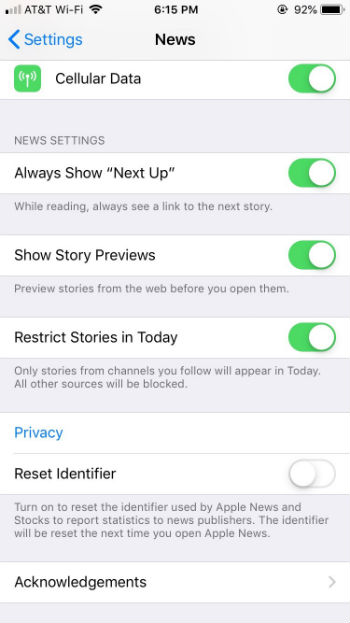
7. To change your Apple News settings, first close the app. Then, go to your phone’s settings and scroll down to Apple News. From there you can choose to see links to the next story, story previews, or restrict stories to only channels that you follow.


It’s as simple as that! If you’re looking for a better way to personalize your news experience, give Apple News a shot.

Daredevil canceled – what the hell is going on at Netflix?

Why would Netflix kill its beloved superhero series?

daredevil canceled

While Marvel’s movies have been near-universal home runs, their TV shows have been far more hit-or-miss. The gold standard so far would be Netflix’s “Daredevil.” And now, it seems the superhero has met his most terrible foe: cancellation.

What’s really weird is that “Daredevil’s” team had no idea this was coming.  Expecting bigger things to come, they even planted a tip to the MCU in the most recent season. Check out this tweet from the show’s executive producer:

It seems like the creative team was (pardon the pun) blindsided here. Because Netflix doesn’t release viewership numbers, we don’t know how many people watched “Daredevil.” But anecdotally, we heard far more praise for the show than for many of its Marvel counterparts. Great casting played a role: Charlie Cox, Vincent D’Onofrio, and Deborah Ann Woll were just some of the solid ensemble that kept us glued to Hell’s Kitchen.

Along with great acting, “Daredevil” offered incredible fight choreography. This scene from Season 1 was frequently shared as the oh-my-god-you-have-to-see-this clip that drew many to the show.

“Daredevil” also deserves praise for being one of the rare superhero shows to depict semi-realistic pain for its hero. This io9 essay goes into great detail about why we loved the movie heroes of the 1980s – they all got beat up. Now, it’s unlikely you see the hero suffer (or even bleed) in an action movie. “Daredevil” wisely showed the physical toll of spending your nights battling bad guys. That stuff hurts, and the pain lingers. Hurting your hero is the quickest way to gain an audience’s empathy.

What is Netflix doing?

So why would Netflix kill off one of its most acclaimed shows while ambushing the creative team with the news?

Most likely, this is a preemptive move because of Disney’s upcoming video streaming platform. Disney owns the right to nearly all of the Marvel properties except those airing on Netflix. When Netflix canceled “Iron Fist,” it wasn’t too much of a surprise because of that show’s generally poor reception. “Luke Cage” also got the ax. With “Daredevil,” it seems we’ve got a domino chain that will end up claiming “Jessica Jones” and “The Punisher,” too.

Our guess is that Netflix didn’t want to cancel “Daredevil,” but its hand was likely forced by some kind of impending legal battle. Perhaps it was better to end after a highly regarded third season as opposed to fighting Mickey’s lawyers down the line.

We don’t know if Disney will resurrect the same team for its streaming service when it launches next year. (That would set up a strange scenario where Disney might pay Netflix to share the first three seasons for Disney+, or some kind of soft reboot where no one talks about the old storylines.)

Streaming wars to come

When Netflix began, lots of companies lined up to share their catalogs. The ability to stream old episodes even helped “Breaking Bad” grow its audience every year. The power of the streaming platform became so huge, those companies soon pulled their properties off Netflix to try to monetize them elsewhere.

The result is that Netflix has largely abandoned existing properties to start creating their own. Some estimates suggest Netflix will spend $13 billion on original programming this year alone. (For the record, that amount would be enough to make “Avengers: Infinity War” about 32 times.)

What’s troubling for Netflix, however, is that more than 80% of Netflix streams are for non-Netflix shows like “The Office” or “Shameless.” And 42% of Netflix subscribers watch little or no Netflix originals. Uh-oh.

For Disney’s big streaming leap, they threw down more than $52 billion to buy up Fox, which gets them the rights to the X-Men franchise, “The Simpsons,” and more. Disney is planning its own superhero shows featuring Loki and Scarlet Witch. Disney will have a huge advantage with its library of well-known properties, while Netflix has the edge with existing subscribers and infrastructure, even if they struggle with a fairly abysmal batting average on new series.

It looks like “Daredevil” was simply an innocent bystander in this battle of media titans. When you’re talking about multi-billion dollar media deals, the Kingpins of the world have an unbeatable edge over scrappy blind lawyers from Hell’s Kitchen.