Five Apps to Try this Weekend: featuring Google Photos and My Talking Tom

Welcome back to Softonic’s 5 Apps to try this weekend, the show that helps you discover apps to keep yourself entertained from Friday to Monday.

This week we talk about the A5 Browser, the lightweight internet tool that only takes up one 1MB of space on your Android device.

After that, it is over to the ever popular My Talking Tom, as the chatty feline finally makes his way on to Windows 8 (also available for iOS, Android, and Windows Phone).

We also have Tempo (iOS), the video editor that lets you play with the speed of your videos. It’s simple, but it produces some great results.

Only one game this week, the strategy RPG Dragon Blaze (iOS|Android). With beautifully detailed anime art, this one looks great, but also has deep tactical gameplay to back up its looks.

Finally we have Google Photos (iOS|Android), the photo gallery app that is able to automatically sort your photos and videos by analyzing the images to see what is in them.

That’s it. Remember to subscribe and share, and we will see you next time.

Related Stories

Five Apps to Try this Weekend: Skype Translator, Ice Age Avalanche, and The Witcher

Five Apps to Try This Weekend: featuring Phind and GoatZ

Five Apps to Try this Weekend – May 8th 2015

Follow me on Twitter: @DoFuss

FIFA 16 trailer, finally we have women’s teams, but here are 7 more things we need

The first FIFA 16 gameplay trailer has been unveiled. And while fans have been clamoring for numerous gameplay tweaks and refinements, EA have surpassed everyone’s expectations by announcing the inclusion of 12 national woman’s teams. The female squads include the USA, Canada, England, Brazil, Spain, and Germany, with each team’s starting 11 fully face-scanned. Unfortunately, there will be no Ultimate Team for the new squads (Source – The Guardian).

The trailer also revealed a release date, so start polishing those boots and tightening those laces for September 24, 2015. Here is the video in all its glory:

If that trailer has you ready for more, and September feels like a long way off, then we have a little something to keep you going. Our Spanish sister site has been donning its fedora and trench coat to do a little sleuthing about what fans want from FIFA 16 as part of its Secret Level series – here is what it discovered.

Despite high hopes for FIFA 15, many fans were disappointed. The game was not the leap forward hoped for with the new generation of consoles. This dissatisfaction became a recurring theme as we dug into what FIFA 16 could do better. Feel free to add you own ideas in the comments, or send them to daniel.caceres@softonic.com.

Okay, let’s kick this off.

FIFA caps lock for life

Get some (at the very least) decent AI goalkeepers

Surely this isn’t asking much. All we want are competent goalies. They don’t all have to be Iker Casillas in his prime (we would settle for Massimo Taibi) just as long as they don’t feel like they are actively trying to help the opposition.

If you don’t believe us just check out this video:

Oh come on ref, he barely touched him!

The second complaint tackles the other end of FIFA 15’s AI issues, the referees never miss a thing. Not one. In fact, they occasionally went as far as making stuff up just for something to do. In fairness they never seemed to pick on one team over another, and it did keep players on their toes during matches, but it really broke the flow of the game. All we want for FIFA 16 are refs who want a good, flowing game.

Champions League and Europa League!

The League of Champions

One thing we love about the yearly battle between FIFA and PES is the duel of licenses. FIFA usually has the upper hand, but it has always been missing the Champions League and Europa League. If EA really wants to put it in the back of the net with FIFA 16, it needs to seize these two licenses.

A better tactics editor

While we are comparing PES and FIFA, there is another area where Konami easily beat EA’s game last year: the tactics editor. Although FIFA 15 was an improvement over previous years, it was still overly complicated while providing limited editing options. By contrast, PES 15 had a fluid editor that was full of options… just what we want.

The end of God Mode

Our Lord and Messi-ah

Videogame fans may remember modes like this from the days of Doom. Codes you could enter in a game to make your character invincible. Well, in FIFA 15 the same experience could be discovered if you had control of certain players. We know that Messi and Cristiano Ronaldo are incredible, but in FIFA 15 giving the ball to them was like asking the other team to play wearing flippers. If EA Sports could bring these gods down to the level of mortal stars in FIFA 16, that would be great.

Tighten up those scores

Have you ever finished a game of FIFA 15 with a nil-nil draw? Or with just one or two goals scored? No, I thought not, because close games in FIFA 15 are a myth.

FIFA 16 must find a way to tighten up these results. We want every goal to feel like an achievement worth celebrating, and then to have that palpable tension of knowing the opposition could catch up at any time. Something else that PES manages very well.

As an example, look what happened to one of our Italian colleagues.

The tears of Alessandro

More realistic stats

Whenever FIFA’s team and player stats are revealed football fans get angry because the data does not match reality. EA Sports should be more careful with this, not because the fans are complaining, but because the fans are right – the stats are not accurate. In FIFA 15 teams like Atletico Madrid and Inter Milan launched with hugely inflated stats, a situation that needs to be avoided in 16.

Conclusion: more realism

Let us pause for a moment to reflect on all the improvements we want in FIFA 16. More realistic AI, more realistic difficulty, more realistic stats, and tactical options… damn, I was really building momentum there – but in short more realism across the board (and tactical options). FIFA 15 was about the spectacle, hopefully FIFA 16 will be about the sport.

Still need more football before FIFA 16?

Need more of a football fix before September 24th, here are a few recommendations.

FIFA 15FIFA 15

The latest installment of the franchise. It is not the best, but it did solve many of FIFA 14’s problems.

PES 2015

You may be surprised, but last year’s PES was a big improvement over recent years. It’s worth taking a look.

Football Manager 2015

If you are more interested in the tactics and players than in the running and sweating, Football Manager 2015 is the game for you.


App of the Week: Tysdo

Softonic’s App of the Week highlights some of the coolest and most popular apps. This episode features Tysdo, the app for Android and iOS that helps you start ticking things off your bucket list.

Ever wondered how to start trying to achieve those dreams of yours? Well, Tysdo is here to help. It is designed to connect you to a network of similarly aspirational dreamers. Logging in, you can add people from your contacts, Facebook account, or any of the app’s users around the world. Then, you can start drawing on their knowledge and experience to reach your goals.

Perhaps you want to skydive, see the Mona Lisa, or learn to program. Well, adding all of these to one of your lists allows users from all over the planet to rate them out of five to help you prioritize where to start. More importantly, these people are also able to offer tips on how to achieve them.

Plus, those of you who have already achieved the ambition of getting an Apple Watch will be pleased to hear that Tysdo offers a companion app to let you manage your ambitions from your wrist.

Related Stories

App of the Week: Phind

App of the Week: The Witcher 3

App of the Week: Google Handwriting Input

Follow me on Twitter: @DoFuss

Connected cars: the near future

The near future for connected cars will see currently existing technology being made more widely available. While most of today’s connected cars essentially link your car to your mobile device, next we’ll see cars with their own internet connection and technologies to make sure this doesn’t drop out. We’ll also see more driving responsibilities being taken over by your car.

The more-connected car

Whereas today, your car probably gets its connectivity via your mobile device, in the near future your car will have its own connection to mobile networks. SEAT’s upcoming technologies, for example, will use your car’s radio antenna to maintain connections where your phone usually drops out.

A car with its own connection and software designed specifically for driving, should be better than a car that adapts your Smartphone’s already existing apps (like Google Maps).

As I mentioned in the last article, you can expect to be able to control more of your car from your phone. Existing technologies will be brought together in a more coherent way, so for example, you won’t need one app to tell you where your car is parked, and another one to remotely turn on your air-con.

You’ll be able to manage the interior of your car too, from temperature to driving position and preferred radio stations. With the correct profile selected, you will be able to simply enter your car and drive away, without any of the setting up we do today.

All of this is possible now, but upcoming systems look to make a better integrated experience. So you won’t need a bunch of separate apps to manage the various features of your automobile, but just one.

More and more cars will be compatible with Google’s Android Auto, and Apple’s CarPlay. Both these systems give you the advantage of being made by software-focused companies. This means well integrated services, and smooth running interfaces. Touchscreens in cars are nothing new, but car manufacturers have not proven themselves as great at designing interfaces – both Apple and Google are unlikely to have this problem.

New displays

Beyond your dashboard screen, some companies, like Spain’s LABS4GLASS are creating heads-up display systems that will project onto your windscreen. This translucent display seems even better in terms of keeping your eyes on the road. This technology will work in conjunction with your smartphone too, offering you a seamless experience from the street to the cockpit. Instead of your dashboard touchscreen taking over smartphone duties, an interface will be projected onto your windscreen.

Assisted driving in connected cars

We’ve had plenty of technology assisting our driving for years, from ABS and power steering, to cruise control. Proximity sensors are also commonplace, helping us park by telling is how close objects are around us. The connected car in the next couple of years will increase the number of driver aids available to us.

Highway cruising will require little more than monitoring, as your car’s sensors will allow it to maintain safe distance from the car ahead, while keeping the vehicle in lane. This isn’t fully automated driving, but it does offer some significant safety improvements.

BMW is developing technology called ‘ActiveAssist‘, which you can see in the video below. It’s an almost self-driving car, able to navigate highways without human assistance. Of course, it does need human monitoring, which begs another question – how do we stay alert when we don’t even have the tedium of driving to keep us awake?

Default player


brightcove.createExperiences();

Sensors offer improved reaction times over humans, and cannot be distracted. This means bottlenecks of traffic around junctions should decrease, and the infamous highway pile-up should be less likely too. If you are nervous about computer controlled/assisted driving, you’ll still be able to take control whenever you want.

Still not time to hang up your driving gloves

The next two or three years will see much greater integration of connected technologies in our cars. Self-driving cars are looking more and more viable, but face regulatory challenges. Computer-controlled cars will inevitably require new laws, and governments are not famed for acting quickly. Furthermore, there’s the challenge of convincing the public that self-driving cars are safe.

I’ll look at what the fully automated self-driving car will offer us in the third part of this series on Connected Cars.

Related articles

What are Connected Cars?

See how Apple CarPlay works in this video

Google I/O 2014: Android Auto coming later this year

Follow me on Twitter @jonathanriggall

Diary of a fat man: Zombies, Run! (the undead are good for you)

Sometimes you don’t know what you need until you find it. Luckily, Zombies, Run! appears to be exactly the right tool for me.

I have spent the last four weeks running 5 km three times a week. My first checkpoint in my fight to regaining fitness was to be able to complete this distance in under 25 minutes. The reason for this is two fold, it makes for a nice 5 min/km time, and the machines at my gym cut off after 25 minutes.

But I was always just outside this, goal. Yes, I was inching down seconds at a time, but before trying Zombies, Run! I was still 70 seconds or so off my target.

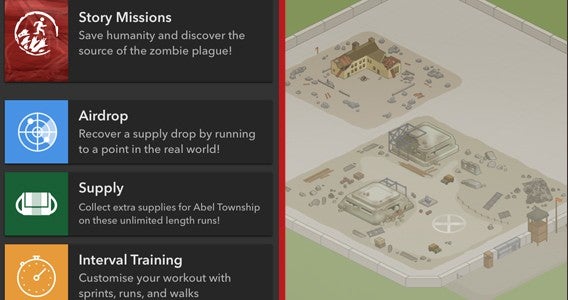
Zombies, Run! is a mix of training app and game that tracks your running pace while also playing you what could best be described as a zombie based radio play. During your run the story adds context and introduces “play” to your excursions, with the aim of inspiring you to move faster.

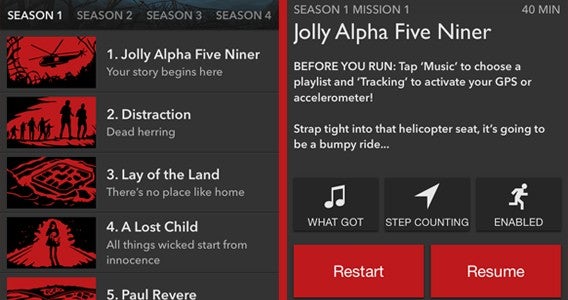
The main focus of Zombies, Run! is a number of story “seasons” each with various missions. If you exhaust these, other options like Airdrop and Race are on hand to keep you busy – but I jumped straight into the main game.

Start running!

Before starting I was asked to toggle a few options, where I wanted to source my music (my iTunes playlist), if I wanted to judge my distance by position or motion (I was on a treadmill so motion), and whether I wanted zombie encounters turned on (where occasionally I would be randomly chased by hordes). Setting this was  incredibly easy, and after turning on zombie encounters I declared to myself “Zombies, RUN” and hit play.

Starting to run I was treated to a story set up that had me in a military helicopter that was quickly shot down by unknown parties. In contact with a near by settlement I began receiving instruction to start running. With the sound of the shambling zombies in my ears I started to move as the settlement’s radio station kicked in, which is when I discovered that there are few things than make me happier than hearing Taylor Swift’s Shake it Off kicking in over the sound of the groaning undead.

In truth, I have never enjoyed running, but Zombies, Run! managed to take my mind off the monotony I usually feel just listening to music. With the simple addition of a little context to my efforts I felt invigorated with each new piece of story. With this alone I may have made the 5 km distance in 25 minutes, but the random zombie encounters that encourage bursts of speed further helped.

Collectibles

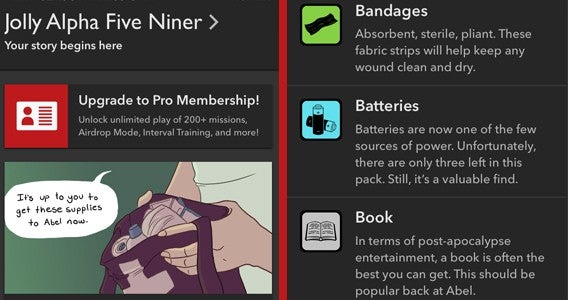
Oddly, I never out ran an attacking horde despite maxing out the treadmill at 16 km/h. But while I remain uncertain of how to outpace the pack, these sprints surreptitiously encouraged a kind of interval training that I wouldn’t usually employ. The result was a time of 24:27, my fastest time by far in over a year. True, in part this is down to my recent training, but I can’t help but attribute the 33 seconds I came in under my target time to Zombies, Run!

Of course, if you have zero interest in the theme I can’t imagine it helping you. But if you run and like zombie movies, games, or fiction, this is one tool that could really aid and encourage your routine. It is already inspiring me to more and further longer, so I intend to stick with it.

Related Stories

Diary of a fat man: MyFitnessPal (the training wheels are off)

Diary of a fat man – Part 2 of the Noom chronicles

Diary of a fat man – Runtastic Road Bike

Follow me on Twitter: @DoFuss

Make videos from your photos in no time with RealTimes

These days everyone uses their mobile devices to take photos and record videos. The thing is, many of us are at a loss as to what we should do with all of those pics and videos. Sure, you could upload them to the cloud but what if you want to share them with others? While it’s possible to grant access to your cloud storage, that can be cumbersome and ultimately an unappealing option. Enter RealTimes.

RealTimes easily organizes your photos and videos into shareable “stories” that you can then customize to their liking and then access on any device anywhere. The mobile app is simple to use and is currently available for iOS and Android mobile devices as well as the Web and Windows-based PCs.

RealTimes works by organizing your photos and videos into customizable “stories,” replete with music that you can easily share with others. RealTimes starts by scanning your device for photos and videos. Where it differs from other solutions is that RealTimes has the ability to determine where the photos and videos were taken as well as the dates and times they were taken. Additionally, RealTimes’ algorithm does a great job of choosing the best photos. In other words, don’t worry about all of those blurry, dark, or duplicate photos.

Default player


brightcove.createExperiences();

For our tests, we installed RealTimes on a Android phone as well as an iPad Mini. Once installed RealTimes scanned each device and created the “stories.” Basically, stories are like slideshows that average about 30 seconds. Once the stories are created by RealTimes, you have the option to edit them. Simply tap to open a story and while the story is playing you’re presented with a series of options for changing the title, reordering the photos and videos (what RealTimes refers to as “scenes”), adding simple effects like filters and transitions, and changing the soundtrack. If you have any music saved locally you can add that to your story. While the app does contain quite a bit of stock music, we really enjoyed the ability to add voiceovers to our stories. We also showed RealTimes to a real estate agent who immediately began making stories to showcase the many houses that he has on the market!

After you’re done editing the story, you can choose to save or share the story. Sharing your stories is one of the most compelling aspects of RealTimes, as this feature is both simple to use and comprehensive. You can share stories with others via email, text message, share on Facebook and Twitter or just get a copy of the link to send to people.

For anyone who’s worried about forcing others to sign up for another service, RealTimes doesn’t require those you share your stories with to have an account. If you share a story on Facebook, the stories appear as embedded videos in a user’s feed and as a link in email.

One really surprising thing about RealTimes is the apps ability to help you relive moments that you may have forgotten about. Because it scans your entire video and photo libraries, the app creates stories from photos and videos that are years old. Friends really enjoyed reliving these blasts from the past.

Users who sign up for the free version of RealTimes will benefit from 2GB of cloud storage while also being able to create stories that are up to 30 seconds in length. Enable RealTimes’ auto upload feature and that cloud storage is bumped up to 7GB. That said, RealTimes will also boast a subscription model where for $5 a month, users are allocated 25GB of cloud storage. Opt for the $10 a month model and cloud storage is unlimited! Subscribers can also create longer stories. Of course there will also be $1 in-app purchases to unlock specific features that appeal to individual users. Features like the ability to add more photos and music and more importantly, the ability to remove the RealTimes watermark.

If, like us, your mobile devices are packed with photos and videos and you’re looking for an easy and elegant solution to share these moments with friends and family then look no further than RealTimes. Grandma and grandpa will thank you.

Download Realtimes for Windows, iOS and Android.

Five Apps to Try this Weekend: featuring Skype Translator, Ice Age Avalanche, and The Witcher

Welcome back to Softonics Five Apps, the show that tells you the best way to while away your time till Monday.

First up this week we have Skype Translator. Yes, we have featured this before, but it is now available for anyone using Windows 8.1 or the Windows 10 preview. It can translate voice calls between Italian, Mandarin, English, and Spanish along with 50 written languages. And no, we aren’t going to list them all here.

Next this week is Paper by FiftyThree, a note book app that lets you jot down all of your sketches and ideas with a huge selection of artistic tools.

Music lovers should try out MixRadio (iOS|Android), the service that that creates playlists for you based on your favorite songs and artists. Great for discovering new music.

Also out this week is Ice Age Avalanche (iOS|Android). Based on the popular animated movies, this match-3 puzzler is a lot like Candy Crush, but manages to distinguish itself with great presentation and a few twists on the classic formula.

Finally this week is the The Witcher 3: Wild Hunt, the stunning open-world fantasy RPG for PC and console. With a world bigger than GTA V, and more dynamic combat than Skyrim this game will probably keep us busy until next year.

That’s it for this week, remember to subscribe to make sure you never miss a video, and we will see you next time.

Related Stories

Five Apps to Try This Weekend: featuring Phind and GoatZ

News Roundup: No free Windows 10 for pirates and more

App of the Week: The Witcher 3

Follow me on Twitter: @DoFuss

App of the Week: The Witcher 3

Softonic’s App of the Week highlights some of the coolest, most unique, and popular apps that have been released for Android, iOS, Windows, and Mac. This week we are featuring one of the best RPGs of recent years, The Witcher 3: Wild Hunt.

This open-world RPG is outstanding, with stunning graphics, dynamic gameplay, and an original story that takes place in one of the most fully realized fantasy worlds we have ever seen. Comparisons with Skyrim were always going to happen but the map here is far larger, dwarfing even that of GTA V. No wonder there is a calculated 200 hours of content.

Default player

<!–
By use of this code snippet, I agree to the Brightcove Publisher T and C
found at https://accounts.brightcove.com/en/terms-and-conditions/.
–>

<!–
This script tag will cause the Brightcove Players defined above it to be created as soon
as the line is read by the browser. If you wish to have the player instantiated only after
the rest of the HTML is processed and the page load is complete, remove the line.
–>
brightcove.createExperiences();

Well as enlarging the world, developer CD Projekt Red have also significantly improved the gameplay, with your character Geralt able to jump, climb, and swim under water. The combat has also been enhanced with various magical incantations and traps to help you bring down the different monsters you’ll face.

In short, The Witcher 3: Wild Hunt is an immense game that will most likely have you hooked for weeks to come.

Related Stories

The Witcher 3 review

App of the Week: Project CARS

App of the Week – DiRT Rally

Follow me on Twitter: @DoFuss

Adblock Plus browser gets rid of annoying ads

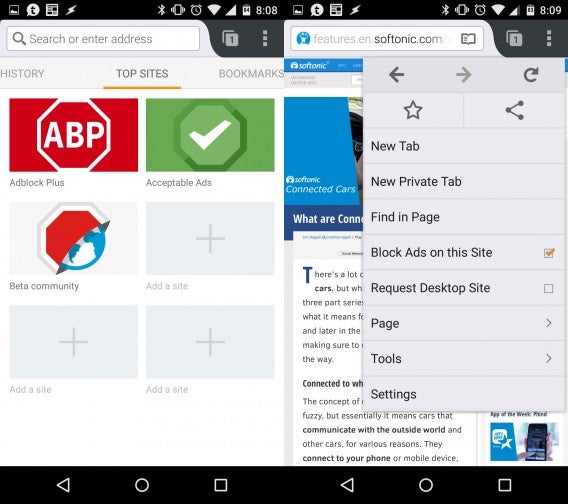
Adblock Plus released an Android browser that blocks annoying ads. The browser is based on Firefox for Android and it looks and feels extremely similar. Firefox for Android users will feel right at home.

The Adblock Browser is currently in beta, so it’s not quite ready for prime time just yet. However, during my short testing, the browser never crashed and worked as well as Firefox for Android. The biggest drawback so far is the lack of integration with Firefox Sync. This means you won’t be able to sync your Firefox settings, tabs, history, or passwords with Adblock Browser just yet. Hopefully Adblock Plus includes this feature in a future release.

Adblock Browser combined

If ads annoy you, Adblock Browser works wonders. This beta is just as effective as its browser add-on for Chrome and Firefox. By blocking ads, web pages load faster and you’ll use less data too. But if you’re already using Firefox for Android, you can enable “reading mode” on any page to get a focused view of the page, showing only text and images. This won’t block pop-up ads but it’s a nice feature nonetheless.

By default, some non-obtrusive advertising is allowed but you can tell the browser to block all ads if you want. But please don’t as this is how sites like ours make money. In fact that’s how Google and Microsoft make money too and as a result, both companies have struck a deal with Adblock Plus to be whitelisted.

Adblockers have always been controversial since that’s how a majority of internet sites make money. Adblock Plus hopes to put pressure on sites and advertisers to increase the quality of their ads and decrease their annoyance.

If you want to try the Adblock Browser, scan the QR code using your phone or click on this link. You’ll also need to enable installing applications from unknown sources. See this guide for how to enable this feature.

Adblock Browser QR code

Related Stories

News Roundup: No free Windows 10 for pirates and more

The best in tech: what you missed this weekend – May 18th

My (almost) year with Android Wear

Five Apps to Try This Weekend: featuring Phind and GoatZ

What are Connected Cars?

Follow me on Twitter: @lewisleong

News Roundup: No free Windows 10 for pirates and more

This week we have a new video series for you guys. Alex breaks down the top news stories you missed from last week. Start off your Monday right by catching up with the most important app news.

Our first story is about a security flaw found on the Apple Watch. Attackers can apparently reset Apple’s smartwatch without a passcode, making it a target for theft. While the iPhone has a feature where the phone can’t be reset without your iCloud password, the Apple Watch has no such feature. This seems like a bizarre oversight by Apple.

One of gaming’s biggest names, Konami, is abandoning its traditional PC and console games for mobile. This came as a shock to many as Konami has big PC and console franchises like Metal Gear and Pro Evolution Soccer. “We will pursue mobile games aggressively. Our main platform will be mobiles. Following the pay-as-you-play model of games like Power pro and Winning Eleven with additional content, our games must move from selling things like ‘items’ to selling things like ‘features,'” says Konami CEO Hideki Hayakawa.

Next up, we have Facebook Instant Articles. The social network is solving the problem of slow loading web pages by hosting publisher’s content on its own platform. This allows Facebook to load stories with almost zero lag. No more waiting for images and ads to load. While this is great for Facebook users, some publishers fear it may give Facebook too much control over their content.

And our last news stories for today are about Windows 10. The upcoming operating system will get Candy Crush Saga, makes porting Android and iOS apps easy, and will not be free for pirates. Microsoft wowed developers with its new tools to easily port Android and iOS apps to Windows 10 Mobile. However, many developers are worried porting apps will lead to a sub par user experience and disincentivizes native development for Windows Mobile.

More shockingly, Microsoft is backtracking on its promise to allow pirated copies of Windows to upgrade to Windows 10 for free. Windows chief Terry Myerson originally stated that pirated versions of Windows were eligible for free upgrades to Windows 10 but company representatives quickly qualified that promise with an ambiguous statement. Now the company has flat out stated that pirates will have to pay, but there will be some “very attractive Windows 10 upgrade offers” pirate users can look forward to.

That wraps up our first Softonic news roundup. Remember to subscribe to stay up to date with the latest Softonic videos. Let us know what you think in the comments and we’ll be back next week with another news roundup.

Related Stories

The best in tech: what you missed this weekend – May 18th

Which Windows 10 version should I get?

Five Apps to Try This Weekend: featuring Phind and GoatZ

App of the Week: Phind

What’s new in Office 2016 for Windows

Follow me on Twitter: @lewisleong