Google April Fools joke adds Pokémon to Google Maps, challenges you to catch ’em all

April Fools is tomorrow but Google’s annual prank has already appeared. This year, Google released a video about the Pokémon Challenge, an augmented reality game. Search for Pokémon using Google Maps and catch them all.

The video shows people rock climbing, fishing, and snapping pictures of Pokémon using their phones. The graphics are within the realm of possibility but augmented reality is not this advanced yet.

Default player


brightcove.createExperiences();


However, Google has added 150 Pokémon around the world using Google Maps. Android and iOS users can navigate to Google’s headquarters in Google Maps to begin their search for Pokémon. There’s no update needed to start playing.

Google Pokemon prank

A good place to start is the Googleplex, which has been recreated to look like a building in the Pokémon games. Pan around the map and try to find all 150 Pokémon, which includes a mix of monsters from all the various versions of the game. Once a Pokémon is caught, you can view information about it in your Pokédex.

Source: Google Maps (YouTube)

RELATED STORIES

Where’s that annoying music coming from? Chrome will tell you

Ads that talk… irritating jingles… annoying videos… strange beeps. Finding the source of a sound in a sea of tabs is difficult. Luckily, Chrome helps you hunt down that nuisance noise.

Since version 32, Chrome displays the tabs that make noise through the use of a small icon. It’s a telltale sign that points to noisy tabs and, although it’s not very visible, it’s not annoying either. It looks like this:

Finding a noisy tab in Google Chrome

The sound detection works with any source, whether it’s a Flash ad, a full screen video or the beep of a game – if a tab even so much as utters a peep, Chrome tells you via an icon. You can then choose whether you want to close the tab or decrease the volume.

For now, only noisy pages are shown in the tabs; it’s not possible, for example, to see them in the Chrome Task Manager. There are no options associated with this function. What you see is what you get: a speaker icon.

And if you want to stop the noise coming from a tab?

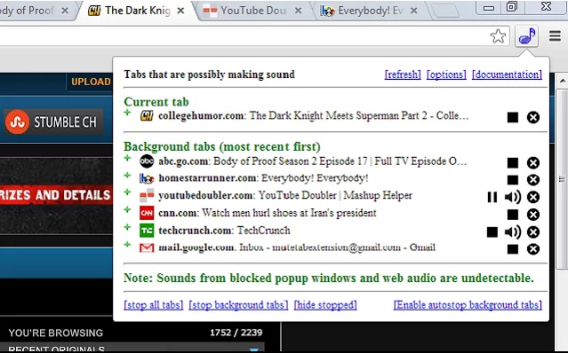
Google Chrome shows you which tab is making the noise, but doesn’t give you the option to block the sound. Luckily, there’s already a great extension called MuteTab, which further identifies noisy tabs, allowing you to block their sound.

MuteTab displays all the noisy Chrome tabs and allows you to selectively silence them

And how about other browsers, like Firefox, IE, and Opera?

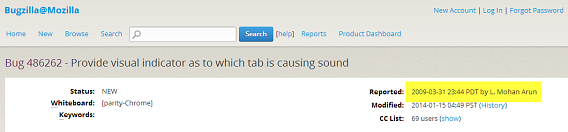
This function is currently only available in Google Chrome. In Firefox, there’s been a petition going since 2009 to add something similar, but to date this still hasn’t happened – no one knows why.

People have wanted the same functionality in Firefox since 2009

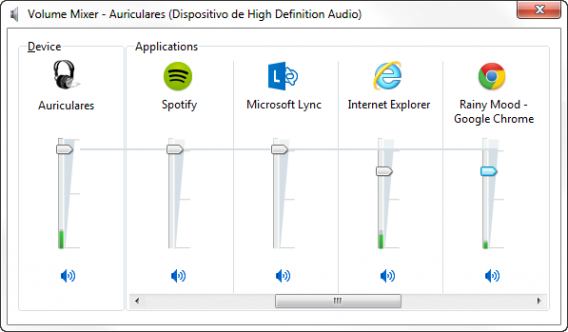
Internet Explorer doesn’t provide any way of knowing which tab is making the noise. The only way to lower the volume is to go directly to the sound system mixer, but it’s something you can already do with any other application.

Hopefully Opera and Safari, which share code with Chrome, will soon add this useful feature, although their development follows different routes. In the case of Opera, you can install MuteTab, because Opera uses the same extensions as Chrome.

Battlefield 4: Naval Strike DLC out for PC after delay

Battlefield 4 developer, DICE, promised to roll out the Naval Strike map pack for players on March 25th across all platforms. The launch went smoothly for the consoles but the PC version was delayed due to performance issues. Today, the Naval Strike DLC is available to download.

Default player


brightcove.createExperiences();

The Naval Strike DLC includes four new multiplayer maps, two new gadgets, five new weapons, and a hovercraft. The update also brings the Carrier Assault Mode, which is a tribute to Battlefield 2142’s Titan mode. In Carrier Assault mode, players will try to sink each other’s aircraft carriers.

Battlefield Premium members can download the Naval Strike DLC today. All other players will have to wait two weeks.

Source: Battlefield

RELATED STORIES

The best free puzzle and intelligence games for your mobile

Intelligence and puzzle games are super popular on iPhone and Android. But what is it that makes them worthwhile? Today we’re going to recommend 5 free (and extremely varied) titles.

From puzzles where you have to match colors, to brainteasers and surreal mini-games, we bet that these 5 games will give you countless hours of enjoyment….for free! Let’s get started!

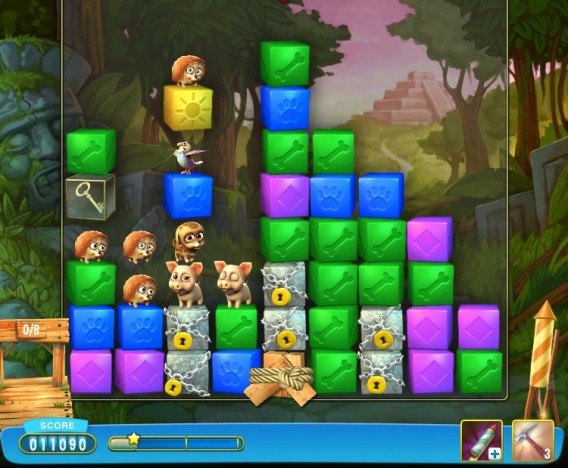
Pet Rescue Saga

Candy Crush Saga is a hit, but its creator, King also offers other interesting games that are worth trying. One of the newest is Pet Rescue Saga. Although it uses the classical system of matching colored pieces together to destroy them, it goes a bit further: the incentive for moving through the levels is to save the cute little animals on screen.

Will Pet Rescue Saga enjoy the same success as Candy Crush? We’re not sure, but it’s certainly addictive, easy to play and colorful – three key features in the success of its candy-colored cousin.

Download Pet Rescue Saga for Android

Download Pet Rescue Saga for iPhone

TETRIS Blitz

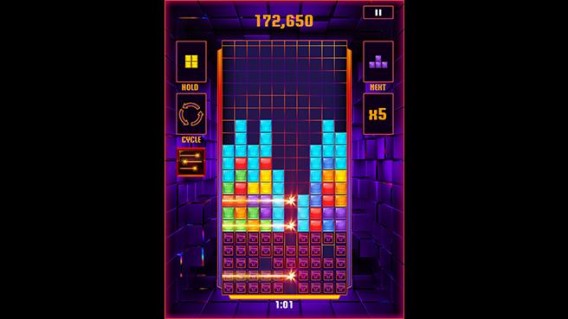
Tetris is much more than just a game franchise: it’s a legend with almost 30 years of history. And seeing as legends are timeless, then it’s not surprising that the game continues to rack up new versions. One of the most fun is this mobile offering featuring a very original approach:  2 minute games where the aim is to score as many points as possible.

Although we’ve become accustomed to using keys or buttons to play, the truth is that TETRIS Blitz is really well suited to the touchscreen, and it actually makes it easier when it comes to unlocking levels.

Download TETRIS Blitz for Android

Download TETRIS Blitz for iPhone

Download TETRIS Blitz for Windows Phone 7

Dumb Ways to Die

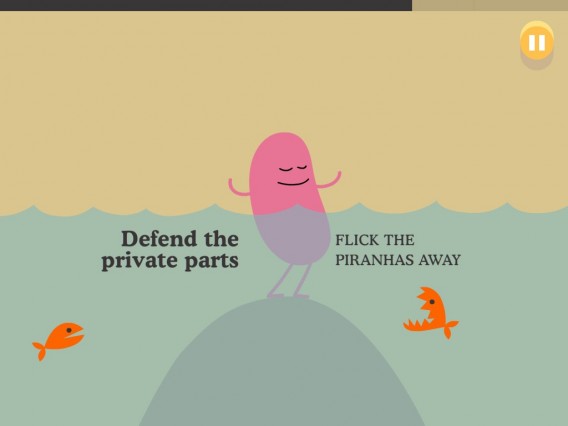
If you like games with mini-tests then you’ll love Dumb Ways to Die. This app is about saving the lives of characters who get into the most dangerous situations.

The actions to be taken to save these cute – and hard-to-describe – creatures are really simple, so the difficulty of the game lies with doing it in time. So really, it’s about testing your ability to concentrate and getting the job done quickly.

Download Dumb Ways to Die for Android

Download Dumb Ways to Die for iPhone

100 Floors

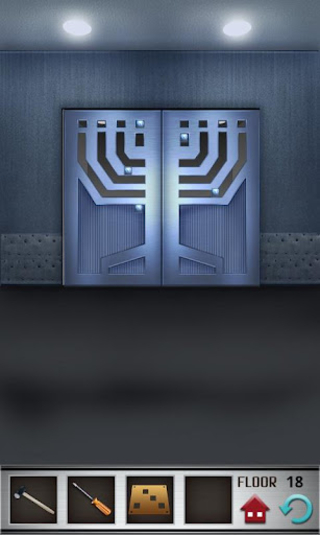
Something as simple as opening a door becomes a real challenge with 100 Floors. In this intelligence game you must solve puzzles in order to open the elevator doors: find pieces, solve keys or move levers.

100 Floors is achievable but definitely falls within the category of games that end up stumping you. When this happens, take a break: for sure when you start to play again you’ll quickly come up with the solution to the mystery!

Download 100 Floors for Android

Download 100 Floors for iPhone

Munch Time

Do you like Cut The Rope, a game where you feed a friendly monster? If you do, then you’ll also like Munch Time, a game in which you’ve got to get a chameleon to their meal. To do so, you have to guide the character through different obstacles and platforms, using a combination of his tongue and your intelligence.

With an excellent game physics and really simple mechanics, Munch Time is a great puzzle game which has a free version as well as a more extended paid-for version (available here on Android and iPhone).

Download Munch Time (free) for Android

Download Munch Time (free) for iPhone

A perfect genre for mobiles

The reason there are so many intelligence and puzzle games in the iPhone and Android catalogs is basically because they‘re easy to pick up and play for a short time. They’re also ideal for waking up our brains first thing in the morning when much of the population takes public transport to go to work or school.

EA’s Origin announces the end of games on disc

Origin, EA’s PC gaming platform and Steam competitor, has announced there will be no more games released on disc. From April 4th, the whole Origin catalog will be available as digital download only on PC and Mac.

This isn’t a surprising move: while console physical releases are still popular and common, since the rise of Steam and other PC gaming platforms, physical formats have looked more and more like a relic of the past. This announcement pretty much seals the fate of PC physical games.

Digital downloads are easy to manage for users, and it may be easier to control piracy if games are all tied to online services like Origin. All-digital also means less physical waste, which is better for the environment. Another issue is size – as AAA games get bigger and bigger, DVDs are simply not an efficient way to distribute them anymore. Many powerful laptops and ultrabooks don’t even have DVD drives, so the writing has been on the wall for a while.

Not everyone will be happy. Some people do have limited internet access and data plans, and for them a 35GB download might be a problem. Others are attached to the idea of physical purchases, and like the feel of boxed games.

Source: Origin

RELATED STORIES

Cut the Rope 2 arrives on Android

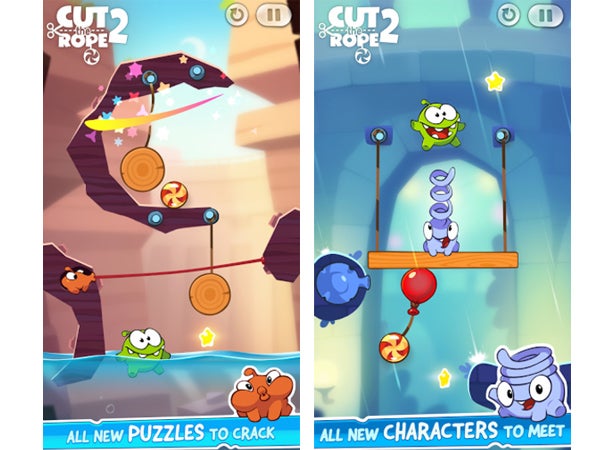
Cut the Rope 2 has finally arrived on Android, now available as a free download in both the Google Play and Amazon App stores. The sequel to the popular game has been available for iOS since December, but it wasn’t until just a few days ago that developers from ZeptoLab announced its availability on Android.

The long-awaited sequel comes with new features including power-ups, hints, customization, interactive maps, and new missions for each level.

Cut the Rope 2 for Android

CEO of ZeptoLab, Misha Lyalin, says they have been “working hard to bring new content and challenges to this free version, while maintaining all of the fun and simplicity that made Cute the Rope 2 great.” They also thanked Android fans for their patience.

ZeptoLab also took the game’s Android launch as an opportunity to announce that Cut the Rope games have now been downloaded more than half a billion times on iOS and Android devices, a number which is sure to see an increase with the newest Android release.

Source: Polygon

RELATED ARTICLES:

Meet ‘Flockers’, the new puzzle game from Team17

I sat down at EGX Rezzed to play Flockers, a new title from Team17, the UK developer most famous for the Worms series. Flockers charges players with guiding a flock of sheep through grizzly, dangerous ‘steampunk’ levels filled with spinning blades, spikes and more lethal machinery.

The sheep are trying to escape the grip of ‘the tyrannical worms’, and you have to help them by changing their formation and giving them special powers like jumping, exploding and wall climbing. The gameplay is similar to Lemmings, but the tone is altogether more gruesome. Sheep fall victim to the steampunk killing machines in showers of gore accompanied by blood curdling screams. It’s dark, macabre fun.

The demo at Rezzed had three levels, and while Senior PR executive Bethany Aston explained to me that is was possible to complete them while saving all the sheep, not saving a few does seem to be part of the fun. It’s the first non-Worms game from Team17 for some years, and they are clearly very enthusiastic to be launching a new IP.

Default player


brightcove.createExperiences();

Aston explained to me how keen they are to get community feedback on the game, and Flockers will be available for everyone to play on PC via Steam Early Access sometime in Q2 this year, with a full release sometime later.

RELATED STORIES

Avoid attacks from behind in Dark Souls II

Backstabbing is a big risk for any character in Dark Souls II because it almost instantly results in death. Here, we’ll give you a few tips on how you can protect yourself, turn the tables, and become the assassin, without leaving your back vulnerable to attack.

Dark Souls 2 - How to backstab

Avoid attacks from behind

Out of nowhere, a sword can fly into your back, sending your life bar plummeting to zero. It’s not uncommon to find yourself in this situation at one time or another in Dark Souls II; even a seemingly harmless opponent can master the technique if you turn your back on them.

If you don’t want them to come in for the kill, you need to move cautiously without turning a blind eye to any enemies. A lifeless skeleton, for example, can quickly get up, track you, and hit you with a deadly blow–usually from behind–as soon as you pass it.

Dark Souls 2 - Mark Target

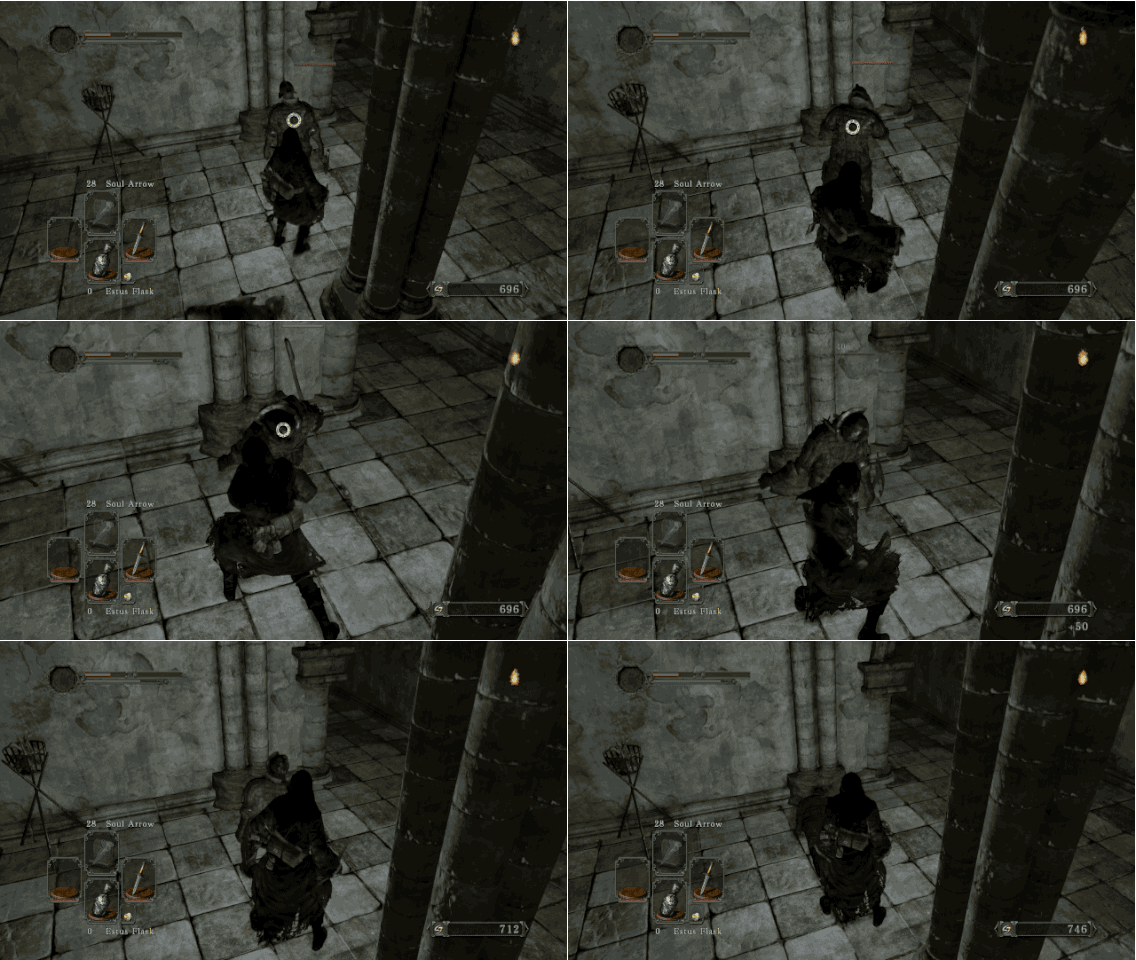
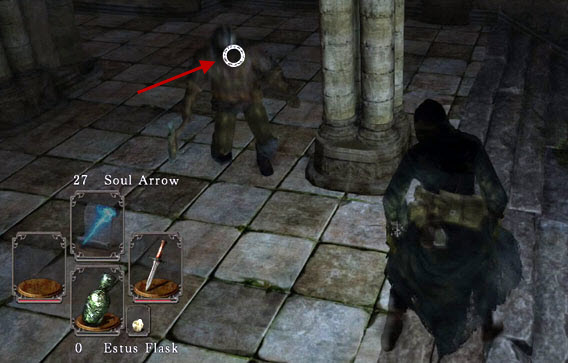
Mark your enemies, so that the camera automatically focuses on them.

If you see a potential enemy, mark them by clicking the right analog stick of your controller. A small circle will appear on the center of your enemy. The advantage is that the camera automatically aligns itself with the selected enemy. As a result, they can’t get behind you, but that doesn’t mean that the enemy is alone, and you still need to be careful.

Inflicting a deathblow

To perform a backstabbing attack yourself, mark your enemies (as described above). Observe their movements. If the enemy attempts a heavy blow, roll under the attack; this quickly puts you behind them.

Unlike in Demon’s Souls and Dark Souls, this immediately sets you up in the right position to launch a backstab attack. First, start with a normal blow. This gives the opponent a fraction of a second to escape the mortal blow. From there, you can inflict a subsequent blow which will literally impale your enemy and cause considerable damage.

Backstabs work with most simple enemies, as well as with most weapons, particularly handy, fast weapons like daggers. Large enemies or bosses, however, are usually unimpressed by these sorts of attacks. Against these enemies, you have to find other methods, and we’ve attempted to do just that with our 8 tips for surviving Dark Souls II.

Dark Souls II backstabs can easily make or break you

Backstabs are a basic element of Dark Souls II. Whoever can master them has a great advantage. Those who neglect this serious danger will die more often than not. This applies not only against computer-operated enemies, but also in the PvP (player-versus-player) battles. Be on guard and faster than your opponent if you want to survive these deadly blows.

RELATED ARTICLES:

What makes WhatsApp Plus different from WhatsApp?

There’s been a lot of talk about WhatsApp Plus. Here, we’ll show you how it differs from the original version so that you can decide if it’s worth making the switch.

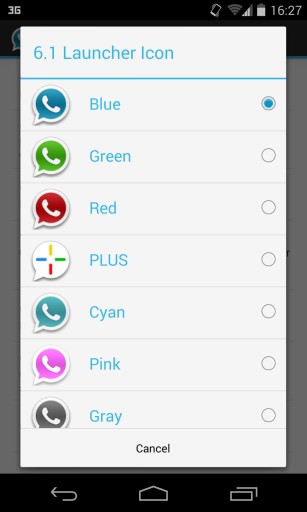
WhatsApp Plus is a modified version of WhatsApp for Android, created by the Spanish developer Rafalete in 2012. The app itself is free, but the user license is the same as WhatsApp. It’s also known as WhatsApp+ and WhatsApp Plus Holo, and has a blue icon.

WhatsApp Plus

We still don’t know if using WhatsApp Plus is legal – we’ve asked WhatsApp for clarification with no response – but what we do know is that it works very well. Installing WhatsApp Plus is really simple, but it does require removing the original WhatsApp.
WhatsApp Plus

The big question is, is it worth deleting the original WhatsApp for a new one? First, we have to see what functions WhatsApp Plus has added.

Visual themes added

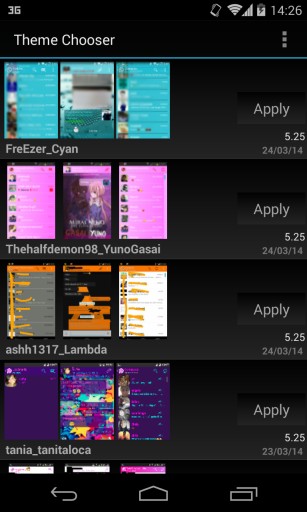
The most notable feature of WhatsApp Plus (and why it was created in the first place), is the ability to completely change the look of WhatsApp, which can be done by choosing new styles or visual themes.
WhatsApp Plus

Themes are installed directly from WhatsApp Plus, and are free. There are over 700 themes, and you can sort by downloads, name, version, and date.
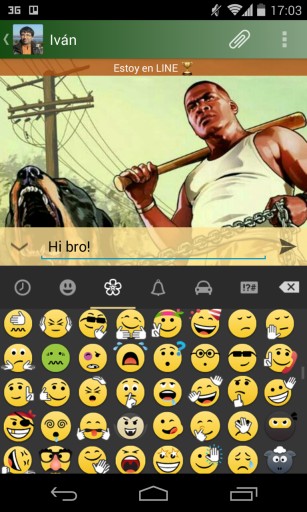
WhatsApp Plus

The GTA V Plus Skin for WhatsApp​

The original WhatsApp doesn’t have anything similar; the Plus themes not only change the background of the chat, but the bottom of the contact list, and the colors of the bar and texts.

New emoticons added

If WhatsApp doesn’t have enough already, another feature of WhatsApp Plus is the addition of new emoticons, including the smileys from Google Hangouts. You can see all the WhatsApp plus emoticons below:
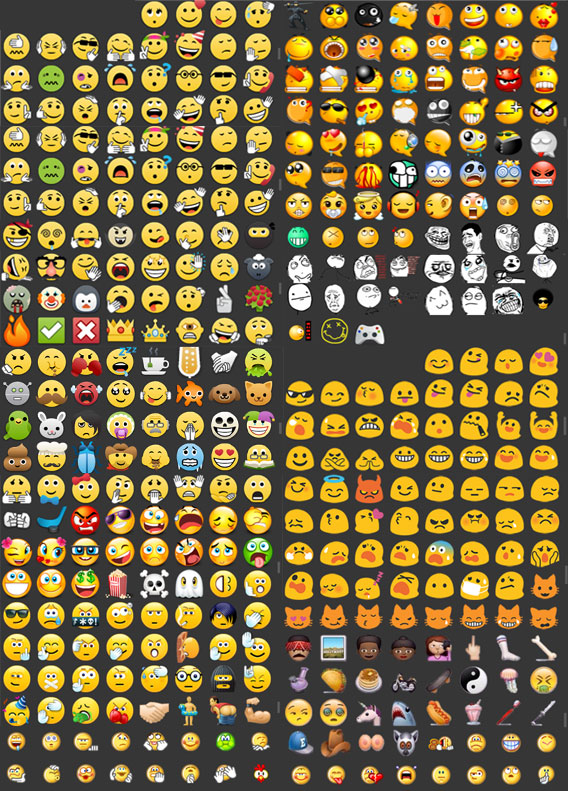
WhatsApp Plus emoticons

These are all the additional emoticons from WhatsApp Plus

There is, unforunately, a “but”– these emoticons can only be seen by otheres who have also installed WhatsApp Plus. If you send an unofficial emoticon to someone who uses the classic WhatsApp, all they’ll see is a question mark.

WhatsApp Plus

What someone who doesn’t use WhatsApp Plus sees when you send a new emoticon

Hide your last connection / status

For years, one of the star features of WhatsApp Plus has been hiding the last time of  access, which usually betrays your presence in WhatsApp. although it’s a function you have to pay for.
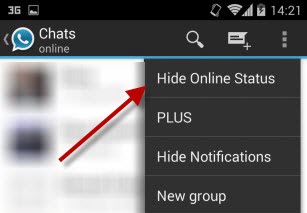
WhatsApp Plus

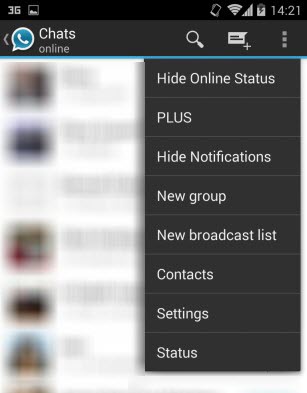
Recently, the official version of WhatsApp for Android has added the same function, which is a blow to WhatsApp Plus.
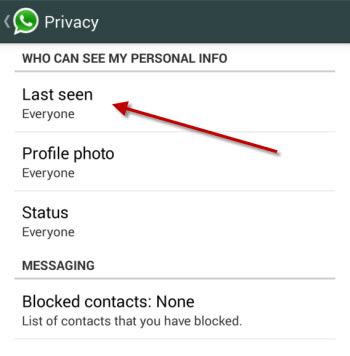
WhatsApp Plus

WhatsApp for Android now includes an option to hide your status

Edit file sharing options

Another WhatsApp Plus option lets you change the size limit of sent files from 2, to 50 MB. There are also options for maintaining the size and quality of images and videos.

WhatsApp Plus

Edit appearance and settings of everything

In addition to the skins menu, WhatsApp Plus has no fewer than 6 menus for editing appearance and settings:

  • Header, colors and size of chat images
  • Header and size of contacts’ image
  • Appearance and size of pop-up notifications
  • Disabling of functions (voice notes, animations)
  • Size and colors of widgets
  • Color of launcher icon

WhatsApp Plus

Recommended for those who want to change their skin

Following the purchase of WhatsApp by Facebook, it’s very likely that we’ll see big changes in the official application, including voice calls and greater security features which you might not see in WhatsApp Plus.

If, on the other hand, you want to customize the look of WhatsApp and want more control over things like notifications and sending pictures, WhatsApp Plus is the perfect alternative for you.

Will you change to WhatsApp Plus, or will you wait for improvements to WhatsApp?

Alien Isolation coming on October 7th 2014

Developer The Creative Assembly has announced Alien Isolation, the latest game in the Alien franchise, will be released on October 7th. It’s coming out on PC, Xbox One, PlayStation 4, Xbox 360 and PlayStation 3.

The announcement was made during a developer session at EGX Rezzed in Birmingham, UK, where publisher Sega has also been showing an early demo of the game. Creative Assembly explained at the presentation how they are making ‘the Alien game they always wanted to play’. The team did a lot of research on 1970s science fiction, and worked closely with Fox to make sure the game has the same ‘low-fi sci-fi’ feel of the original 1979 movie.

The demo we saw at Rezzed is absolutely terrifying. It’s very much survival horror, and the sense of dread and fear in the game is palpable. Creative Assembly announced that the game will feature crafting, to allow you to create tools and weapons to fight the alien. The alien itself will have an advanced artificial intelligence, enabling it to learn from your play style, and will be unpredictable so players can’t learn where the alien will appear or how it will react.

We’ll follow the development of Alien Isolation over the next few months.