Exclusive: In-depth video interview with Voddler

 [youtube]http://www.youtube.com/watch?v=q0ouP5I99Hs[/youtube]

Video Interview: Part 1, Part 2, Part 3

It might be the depths of winter in Sweden but things at Stockholm based Voddler are really hotting-up. Despite being only available in Sweden, the video on demand service being labeled as “Spotify for films” already has almost 500,000 users and recorded one million streams being accessed across its peer-to-peer network in January. However, such rapid progress hasn’t been without its problems. As I reported yesterday, Voddler has temporarily been suspended until March 8th after a security breach of the desktop client and now all their energies are focused on the release of an exciting YouTube style web client due for launch on March 8th.

With a Europe wide roll-out expected by the end of the year (although no North American date set as yet), Voddler is quietly poised to emerge out of the Swedish tundra and take the video entertainment industry by storm. Despite beta teething problems, I was thoroughly impressed with the app when I tried it on both Windows and Mac a few weeks ago. A few weeks ago, I finally got the chance to go behind the scenes at Voddler to find out more about what could be one of the most successful entertainment applications of the year.

I was introduced to Mathias Tönnesson, the enthusiastic Vice President of Business Development at Voddler who joined the team after being convinced that its pioneering technical infrastructure and “freemium” business model was onto a winner. A quick guided tour around the work in progress at Voddler’s new offices indicate how rapidly the company is growing. Having recently moved from Stockholm’s old town, the company now occupies a spacious new media complex on the outskirts of the city. After giving me a detailed overview of the basics behind Voddler, I sat down with Tönnesson for OnSoftware to find out more about this exciting project. The interview is transcribed in full below or you can watch the entire half hour video here: Part 1, Part 2, Part 3.

Note that this interview took place on February 9th so it was before the recent decision to suspend the service temporarily until March 9th. Continue reading “Exclusive: In-depth video interview with Voddler”

How to: Make your own wedding invitations

heart_final.pngWell, judging by the glorious weather this morning, I’d say that spring is in the air. And we all know what spring means – weddings! If you are planning for the big day, you’ll probably be thinking about a million things you have to do and the million bucks you have to spend. Take care of one of the most important aspects at home – it will save you money and give you a chance to show off your creative side. Why not make your own invitations?
At the low-tech end of the spectrum, you could search for some free templates. Using patterns such as these as a base, some imagination should be enough to create lovely handcrafted invites. There are even some ready to use in Microsoft Word, which is probably the easiest option of them all.

If you want to include a photo or image in the invite, you’re in luck. A lot of photo software can easily be leveraged to make invitations with a personal touch. Try Wondershare Photo Collage Studio (online tutorial here), Belltech Greeting Card Designer or My Photo Calendars + My Photo Cards Software. Continue reading “How to: Make your own wedding invitations”

Friday Timewaster: Wavespark

Wavespark is a chilled out one button physics game. The idea is simple: There’s a ball, moving along a wave, and your one button is used to increase gravity. Therefore, when the ball’s going down a wave, you can give it a boost by increasing gravity, flinging it up peaks. You have to keep going as long as you can. There’s nothing else to it!

Your score increases the longer you last, as a timer counts down, so if you go to slow you won’t reach the next checkpoint. There are four game modes, Distance, Bonus, Time Attack (my favorite) and Free Play. Requires Flash, and plays in your browser.

How to: Kill frozen processes

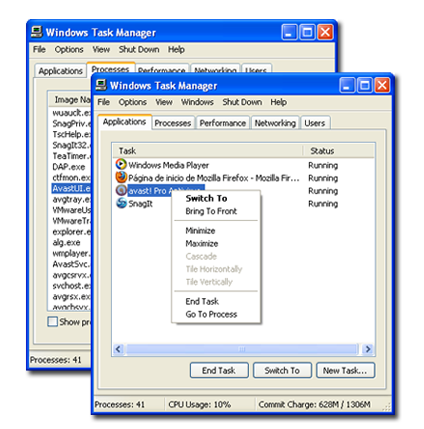
Today I spent a over 30 minutes trying to kill an unholy mangle of Spotify, VMWare and an Excel document – it was a geek’s nightmare! When I realized that not one, but three programs had frozen, I tried to end the tasks in Task Manager. When I realized that that wasn’t working, I tracked them down in Processes and tried to exterminate them there. What happened? Nada, nothing, zilch. What’s a girl to do?

tmfinal.png

The reasons for my mess of frozen programs could have been many and varied. From viruses to overloaded systems, why a program (or three) might freeze is a discussion for another day. My main concern was how to get rid of them without having to resort to the old cybertrick of turning it off and on again. Continue reading “How to: Kill frozen processes”

Voddler suspended until March 8th

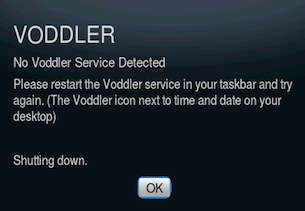
voddler-message.pngOn the eve of our exclusive interview with Voddler, things couldn’t be worse for the “Spotify for movies” streaming service. Although only rolled-out in Sweden less than six months ago, the service was suspended yesterday until March 8th due to hackers using VLC Player to download films streamed on it. Voddler are therefore pinning all their hopes on the new Adobe Air Flash based web client to be launched next month.

However, I think there’s a little more to it than that.

There has been much criticism from users over the usability of the desktop client and in retrospect, it may have been wiser for them to have launched the YouTube style web client first. In fact, I asked Vice President of Business Development at Voddler Mathias Tönnesson about this issue during the interview.

Do you think in hindsight, because some people have “complained” about the functionality of the desktop client because its designed more for using with a TV and keyboard at ten meters away, it would have been better to have launched the web client first and then gone onto the desktop client?

Tönnesson: I think the history we are actually bringing with us is to give the end user a fantastic customer experience. It comes with the viewpoint that you sit in your sofa with a big TV screen and you have a fantastic one and a half hours watching a movie, I think that legacy actually makes it easier for us to take the step out onto the web. I think if we had started on the web, I think we would have forgotten about the ultimate aim is to provide a fantastic environment for watching movies with great picture quality etc and I think that’s really important. So I’m really happy that we’re starting with the 10 meters away idea and then in phase two, making the content even more available to a wider audience.

However, I’m not sure users are quite so upbeat about this logic behind the move. I’ve noticed a hell of a lot of people on Twitter complaining about the functionality of the desktop client – and I presume Voddler must have been following such criticism too – and maybe the security breach was seen as a good opportunity to clean-up problems with the client – or even ditch it completely for now – before a PR disaster developed.

Of the new web client, Voddler say:

The new Voddler will feature web-based movie-player, search tool and mouse control. With a completely web-based movie service Voddler is confident to be able to meet the ever-growing demand for a great selection of free and rentable movies in an accessible environment. The sparkling new Voddler service will not only satisfy the Swedish movie-viewers but the time has come to invite Norway, Denmark and Finland.

In some ways this raises more questions than it answers about the future of Voddler however:

  • If security has been so easily breached on Voddler, doesn’t it raise questions about how secure the P2P sharing network is that you’re using? After all, there’s a reason that Voddler requires 13GB of hard drive space – to share the film you’re streaming with other users.
  • Is it really going to be possible to deliver the same quality of streaming, video and sound over what is essentially an Adobe Air based Flash platform?
  • Will the Voddler client be available again after March 8th?
  • Will those that have beta invites for the client be able to access the web client or will they require new invites?
  • If it’s the downloading of films from Voddler that’s such a concern, surely its going to be even easier on an a Flash based client which hackers are far more familiar with?

Judging by some of the comments left on the Voddler blog, the decision to move to Flash isn’t popular with everyone either. Personally, I think as long as its executed more smoothly than the desktop release and the film selection is much wider and more up to date, it could be the launchpad that Voddler have been looking for. If not however, the success of Voddler could look very dubious indeed.

Don’t miss the half-hour video interview tomorrow for a closer look at Voddler.

Supreme Commander 2 demo released


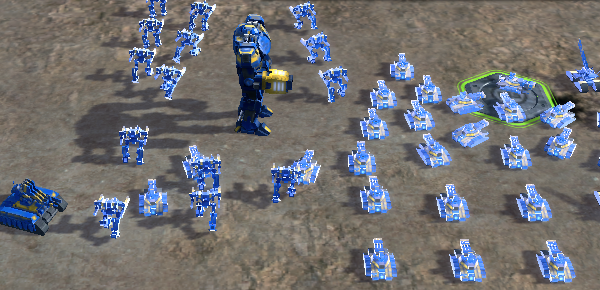
If your main problem with real time strategy is that the games don’t have enough scale, Supreme Commander 2 looks like solving that problem. This futuristic game puts you in the position of Supreme Commander, controlling an army from a giant robot. Square Enix have just released a demo through Steam, and if your PC is up to it, I’d recommend having a go.

The gameplay is fairly standard, as you have to build factories, armies, manage resources and so on while defending or attacking enemies. It’s good, but doesn’t reinvent the wheel. However, the size of Supreme Commander is impressive, with huge armies and vast play areas. Personally, I find the scale a bit overwhelming, but if you love multitasking, this is definitely the game for you. My only complaint is that the dialogue is pretty cheesy and hammy which detracts from the overall feeling of the game.

Supreme Commander 2 requires the Steam client which can be downloaded here, though you’ll need at least a 2.6 GHz processor to run it!

How to: Download Flash games and play them offline

There are dozens of websites to play online Flash games, but wouldn’t it be nice to be able to play them when you have no Internet connection available? In fact, it’s easier than it seems. Just follow these simple steps and you’ll be able to download Flash games to your hard drive and play them offline in no time.

1. First of all, open the web page where the game you want to download is stored. Copy the URL to the clipboard, and then open a new tab to browse to File2HD.com.

2. File2HD.com extracts all the files you see on a web page. Paste the address in the URL field, tick agreement checkbox and filter the contents by Objects. The page will display a list of all available files, from which you have to identify the SWF that corresponds to the game. Right click on it and save it to your hard drive.

Download Flash games and play them offline

3. Now that you have the SWF on your computer, it’s time to turn it into a playable file. Download and install FlashOffliner. When you run the program, click on the system tray icon and select Create new FlashOffliner package.

Download Flash games and play them offline

4. Fill in the fields with the required information (game name, SWF file) and press Start Packing. This will create a FOP file in the selected output folder. Continue reading “How to: Download Flash games and play them offline”

Why still no Kindle software for Mac Amazon?

Amazon Kindle 2Mac users are used to being last in the queue when it comes to software releases. Well, maybe we’re not quite as hard done by as Linux users, but you know what I mean.
We grudgingly accept that Windows still dominates the market and usually, we’re happy to wait just a little bit longer if it means we don’t have to use anything made by Microsoft.

However, when it comes to three and a half years after the release of a piece of hardware, our patience starts to wear thin.

In this case its the Amazon Kindle, first released in the USA in November 2007. Today, Mac users still have to sign-up for notification when Kindle software will be released on Macs. This is crazy when you consider its already available on PC, iPhone and BlackBerry.

It’s also all the more strange for three very good reasons:

  • The release of the iPad: You’d think that Amazon would at least be in a rush to get a foothold in the e-book market before Mac users start flocking to Apple’s latest invention.
  • Kindles basically run Linux: From a technical standpoint, other than Linux, Macs should be the easiest platform to develop Kindle software. As Chris Dannen points out at Fast Company, Kindles basically run Linux and Java applications.
  • Mac users are generally early adopters: Not afraid of splashing-out cash for something that actually works properly and looks good, Mac users are often the most eager to try new gizmos and gadgets, even those that aren’t made by Apple.

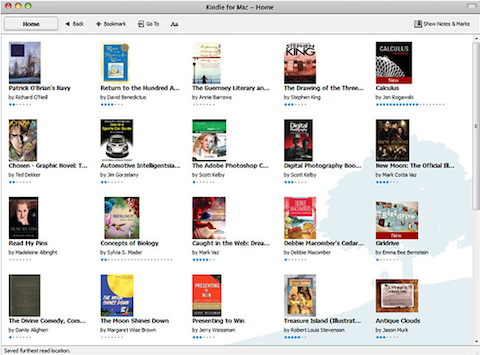
Amazon haven’t done themselves any favors either in embracing developers on this issues. By all accounts, developers have had the doors shut in their faces whenever they’ve tried to approach them about developing third-party software for the Kindle. For now, Mac users will have to do with one paltry screenshot of how Kindle for Mac will look:

Kindle for Mac screenshot

By the looks of it, it might be nothing to get excited about anyway. As Jon pointed out, if it’s anything like the Windows version which offers little of the functionality of the Kindle itself, it will be disappointing. And more to the point, if you’ve got a Kindle, do you really need to read a book on your Mac anyway?

Well, if you insist, you can always try Stanza.

Take a Space Walk with NASA

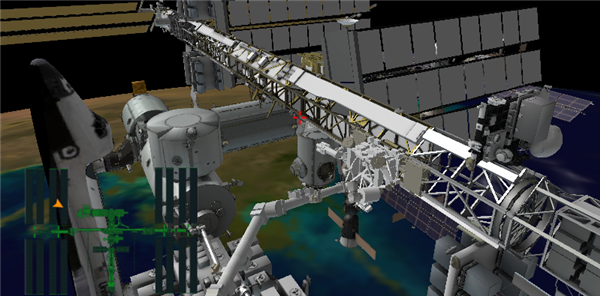
Ever wanted to experience space? The world of video games isn’t short of space experiences, but they’re nearly all science fiction, and usually involve blasting some kind of aliens. NASA have created a short 3D space adventure, allowing you to undertake EVA s(extra vehicular activities), or spacewalks, around the International Space Station.

Using the excellent 3D plugin Unity, the Station Spacewalk Game gives you four missions to complete, maintaining and fixing the ISS, and heading out to collect lost tools, all while watching you have enough oxygen to get back to the airlock.

It’s a pretty short game, although improvements are promised this year, allowing unlimited exploration, which will be cool. While it require a light touch on the controls, it’s not too hard and the gentle, slow pace of the game is fantastic. The model of the station is good, though it’s a shame Earth has pretty poor resolution, as that would really make it a beautiful experience.

Still, if you never realized that dream of becoming an Astronaut, here’s your chance to make amends! You can play in your browser, or download standalone Windows and Mac versions here.

The new Puma Phone: the oddest mobile ever made?

Why a company that normally makes running shoes would decide to produce a mobile phone is anyone’s guess. We just received the tech sheet for the new Puma Phone and it’s clear the German sportswear giant has some fairly odd ideas about mobile technology. The specs talk of features such as an on-demand digital cat called Dylan, a sarcastic calculator, and a scratching turntable. Quite what all this means is anyone’s guess. Perhaps Puma decided to cut corners by getting a bunch of footballers to design its phone, rather than call in professional engineers. After all, the company admits in the tech sheet that it doesn’t even know what the on-board AGPS does!

Other interesting looking features of the sporty phone include a GPS run and cycle tracker, yachting compass, video chat and a full touch screen proprietary user interface. Oh, yeah and it’s solar powered. Of course, it could be that the spec sheet is just an off-the-wall marketing stunt by Puma, but either way it’s got us excited about its launch in April.

Puma Phone