Road safety: 5 free apps to stay awake at the wheel

As we approach the winter, the days get shorter and the weather turns inhospitable. These changes means that it is often necessary to drive at night, sometimes through rain, fog, or snow. All these factors can cause fatigue making us to feel drowsy while driving, especially on long trips.

The subject is alarming. According to an annual report by the Association of French Motorway Companies (the AFSA), drowsiness is the direct cause of nearly 30% of deaths on the major roads. But, even with this troubling statistic, journeys still have to be made, so what can you do to limit the risks?

Well, besides the standard environmental tips – eating high energy snacks, napping at service areas, lowering the temperature of the vehicle, moving about, listening to music, singing loudly – technology, once again, has some possible solutions. Here is our list of five free iOS and Android apps to keep you focused while you drive!

The simple alarm

Anti Drowse

The principle of AntiDrowse is simple. Before starting your journey, program how long the journey is expected to take and the app emits an alarm at irregular intervals – just stay away and try not to be shocked by the sound! Practical, as you don’t really have to interact much with the smartphone while driving, but risky if you fall asleep between rings.

Download AntiDrowse for iOS

Driving night and day
anti sleep driver

The next app, Anti Sleep Driver, is designed to “fool” your brain in to thinking its day time despite it being pitch-black outside. It does this by emitting blue light, a wavelength of light that our brain associates with sunlight – in effect tricking us into feeling more awake. Suddenly, all that sleepiness is “deprogrammed” – good as it is less invasive than many other options, removing the possibility of being unduly shocked while driving. Assuming you brain falls for it that is.

Download Anti Sleep Driver for Android

Detect your movement – or lack of it
Useful on the road, but also at school, work, or anywhere else you may nod off – all Keep Me Awake needs is to be sat in your pocket. If it does not detect any movement for more than 50 seconds, the application will emit vibrations or audio to nudge you back to consciousness. You may want the vibrate option if you are at school though.

Download Keep Me Awake for Android

Check you are well rested

Stay Awake is another app that relies on gestures, but this time you must show it you are fully awake. You have to tap the button at regular intervals and, if you do not, Stay Awake will trigger an unpleasant alarm and emit a light flash. It can be stressful, but it’s also very effective. The only drawback is that, to use it properly, you will have to pull over – tired and distracted are not a great combination behind the wheel.

Download Stay Awake for Android

Eye-tracking technology

Created in Thailand a few years ago, Awake Drive is stuffed with promising and innovative technology: eye-tracking. You must place your smartphone on your windshield so that it can see your eyes – when it gets worried they are drooping it will suggest you get off at the next exit to for a large coffee.

Download Awake Drive for Android

Download Awake Drive for iOS

And you? What tips or apps do you have for safe night driving?

Top 5 music apps

Last week we said we would bring you the best music editing apps and, ever true to our word, we have. So put those headphones on, crank up the volume, and get ready to become a mobile maestro.

Our opening act is the fantastic Beatwave (iOS), a thumping app with an intuitive interface that lets you easily loop and layer your samples. Just add the instruments you want and set them to repeat – you can then play around with their tempo, add in other tracks, and even import samples from other apps to create sweet music.

Every band needs their percussion section, and ours is Drumpads (iOS). The developer of this little tool releases new sounds monthly and provides a slew of YouTube tutorials to make sure you are making the most of the content. Best of all you can easily save and share all of your creations.

Figure (iOS) is an app for all digital DJs who want to experience what a good touch interface could do for their art. Utilizing gestures, swipes, touch, and drag across its many musical tools, Figure lets you intuitively manipulate, sound, beat, and intensity of individual elements with playful analogue simplicity. Android and Windows users can try Music Maker Jam instead.

Our next app is actually more of a game that uses physics and your interactions to create original joyous tunes. The app’s name is MUSYC (iOS), and it doesn’t just sound incredible it looks it too, with a beautiful color palate and geometric style that perfectly sets off the audio.

The grand finale of the show is Keezy (iOS), an app that lets you turn your voice into an instrument. Yes, we can all make beatbox-like sounds, but Keezy lets you easily layer your attempts until you sound like a real pro. Unfortunately, it only available for iOS, but Android users can always try Beat Box for something similar.

So, those are our five recommendations of musical apps for you to try. Next week we will be bringing you the top five video editing apps, be sure to check back on Softonic for that.

Related Stories

The top five Windows Store exclusive apps

Top 5 Google Chrome extensions

The three worst Star Wars games ever

Follow me on Twitter: @DoFuss

iPad Pro Ups Creativity and Gaming Prowess

The iPad Pro offers not only a super large screen but also the potential of using an iOS device for proper business productivity. While the number of apps that take proper advantage of the devices large screen are low, there is strong promise here. Combine this with the cloud enables apps for Office and Google documents and the iPad Pro is a substantial game changer.

Beyond the screen, the device offers a new keyboard connector. This provides both power and data to connected peripherals and makes possible a Microsoft Surface style super slim keyboard that doesn’t require power.

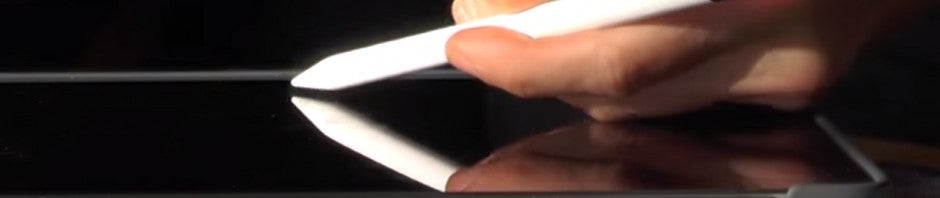
The jewel in the crown here is the Apple Pencil. This may surprise some but using the stylus to draw, paint, and design is simply a delight. It’s super responsive and feels well balanced in the hand. Lay the tip on its edge and you can move from point-work to shading. All round it’s the best stylus I’ve used.

For gaming too the iPad Pro is a stand out device. As you can see in the comparison below, load up a game like Skylanders and it scales to take full advantage of the processor and screen. This really is a play-anywhere console style experience.

While the iPad Pro isn’t the cheapest professional tablet on the market it’s an impressive first entry into the space from Apple and will only improve as the iOS takes more advantage of that massive screen real estate.

Family Technology Expert: Andy Robertson

Andy Robertson is a freelance family technology expert for the BBC.

He runs the Family Gamer TV YouTube channel and contributes to a range of UK media on the topic of video-games and family.

See more videos from Andy Robertson on Family Gamer TV and follow him on Twitter.

The 3 best spy games

It is Spy Game week here on Click-Swipe-Play, so our editors have been picking out their favorite games featuring espionage, infiltration, and suave style.

I actually won a fight with Danni for my pick. It was quite violent, and I think I managed to undo his bow tie. The game is Obsidian Entertainments action RPG, Alpha Protocol. True, it was technically a bit of a mess – with the game almost unfinishable if you didn’t correctly specialize your character – but that didn’t stop it being amazing fun.

What really sets it apart is the importance of its conversations. When picking any of the three or four dialogue options, you can completely change people opinion of you, letting you manipulate characters to your will. Just like a real spy.

With Alpha Protocol taken, Danni went back to the drawing board and came up with a real winner, The Operative: No One Lives Forever, starring Cate Archer, AKA the most incredible female secret agent in history. This FPS is a perfect spoof on the spy genre, specifically Roger Moore’s era of James Bond.

Cate comes ready with a whole range of comical gadgets and one liners to make her the perfect 70´s spy protagonist – taking the patriarchal stereotype of the spy persona and twisting it on its head. And the whole game works with her, so each villain is a wonderful pastiche on characters of the time – such as mimes, ninjas, and opera singers. The only downside is that both NOLF and its sequel are both lost in IP confusion, so they are both really hard to find – though we do have the multiplayer demo here.

Outside of Danni and I´s squabbling sat Maria, who happily selected The Saboteur as her spy game. This often overlooked open-world sandbox game was really interesting. This was in part because of how it handles its WW2 setting in the occupied city of Paris, but it was due to its use of color and art.

Playing as Sean Devlin, an Irish race-car driver who has allied himself with the French Resistance, you must infiltrate Nazi facilities, gather intelligence, and then blow to bits any strategically relevant structures. To do this you can climb, drive, and even use disguises to blend in with the military forces around you. Its great fun, that is made even more rewarding as the black-and-white Paris slowly filling with color and life as you reclaim it.

That it for this week´s Click-Swipe-Play, be sure to check with Softonic next week, or subscribe on YouTube, to make you catch our next top three.

Related Stories

The three worst Star Wars games ever

Call of Duty: Black Ops 3 – Specialist quick guide

Call of Duty: Black Ops III review

Fallout 4 review

Follow me on Twitter: @DoFuss

4 apps to learn more about climate change – COP21

The Paris Conference on Climate Change, or COP21, to be held from November 30 to December 15, 2015 at Le Bourget Conference Center. World leaders will meet to decide what measures to put in place to limit global warming to less than 2 degrees – the amount predicted to a cause worldwide environmental catastrophe if reached.

But the COP21 is also an opportunity for all of us to reflect on the subject. A chance to be informed and to ask what we can do, alongside the actions of industry and government, to limit the damage. Control our carbon footprint, save energy, water, change some habits, and contribute to this good cause.

Here is a list of four apps that can educate, inform, and entertain, around this issue – showing us the possible our planet and presenting environmental news in real time. Some guide us, teaching us how to behave better and more responsibly. Others talk directly to children, encourage them to adopt good behaviors through play. And the final app will help you to refute the arguments of climate change skeptics.

So, are you ready to become a model environmental citizen? Here is what your smartphone can do for you!

GoodPlanet: follow environmental news

GoodPlanet for iPhone and iPad is intended to make you better understand major environmental issues at the global level through several types of content. The app obviously presents key data on deforestation and climate change, as well as a thematic news feed. But GoodPlanet goes further through Action Carbon calculator, you will know the amount of carbon you emit when you travel, and therefore be better equipped to reduce your footprint.

Download GoodPlanet for iOS

PlanetOcean: knowing what fish eat

Also developed by GoodPlanet, PlanetOcean turns its focus to news of the marine world, which it publishes in real-time. PlanetOcean lists 100 threatened species of fish and shellfish, looking at the state of reserves and fishing techniques. The idea is to guide users in the selection of species for consumption and therefore reduce the impact of Fishing on the diversity of ocean wildlife.

Download Planet Ocean for Android
Download Planet Ocean for iOS

Cleanopolis VR: fight against pollution as Captain Clean!

Created by EDF on the occasion of COP21, this game allows children to understand greenhouse gases, carbon footprint, and climate change issues. Mini-games teach them the responsible actions and encourage them to acquire good reflexes. Playful and lively with nice graphics, the game offers an education through rewarding good behavior.

Download Cleanopolis VR for Android
Download Cleanopolis VR for iOS

Skeptical Science: refute the climate change deniers

Inspired by John Cook’s famous blog, the Skeptical Science app aims to refute one by one the arguments of those who do not believe, or dismiss, the scientific research around climate change. If a co-worker is telling anyone who will listen that the oceans are cooling, the polar bear population is increasing, or that it has been like this since the Middle Ages – this app can show you how to respond.

Download Skeptical Science for Android
Download Skeptical Science for iOS

Do you use any application to act against global warming and keep abreast of the climatic change? Let us know in the comments.

The top five Windows Store exclusive apps

The Windows 10’s Store is not the most fulfilling experience. You can go looking for something you think is quite mundane – like an official Instagram app – and find yourself coming away empty handed. But still, it has its hidden gems, exclusive apps that are only available for Windows – and here are our five favorites.

Artists will struggle to find a more appealing app than Fresh Paint. This drawing tool is filled with nice little touches that allow you to use your device like a real paint palate and easel. This includes the ability to add texture to your digital canvas and to swirl colors together to get the one you want as you would in real life.

The unimaginatively named Drawboard PDF provides everything you need to edit your PDFs. From basic editing tools like highlighters and pens, to the ability to add annotations, notes, and even audio inserts – it puts all you need right at your fingertips.

Toolbox for Windows 8 (and Windows 10) unlocks full multitasking power of Windows. This app integrates a web browser, Facebook, Twitter, a calculator, a currency converter, notifications, a stopwatch, a calendar, and more. It then allows you to place them all however you want them in its single screen interface to make you more efficient than ever (at procrastinating).

Network Speed ​​Test is a tool developed by Microsoft that does exactly what it claims to – instantly testing your download and upload connection times. That is basically it, but it does include some tips you improve your connection if you are having problems, and a feature that measures the quality of your connection on the move – letting you find and solve any black-spots in your home network.

We finish with the music app, Chusix. This fun music creation suite lets you build music from recorded loops and samples until you have your own little symphony. What stands out as particularly fun is the way you can position individual tracks in relation to two speakers, creating amplification and position effects during playback.

That’s our five favorite Windows exclusive apps but, as always, let us know if you think we missed any – and if you know any good alternatives for Android and iOS. See you in seven days, when we will be back with the best music apps.

Related Stories

The three worst Star Wars games ever

Microsoft guesses your state of mind with its new application

The Best 24 Apps for Windows 10

Follow me on Twitter: @DoFuss

Does your phone take hours to charge? With this Huawei battery it will take 5 minutes.

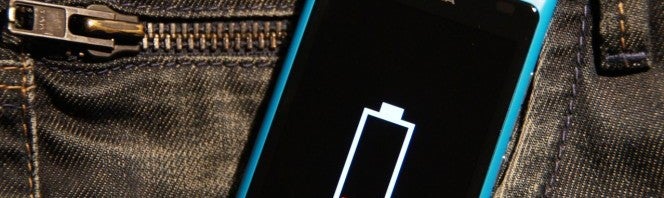
Phone batteries are lasting less and less time, and taking longer and longer to charge. However, this could soon end with a new invention from Huawei: a battery that charges 48% in just 5 minutes.

This new battery from the Chinese company is made with lithium ions and graphite-coated anodes. Yeah, it sounds like Klingon to us too, but what we do know is that these materials make charging really fast. So fast, in fact, that it can charge a 300 mAh battery to halfway in just 300 seconds.

But that’s not all, because Huawei is making a smaller capacity model of 600 mAh that would charge 78% in 5 minutes. This second model would be planned for wearables like smartwatches, devices that are used for nearly the entire length of a day.

In both cases, Huawei hasn’t indicated when it will make this technology available for sale, although we do know one thing about it: it will need a special charger.

I don’t know about you, but if they can promise us rapid charging, we don’t mind shelling out more money on gadgets.

Huawei isn’t the only one making batteries

In addition to Huawei, other companies are also promising rapid charging. Qualcomm is one of these companies, who are promising to release a battery in 2016 that will allow our mobile devices to charge 80% in just over a half hour.

Microsoft guesses your state of mind with its new application

Microsoft has launched a beta application which guesses how you are feeling. It is not magic, simply another use of facial recognition technology.

Do you remember that app that could tell your age? The new experiment works with similar technology: all you have to do is upload a photo to its website and the technology will recognize your face and detect your emotions.

Do you want to use it? All you have to do is upload a photo to the Microsoft Project Oxford website and observe the results. The app will inform you that it is in the experimental phase, and so the result will not always be accurate. Also, it will largely depend on the photo you provide: front facing photos are much better than those in profile or with your face covered by accessories, such as sunglasses. Yeah, sunglasses should really be avoided.

But the question is: does it work?

I have uploaded some photos of mine to the website to test its accuracy. And yes, it did more or less detect how I was feeling.

According to Microsoft, in one photo I’m between happy and neutral. Which is about right, really.

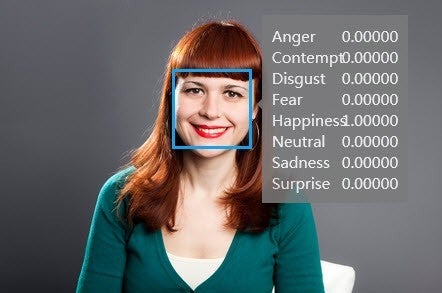
In another image, in the same session, I crack a big smile. Undoubtedly, the application has detected my happiness.

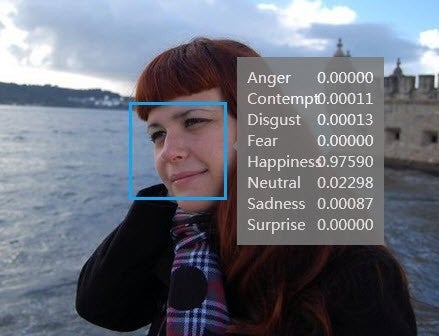
I consider myself to be more contemplative than happy in another photo, but my slight grin confuses Microsoft making it think that I’m in a moment of almost absolute bliss.

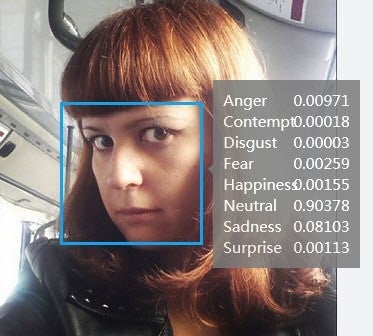
Yes, this face is saying neither yes nor no so, of course, it is “neutral” and a little sad… would that be because of the look?

We encourage you to try this application and share the result with us on our Facebook page!

LG Lucky: an Android 4.4 phone… for 10 dollars!

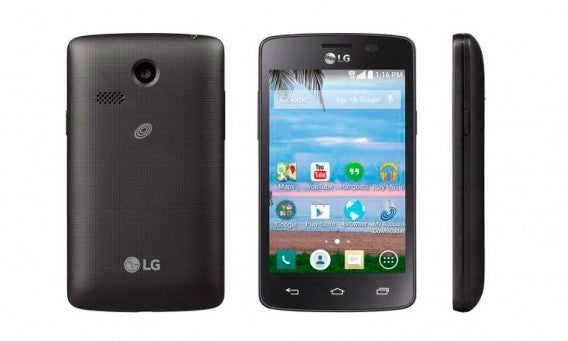
Not having money will no longer be a excuse for not having a smartphone. LG have just launched the LG Lucky, an Android phone for just 10 bucks. For this price you can’t expect a Samsung Galaxy S6. What you can expect is a phone capable of using WhatsApp and social networks, taking photos, surfing the web, or listening music.

LG Lucky has the following technical specifications: 3.8 inch screen, 1.2GHz dual core processor, 3 megapixel camera, 4GB of memory from an included microSD card, 3G, WiFi… and Android 4.4 KitKat! The latter is a huge surprise, since with these specifications we expected the phone to run, at most, Android 2.3 Gingerbread.

Imagine: LG Lucky’s technology is equivalent to the first iPhone. A short time ago I had my hands on a first generation iPhone and, even though most apps didn’t work due to the lack of iOS updates, it’s performance was still more than acceptable.

This phone will probably be especially useful for old people or for people who don’t want to be too connected but refuse to give up communication with family and friends.

The LG Lucky is currently only sold in Walmart, so the rest of the world will have to wait.

How to find your lost or stolen iPhone or iPad with the “Find My iPhone” application

Has your iPhone or iPad been stolen or lost? We’ll help you to locate your device as quickly and as easily as possible, so that the fright will soon be over. The key to fixing this mess is the official “Find My iPhone” app. This app not only works on iOS devices, but also allows you to find your device from your PC or Mac.

What exactly is “Find My iPhone”?

It’s Apple’s official solution for tracking down your iPhone, iPad, iPod Touch, or even your Mac. Although it’s called “Find My iPhone”, as you can see, it is a bit more versatile than that.

“Find My iPhone” allows you to:

Locate your phone or tablet.
Prevent others from using your iPhone, iPad, or iPod Touch if you have lost it.
– Perform a factory reset on your device, to prevent the information on it from falling into the wrong hands.

Are there any special requirements I need to meet in order to use this app?

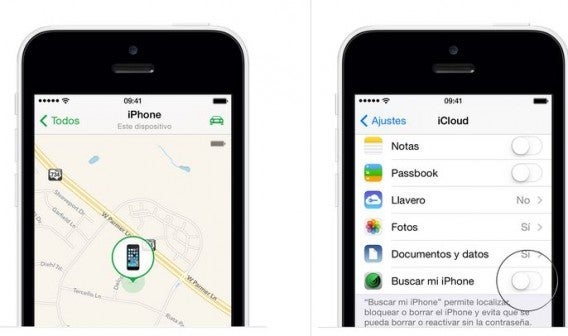
This first bit is very important: you must have “Find My iPhone” activated on your lost device. If you don’t have it, we offer alternatives at the end of this article. You can download “Find My iPhone” from Softonic with ease, but note that the app comes preinstalled on newer models.

Carefully examine the iCloud settings: if you want to find your lost iPhone from your PC, you need to log in to your iCloud.com account. From there you may use the app, provided you have installed it on the device beforehand.

How to use “Find My iPhone”?

If you want to use the app on your iOS device, download it. Remember that it is available on Softonic.

If you’ll be using it from your Mac or PC, open the page icloud.com/find.

When selecting your device, the first thing you’ll see is its location on a map, providing it is powered on. If the device is nearby, the app can issue a command to make your iPhone or iPad beep, allowing you or someone else to be able to find it.

Once you have confirmed that your device is lost, activate Lost Mode. This mode blocks the device using a four-digit code, assuming you have set one previously. What if you don’t have a code? In that case, the app will help you to create one there and then.

Additionally, Lost Mode lets you display a message to appear on your iPhone or iPad to notify anyone who has found your device before you have.

Now there’s one more step to take… but only if necessary.

Okay, now that you’ve taken the first measures of preventing others from accessing your mobile phone or tablet, let us take some more serious steps. First of all, report the loss or theft of the device to the police. Law enforcement may ask you for the device’s serial number. You’ll find this on the original box, and on your receipt in My Support Profile (supportprofile.apple.com) if you have registered your iPhone or iPad using your Apple ID.

Finally, erase the data from your device if you really believe that the information is at risk. But be warned: follow all of the above steps in this tutorial before wiping the data, because – once you have deleted all the information – “Find My iPhone” will be disabled. Furthermore, do not take this step if you know for certain that there is no threat to your data. In order to erase the information, you must enter your Apple ID password.

What can I do if my phone is switched off?

In this case, you can at least block and/or erase its contents; both actions will be executed the next time it connects. What you will not be able to do is locate it on the map.

What can I do if I haven’t activated “Find My iPhone” on my lost device?

You still have a few options which could help:

1. Change the Apple ID password. This will prevent someone else from accessing your data on iCloud and other services.

2. We also recommend changing the passwords of any accounts which appear in some form on your device, such as Facebook, Twitter, Gmail…

3. Report the loss or theft of your iPhone or iPad to the police, and inform your service provider of what happened. This way, they can disable the connection. If someone has stolen your phone, they will not be able to call, send text messages, or use data.

If you need additional (and Android) alternatives…

Here are four different applications which we recommend to help you locate your lost device:

Prey, a comprehensive anti-theft service
Cerberus, the best for Android
McAfee WaveSecure, another comprehensive solution
Norton Anti-Theft, Symantec’s anti-theft software.

As if that weren’t enough, here are some additional apps to strengthen the security of your device, such as:

AppLock, to block unwanted apps
Kids Place, for the security of your children
Secure Wipe, for permanent deletion
Mobiwol, a useful firewall.

Will you be using “Find My iPhone”?