Watch short video clips with Yahoo Screen for Android

Android users who want to watch some quick video clips on the go have a new app to download. Yahoo Screen for Android offers clips from Comedy Central, Saturday Night Live, and many more channels.

Yahoo Screen focuses on making the app easy to navigate with swipe controls. Swipe up and down to move between channels. Swipe left and right to move between videos within a channel.

Yahoo Screen for Android

There’s tons of video content in bite-sized portions. It’s a great way to waste some time watching clips. There are no full episodes of shows. For that, you’ll still have to download a show’s app or pay for a streaming service like Hulu Plus.

There’s no word when iOS users can expect Yahoo Screen, but Yahoo has shown it’s dedicated to bringing its apps on both platforms.

Download Yahoo Screen for Android

Source: Yahoo

RELATED STORIES

Beats Music teases iPad app

Beats Music hasn’t really taken off since its launch in January of this year. Perhaps the upcoming Beats Music for iPad app will change that. It’s odd that an iPad version wasn’t available at launch, especially with stiff competition from Spotify and Rdio who both have iPad apps.

Beats Music’s paid-only subscription model has had a tough time convincing users to leave Spotify, which offers free streaming. The company recently began allowing users to subscribe inside the iPhone app via in-app purchase. This gives Apple 30% of the profits but Beats is willing to do this for more subscribers.

If you’re a current Beats Music subscriber, you will be able to use the iPad app for free. For $9.99 per month or $119.88 per year, you get to use Beats Music on up to 3 devices. If you have multiple users, you can sign up for the family plan for $14.99 per month, which allows up to 5 users and 10 devices.

Source: Beats Music (Twitter)

RELATED STORIES

Facebook Like button for apps makes sharing easy

Facebook kicked off its F8 developer conference today with some exciting announcements. The company introduced anonymous logins as well as a new “Like” button for mobile apps. It’s surprising Facebook has taken so long to bring the like button to mobile apps, which has been on the mobile and desktop web for years.

The Like button makes it easy to share content Facebook. Currently, users have to tap share within an app, select, Facebook, and compose a status update. With the Like button inside apps, users can simply tap once to share something on Facebook.

While this might not be the most exciting feature, it will help app developers spread their content and apps. There’s no word when apps will be integrating the new Like button but it should be soon.

RELATED STORIES

Facebook now allows anonymous logins for third-party apps

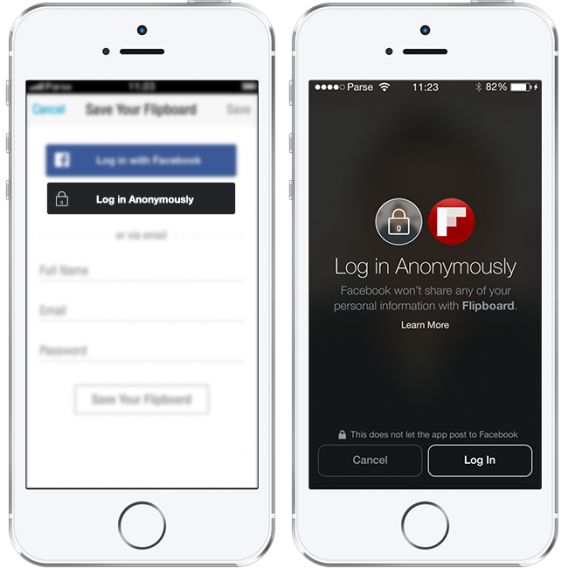
Facebook is finally allowing users to log into third-party apps anonymously. If you want to try out an app without sharing your personal information, anonymous login is perfect.

Anonymous logins are currently being tested so don’t expect to see it everywhere just yet. Select partners like Flipboard have the new feature.

Facebook Flipboard anonymous login

By allowing users to log in without sharing any information, users have the ability to try out an app risk free. This is good for app developers since users won’t be turned off immediately by the traditional Facebook login.

Facebook also updated the way it asks for permissions during log in. Permissions are now displayed as a list with permissions that you can quickly uncheck. This is more transparent than asking for individual permissions.

The new log in will be rolling out over the next few months. Anonymous logins are still being tested with a few select developers but Facebook plans to open it up to more developers soon.

Source: Facebook

RELATED STORIES

Google releases new Docs and Sheets apps for working offline

Google Drive is a great productivity suite if you’re online. However, offline editing has never been great with Drive. Google has realized this and has released separate apps for Google Docs and Google Sheets for working offline.

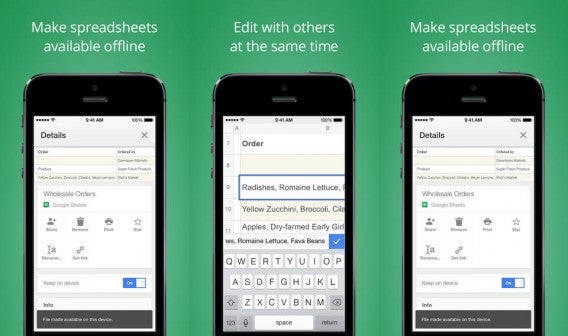
If you’re a Google Drive user, Docs and Sheets will work exactly like they do in Drive. Your files are arranged in a grid of thumbnails so you can find something at a glance. You can still control who can edit, view, and comment on your documents and collaborate with other users.

Google Sheets for iOS

Everything is saved to your device automatically as you type so you’ll never lose your work. This is great, especially for people with unreliable internet connections.

The only missing app is Google Slides, which should be coming soon.

Microsoft finally brought Office to the iPad last month but requires an Office 365 subscription to edit. Google Docs and Sheets offers a great, free alternative for users who don’t need all the features in Microsoft office.

Google Docs and Sheets are available now for Android and iOS. You can download the apps below.

Download Google Docs for Android

Download Google Sheets for Android

Download Google Docs for iOS

Download Google Sheets for iOS

Via: Android Police | TechCrunch

RELATED STORIES

May Releases: Could Watch Dogs be Game of the Year?

Even though it was delayed, Watch Dogs is one of the anticipated games to showcase the PlayStation 4 and Xbox One, but the release is up against some strong competition with games like Wolfenstein: New Order and  Mario Kart 8.

As we told you in April, May is when the second batch of big releases start. Ubisoft finally releases its long-awaited Watch Dogs, its winning card for the new generation of consoles. Wolfenstein is also hoping to make an impact, and we’ll see the return of one of Nintendo’s most beloved characters.

The Amazing Spider-man 2 – PS3, PS4, Xbox 360, Xbox One, Wii U, 3DS (April 29, 2014)

The blockbuster based on the Marvel comic has already been turned into a videogame. Here we find the plot from the film but additional stories like the search for Uncle Ben’s murderer.

So, in this open-world game, Spider-Man will carry out all kinds of superhero missions and face a number of villains. In addition to Electro and the Green Goblin, Spider-Man will have to fight against Black Cat, Venom, and Kingpin.

The Amazing Spider-man 2

Bound by Flame – PC, PS3, PS4, Xbox 360 (May 9, 2014)

The Elder Scrolls Online isn’t the only roll-playing game out there; there are many other RPGs looking for an audience. This month’s RPG launch is Bound by Flame, a medieval-style open world ruled by a demon.

This villain will offer us amazing powers if we decide to join his side. If we reject his offer we’ll be on the side of justice, initially weak but with powerful combat tactics available as we play. Which side will you choose?

Bound by Flame

Killer is Dead – Nightmare Edition – PC (May 23, 2014)

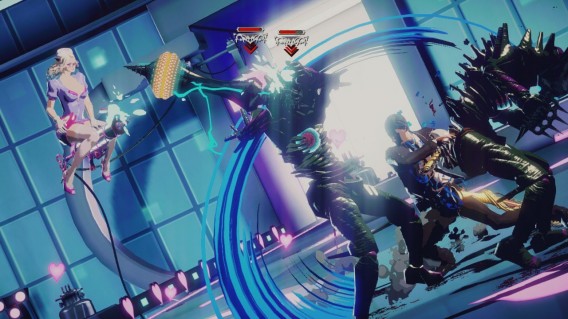
After the console release in August 2013 , Suda51’s latest game is now available for PC. In the Nightmare Edition, we’ll meet a wild and attractive assassin that fights evil.

Forget about Hitman’s sobriety, the guys at Grasshopper Manufacture like to think big and Killer is Dead is all about insane action.

Killer is Dead - Nightmare Edition

Wolfenstein: The New Order  – PC, PS3, PS4, Xbox 360, Xbox One (May 20, 2014)

Wolfenstein is a well-known series for veteran FPS fans. Its last version, from 2009, was both praised and criticized, but it seems this conflict of opinion will end with the new game,The New Order.

Set in the 1960s, The New Order takes us to an alternate history where the Third Reich won World War II. You play as William “B.J.” Blazkowicz who is called once again to stop the Nazis from destroying the world.

Wolfenstein: The New Order

Watch Dogs – PC, PS3, PS4, Xbox 360, Xbox One (May 27, 2014)

But, the most anticipated event of the month is Watch Dogs. This game offers a combination of elements that’s hard to resist: action, open world, a futuristic setting, and a mysterious protagonist.

Watch Dogs

Mario Kart 8 – Wii U (May 30, 2014)

Wii U launches one of the most anticipated games for Nintendo enthusiasts, a new Mario Kart. Distancing itself from simulation, but without losing its famous strategic elements, this new Mario game has very interesting new features.

After introducing motorcycles and watercraft in previous editions, Nintendo introduces anti-gravity in Mario Kart 8, which will let you drive upside down. In addition, it features an online mode for up to 12 players, plus the usual four player split-screen offline.

Mario Kart 8

Excited? Well, wait for E3!

If you think May is an interesting month for the videogame industry, let me remind you of one thing: the most important expo in games, E3 in Los Angeles, will take place next month. In other words,  we’re only a few weeks away from discovering even more great games.

Related Articles

Create admin users in Windows

As part of our Windows Tip of the Week series, this week we’ll show you how to create admin accounts in Windows.

Windows admin accounts are user accounts that have permission to makes changes on your PC that effect all users. Often, admin permission is necessary to install and uninstall apps and to change the computer’s configuration settings. In this article, we’ll show you the traditional way of creating an admin account, as well as the “secret” way of doing it.

Before we show you how though, you need to remember that giving admin permissions to a user could pose a security risk, so be careful who you give them to, and make sure that you’ve always got the accounts under control. It’s also a good idea to make sure the admin user accounts are protected with a password.

The traditional method

The most popular (but also most limited) way of creating a new administrator account is via the Control Panel. To do this, go to Control Panel > Users Accounts and Family Safety > User Accounts > Manage another account.

If you want an even easier way to find it, just write “user accounts” in the Windows search menu.
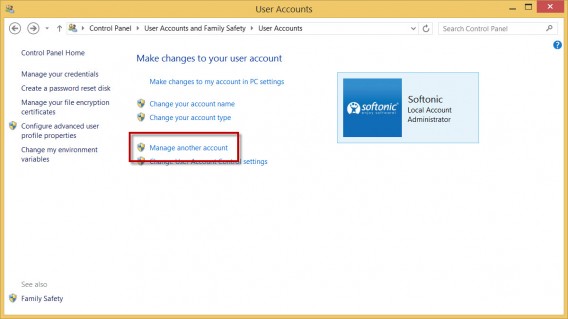
User accounts

Now choose Add a new user in PC settings (Windows 8.1) or Create new account (Windows 7 and earlier). Write a name and select the type of account. In this case, it’ll be Administrator:
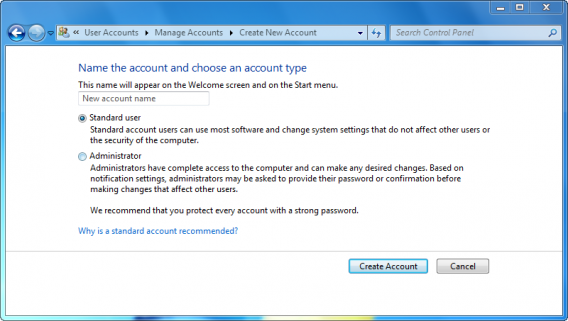
Choose account typeAccount creation menu in Windows 7

This way of doing it has several limitations. You can’t, for example, create multiple accounts at once, and it doesn’t let you configure password security options. It also doesn’t let you add a description for the account.

The “secret” method

The advanced way of adding admin users is to do it via the Computer Management menu, a hidden option that lets you control many aspects of your PC.

1. Access the Users and Local Users menu

You can access this menu via Control Panel > System and Security > Administrative Tools > Computer Management.

In Windows 8.1, you can open this option quickly by pressing the Windows key + X and selecting Computer Management. On older version of Windows, just type “Computer Management” into the search menu.

When it opens, you’ll find the option inside System Tools.

Computer Management options

2. Create a new user

Click on Users and Local Groups > Users and you’ll see a list of the computer’s current users.

To create a new user account, right-click inside the windows and select New User.

Create a new user

3. Configure the new user

In the window that appears, you’ll have to enter the following data:

  • Name
  • Full name
  • Description
  • Password: if you don’t want to use a password, leave this blank
  • Password options: here, you can deactivate the account without deleting it, force the user to change the password when they begin the next session, prevent the password from being changed, or set it so that the password never expires

Once everything is ready, click Create.

The new user's details

4. Add the new user to the Admin Group

The final step is to add the new user to the Admin group. Windows allows you to create user groups so that you can manage multiple accounts at once. The Admin Group is created by default, and all users in the group have admin privileges.

To add a new user to the group, right click on the username and choose Properties.

Then open the Member Of tab and click Add.
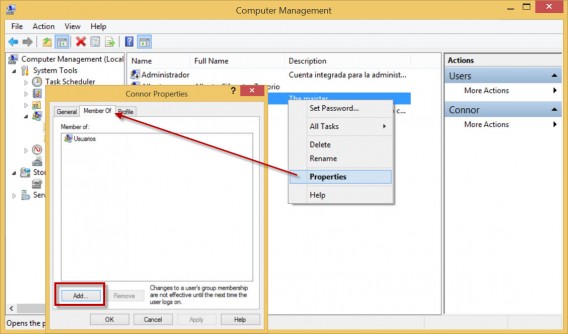
Modifying group members

Now write “Administrators” in the field, and click Check Names. The system will recognize the group and put everything in the right format.
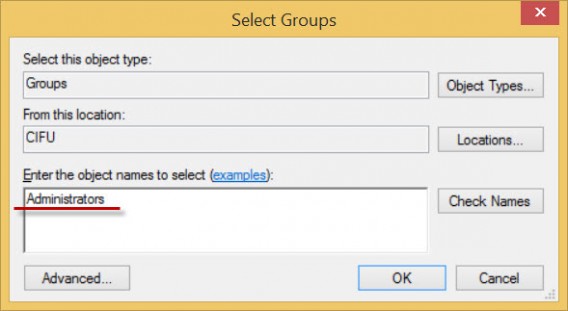
Select adminstrators

Finally, click on Accept, and you’ll have a new admin user.

If you want more information about Windows, check back every Wednesday for our Windows Tip of the Week.


Popcorn Time is back: version 0.3 coming soon

Popcorn Time, the torrenting-made-easy app, is back. The app made headlines when it was originally released, as it arguably made watching pirated torrent files of movies even easier than legal streaming apps like Netflix.

The original developers walked away from the project in March, stating that they didn’t want to spend time constantly debating whether or not the application was legal. It worked as a proof of concept for streaming media via BitTorrent, as it was very easy to use and effective. However, in some countries using an app to view pirated torrent files is indeed illegal.

Another group of developers took over the project and relaunched Popcorn Time. In an official blog post, they explain that now the project is up and running again, with a team of 20 developers. They claim not to be interested in the legal questions surrounding the project, and just want to complete Popcorn Time as it was originally imagined.

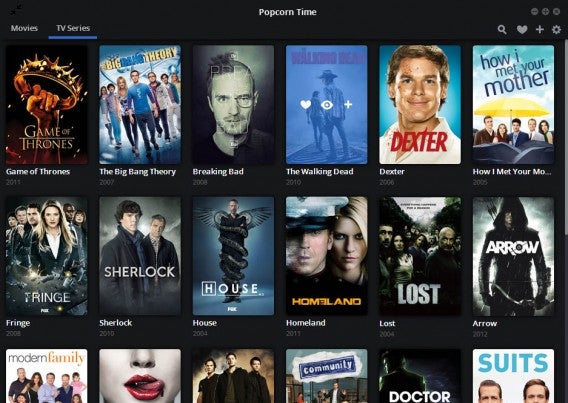
The current available version is the beta 2.9. The next version will be 0.3, and the Popcorn Time team will announce its release date in the next few days. The major addition to the next version is TV shows – you will now be able to browser Popcorn Time for torrents of TV shows as well as movies.

Popcorn Time is a good example of technology being ahead of industry. BitTorrent is a great way to distribute files efficiently, and the internet means that national borders are less important to people than they used to be. Even if it is illegal, Popcorn Time has shown people that if the entertainment industry can keep up, technology could make watching movies and TV shows much easier than it is today. This is especially true outside the US, where licensing agreements can mean streaming or new shows is disabled until they have been shown on terrestrial TV channels. This is a very old model of distribution now, and Popcorn exposes just how antiquated it is.

Popcorn Time is available for OS X, Windows and Linux. Make sure you are aware of your local laws before using an app like this.

Source: Get Popcorn Time blog

RELATED STORIES

Rumor: Next Call of Duty to be called ‘Blacksmith’ (updated)

Update: We now know this rumor is not true, as is sometimes the case with rumors. We try to only publish the most credible rumors, but sometimes false ones will get through. We never ever publish rumors as fact, and will always try to confirm or debunk any we cover on Softonic. The original story is below.

Around a year ago, we head the first rumors about Call of Duty: Ghosts, and now we hear that 2014’s CoD might be called ‘Blacksmith‘. The next Call of Duty is being developed by Sledgehammer Games, and we expect more announcements about it in May, as we approach the E3 games conference.

In recent years, Activision has begun to officially tease Call of Duty games in May. Last year there was an interactive mosaic website that revealed the Ghosts skull logo, so we expect to see something similar in the next few days. The first image from the game was published last week, a close up of a character model, that revealed the impressive detail of the graphics in the next CoD, but little else.

A previous rumor suggested the next Call of Duty might be ‘Modern Warfare 4.’

‘Blacksmith’ could be a codename for the next Call of Duty, or it might be the final title. Either way, more important for the series is whether this Call of Duty can catch up DICE’s Battlefield in terms of graphics. Call of Duty’s game engine is old, and shows its age when compared to Battlefield 4. Had that game not had such a disastrous online launch, Call of Duty might not be the top dog in the FPS (first person shooter) world any more. EA will not make the same mistakes with any Battlefield game this year, so Call of Duty needs to impress in 2014.

This year’s Call of Duty will be released on PC and consoles in Fall 2014.

Source: MP1ST

RELATED STORIES

Facebook F8 event: the rumors

Today Mark Zuckerberg will give the keynote speech at the Facebook F8 event. It’s mainly for developers and businesses that want to work with Facebook, but what is announced will affect you on Facebook.

The biggest rumor about F8 is the launch of an e-commerce platform, perhaps like Paypal, or more likely as a partnership with a company like Paypal. The product could be an auto-fill feature for anyone logged into Facebook. So, if you are logged in, and making purchases on another website, you could click a ‘check out with Facebook’ button, which would give the site your payment details. This obviously means you’d have to give Facebook your payment details.

Another announcement could be about Facebook’s ad network. With recent developments like the ‘traveling to’ status updates, Facebook could offer partners (and users) better targeted ads, based on your personal data, like location. So, you could start seeing ads in Facebook about places you are going to visit. TechCrunch says the new ad network could be called ‘Facebook Audience Network.’

Another rumor is that there could be more standalone apps announced. Facebook Messenger has been successful. and Paper was very well received, even if it’s still a US only app. There might be apps for Events and Groups next, according to TechCrunch.

Lastly, a rumor seen on Secret suggested that Facebook might try to win more user trust, by blocking third party app access to your Facebook friends’ data. This would be popular with privacy advocates, but less so with developers who use Facebook data to power their services.

Stay tuned for coverage of Facebook F8.

Sources: TechCrunch, ReadWrite

RELATED STORIES