Platforms it is available for, editions available, prices, and much more.
The last month of the year is not usually a typical one for video game releases, but 2024 comes loaded with many new features, including one we are very excited about: Indiana Jones and the Great Circle.
Our beloved Indy returns to video games with an adventure that has been in development for several years. If you’re one of those who wants to get your hands on it, we tell you everything you need to know about Indiana Jones and the Great Circle.
When is Indiana Jones and the Great Circle coming out?
Indiana Jones and the Great Circle goes on sale in just a few days, this upcoming December 9, 2024, to be exact.
For which platforms is Indiana Jones and the Great Circle being released?
Indiana Jones and the Great Circle is available from day 1 for Xbox Series X | S and PC. PlayStation 5 players will have to wait until spring 2025 to get their hands on it due to the existing exclusivity period on Microsoft’s console.
What is the price of Indiana Jones and the Great Circle?
True to the usual, Indiana Jones and the Great Circle arrives on the market with a large number of different editions. However, before detailing each one, it is necessary to specify that it can be played on Xbox Game Pass. Therefore, if you have a subscription to Microsoft’s service available, Indiana Jones and the Great Circle will be available to play from Day 1.
Having mentioned the above, Indiana Jones and the Great Circle has the following editions:
Standard: base game and The Last Crusade pack (travel outfit and lion tamer whip). $69.99 on PC, $79.99 on consoles.
Premium: all the content of the standard plus three-day early access (to play from December 6), story expansion called The Order of the Giants, digital art book, and The Temple of Doom outfit. $99.99 on PC, $109.99 on consoles.
Collector: all the content of the Premium edition plus a Jumbo Steelbook case (metal box), a physical diary, a 28 cm globe with a hidden compartment, and a replica of the Creator’s relic that holds the game key. The price is $199.99 for both versions.
What is Indiana Jones and the Great Circle?
Behind Indiana Jones and the Great Circle lies the new adventure of the famous archaeologist. Announced in January 2021 by Lucasfilm Games and Bethesda, and developed by MachineGames, creators of the latest installments of the Wolfenstein series, this Indy installment bets on a terrain where the Swedish studio excels: the first-person action genre.
Instead of opting for a third-person view like it could be Uncharted or Tomb Raider, MachineGames has decided to go where they know best. Thanks to this, we will see everything through the eyes of Indiana Jones, from his usual punches to the shots or whiplashes he delivers. Likewise, all this action will be accompanied by very beautiful settings where jumps and movement will be very present, as well as puzzles. What would Indiana Jones be without puzzles, right?
What is the story of Indiana Jones and the Great Circle?
Although the idea of adapting the movies might have been tempting, Lucasfilm had something much better in mind: developing an exclusive story in the Indiana Jones universe.
To be exact, the story of Indiana Jones and the Great Circle takes place in the year 1937, between Raiders of the Lost Ark and The Last Crusade. A large group wants to seize the secret power of the Great Circle, so our beloved Indiana Jones must prevent that from happening.
During the adventure, we will have the opportunity to explore a multitude of different spaces, from the classrooms of Marshall University to the heart of the Vatican, the pyramids of Egypt, or the submerged temples of Sukhothai. There are more locations planned, but the Swedish team has not wanted to reveal more surprises.
Up to this point, the most important things you need to know about Indiana Jones and the Great Circle. It’s your turn to step into the explorer’s shoes and combine the best stealth, action… and the wisdom to solve the puzzles!
AI systems are integrated into almost every facet of modern life. They suggest which shows and movies you should watch, and even help business owners decide whom they want to hire. But what happens when these systems, often considered neutral, start making decisions that disadvantage certain groups or, worse yet, cause harm in the real world? This question is being asked by thousands of professionals. The consequences of AI applications, which are often overlooked, demand regulatory frameworks that can keep pace with this rapidly evolving technology. […]
AI systems are integrated into almost every facet of modern life. They suggest which shows and movies you should watch, even help employers decide who they want to hire.
Subscribe to the Softonic newsletter and get the latest in tech, gaming, entertainment and deals right in your inbox.
But, what happens when these systems, often considered neutral, start making decisions that disadvantage certain groups or, worse yet, cause harm in the real world? This question is asked by thousands of professionals.
The often overlooked consequences of AI applications demand regulatory frameworks that can keep pace with this rapidly evolving technology. And an expert in this field, Sylvia Lu, has studied the intersection between law and technology to outline a legal framework to do just that.
Regulation that never moves as fast as innovation
Despite these growing dangers, legal frameworks around the world have struggled to keep up. In the United States, a regulatory approach that emphasizes innovation has made it difficult to impose strict standards on how these systems are used in multiple contexts.
Courts and regulatory bodies are accustomed to dealing with concrete damages, but algorithmic damages are often more subtle, cumulative, and difficult to detect. Regulations often do not address the broader effects that AI systems can have over time.
The algorithms of social networks, for example, can gradually erode users’ mental health, but since these damages accumulate slowly, they are difficult to address within the limits of current legal norms.
AI harms aren't obvious or immediate. They're insidious, building over time. https://t.co/xSrWkflVQL
Categorizing the types of algorithmic damages outlines the legal boundaries of AI regulation and presents possible legal reforms to close this liability gap.
The changes that the expert believes would help include mandatory algorithmic impact assessments that require companies to document and address the immediate and cumulative harms of an AI application to privacy, autonomy, equality, and security, before and after its deployment.
For example, companies that use facial recognition systems would have to assess the impact of these systems throughout their lifecycle.
Another useful change would be the strengthening of individual rights regarding the use of AI systems, allowing people to opt out of harmful practices and making certain AI applications opt-in.
New study finds that AI models consistently escalated to war and would deploy nukes without warning in a series of conflict simulations
For example, require an opt-in regime for data processing by companies using facial recognition systems and allow users to opt-out at any time.
Finally, the expert suggests requiring companies to disclose the use of AI technology and its anticipated harms. For example, this could include notifying customers about the use of facial recognition systems and the anticipated harms in the areas described in the typology.
As the use of AI systems in critical social functions becomes widespread (from healthcare to education and employment), the need to regulate the harms they can cause becomes more urgent. Without intervention, it is likely that these invisible harms will continue to accumulate, affecting almost everyone and disproportionately impacting the most vulnerable.
#AI harm is often behind the scenes and builds over time – a legal scholar explains how the law can adapt to respond
With generative AI multiplying and exacerbating the harms of AI, the expert believes that it is important for policymakers, courts, technology developers, and civil society to recognize the legal harms of AI. This requires not only better laws but a more thoughtful approach to cutting-edge AI technology, prioritizing civil rights and justice in the face of rapid technological advances.
As Sylvia Lu says in her article, the future of AI is incredibly promising, but without the proper legal frameworks, it could also entrench inequality and erode the very civil rights that, in many cases, it is designed to enhance.
Black Friday isn’t over yet, so you’ve still got one of the best chances this year to boost your creativity at a discount. Even Adobeis getting in on the action, offering big savings on their Creative Cloud All Apps subscriptions. Is there a catch? No. But you’ve only got until November 29 or it’s gone.
The discounts are tailored for everyone, whether you’re an individual trying to give your creative projects a boost, a student desiring professional tools to see you to success, or a business wanting to empower your team. Discounts go up to 70% off, and that’s just too good to pass up.
Time is running out! These exclusive Black Friday deals won’t last. Grab an amazing discount and unlock the mighty suite from Adobe to create your next masterpiece. Don’t wait, act today and save big before it’s too late!
Unlock Massive Savings on Adobe Creative Cloud This Black Friday
As mentioned, the discounts are split for individuals, students and businesses. Let’s take a closer look at what’s on offer, so you can consider taking advantage of these Black Friday Deals and save:
For Individuals: Save 50% on Creative Cloud All Apps
Up until the end of Black Friday, anyone can access the Creative Cloud All Apps plan at 50% off the annual price, which can be paid upfront or split by month. This is great for freelance professionals, hobbyists or simply anyone who loves to create things. All Apps gives access to more than 20 tools that have set industry standards, including:
Photoshop: Perfect for photo editing and graphic design.
Illustrator: Create stunning vector art and illustrations.
Acrobat Pro: Simplify document workflows with advanced PDF tools.
You can bring your creative ideas to life and only pay half as much. It’s an unmissable chance to pursue your creative interests while taking them to new levels.
Save 70% with the best discount Adobe is offering on the Creative Cloud All Apps plan. This exclusive offer for educational purposes is ideal to:
Create award-winning presentations and projects through Photoshop and InDesign.
Enhance your video projects using Premiere Pro.
Build professional portfolios that showcase your capabilities.
Perfectly suitable for new subscribers, this plan provides all you might need during a 12-month plan. This package gets you access to tools that industry pros depend on and you can start to develop skills relevant to your future career.
Enable your team to create anything with Adobe Creative Cloud for business, now 50% off for the first year. This plan comprises of:
Collaboration tools: Native creative teamwork with apps like Photoshop, Illustrator, and XD.
Cloud storage: Share files easily and work across devices.
Team management tools: Simplify licensing and user management for seamless workflows.
You could be a small business wanting to give your branding a boost or a large team needing advanced tools, either way, this deal provides you with an economical way to drive productivity and creativity.
This Black Friday, Adobe has planned offers that everybody can take advantage of for unbeatable prices, from solo creators to teams. So act fast and grab these limited-time discounts before they disappear!
Why Adobe Creative Cloud All Apps Is Your Best Choice
The Adobe Creative Cloud All Apps package is the ultimate, complete creative ecosystem designed to satisfy needs of individuals, students, and businesses. Here is why the All Apps package would be your smartest choice toward unleashing creativity.
One Plan, Endless Possibilities
The All Apps plan gives you access to more than 20 industry-standard programs for the ultimate creative experience; no more choosing between apps. Here’s what you get:
Photoshop for advanced photo editing and graphic design.
Illustrator for gorgeously stunning vector artwork.
Premiere Pro for professional video editing.
Acrobat Pro for professional authoring and management of PDFs.
Additional tools: InDesign, After Effects, Lightroom and many more.
Unlike individual subscriptions, All Apps ensures you’re ready for any creative challenge that comes your way: Create a logo, edit a video, design a publication. This plan offers limitless flexibility.
Maximize Productivity and Collaboration
Beyond creativity, the All Apps plan boosts efficiency too:
Creative Freedom Across Projects: Seamlessly transition between apps like Photoshop, Illustrator, and After Effects to take on any multi-discipline project.
Collaboration Made Easy: Share files and feedback effortlessly, courtesy of cloud storage and team collaboration tools.
By choosing the All Apps plan, you are not only avoiding limitations imposed by single app subscriptions but also are better equipped for projects that might require a variety of apps, without any additional cost.
Stay Ahead with Cutting-Edge Innovations
Adobe’s All Apps plan keeps you up-to-date with the latest industry innovations:
Photoshop’s Generative Fill and Distraction Removal: Save time while enhancing creativity.
Adobe Express: Perfect for quick, creative visual content that’s perfect for social media or branding.
With regular updates, you’re guaranteed to stay at the forefront of creative technology; it’s a future-proof investment.
Designed for All Needs
For Students: Learn industry-standard tools and create a standout portfolio
For Businesses: Empower teams with tools for branding, marketing, and streamlined workflows.
No matter your role, the All Apps plan provides unmatched value for your goals. Make your creative vision a reality with everything you need in one comprehensive package.
Being that it’s a Black Friday sale, the time is limited and it’s important to make an informed decision before committing. Here are some tips for individuals, students, and businesses to get the most out of these incredible offers:
For Individuals: Focus on Flexibility and Creativity
Define Your Goals: Determine what you want to use the software for. Depending on your projects, you might need to edit photos, design graphics, and make videos. If your projects require more than one app, you’ll get the better value from the discounted All Apps plan rather than two separate individual subscriptions.
For Students: Unlock Your Academic and Career Potential
Compare Discounts: The student discount offers 70% off, so if you think you’ll definitely use one or two apps now, this deal makes sure your creative needs are covered for at least a year.
Build Your Portfolio: If you do take the discount, make sure to make the most of your time. Prepare yourself a portfolio and invest the time in really building your skills.
For Businesses: Empower Your Team
Assess Collaboration Needs: Determine how many users and what features are needed to ensure smooth collaboration. The All Apps plan supports multi-disciplinary projects with cloud collaboration.
Plan for Renewals: After the discount of the first year, account for renewal costs to make sure the new subscription is budget-aligned.
General Advice: Act Fast and Stay Informed
Don’t Wait: Adobe’s Black Friday deals end on November 29.
Read the Fine Print: There are normally always terms and conditions on annual plans and subscriptions. Make sure you’ve revised the conditions before committing and understand that discounted subscriptions in general typically renew without the discounted price.
Try Before You Commit: Even with the discount, you still have 14 days to try all of the apps like Photoshop and Premiere Pro to ensure they meet your needs before fully committing to the subscription.
Here’s a summary of the three discounts during Adobe’s exclusive Black Friday, created for individuals, students, and businesses. All three end on November 29. ’
For Individuals: Save 50% and let your imagination run wild with Photoshop, Illustrator, and Premiere Pro.
For Students: Get 70% off the All Apps plan and develop your professional skills.
For Businesses: Get the tools to drive collaboration and productivity for your team at 50% off.
Don’t let these savings slip away. Save now with Adobe’s Black Friday deals!
FAQ: What You Need to Know About Adobe’s Black Friday Offers
What apps are included in the All Apps plan?
Photoshop, Illustrator, Premiere Pro, After Effects, Lightroom, Acrobat Pro, to name just a few. All in all there are more than 20 tools included, which makes it the go-to package for creative professionals, students, and businesses.
Are there hidden costs after the first year?
Adobe is upfront about their fees. One thing to remember though is that the discount is for the first year as it’s a promotion. When the subscription renews, even if that’s a black friday deal next year, your subscription will be renewed at the standard rate at whatever that might be at the time.
Make sure you review the terms that clearly explain pricing and how the subscription works.
Can existing subscribers take advantage of these offers?
Adobe usually has deals on Black Friday for first-time new subscribers. If you’ve got a subscription already, you can check your account and see the upgrade options or if there are any special promotions for you.
How does the student discount work?
Students (and teachers)save 70% on the Creative Cloud All Apps plan for the first year. You’ll need to verify your academic status during signup. This package is perfect for building academic projects or professional portfolios.
WhatsApp and Telegram have forever changed the way we communicate. As part of a global reach of our communications, we can choose with whom we want to interact as well as block those we prefer not to. Let’s see how we can identify if someone has blocked us on these platforms. Four signs that could indicate we have been blocked To find out if someone has blocked us on WhatsApp or Telegram, since the apps do not provide this information, we must pay attention to several signals. Although none is definitive on its own, cumulatively they allow us to draw conclusions. This is […]
WhatsApp and Telegram have forever changed the way we communicate. As part of a global reach of our communications, we can choose with whom we want to interact as well as block those with whom we prefer not to. Let’s see how we can identify if someone has blocked us on these platforms.
Four signs that could indicate we have been blocked
To find out if someone has blocked us on WhatsApp or Telegram, since the applications do not provide this information, we must pay attention to several signs. Although none is definitive on its own, cumulatively they allow us to draw conclusions. This is what we should look for:
Visibility of the last connection: If we could previously see when a contact was online and that information suddenly becomes unavailable, it could be a sign. It’s important to remember, however, that the other person might have changed their privacy settings to hide this information from all their contacts.
Message confirmation: In both applications, the presence of two ticks or checks lets us know that the message has been delivered. If we see that our messages continue with only one check for too long while other contacts show two, it could indicate a block. Just like in the previous case, we cannot rule out that the other person simply does not have internet access.
Profile picture: A change in a contact’s profile picture to a generic avatar can also be a clue. If this happens, it could indicate that we have been blocked.
Calls and groups: If we try to call this person through WhatsApp or Telegram or add them to a group and encounter errors, these are clear indications that we might be blocked.
The final check, however, will be to ask a mutual contact if they see the person online while we do not see them that way. Here the conclusion is clear.
Messaging platforms make it easier for us to stay connected in ways that were previously impossible —even though we might fall for some hoaxes—, but it is important to always remember that behind every screen there is a person —or Meta’s AI—. Do we want to find out if communication with them is still active? Whether on WhatsApp or Telegram, these methods can help us confirm it.
When we think of an iPhone, we obviously think of Apple. The iconic phone introduced by Steve Jobs in 2007 is already a benchmark in the collective imagination and the target of other brands that want to match its quality, design, and functionality. There is another iPhone, one that is not from Apple. Let’s talk about a much less known story, that of a phone which, although it bears the same name, has nothing to do with Cupertino. An interesting chapter where trademark rights, creativity, and, of course, technology intersect. The name iPhone, registered before […]
When we think of an iPhone, we obviously think of Apple. The iconic phone introduced by Steve Jobs in 2007 is already a benchmark in the collective imagination and the target of other brands that want to match its quality, design, and functionality. There is another iPhone, one that is not from Apple. Let’s talk about a much less known story, that of a phone which, although it bears the same name, has nothing to do with Cupertino. An interesting chapter where trademark rights, creativity, and, of course, technology intersect.
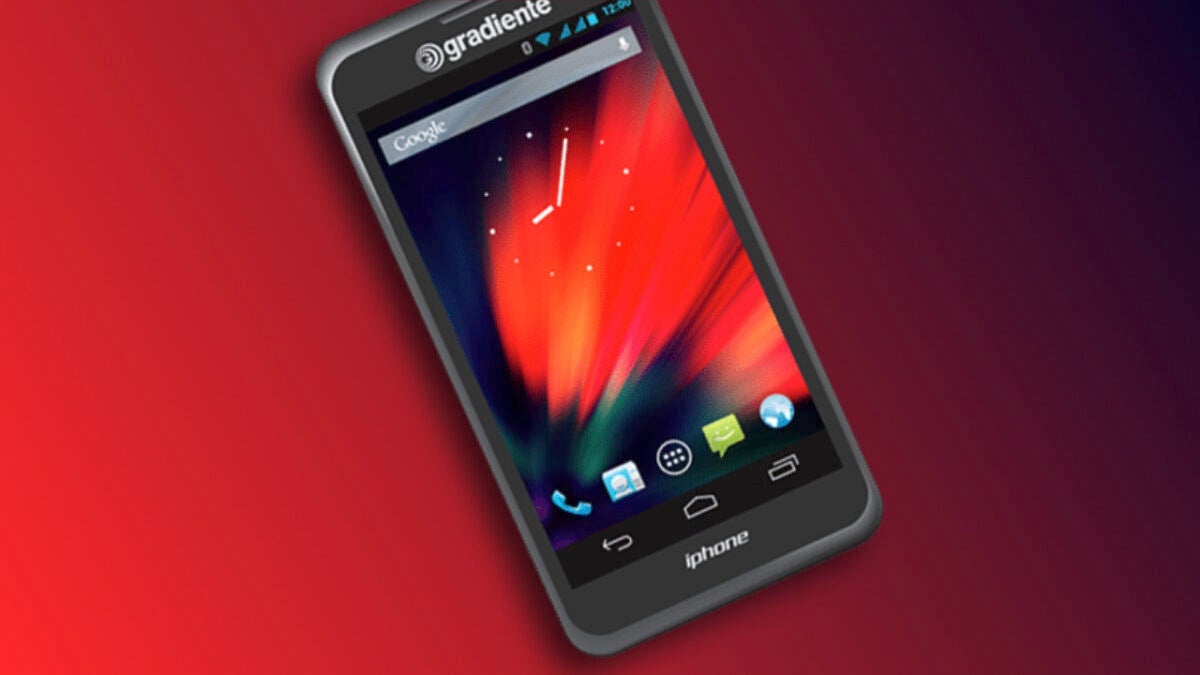
In the year 2000, six years before Apple introduced the first iPhone, the Brazilian company Gradiente registered the trademark “iPhone” in Brazil. A decision that, at the time, went almost unnoticed, but became the center of attention in 2012, when Gradiente launched its own phone under this name.
The Gradiente device had nothing to do with Apple’s proposal, beyond the name. It ran on Android 2.3 Gingerbread and its specifications were far from what Cupertino offered: a 700 MHz processor, 384 MB of RAM, and 2 GB of storage. We are talking about a basic phone, designed for a very different market than the one Apple targeted with its revolutionary device, but it was called “iPhone.”
Apple began the process to register “iPhone” in Brazil in 2006, but Gradiente, which already had the name reserved, sparked a legal battle that lasted several years. In 2013, the Brazilian justice ruled that both companies could use the name, but Gradiente would have to differentiate by adding its own brand: “Gradiente iPhone.” This resolution allowed Apple to continue selling the iPhone in Brazil while Gradiente maintained its rights over the original name.
An outcome that set a precedent
After several more lawsuits, Gradiente’s original registration was canceled—mainly due to the company’s lack of use of the term—opening the door for Apple. It wasn’t easy, as Apple had to demonstrate that its iPhone was much more than a name: it was a globally recognized icon. In the process, it became clear that a name can symbolize much more than a product; it can be the reflection of a vision for the future and an experience.
“iPhone” is design, functionality, and performance working in harmony. It is synonymous with Apple’s way of designing and working, and although technically, there was another iPhone, in the global collective imagination, there is only one authentic one.
The case of the Gradiente iPhone is one of the most curious episodes in Apple’s history. Brands and names are a fundamental part of the technological ecosystem, and they define the perception and reach of products in the market. And even with this, a name is not enough: Quality, innovation, and user experience are the true keys to success.
The name matters, but the content is what truly makes the difference. In this case, we can safely say, just like Steve Jobs didn’t want Apple to resemble Disney, that the iPhone, the real one, is much more than a device. It is a reflection of Apple’s philosophy in all its splendor.
Yesterday, Thursday, November 28, Apple opened the doors of its new store in the La Vaguada shopping center in Madrid. After a decade without opening new Apple Stores in Spain, this event marked a key moment. Beyond being a point of sale, Apple La Vaguada is a space to discover everything the company’s technology can do for us and to do it in the best possible way. The opening was quite an event and attracted people from diverse backgrounds who, more than 6 hours before the opening, already […]
Yesterday, Thursday, November 28, Apple opened the doors of its new store in the La Vaguada shopping center, in Madrid. After a decade without opening new Apple Stores in Spain, this event has marked a key moment. Beyond being a point of sale, Apple La Vaguada is a space to discover everything the company’s technology can do for us and to do it in the best possible way.
The opening was quite an event and attracted people from diverse backgrounds who, more than six hours before the opening, were already gathering in front of the doors of the new store. A store, it must be said clearly, that hides much more than meets the eye.
A design that combines innovation and sustainability
From the moment we approach the store, its design catches the eye. Like all Apple stores, La Vaguada has been designed to elegantly integrate into the shopping center’s environment, yet stand out with its unmistakable style. Large glass panels, natural wood details, and an open atmosphere invite us to enter and explore. Without barriers, but with each area strategically placed, the entire space flows so that we feel comfortable while discovering new products or receiving technical support.
Just like in its products, Apple takes care of the sustainability of all its stores. The energy that powers Apple La Vaguada comes 100% from renewable sources, and the materials used, from the display tables to the decorative panels, are recyclable or have been sourced responsibly. The ceiling, made with sugar cane or the terrazzo floor, made with eco-friendly resin, is particularly noteworthy. Every detail in this store conveys Apple’s philosophy: technology must be useful and respectful to those of us who use it — hence its focus on privacy — and respectful of the environment.
A space to learn, together
Apple La Vaguada is not just a place to buy an iPhone, a Mac, or AirPods. It is, above all, a space designed to learn and connect. The store features an area where the popular Today at Apple sessions will be held. In these activities—free and open to everyone—we can learn to make the most of our devices, from mastering photography with the iPhone or discovering the best apps of 2024 to exploring the creative possibilities of an iPad.
Section for Today at Apple sessions.
Something not everyone knows? If a person arrives with headphones to a session, those headphones automatically connect to the session’s audio without any employee having to intervene. This is the level of detail that Apple ensures so that EVERYONE —I have to write it in uppercase— can enjoy the devices.
Apple Watch Studio, where to customize our new watch.
In the Genius Bar, there are two seating heights. People with reduced mobility who need a wheelchair can approach the counter with ease. The aisles, twice as wide as in the traditional configuration of an Apple Store, accommodate all customers, including those who need more space to move due to their condition.
Genius Bar and pickup section.
There are details throughout the store that, while they may go unnoticed during a visit, do not escape the attention of those who need them. This includes the possibility of using sign language during any personalized shopping session—in which an employee will personally accompany us to choose the product that best suits us, resolve doubts, and, ultimately, shop with an expert by our side.
A simply grand opening
Exterior of La Vaguada one hour before the inauguration.
If you haven’t been to an Apple Store opening, the feeling is hard to explain. You wait in line for quite a while, and just when it seems like the doors are about to open, the employees come out to greet you with all their enthusiasm. When you enter, a human row of enthusiasm welcomes you and offers you the commemorative gift of the opening.
Just two minutes before the first customer arrives.
From there, you can only stand and look around. The joy of someone who has waited to buy an Apple product in the store on its first day is evident, while the employees are simply delighted to be part of a benchmark like an Apple Store. Everyone celebrates the day. You can ask a perfect stranger which iPhone they are considering or congratulate them on the Mac they just bought, the atmosphere invites everyone to enjoy together.
A server alongside Fran Besora at the inauguration.
The store filled up in minutes. The atmosphere was as vibrant, if not more, than what I remember years ago at the Puerta del Sol opening: simply Apple. Joy in all its splendor. A unique experience that marks a great beginning for the fifth Apple Store in the capital of Spain. A space that is much more than a store, and is waiting for our visit.
Cuando Palworld apareció a principios de año, muchos de nosotros nos preguntamos cómo pudo haber sucedido algo así. ¿Un juego que claramente tomó diseños de Pokémon y les dio una ametralladora? Se asemejaba a la audacia de las películas filipinas de los años 70 y 80, que combinaban sin esfuerzo personajes con propiedad intelectual y los enfrentaban entre sí. Pero, de alguna manera, estos plagios casi literales se están volviendo cada vez más normales dentro de la industria de los videojuegos. Si Palworld se salió con la suya, ¿por qué no lo haría Light of […]
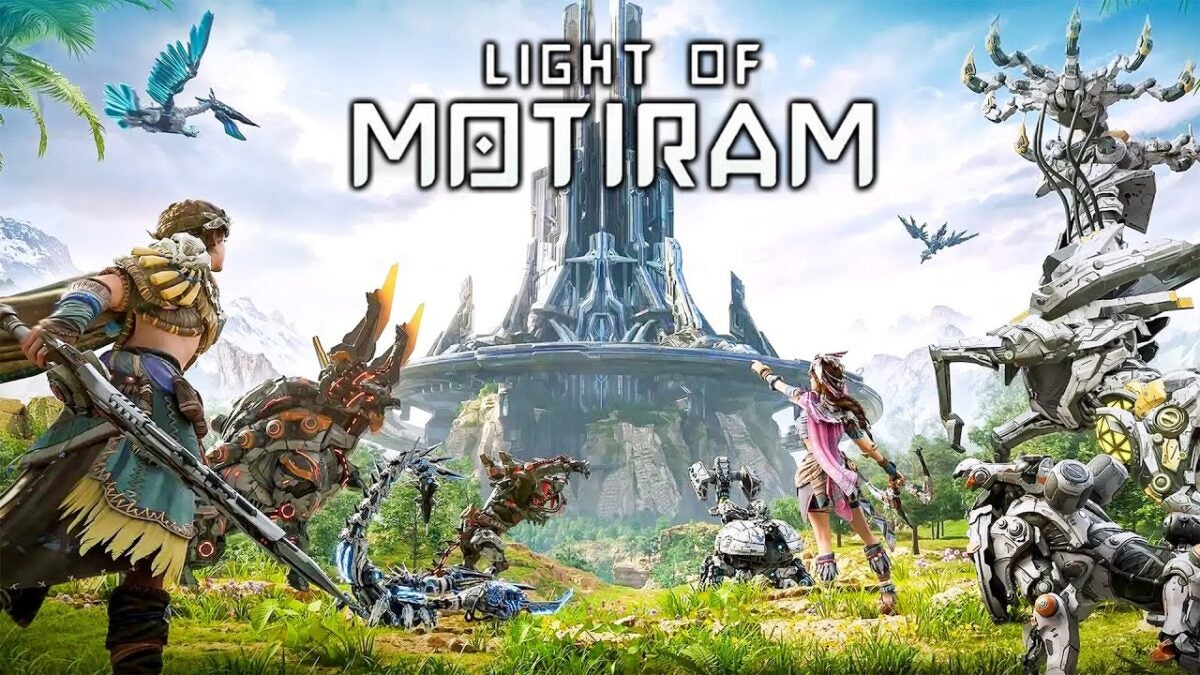
When Palworld appeared at the beginning of the year, many of us wondered how something like this could have happened. A game that clearly took Pokémon designs and gave them a machine gun? It resembled the audacity of Filipino films from the 70s and 80s, which effortlessly combined characters with intellectual property and pitted them against each other. But, somehow, these practically literal plagiarisms are becoming increasingly common within the video game industry. If Palworld got away with it, why wouldn’t Light of Motiram?
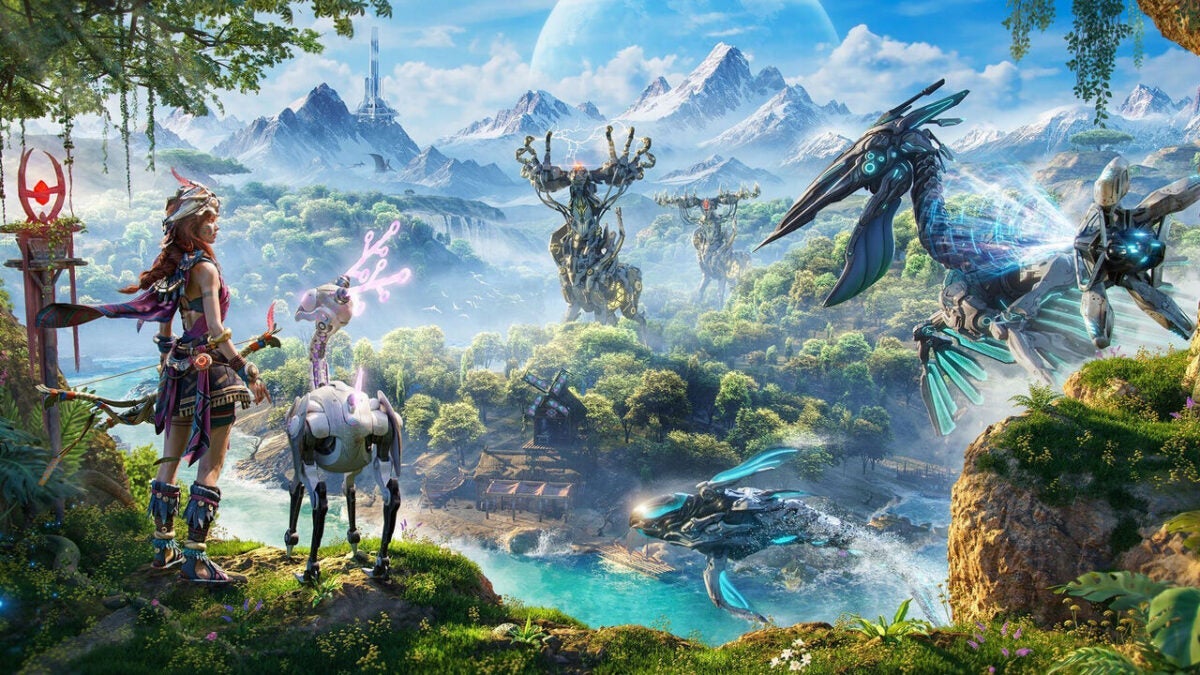
Polaris Quest, the studio behind Light of Motiram, hasn’t exactly been subtle. The plot, set in a natural world dominated by gigantic machines (ahem), is notably similar to that of Horizon Zero Dawn, but it doesn’t stop there: from what we can see in its first images, they have adapted the same tones and have created a very similar world. We can think positively and believe it was a coincidence, but in 2024, coincidences rarely exist.
Most people are surprised by the colossal lack of shame from the studio, which clearly plays coy, but whose gameplay is very different from Aloy’s adventures. In this case, it’s about building a base where you can train up to a hundred “mechanimals” (that’s what the creatures are called), which you can modify to fight each other, alone or with others: the world can be explored cooperatively, with up to ten players. There you go.
In other words, it will be like Palworld but in the world of Horizon Zero Dawn. At this point, one wonders if there have really been humans behind the game or if we are facing one of those titles where AI has taken the lead (but they still don’t dare to say it due to the consequences it may have). For now, there is no release date for Light of Motiram (we only know, in fact, that it will be released on Steam and the Epic Games Store), but it has become, perhaps to its regret, the new laughingstock of the industry. Rightly so.
Facing the task of designing an album can seem complicated, especially if you have never used professional design software. This is where Adobe InDesign could be of great help. Although it may sound somewhat intimidating at first, InDesign is more accessible than it seems, even for beginners. With some basic concepts and a bit of creativity, you’ll see how InDesign will help you shape an album with charm and that also looks professional. First step: create your document Before opening InDesign, come prepared. Organize which photos you want to include, the orientation, and also think about […]
Facing the task of designing an album can seem complicated, especially if you have never used professional design software. This is where Adobe InDesign could be of great help. Although it may sound somewhat intimidating at first, InDesign is more accessible than it seems, even for beginners.
With some basic concepts and a bit of creativity, you’ll see how InDesign will help you shape a charming album that also looks professional.
Before opening InDesign, come prepared. Organize which photos you want to include and their orientation, and also think about the style it will have: minimalist, traditional, loaded with details… In short, think about how it will be. This will help you save a lot of time and avoid so much trial and error. Once we have our material organized, we can get to work.
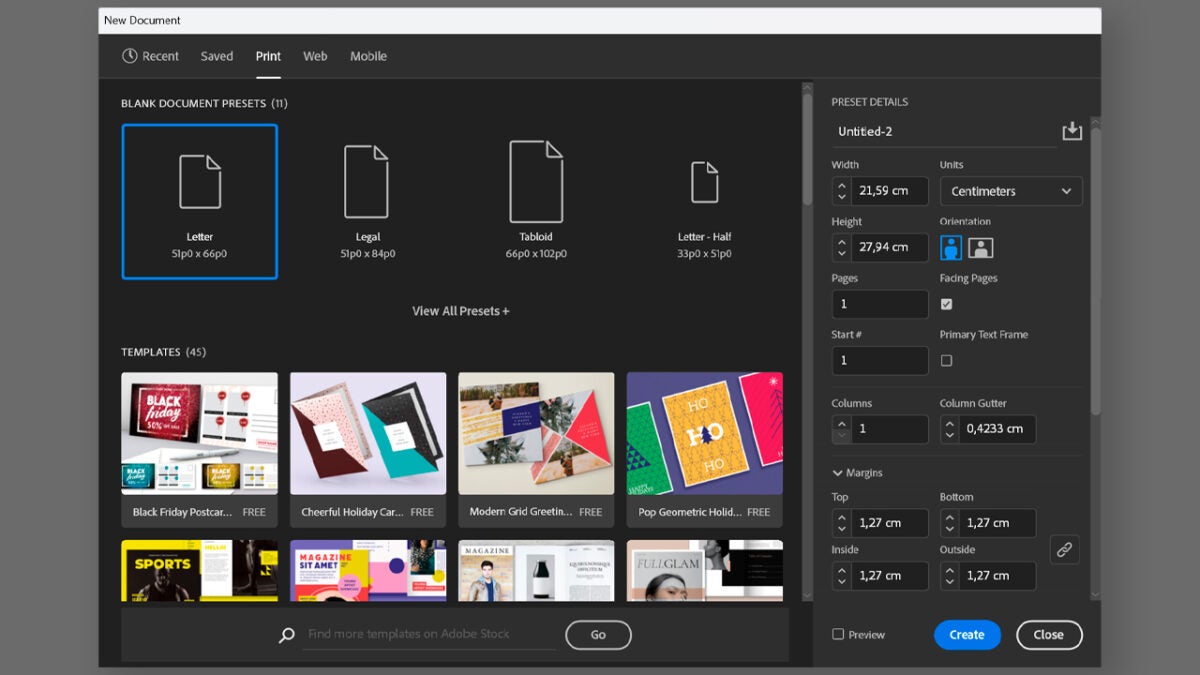
Open InDesign and select New File. On the start screen, you will also have several presets at your disposal to start with specific sizes and resolutions. If you want, you can start directly by selecting one of these presets.
On the New Document screen, you will need to set the album size, the number of pages, the margins, and the bleed. Sections like the number of pages can be modified later without any issues.
The bleed is important to consider if you are going to print your album. It is an extra margin that extends beyond the final edge and ensures that images and text remain intact when trimmed. Adding a few extra millimeters (3 to 5 mm) would be enough to ensure everything goes well.
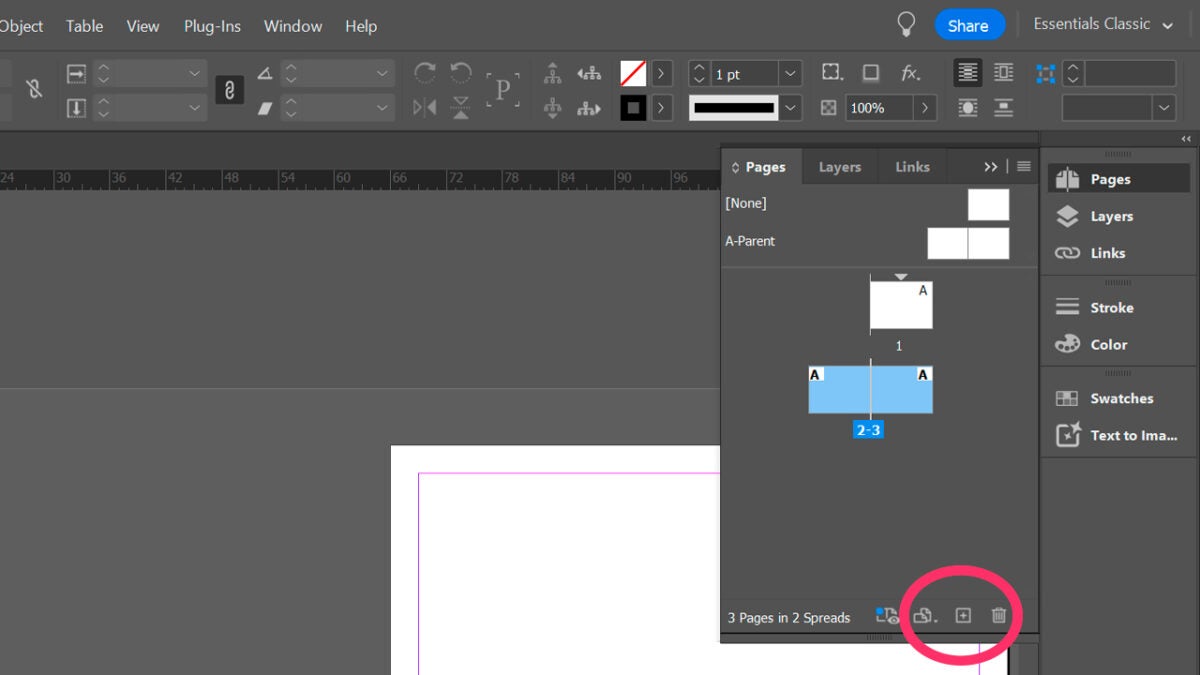
If you want to add or delete pages, go to Window and click on Pages (F12). This will appear in the properties panel, which you will usually see on the right. Then, click on Create new page (+). From Pages, you can navigate through the file and quickly jump between spreads. You can also go to a specific page by typing its number from the status panel located at the bottom left.
It is important that you also know what a master page (parent page) is and how they work within InDesign. In summary, we could describe it as a template that is applied to multiple pages to maintain a consistent design. If you have elements that are constantly repeated in your document, setting up master pages will help you avoid placing each item manually.
You will find the master pages at the top of the Pages panel. To create a master page, go to the Pages panel, right-click on the A-Parent page, and select New Parent. Now, you will need to set up some essential aspects, such as the prefix that identifies the page, the name, its size, and its orientation. To edit the master page, simply double-click on it from Pages.
Second step: add photos and text to your album
We already have our document created; it’s time to add the text and the images:
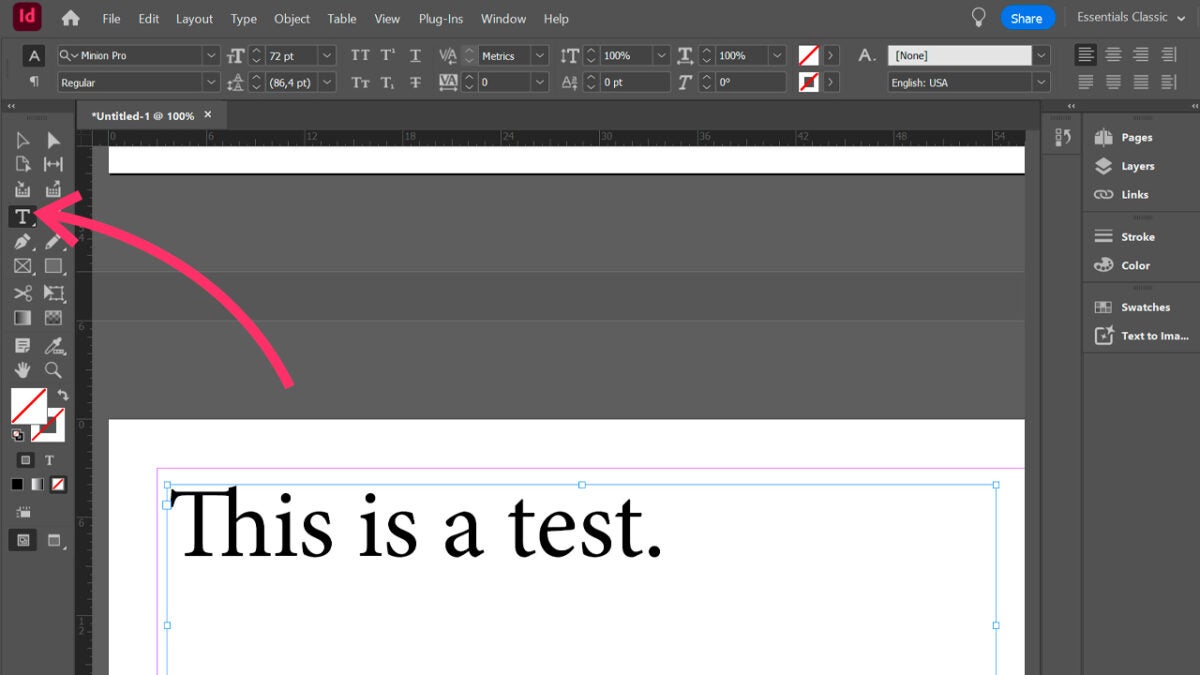
To add text, use the Type (T) tool and click and drag over the area of the page where you want to write. You can also double-click on an existing text frame.
InDesign allows you to add placeholder text to see how your final document would look when placing real texts. Right-click on the text box and select Fill with Placeholder Text.
Now, it’s time to add the images. After all, what would an album be without its photos?
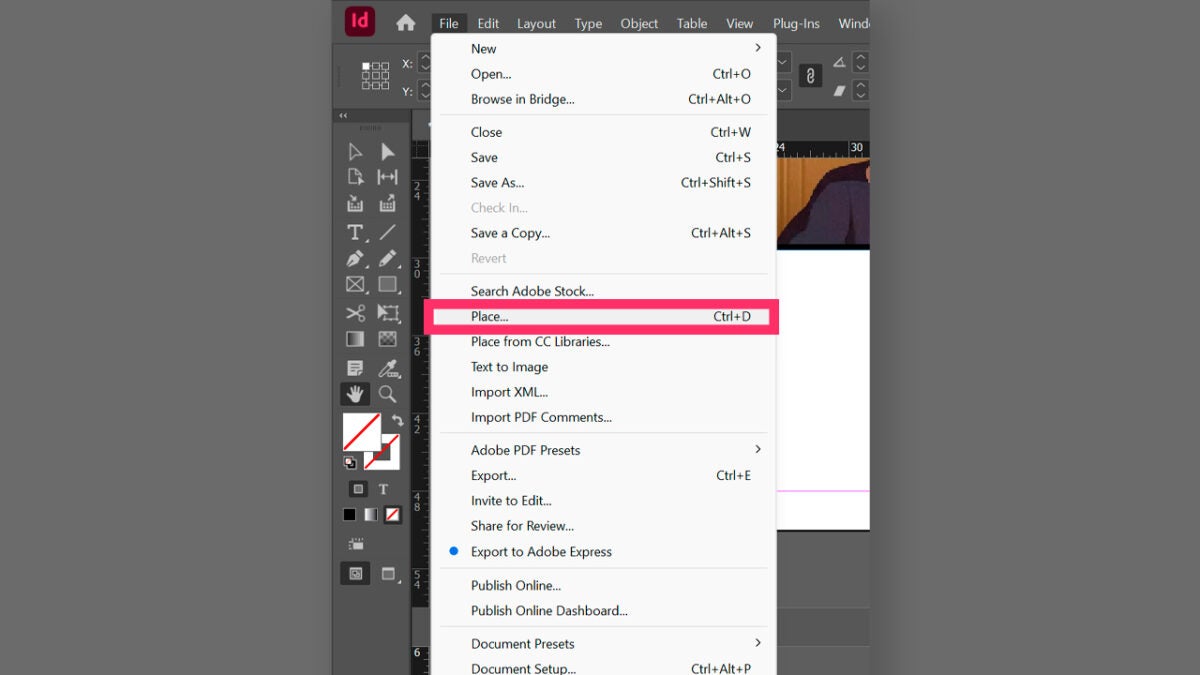
Go to File and then, Place. Choose from your computer the image or images you want to insert. You can also import files with the extension PSD, PDF in layers, AI or INDD. Before adding the images, check the option Image Import Options and then, select OK. This will help you, among other things, to preview a page before placing it.
Import your photo album
Once you have your album, it will be time to import it. In this case, we will prepare the document as if we were going to take it to print. Before exporting, check that everything is in place, that the images have the correct resolution (300 dpi or more), and that the margins and bleeds are properly set.
The best option will be to export it to PDF and use the high-quality Print settings. Go to File and then, Export. Choose a name and where the file will be located. The extension will be Adobe PDF (Print).
In Windows, you will need to select Save As and in macOS, Format. In the panel that appears, you can use options already predefined by Adobe from the PDF Preset Menu, such as [High Quality Print]. You can also customize it to your liking and modify the sections you need. To finish, select Export.
Until very recently, incorporating 3D objects into your illustrations required at least switching between applications or dealing with very complex programs. But now, with the new 3D functionalities of Adobe Illustrator, the process is not only possible but also much more accessible. From Illustrator, you can turn flat designs into 3D objects and even manipulate perspectives and materials. If you want to know how you can incorporate 3D into your designs, stay with us a little longer. This is how you can transform your designs with 3D effects Transforming your drawings into three-dimensional objects is a process we can do from Illustrator, without […]
Until very recently, incorporating 3D objects into your illustrations required at least switching between applications or dealing with very complex programs. But now, with the new 3D features of Adobe Illustrator, the process is not only possible but also much more accessible.
From Illustrator, you can convert flat designs into 3D objects and even manipulate perspectives and materials. If you want to know how you can incorporate 3D into your designs, stay with us a little longer.
This is how you can transform your designs with 3D effects
Transforming your drawings into three-dimensional objects is a process we can do from Illustrator, without the need to combine it with other programs. Here, our starting point will be a vector drawing. If yours is flat, you will need to convert it to vectors. You can do it in the following ways:
By hand: Import your drawing into Illustrator from File> Place. Now, use the Pen (P) tool to draw over your sketch and create the vectors. If you want to make curved strokes, hold down the left mouse button and move it over the canvas.
Image Trace: To make this option appear, select your drawing with Selection (V) and click on the Image Trace option you will see in the top bar, as shown in the image. If you don’t see this bar, go to Windows and click on Control.
These are just some of the ways we propose for vectorizing images. The vast number of options and tools that Illustrator offers will allow you to reach the same goal in different ways.
To start applying 3D effects to our vectors, we need to access the 3D and Materials panel, which you will find in Windows > 3D and Materials. From here you can make use of options like Extrude and Rotation, Lighting, Shadows and much more. Once again, remember that effects cannot be applied to flat objects.
Select your vector design with the Selection (V) tool.
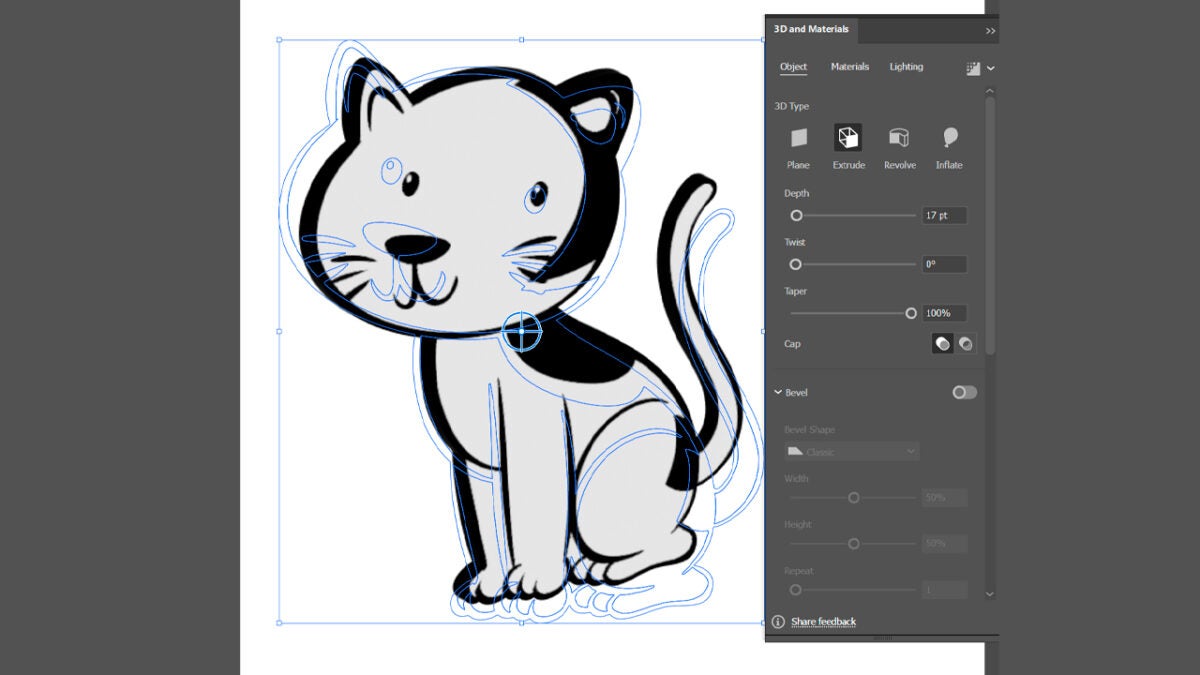
From the 3D and Materials panel, choose the effect you want to apply. In our case, we have chosen Extrude.
Adjust the Depth, Twist, and Taper fields according to your preferences. You can also rotate the object and change its perspective with the Rotation and Perspective options.
Now that our design has depth, we can add materials. In the Materials section, you will find many belonging to Adobe Substance 3D, although you can also add your own materials by clicking on the “+” icon. After applying a material, experiment with lights and shadows from Lighting:
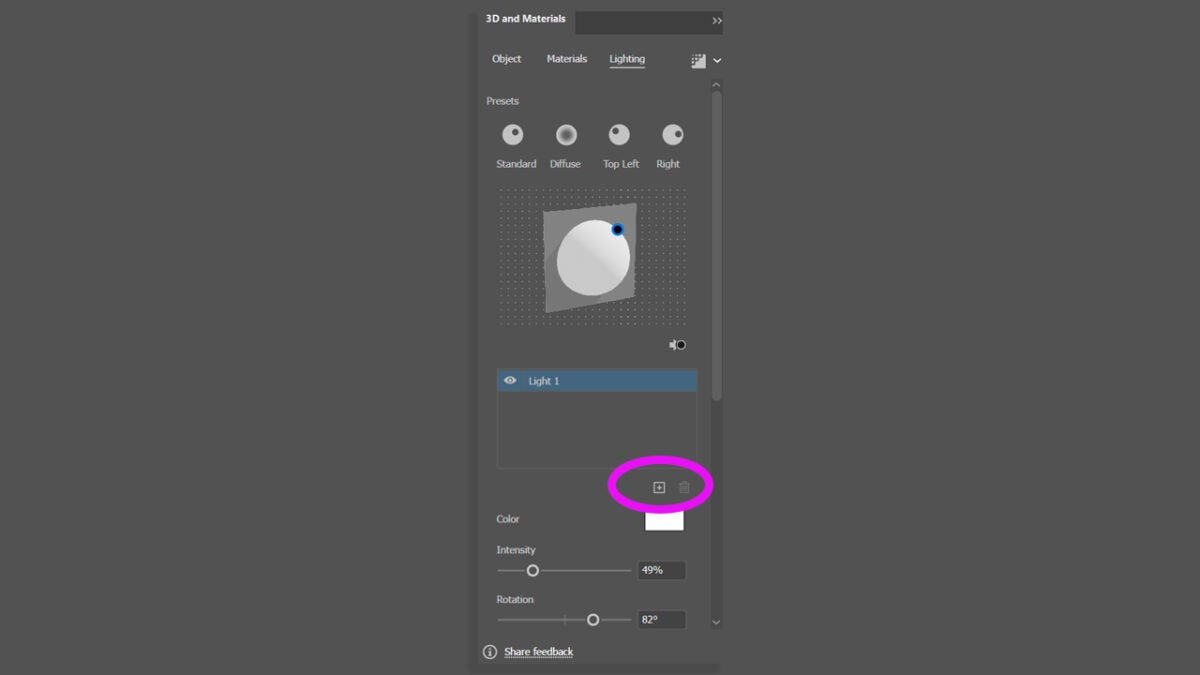
Single light: Choose one of the default settings like Standard, Diffuse, Top Left or Right. To adjust its position, play with the Rotation and Height sliders.
Multiple lights: Illustrator allows you to add up to 10 lights in total. To add a new one, select the “+” button.
Create 3D objects within Illustrator
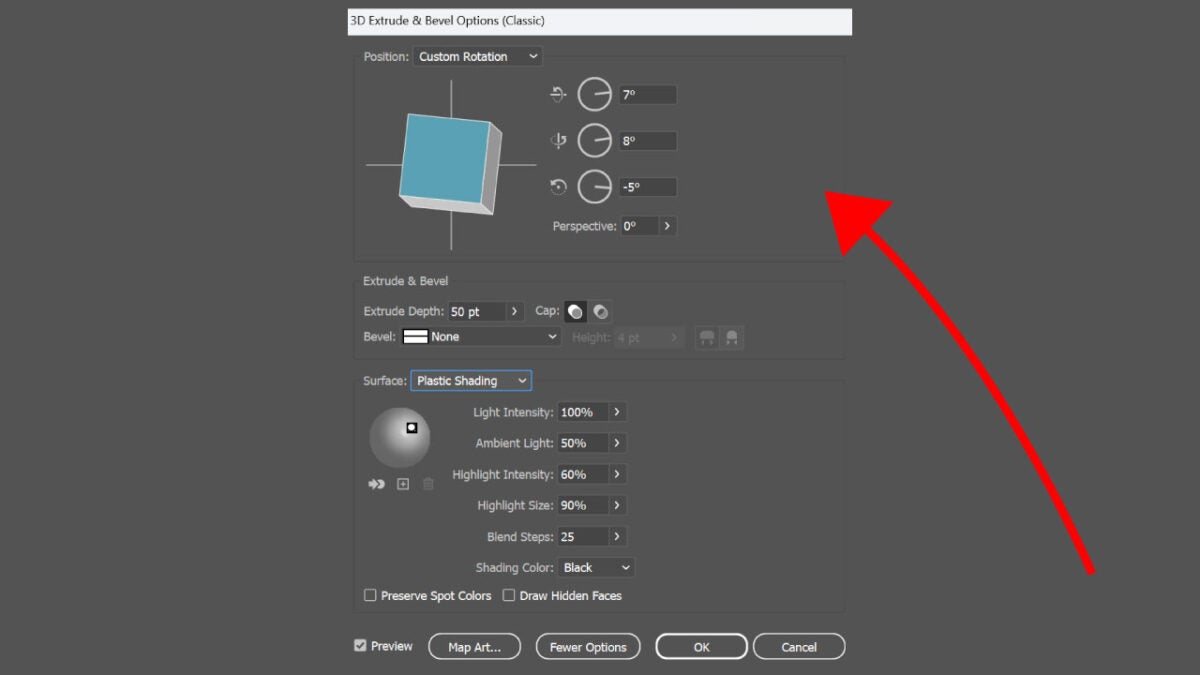
Illustrator allows us to create 3D objects from flat illustrations. One of the ways we can do this is through extrusion. To start, select the flat shape you want to transform. Select Effect, 3D Materials, then 3D (Classic) and then, Extrude & Bevel.
Then, click on More Options so you can see the number of options available to you. You will see that you can adjust some options such as the position, surface, or lights of the 3D object. Once you have achieved the desired result, click on Ok.
YouTube is currently the second most popular social media platform in the world and an unlimited source of original content. With almost 3 billion active users per month, the number of YouTube creators has increased exponentially in the past 5 years. Channels like T-Series or CoComelon as well as celebrities like MrBeast and the controversial Jake Paul attract new subscribers day after day, generating millions of dollars per month. To understand their success, we simply need to delve deep into the statistics of this popular video-sharing platform.
In today’s article we’ll explore YouTube’s latest stats and figures of 2024, taking a closer look at its top creators, revenue, biggest channels and most popular videos of all time.
Subscribe to the Softonic newsletter and get the latest in tech, gaming, entertainment and deals right in your inbox.
As of June 2024, there are around 63.8 million YouTube content creators worldwide.
With 260.12 billion views, T-Series is the most viewed channel on the platform.
MrBeast has the largest number of subscribers (332 million).
MrBeast is YouTuber’s top earner, making an average of $54 millions per year.
Pinkfong’s Baby Shark Dance is the most watched video with 15.4 billion views.
How Many YouTube Content Creators Are There?
The latest data gathered by Social Blade shows that there’s approximately 64 million YouTube creators worldwide. The number increased exponentially in 2020, due the COVID-19 pandemic, although most of these new creators stopped making videos post-COVID. However, the number of YouTube creators is still increasing and it is expected that from every 80 YouTube users, 1 will create and upload their videos to the platform.
Which channel on YouTube Has the Most Views?
According to Statista, the most-viewed channel of all time is T-Series with 260.12 billion views. This channel is owned by India’s largest music label and movie studio, offering an ample catalogue of hindi and bollywood music as well as popular reality shows like Indian Idol. In second position there’s CoComelon nursery rhymes with 184.76 billion views. This popular music channel for kids turns well-known nursery songs into adorable cartoons that follow the life of JJ and his family. Finally, in third position there’s SET (Sony Entertainment Television) India with 166.26 billion views. Here users can watch all kinds of hindi entertainment shows and movie premieres.
Here’s a complete breakdown of the results:
T-Series: 260.12 billion views.
CoComelon Nursery Rhymes: 184.76 billion views.
SET India: 166.26 billion views.
Sony AB: 116.65 billion views.
Kids Diana Show: 104.26 billion views.
Like Nastya: 101.9 billion views.
Vlad and Niki: 92.27 billion views.
Zee TV: 91.4 billion views.
WWE: 85.85 billion views.
Colors TV: 71.94 billion views.
Which YouTube Channel Has the Most Subscribers?
Currently, MrBeast holds the title of the most subscribed YouTube channel with 296 million subscribers. In second position we find T-Series, boasting over a quarter of a billion subscribers (268 million). Following from afar we have YouTube Movies and CoComelon Nursery Rhymes, with 182 and 172 million subscribers respectively.
Here’s the top 10 subscribed channels on YouTube:
MrBeast: 296 million subscribers.
T-Series: 268 million subscribers.
YouTube Movies: 182 million subscribers.
CoComelon Nursery Rhymes: 178 million subscribers.
According to the latest data by The Money Ninja and Forbes, MrBeast (Jimmy Donaldson) is the richest YouTuber in the world. It is estimated that he earns a total of $85 million per year through the platform thanks to his challenger videos. In second position we find the always controversial Jake Paul, whose tricks, music videos and boxing career made him earn an average of $45 million per year. Last, but not least, there’s Markiplier (Mark Edward Fischbach) with his let’s play videos and comedy videos. These have made him earn an average of $38 million per year.
Here’s the complete list of the 10 top YouTubers by earnings:
MrBeast: $85 million.
Jake Paul: $45 million.
Markiplier: $38 million.
Rhett and Link: $30 million.
Like Nastya: $28.1 million.
Ryan Kaji: $27 million.
Ninja: $20 million.
Dude Perfect: $20 million.
Logan Paul: $18 million.
Preston: $16 million.
In conclusion, Mr Beast is definitely the highest-paid YouTube creator in the world, having a total net worth of $500-$700 million per year. In fact, he made it into the TIME 100 most influential people list of 2023 and is the number one creator of 2024 according to the Forbes magazine.
How Old is the Average YouTube Creator?
Most of the current YouTube creators are between 25 and 34 years old. Most of them started their channels as teenagers, dedicating approximately 3 years to create content for their channel. If we take MrBeast as an example, he started his YouTube channel when he was 15 years old and it took him over 4 years (from 2012 to 2016) to get 1000 subscribers.
Which Countries Pays YouTube Creators the Most?
YouTubers all over the world don’t get paid the same for their number of views, their earnings mostly depend on where their audience lives. This is because YouTube pays their creators through their adverts’ performance, before or during the video. Creators only get a small amount of money from these ads, and the total is measured by how much they earn per 1000 views. This concept receives the name of Revenue Per Mile (RPM).
According to Is This Channel Monetized, the country that pays the most for YouTube content is the United States ($11.62 RPM). In second position we find Australia with $9.53 RPM, followed closely by Switzerland with $9.32.
Here’s the complete list of the top countries for YouTube earning power:
USA: $11.62 RPM.
Australia: $9.53 RPM.
Switzerland: $9.32 RPM.
Norway: $7.89 RPM.
New Zealand: $7.17 RPM
Canada: $6.90 RPM
Denmark: $6.89 RPM
UK: $6.64 RPM
Germany: $6.36 RPM
The Netherlands: $6.14 RPM
What Is the Most Viewed YouTube Video of All Time?
With over 15 billion views, Baby Shark Dance is the most viewed YouTube video of all time. While Korean education brand Pinkfong holds this record-holder with its catchy shark song, it was Korean artist Psy’s Gangnam Style who remained in the top stop the longest (4.6 years).
The second most watched video on the platform is Luis Fonsi’s Despacito ft. Daddy Yankee. While also a record-breaker with its 8.6 billion views, it still is miles away from Baby Shark. Finally, in third position we find LooLoo Kid’s Johny Johny Yes Papa with almost 7 billion views. With figures like these, it comes to no surprise that the most popular YouTube videos are music ones. In fact, since 2010, the most-viewed content on the platform has been music videos.
Here’s the list with the most popular YouTube videos of 2024 based on their total views:
19 years have passed since “Me at the zoo” was first uploaded to YouTube back in 2015. From that day forth, the platform has attracted billions of content creators who daily share their entertainment videos with the rest of the world. While only a few celebrities like MrBeast or Jake Paul can earn a living with their videos, YouTube has slowly become a stable source of income to many creators through their ads. However, Indian entertainment, content for children and music videos are still the top dogs that dominate the YouTube charts. And the numbers say that’s not going to change anytime soon.