
How to: get your hands on Windows 8 Release Preview

windows 8 logoMicrosoft surprised everyone when they accidentally leaked information about releasing Windows 8 Release Preview yesterday. Well the (short) wait is over and now you can get your hands on the newest version of Windows 8! Here’s what you have to do:


Pre-existing Windows 8 installation

If you already have Windows 8 Consumer Preview installed on machine or running in a virtual machine, just navigate to the Windows 8 Release Preview page and hit “Download Windows 8 Release Preview.” This will download a small application to your desktop. When you run it, the program will check all of your installed applications and hardware to see if anything is going to prevent you from upgrading. Continue reading “How to: get your hands on Windows 8 Release Preview”


How to: make a video out of your Facebook Timeline

Facebook Timeline has gotten mixed reviews among users. Some people love it for its visual appeal and organizational style. Others loathe the change, and were quick  to take advantage of James’ tutorial on how to remove Facebook Timeline from your profile.

For those of you who love it, why not make a movie out of it? Timeline Movie Maker lets you do just that, allowing you to commemorate your favorite pictures, videos and events in a short and snappy film you can share with family and friends.

Best of all, Timeline Movie Maker is easy to use and gives you full directorial control to ensure your movie comes out just as you want it! Continue reading “How to: make a video out of your Facebook Timeline”

5 Creative photo apps for mobile

Whenever I consider buying a new phone, one of the last features I look at is the camera. I think of myself as a casual photographer, and that’s only when using a friend’s DSLR. On my phone, I rarely post pictures in their original form, relying on apps to tweak and edit images to make them look more “creative.”

It’s still a big selling point for companies to announce the megapixel size on their devices. When you consider how small the lenses are though, the larger numbers don’t even matter. Granted, we shouldn’t have a VGA front facing camera anymore, but all the talk of a 40+ megapixel camera on a phone is simply misdirection.

Most people rely on photo-editing apps to customize their images to make them more creative.  This makes the power of the camera less important than the power of the app.  As long as the image is clear and in focus, apps can take care of the rest.

Since a lot of people use camera apps with built-in editing, here are some of the best.

Continue reading “5 Creative photo apps for mobile”

Google+ for Android updates with a few extra features

google-Plus-iconA couple of weeks ago, Google released a huge update to their Google+ application for iOS. The designers went back to the drawing board for almost every feature, the biggest change being the new stream. The news stream has been the heart of the Google+ application and has been completely redesigned to be more visual. Updates now feature huge pictures with text, +1s, and comments. As the user scrolls, stories fall into place with a slick animation.

Interestingly enough, the Android version was suspiciously absent during the iOS launch, though the official Google+ blog teased that the Android version would get “a few extra surprises.” Well the Google+ 2.0 update for Android is here! Let’s take a look at what those few extra surprises are. Continue reading “Google+ for Android updates with a few extra features”

How to: configure PuTTY

putty-icon-largeIf you manage a web server and need secure access too it, Secure Shell, or SSH, will allow you to do so. SSH is designed to provide a secure connection between two machines over an unsecured network like the internet. There are plenty of SSH clients out there but none are as portable and versatile as PuTTY. In this guide, I will show you how to perform basic tasks and customizations to PuTTY to tailor SSH sessions to your needs. Continue reading “How to: configure PuTTY”

3 Easy ways to make Flash animations for beginners

Adobe Flash is generally believed to be the hands-down best tool for creating animations for the web. The problem is it’s not very beginner friendly.

That shouldn’t stop you from trying your hand at eye-catching designs and animations. You might just need a slightly more user-friendly tool to get the job done.

It’s a good thing there are lots of programs out there for beginning users. You just need to know where to look. From complete Flash website creation to dynamic photo slideshows and cool text effects, here are three tools that’ll have you making dynamic presentations and animations in no time flat. Beginners welcome! Continue reading “3 Easy ways to make Flash animations for beginners”

Android: Interface Confusion

The Android OS offers a great user experience. Its operating system allows a lot of customization and an “open-door” approach to its usability. Not considering the divide between fans of Android and iOS, I think the problem with Android is not the core OS, but the fragmented user interface (UI) overlays that phone manufacturers place on top of Android’s own OS.

Even though there are multiple versions of the Android operating system available for the wide variety of devices that run it, the majority of them have some manufacturer-developed skin over the Android OS. That addition can do two things: add a layer of unnecessary functionality and complicate simple features.

Continue reading “Android: Interface Confusion”

Giveaway: Ocster 1-Click Backup

Thanks for all your entries! This competition is now closed, and we’ll contact the winners very shortly!

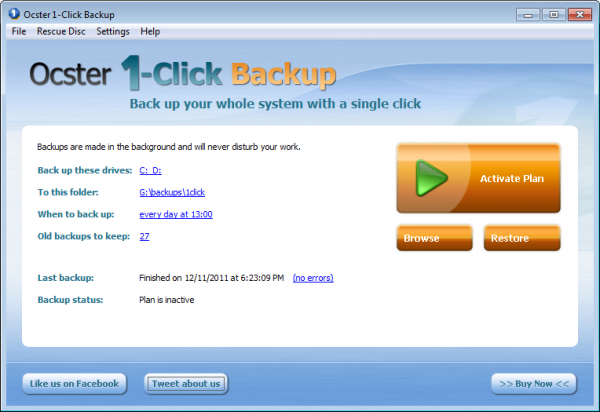
We have 10 codes to give away for Ocster 1-Click Backup, a simple app that makes backing up your Windows PC into one of the easiest jobs you can imagine. We all know that we should back up our computers in case the worse happens, but how many of us actually do it? Some people are put off by the fact that backing up seems time-consuming and boring, or difficult and complicated. With Ocster 1-Click Backup, it’s neither!

  • To win a Ocster 1-Click Backup code, simply leave a comment below before May 31th at 12pm PDT (Pacific Daylight Time), and we’ll do a random draw to select the winners. Winners will be notified on the same day.
  • When you comment, make sure you enter your email address properly. This is how we will contact you if you are a winner – we will not share your email address with anyone.
  • Here are the full terms and conditions.

If you’ve never used Ocster 1-Click Backup, check out Niamh’s review for the full low-down.

Heroes & Generals enters Closed Beta

Since seeing Heroes & Generals at GDC 2012 and playing a bit of the alpha, I’m quickly becoming more interested in the game. Without considering its free-to-play aspect, the gameplay is great. Most of my in-game experience is as a soldier, and there are a lot of details even in the early build.

The monetization of the game hasn’t really been really explained in depth, though it does appear that players will at least purchase weapons to use in the game.  When I was playing the alpha, there were noticeable issues with lag and physics, but those problems didn’t degrade the gameplay.  And since Reto-Moto, that company responsible for creating Heroes & Generals, is always working with the community on bugs and issues, it wasn’t unusual to see updates stream through the browser add-on.

Reto-Moto have announced that Heroes & Generals is now officially in closed beta.

Continue reading “Heroes & Generals enters Closed Beta”

Extend Android battery life with JuiceDefender

juice defender iconManaging battery life on an Android device can be frustrating. Many applications run in the background and system processes suck a lot of power, even when the phone is idling. Android 4.0 Ice Cream Sandwich did a lot to improve the transparency of what apps are affecting performance and battery life, but there are still a few tricks to squeeze out a few more hours of battery life out of your Android phone.

Enter JuiceDefender.

This battery management application claims to save hours on your battery, but how exactly does it work? Does it actually work? Continue reading “Extend Android battery life with JuiceDefender”